FindThatLead vs VerifiedEmail: Which Email Tool Wins in 2026?
FindThatLead sells discovery. VerifiedEmail sells validation. Here's how the two actually compare on accuracy, credits, pricing, and bounce rates — plus when neither one is the right pick.
TL;DR — FindThatLead vs VerifiedEmail in 30 seconds
- FindThatLead vs VerifiedEmail is not a fair fight, and that is the point. One tool finds addresses. The other checks that they exist.
- FindThatLead is a prospecting suite: domain search, lead search, a Chrome extension, and a basic sender. Verification is a bundled extra, not the main event.
- VerifiedEmail-style validators do one job. You upload a list and get back valid, invalid, catch-all, or risky. They do not find new contacts.
- Running both means two subscriptions, two credit pools, and two places for your data to go stale. One tool that finds and verifies usually costs less per usable contact.
- If you buy one thing, buy accuracy at the point of discovery. Verify-on-find beats find-now-clean-later almost every time.
What are FindThatLead and VerifiedEmail, exactly?#
FindThatLead is a Spain-based B2B prospecting platform. Give it a domain, a company name, or a LinkedIn profile. It returns likely business email addresses. It also bundles a lead search database, a Chrome extension, a "Scrab.in" LinkedIn add-on, and a light cold email sender. You can go from list to send inside one dashboard. The target users are solo founders, agencies, and small sales teams. The pitch is breadth: one tool, whole funnel.
VerifiedEmail — and the wider class of tools that share the name pattern — does one job. It takes an address you already have and tells you whether a message sent there will land. It runs a syntax check, a DNS/MX lookup, a disposable-domain flag, a role-account flag, an SMTP handshake, and catch-all detection. No sourcing. No sequences. No CRM.
That gap is the whole comparison. Asking which one is better is like asking whether a fishing rod beats a scale. One brings fish in. The other tells you which ones are worth keeping. The real question is what your stack needs, and what you pay for the overlap.
FindThatLead vs VerifiedEmail: feature by feature#
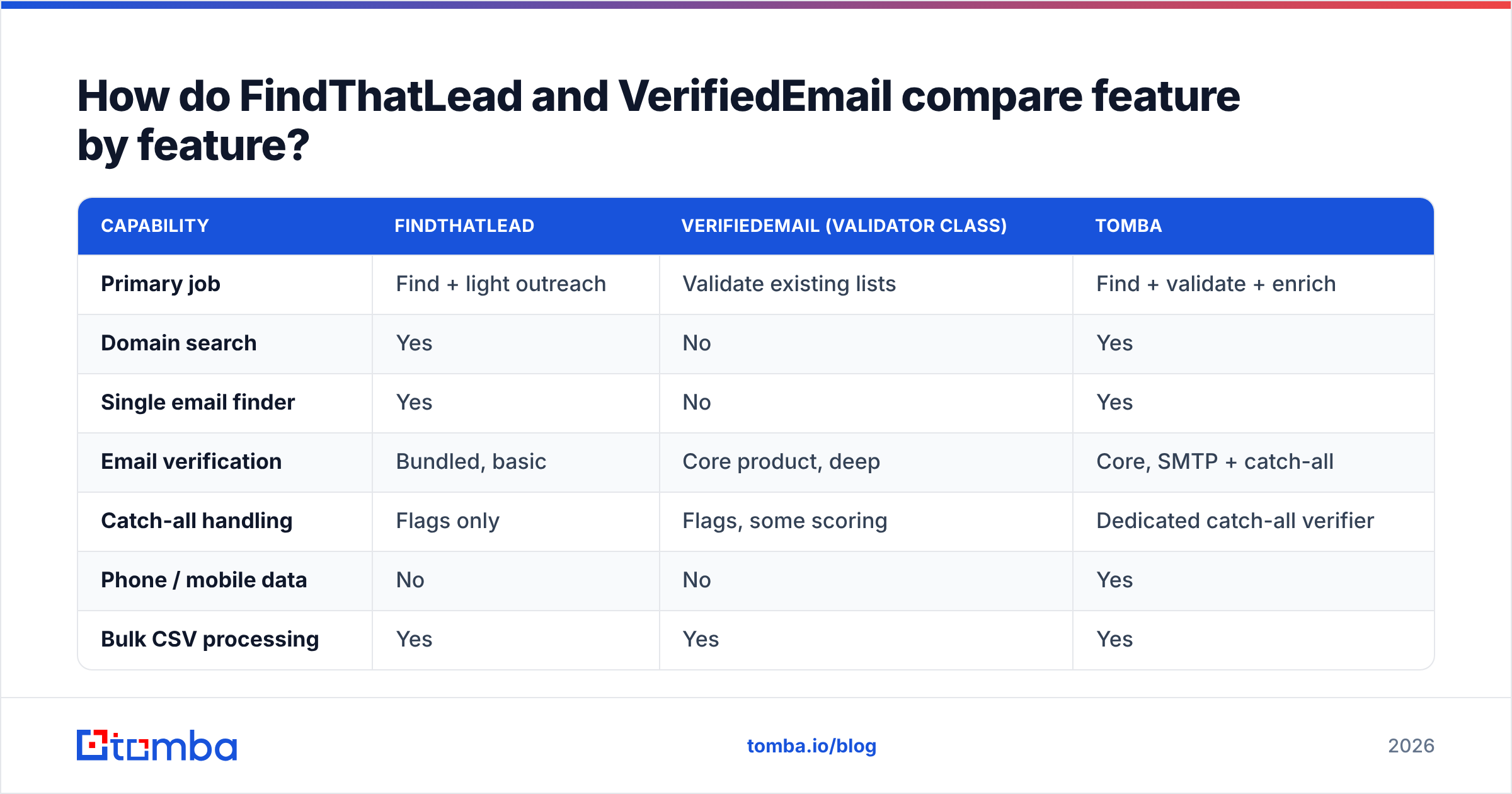
Here is the honest side-by-side. Tomba sits in the table as the combined-stack reference point, because it does both jobs from one credit pool.
| Capability | FindThatLead | VerifiedEmail (validator class) | Tomba |
|---|---|---|---|
| Primary job | Find + light outreach | Validate existing lists | Find + validate + enrich |
| Domain search | Yes | No | Yes |
| Single email finder | Yes | No | Yes |
| Email verification | Bundled, basic | Core product, deep | Core, SMTP + catch-all |
| Catch-all handling | Flags only | Flags, some scoring | Dedicated catch-all verifier |
| Phone / mobile data | No | No | Yes |
| Bulk CSV processing | Yes | Yes | Yes |
| Native cold email sender | Yes | No | No (integrations instead) |
| Chrome extension | Yes | Rare | Yes |
| Public API | Yes | Yes | Yes, documented |
| Entry paid price | ~$49/mo | ~$20–$40/mo | $49/mo Starter |
| Free tier | Limited trial credits | Small free batch | 25 searches/mo |
Read the table as a stack-design exercise, not a scoreboard. If you already own a verifier you like, FindThatLead plus that verifier is a sound setup. If you own neither, you are buying two products to cover one workflow. That is where budgets quietly leak.
Which one is more accurate?#
Accuracy means two different things here, and vendors enjoy the confusion.
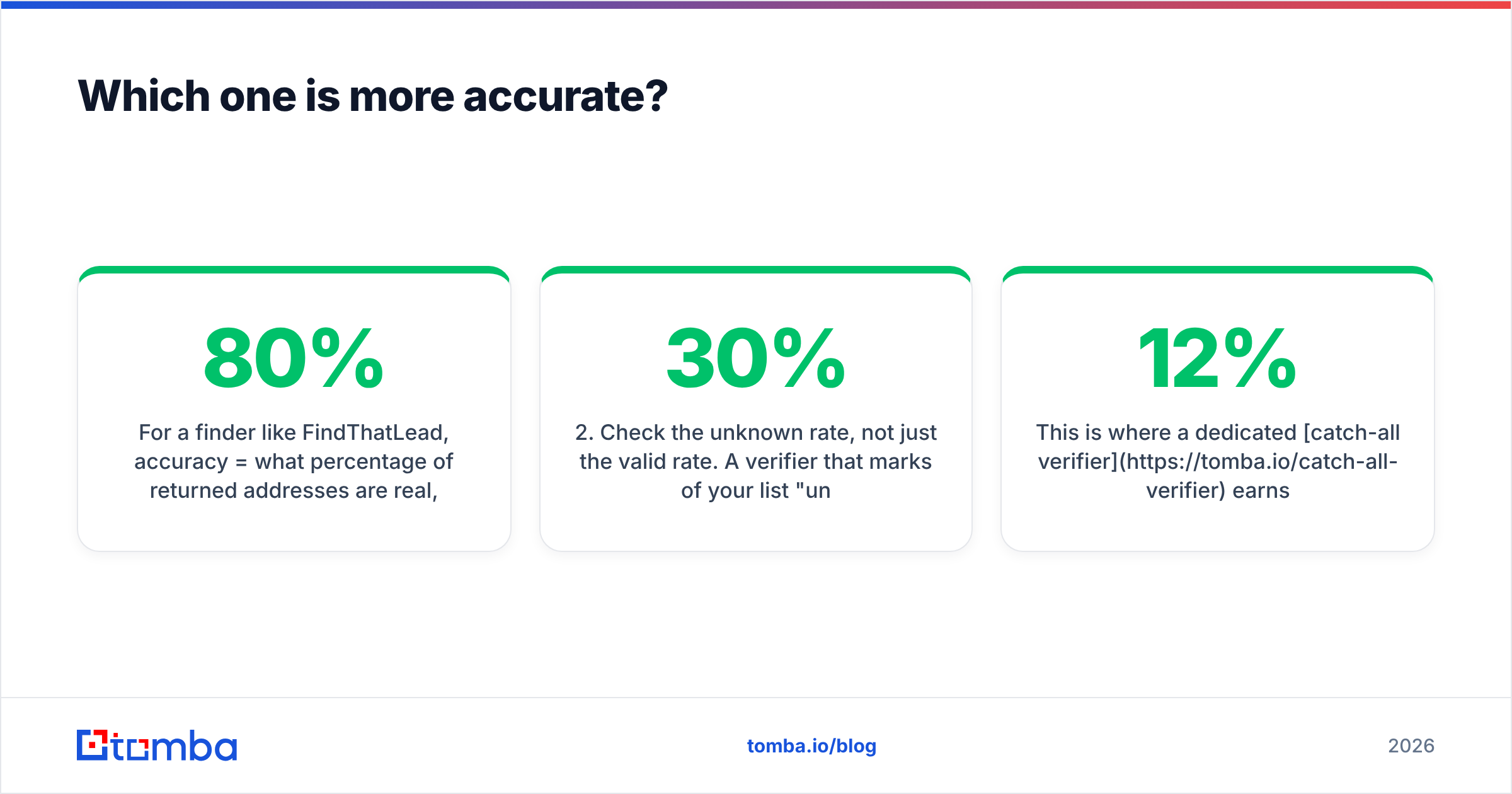
For a finder like FindThatLead, accuracy is the share of returned addresses that are real, working mailboxes. Pattern-guessing engines inflate that number. They return firstname.lastname@domain.com for every prospect, whether or not the mailbox exists. User reports on G2 put practical hit rates for mid-market finders at 60–80% on clean, well-known domains. The rate drops sharply on small companies, non-English domains, and catch-all servers.
For a verifier like VerifiedEmail, accuracy is how often its verdict matches reality. The hard cases are catch-all domains, where the server accepts everything and SMTP tells you nothing. Some providers also greylist or block verification probes. Microsoft 365 tenants are the classic problem: a naive SMTP check returns "valid" for addresses that will bounce.

Four things to test before you trust either number:
- Build a known-answer control set. Take 100 addresses you have emailed successfully and 50 you know bounced. Run both through the tool. Trust the vendor whose claimed accuracy survives that test.
- Check the unknown rate, not just the valid rate. A verifier that marks 30% of your list "unknown" has handed the decision back to you. Compare tools on valid plus invalid coverage.
- Segment by domain type. Test large domains, sub-50-employee domains, and catch-all domains separately. Averages hide the failure mode you care about.
- Measure the outcome, not the label. Send to 500 verified addresses and count real bounces. That is the only accuracy metric your ESP cares about.
This is where a dedicated catch-all verifier earns its keep. Instead of shrugging at accept-all domains, it scores them with pattern history and other signals. That is the gap between a 12% bounce campaign and a sub-2% one.
FindThatLead vs VerifiedEmail: what does each one cost?#
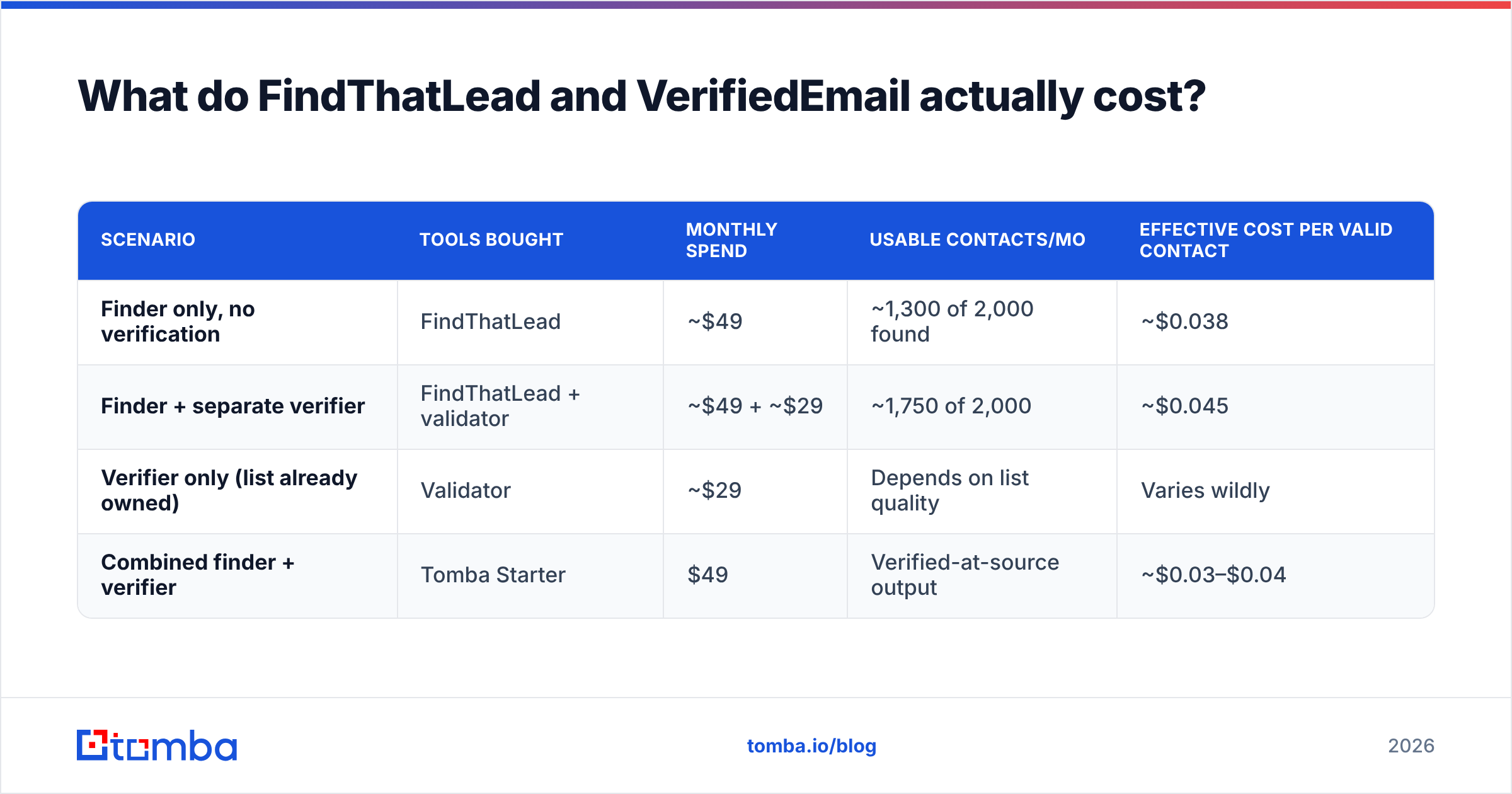
Sticker price is the wrong unit. The unit that matters is cost per valid, contactable person.
| Scenario | Tools bought | Monthly spend | Usable contacts/mo | Effective cost per valid contact |
|---|---|---|---|---|
| Finder only, no verification | FindThatLead | ~$49 | ~1,300 of 2,000 found | ~$0.038 |
| Finder + separate verifier | FindThatLead + validator | ~$49 + ~$29 | ~1,750 of 2,000 | ~$0.045 |
| Verifier only (list already owned) | Validator | ~$29 | Depends on list quality | Varies wildly |
| Combined finder + verifier | Tomba Starter | $49 | Verified-at-source output | ~$0.03–$0.04 |
Two takeaways. First, adding a verifier on top of a finder raises your monthly bill and lowers your bounce rate. That trade is usually worth it, so nobody should run a finder naked. Second, when one platform verifies at the point of discovery, you stop paying twice for the same contact. Tomba's pricing works that way: Free at 25 searches/mo, Starter $49/mo, Growth $99/mo, Pro $249/mo, Enterprise custom. Finding and verification draw from one pool, not two invoices.
Budget for the hidden costs too. Credits burn on failed lookups. Most tools do not roll credits over. Annual-only discounts lock you in before you have tested accuracy. And someone has to spend the hours gluing two APIs together.
When should you pick FindThatLead?#
Pick FindThatLead if these describe you:
- You want one dashboard for the whole motion. Find, build a list, and send without exporting a CSV. For a two-person team, that is genuinely valuable.
- Your ICP is European SMB. Coverage skews strong in Spain and the wider EU, where US-first databases thin out.
- You use LinkedIn heavily. The Scrab.in add-on covers connection requests and profile visits. A pure email tool will not.
- Volume is modest. Under a few thousand lookups a month, convenience beats precision.
- You are fine adding verification on the side. Treat the bundled verification as a first pass. Then run anything important through a proper email verifier before a real send.
Where it struggles: data depth at enterprise scale, phone numbers, catch-all resolution, and per-credit cost at volume. Teams that outgrow it usually do so on data coverage, not on features.
When should you pick VerifiedEmail (or any standalone verifier)?#
A standalone validator is the right buy in exactly three situations:
- You inherited a list. A bought database, a trade-show export, a dormant CRM segment. Clean anything you did not source yourself before it touches your sending domain.
- You have a re-engagement campaign. B2B email data decays 22–30% a year as people change jobs. A list that was clean 12 months ago is not clean now.
- Your sender reputation is already damaged. If bounces have pushed you into spam folders, a hard scrub is triage, not tuning. Pair it with the basics: check your SPF record, authenticate properly, and watch sender reputation recover over a few weeks.
A standalone verifier will never grow your pipeline. It is a hygiene product. If your problem is "not enough qualified contacts," no amount of validation fixes it.

Is a combined finder-plus-verifier better than running both?#
For most teams, yes — and the reason is workflow, not price.
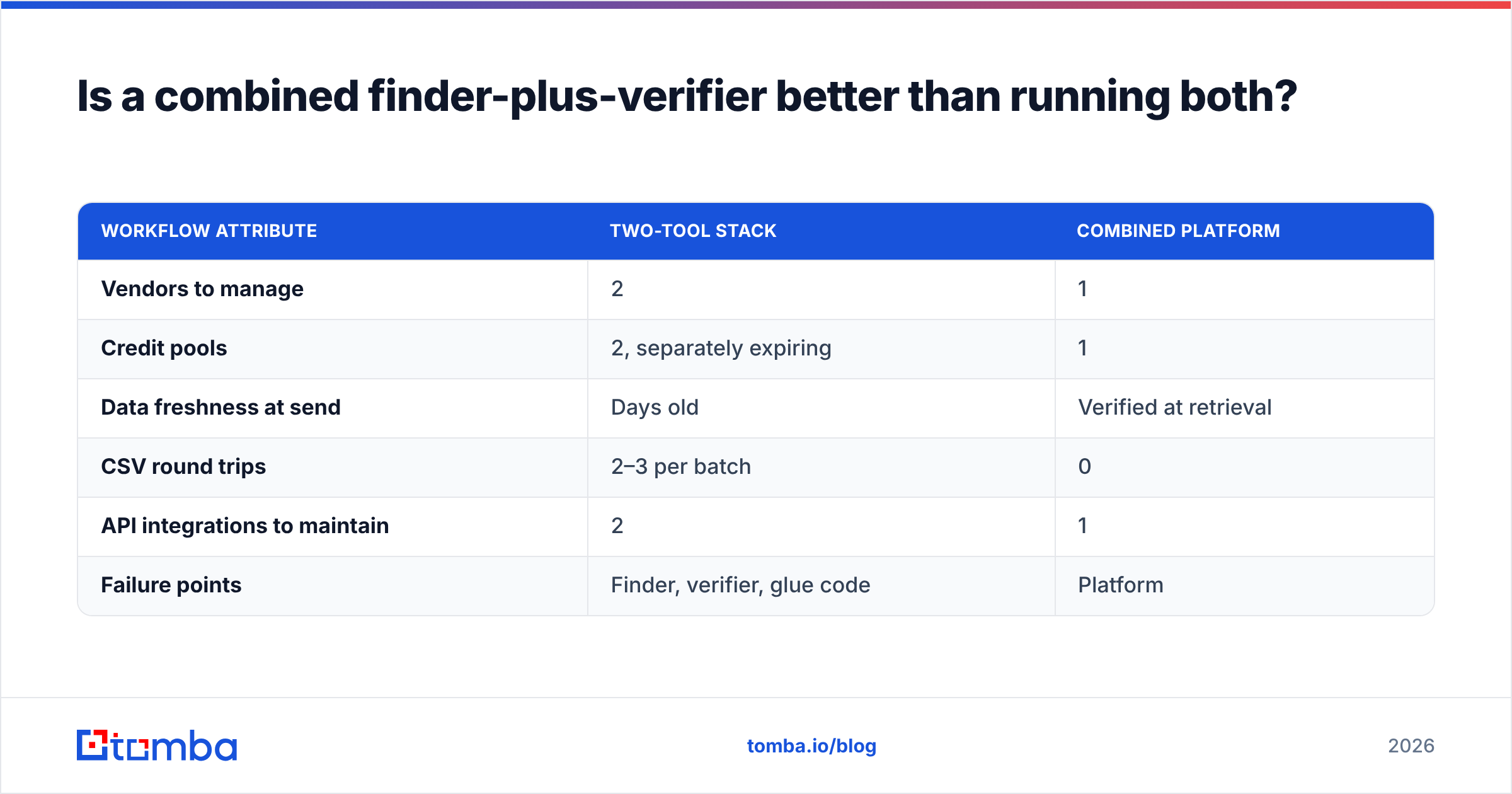
When finding and verifying live in two systems, you get a lag. You export 2,000 contacts on Monday. You verify them Wednesday. You load them into a sequencer Friday. By then some records have gone stale, some got duplicated in the round trip, and your ops person has spent three hours on CSV plumbing. Every handoff is a place data goes wrong.
Verify-at-source removes the handoff. The address is checked before it reaches you, so what enters your CRM is ready to send. That is the model Tomba uses. The email finder runs verification inline. Domain search returns whole companies with confidence scores attached. Bulk lead generation handles the volume case without a second vendor.
| Workflow attribute | Two-tool stack | Combined platform |
|---|---|---|
| Vendors to manage | 2 | 1 |
| Credit pools | 2, separately expiring | 1 |
| Data freshness at send | Days old | Verified at retrieval |
| CSV round trips | 2–3 per batch | 0 |
| API integrations to maintain | 2 | 1 |
| Failure points | Finder, verifier, glue code | Platform |
There are fair reasons to keep the two split. Your compliance team may have already approved a verifier. You may want a second opinion on high-value accounts. Or your volume may be large enough that specialist pricing beats bundled pricing. Just make that a decision rather than an accident.
Not every alternative is a like-for-like swap, either. Providers such as BookYourData sell pre-built, pay-as-you-go B2B lists with their own accuracy guarantees. That is a different way to buy, and it suits teams who want contacts without running searches at all. Compare on how you prefer to buy data, not just on feature checkboxes.
What should you actually check before buying either?#
Run this five-point test on a trial account with both tools. It takes an afternoon and saves a year of regret.
- Same 50 prospects, both tools. Identical input. Compare found rate, verified rate, and how many you can confirm on LinkedIn.
- Credit mechanics. Does a failed search burn a credit? Do credits roll over? Is verification billed apart from discovery?
- Export path. Can you push straight to your CRM, or is CSV the only road? A working HubSpot integration removes a manual step.
- API quality. Read the docs first. Rate limits and error handling decide whether you ever automate. Tomba publishes a full email finder API spec.
- Compliance posture. Ask where the data comes from. A vendor that will not answer is telling you something. Tomba lists its data sources publicly.
Sanity-check the sending side too. Even perfect data bounces if your DNS is wrong. A free email checker and a quick spam-score pass catch problems that no vendor comparison will surface. Deliverability guidance from HubSpot and the sender rules published by the big mailbox providers are baseline reading, not optional.
So which one wins?#
So who wins FindThatLead vs VerifiedEmail? Neither, cleanly — and that is the useful answer.
FindThatLead wins if you want a light all-in-one for European SMB prospecting and you are happy to bolt on verification. VerifiedEmail-class validators win when you already have a list and need it clean before it touches your domain. Neither wins if you are building a durable outbound engine from scratch. You will end up buying both, paying twice, and hand-maintaining the seam between them.
The pattern that holds up at volume is simple. Source and verify in the same motion. Keep one credit pool. Measure yourself on bounce rate and reply rate, not on how many addresses a dashboard claims to have found.
If that is the setup you want, start with the Tomba Email Finder. The free tier gives you 25 searches a month — enough to run the 50-prospect test above against whatever you use today. Starter at $49/mo covers finding, verification, and catch-all handling from one balance instead of two invoices. Run the comparison on your own ICP, check the bounce numbers a week later, and let the data pick the winner.
Related guides#
Ready to find emails that actually work?
Join 150,000+ professionals who stopped guessing and started sending. Free credits on signup — no credit card required.
Get the Tomba newsletter
Practical outbound tactics and product updates — once every two weeks.
About the author