FindThatLead vs VerifyEmailAddress.com: 2026 Comparison
FindThatLead vs VerifyEmailAddress: one tool builds your list, the other only tells you if a single address exists. Here is how they compare on coverage, accuracy, catch-all handling, and real cost in 2026.
FindThatLead vs VerifyEmailAddress is not a fair fight, and that is the point. One tool builds your list. The other only checks a single address you already have. Here is what each does well, what each costs, and which one fits your job in 2026.
TL;DR
- FindThatLead is a prospecting suite. It finds email addresses from domains, names, and LinkedIn, then sends campaigns. VerifyEmailAddress.com is a single-purpose SMTP checker: paste one address, get a verdict.
- They are not true rivals. Comparing them is like comparing a fishing boat to a scale. One brings in the catch. The other tells you what it weighs.
- Need volume? Use a finder with a verification layer built in. Need a free sanity check on one address before a hand-written email? A standalone checker is fine.
- Neither handles catch-all domains well on its own. That is where most "verified" lists quietly rot.
- Best-fit call: FindThatLead if you want find-plus-send in one seat. Pick a dedicated finder-and-verifier stack (Tomba, Hunter, Findymail) if accuracy per credit is the metric you are judged on.
What is FindThatLead?#
FindThatLead is a B2B prospecting platform built in Barcelona. It launched in 2015. The pitch is end-to-end: find contacts, enrich them, and email them without leaving the app.
The core modules are easy to list. A domain-based lead search: give it a company URL, get the people. An email finder that guesses and checks first-name-plus-last-name patterns. A Chrome extension that pulls contacts off LinkedIn profiles and search results. A "Prospector" filter for role, location, and industry. And a built-in cold email sender with basic sequencing.
That bundling is the whole point. For a solo founder or a two-person sales team, one plan replaces a finder plus a sending tool. You can read the current feature set on findthatlead.com. The shape has been stable for years: breadth over precision.
The trade-off is easy to predict. Tools that do five things rarely do the hardest one well. That hardest one is email accuracy. FindThatLead's finder returns a confidence label, but its checks are lighter than what a dedicated email verifier applies. Its database also leans toward small firms and European coverage.
What is VerifyEmailAddress.com?#
VerifyEmailAddress.com is a free, browser-based checker for one address at a time. You type an address into a box. It runs a syntax check, a DNS/MX lookup, and an SMTP handshake with the receiving mail server. Then it reports whether the mailbox seems to exist.
That is the whole product. There is no database, no search, no list building, no CRM sync, no sequencer. It does not find anything. It only judges what you already have.
Tools in this class are useful, and honest about what they are. Under the hood they do what SMTP allows. They open a chat with the mail server, send a RCPT TO command, and read the reply code. If the server says the recipient is unknown, the address is dead. If the server accepts everything (a catch-all), the checker learns nothing. It usually returns "unknown" or a false positive.
Free single-address checkers have other ceilings too. Expect rate limits, no API, and no bulk upload. Results are only as good as the checking IP. If that IP is already blocklisted by the receiving server, the answer is noise.

FindThatLead vs VerifyEmailAddress: are they even the same category?#
No. Pretending otherwise is how teams end up with two subscriptions that cover 60% of the workflow.
Here is the honest split of what each layer of an outbound stack owns:
- Discovery — turning a company or a person into a candidate email address. FindThatLead does this. VerifyEmailAddress.com does not. This is where domain search and pattern detection live.
- Validation — proving that candidate address will accept mail. VerifyEmailAddress.com does this one address at a time. FindThatLead does a lighter version inline, bundled into the find.
- Catch-all resolution — deciding what to do when a server accepts every address. Neither tool solves this. It needs a dedicated catch-all verifier or past engagement data.
- Enrichment — adding job title, company size, tech stack, and phone to the contact. FindThatLead does some of this. VerifyEmailAddress.com does none.
- Activation — pushing the contact into a sequence, a CRM, or a spreadsheet your reps actually open. FindThatLead ships a sender. A standalone checker leaves this to you.
Map your own gap against those five rows before you buy anything. Most teams that complain about bounce rates are missing row 3, not row 1.
FindThatLead vs VerifyEmailAddress: how do they compare feature by feature?#
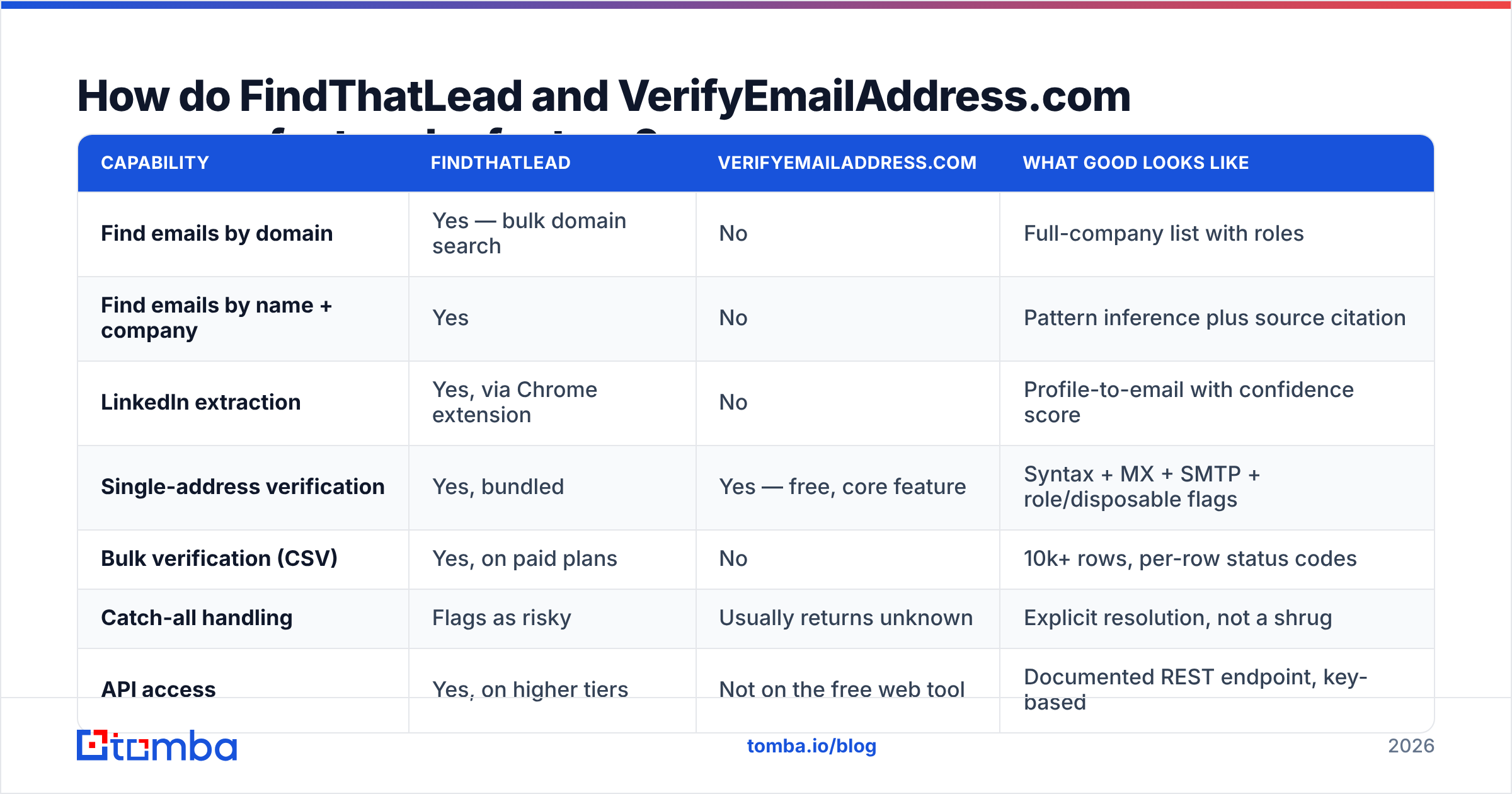
| Capability | FindThatLead | VerifyEmailAddress.com | What good looks like |
|---|---|---|---|
| Find emails by domain | Yes — bulk domain search | No | Full-company list with roles |
| Find emails by name + company | Yes | No | Pattern inference plus source citation |
| LinkedIn extraction | Yes, via Chrome extension | No | Profile-to-email with confidence score |
| Single-address verification | Yes, bundled | Yes — free, core feature | Syntax + MX + SMTP + role/disposable flags |
| Bulk verification (CSV) | Yes, on paid plans | No | 10k+ rows, per-row status codes |
| Catch-all handling | Flags as risky | Usually returns unknown | Explicit resolution, not a shrug |
| API access | Yes, on higher tiers | Not on the free web tool | Documented REST endpoint, key-based |
| Cold email sending | Yes, built in | No | Warmup, throttling, reply detection |
| Phone numbers | Limited | No | Verified mobile plus direct dial |
| Free entry point | Limited free credits | Fully free, rate limited | Enough credits to test 25-50 real leads |
The pattern is clear. FindThatLead spans nine of those ten rows, but shallowly. VerifyEmailAddress.com covers exactly one row, and charges nothing for it. So the question is not "which is better". It is "which row am I short on".
FindThatLead vs VerifyEmailAddress: which one is more accurate?#
Accuracy means something different for each tool. Measure them separately.
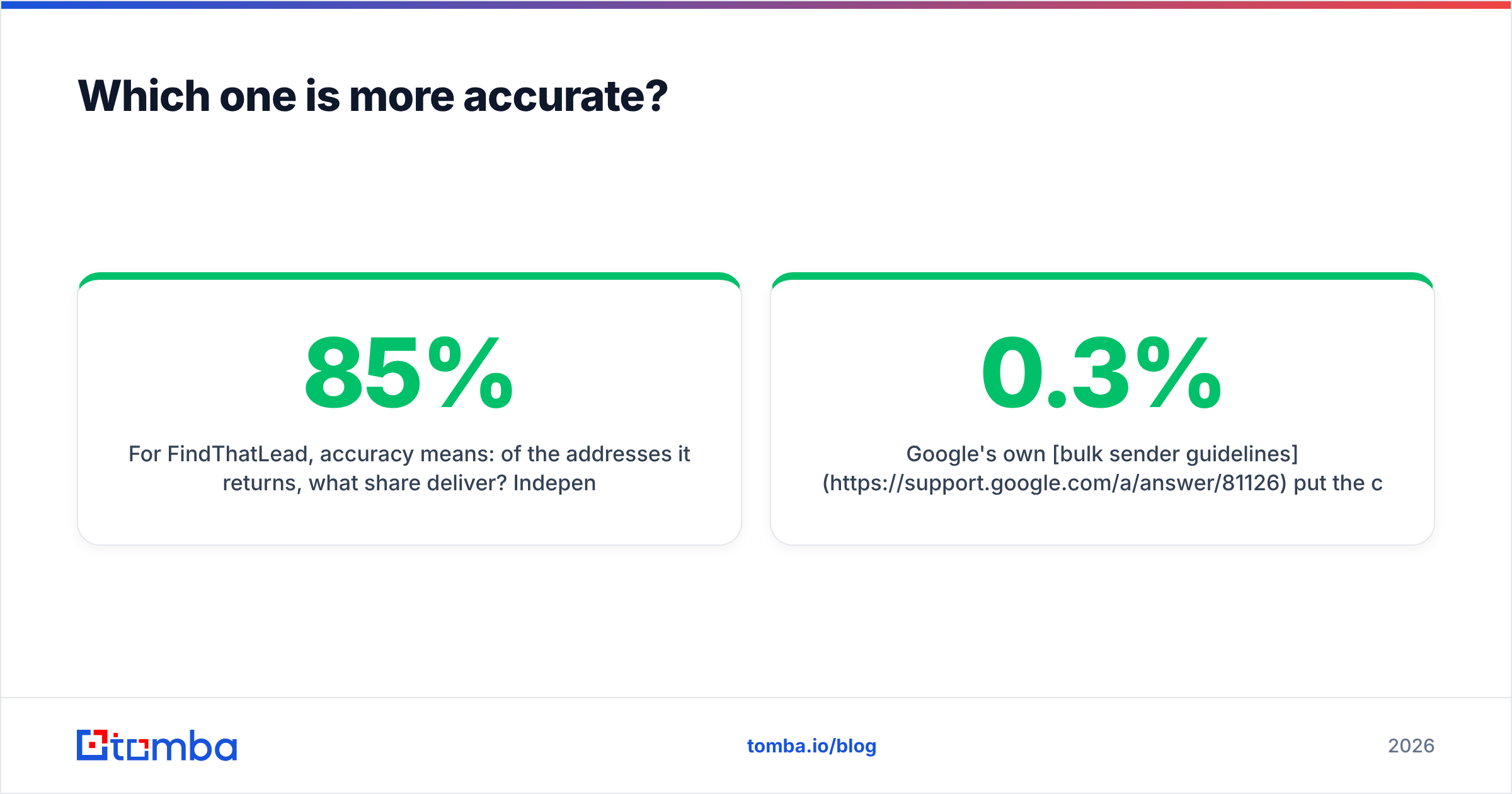
For FindThatLead, accuracy means one thing: of the addresses it returns, how many deliver? User reports on G2 and in outbound communities put bundled finders in the 70-85% band. Variance is wide by region and company size. European small firms are a strength. US enterprise and freshly-hired contacts are weaker. Below 90% verified deliverability, re-verify before you send. A bundled confidence score is not a verification pass.
For VerifyEmailAddress.com, accuracy means: when it says "valid", is it? On normal mail servers that honour RCPT TO, a single check is close to definitive. The failure mode sits elsewhere. Microsoft 365 tenants, Google Workspace domains with catch-all on, and servers behind greylisting or an anti-harvesting filter will accept everything or refuse the handshake. A free checker runs from a shared IP that is often blocklisted. It hits that wall more often than a paid verifier on dedicated infrastructure.

The takeaway is practical. One free check is a fine tiebreaker before you hand-write an email to a single prospect. It is not a list-hygiene process. For 500 rows you need bulk verify with per-row status codes, deduplication, and a catch-all rule you set in advance.
Google's own bulk sender guidelines cap the spam-complaint rate at 0.3% and expect low bounce volumes. You cannot stay under that ceiling with copy-paste verification.
FindThatLead vs VerifyEmailAddress: what do they cost in 2026?#
Prices below reflect publicly listed plans at the time of writing. Always confirm on the vendor's own page. Credit definitions change more often than headline prices.
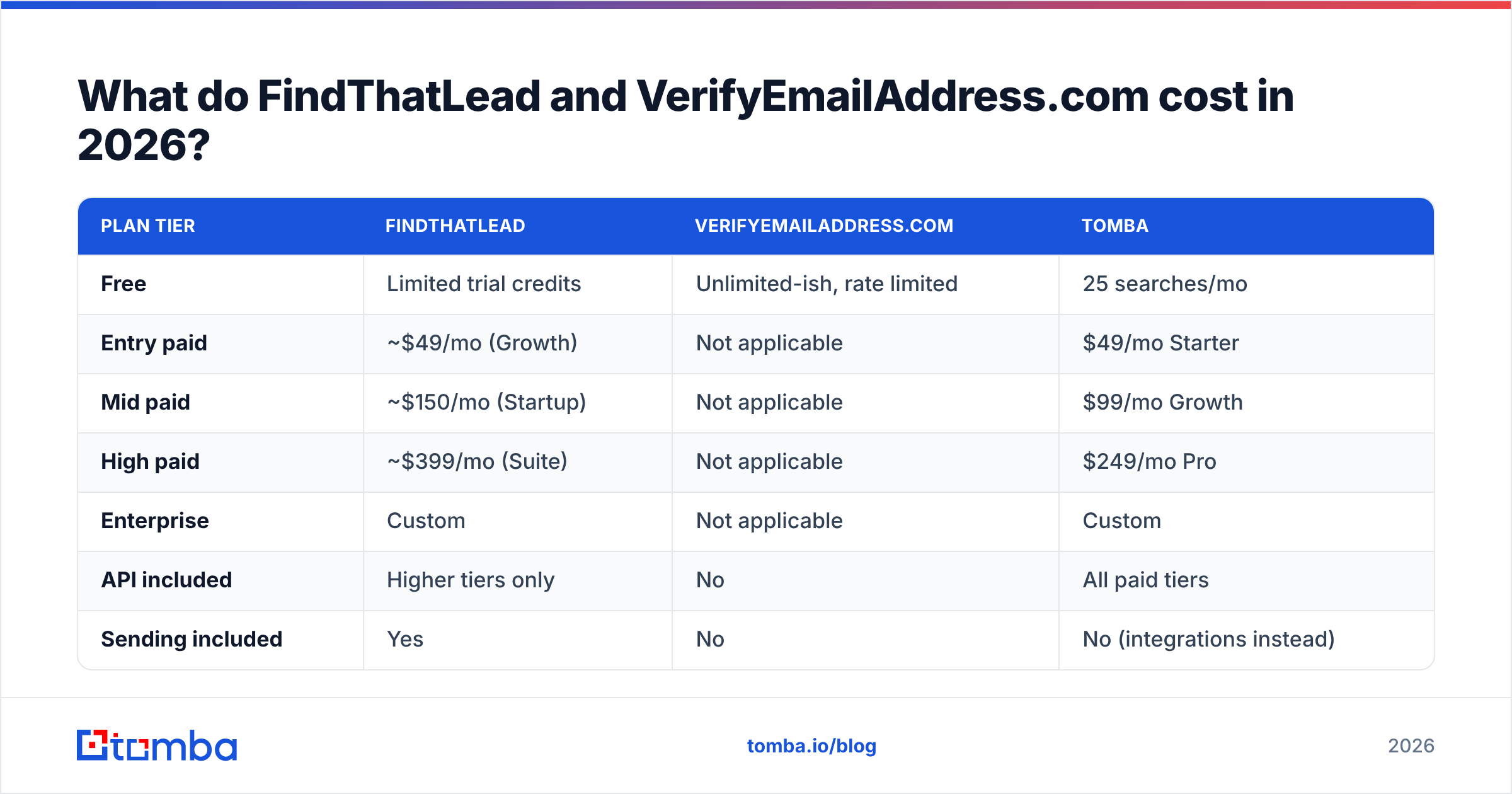
| Plan tier | FindThatLead | VerifyEmailAddress.com | Tomba |
|---|---|---|---|
| Free | Limited trial credits | Unlimited-ish, rate limited | 25 searches/mo |
| Entry paid | ~$49/mo (Growth) | Not applicable | $49/mo Starter |
| Mid paid | ~$150/mo (Startup) | Not applicable | $99/mo Growth |
| High paid | ~$399/mo (Suite) | Not applicable | $249/mo Pro |
| Enterprise | Custom | Not applicable | Custom |
| API included | Higher tiers only | No | All paid tiers |
| Sending included | Yes | No | No (integrations instead) |
Two things stand out.
First, "free" is not the same as free at scale. VerifyEmailAddress.com costs nothing per check. But a rep who verifies 300 addresses by hand at 15 seconds each burns 75 minutes. At any real hourly cost, that is dearer than a $49/mo tool that does the same job in one upload.
Second, FindThatLead's mid and high tiers price the sender, not the data. If you already pay for Instantly, Smartlead, Lemlist, or a sequencer inside your CRM, you are buying that twice. Teams in that spot usually get better unit economics by splitting the stack: a precise finder plus their current sender. That is the argument behind most Findymail alternative and Hunter-versus-suite comparisons too.

For reference, Tomba pricing starts at $49/mo for Starter, $99/mo for Growth, and $249/mo for Pro. API access comes with every paid tier, not just the top plan. Check that detail on any vendor before you commit. API gating is the most common hidden upgrade trigger in this category.
Where does each tool break down?#
FindThatLead's failure modes. Coverage gaps on US mid-market and enterprise. Thinner data on people who changed roles recently. A bundled verifier that flags catch-alls rather than resolving them. The sender works, but it lags dedicated cold email platforms on deliverability tooling. Warmup is shallow and inbox rotation is limited. If deliverability is your bottleneck, the bundle will not fix it.
VerifyEmailAddress.com's failure modes. No bulk, no API, no audit trail, and a hard stop on catch-all domains. It also gives you no context. You learn that an address might accept mail. You learn nothing about whether the person still works there. An address can be valid and still commercially dead: the mailbox exists, the human left in March.
The shared failure mode. Both treat the address as the deliverable. It is not. The deliverable is a reachable decision maker who still works there, with enough context to write a relevant first line. That needs data enrichment: title, seniority, company size, a recent role change. Neither tool fully supplies it.
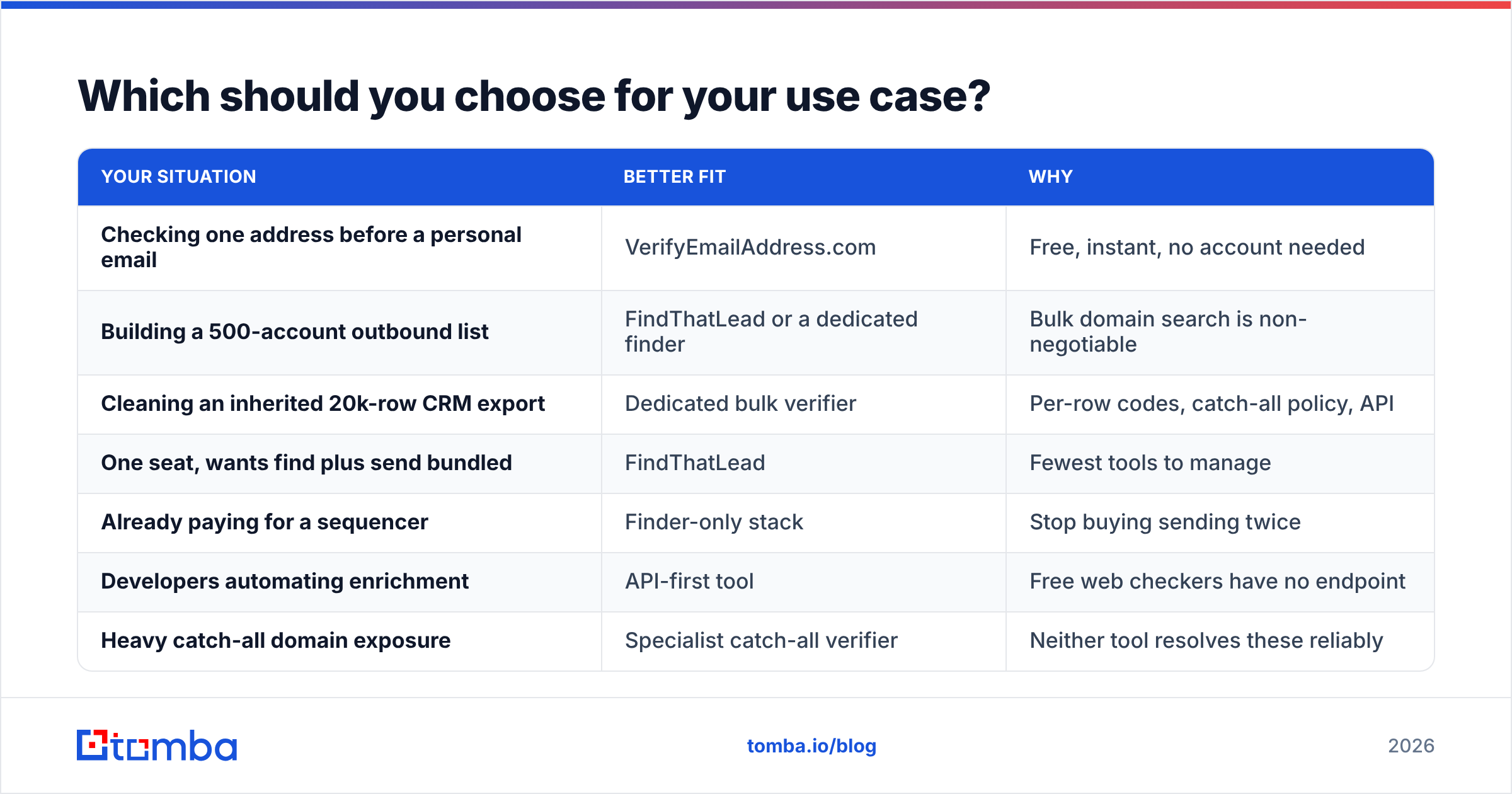
Which should you choose for your use case?#
| Your situation | Better fit | Why |
|---|---|---|
| Checking one address before a personal email | VerifyEmailAddress.com | Free, instant, no account needed |
| Building a 500-account outbound list | FindThatLead or a dedicated finder | Bulk domain search is non-negotiable |
| Cleaning an inherited 20k-row CRM export | Dedicated bulk verifier | Per-row codes, catch-all policy, API |
| One seat, wants find plus send bundled | FindThatLead | Fewest tools to manage |
| Already paying for a sequencer | Finder-only stack | Stop buying sending twice |
| Developers automating enrichment | API-first tool | Free web checkers have no endpoint |
| Heavy catch-all domain exposure | Specialist catch-all verifier | Neither tool resolves these reliably |
One rule holds up across most teams. Buy discovery and validation from a vendor that treats them as the product. Buy sending from a vendor that treats deliverability as the product. Bundles win on convenience. They lose on the two numbers that decide whether outbound works: bounce rate and reply rate.
How do you build a stack that beats either one alone?#
Four steps, in order.
- Define the account list first. Firmographics before contacts. Discovery tools are only as good as the domains you feed them. A great finder pointed at bad accounts gives you well-verified irrelevance.
- Find at the domain level, not the person level. Pull every relevant role at each account in one pass, then filter. Person-by-person lookups burn credits and hours.
- Verify in bulk, with a clear catch-all rule. Decide up front: send to catch-alls at lower volume, or drop them. Do not let "unknown" slip into your main send.
- Enrich before you write. Title, headcount, and a recent trigger event turn a verified address into a reason to email. Skip it and your bounce rate looks fine while replies stay at 1%.
Run that loop and the FindThatLead vs VerifyEmailAddress question mostly dissolves. You stop choosing between a shallow bundle and a manual tool. You start assembling a pipeline where every stage is measurable.
The verdict#
VerifyEmailAddress.com is a good free utility and a bad list-hygiene process. FindThatLead is a fair all-in-one for small teams who value one login over per-stage quality. It is a poor fit for anyone whose comp plan depends on reply rate.
If your bottleneck is finding accurate addresses at volume, start with a tool built for that job. For most outbound teams, that is the bottleneck. The Tomba Email Finder covers domain search, name-plus-company lookup, LinkedIn extraction, and verification in one workflow. API access comes with every paid plan. The free tier gives you 25 searches a month, so you can test it against your own account list before paying anything. Run 25 of your hardest domains through it, compare the hit rate to whatever you use now, and let the bounce report decide.
Related guides#
Ready to find emails that actually work?
Join 150,000+ professionals who stopped guessing and started sending. Free credits on signup — no credit card required.
Get the Tomba newsletter
Practical outbound tactics and product updates — once every two weeks.
About the author