FindThatLead vs Verimail 2026: Which Email Tool Wins?
FindThatLead finds prospects. Verimail cleans lists. They solve different halves of the same problem, and buying the wrong one first is the expensive mistake. Here is the honest breakdown for 2026.
TL;DR
- FindThatLead and Verimail are not really competitors. FindThatLead is a prospecting tool that generates email addresses from names, domains, and LinkedIn. Verimail is a verification engine that tells you whether an address you already have will bounce.
- If you have no list, a verifier is useless. If you have a list from a scraper or a trade show, a finder is redundant. Buy in that order.
- FindThatLead bundles a light cold-email sender, which is convenient but means you are paying for sequencing you may already have in Instantly, Smartlead, or your CRM.
- Verimail's pay-as-you-go credits are the cheapest way to clean an occasional list. They are the most expensive way to clean lists every week.
- The cheapest real-world setup for most teams in 2026 is one vendor that does find and verify on the same credit pool, which is where Tomba's $49/mo Starter plan lands.
What problem does each tool actually solve?#
Think of outbound like cooking. Finding emails is shopping for ingredients. Verifying emails is checking expiry dates before you cook. You need both, but you never check expiry dates on food you have not bought yet.
FindThatLead (findthatlead.com) is the shopping trip. You give it a domain, a first name plus last name, or a LinkedIn URL, and it returns a best-guess professional address with a confidence score. It also ships a Chrome extension, a "Prospector" search that filters by role and geography, and a basic email sender so you can go from list to first touch without a second tool.
Verimail (verimail.io) is the expiry check. It takes addresses you already have and runs syntax checks, MX record lookups, disposable-domain detection, role-account flags, and SMTP-level mailbox probing. It returns a verdict: deliverable, undeliverable, risky, or unknown. It does not source anything.
That distinction decides the whole comparison. Searching "FindThatLead vs Verimail" usually means one of two things: you are trying to figure out which one to buy first, or you have been sold one and discovered it does not do the other half.
How do FindThatLead and Verimail compare feature by feature?#
Here is the head-to-head, with a third column for a combined-stack vendor so you can see what you give up by splitting.
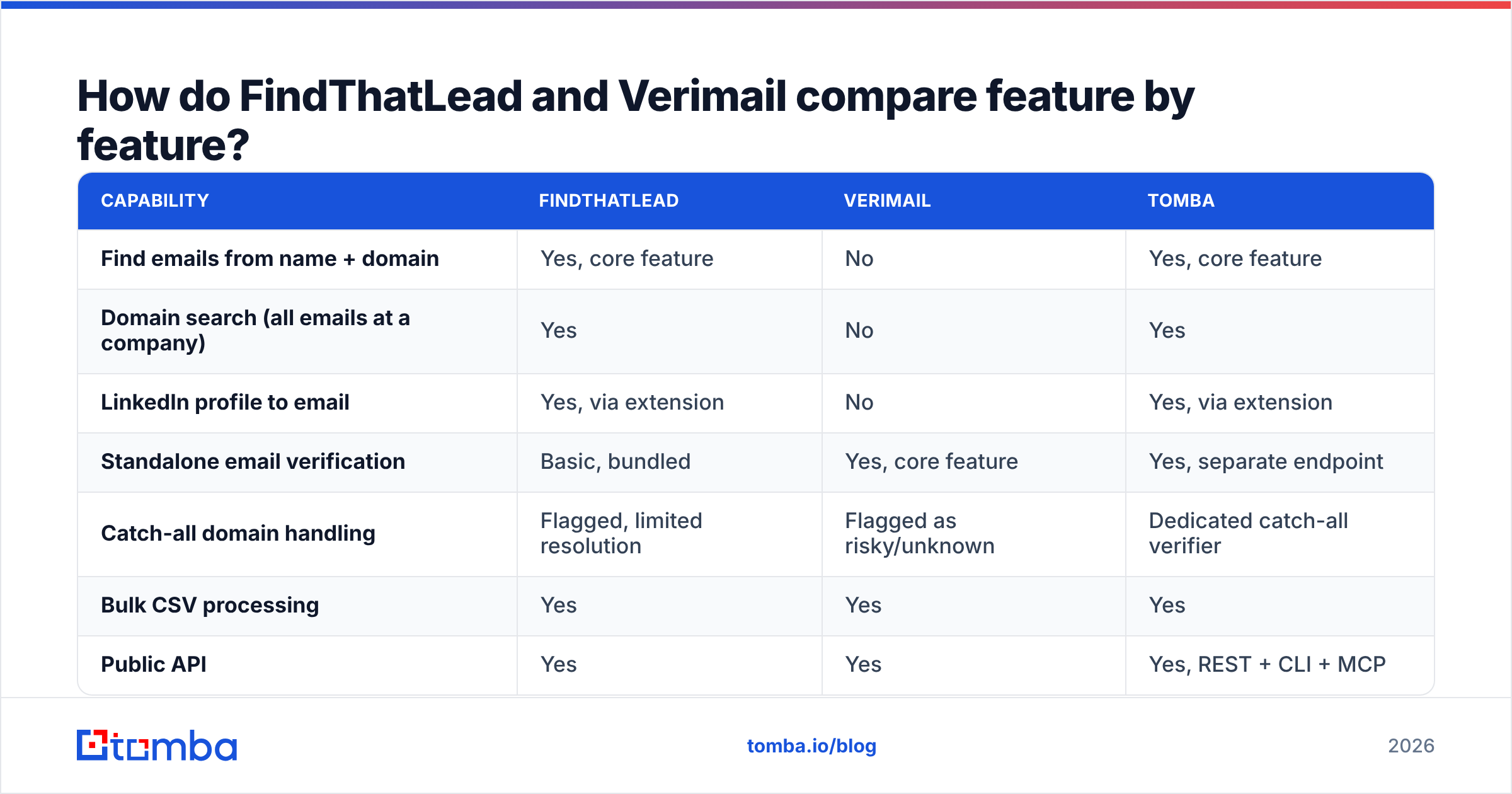
| Capability | FindThatLead | Verimail | Tomba |
|---|---|---|---|
| Find emails from name + domain | Yes, core feature | No | Yes, core feature |
| Domain search (all emails at a company) | Yes | No | Yes |
| LinkedIn profile to email | Yes, via extension | No | Yes, via extension |
| Standalone email verification | Basic, bundled | Yes, core feature | Yes, separate endpoint |
| Catch-all domain handling | Flagged, limited resolution | Flagged as risky/unknown | Dedicated catch-all verifier |
| Bulk CSV processing | Yes | Yes | Yes |
| Public API | Yes | Yes | Yes, REST + CLI + MCP |
| Built-in cold email sender | Yes | No | No, integrates instead |
| Phone number lookup | No | No | Yes |
| Free tier | Limited monthly credits | Trial credits | 25 searches/mo |
| Entry paid price | ~$49/mo (published) | Pay-as-you-go credit packs | $49/mo Starter |
Two things jump out. First, FindThatLead's verification is a bundled convenience, not a specialist engine, which is exactly why people who own it still shop for Verimail. Second, Verimail has no sourcing at all, so it can never be your only vendor unless your leads arrive from somewhere else.

Which one is more accurate, and how would you even know?#
Accuracy means different things on each side of this comparison, and vendors exploit that.
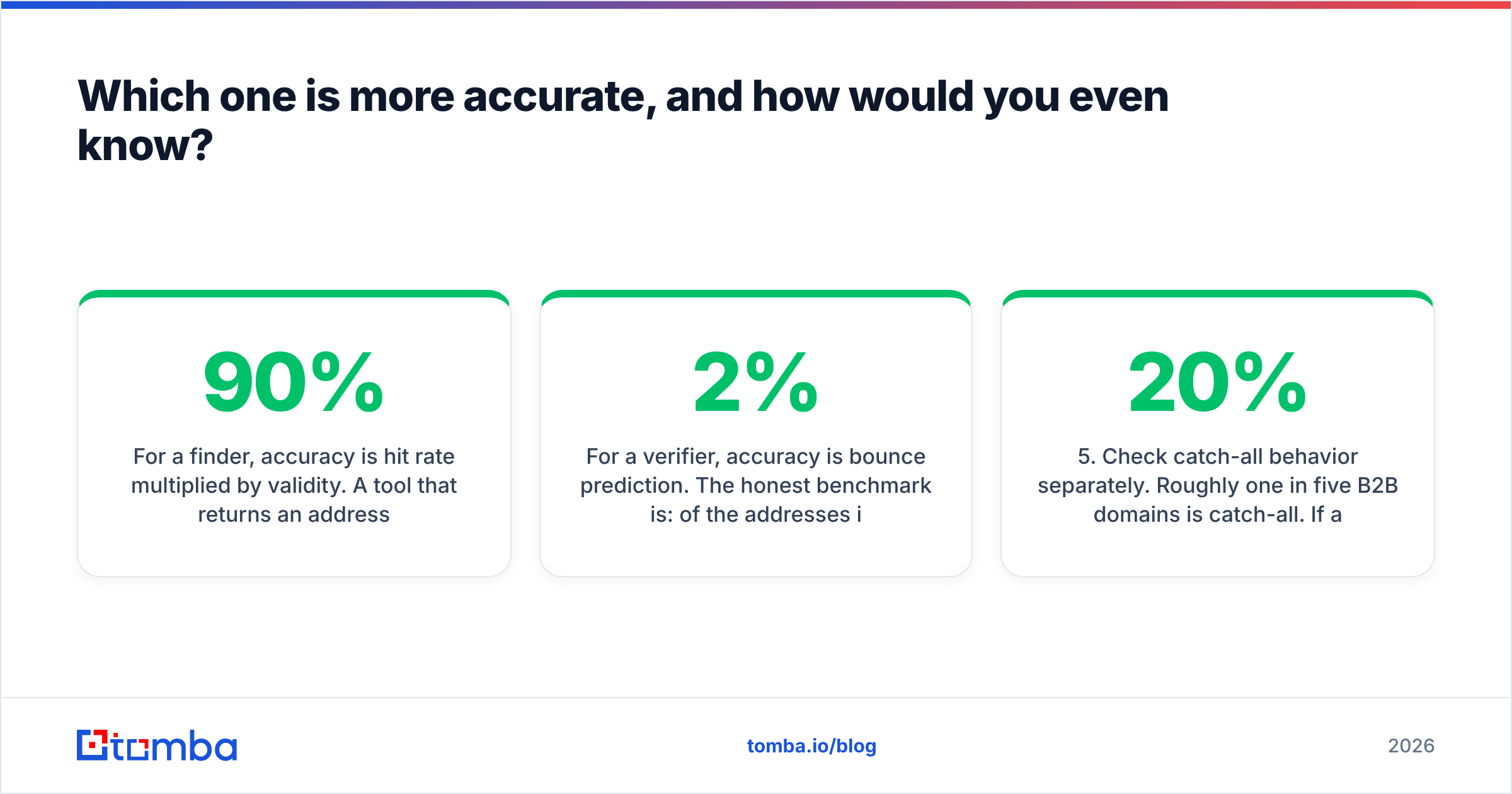
For a finder, accuracy is hit rate multiplied by validity. A tool that returns an address for 90% of your inputs but is only right 60% of the time is worse than one that returns 65% and is right 96% of the time, because every wrong guess costs you a bounce, and bounces cost you domain reputation.
For a verifier, accuracy is bounce prediction. The honest benchmark is: of the addresses it marked "deliverable," what percentage actually bounced when you sent? Anything under 2% is good. Anything over 5% means the verifier is guessing on catch-all domains and calling it a pass.
Run your own test before you commit money. It takes twenty minutes:
- Build a 100-row control list. Use contacts you already emailed successfully in the last 90 days, plus 20 addresses you know are dead (people who left, hard bounces from your ESP).
- Strip the emails out. Keep name, company, and domain only. That is your finder test input.
- Run the finder. Score coverage (how many rows got an address) and precision (how many matched the address you already had).
- Run the verifier on the full 100. Count how many known-dead addresses it caught and how many known-good addresses it wrongly flagged as risky. False positives are the hidden cost nobody advertises.
- Check catch-all behavior separately. Roughly one in five B2B domains is catch-all. If a tool returns "unknown" on all of them, you are back to guessing on 20% of your list.
- Compare cost per usable contact, not cost per credit. A cheap credit that returns "unknown" is not a discount.
That last point is where most buying decisions go sideways. Credit pricing is designed to be hard to compare. Normalize everything to dollars per verified, deliverable, sendable contact.
Sorry, that image needs a proper reference:

Is FindThatLead's bundled sender worth paying for?#
Only if you have no sequencing tool at all.
FindThatLead's pitch is end-to-end: prospect, verify, send, all in one dashboard. For a solo founder doing 200 emails a month, that is genuinely convenient and one bill instead of three. For anyone running real outbound volume, the bundled sender is the weakest link in the chain. It does not match a dedicated sending platform on inbox rotation, warmup scheduling, reply detection, or per-mailbox throttling, and those are precisely the features that keep you out of spam in 2026 under Google and Yahoo's bulk sender rules.
The practical risk: you pay a premium for a sender you barely use, then bolt on a real sending tool anyway, and now you are paying twice for the same job. Before you buy any bundle, list what you already own. If you have Instantly, Smartlead, Lemlist, Reply, or HubSpot Sequences, the sender in a finder tool is dead weight.
The same logic runs in reverse with Verimail. It is a focused verifier and it does that job cleanly, but a focused verifier means one more vendor, one more API key, one more invoice, and one more CSV round trip between systems every time you build a list.
When should you use a verifier at all?#
Not always. Verification earns its cost in specific situations:
- Bought, scraped, or inherited lists. Anything you did not source yourself is guilty until proven deliverable. Verify 100% of it.
- Lists older than 90 days. B2B email decay runs roughly 22–30% per year as people change jobs. A list that was clean in March is not clean in August.
- Before a domain warmup or a new sending domain. Early bounces on a fresh domain do disproportionate damage to sender reputation.
- Catch-all-heavy segments. Enterprise domains skew catch-all. These need a specialist catch-all verifier, not a generic pass/fail.
When you do not need a separate verification pass: when your finder already returns SMTP-validated addresses with a confidence score and you are sending within days of building the list. Verifying an address a good finder just validated is paying twice for the same check. That is the core inefficiency in the FindThatLead-plus-Verimail stack.
What does each option really cost per month?#
Published pricing changes often, so treat these as directional and confirm on each vendor's page before you buy. The point here is the shape of the cost, not the exact cent.
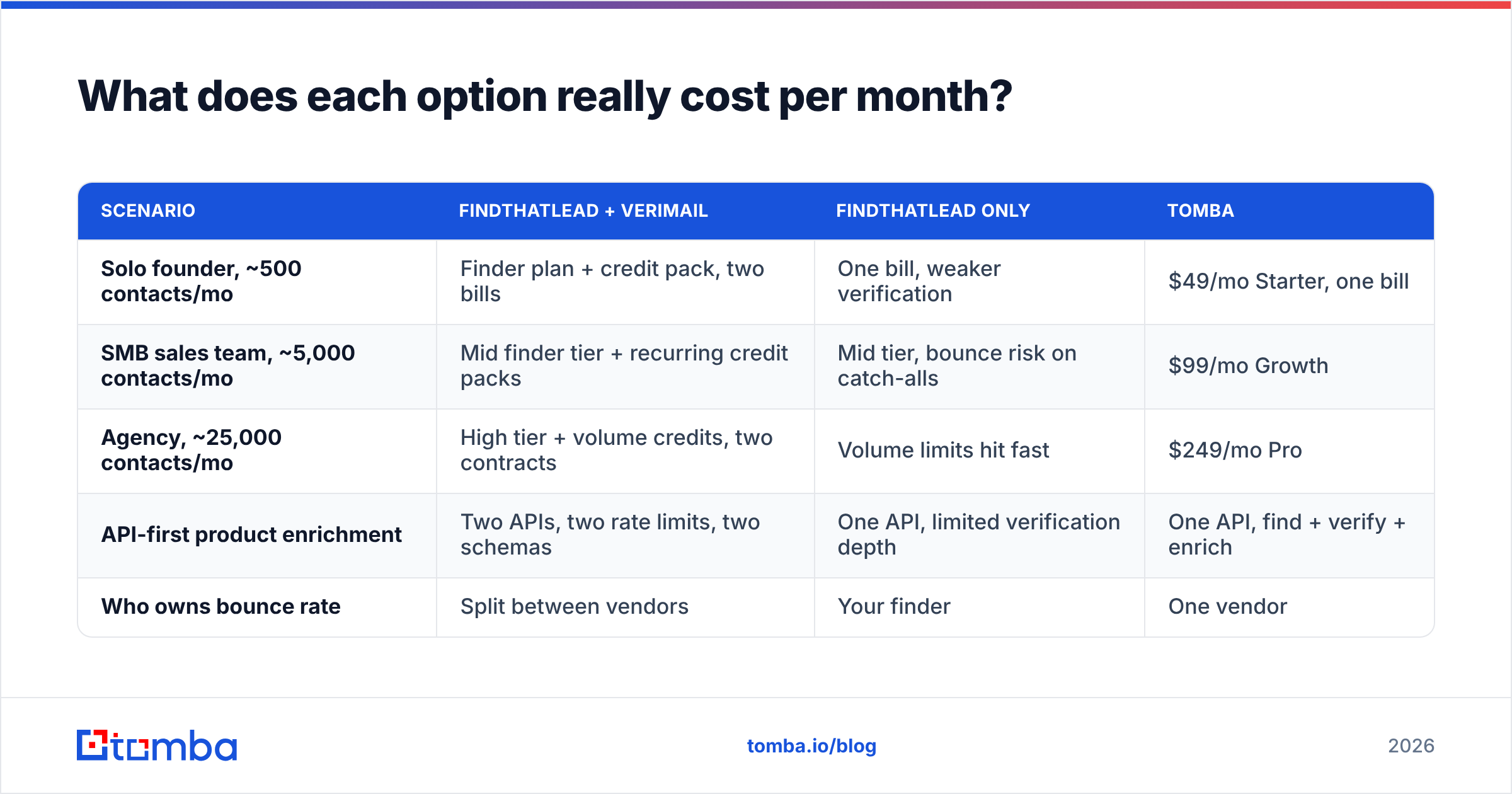
| Scenario | FindThatLead + Verimail | FindThatLead only | Tomba |
|---|---|---|---|
| Solo founder, ~500 contacts/mo | Finder plan + credit pack, two bills | One bill, weaker verification | $49/mo Starter, one bill |
| SMB sales team, ~5,000 contacts/mo | Mid finder tier + recurring credit packs | Mid tier, bounce risk on catch-alls | $99/mo Growth |
| Agency, ~25,000 contacts/mo | High tier + volume credits, two contracts | Volume limits hit fast | $249/mo Pro |
| API-first product enrichment | Two APIs, two rate limits, two schemas | One API, limited verification depth | One API, find + verify + enrich |
| Who owns bounce rate | Split between vendors | Your finder | One vendor |
The split-stack column is not just more expensive. It is operationally slower. Every list means export from the finder, import to the verifier, wait, export again, import to the sender. Three file handoffs is where deduplication errors and stale rows creep in.

Is there a single tool that does both jobs properly?#
Yes, and that is the honest reason this comparison usually ends in a third option.
Tomba's email finder handles the sourcing half: name plus domain lookup, domain search to pull every published address at a company, LinkedIn extraction, author lookup for content-led outreach, and bulk CSV processing. The email verifier handles the other half with syntax, MX, disposable, role, and SMTP checks, plus a dedicated catch-all path so enterprise domains do not all come back "unknown."
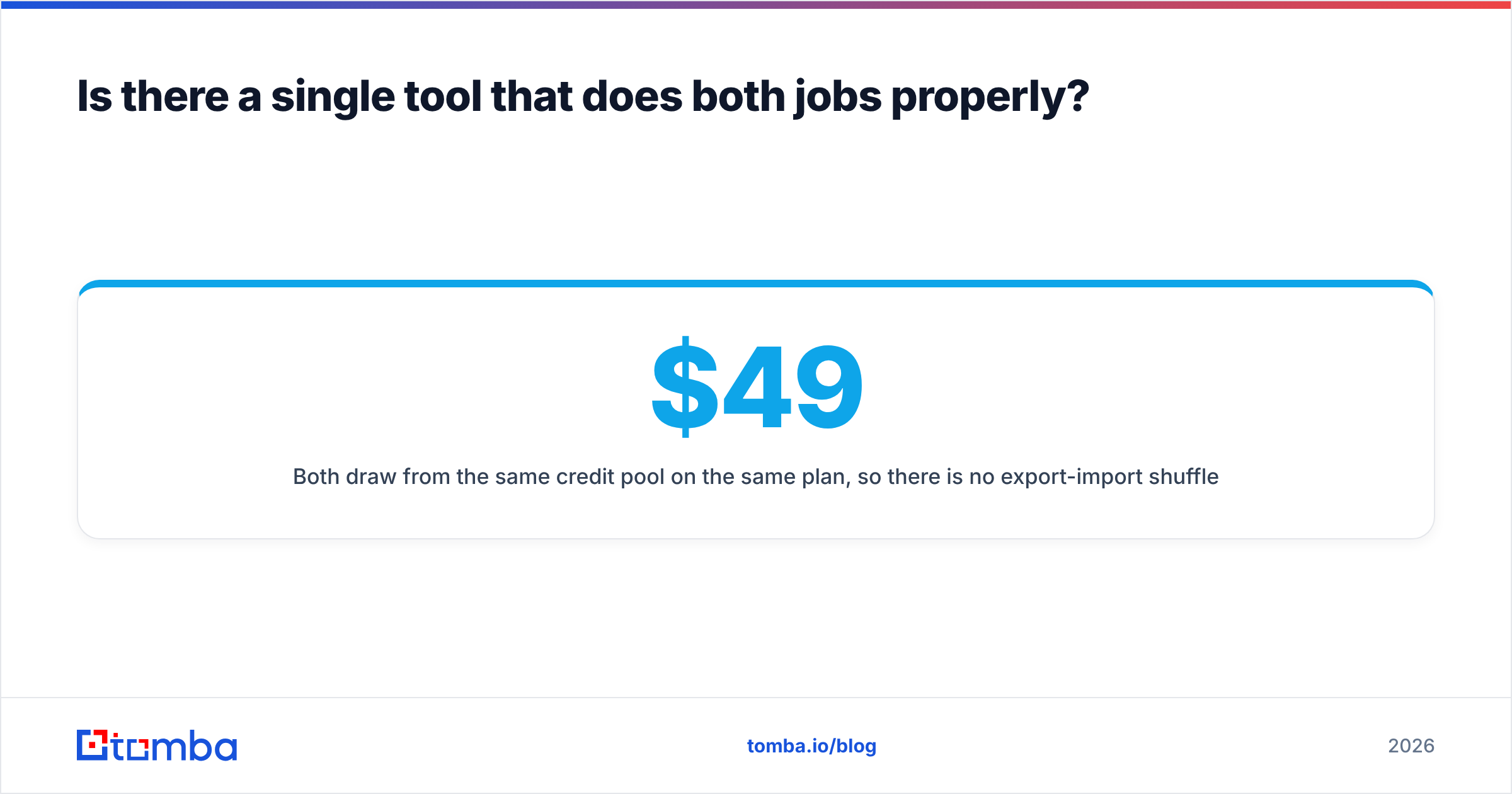
Both draw from the same credit pool on the same plan, so there is no export-import shuffle and no second invoice. Tomba pricing starts with a free tier at 25 searches per month, then Starter at $49/mo, Growth at $99/mo, Pro at $249/mo, and custom Enterprise. If you work in spreadsheets, the Google Sheets add-on and Excel add-in run finds and verifications in place; if you work in code, the REST API, CLI, and MCP server cover the same surface.
None of this makes FindThatLead or Verimail bad tools. FindThatLead is a reasonable all-in-one for a founder who wants one dashboard and does not yet own a sending platform. Verimail is a clean, focused verifier that does its one job without ceremony. The question is whether you want to run two vendors to cover what one credit pool can cover.
How do you decide in the next ten minutes?#
Answer three questions honestly.
- Do you have a list right now? No list means you need a finder first. Verimail cannot help you until you do.
- Do you already send from a dedicated platform? If yes, FindThatLead's bundled sender is a feature you will pay for and not use. Weigh the finder alone.
- How often do you build lists? Monthly or less, pay-as-you-go verification credits are fine. Weekly or more, recurring credit packs quietly become the largest line item and a combined plan wins.
A useful cross-check before you commit: read recent reviews on G2 filtered to your company size, and ignore anything older than twelve months. Data vendors change providers, and a 2023 accuracy review tells you nothing about 2026 coverage.
Then run the 100-row control test above against whichever two options you shortlisted. It costs you a free tier and twenty minutes, and it beats every comparison article on the internet, including this one, because it uses your ICP, your domains, and your geography.
The bottom line#
FindThatLead vs Verimail is not really a versus. It is a sequencing question: source first, verify second, and only pay for both jobs once. If you are already committed to a sending platform, buying a finder-plus-sender bundle and a standalone verifier means three overlapping subscriptions covering two actual tasks.
Start with the free tier of the Tomba Email Finder and run your own 100-row control list against it. Twenty-five searches is enough to measure coverage and precision on your real ICP, and the verification runs on the same credits, so you can see the bounce prediction in the same pass instead of exporting to a second vendor to find out. If the numbers beat your current stack, the consolidation pays for itself on the first invoice.
Related guides#
Ready to find emails that actually work?
Join 150,000+ professionals who stopped guessing and started sending. Free credits on signup — no credit card required.
Get the Tomba newsletter
Practical outbound tactics and product updates — once every two weeks.
About the author