FindThatLead vs Vocus.io: Which Sales Tool Wins in 2026?
FindThatLead finds the leads. Vocus.io sends the emails. They get compared constantly, but they solve different halves of the same problem — here is where each one actually earns its seat in your stack.
FindThatLead vs Vocus.io is a comparison people run for the wrong reason. The two tools do different jobs. One finds contacts. The other sends mail from Gmail. Here is how to tell which half you actually need to fix.
TL;DR
- FindThatLead and Vocus.io are not really competitors. FindThatLead is a prospecting and email-finding platform; Vocus.io is a Gmail-native sending, tracking, and follow-up layer.
- Pick FindThatLead if your bottleneck is "I don't have contacts." Pick Vocus.io if your bottleneck is "I have contacts but my Gmail workflow is manual."
- Vocus.io is much cheaper per seat (single-digit to ~$20/user/mo) because it does not sell data. FindThatLead's cost scales with credits, and credits get burned on guesses that never verify.
- Neither tool gives you a clean, verified, API-first data layer. Most teams fill that gap with a dedicated finder plus a verifier.
- If you buy both, budget for a third line item: verification. Unverified finds are the biggest source of bounce-driven domain damage in 2026.
What are FindThatLead and Vocus.io, actually?#
They get bundled together in "cold email tools" listicles. That is how people end up buying the wrong one. Here is the honest split:
- FindThatLead is a data acquisition tool. Give it a domain, a name, a LinkedIn URL, or a search filter, and it returns business email addresses. It also bolts on a light sender ("Scrapper" and campaign features) so you can act on what you found. Data is the product. Sending is the accessory.
- Vocus.io is a workflow tool that lives inside Gmail. It adds open and click tracking, mail merge, sequences, scheduled sends, snippets, meeting links, and CRM sync to the inbox you already use. It finds you nothing. Sending is the product. Data is your problem.
The feature overlap is small — call it 15%. Both touch "cold email," and that is where the similarity ends. A side-by-side feature scorecard tells you almost nothing here.
The real decision is sequencing. Ask which half of your pipeline is broken this quarter, sourcing or sending. Then buy for that half only. Teams that buy both on day one end up with two half-used subscriptions and a bounce rate above 6%.
One more thing neither tool solves: verification. FindThatLead includes a basic validation step. Vocus.io includes none. List hygiene is the part most teams under-invest in, then blame on "deliverability."
Once you frame it that way, the FindThatLead vs Vocus.io comparison gets a lot more useful.
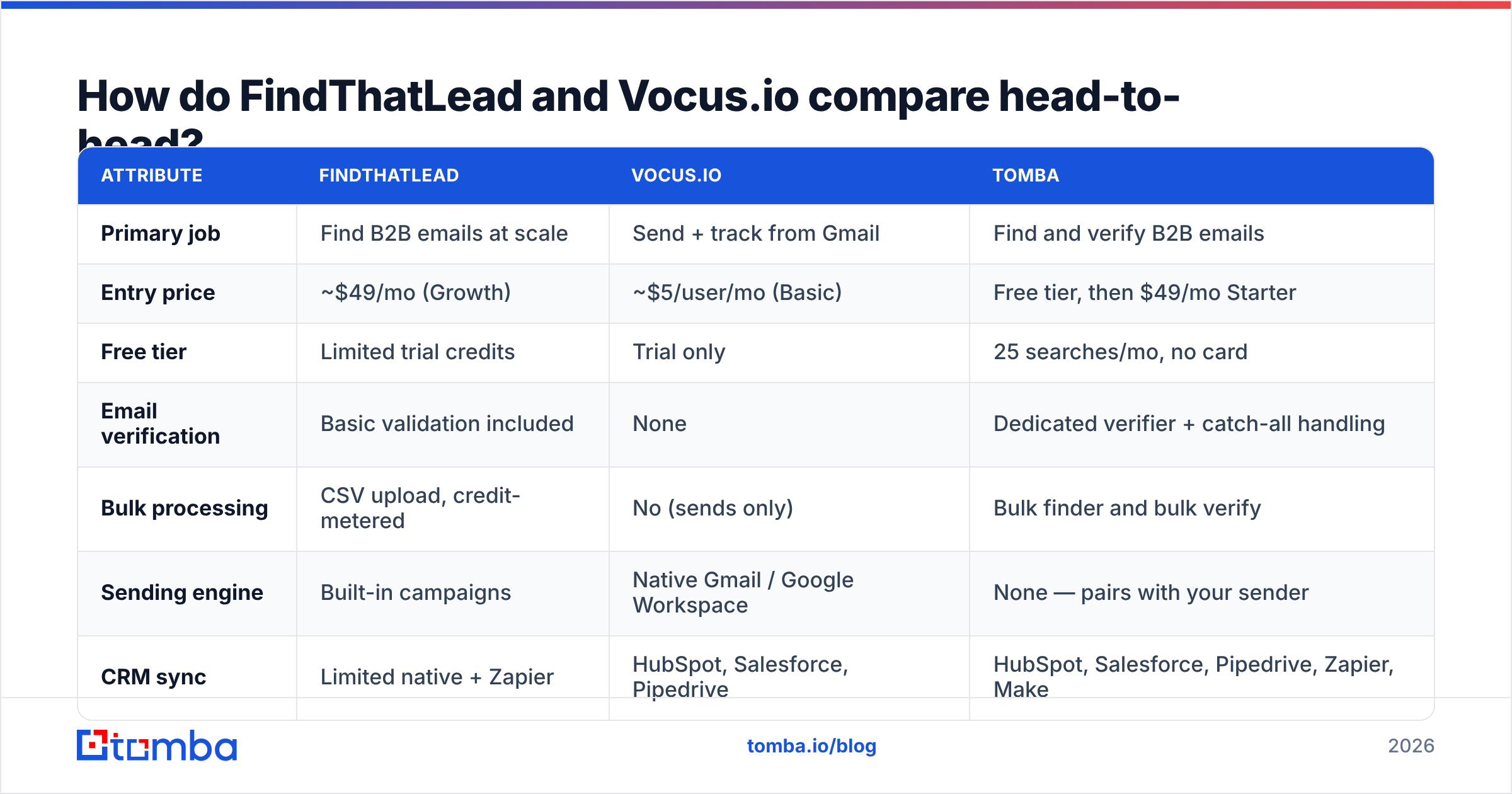
FindThatLead vs Vocus.io: how do they compare head-to-head?#
Pricing below reflects published list pricing at the time of writing. Both vendors change tiers often, so confirm on their own pages before you commit.
| Attribute | FindThatLead | Vocus.io | Tomba |
|---|---|---|---|
| Primary job | Find B2B emails at scale | Send + track from Gmail | Find and verify B2B emails |
| Entry price | ~$49/mo (Growth) | ~$5/user/mo (Basic) | Free tier, then $49/mo Starter |
| Free tier | Limited trial credits | Trial only | 25 searches/mo, no card |
| Email verification | Basic validation included | None | Dedicated verifier + catch-all handling |
| Bulk processing | CSV upload, credit-metered | No (sends only) | Bulk finder and bulk verify |
| Sending engine | Built-in campaigns | Native Gmail / Google Workspace | None — pairs with your sender |
| CRM sync | Limited native + Zapier | HubSpot, Salesforce, Pipedrive | HubSpot, Salesforce, Pipedrive, Zapier, Make |
| API access | Yes, on higher tiers | Limited | Yes, on all paid plans |
| Chrome extension | Yes | Yes (Gmail-scoped) | Yes |
| Best for | Solo founders sourcing lists | SDRs and consultants in Gmail | Teams needing accurate data at scale |
The row that decides most purchases is verification. FindThatLead will happily hand you a pattern-guessed address. Vocus.io will happily send to it. Between those two steps, nobody checks whether the mailbox exists.
What does FindThatLead do well — and where does it break?#
Where it wins:
FindThatLead is genuinely good at breadth-first prospecting. Give it an industry, a location, and a job title, and it will produce a list fast. The Prospector search and the LinkedIn extension are the two features users cite most in G2 reviews. Its Spanish and Latin American coverage also beats most US-built competitors — a real edge if that is your market.
The all-in-one framing works for a specific buyer: the solo founder who wants one login, one invoice, and a straight line from "search" to "sent." If you send 200 emails a month, and your alternative is stitching four tools together, that simplicity has real value.
Where it breaks:
Credits. FindThatLead charges you for lookups whether or not the result is usable. On common domains with predictable patterns, that is fine. On mid-market companies with catch-all servers, mixed naming conventions, or recent rebrands, you burn credits on addresses that are technically returned and practically dead. Users report accuracy in the 70–85% band, depending on vertical. That is normal for the category. The pricing model just does not adjust for it.
The second issue is the sending side. FindThatLead's campaign feature is adequate, not competitive. Next to a dedicated sequencer, you give up inbox rotation depth, reply detection quality, and granular deliverability controls. Teams that scale past a few hundred sends per day almost always move the sending layer out.
If you are judging alternatives on data quality, read how each vendor describes its data sources before you trust a headline accuracy number. "Verified" means something different at every vendor.
What does Vocus.io do well — and where does it break?#
Where it wins:
Vocus.io is one of the best price-to-value tools in the sales stack, and it gets ignored because it is not flashy. For about the cost of a coffee per user per month, you get open tracking, click tracking, mail merge, scheduled sends, follow-ups that stop on reply, shared snippets, a meeting scheduler, and CRM logging. All of it sits inside Gmail. No new interface, no separate sending domain to warm, no migration.
For consultants, agencies, recruiters, and founder-led sales, that is often the whole requirement. You already know who you want to email. You just want the follow-ups to fire and the replies to land in your normal inbox. Check the current feature set on vocus.io — it has quietly expanded over the years.
The Gmail-native architecture is also an underrated deliverability advantage. You send through Google's infrastructure on your existing sender reputation, not through a shared third-party relay.
Where it breaks:
Volume and data. Google Workspace caps sending around 2,000 recipients per day, and cold outreach should stay well below that. Vocus.io is not built for 5,000-prospect campaigns across rotating domains, and it does not pretend to be.
The bigger gap is that Vocus.io has no data layer at all. No finder, no verifier, no enrichment. Every contact comes from somewhere else. That is a deliberate design choice, but it means Vocus.io is never a full answer to "how do I run outbound?" It is one component, priced accordingly.
There is also no list hygiene. If your CSV has 12% dead addresses, Vocus.io sends to all of them and your domain absorbs the damage. Run every list through an email verifier before it touches a sending tool. That is not optional in 2026. Google and Yahoo now enforce bounce-rate thresholds.
How do the pricing models actually compare?#
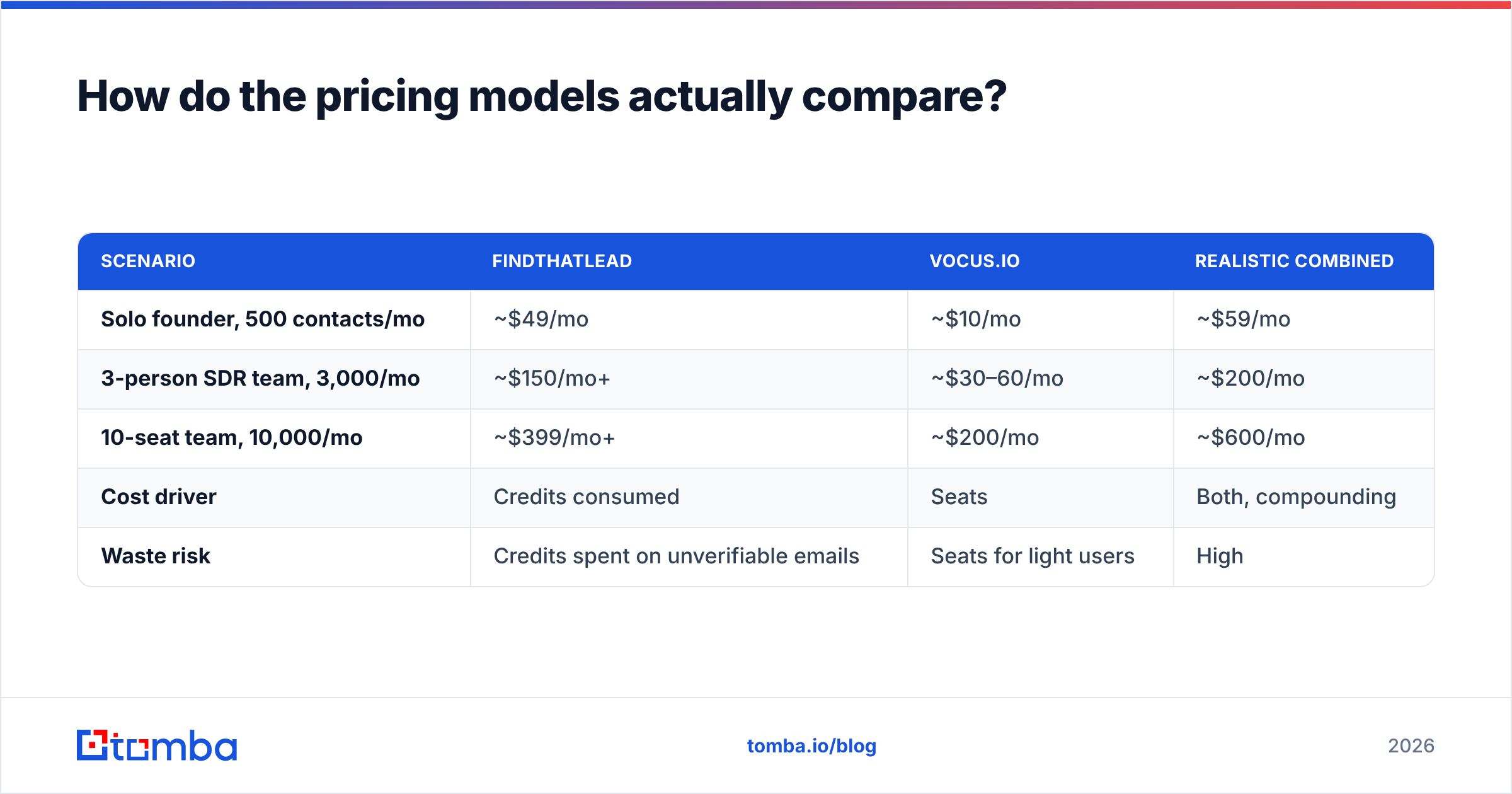
The headline numbers mislead, because the two tools meter completely different things.
| Scenario | FindThatLead | Vocus.io | Realistic combined |
|---|---|---|---|
| Solo founder, 500 contacts/mo | ~$49/mo | ~$10/mo | ~$59/mo |
| 3-person SDR team, 3,000/mo | ~$150/mo+ | ~$30–60/mo | ~$200/mo |
| 10-seat team, 10,000/mo | ~$399/mo+ | ~$200/mo | ~$600/mo |
| Cost driver | Credits consumed | Seats | Both, compounding |
| Waste risk | Credits spent on unverifiable emails | Seats for light users | High |
Two things fall out of that table.
First, Vocus.io's per-seat model punishes you for occasional users. FindThatLead's credit model punishes you for prospecting in hard verticals. If five people on your team send daily and three send monthly, per-seat pricing is expensive noise.
Second, the combined cost at scale is not trivial. At ten seats you are near $600/mo for a stack with no verifier, no catch-all resolver, and no phone data. That is when teams start pricing consolidated options. Tomba pricing covers the data half at $99/mo for Growth or $249/mo for Pro, without credit anxiety.
Which one should you pick for your use case?#
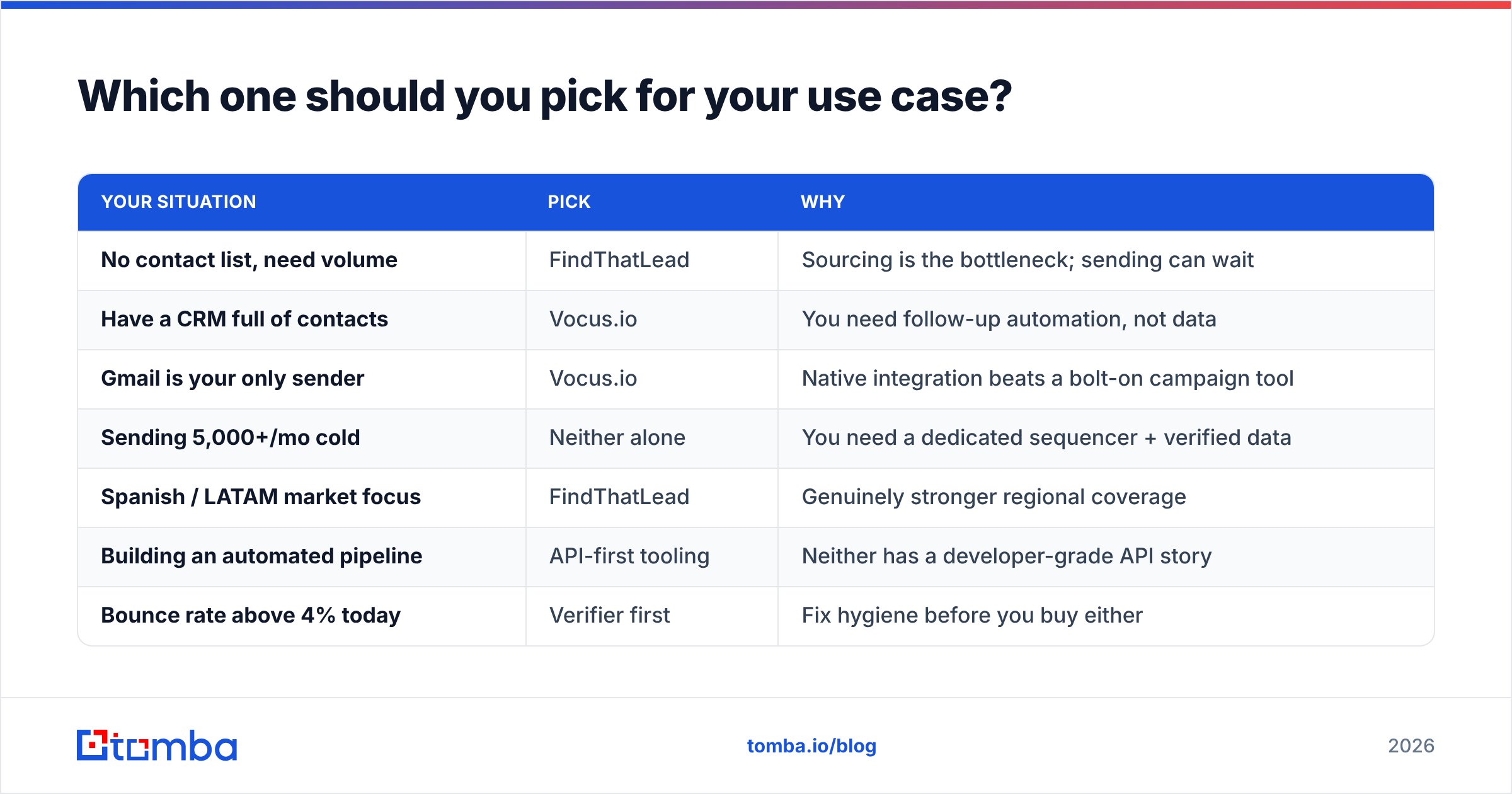
| Your situation | Pick | Why |
|---|---|---|
| No contact list, need volume | FindThatLead | Sourcing is the bottleneck; sending can wait |
| Have a CRM full of contacts | Vocus.io | You need follow-up automation, not data |
| Gmail is your only sender | Vocus.io | Native integration beats a bolt-on campaign tool |
| Sending 5,000+/mo cold | Neither alone | You need a dedicated sequencer + verified data |
| Spanish / LATAM market focus | FindThatLead | Genuinely stronger regional coverage |
| Building an automated pipeline | API-first tooling | Neither has a developer-grade API story |
| Bounce rate above 4% today | Verifier first | Fix hygiene before you buy either |
The last row matters more than the rest. If your bounce rate is already high, a finder makes it worse and a sender makes it worse faster. Fix the list first.
What does a complete 2026 outbound stack look like?#
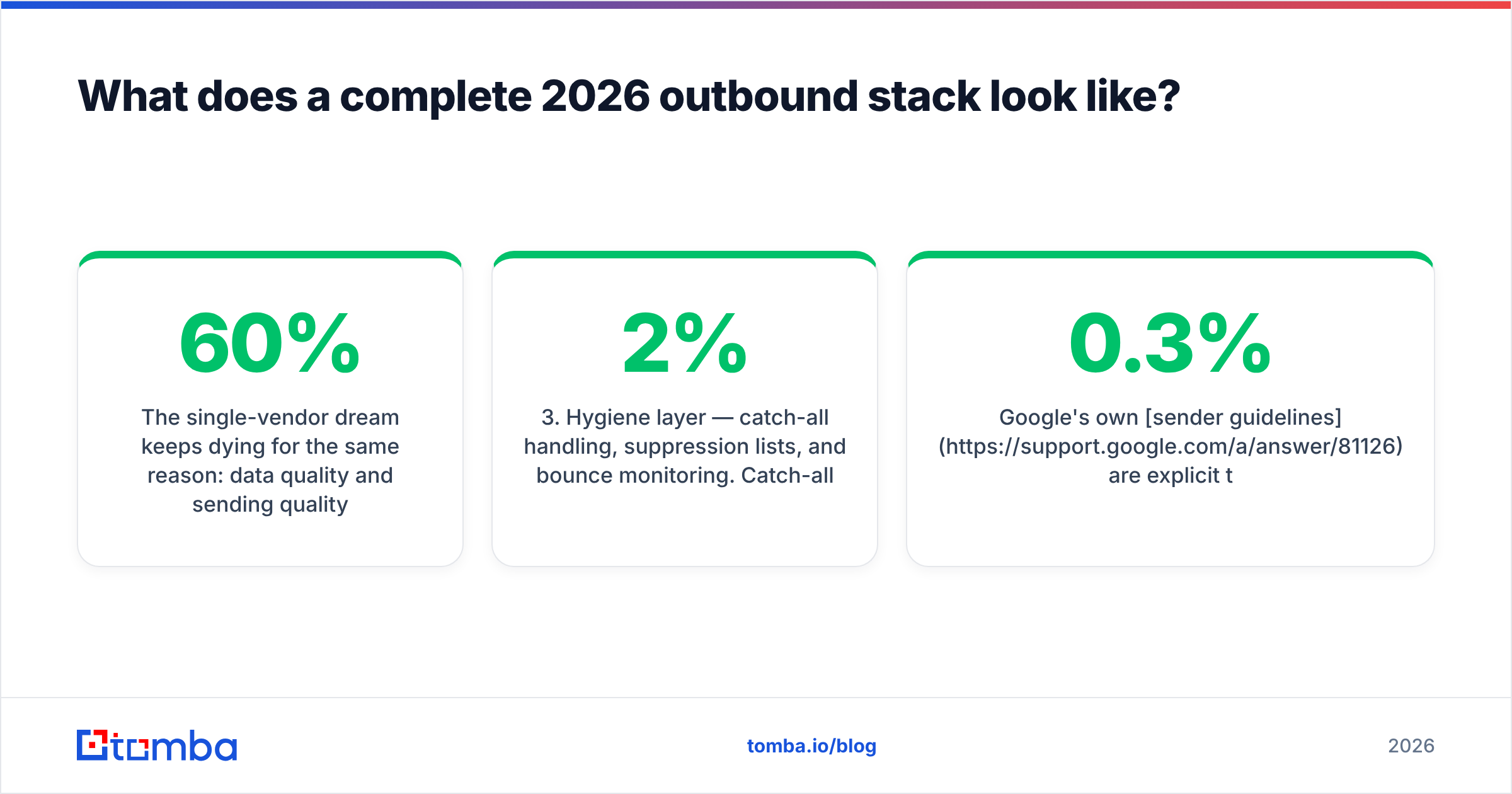
The single-vendor dream keeps dying for one reason. Data quality and sending quality are different engineering problems. Vendors that chase both usually do one of them at 60%.
A stack that holds up has three layers:
- Data layer — a finder plus a verifier, with an API so it can run unattended. Spend your quality budget here. Use a domain search to map a company's addresses in one call, then verify before anything leaves the system.
- Sending layer — a tool that matches your volume. Under ~1,500 sends/mo, Vocus.io inside Gmail is hard to beat on price. Above that, a dedicated sequencer with inbox rotation earns its cost.
- Hygiene layer — catch-all handling, suppression lists, and bounce monitoring. Catch-all domains are where most "verified" lists quietly rot. A catch-all verifier is the difference between a 2% and a 9% bounce rate on enterprise targets.
Google's own sender guidelines are explicit. Bulk senders must keep spam complaint rates under 0.3% and maintain valid authentication. That is a data-quality requirement dressed up as a deliverability rule. No sending tool can rescue a list that was never verified.
If you are committed to Gmail, the practical combination is simple. Source and verify with a dedicated data tool, send with Vocus.io, and skip the all-in-one. You pay less than the FindThatLead plus Vocus.io pairing and get better addresses.
Is there a better alternative to both?#
In the FindThatLead vs Vocus.io matchup, the better answer depends on which half you are replacing.
Replacing FindThatLead's data layer: you want higher confirmed-accuracy rates, transparent verification statuses (valid / invalid / catch-all / unknown rather than one confidence blob), and an API you can call from your own workflows. Tomba's email finder runs SMTP-level verification on every result and includes bulk processing. It starts free at 25 searches/mo, so you can benchmark it on your existing list before you switch anything. The Tomba API ships on every paid plan, not behind an enterprise tier.
Replacing Vocus.io's sending layer: honestly, most teams shouldn't. For its price band it is exceptional. Move only when you outgrow Google Workspace sending limits or need multi-domain rotation. At that point you are buying a different category of product, not an upgrade.
Replacing both: no single tool does world-class finding and world-class Gmail-native sending. Anyone claiming otherwise is asking you to accept 60% on both.
What should you do next?#
Run a real test instead of trusting a comparison table — including this one. Take 100 contacts you know are valid. Run them through each finder and measure the confirmed match rate yourself. Then send a 50-contact batch through your candidate sender and watch the bounce log.
If the test shows your data is the weak link — and it usually is — start with the Tomba Email Finder. The free tier gives you 25 searches a month with no card. Starter is $49/mo. Every result comes back with a verification status instead of a guess. Find the address, confirm it exists, then let Vocus.io or your sequencer do the part it is genuinely good at.
Related guides#
Ready to find emails that actually work?
Join 150,000+ professionals who stopped guessing and started sending. Free credits on signup — no credit card required.
Get the Tomba newsletter
Practical outbound tactics and product updates — once every two weeks.
About the author