Findymail vs Forager (2026): Which Email Finder Wins?
Findymail and Forager solve the same problem from opposite ends: one is a self-serve prospecting tool, the other a data API. Here is how they compare on accuracy, pricing, exports, and where a third option beats both.
TL;DR
- Findymail is a self-serve email finder built around LinkedIn and Sales Navigator exports, with a bounce guarantee and per-seat, credit-based plans starting around $49/mo.
- Forager is a data-platform play — an API and contact database aimed at teams that want to pipe fresh people data into their own systems, usually via a sales conversation rather than a checkout page.
- They are not really competitors for the same buyer. Findymail wins for a two-rep team building lists by hand. Forager wins for a RevOps or engineering team enriching thousands of records programmatically.
- Both leak money in the same place: credits burned on unverifiable catch-all domains, and seats you pay for whether or not the rep prospects that month.
- If you want both the self-serve workflow and a real API on one credit pool, that is where Tomba fits — same $49/mo entry point, no seat tax on the API.
What are Findymail and Forager, exactly?#
They start from different assumptions about who is doing the prospecting.
Findymail is a prospecting tool for humans. You install a Chrome extension, run a Sales Navigator search, export the list, and Findymail resolves work emails for each profile — then verifies them before they hit your CSV. Its headline promise is a bounce guarantee: emails it marks valid are supposed to land, and the company will credit you when they don't. That framing tells you the target buyer: founders and small SDR teams who care more about not torching a sending domain than about data volume.
Forager is a data infrastructure play. It maintains a large B2B people-and-company dataset with an emphasis on refresh frequency — job changes, new roles, updated company attributes — and exposes it through an API and bulk delivery rather than a prospecting UI. You are less likely to be clicking around inside Forager and more likely to be calling it from a script, a workflow tool, or your warehouse.
That single distinction drives almost everything else in this comparison. One tool optimizes for the list you build this afternoon. The other optimizes for the 40,000 records already sitting in your CRM going stale.
How do Findymail and Forager compare head-to-head?#
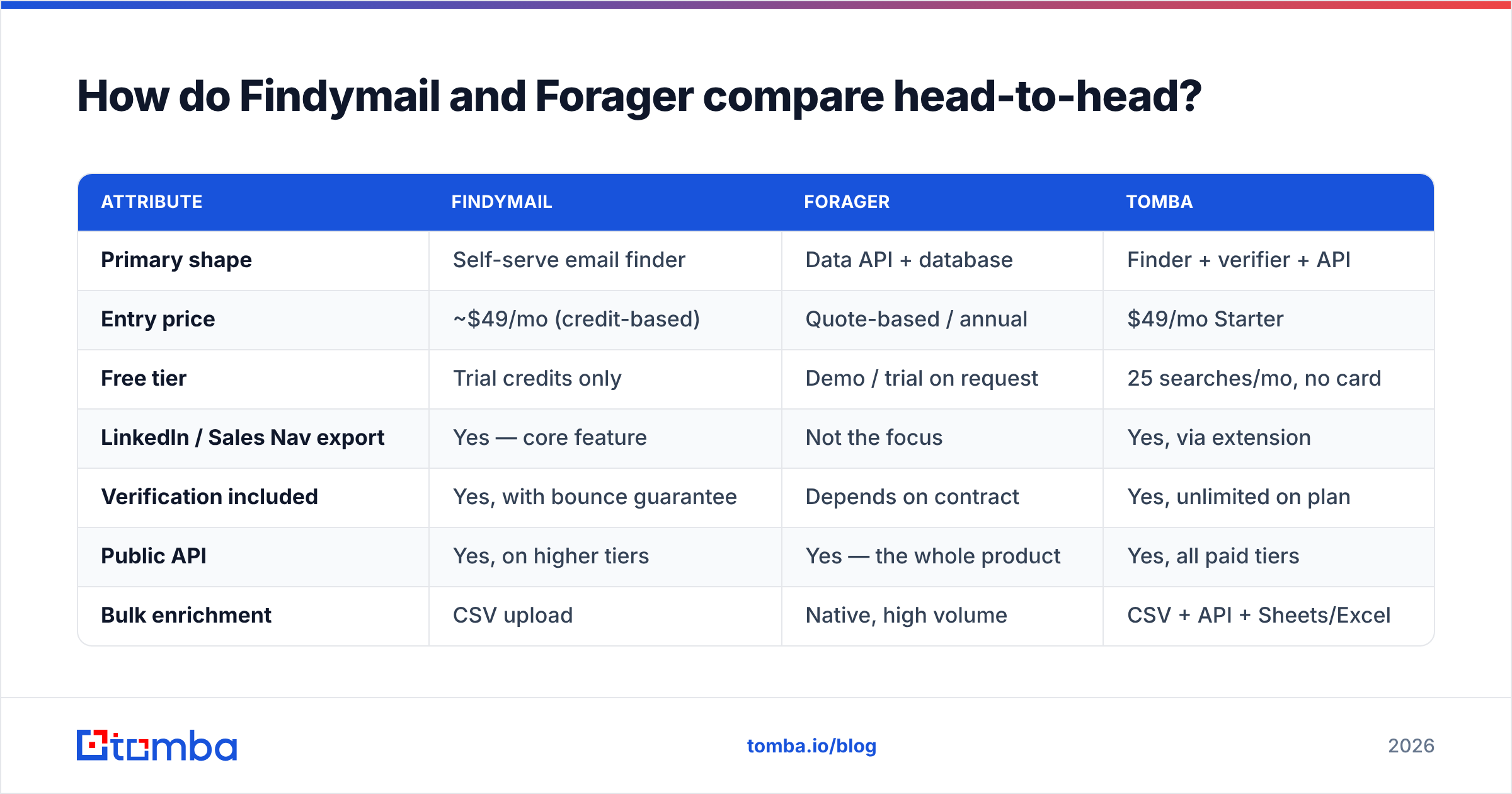
Here is the practical side-by-side. Treat pricing as directional — both vendors adjust plans, and Forager in particular quotes rather than publishes for anything past entry level.
| Attribute | Findymail | Forager | Tomba |
|---|---|---|---|
| Primary shape | Self-serve email finder | Data API + database | Finder + verifier + API |
| Entry price | ~$49/mo (credit-based) | Quote-based / annual | $49/mo Starter |
| Free tier | Trial credits only | Demo / trial on request | 25 searches/mo, no card |
| LinkedIn / Sales Nav export | Yes — core feature | Not the focus | Yes, via extension |
| Verification included | Yes, with bounce guarantee | Depends on contract | Yes, unlimited on plan |
| Public API | Yes, on higher tiers | Yes — the whole product | Yes, all paid tiers |
| Bulk enrichment | CSV upload | Native, high volume | CSV + API + Sheets/Excel |
| Best for | 1–10 rep outbound teams | RevOps, data engineering | Both, on one credit pool |
Two things jump out. First, Forager has no meaningful self-serve on-ramp — if you want to test it on Friday afternoon with a company card, you generally can't. Second, Findymail's API is real but sits behind higher tiers, which means the "I'll just automate this" moment usually costs an upgrade.

Which one finds more valid emails?#
Nobody wins this on paper — it depends entirely on your target list.
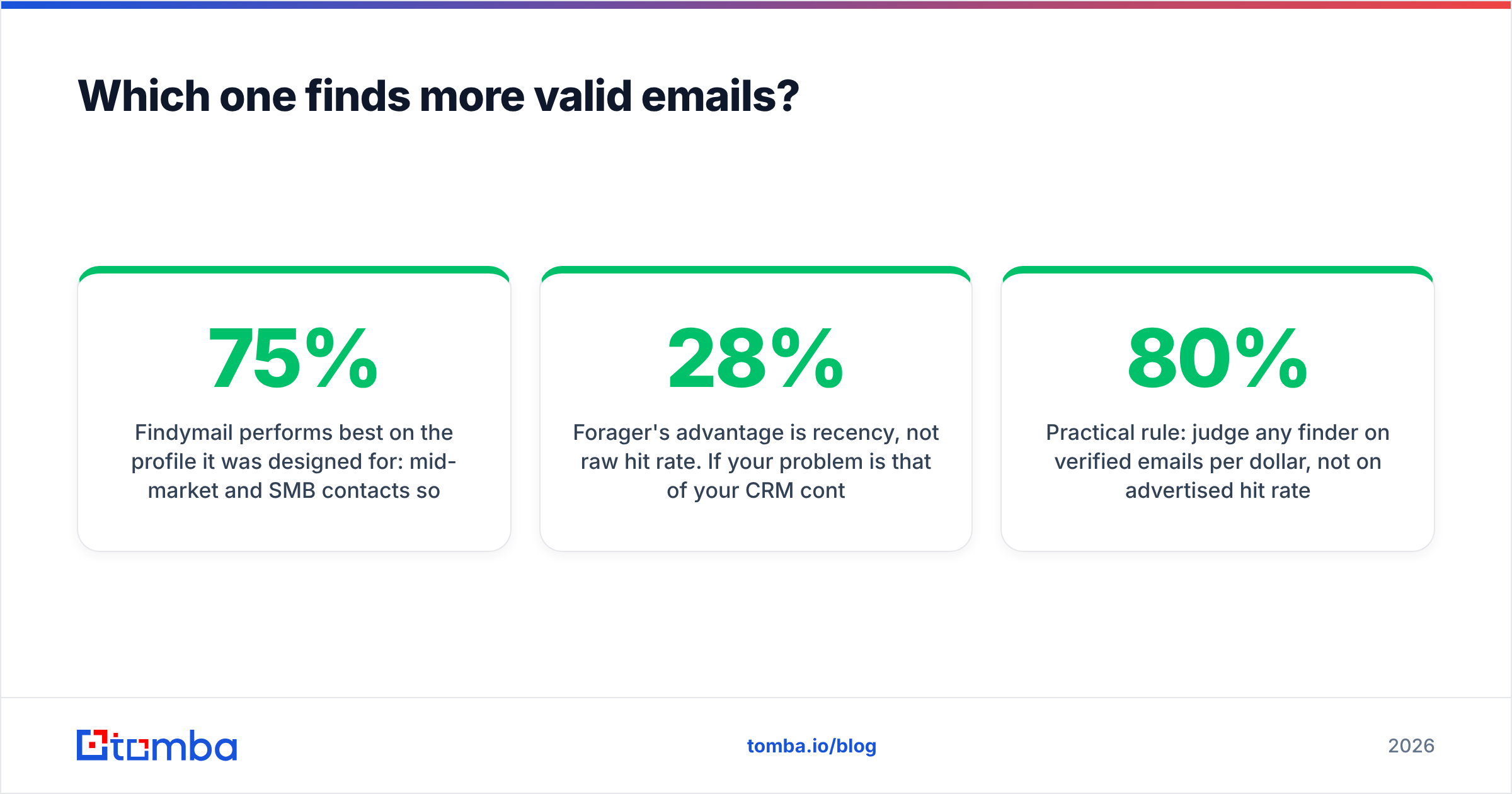
Findymail performs best on the profile it was designed for: mid-market and SMB contacts sourced from LinkedIn, in North America and Western Europe, at companies with a public website and a guessable email pattern. On that slice, hit rates in the 60–75% range are typical for most finders, and Findymail sits comfortably in that band with a lower bounce rate than average because it verifies before delivery rather than after.
Forager's advantage is recency, not raw hit rate. If your problem is that 28% of your CRM contacts changed jobs last year — and Gartner and most RevOps benchmarks put B2B contact decay somewhere in the 25–30% annual range — a dataset refreshed on a tight cadence beats a one-time lookup. Forager is built for that continuous-correction job.
The failure mode both share is the catch-all domain. When a mail server accepts every address at the domain, SMTP verification returns nothing useful, and tools either mark the address "risky" (and you skip a real prospect) or "valid" (and you eat a bounce). Roughly a fifth of B2B domains behave this way. This is where a dedicated catch-all verifier earns its keep, because it uses pattern confidence and cross-source corroboration instead of trusting a single SMTP handshake.

Practical rule: judge any finder on verified emails per dollar, not on advertised hit rate. A tool with an 80% find rate and a 6% bounce rate is worse than one with 68% and 1%, because bounces cost you sender reputation, and reputation costs you every future campaign.
What does each actually cost you per month?#
Sticker price is the smallest part of the bill. The four line items that actually move total cost:
- Credit definition. Does a failed search consume a credit? Does verification cost a separate credit? Findymail generally charges for successful finds, which is buyer-friendly. Enterprise data contracts often charge per record requested.
- Seat multipliers. Per-seat pricing punishes teams with occasional users — the marketer who pulls one list a quarter costs the same as your top SDR.
- Annual lock-in. Quote-based vendors almost always want twelve months. That is fine if volume is predictable and expensive if you are still testing channels.
- Overage rates. The per-credit price after you exhaust the plan is where the margin lives. Ask for it in writing before signing.
- Rollover. Unused credits that expire monthly are a hidden 10–20% tax on any team with lumpy campaign schedules.
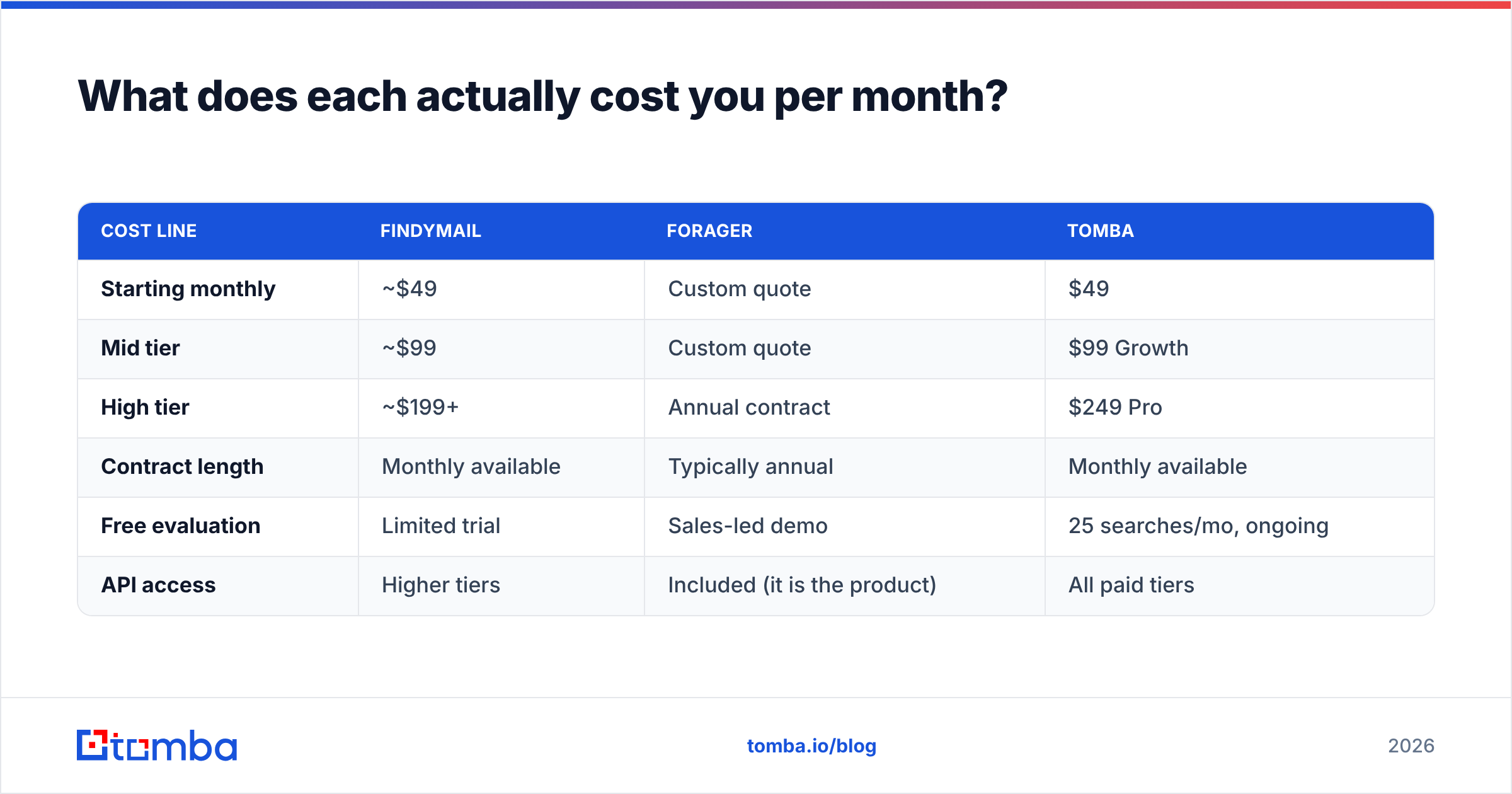
| Cost line | Findymail | Forager | Tomba |
|---|---|---|---|
| Starting monthly | ~$49 | Custom quote | $49 |
| Mid tier | ~$99 | Custom quote | $99 Growth |
| High tier | ~$199+ | Annual contract | $249 Pro |
| Contract length | Monthly available | Typically annual | Monthly available |
| Free evaluation | Limited trial | Sales-led demo | 25 searches/mo, ongoing |
| API access | Higher tiers | Included (it is the product) | All paid tiers |
Check current numbers on each vendor's own page before you budget — this table is a planning aid, not a quote. Tomba's pricing details are public for every tier, including Enterprise minimums, which makes the comparison easier to run than it usually is in this category.
Where does each tool break down?#
Honest limits, because every comparison that lists only strengths is an ad.
Findymail's constraints. The product is tightly coupled to a LinkedIn-first workflow. If your prospecting starts from a conference attendee list, a G2 category page, or a set of domains from your website analytics, you are working against the grain. The API exists but is not the center of gravity, so complex enrichment pipelines feel bolted on. And the bounce guarantee, while genuinely useful, is a credit refund — it does not undo the damage a bad batch does to your sending domain.
Forager's constraints. No self-serve means no fast evaluation. You cannot benchmark it against your own list on a Tuesday without a call, and vendors know that friction hides mediocre coverage on niche segments. Database-first tools are also structurally weaker on the long tail: a 15-person agency in Lyon that nobody has ever scraped is not in anyone's database, and only real-time discovery finds that address. Finally, annual data contracts assume stable volume — if your outbound program is seasonal, you pay for months you don't use.
What both do badly. Neither is a full outreach stack. You still need sending infrastructure, warmup, and sequencing. And neither solves phone data well — if you run a multi-channel motion you will end up buying a phone finder separately anyway.

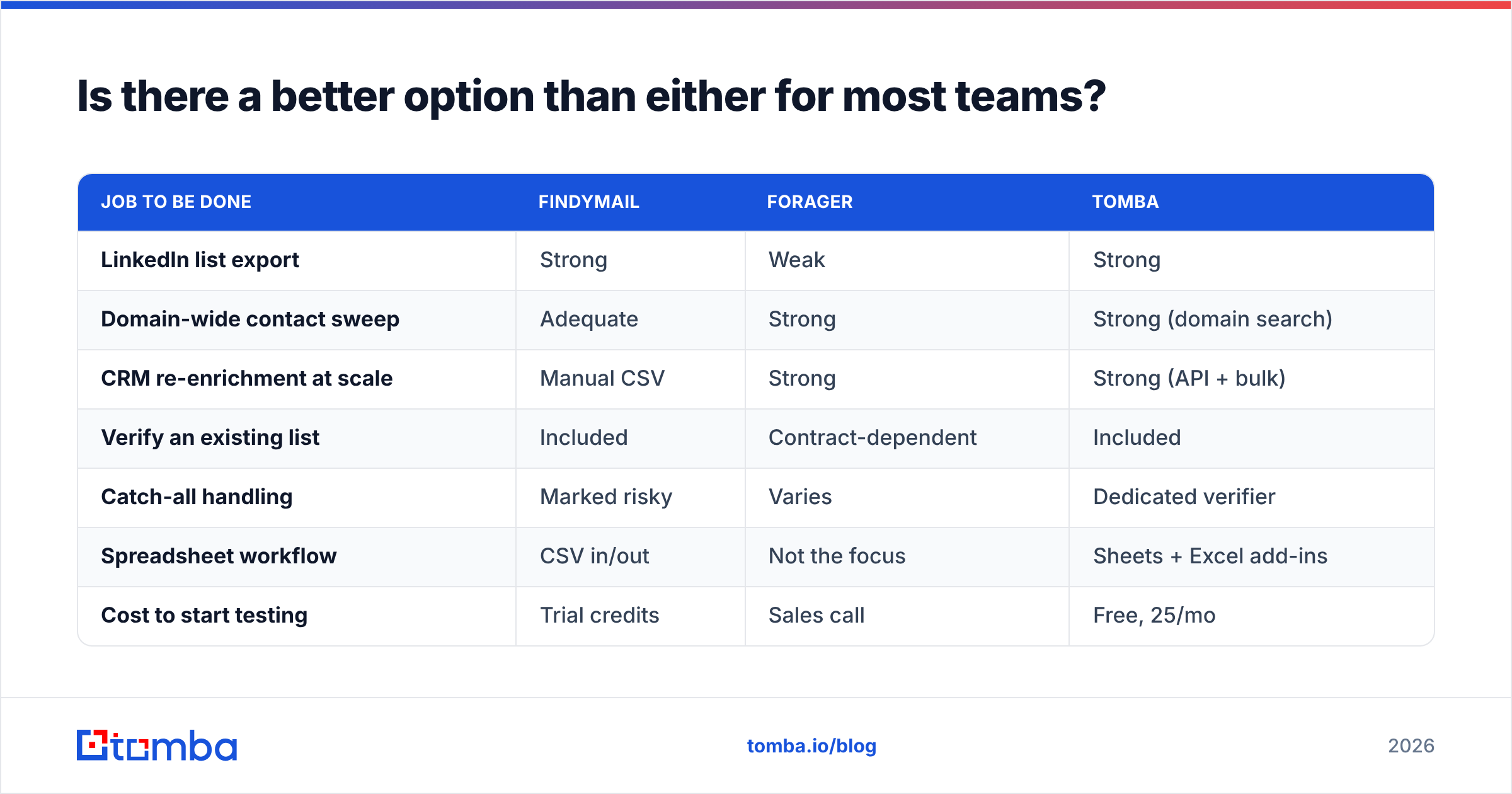
Is there a better option than either for most teams?#
For most teams under 50 reps, the answer is a tool that does both jobs on one credit pool — because the "self-serve tool or data API" split is an artifact of vendor positioning, not of how outbound actually works.
A realistic week looks like this: an SDR pulls 200 contacts from a LinkedIn search on Monday, marketing uploads a 3,000-row webinar list on Wednesday, and an automation re-enriches 900 stale CRM records on Friday. Findymail handles Monday well and Friday poorly. Forager handles Friday well and Monday not at all. Running both means two contracts, two credit systems, and two sets of accuracy assumptions to reconcile.

| Job to be done | Findymail | Forager | Tomba |
|---|---|---|---|
| LinkedIn list export | Strong | Weak | Strong |
| Domain-wide contact sweep | Adequate | Strong | Strong (domain search) |
| CRM re-enrichment at scale | Manual CSV | Strong | Strong (API + bulk) |
| Verify an existing list | Included | Contract-dependent | Included |
| Catch-all handling | Marked risky | Varies | Dedicated verifier |
| Spreadsheet workflow | CSV in/out | Not the focus | Sheets + Excel add-ins |
| Cost to start testing | Trial credits | Sales call | Free, 25/mo |
The reason to look at Tomba here is not that it beats Findymail at Findymail's own game by a wide margin — on a clean LinkedIn list, the two land close. It is that the same $49/mo entry plan includes API access, bulk verification, catch-all handling, and spreadsheet add-ins, so you don't hit a wall the first time a workflow needs automation. If you are specifically evaluating a swap, the Findymail alternative breakdown runs the feature-level diff.
How should you actually decide between them?#
Run a real test instead of reading more comparison posts, including this one.
- Build a 200-row control list that mirrors your real ICP — same industries, same company sizes, same geographies. Include at least 20% companies under 50 employees, because that is where coverage claims fall apart.
- Run it through each candidate on trial credits. Record found, not-found, and risky counts.
- Send a verification-only pass through a neutral third tool such as an independent email verifier, so you are not grading the vendor with the vendor's own homework.
- Send a small real campaign — 100 contacts, plain text, from a warmed domain — and measure the actual bounce rate. This is the only number that matters.
- Divide total cost by verified-and-delivered contacts. That is your true cost per usable contact. Compare that figure, not the plan price.
Most teams find the ranking flips once step 5 runs. A tool that looked 30% cheaper often loses on unusable credits, and a tool that looked expensive wins because 94% of its output actually delivers. Peer reviews on G2 are useful for spotting support and billing complaints, but they cannot tell you coverage on your segment. Only the control list can.
Which one should you pick?#
Pick Findymail if your outbound starts and ends in LinkedIn Sales Navigator, you have one to ten reps, and deliverability protection matters more to you than data volume. The bounce guarantee is a genuine differentiator for teams running a single sending domain they cannot afford to burn.
Pick Forager if you have engineering support, a CRM full of decaying records, and a defined annual volume. Its refresh cadence is the right answer to job-change churn, and the API-first shape means it slots into a warehouse or workflow tool without a human in the loop.
Pick neither if you are doing what most teams are actually doing: a mix of manual list building, spreadsheet work, and light automation, with volume that changes month to month. That profile wants one vendor, one credit pool, public pricing, and an API that does not require an upgrade conversation.
That last case is why Tomba exists in this comparison at all. Start free with 25 searches a month on the Tomba Email Finder — no card, no demo call — run your 200-row control list against whatever you use today, and let the delivered-contact math make the decision instead of a pricing page.
Related guides#
Ready to find emails that actually work?
Join 150,000+ professionals who stopped guessing and started sending. Free credits on signup — no credit card required.
Get the Tomba newsletter
Practical outbound tactics and product updates — once every two weeks.
About the author