Findymail vs LeadGibbon 2026: Accuracy, Pricing, Verdict
Findymail and LeadGibbon both promise verified B2B emails, but they solve different problems. Here is an honest breakdown of accuracy, credits, LinkedIn exports, API access and real monthly cost.
TL;DR
- Findymail is built for one job: turning a LinkedIn or Sales Navigator list into verified, deliverable emails with a credit-refund policy on bounces. It is the better pick if cold email deliverability is your bottleneck.
- LeadGibbon leans toward list building and database browsing — find a company, pull contacts, export to CSV or Google Sheets. Better if your team lives in spreadsheets and wants breadth over depth.
- Neither is a full GTM platform. If you need an API, bulk enrichment, catch-all handling and phone data in one place, both will feel narrow.
- Published pricing on both sits in the same $49–$250/month band, so the decision comes down to workflow fit and bounce rate, not sticker price.
- Our pick for most teams doing outbound at volume: run Findymail's accuracy discipline, but budget for a verification layer on top — bounce-free is a claim, not a guarantee.
What are Findymail and LeadGibbon, actually?#
Both tools sit in the same aisle — B2B email finders — but they were designed by people solving different problems.
Findymail started as an answer to a specific complaint: cold email tools kept returning "probable" addresses that bounced and burned sending domains. Its pitch is verified-only output. If an address bounces, you get the credit back. The workflow is list-first: paste a Sales Navigator search or a company list, get enriched contacts, push them into Lemlist, Instantly or a CSV.
LeadGibbon approaches it from the list-building side. You search a company, browse the contacts it has on file, tick the ones you want, and export. There is a LinkedIn browser extension, a saved-list concept, and Google Sheets export baked into the flow. Think of it as a lightweight contact database with a finder attached, rather than a finder with a database attached.
The analogy: Findymail is a water filter — narrow inlet, very clean output. LeadGibbon is a well — you pull up more volume, and you decide how much filtering happens downstream.
That distinction drives almost every difference below.

How do their core workflows differ?#
Here is the honest version of what each tool is optimised for:
- Findymail — list enrichment. Its strongest path is "I already know who I want to reach." You bring a Sales Navigator URL, a CSV of names and domains, or a company list. It returns emails it believes are deliverable and skips the ones it does not trust. Fewer rows out than in — by design.
- LeadGibbon — list discovery. Its strongest path is "I know the company, not the people." You search a domain, browse the contacts it holds, and build a list from what is available. More rows out, more variance in quality.
- Findymail — deliverability guardrails. Credit refunds on bounces and a stated policy of withholding low-confidence guesses. That is a real constraint on the product, and it costs them coverage.
- LeadGibbon — spreadsheet-native output. Direct Google Sheets and CSV export as a first-class action, not an afterthought. If your SDR team's system of record is a shared sheet, this removes friction.
- Both — LinkedIn-adjacent. Each has a browser extension that reads a LinkedIn profile or search page. Neither replaces a proper LinkedIn finder workflow at scale, and both are subject to LinkedIn's rate limits and account risk.
- Neither — deep API-first automation. Both ship APIs, but neither is positioned as infrastructure. If you are wiring email discovery into a product or an internal data pipeline, you will feel the ceiling quickly.
If you cannot tell which of the first two problems you have, you probably have both — and that is the case where a single-purpose tool disappoints you.
Which one is more accurate?#
Accuracy in this category is measured on two axes that vendors love to blur together:
- Coverage (hit rate): of 1,000 contacts you submit, how many come back with any email at all?
- Validity (bounce rate): of the emails returned, how many actually deliver?
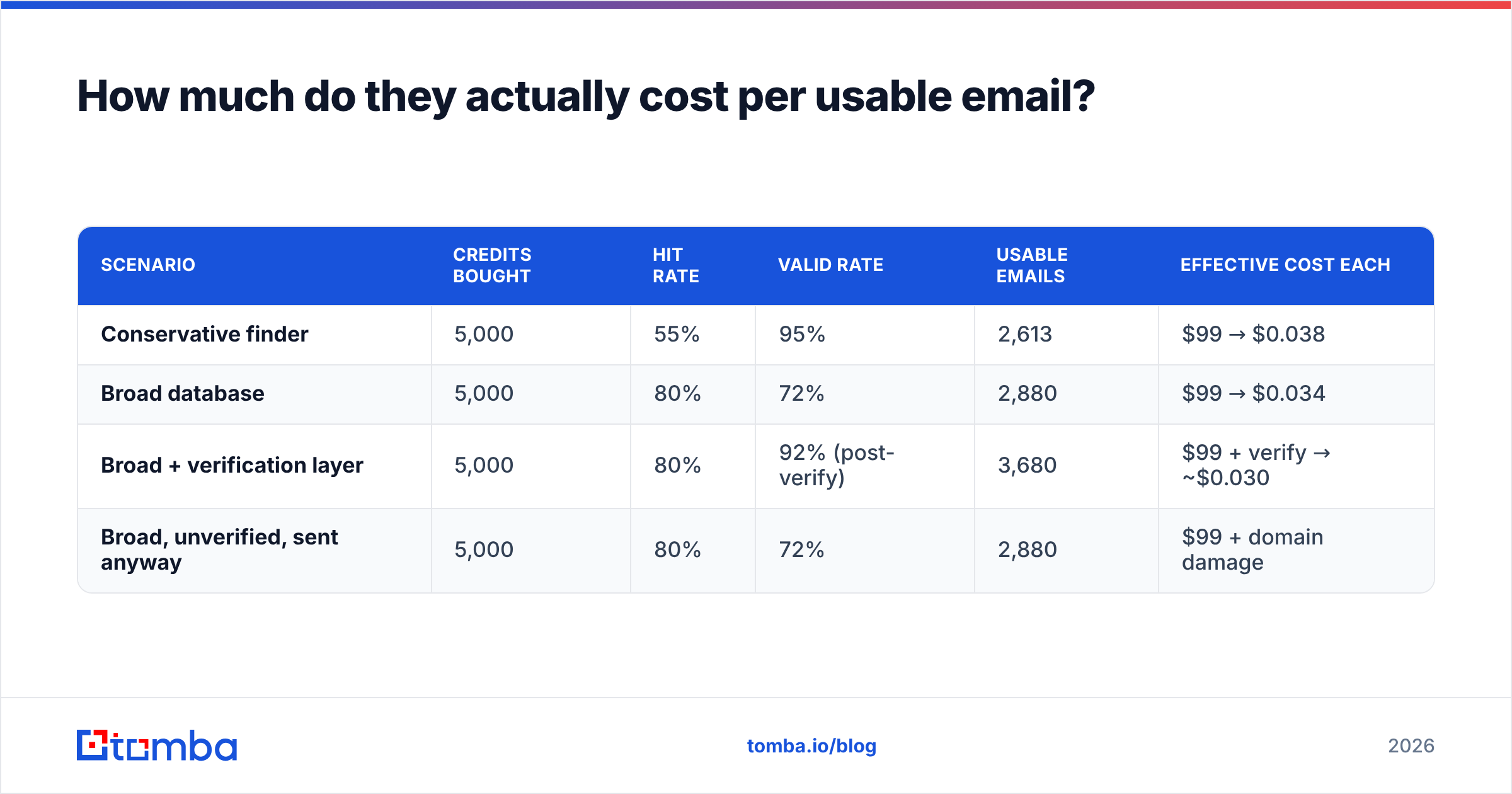
You can win either axis by sacrificing the other. A tool that returns a guess for every row has 100% coverage and a terrible bounce rate. A tool that only returns SMTP-confirmed addresses has a beautiful bounce rate and leaves half your list empty.
Findymail deliberately optimises for validity. LeadGibbon, in practice, returns more rows and asks you to trust the database. Neither is wrong — but they produce very different downstream numbers.

The trap: hit rate is worthless without validity, and validity is worthless without volume. A 95% valid rate on a 30% hit rate means you emailed 285 of your 1,000 targets. A 70% hit rate at 80% validity means you emailed 560 — and torched your domain doing it.
This is why serious outbound teams stop treating the finder as the last step. They run found addresses through a dedicated email verifier before anything reaches a sending tool, regardless of what the finder promised. It is the cheapest insurance in the stack, and it turns "the vendor says these are clean" into a number you can audit.
Also worth checking on either tool: how they handle catch-all domains. Catch-all servers accept everything at SMTP time, so a naive verifier marks them valid and a conservative one marks them unknown. Both behaviours cost you money in different ways. A dedicated catch-all verifier gives you a confidence score instead of a coin flip, which matters more than most buyers realise — catch-alls are a large share of mid-market and enterprise domains.
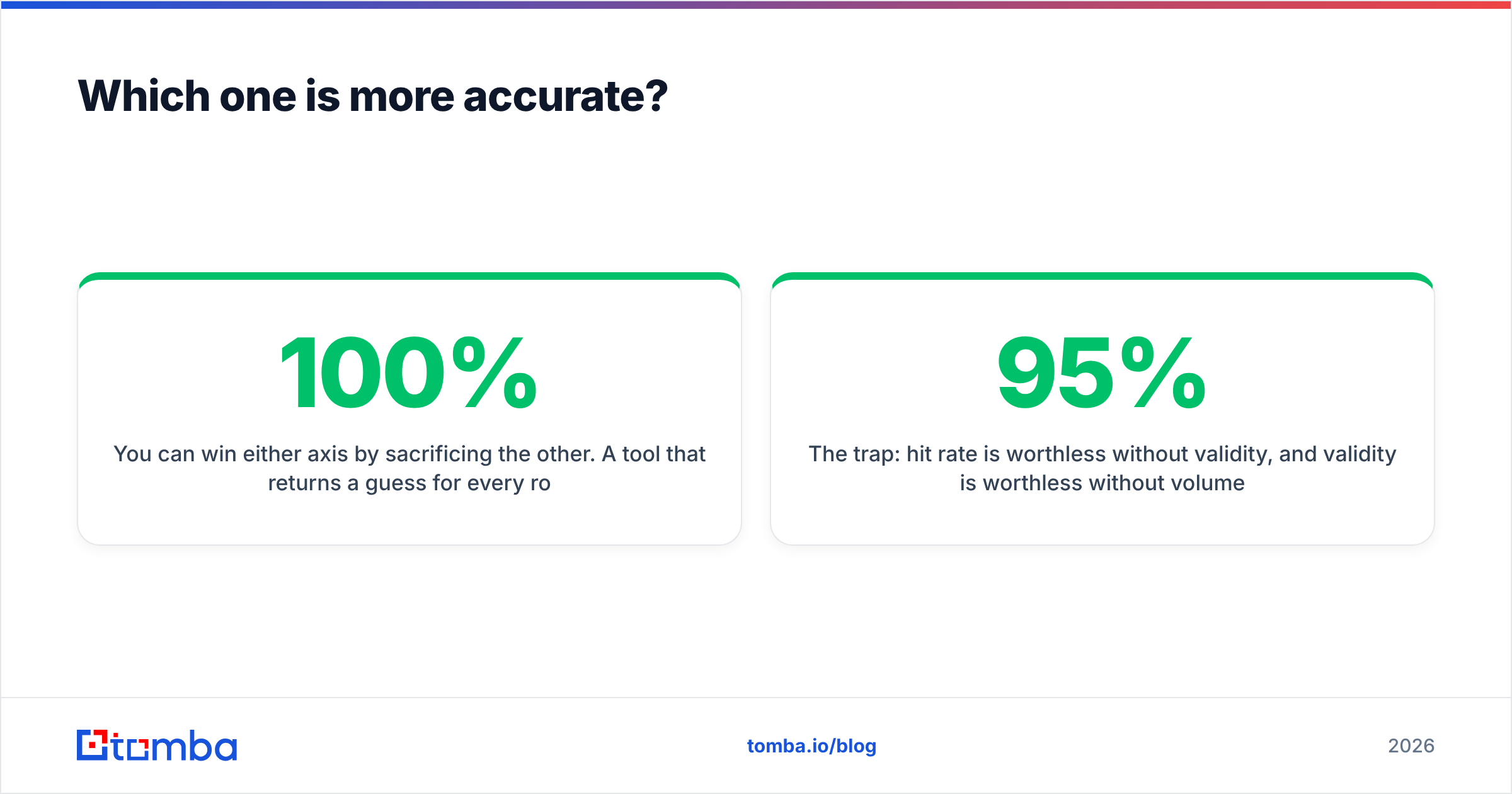
Findymail vs LeadGibbon: how do they compare feature by feature?#

| Feature | Findymail | LeadGibbon | Tomba |
|---|---|---|---|
| Primary use case | Enriching known lists | Building lists from a database | Finding + verifying at scale |
| Entry paid plan | ~$49/mo | ~$49/mo | $49/mo (Starter) |
| Free tier | Limited trial credits | Limited trial credits | 25 searches/mo, no card |
| Bounce policy | Credits refunded on bounces | No published refund policy | Verification included in flow |
| LinkedIn / Sales Nav export | Yes, a core strength | Yes, via extension | Yes, via LinkedIn finder |
| Domain-wide contact discovery | Limited | Yes | Yes, via domain search |
| Standalone email verification | Bundled, not standalone | Limited | Yes, standalone verifier |
| Catch-all handling | Conservative (often skipped) | Varies | Dedicated catch-all verifier |
| Phone numbers | No | Limited | Yes, phone finder |
| Public API | Yes | Yes | Yes, documented REST API |
| Spreadsheet add-ons | CSV, integrations | Google Sheets, CSV | Sheets, Excel, Airtable |
| Best for | Cold email teams protecting domains | SDRs building lists in sheets | Teams needing one stack end-to-end |
Pricing on both vendors has moved more than once in the last two years, so treat the figures above as a band, not a quote — check each vendor's live pricing page before you commit, and check Tomba pricing for the current tiers. What has stayed stable is the shape of the market: roughly $49 to get started, roughly $99 for a working team, roughly $250 once you are doing real volume.
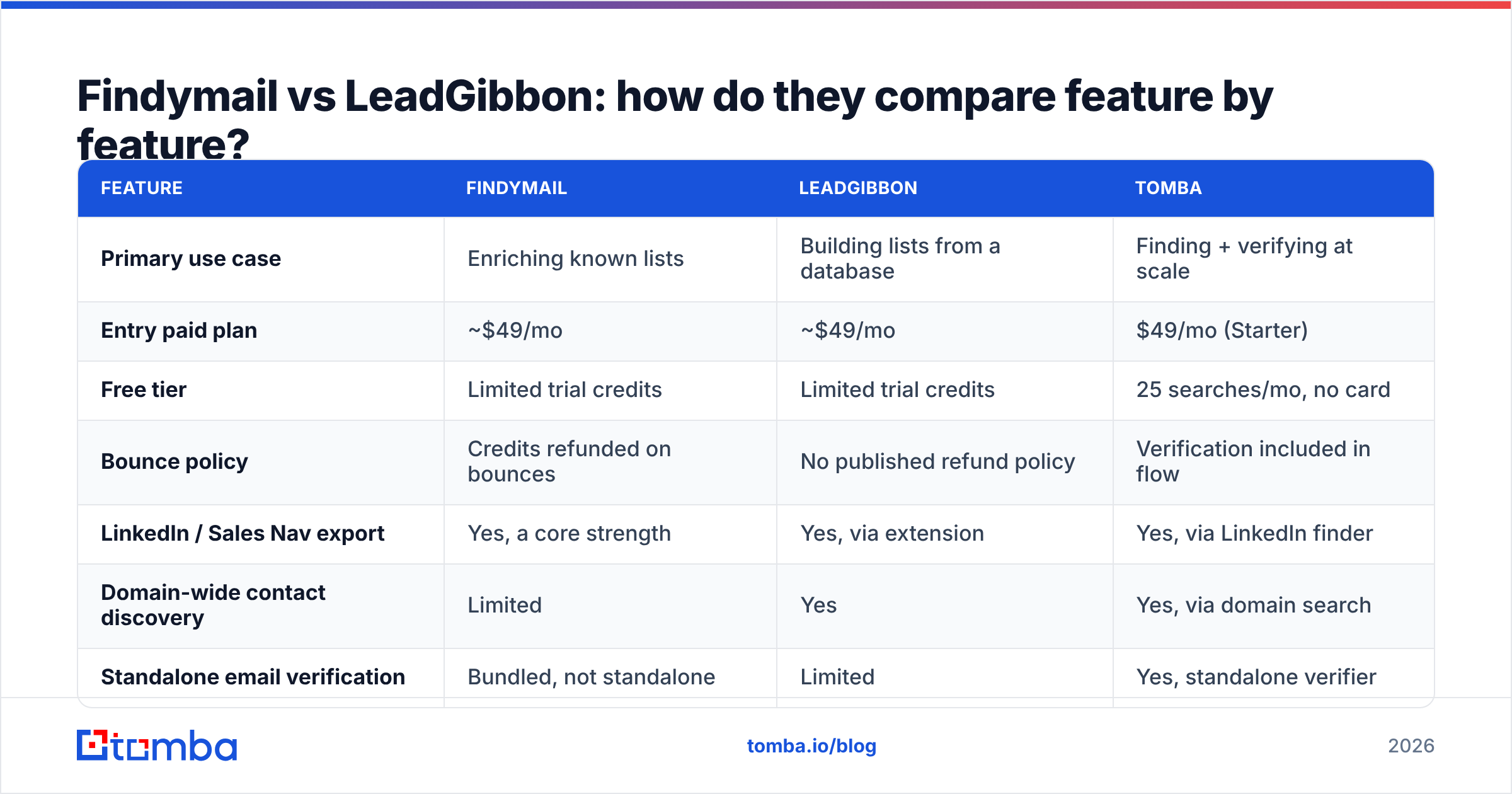
How much do they actually cost per usable email?#
Sticker price is the wrong metric. The number that matters is cost per email you can actually send to.
Work it out like this:
| Scenario | Credits bought | Hit rate | Valid rate | Usable emails | Effective cost each |
|---|---|---|---|---|---|
| Conservative finder | 5,000 | 55% | 95% | 2,613 | $99 → $0.038 |
| Broad database | 5,000 | 80% | 72% | 2,880 | $99 → $0.034 |
| Broad + verification layer | 5,000 | 80% | 92% (post-verify) | 3,680 | $99 + verify → ~$0.030 |
| Broad, unverified, sent anyway | 5,000 | 80% | 72% | 2,880 | $99 + domain damage |
Two things fall out of that table.
First, the conservative and broad approaches land closer together than the marketing suggests. You pay for coverage or you pay for cleanliness; the arithmetic mostly evens out.
Second, the cheapest row is the one that adds verification, not the one that skips it — because verification recovers rows the finder would have discarded and removes rows it wrongly kept. The fourth row, sending unverified, looks identical to row two on paper and is the one that gets your domain into a spam folder for a quarter.
If you are processing lists in the thousands, the mechanics matter more than the per-credit rate: check whether each tool charges for a lookup that returns nothing, whether credits roll over, and whether the bulk email finder path is rate-limited differently from the UI. Those three details swing real cost by 30% or more.

When should you pick Findymail?#
Choose Findymail if most of these are true:
- Your list source is LinkedIn Sales Navigator, and you export from it weekly.
- You have already been burned by a high bounce rate and your sending domain reputation is the constraint on growth.
- You run a small number of high-intent campaigns rather than broad sprays.
- You value a refund policy on bounced credits more than raw coverage.
- Your stack is already cold-email-centric — Lemlist, Instantly, Smartlead — and you just need clean fuel for it.
Where it frustrates people: coverage on non-US, non-tech, and smaller companies drops noticeably, and you cannot easily browse "who works at this company" without an existing list. It is an enrichment tool, not a discovery tool, and reviews on G2 reflect that split — high marks on quality, mixed marks on volume.
When should you pick LeadGibbon?#
Choose LeadGibbon if most of these are true:
- You are building lists from scratch and need to discover contacts, not just enrich known ones.
- Your team works in Google Sheets and wants a one-click path there.
- You want a lighter, cheaper entry point than an Apollo- or ZoomInfo-class platform.
- You can tolerate — and will independently verify — a lower validity rate.
- Your ICP skews toward companies that show up well in commercial databases.
Where it frustrates people: data freshness and the absence of a strong verification story. Contacts move roles constantly, and a database-first tool inherits every stale record it holds. Budget for a verification pass and you will be fine; skip it and your bounce rate will teach you the lesson expensively. If you are also evaluating other list-building tools in this bracket, respected options like BookYourData take a similar database-first approach with a different data footprint — worth a look if breadth is your priority.
What are the alternatives worth checking?#
Both tools are narrow by design, which is fine until your workflow widens. Common reasons teams outgrow them:
- You need discovery and enrichment. Buying two tools to cover one funnel is a tax. A domain search that returns every public contact at a company, plus a finder for named prospects, collapses the two purchases into one.
- You need an API, not a UI. If email discovery is part of a product feature or an automated pipeline, you want documented endpoints, predictable rate limits and stable schemas — not a Chrome extension.
- You need phone numbers. Cold email alone is a weaker channel than it was three years ago. Multichannel means you need dial data next to email data.
- You need verification you control. Vendor-side "we only return valid emails" is a policy, not an audit. Owning the verification step means you can prove your list quality to whoever asks.
Tomba sits in that wider slot: find email addresses by name or domain, verify them, handle catch-alls explicitly, pull phone data, and do all of it through the same API. Pricing runs Free (25 searches/month), Starter $49/mo, Growth $99/mo, Pro $249/mo, and Enterprise custom — the same band as both tools above, with the discovery, verification and enrichment steps in one place instead of three.
Findymail vs LeadGibbon: what's the verdict?#
If your bottleneck is deliverability, pick Findymail. If your bottleneck is finding anyone at all, pick LeadGibbon. If your bottleneck is both, neither one alone will fix it.
The uncomfortable truth about this whole category is that the finder is rarely the reason a campaign fails. Lists go stale, verification gets skipped, sending volume outruns domain warmup, and the copy is generic. A better email finder improves the top of that chain by maybe 15%; fixing verification and list hygiene improves the whole chain by considerably more.
So run the test properly before you buy either. Take 200 real prospects from your actual ICP — not a demo list the vendor suggests. Run them through both trials. Then run every returned address through an independent verifier and count three numbers: rows returned, rows verified valid, and rows that bounce on the first send. Whichever tool wins on the third number wins, full stop. Two afternoons of testing beats six months on the wrong contract.
Ready to stop guessing on email quality? Start with the Tomba Email Finder — 25 free searches a month, no card required, with verification, catch-all detection and domain search in the same workspace. Run your 200-prospect test against it alongside Findymail and LeadGibbon, and let the bounce rate pick the winner.
Related guides#
Ready to find emails that actually work?
Join 150,000+ professionals who stopped guessing and started sending. Free credits on signup — no credit card required.
Get the Tomba newsletter
Practical outbound tactics and product updates — once every two weeks.
About the author