Findymail vs LFBBD Lead For Business: 2026 Data Comparison
Findymail finds emails on demand. LFBBD Lead For Business sells lists you download. That single difference changes your bounce rate, your cost per valid contact, and how fast your list rots. Here is the honest breakdown.
Findymail vs LFBBD Lead For Business comes down to one choice: find each email live, or buy a list that already exists. That choice sets your bounce rate, your cost per valid contact, and how fast your data rots. Here is the short version.
TL;DR
- Both tools solve the same problem: getting a working email for a named prospect. They work from opposite ends — one finds contacts live, the other sells records that already exist.
- Live finders win on freshness and on niche or long-tail domains. Prebuilt databases win on speed when you want 5,000 contacts in one SIC code by lunchtime.
- Bounce rate is the metric that decides this. A 12% bounce on 5,000 records costs more in domain reputation than the list cost in dollars.
- Pricing is not comparable at face value. Findymail bills per verified email found. Database vendors bill per record downloaded — and downloaded is not deliverable.
- Want both models under one subscription with a real free tier? Tomba does live finding, verification, and database lookups from $49/mo.
What are Findymail and LFBBD Lead For Business?#
They belong to two different categories, and marketers keep lumping them together. The confusion is expensive.
- Findymail is a real-time email finder. You give it a name plus a company domain, a LinkedIn URL, or a CSV of both. It resolves the address at query time, then verifies it before returning it. Its pitch, on findymail.com, is bounce-rate protection: it would rather return nothing than return a guess.
- LFBBD Lead For Business is a B2B lead database. You filter a stored dataset by industry, geography, title, or company size, then export the matching records. The contacts exist before you ask for them.
- The freshness gap is the practical consequence. A live finder's answer is as current as the moment you clicked. A database record is as current as its last refresh cycle, which you rarely get to see.
Two more gaps decide which model fits your motion.
- The coverage gap runs the other way. A live finder needs you to know who you are targeting. A database lets you discover people you did not know existed. That is the whole point of building a territory list from scratch.
- The verification gap is where most teams get burned. "Verified" on a database export usually means verified at ingest. "Verified" on a live finder means verified seconds ago. B2B addresses decay at roughly 2–3% per month as people change jobs, so the two are not equivalent.
Neither model is wrong. They fail differently, and you should pick based on which failure you can absorb.
Findymail vs LFBBD Lead For Business: how do the data models differ?#
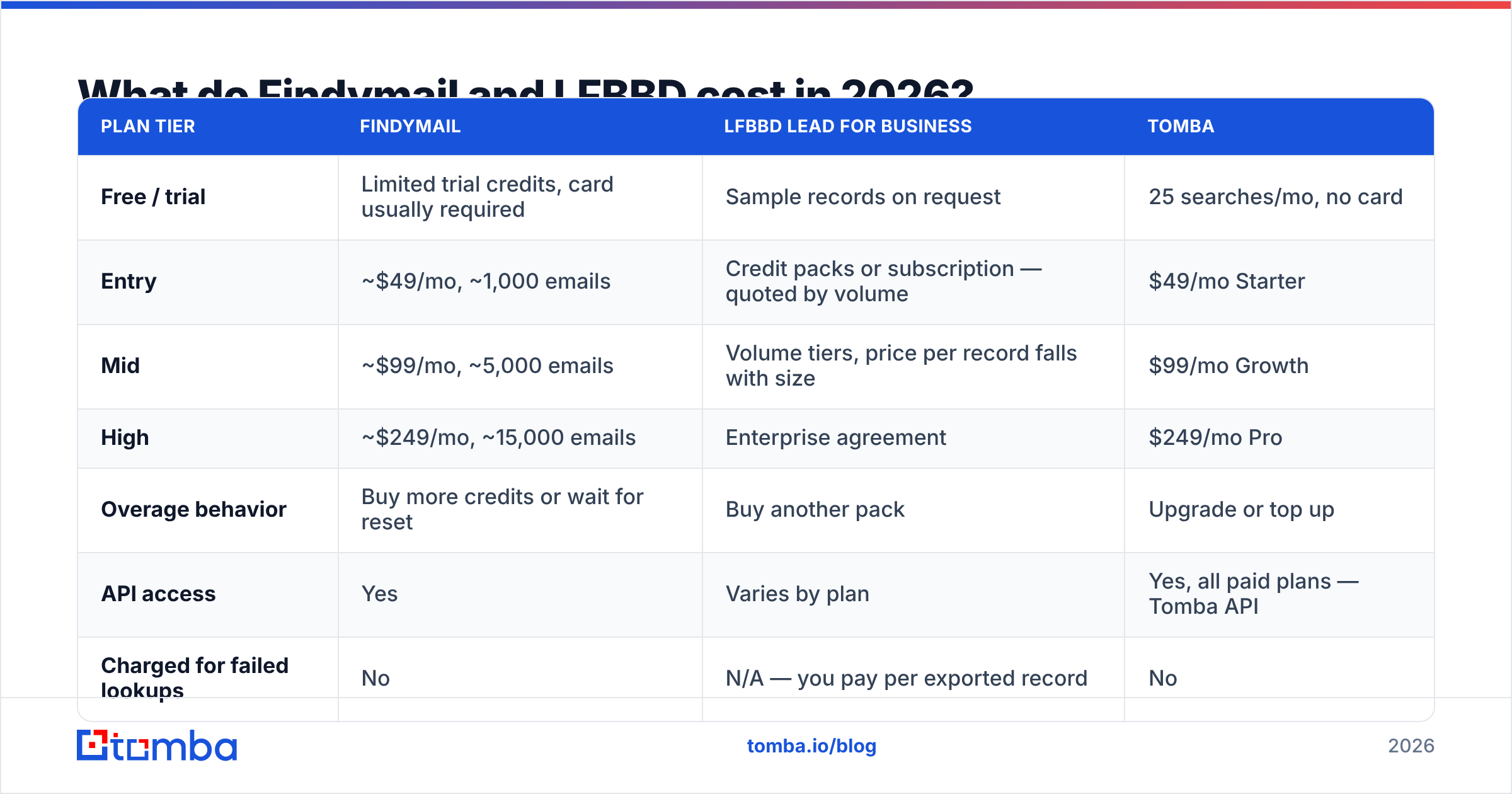
| Dimension | Findymail (live finder) | LFBBD Lead For Business (database) | Tomba (hybrid) |
|---|---|---|---|
| How you get a contact | Query by name + domain or LinkedIn URL | Filter and export from a stored dataset | Either — finder, domain search, or database filters |
| Data freshness | Resolved at query time | As fresh as the last refresh cycle | Live resolution plus refreshed database |
| Discovery of unknown prospects | Weak — you supply the names | Strong — filter by firmographics | Strong via domain search |
| Long-tail / SMB domains | Good — resolves on demand | Depends on dataset coverage | Good — pattern detection plus SMTP checks |
| Verification model | Verify-then-return, no-charge on fail | Typically verified at ingest | Separate email verifier with catch-all handling |
| Billing unit | Per verified email returned | Per record exported | Per search, unused credits do not silently vanish |
| Free tier | Limited trial credits | Sample records on request | 25 searches/mo, no card |
The row that decides most evaluations is the third one. If your ICP is "VP Engineering at Series B fintechs in the Nordics," you need discovery, and a pure finder cannot give it to you. If your ICP is "these 400 accounts my AE team already picked," discovery is worthless and freshness is everything.

Which one returns more valid emails?#
Ask the question properly, because vendors answer two different versions of it.
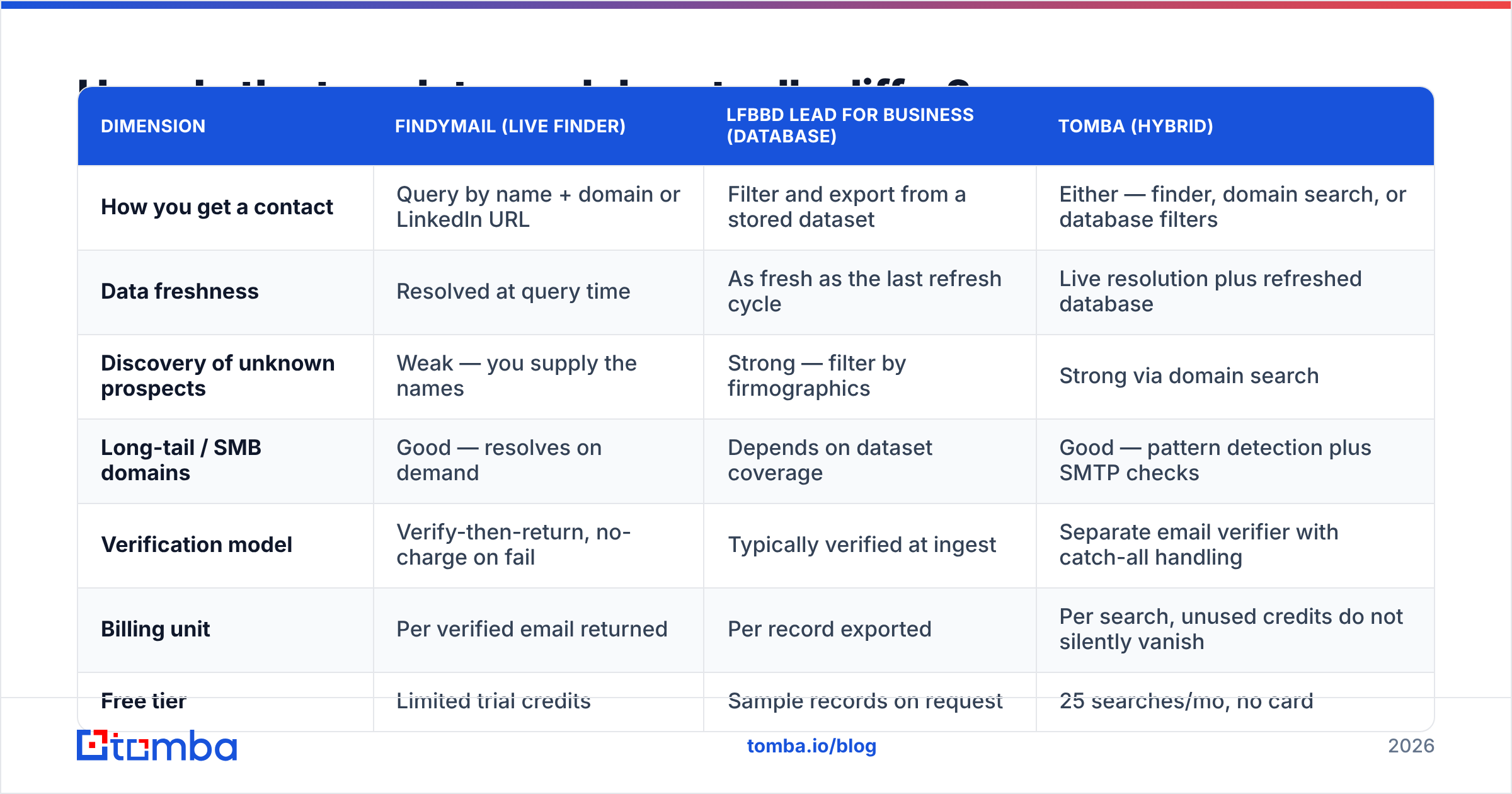
Hit rate is the percentage of your input rows that come back with any email at all. Database exports look spectacular here. You filtered for records that have emails, so the hit rate is 100% by construction. Live finders report 50–70% on messy input and 80%+ on clean, well-known domains.
Valid rate is the percentage of returned emails that actually accept mail. This is the number that shows up on your Postmaster dashboard three days later. It is also the one you should insist on measuring yourself.
Run this test before you sign anything:
- Take 200 contacts you already have confirmed, working emails for — past customers, webinar attendees, replied-to prospects.
- Strip the emails, keep name + domain.
- Feed the stripped list to each vendor's trial.
- Compare returned addresses against your known-good ones character by character.
- Send nothing. You already know the truth for these 200 rows.
That benchmark takes an afternoon. It is worth more than every accuracy claim on every pricing page, including the one below.

One pattern holds across independent tests. Live finders lose to databases on raw coverage of large enterprises. They win on companies under 200 employees, where database refresh cycles lag hardest. Catch-all domains are the wildcard. Roughly one in five B2B domains accepts everything at the SMTP layer, so both models return an "unverifiable" verdict — unless the vendor runs a dedicated catch-all verifier on top.
What do Findymail and LFBBD cost in 2026?#
Prices move, so treat this as a shape comparison. Confirm the current rate card on each vendor's site before you buy.
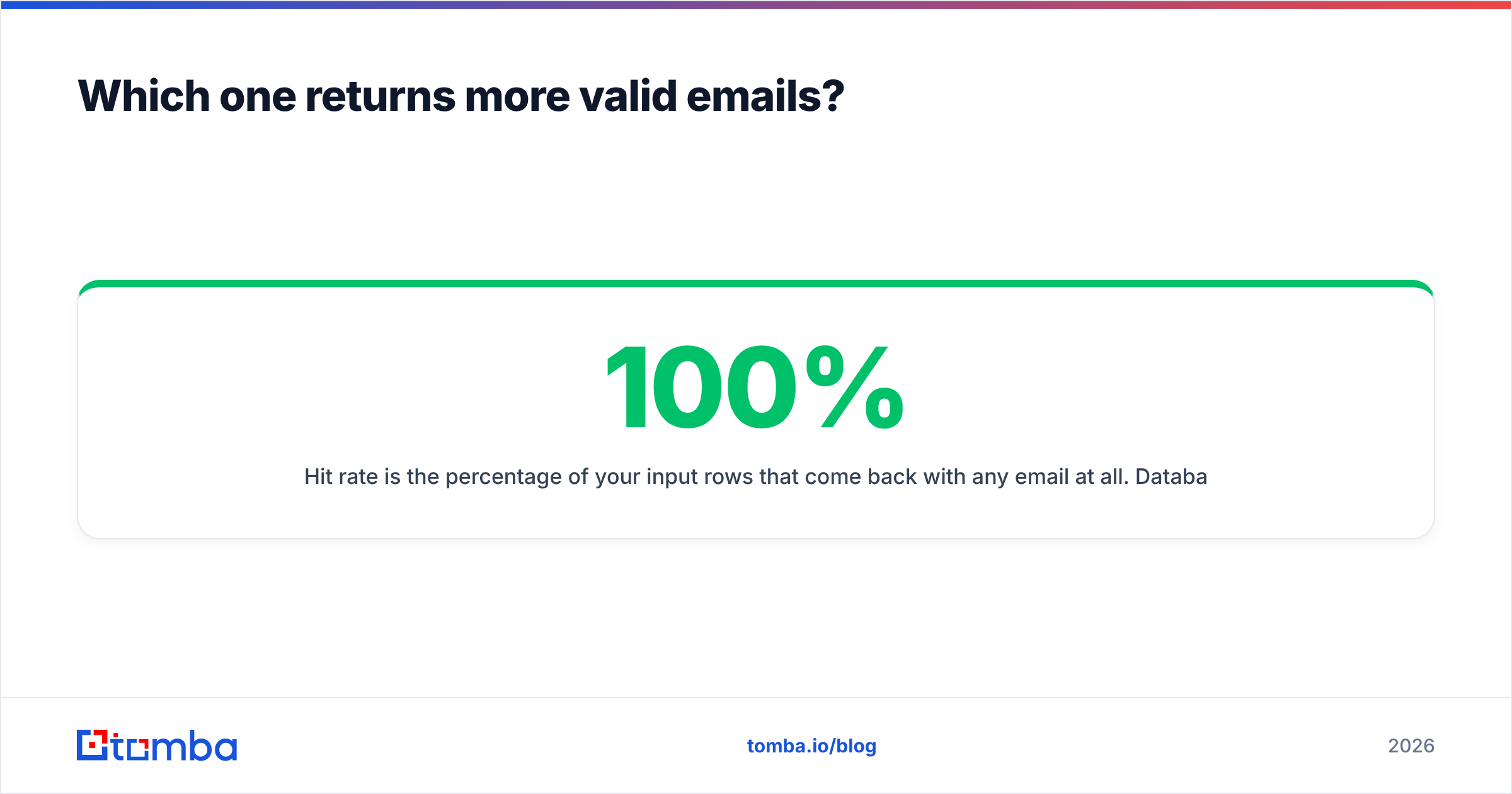
| Plan tier | Findymail | LFBBD Lead For Business | Tomba |
|---|---|---|---|
| Free / trial | Limited trial credits, card usually required | Sample records on request | 25 searches/mo, no card |
| Entry | ~$49/mo, ~1,000 emails | Credit packs or subscription — quoted by volume | $49/mo Starter |
| Mid | ~$99/mo, ~5,000 emails | Volume tiers, price per record falls with size | $99/mo Growth |
| High | ~$249/mo, ~15,000 emails | Enterprise agreement | $249/mo Pro |
| Overage behavior | Buy more credits or wait for reset | Buy another pack | Upgrade or top up |
| API access | Yes | Varies by plan | Yes, all paid plans — Tomba API |
| Charged for failed lookups | No | N/A — you pay per exported record | No |
Two traps in this table.
Trap one: cost per valid contact, not cost per credit. A $0.02 record that bounces 15% of the time costs $0.0235 per deliverable contact — plus reputation damage you cannot price. A $0.05 credit that only charges on a verified hit costs exactly $0.05. Do the division before you compare headline numbers.
Trap two: exports are one-way. Once you download 10,000 database records, they are yours forever. They also start decaying at once. Twelve months later, roughly a quarter of them are wrong. Live finders re-resolve on demand, so the same spend buys current data — but you have to keep spending. Neither is a scam. They are different amortization curves.

Want to sanity-check any of this against peer reviews rather than vendor pages? The B2B data category on G2 carries enough verified reviews to spot the recurring complaints — usually credit expiry, refund policy on bad records, and export limits.
Is Findymail better than LFBBD Lead For Business for cold outreach?#
For cold outreach specifically, freshness beats volume, so a live finder has the structural edge — with three real caveats.
Caveat one: you need a source of names. Findymail resolves emails; it does not tell you who to email. Most teams pair it with LinkedIn Sales Navigator exports, a scraper, or a conference attendee list. If you have not solved that upstream step, a database is genuinely faster to first send.
Caveat two: enrichment depth. Databases usually ship firmographics, technographics, and sometimes direct dials alongside the email. A pure finder gives you an address and little else. You will bolt on a separate data enrichment step to personalize at scale.
Caveat three: compliance posture. For EU and UK prospects, where the record came from matters. Live resolution from public sources and database resale sit in different places under GDPR's legitimate-interest analysis. Ask both vendors, in writing, where records originate and how opt-outs propagate. Vendors that answer this clearly are the ones worth buying from. For a reference point, see how Tomba documents its data sources.

How should you choose between them?#
Work through these questions in order. The first one that applies settles Findymail vs LFBBD Lead For Business for your team.
- Do you already know your target accounts and people? Yes → live finder. No → database, or a domain-search tool that enumerates a company's staff for you.
- Is your ICP mostly under 200 employees? Yes → live finder. Database coverage of SMBs is where refresh lag hurts most.
- Do you need direct dials as well as email? Yes → you need a database or a dedicated phone finder; pure email finders will not cover it.
The last three are about how you buy, not who you target.
- Is your sending domain new or previously burned? Yes → prioritize whichever vendor charges nothing for failed lookups and verifies before returning. Your bounce budget is near zero.
- Do you enrich in bulk from a CRM or spreadsheet? Yes → check the API rate limits and the bulk-upload row cap, not the marketing page. A bulk email finder that caps at 1,000 rows per job will not survive a 40,000-row backfill.
- Are you buying once or continuously? One-time territory build → database. Continuous inbound-to-outbound motion → live finder on a subscription.
Most teams that run this checklist honestly end up wanting both behaviors. That is exactly why single-model vendors keep losing renewals to hybrid platforms.
Where does Tomba fit in this comparison?#
Tomba is the hybrid case, and it is worth a serious look before you commit to either single-model vendor.
You get live finding through the email finder. Domain search handles discovery: give it a company domain, get back the staff directory it can resolve. Verification is a separate scored step, catch-all handling included. A stored B2B database covers filter-and-export workflows. Same credits, same dashboard, same API.
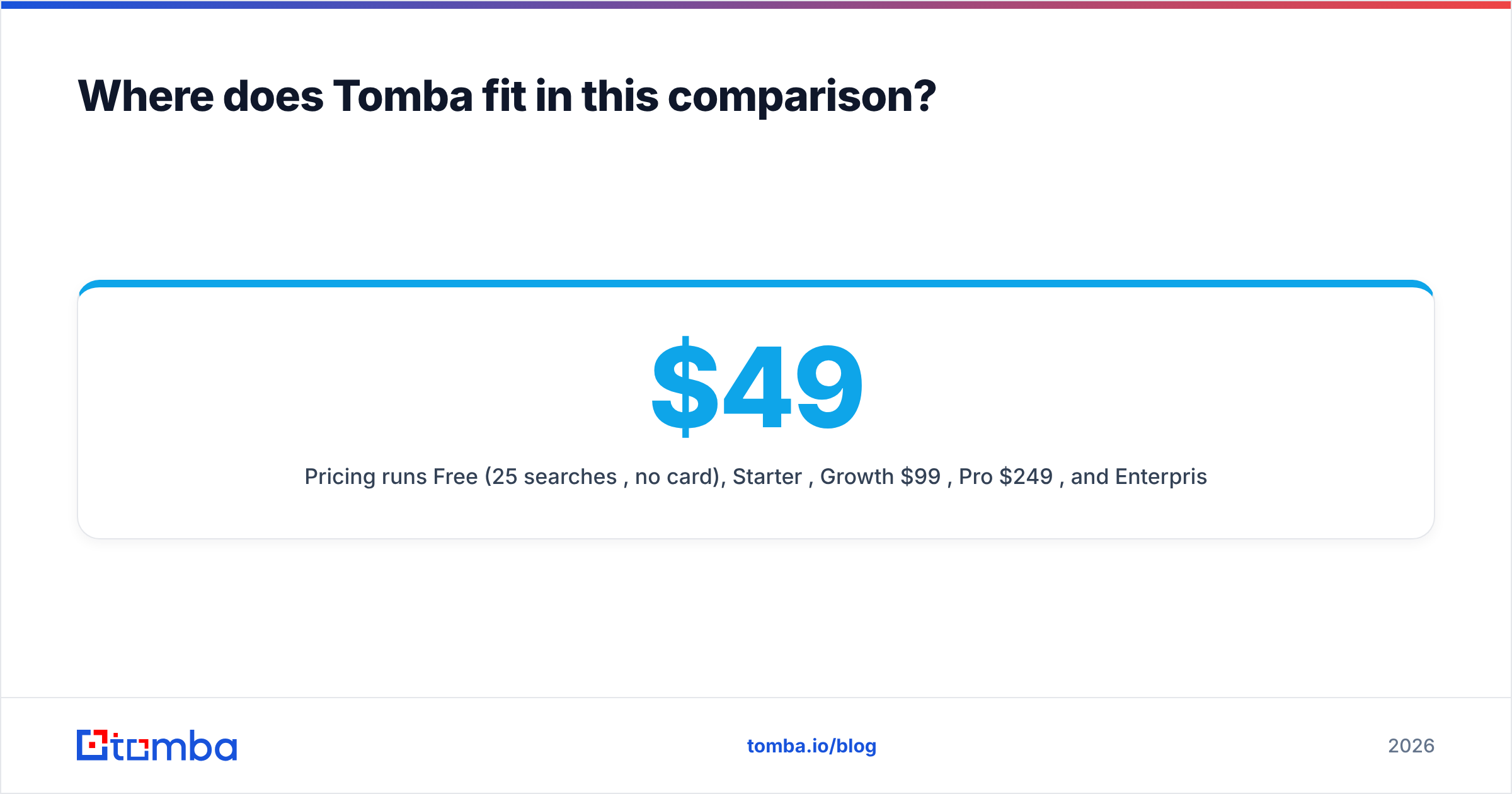
Pricing runs Free (25 searches/mo, no card), Starter $49/mo, Growth $99/mo, Pro $249/mo, and Enterprise on request — see Tomba pricing for current credit allocations. The free tier is the part that matters for an evaluation. You can run the 200-row known-good benchmark described above without giving anyone a card, which is not true of most competitors in this bracket.
Where Tomba is not the answer: if you need deep intent signals, technographic scoring, or a full sales-engagement sequencer, you are shopping for a different category of product — something closer to what HubSpot or a dedicated ABM platform sells. Tomba is a data layer, not a CRM.
What should you do in the next hour?#
Run the parallel trial. Findymail vs LFBBD Lead For Business is settled fastest by your own data, not by either homepage. Take 200 rows you know the answers to, push them through Findymail's trial, request a sample from LFBBD Lead For Business, and run the same 200 through Tomba's free tier. Score all three on valid rate, not hit rate. Then divide the plan price by the number of working addresses each one returned.
Then verify whatever you keep. Whichever vendor you pick, run the final list through an independent email verification pass before the first send. It is the cheapest reputation insurance in outbound — cents per thousand, and it catches the records that decayed between export and send day.
Start with the free tier. Tomba's Email Finder gives you 25 searches a month with no card, live resolution plus database lookups in the same tool, and verification built into the same credit pool — enough to benchmark it honestly against Findymail and LFBBD Lead For Business before you spend a dollar. If it wins your 200-row test, Starter is $49/mo and the API is included from day one.
Related guides#
Ready to find emails that actually work?
Join 150,000+ professionals who stopped guessing and started sending. Free credits on signup — no credit card required.
Get the Tomba newsletter
Practical outbound tactics and product updates — once every two weeks.
About the author