Findymail vs LimeLeads (2026): Which B2B Data Tool Wins?
Findymail finds emails for people you already picked. LimeLeads hands you a filtered list. That single difference decides which one belongs in your outbound stack, and it is not the one most reviews lead with.
Most Findymail vs LimeLeads write-ups score the two on match rate. That is the wrong test. Findymail finds an email for a person you name. LimeLeads hands you a list of people to name. Pick the one that fits your motion, not the one with the better chart.
TL;DR
- They are not the same category. Findymail is an enrichment tool: you bring the person, it returns the email. LimeLeads is a lead database: you bring filters, it returns the people. Accuracy alone is the wrong yardstick.
- Findymail wins for LinkedIn-driven outbound. Sales Navigator exports, a Chrome extension, and bundled verification make it fast for reps who already know their ICP by name.
- LimeLeads wins for cold list building in the US mid-market. Filter by industry, headcount, location, and title, then export. No LinkedIn workflow required.
- Credit accounting is where both bite you. Findymail charges per email found; LimeLeads charges per contact revealed. Neither refunds a lead you decide is unqualified after paying to see it.
- A third option is often the right answer. If you need domain-level discovery, catch-all handling, and an API in one place, a general-purpose email finder covers both jobs from $49/mo.
What are Findymail and LimeLeads, exactly?#
Findymail is an email-finding and verification tool built around one promise: the emails it returns bounce rarely enough that you can skip a separate verification step. It plugs into LinkedIn and Sales Navigator, accepts CSV uploads, and exposes an API. You feed it a name plus a company (or a LinkedIn URL), and it returns a work email or nothing at all. Findymail deliberately does not charge you for a miss, which is the core of its pitch.
LimeLeads is a different animal. It is a searchable B2B contact database, heavily weighted toward United States companies. You open a builder, apply filters — industry, employee count, revenue band, job title, geography — and the platform shows you a count of matching contacts. You then spend credits to reveal and export those records with emails attached.
The practical difference: Findymail assumes you already have a target list. LimeLeads assumes you do not.
That distinction should drive your evaluation more than any accuracy percentage in a vendor comparison chart, including this one.
Findymail vs LimeLeads: how do they actually differ?#
Here is the structural comparison, before we get to price.
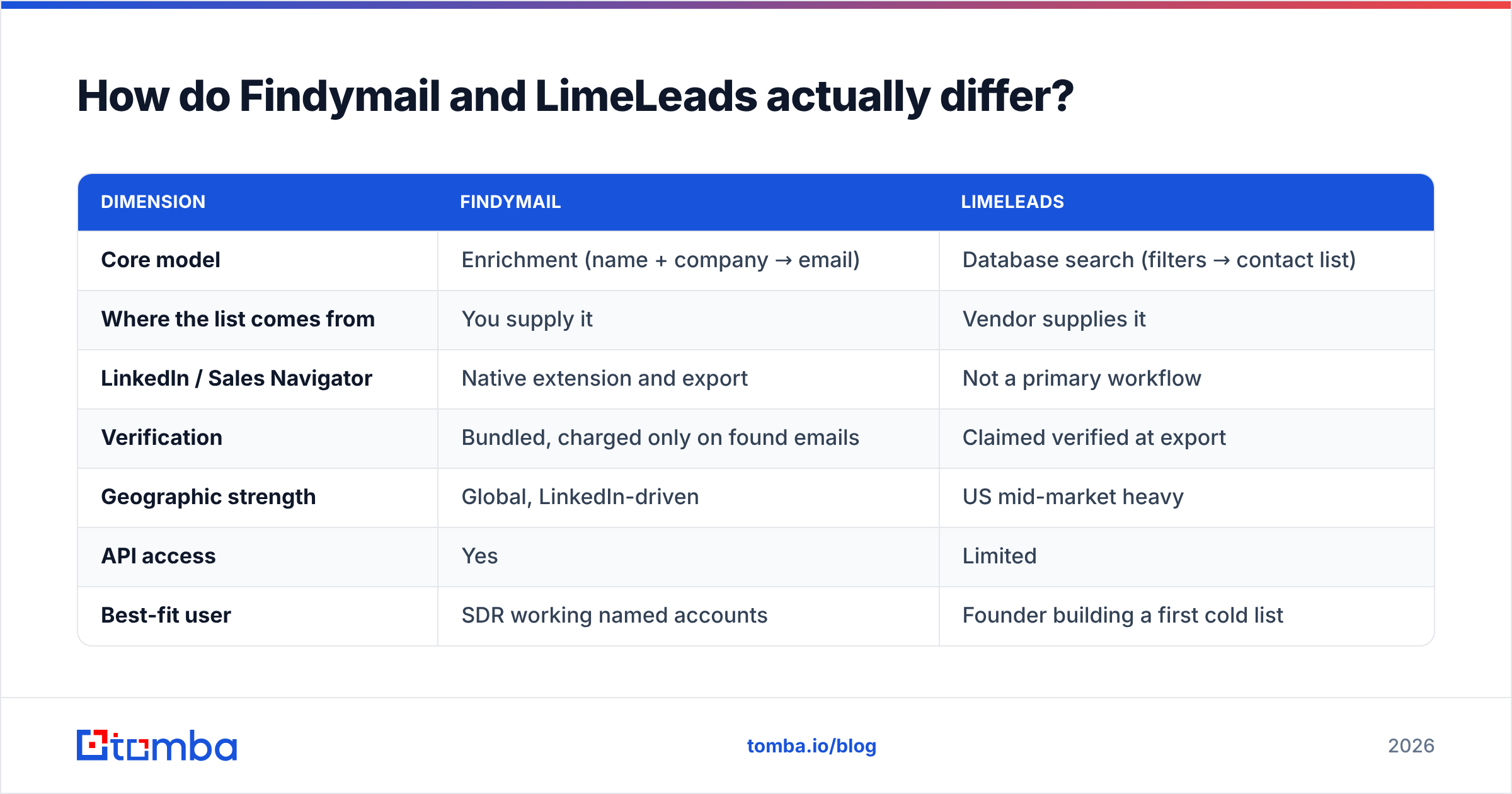
| Dimension | Findymail | LimeLeads |
|---|---|---|
| Core model | Enrichment (name + company → email) | Database search (filters → contact list) |
| Where the list comes from | You supply it | Vendor supplies it |
| LinkedIn / Sales Navigator | Native extension and export | Not a primary workflow |
| Verification | Bundled, charged only on found emails | Claimed verified at export |
| Geographic strength | Global, LinkedIn-driven | US mid-market heavy |
| API access | Yes | Limited |
| Best-fit user | SDR working named accounts | Founder building a first cold list |
Read that table twice. Is your motion account-based? If you or your marketing team already picked the 300 companies that matter this quarter, an enrichment tool is the right shape.
If you are still working out who to talk to, a database is the right shape. Paying an enrichment tool to guess at emails for people you have not named yet makes no sense.
Four practical tests that separate the two in real evaluations:
- Do you have a list today? If yes, Findymail. If no, LimeLeads (or another database).
- Is your ICP outside the US? LimeLeads thins out fast beyond North America. Findymail follows LinkedIn coverage, which is broader.
- Do you need this inside a workflow? Findymail's API and Zapier path make it embeddable. LimeLeads is closer to a self-serve export tool.
- How much do you care about title precision? Database filters give you "VP Marketing at 50–200 employee SaaS" in one query. Enrichment tools cannot do that for you.

Which one finds more valid emails?#
Findymail, on the workload it is designed for. LimeLeads, on the workload it is designed for. The honest answer is that these tools rarely compete for the same query.
Hand Findymail a specific person at a specific company and it runs pattern inference, source checks, and SMTP-level validation before it answers. If it cannot be sure, it returns nothing rather than a guess.
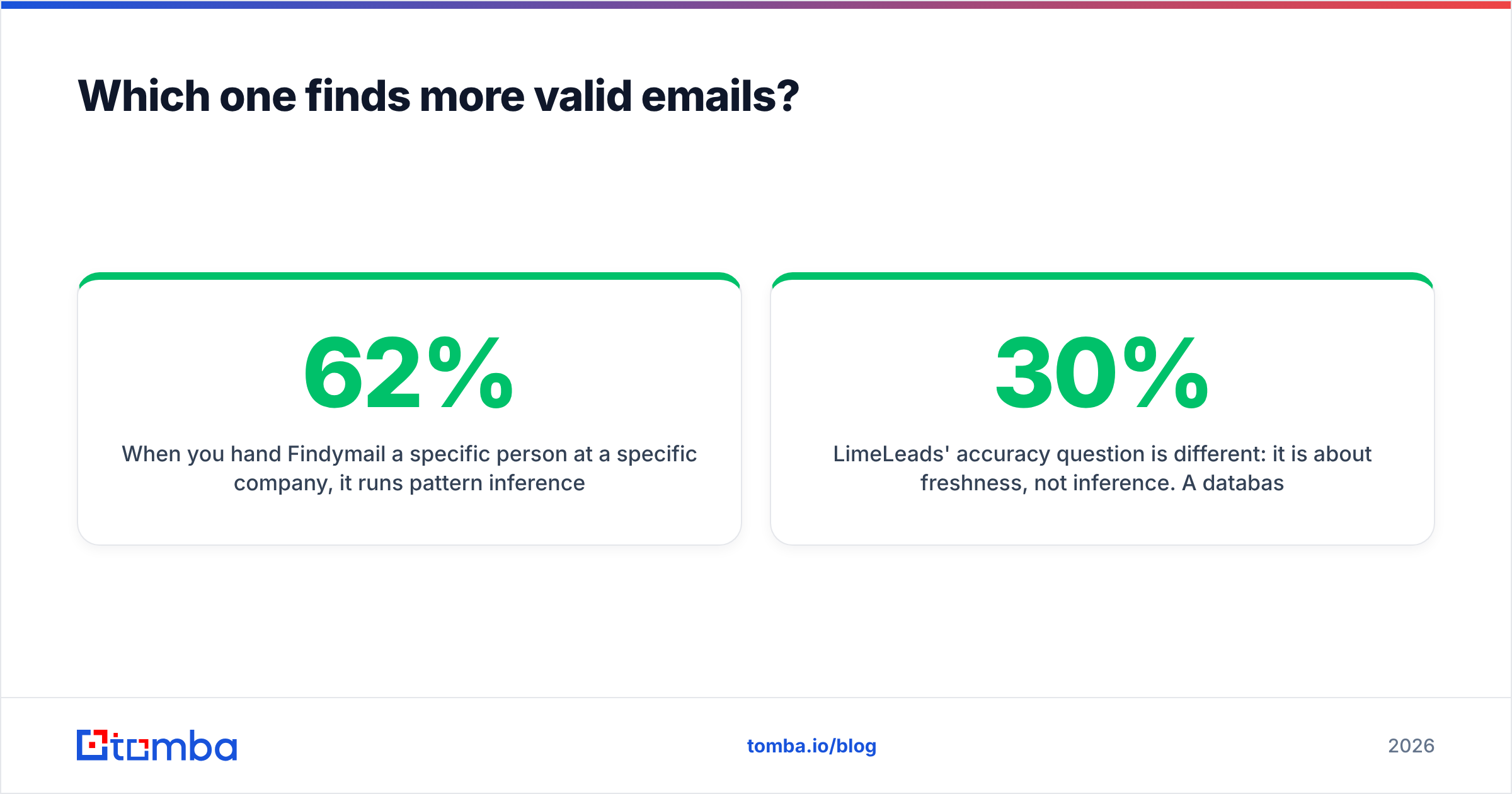
That is why its published accuracy claims hold up better than most: the denominator leaves out the hard cases it declines to answer. It is a fair design choice, not a trick. But know what it costs you in coverage. A run that returns 62% of your list with near-zero bounces is a very different outcome from one returning 90% with a 9% bounce rate. Neither number alone tells you which campaign did better.
LimeLeads' accuracy question is different: it is about freshness, not inference. A database record is a snapshot. The contact was valid when it was collected. Whether it is still valid the day you export depends on how often the vendor re-verifies. Job-change churn in B2B runs roughly 20–30% a year depending on the segment. Any database that is not re-verified constantly degrades noticeably inside a year. Always re-check database exports through a dedicated email verifier before they touch your sending domain — whatever "verified" badge is on the file.

The pattern in benchmark data across this category is consistent. Tools that decline to answer post higher precision. Tools that always answer post higher coverage. The only number that matters to you is valid emails delivered per dollar, and that requires running your own sample.
[Suggested visual: side-by-side screenshot of a Findymail bulk enrichment result vs a LimeLeads export preview showing the same 25 target accounts]
Findymail vs LimeLeads pricing: which one costs less?#
Both vendors have adjusted pricing repeatedly, so treat these as directional and confirm on their own pages before you buy. What matters more than the headline number is the unit each one bills.
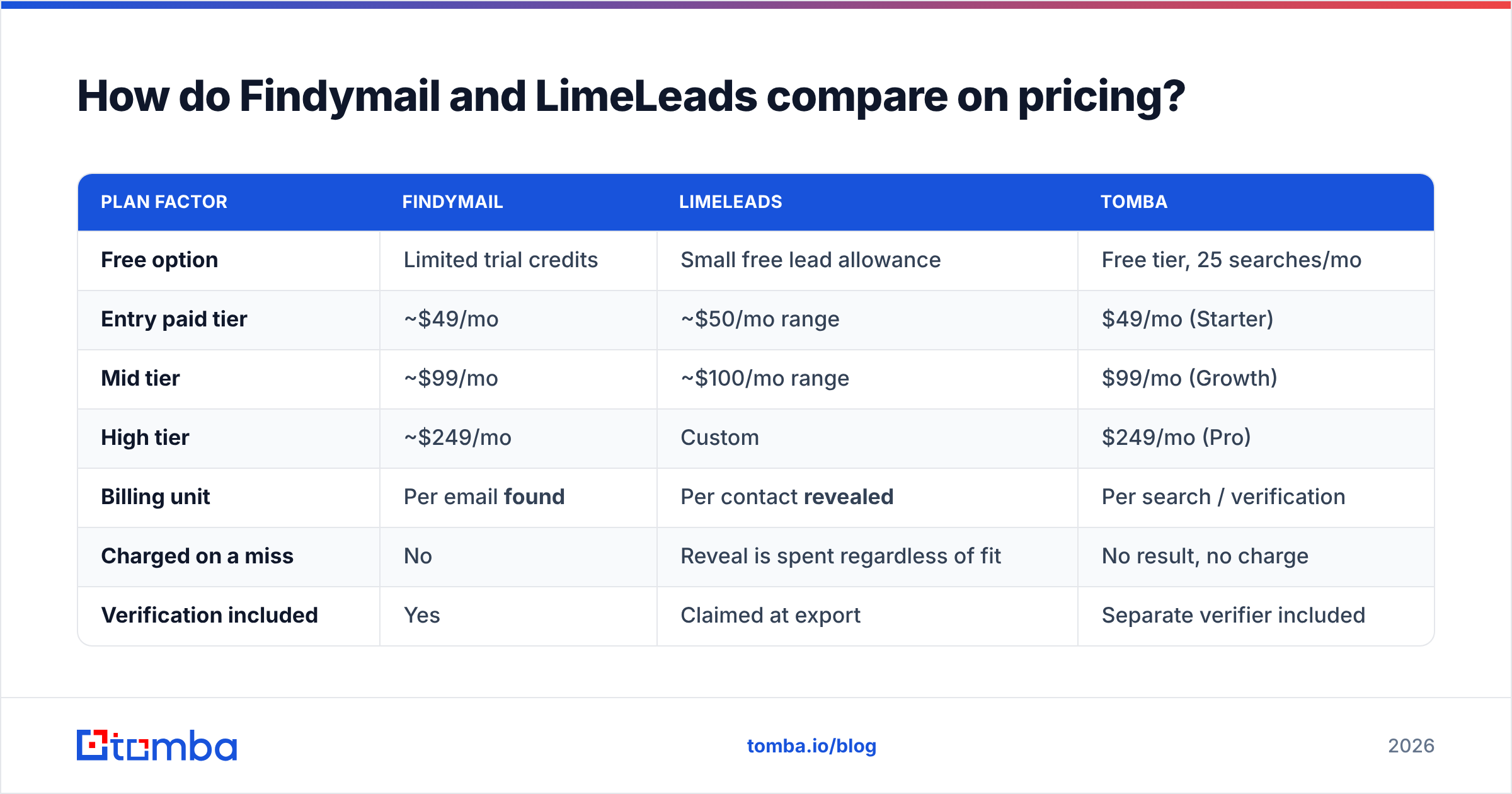
| Plan factor | Findymail | LimeLeads | Tomba |
|---|---|---|---|
| Free option | Limited trial credits | Small free lead allowance | Free tier, 25 searches/mo |
| Entry paid tier | ~$49/mo | ~$50/mo range | $49/mo (Starter) |
| Mid tier | ~$99/mo | ~$100/mo range | $99/mo (Growth) |
| High tier | ~$249/mo | Custom | $249/mo (Pro) |
| Billing unit | Per email found | Per contact revealed | Per search / verification |
| Charged on a miss | No | Reveal is spent regardless of fit | No result, no charge |
| Verification included | Yes | Claimed at export | Separate verifier included |
| API on entry tier | Yes | Limited | Yes |
The subtle cost sits in the third-from-last row. Findymail's "no charge for a miss" policy is genuinely good, and most comparison posts under-weight it.
A database reveal works the other way. You spend the credit to see the record. If the title is wrong or the person has left, that credit is gone. On a 5,000-contact list with 25% churn, you paid for 1,250 records you will delete. Model that into your cost per usable contact before you compare sticker prices.
Also check export caps. Database tools frequently limit how many records you can pull per month, per day, or per search, separate from your credit balance. A 10,000-credit plan with a 1,000-per-export ceiling is a very different tool than the number suggests.

For a like-for-like reference point, Tomba pricing runs Free (25 searches/mo), Starter $49/mo, Growth $99/mo, and Pro $249/mo, with the verifier, domain search, and API on the same account rather than as separate line items.
Which is better for LinkedIn prospecting?#
Findymail, clearly, and it is not close.
If your prospecting starts in Sales Navigator — you build a saved search, filter to 400 people, and want their emails — Findymail's extension and list export were built for exactly that motion. You stay inside LinkedIn, select, export, and the emails arrive verified. LimeLeads has no equivalent workflow; it wants you to use its filters instead of LinkedIn's, which is a philosophical difference more than a feature gap.
Two caveats worth stating plainly:
- LinkedIn scraping is a moving target. Every tool in this category operates against LinkedIn's terms and is subject to rate limits, account restrictions, and periodic breakage. Use a secondary LinkedIn account for exports, keep daily volumes modest, and do not build a business process that dies if the extension stops working for a week. If you want this workflow with a fallback path, a standalone LinkedIn finder plus API access gives you a second route to the same data.
- Sales Navigator is an extra $99+/mo. Factor that into the Findymail total cost of ownership if you do not already have a seat.

Which is better for building a list from scratch?#
LimeLeads, if your ICP is a US company with 20–500 employees in a mainstream industry.
The strength of a database is the count preview. You set filters and immediately see "3,412 contacts match" before you spend anything. That feedback loop is genuinely useful for territory planning and TAM sizing, and no enrichment tool gives it to you. For a founder doing first-100-customers outbound with no existing list, that is worth real money.
The weakness shows up in three places:
- Coverage outside the US. European, APAC, and LATAM records are noticeably thinner across most US-first databases, LimeLeads included.
- Long-tail titles. Filters are only as good as the title normalization behind them. Niche roles ("Head of RevOps", "Director of Category Management") return inconsistent results in most self-serve databases.
- Snapshot decay. Covered above. Assume you will re-verify.
A hybrid approach beats either tool used alone. Use a database for discovery: who exists, how many, and where. Then use domain-level discovery and verification to get the actual sending addresses. A domain search run against your shortlist returns current, source-attributed contacts instead of a snapshot from an unknown date — and it works on companies the database has never heard of.
[Suggested visual: LimeLeads list-builder screen showing filter panel with live match count, annotated to highlight where export caps apply]
What do real users complain about?#
Pull the review sites — G2 and Capterra both carry entries for this category — and the complaint patterns are stable enough to plan around.
Findymail, recurring criticism:
- Coverage gaps on smaller companies and non-LinkedIn-active industries (trades, local services, manufacturing).
- Credits do not roll over on most plans, so seasonal outbound teams overpay in slow months.
- Because it will not guess, some users read "no result" as a product failure when it is the product working as designed.
LimeLeads, recurring criticism:
- Data freshness on records outside high-traffic segments.
- Export and credit limits that are less visible during the trial than after purchase.
- Fewer native integrations than larger database players, meaning more CSV handling.
Shared across both: support responsiveness on annual plans, and the standard difficulty of getting a meaningful refund once credits are consumed. Run a paid single month before committing to annual, on both.
Which should you actually pick?#
The Findymail vs LimeLeads decision comes down to five questions, in order:
- Do you already have named accounts? Yes → Findymail. No → a database.
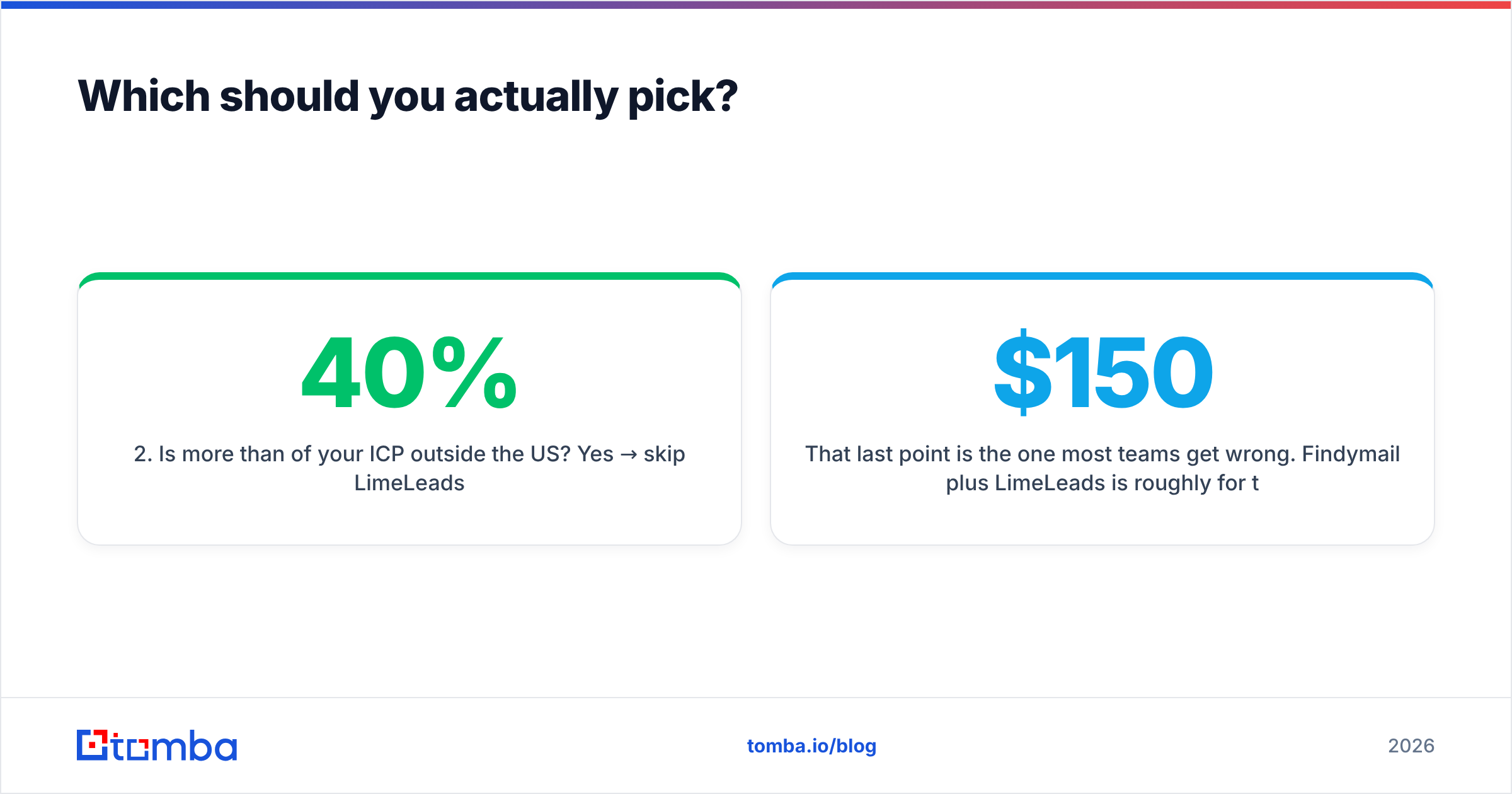
- Is more than 40% of your ICP outside the US? Yes → skip LimeLeads.
- Do you need programmatic access? Yes → Findymail or a tool with a first-class email finder API. LimeLeads is weaker here.
- Are catch-all domains a big part of your list? Both struggle. You will want a dedicated catch-all verifier regardless of which you choose.
- Are you running both discovery and enrichment? Then you are buying two tools — price it as two tools, or consolidate.
That last point is the one most teams get wrong. Findymail plus LimeLeads is roughly $150/mo for two partial workflows, two credit systems, two CSV formats, and no shared API. Before you sign both, check whether one platform covers the 80% case at a single price.
Where does Tomba fit in this comparison?#
Tomba sits closer to Findymail in philosophy — find and verify, do not guess — but adds the discovery side that Findymail leaves to you. The email finder, verifier, domain search, catch-all handling, phone lookup, and enrichment run on one account and one credit pool, with an API on every paid tier and a free plan at 25 searches a month for testing.
Where Tomba is not the answer: if you specifically want a filterable US contact database with a live match-count builder, LimeLeads does that job and Tomba does not try to replicate it. Buy the tool that matches your motion, not the one with the longest feature list.
Where Tomba tends to win the evaluation: teams that started with a LinkedIn-only workflow and hit its ceiling — companies with no LinkedIn presence, catch-all domains, bulk lists arriving from webinars and events, or an engineering team that wants the whole thing behind an API instead of a Chrome extension.
The practical next step#
Run the same 100 contacts through all three tools. Measure three numbers: match rate, bounce rate on a small real send, and credits consumed. Ignore vendor accuracy claims, including the ones in this post. Thirty minutes of testing beats thirty comparison articles.
If you want to include Tomba in that test, start with the Tomba Email Finder — the free tier gives you 25 searches with no card, enough to benchmark against your Findymail or LimeLeads sample, and verification is included in the same result so you are comparing deliverable emails rather than raw guesses.
Related guides#
Ready to find emails that actually work?
Join 150,000+ professionals who stopped guessing and started sending. Free credits on signup — no credit card required.
Get the Tomba newsletter
Practical outbound tactics and product updates — once every two weeks.
About the author