Findymail vs No2bounce (2026): Email Finder vs Verifier
Findymail finds emails. No2bounce cleans lists. They solve different halves of the same problem — here's how they compare on accuracy, pricing, and workflow, and when one tool is enough.
TL;DR
- They are not the same category. Findymail is a B2B email finder built around LinkedIn and list-building workflows. No2bounce is an email verification service built around cleaning lists you already own.
- If your problem is "I have no emails," a verifier will not help you. If your problem is "my bounce rate is 8%," a finder alone will not fix it either.
- Cost per usable contact is the only metric that matters. A $49/mo finder with a 55% hit rate is more expensive than a $49/mo finder with an 80% hit rate — the sticker price is a distraction.
- Most teams end up paying for two tools and stitching them together with CSVs. A combined platform like Tomba removes that step by running find + verify in the same credit pool and the same API.
- Our recommendation: run a 200-contact bake-off on your own ICP before committing. Vendor accuracy claims are marketing numbers; your list is the only benchmark that counts.
What is Findymail and what is No2bounce?#
Start here, because half the confusion in the "findymail vs no2bounce" search is that people are comparing a hammer to a level.
Findymail is an email-finding tool aimed at outbound sales teams. You feed it a name plus a company (or a LinkedIn profile, or a Sales Navigator export) and it returns a work email address. Its pitch has always been bounce protection: emails are validated before they're handed back, and the marketing leans hard on "no bounces or your credits back." It also ships a Chrome extension and integrations with the usual sequencer suspects.
No2bounce sits on the other side of the pipeline. It is an email verification and list-hygiene service: you upload a list you already have — scraped, purchased, exported from a dusty CRM, collected from a webinar — and it tells you which addresses are deliverable, which are invalid, which are role accounts (info@, sales@), and which sit on catch-all domains. It does not generate new contacts for you.
So the honest framing of this comparison is:
- Findymail answers "who do I email?" — discovery and enrichment.
- No2bounce answers "will this email land?" — validation and hygiene.
- Both touch deliverability, but from opposite ends. A finder protects deliverability by never handing you garbage. A verifier protects it by removing garbage you already collected.
- Only one of them can be your only tool. A finder that verifies on the way out can replace a standalone verifier for freshly sourced data. A verifier can never replace a finder.
- Legacy data is the exception. If you have a 400,000-row list from 2021, no finder helps — you need bulk verification, full stop.

How do Findymail and No2bounce compare on features?#
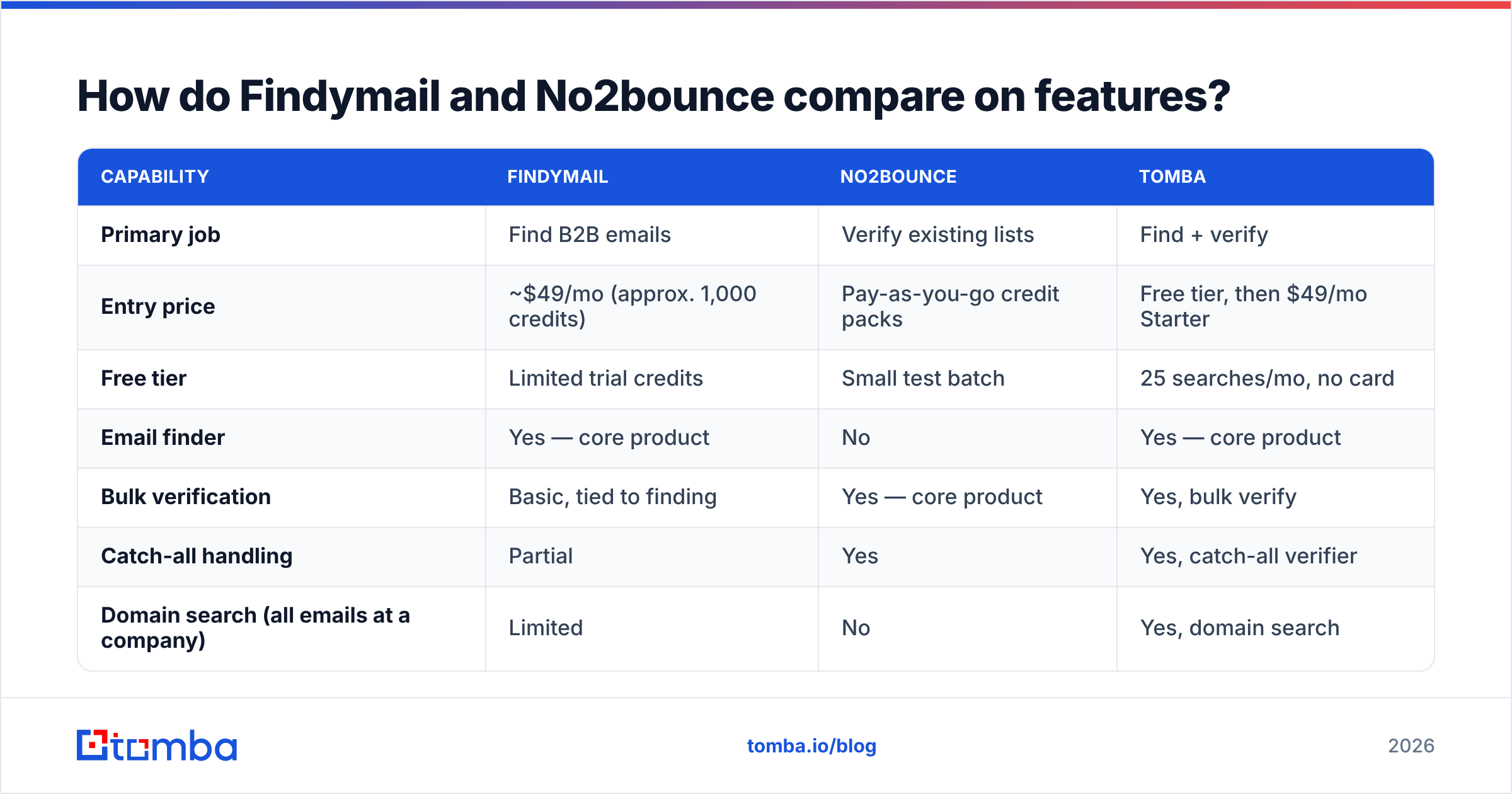
Here's the side-by-side, with Tomba included as a reference point for what a combined platform looks like. Pricing figures reflect publicly listed plans at the time of writing and change often — check each vendor before you buy.
| Capability | Findymail | No2bounce | Tomba |
|---|---|---|---|
| Primary job | Find B2B emails | Verify existing lists | Find + verify |
| Entry price | ~$49/mo (approx. 1,000 credits) | Pay-as-you-go credit packs | Free tier, then $49/mo Starter |
| Free tier | Limited trial credits | Small test batch | 25 searches/mo, no card |
| Email finder | Yes — core product | No | Yes — core product |
| Bulk verification | Basic, tied to finding | Yes — core product | Yes, bulk verify |
| Catch-all handling | Partial | Yes | Yes, catch-all verifier |
| Domain search (all emails at a company) | Limited | No | Yes, domain search |
| LinkedIn / Sales Nav workflow | Strong | No | Yes, LinkedIn finder |
| Phone numbers | No | No | Yes, phone finder |
| Public API | Yes | Yes | Yes, Tomba API |
| Chrome extension | Yes | No | Yes |
| Best for | SDRs building lists from LinkedIn | Marketers cleaning big legacy lists | Teams that need both in one credit pool |
The table makes the structural point clear: the overlap between Findymail and No2bounce is roughly one column. You are not choosing between two versions of the same product — you are choosing which half of the problem you're solving this quarter.
Which one gives you more valid emails?#
This question only makes sense if you rephrase it as two questions.
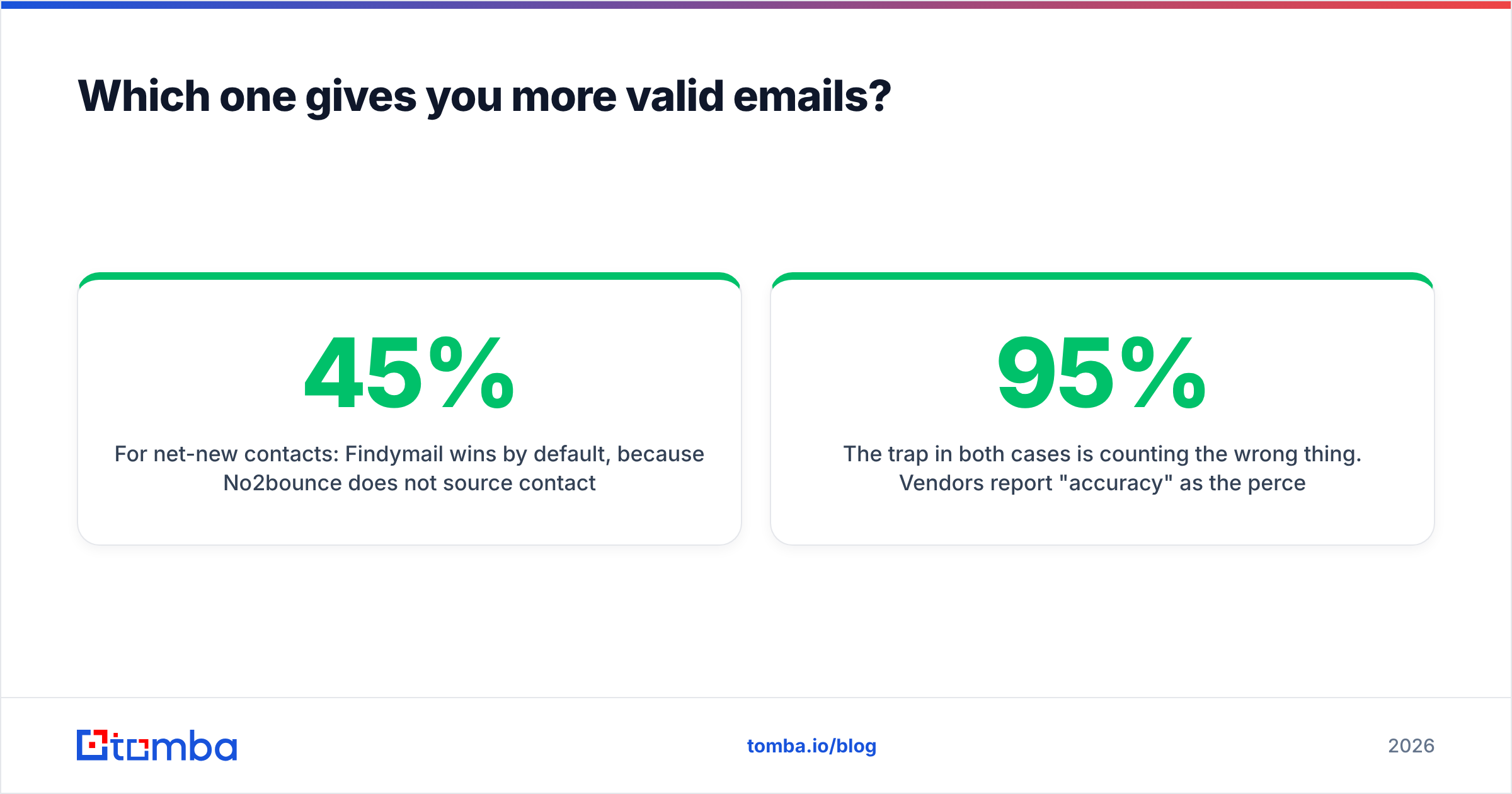
For net-new contacts: Findymail wins by default, because No2bounce does not source contacts. The relevant number is hit rate — of 1,000 prospects you feed in, how many come back with an address? Real-world hit rates for any B2B finder cluster between 45% and 80% depending on region, company size, and industry. Enterprise tech in North America is easy. Mid-market manufacturing in Southern Europe is brutal. Any vendor quoting a single global accuracy number is quoting a blended average that has nothing to do with your list.
For list hygiene: No2bounce is the specialist, and specialists tend to be better at edge cases — catch-all domains, greylisting servers, disposable domains, and accept-all Microsoft 365 tenants that lie to every SMTP probe. This is where a dedicated verifier earns its money.

The trap in both cases is counting the wrong thing. Vendors report "accuracy" as the percentage of returned emails that were valid. That number is easy to inflate: return fewer emails, and accuracy climbs. What you actually care about is valid emails per 1,000 prospects submitted — coverage multiplied by accuracy. A tool with 95% accuracy on a 40% hit rate gives you 380 usable contacts. A tool with 90% accuracy on a 70% hit rate gives you 630. The second tool "looks worse" on the marketing page and is 65% better in your pipeline.
Run this test before you commit:
- Take 200 real prospects from your actual ICP, not a demo list of Fortune 500 CEOs.
- Submit the same 200 to each tool on trial credits.
- Count returns, not claims — how many addresses came back at all?
- Verify the winners with a neutral third tool so you're not grading anyone's homework with their own answer key.
- Divide the monthly price by usable contacts. That's your real cost per lead.
How does pricing actually compare?#

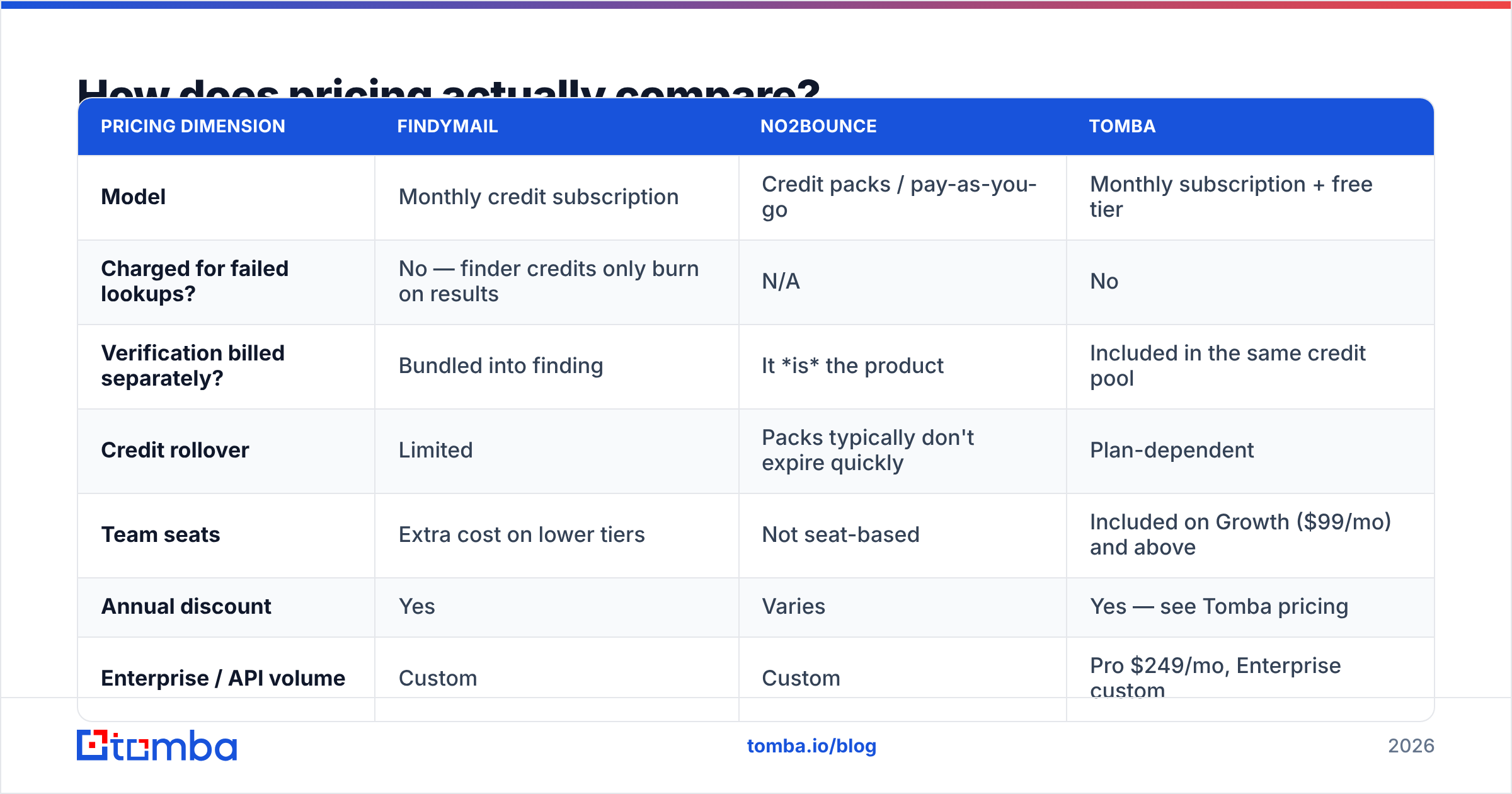
Pricing models differ enough that a straight per-month comparison misleads.
| Pricing dimension | Findymail | No2bounce | Tomba |
|---|---|---|---|
| Model | Monthly credit subscription | Credit packs / pay-as-you-go | Monthly subscription + free tier |
| Charged for failed lookups? | No — finder credits only burn on results | N/A | No |
| Verification billed separately? | Bundled into finding | It is the product | Included in the same credit pool |
| Credit rollover | Limited | Packs typically don't expire quickly | Plan-dependent |
| Team seats | Extra cost on lower tiers | Not seat-based | Included on Growth ($99/mo) and above |
| Annual discount | Yes | Varies | Yes — see Tomba pricing |
| Enterprise / API volume | Custom | Custom | Pro $249/mo, Enterprise custom |
Three things to watch in any of these contracts:
- Credit expiry. Monthly credits that reset are a hidden price increase for teams with lumpy prospecting cycles. If you build lists in two-week sprints, pay-as-you-go packs can be cheaper even at a higher unit price.
- Double-charging for verification. If you buy a finder and a verifier separately, you pay twice per contact. That's defensible when the verifier is meaningfully better. It's waste when the finder already validated the address.
- Seat pricing. Solo founders don't care. A five-SDR team on a per-seat plan can pay more in seats than in credits.
For teams cleaning a genuinely large legacy database — hundreds of thousands of rows — a dedicated verifier's pay-as-you-go pricing usually beats burning subscription credits. For teams sourcing 2,000–5,000 new contacts a month, a combined finder is almost always cheaper than two subscriptions.
Is a dedicated verifier still necessary in 2026?#
Sometimes, yes. Here's the honest breakdown of when to keep a standalone verification tool in the stack:
- Bulk legacy cleanup. Anything over ~50,000 rows of unknown-provenance data. Dedicated verifiers are built for this throughput and priced for it.
- Purchased or partner lists. If the data didn't come from your own sourcing, treat it as radioactive and verify it independently. This is also where prebuilt-database providers like BookYourData fit well — they ship verified contacts, but a second-pass check before a big send is still cheap insurance.
- Compliance-sensitive sends. When a spam complaint carries regulatory consequences, an independent verification log has audit value.
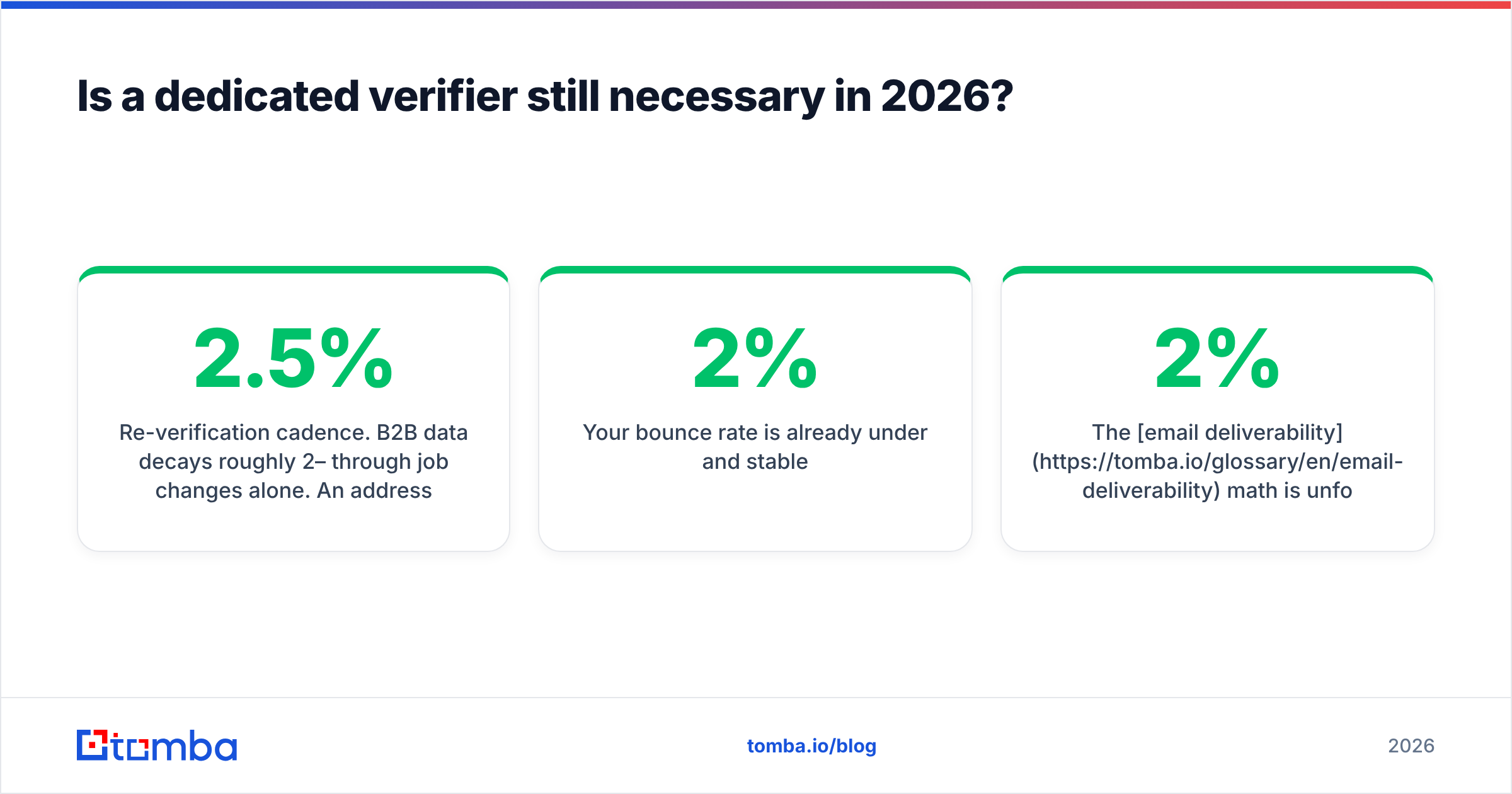
- Re-verification cadence. B2B data decays roughly 2–2.5% per month through job changes alone. An address verified in January is a coin flip by December. Re-running your CRM through verification quarterly is a real, ongoing job.
And when you don't need one:
- Your contacts were sourced this week by a finder that verifies at source.
- Your bounce rate is already under 2% and stable.
- Your list is under a few thousand rows and refreshed continuously.
The email deliverability math is unforgiving either way: most mailbox providers start throttling around a 2% hard-bounce rate, and Google and Microsoft both tightened bulk-sender requirements in the last two years. One bad send can cost you weeks of sender reputation recovery — far more than the verification credits would have.

Can one tool replace both?#
For most outbound teams, yes — and that's the practical argument against running Findymail and No2bounce side by side.
The workflow tax of two tools is real: export a CSV from the finder, upload to the verifier, wait, download, re-import to the sequencer, reconcile the rows that got mangled. Multiply by every list you build. That's an hour a week of a salaried person doing data janitorial work, plus the errors that creep in whenever humans touch spreadsheets.
A consolidated platform collapses that into one step. With Tomba, the finder returns an address that has already been validated, the email verifier runs against the same infrastructure, and both draw from the same credit balance — so you're not forecasting two budgets. The data enrichment layer fills in the rest (company, role, sometimes phone), and everything is reachable from one API key if your RevOps team would rather automate than click.
The tradeoff is honest: a generalist platform will occasionally lose a specific edge case to a specialist. A dedicated verifier will sometimes resolve a nasty catch-all domain that a bundled verifier flags as "unknown." If catch-all resolution is your bottleneck, test the catch-all finder against your problem domains specifically rather than trusting anyone's aggregate number.
Which should you choose?#
Match the tool to the actual bottleneck:
- You need net-new contacts from LinkedIn. Findymail is a legitimate choice, built for exactly that motion. So is Tomba, at a lower entry point with a free tier to test on.
- You have a huge old list and a bounce problem. No2bounce or another dedicated verifier. A finder solves nothing here.
- You need both, monthly, forever. Consolidate. Two subscriptions plus CSV shuffling is the most expensive option on this page and nobody markets it as such.
- You're building on an API. Compare rate limits, response schemas, and whether verification is a separate call. Ergonomics compound when you're making 50,000 calls a month.
- You're a solo founder or early-stage team. Start on free tiers, measure cost per usable contact, and only upgrade the tool that's actually constraining you.
Check current reviews on G2 or Capterra before you sign anything — but weight your own 200-contact test far above star ratings. Review scores measure how people felt about a tool. Your bake-off measures how many meetings it will book.
Ready to test it on your own list?#
Don't take our word for the accuracy numbers — or anyone else's. Run your ICP through the Tomba Email Finder on the free tier (25 searches a month, no card), compare the hit rate against whatever you're paying for now, and check the returned addresses with an independent verifier. If Tomba returns more usable contacts per 1,000 prospects at $49/mo Starter than your current stack does across two subscriptions, the decision makes itself. If it doesn't, you've lost twenty minutes and learned something concrete about your data.
Related guides#
Ready to find emails that actually work?
Join 150,000+ professionals who stopped guessing and started sending. Free credits on signup — no credit card required.
Get the Tomba newsletter
Practical outbound tactics and product updates — once every two weeks.
About the author