Findymail vs Noparam: Which Email Finder Wins in 2026?
Findymail and Noparam both promise verified B2B emails with near-zero bounces. We compared coverage, catch-all handling, exports, API depth and real cost per usable contact to find where each one actually earns its price.
TL;DR
- Findymail is the safer default if your prospecting starts in LinkedIn Sales Navigator and you want scraped lists that arrive already verified. Its pitch is bounce protection, and it mostly delivers.
- Noparam is a waterfall-style enrichment layer: it queries multiple data sources per contact and only bills you when something comes back. Best when you're enriching an existing list, not building one from scratch.
- Neither is cheap once you scale. Both charge per successful find, and both get expensive fast at 10k+ contacts/month.
- If you need domain search, catch-all verification, phone lookup and an API in one bill, a general-purpose finder like Tomba at $49/mo covers more ground than either.
- The real decision isn't accuracy — it's where your list comes from. Pick based on that, not on marketing claims.
What are Findymail and Noparam, actually?#
Both sell the same headline outcome — a valid work email for a person you can name — but they get there from opposite directions.
Findymail is built around list-building. You point it at a LinkedIn or Sales Navigator search, it scrapes the profiles, then finds and verifies an email for each one before it hands you the CSV. The company's whole positioning is "no bounces," and it backs that with a credit-refund policy on emails that turn out to be invalid. It also has a Chrome extension, a bulk CSV enricher, and integrations into common sequencers.
Noparam is an enrichment API and dashboard that runs a waterfall: for each contact you submit, it tries a chain of providers and pattern-inference methods in sequence until one returns a deliverable address. You get charged only when the chain succeeds. That model is attractive on paper because you're never paying for empty rows — but it also means your unit cost is unpredictable until you've run a real batch.
The practical difference in one line: Findymail builds the list, Noparam fills it in.
How do Findymail and Noparam compare feature by feature?#
Here's the head-to-head on the things that actually change your workflow. Pricing figures are the publicly listed entry points at time of writing — both vendors revise tiers, so confirm on their own pages before you commit.
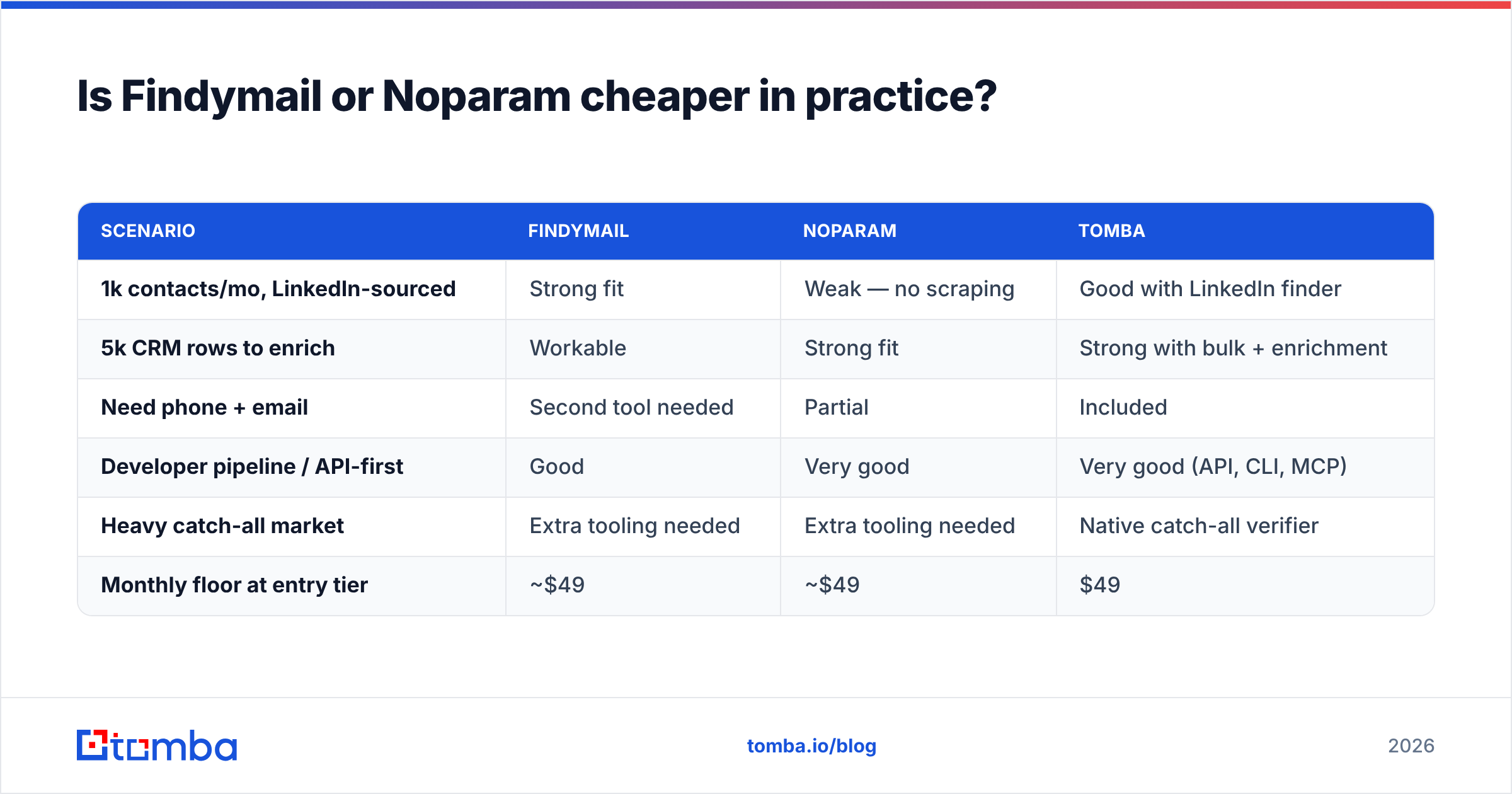
| Attribute | Findymail | Noparam | Tomba |
|---|---|---|---|
| Core model | Scrape + find + verify | Waterfall enrichment | Finder + verifier suite |
| Free tier | Limited trial credits | Trial credits | 25 searches/mo, no card |
| Entry paid plan | ~$49/mo | ~$49/mo | $49/mo (Starter) |
| Mid plan | ~$99–$199/mo | Usage-scaled | $99/mo (Growth) |
| LinkedIn / Sales Nav scraping | Yes, native | No (bring your own list) | LinkedIn finder |
| Domain search (all emails at a company) | Limited | No | Yes |
| Catch-all handling | Flags, partial resolution | Depends on source chain | Dedicated catch-all verifier |
| Phone numbers | No | Add-on / partial | Yes, phone finder + validator |
| Public API | Yes | Yes, API-first | Yes, REST + CLI + MCP |
| Billing on failures | Refund policy on bounces | Pay-per-success only | Credit returned on no-result |
| Best for | Building lists from LinkedIn | Enriching an existing CRM | Mixed sourcing + verification |
The table hides one thing worth saying out loud: Noparam's pay-per-success model is genuinely the fairest billing structure of the three when your input list is messy. If you feed it 10,000 half-broken CRM rows and only 3,100 resolve, you pay for 3,100. Findymail's credit model is closer to pay-per-attempt with a bounce refund, which is not the same thing.

Which one is more accurate?#
Accuracy claims in this category are close to meaningless without context, because every vendor benchmarks on a list that flatters its own data sources. A tool tuned on US SaaS mid-market will look brilliant on US SaaS mid-market and mediocre on German manufacturing.
What you should compare instead is three separate numbers:
- Hit rate — of the contacts you submit, how many come back with any email at all? This is where waterfall tools like Noparam usually win, because they're stacking multiple providers.
- Deliverability rate — of the emails returned, how many actually land? This is where Findymail's verify-before-delivery step earns its keep.
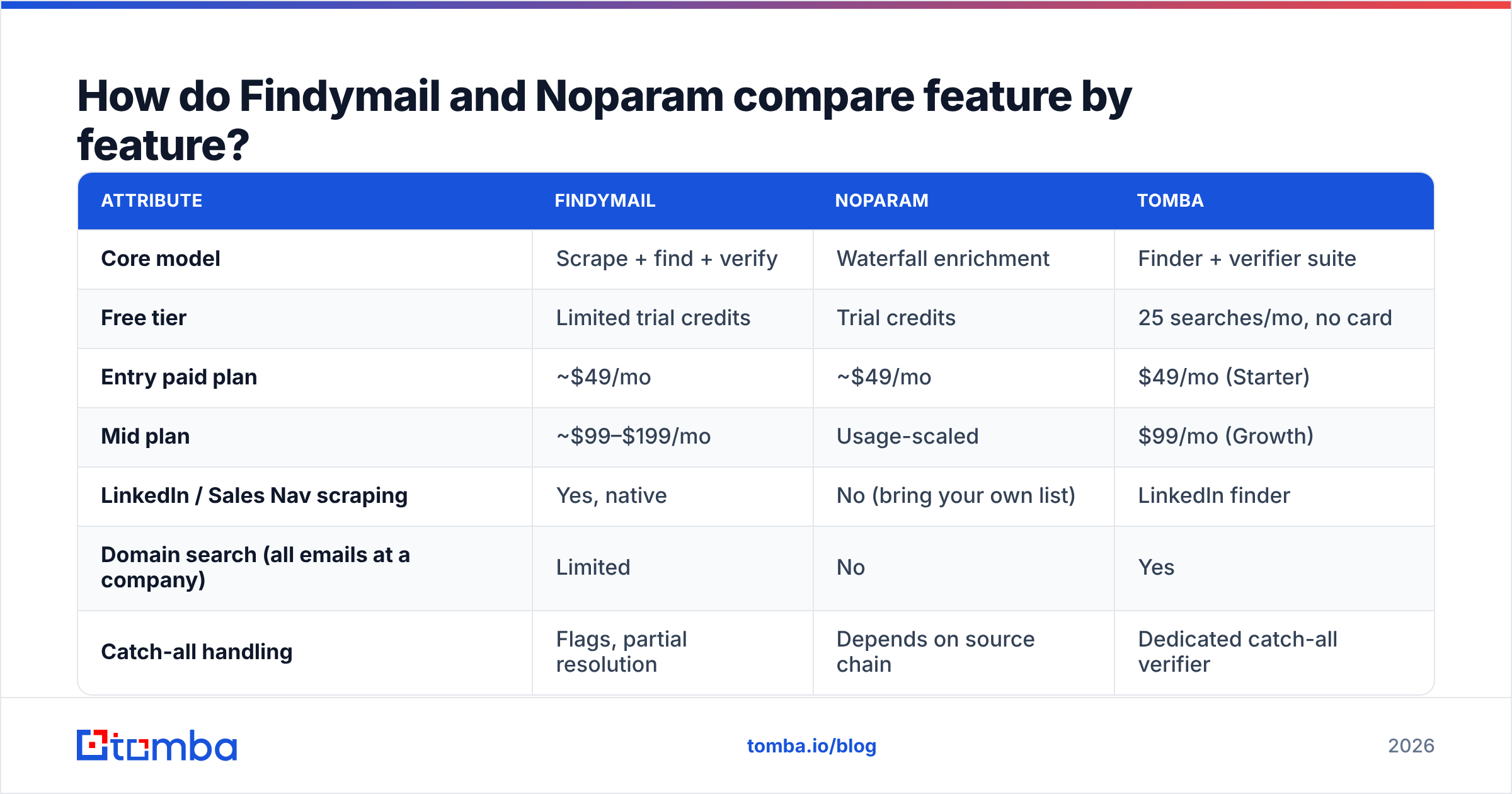
- Catch-all share — how many results sit on domains that accept everything and therefore can't be SMTP-verified? On enterprise-heavy lists this can be 20–35% of results, and it's the single biggest source of "the tool lied to me" complaints.
A tool that returns 80% hit rate with 30% catch-alls is not obviously better than one returning 62% hit rate with almost none. Run both on the same 500-row sample from your actual ICP and count all three numbers before you sign anything.

Suggested visual: side-by-side export from your own test batch — Findymail CSV vs Noparam CSV, same 500 contacts, with a column showing verification status.
Catch-alls deserve their own note. Findymail flags them and, in many cases, declines to charge you. Noparam's behaviour depends on which provider in the chain answered. If catch-all domains are a large slice of your market, budget for a separate catch-all verifier regardless of which tool you pick — treating "accepted by the server" as "real person" is how good domains get burned.
Is Findymail or Noparam cheaper in practice?#
Ask a different question: what is your cost per contact you can actually email?
Work it out like this:
- Start with the plan price, not the per-credit rate on the pricing page.
- Divide by contacts you'd realistically process per month, not the plan's ceiling.
- Multiply out your hit rate — a 55% hit rate nearly doubles your true unit cost.
- Subtract catch-alls and risky results you won't send to.
- Add the cost of every other tool the finder doesn't replace — verifier, phone data, enrichment.
That last step is where single-purpose finders get expensive. A stack of "list scraper + standalone verifier + phone provider" routinely lands north of $200/mo before you've sent a single email, and each tool brings its own credit pool that you either underuse or blow through.
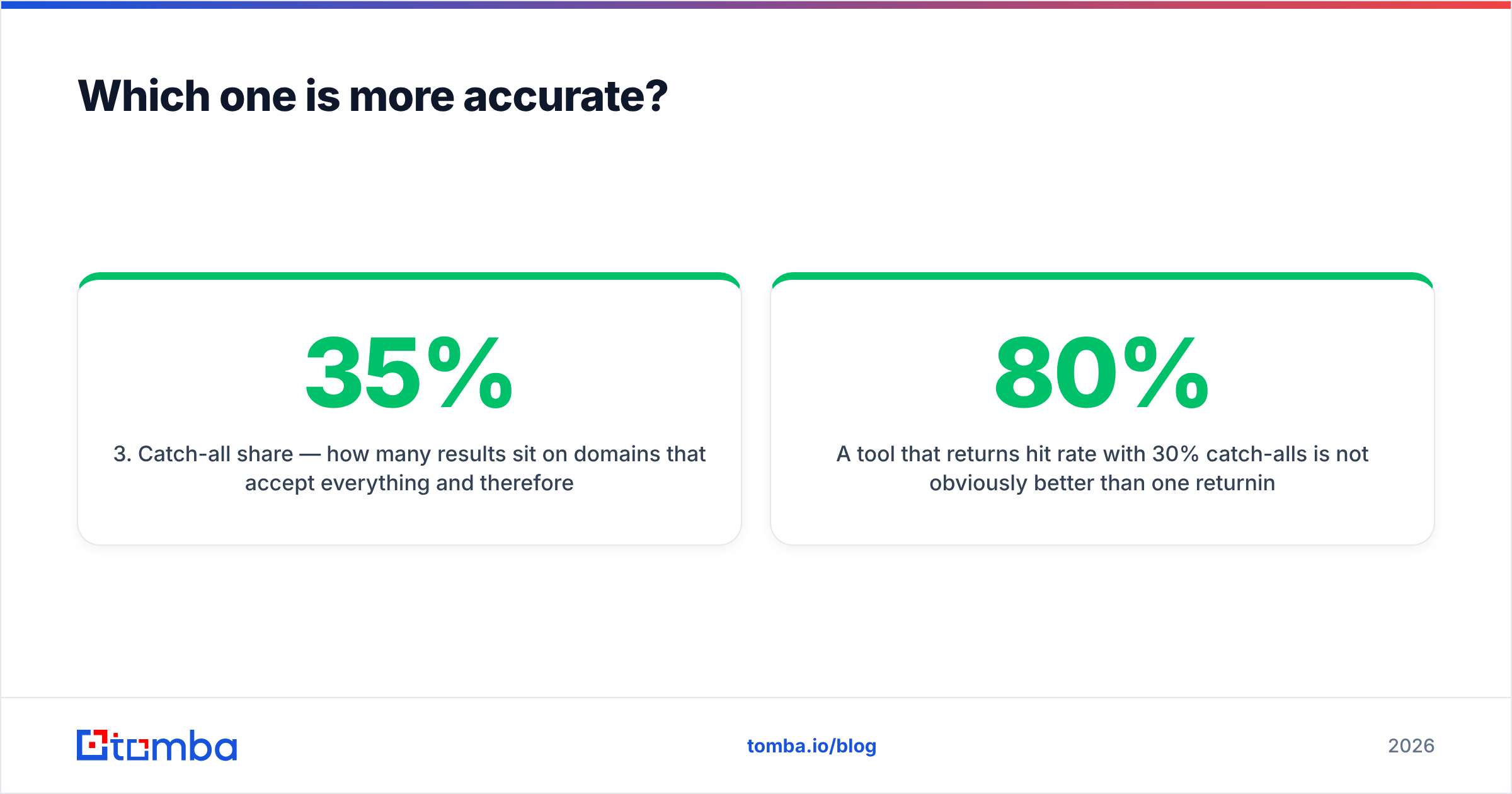
| Scenario | Findymail | Noparam | Tomba |
|---|---|---|---|
| 1k contacts/mo, LinkedIn-sourced | Strong fit | Weak — no scraping | Good with LinkedIn finder |
| 5k CRM rows to enrich | Workable | Strong fit | Strong with bulk + enrichment |
| Need phone + email | Second tool needed | Partial | Included |
| Developer pipeline / API-first | Good | Very good | Very good (API, CLI, MCP) |
| Heavy catch-all market | Extra tooling needed | Extra tooling needed | Native catch-all verifier |
| Monthly floor at entry tier | ~$49 | ~$49 | $49 |
If you're comparing against a broader platform, Tomba pricing starts free at 25 searches/mo, then $49 Starter, $99 Growth, $249 Pro. The relevant point isn't that the entry price is the same — it's that one bill covers email finder, email verifier, domain search, catch-all checks and phone lookup rather than one of them.
When should you pick Findymail?#
Choose Findymail when all of these are true:
- Your list starts in LinkedIn. Sales Navigator searches are your prospecting motion, and you want the scrape-to-verified-CSV path in one place.
- Bounce rate is your board-level metric. You'd rather get 600 clean addresses than 900 with 12% junk.
- Your team isn't technical. The extension and dashboard are approachable; nobody has to touch an API.
- Volume is moderate. Under roughly 5k contacts/month, the pricing stays sane.
Where it struggles: non-LinkedIn sourcing, phone numbers, deep firmographic enrichment, and any workflow where you want every email at a company rather than a specific named person. For that last case you want domain search, which Findymail treats as a secondary feature at best. If you've already outgrown it, the comparison worth reading next is the Findymail alternative breakdown.
When should you pick Noparam?#
Choose Noparam when:
- You already have the names. A CRM export, a conference list, a scraped dataset — you need emails attached, not people discovered.
- You want strict pay-per-success billing. No charges for rows that come back empty is a real budget advantage on low-quality inputs.
- You're building a pipeline, not clicking buttons. The API-first design suits engineering-led RevOps teams who want enrichment to run on a schedule.
- Your hit rate matters more than a single provider's opinion. Waterfalls genuinely find contacts that a single-source tool misses.
Where it struggles: it doesn't build lists. If your problem is "I don't know who to contact at these 400 companies," a waterfall enricher has nothing to enrich. You'll need a separate sourcing layer, and now you're managing two vendors and two credit pools.

What do the reviews say?#
Both tools sit in the same G2 neighbourhood, and both skew positive — which is normal for products in this category, since unhappy users churn quietly rather than write reviews. Read G2's email-finder category with two filters on: only reviews from companies your size, and only reviews from the last 12 months. Data quality in this market changes faster than review scores do.
Recurring themes worth knowing:
- Findymail — praise for low bounce rates and the Sales Navigator workflow; complaints about credit consumption on large exports and coverage outside North America and Western Europe.
- Noparam — praise for hit rate and the fairness of pay-per-success; complaints about unpredictable per-contact economics and the absence of a sourcing feature.
- Both — the same underlying industry issue: no email finder has good coverage of every geography, and none of them will tell you upfront where their coverage is thin.

How should you actually run the comparison?#
Don't take anyone's word for it — including this post's. Run a controlled test. It takes an afternoon and it's the only evidence that matters for your ICP.
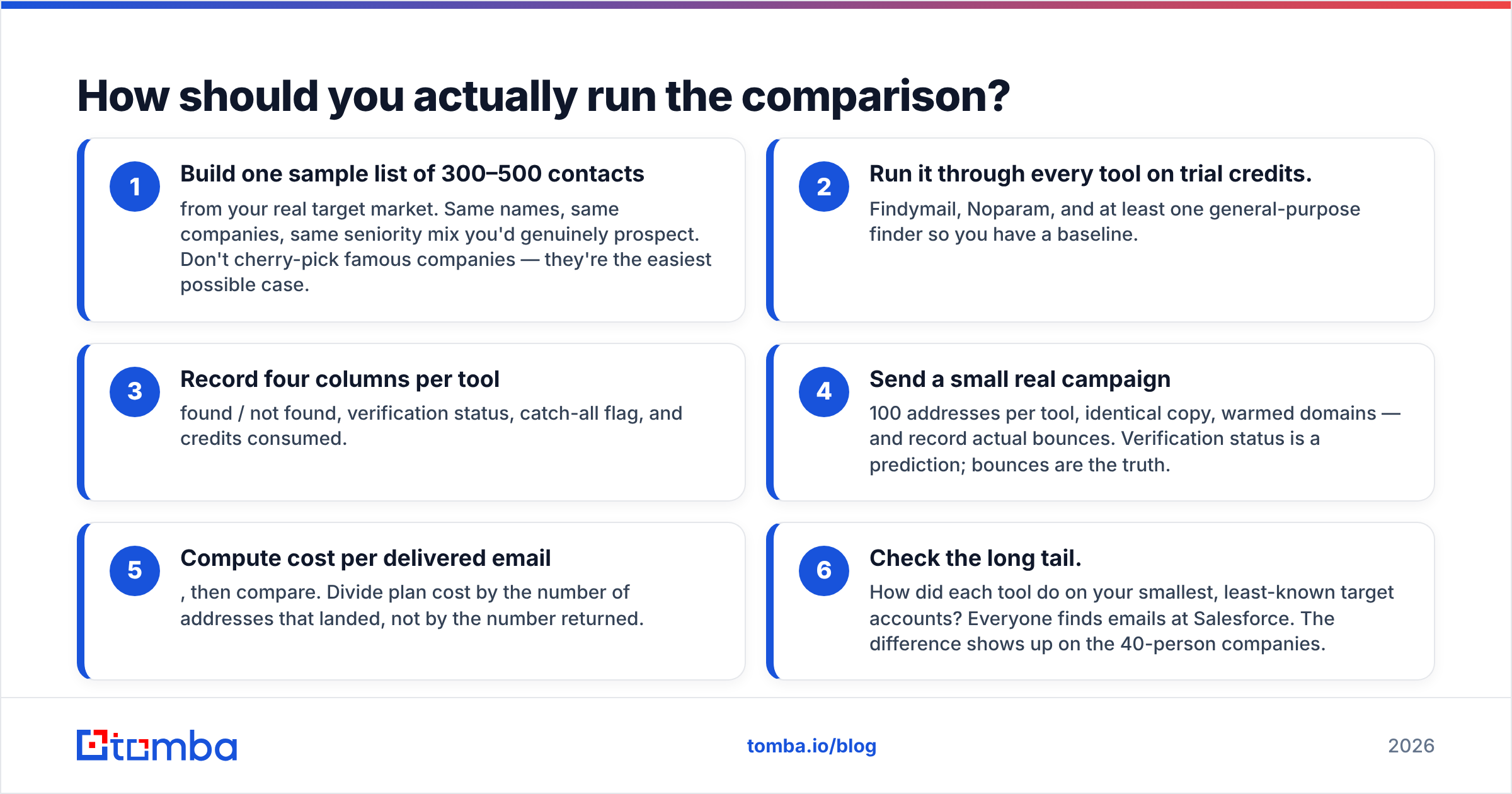
- Build one sample list of 300–500 contacts from your real target market. Same names, same companies, same seniority mix you'd genuinely prospect. Don't cherry-pick famous companies — they're the easiest possible case.
- Run it through every tool on trial credits. Findymail, Noparam, and at least one general-purpose finder so you have a baseline.
- Record four columns per tool: found / not found, verification status, catch-all flag, and credits consumed.
- Send a small real campaign — 100 addresses per tool, identical copy, warmed domains — and record actual bounces. Verification status is a prediction; bounces are the truth.
- Compute cost per delivered email, then compare. Divide plan cost by the number of addresses that landed, not by the number returned.
- Check the long tail. How did each tool do on your smallest, least-known target accounts? Everyone finds emails at Salesforce. The difference shows up on the 40-person companies.
That fourth step matters more than people expect. A free email checker run over each export will catch obvious syntax and MX problems before you spend send reputation testing them, and it costs nothing.
Which one wins?#
There's no single winner, and any post that declares one is selling something.
- LinkedIn-first sourcing, non-technical team, moderate volume → Findymail.
- Existing list, engineering-led enrichment pipeline, unpredictable input quality → Noparam.
- Mixed sourcing, catch-all-heavy market, or you need phones and enrichment on one bill → a broader platform beats both.
The mistake most teams make isn't picking the wrong tool. It's picking a narrow tool and then quietly bolting on three more to cover its gaps, until the "cheap" $49 finder is the smallest line item in a $300 stack. Before you commit, list every data task your outbound motion needs — find, verify, catch-all check, phone, enrich, dedupe — and check which of them the tool you're evaluating actually covers.
If that list is long, start with something that covers most of it from day one. Tomba's Email Finder gives you 25 free searches per month with no card, and the same account includes verification, domain search, catch-all checks and phone lookup — so you can run the head-to-head test above against Findymail and Noparam on your own data before deciding where your budget goes. Run the 500-contact sample, count the bounces, and let the numbers pick the winner.
Related guides#
Ready to find emails that actually work?
Join 150,000+ professionals who stopped guessing and started sending. Free credits on signup — no credit card required.
Get the Tomba newsletter
Practical outbound tactics and product updates — once every two weeks.
About the author