Findymail vs Ocean.io (2026): Which B2B Data Tool Wins?
Findymail finds verified emails one contact at a time. Ocean.io builds lookalike account lists. They solve different halves of the same problem — here is which one your team actually needs, and what it costs.
TL;DR — Findymail vs Ocean.io
- Findymail vs Ocean.io is not a fair fight. They do different jobs. Findymail finds and verifies one contact at a time. Ocean.io builds lookalike account lists. Buy one instead of the other and you own half a workflow.
- Findymail wins on cost per verified email, bounce protection, and CRM enrichment. Ocean.io wins on net-new account lists built from a seed customer set.
- Ocean.io pricing is quote-based, annual, and per seat. Findymail is self-serve and starts near $49/mo. The gap is often 5-10x.
- If you already know who to target, neither tool is the cheapest path. A finder plus verifier stack (Tomba starts at $49/mo, free tier included) covers it for less.
- Read the credit math before you sign. Both vendors count credits their own way. That is where the real cost hides.
Findymail vs Ocean.io: what does each tool do?#
They sit at opposite ends of the prospecting pipeline. Mixing them up is the costliest mistake in this comparison.
- Findymail is a contact-level email finder. Give it a name and a company, a LinkedIn URL, or a Sales Navigator export. It returns a work email it has already checked. Its pitch is bounce protection: it would rather return nothing than a guess.
- Ocean.io is an account-level search engine. Give it your best customers. It returns similar companies, filtered by industry, tech, headcount, geography, and growth signals. Contacts are a side feature.
- Findymail's unit of work is a person. One credit, one email, one verdict. The result lands in a CSV, a CRM, or a sequencer.
- Ocean.io's unit of work is a company. The output is a target account list for ABM, territory planning, or TAM sizing.
- The overlap is thin. Ocean.io hands you contacts at the accounts it finds. Findymail bulk-processes a domain. Each does the other's job badly.
Most "Findymail vs Ocean.io" searches come from a buyer with one budget line and two gaps. So the honest answer depends on your gap: who to target, or how to reach them.
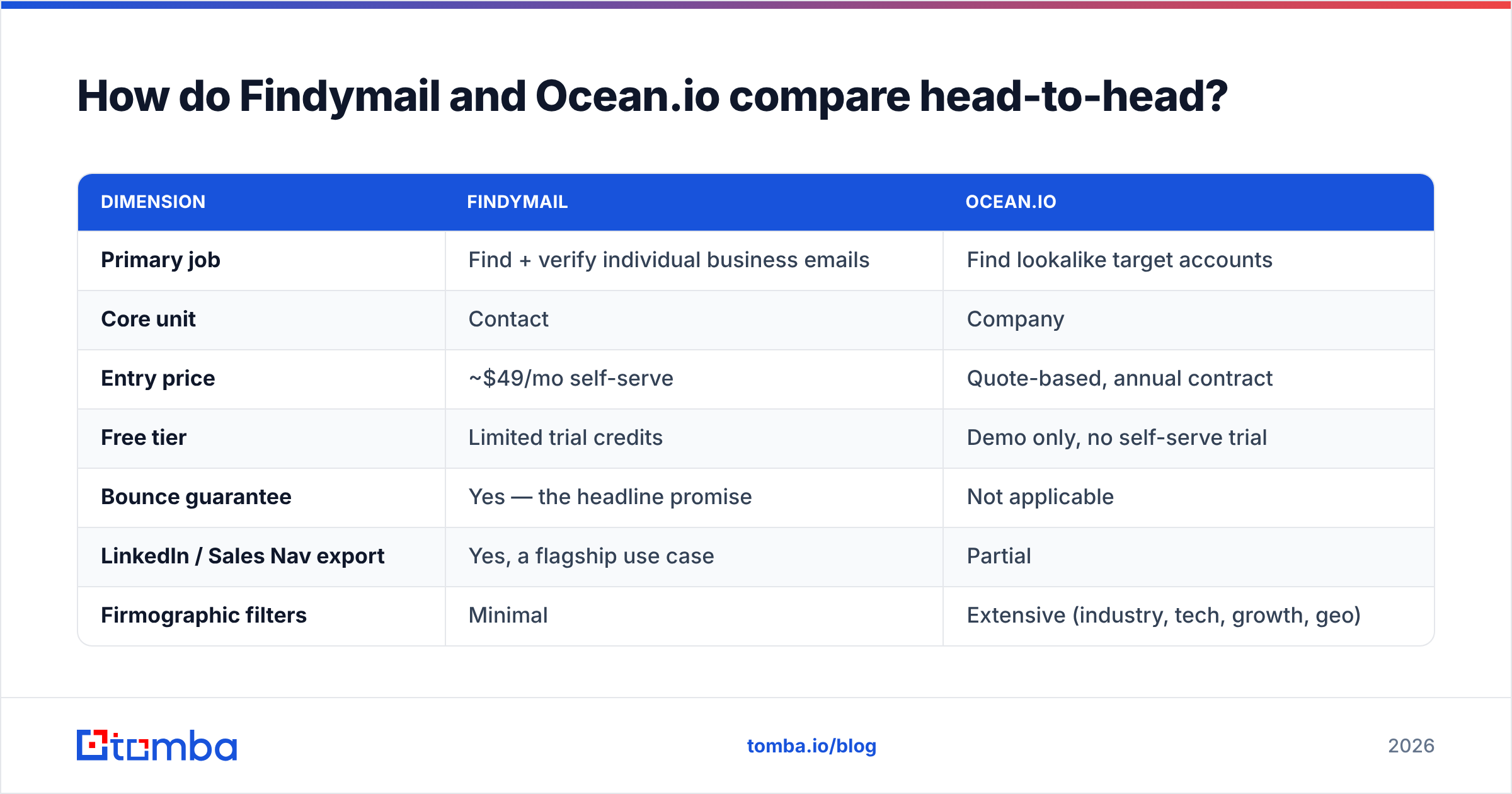
Findymail vs Ocean.io: the head-to-head table#
Here is the side-by-side, based on each vendor's public docs and what buyers report on review sites.
| Dimension | Findymail | Ocean.io |
|---|---|---|
| Primary job | Find + verify individual business emails | Find lookalike target accounts |
| Core unit | Contact | Company |
| Entry price | ~$49/mo self-serve | Quote-based, annual contract |
| Free tier | Limited trial credits | Demo only, no self-serve trial |
| Bounce guarantee | Yes — the headline promise | Not applicable |
| LinkedIn / Sales Nav export | Yes, a flagship use case | Partial |
| Firmographic filters | Minimal | Extensive (industry, tech, growth, geo) |
| Phone numbers | No | Limited, via partners |
| API access | Yes | Yes, on higher tiers |
| Typical buyer | SDR, founder, agency | RevOps, ABM marketer, enterprise SDR lead |
| Contract flexibility | Monthly, cancel anytime | Annual, per-seat |
The pattern is clear. Findymail is a tool you swipe a card for on Monday and use on Tuesday. Ocean.io is a procurement conversation: a demo, a pilot, and a seat count.

Which one actually finds more valid emails?#
Findymail, and it is not close. But that is only because Ocean.io is not trying to win that contest.
Findymail is built on one promise: it will not charge you for a result it cannot back. If it cannot confirm the mailbox, it returns nothing and keeps the credit. That is a good design choice. It is why agencies with strict bounce targets stay loyal.
The tradeoff is coverage. A finder that refuses to guess returns blanks on part of any list: catch-all domains, small firms with no web footprint, and regions with thin data. You get a clean list that is shorter than you hoped.

Ocean.io's contact data sits on top of a company graph. It is fine for spotting who runs which function at a target account. It is not built to be the last step before a send. Treat it that way and you end up with 8% bounce rates and a burned sending domain.
If your workflow is "list in, sends out," use two tools. Use a finder for discovery. Then use a separate email verifier as a gate before anything reaches your sequencer. That second pass catches role accounts, disposables, and the catch-alls that finders quietly pass through. If catch-alls are a big share of your ICP, common in enterprise and European mid-market, a dedicated catch-all verifier will help deliverability more than switching finders.
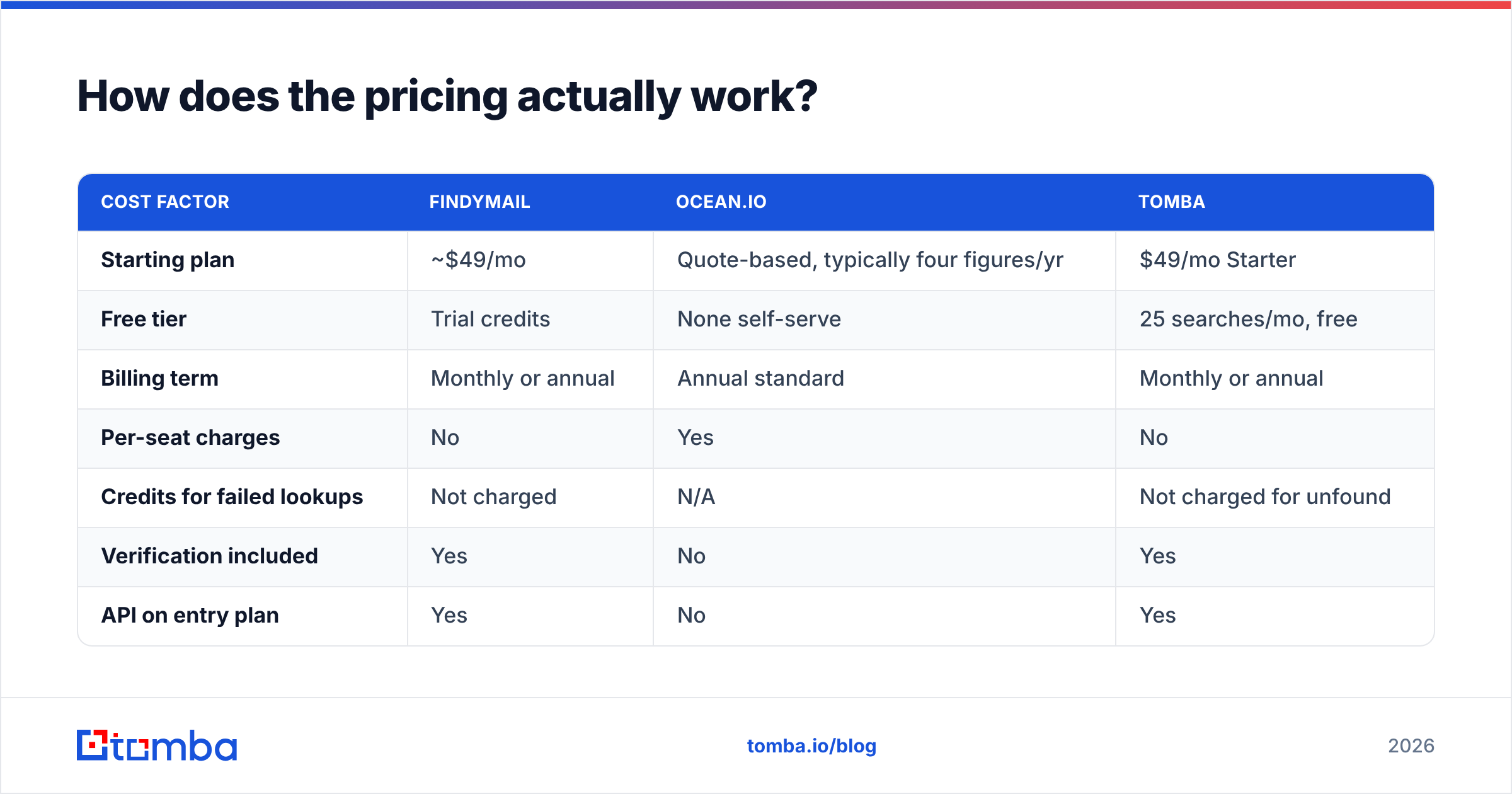
Findymail vs Ocean.io pricing: how does it work?#
Here the two products stop being comparable in any tidy way.
| Cost factor | Findymail | Ocean.io | Tomba |
|---|---|---|---|
| Starting plan | ~$49/mo | Quote-based, typically four figures/yr | $49/mo Starter |
| Free tier | Trial credits | None self-serve | 25 searches/mo, free |
| Billing term | Monthly or annual | Annual standard | Monthly or annual |
| Per-seat charges | No | Yes | No |
| Credits for failed lookups | Not charged | N/A | Not charged for unfound |
| Verification included | Yes | No | Yes |
| API on entry plan | Yes | No | Yes |
| Mid tier | ~$99/mo | Custom | Growth $99/mo |
| Scale tier | ~$199-249/mo | Custom | Pro $249/mo |
Three things to check before you sign either contract:
- Ask what counts as a credit. Some vendors charge for a search. Some charge for a returned result. Some charge per enriched field. A "10,000 credit" plan can mean 10,000 emails or 3,000.
- Ask about seat minimums. Per-seat pricing is the quiet multiplier on enterprise data tools. A $6,000 platform becomes a $24,000 platform once four people need logins.
- Ask about rollover and overage. Credits that expire each month are a price increase in disguise. Overage rates at 3x the plan rate are worse.
Compare that with transparent Tomba pricing. Tiers are published, seats are not metered, and unfound searches do not burn credits. Predictable billing is not a glamorous feature. It is the one RevOps teams miss most.
Who should pick Findymail?#
Pick Findymail if all of these are true:
- You already know your target accounts, from a CRM, a Sales Navigator search, or an old list.
- Bounce rate is a contract or reputation risk for you, as it is for agencies and high-volume teams.
- You want to be productive within an hour, with no procurement cycle.
- Your team is under ten people and per-seat pricing would hurt.
Findymail is a good, focused product. Its weakness is scope. It does not build lists, it has no phone numbers, and its firmographic filters are thin. It assumes you arrive with a target list in hand. See how it compares with broader stacks in our Findymail alternative breakdown.
Who should pick Ocean.io?#
Pick Ocean.io if all of these are true:
- Your problem is discovery, not contact data. You do not know which 2,000 companies to chase.
- You have a seed set of closed-won accounts clean enough to train a lookalike model.
- You run ABM or territory planning, where account choice compounds over quarters.
- You have budget for an annual data contract and the staff to run it.
Ocean.io's lookalike search is useful when your ICP is fuzzy and your win data is clean. Teams get burned when they buy it to fix a pipeline problem that is really a messaging or deliverability problem. A better account list will not rescue a 0.4% reply rate.

Is there a better option than either for outbound teams?#
For most outbound teams under 100 people: yes. It is a stack, not a single tool.
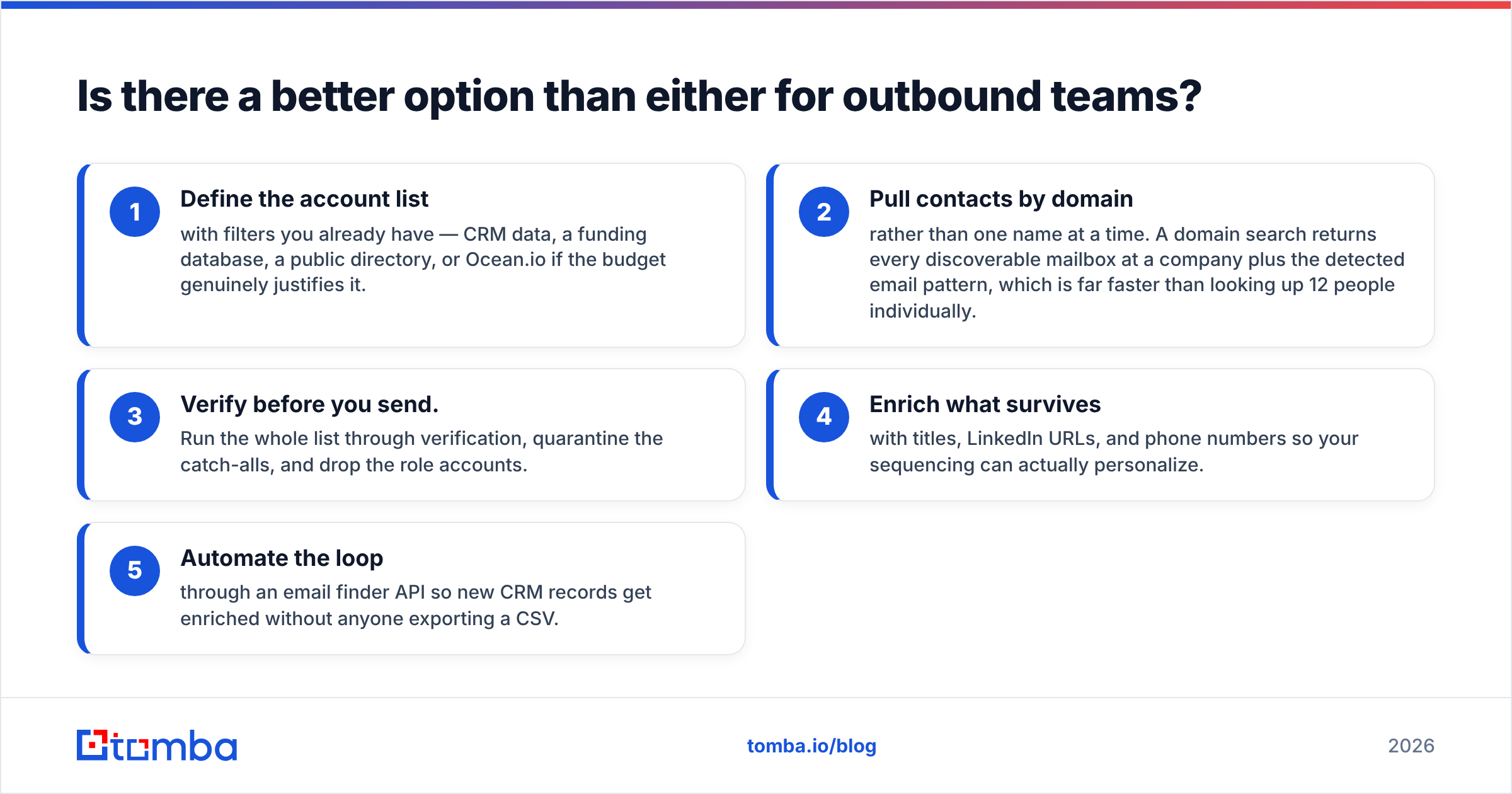
The workflow looks like this:
- Define the account list with filters you already have: CRM data, a funding database, a public directory, or Ocean.io if the budget truly justifies it.
- Pull contacts by domain instead of one name at a time. A domain search returns every mailbox it can find at a company, plus the email pattern. That beats looking up 12 people by hand.
- Verify before you send. Run the list through verification, hold the catch-alls, and drop the role accounts.
- Enrich what survives with titles, LinkedIn URLs, and phone numbers so your sequences can personalize.
- Automate the loop with an email finder API so new CRM records enrich themselves.

That stack costs a fraction of an annual account-intelligence contract. It also covers the part of the pipeline that converts. Account lists are cheap to build badly and costly to build well. Reachable, verified contacts are the scarce input.
Two caveats. First, no vendor's accuracy claim survives your own ICP. A tool that hits 95% on US SaaS may hit 60% on German manufacturing. Run a 200-row bake-off with your own list first. Second, review-site scores like those on G2 favor whoever ran the last review campaign. Read the 3-star reviews, not the average.
What should you test before you commit?#
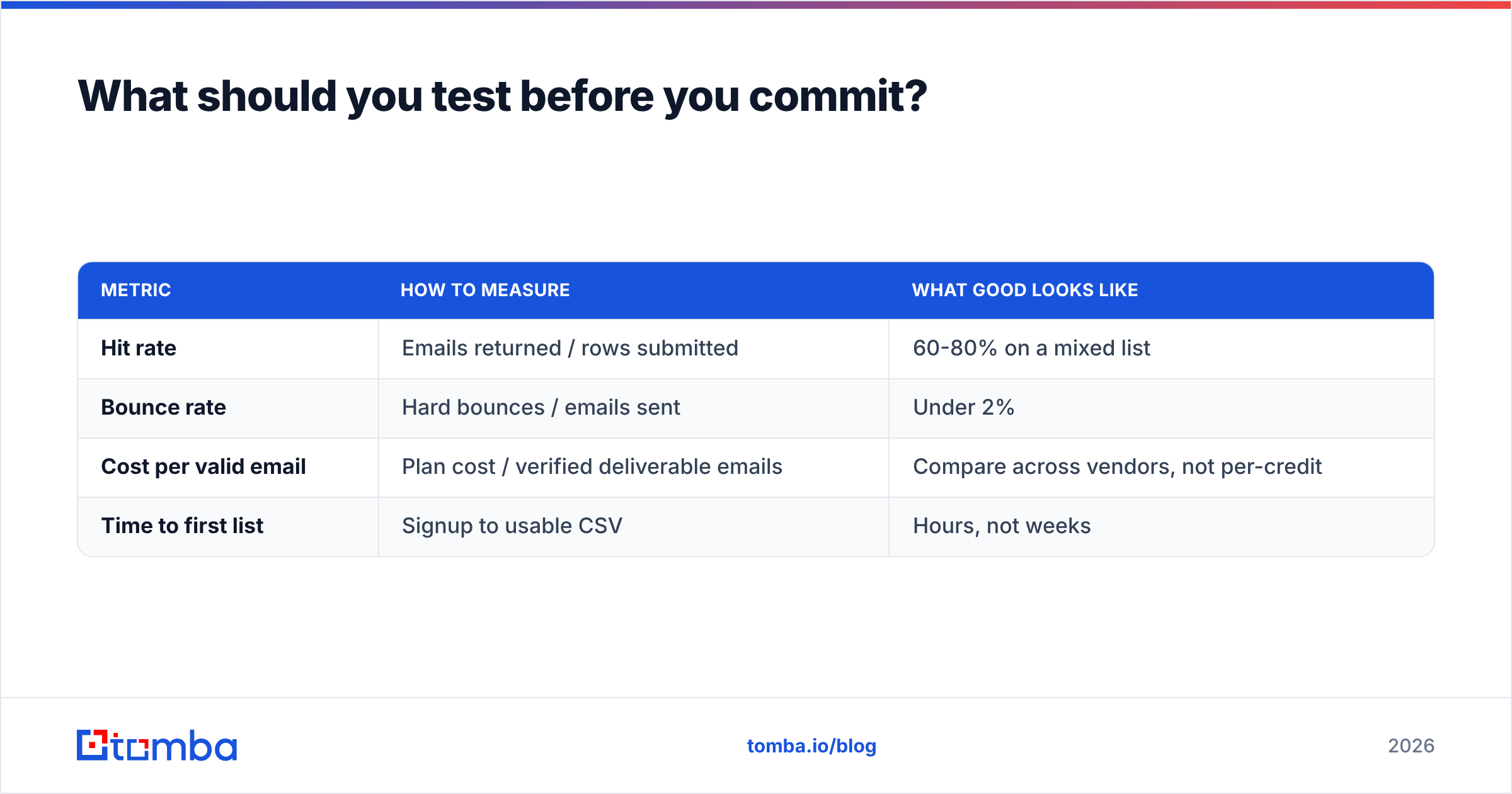
Run the same 200 contacts through every tool on your shortlist. Record four numbers.
| Metric | How to measure | What good looks like |
|---|---|---|
| Hit rate | Emails returned / rows submitted | 60-80% on a mixed list |
| Bounce rate | Hard bounces / emails sent | Under 2% |
| Cost per valid email | Plan cost / verified deliverable emails | Compare across vendors, not per-credit |
| Time to first list | Signup to usable CSV | Hours, not weeks |
Cost per valid email is the only number that matters. A cheap credit that returns a guess costs more than a pricey credit that returns a real mailbox. Bounces cost you domain reputation, and you cannot buy that back next month.
Both vendors publish their own claims. Check Findymail and Ocean.io directly rather than trusting third-party summaries, including this one. Vendor docs change faster than blog posts.
Findymail vs Ocean.io: the verdict#
If you must pick one: Findymail if you are an SDR, founder, or agency who needs reachable contacts this week. Ocean.io if you lead RevOps or ABM, your real gap is account choice, and you have the budget and process to run a lookalike engine. They are not substitutes. Any Findymail vs Ocean.io comparison that names a flat winner is not paying attention.
If your honest answer is "I need verified emails at scale, with no per-seat contract," start with the Tomba Email Finder. The free tier gives you 25 searches a month for your own bake-off. Starter is $49/mo, and verification is built in, not bolted on. So the emails you export are the emails you can send. Run your 200-row test and let cost per valid email decide.
Related guides#
Ready to find emails that actually work?
Join 150,000+ professionals who stopped guessing and started sending. Free credits on signup — no credit card required.
Get the Tomba newsletter
Practical outbound tactics and product updates — once every two weeks.
About the author