Findymail vs Pipileads (2026): Which Email Finder Wins?
Findymail and Pipileads both promise verified B2B emails, but they win on different jobs. Here is an honest breakdown of accuracy, credits, exports, API access, and the cases where a third option beats both.
TL;DR
- Findymail is the more established of the two: strong LinkedIn and Sales Navigator export, a bounce-refund policy, and verification baked into every lookup. It is built for SDRs who live inside LinkedIn.
- Pipileads is the cheaper, lighter option with a Chrome extension and a domain-based lookup flow. It suits solo founders and small agencies doing low-volume prospecting.
- Neither tool wins on raw coverage across every region and company size. Both leave gaps on non-US domains, small companies, and catch-all servers.
- If you need an API, bulk processing, phone data, and catch-all resolution in one place, a broader platform like Tomba is usually the better economic fit at the same monthly spend.
- Verify pricing on each vendor's own page before you buy. Credit definitions and plan names in this category change several times a year.
What are Findymail and Pipileads?#
Both tools answer the same question: given a person and a company, what is that person's work email? They differ in how far they take it.
Findymail launched as a reaction to a specific complaint — email finders that return addresses which bounce. Its pitch is verified-only output. If a lookup can't be confirmed, you aren't charged a credit, and if a delivered address bounces anyway, the vendor's policy is to refund the credit. It leans heavily on LinkedIn workflows: install the extension, open a Sales Navigator search, export the list, get emails attached.
Pipileads is a smaller, newer entrant positioned on price. It bundles an email finder, a verifier, and a browser extension into a single low-cost subscription, with domain search for pulling every public address at a company. The value proposition is straightforward: fewer features, lower monthly cost, no annual lock-in required.
The practical difference is scope. Findymail is a focused prospecting tool with a quality guarantee. Pipileads is a budget utility. Neither is a full data platform with enrichment, phone numbers, and a production API — which matters if your outbound is automated rather than manual.

How does an email finder actually find an address?#
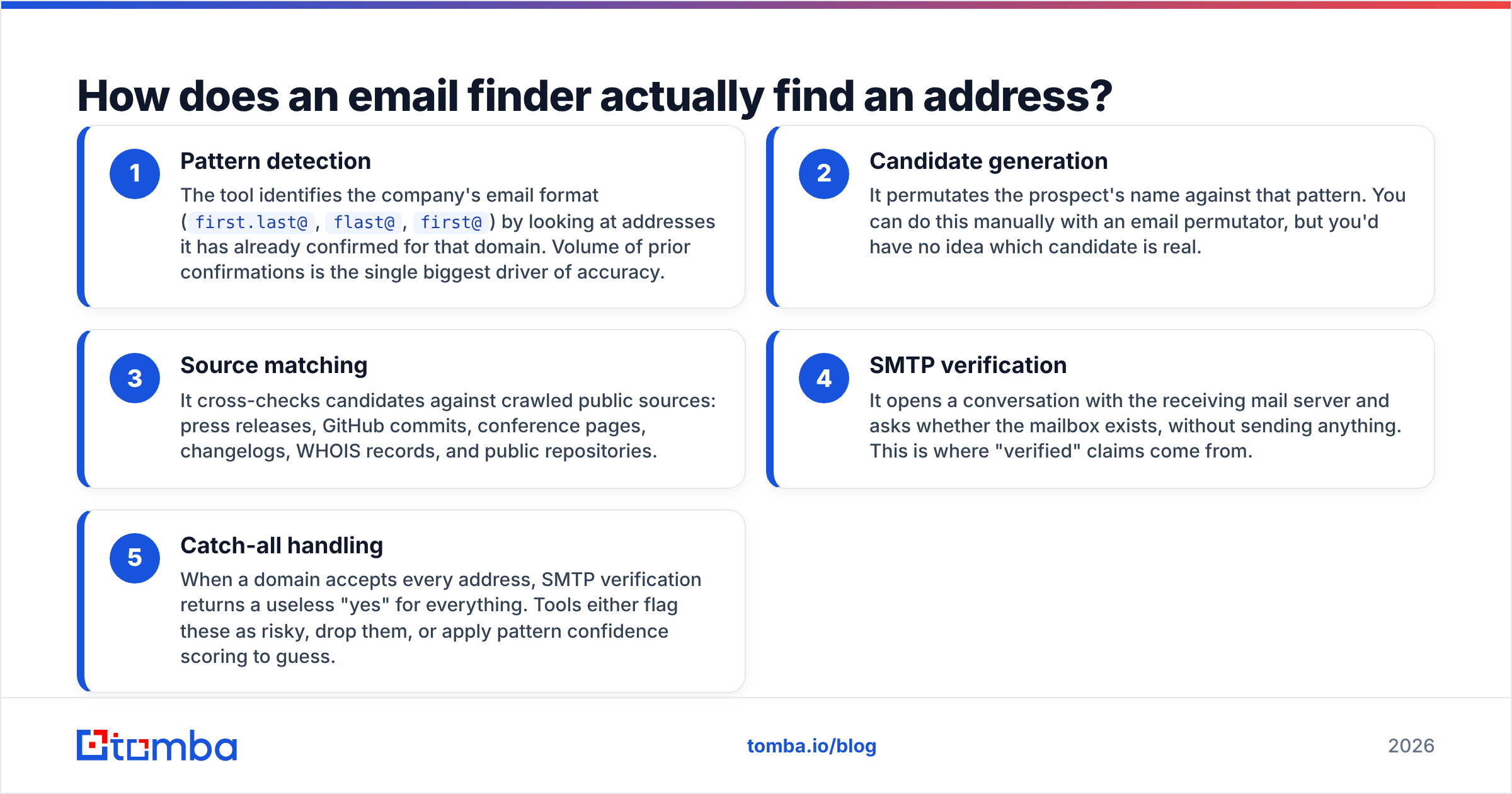
Understanding the mechanism explains why two tools return different results for the same prospect. Every email finder in this category runs some version of these five steps:
- Pattern detection — The tool identifies the company's email format (
first.last@,flast@,first@) by looking at addresses it has already confirmed for that domain. Volume of prior confirmations is the single biggest driver of accuracy. - Candidate generation — It permutates the prospect's name against that pattern. You can do this manually with an email permutator, but you'd have no idea which candidate is real.
- Source matching — It cross-checks candidates against crawled public sources: press releases, GitHub commits, conference pages, changelogs, WHOIS records, and public repositories.
- SMTP verification — It opens a conversation with the receiving mail server and asks whether the mailbox exists, without sending anything. This is where "verified" claims come from.
- Catch-all handling — When a domain accepts every address, SMTP verification returns a useless "yes" for everything. Tools either flag these as risky, drop them, or apply pattern confidence scoring to guess.
Step 5 is where the three tools genuinely diverge. Findymail tends to withhold catch-all results rather than charge you for an unverifiable address. Pipileads returns them flagged. Tomba runs a dedicated catch-all verifier that resolves a meaningful share of those domains instead of writing them off — which matters because catch-all configurations are common at mid-market and enterprise companies.

Which tool is more accurate?#
Accuracy claims in this category are close to meaningless without definitions. A vendor advertising "99% accuracy" is usually describing the subset of lookups it chose to return, not the share of your list it can actually find. Two numbers matter, and they trade off against each other:
- Hit rate — the percentage of your input list the tool returns an address for.
- Bounce rate — the percentage of those returned addresses that fail on send.
A tool can hit near-zero bounces by refusing to answer 60% of your list. That is Findymail's design choice, and it is a defensible one: your sender reputation stays intact, and you don't pay for garbage. The cost is coverage. If you upload 1,000 prospects and get 400 addresses back, you still need a second source for the other 600.
Pipileads is generally the more permissive of the two — higher raw hit rate, more risky and catch-all results in the output. That's workable if you run everything through a separate email verifier before sending, and dangerous if you don't.
In practice, run your own test. Take 100 prospects you already have confirmed emails for, blind them, and run the list through each trial. Score hit rate and correctness yourself. Vendor benchmarks — including any you find on this blog — are directional at best; your ICP is not the benchmark's ICP.
How do Findymail, Pipileads, and Tomba compare on features and price?#
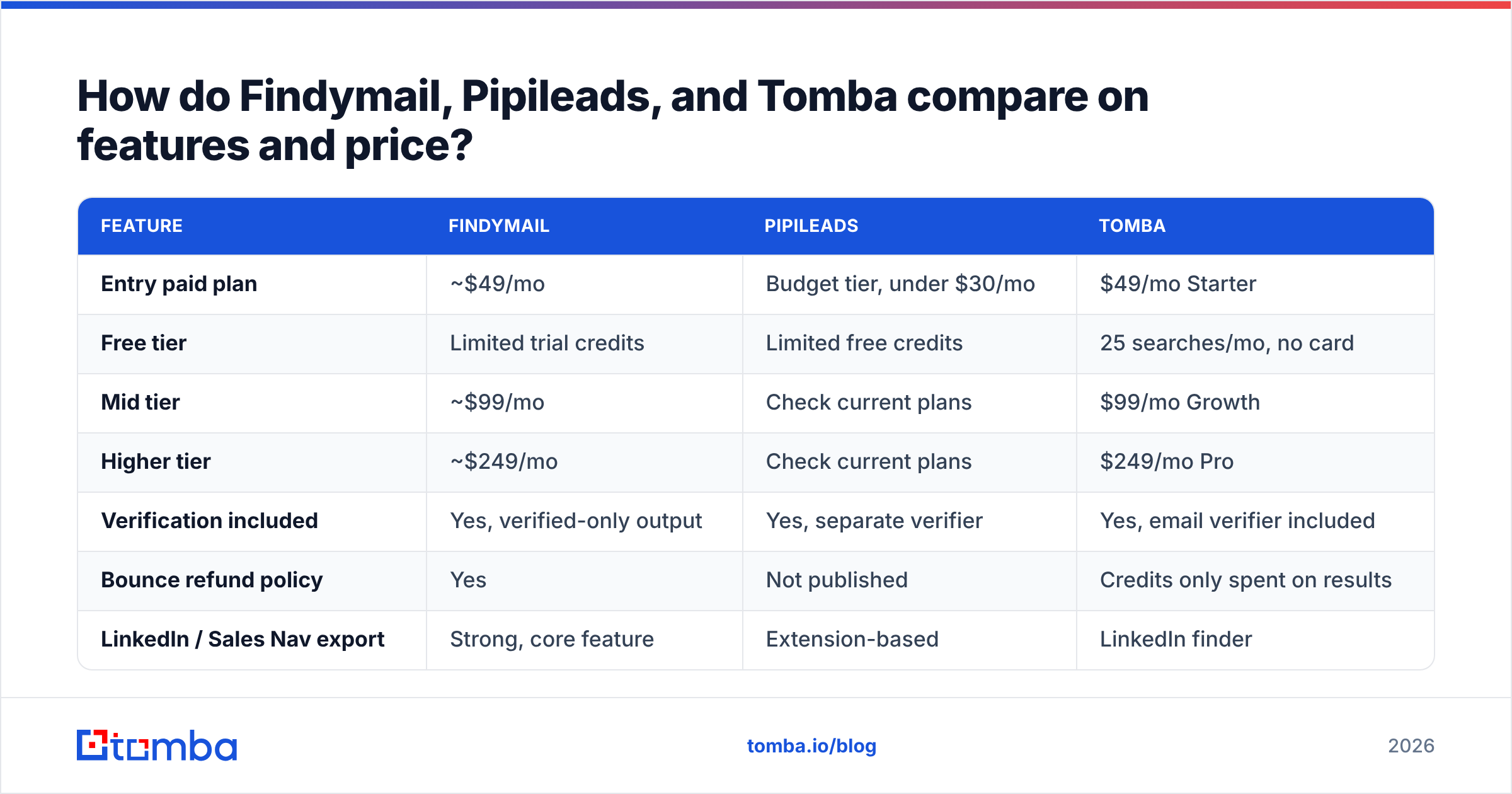
Pricing below reflects each vendor's published entry tiers at the time of writing. Plan names and credit allowances in this category change frequently, so confirm on the vendor's own pricing page before you commit.
| Feature | Findymail | Pipileads | Tomba |
|---|---|---|---|
| Entry paid plan | ~$49/mo | Budget tier, under $30/mo | $49/mo Starter |
| Free tier | Limited trial credits | Limited free credits | 25 searches/mo, no card |
| Mid tier | ~$99/mo | Check current plans | $99/mo Growth |
| Higher tier | ~$249/mo | Check current plans | $249/mo Pro |
| Verification included | Yes, verified-only output | Yes, separate verifier | Yes, email verifier included |
| Bounce refund policy | Yes | Not published | Credits only spent on results |
| LinkedIn / Sales Nav export | Strong, core feature | Extension-based | LinkedIn finder |
| Domain search | Yes | Yes | Yes, with department filters |
| Catch-all resolution | Conservative, often withheld | Returned as risky | Dedicated catch-all verifier |
| Phone numbers | No | No | Yes, phone finder and validator |
| Public REST API | Yes | Limited | Yes, documented Tomba API |
| Bulk CSV processing | Yes | Yes | Yes, bulk finder and verifier |
| Spreadsheet add-ons | Via integrations | Limited | Google Sheets, Excel, Airtable |
| Best fit | LinkedIn-first SDRs | Solo founders, tight budgets | Teams needing API + breadth |

The headline reading: Findymail and Tomba sit at the same $49 entry point, and Pipileads undercuts both. What you get for the extra spend at the $49 tier is breadth — phone data, catch-all resolution, spreadsheet add-ons, and an API you can build on. If your entire workflow is "export a Sales Navigator list, get emails, paste into Instantly," Findymail's narrower scope is not a drawback. If anything touches automation, it becomes one quickly.

Which tool fits your workflow?#
Pick based on how your prospecting actually runs, not on feature counts.
Choose Findymail if: LinkedIn Sales Navigator is your list-building surface, you send from a small number of domains where deliverability is fragile, and you'd rather find 400 clean addresses than 700 mixed ones. The bounce guarantee has real operational value — it removes an entire category of arguments between the SDR team and whoever owns sender reputation.
Choose Pipileads if: you're doing under a few hundred lookups a month, you're price-sensitive, and you already run a separate verification step. It's a reasonable first tool for a founder validating a market who doesn't want a $50+ monthly line item.
Choose neither if: your outbound is programmatic. The moment you're enriching signups on form submission, refreshing a CRM nightly, or running lookups inside a workflow engine, you need documented API rate limits, webhook-friendly bulk endpoints, and predictable credit accounting. That's a different product category. Tomba's bulk email finder and API sit in that bracket, as do enterprise data platforms at considerably higher price points.
Choose two tools if: you're running high volume with a hard coverage requirement. Waterfall enrichment — hitting a primary provider, then falling back to a second for misses — routinely lifts hit rate 15 to 30 points over any single source. It costs more per contact but converts a "we can't reach this segment" problem into a line item.
Where does each tool fall short?#
Honest limitations, because every review that only lists strengths is a sales page.
Findymail's gaps. Coverage outside North America and Western Europe thins out noticeably. Small companies — under roughly 20 employees, without a public web presence generating crawlable addresses — are hit or miss. Because it withholds unverifiable results, your hit rate on genuinely hard lists can look disappointing next to more permissive tools, and the credit-refund policy doesn't help you when the answer is simply "not found." There is no phone data, so if your sequence includes calls you need a second vendor.
Pipileads' gaps. Less public track record, a thinner review footprint on sites like G2, and less transparency about data sourcing. Returning risky and catch-all addresses without strong flagging pushes verification cost onto you. The extension-first design means bulk and programmatic workflows are secondary. For a solo operator that's fine; for a team of five SDRs it becomes a bottleneck within a quarter.
Tomba's gaps, for balance. It is a data and verification platform, not a sequencer. There is no built-in sending, no inbox rotation, no warmup. You'll pair it with a sending tool. And like every provider in this space, coverage on very small companies and personal-domain contacts is imperfect — anyone claiming otherwise is selling you something.
What should you check before you commit?#
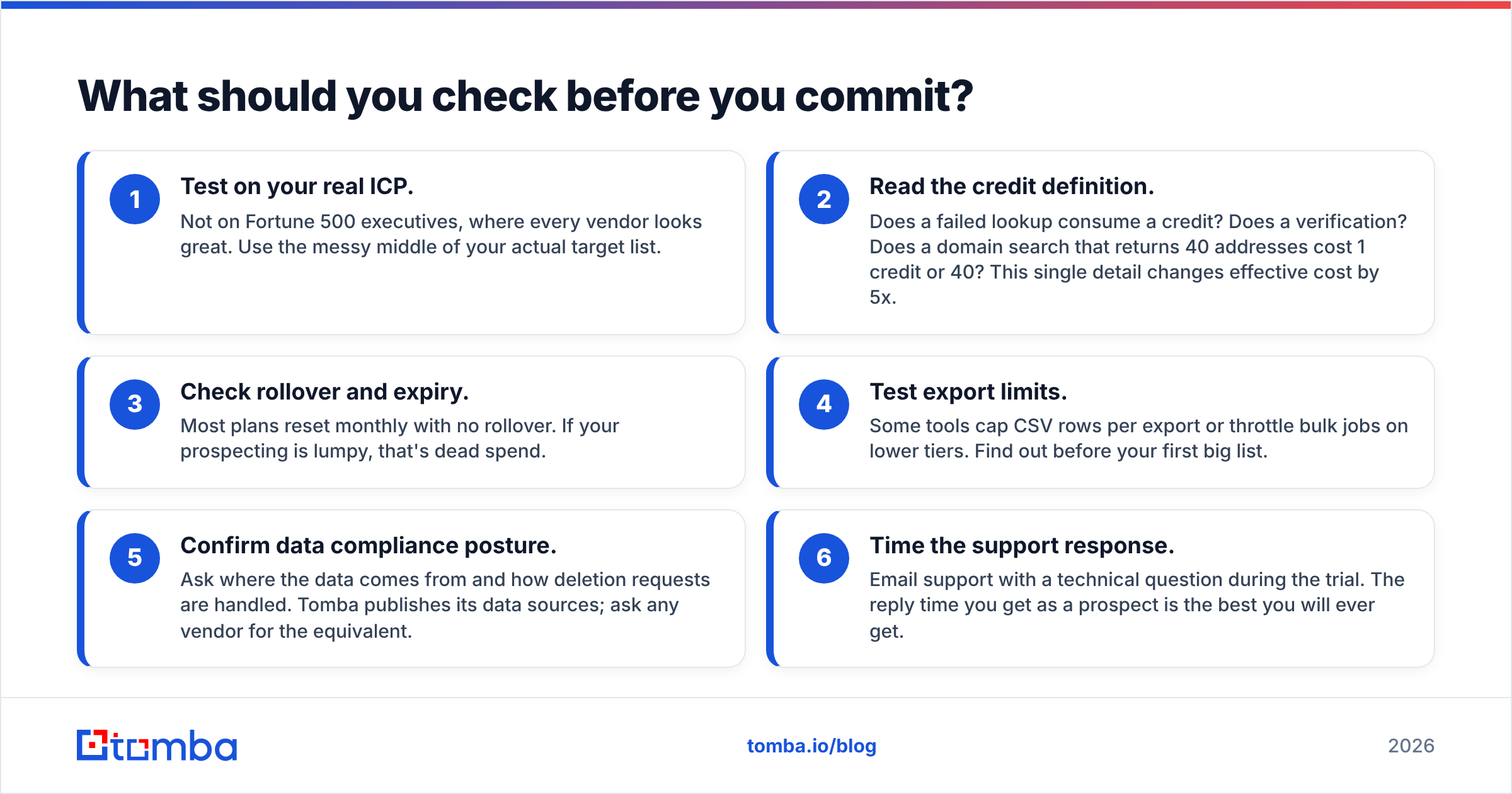
Run this list against any email finder trial, including these three:
- Test on your real ICP. Not on Fortune 500 executives, where every vendor looks great. Use the messy middle of your actual target list.
- Read the credit definition. Does a failed lookup consume a credit? Does a verification? Does a domain search that returns 40 addresses cost 1 credit or 40? This single detail changes effective cost by 5x.
- Check rollover and expiry. Most plans reset monthly with no rollover. If your prospecting is lumpy, that's dead spend.
- Test export limits. Some tools cap CSV rows per export or throttle bulk jobs on lower tiers. Find out before your first big list.
- Confirm data compliance posture. Ask where the data comes from and how deletion requests are handled. Tomba publishes its data sources; ask any vendor for the equivalent.
- Time the support response. Email support with a technical question during the trial. The reply time you get as a prospect is the best you will ever get.
Findymail vs Pipileads: what's the verdict?#
Findymail wins the head-to-head for most B2B sales teams. It is more mature, its verified-only output protects deliverability, and its LinkedIn export workflow is the smoothest of the two. Pipileads wins on price alone, and price alone is a good enough reason when your volume is genuinely small.
But the more useful conclusion is that this comparison is narrower than most buyers think it is. Both tools solve "find one email at a time from a LinkedIn profile." If your requirements include an API, catch-all resolution, phone numbers, spreadsheet-native workflows, or bulk jobs measured in thousands, you are comparing the wrong two products, and the $49 you'd spend on either buys meaningfully more elsewhere.
FAQ#
Is Findymail worth $49 a month? If you send more than roughly 300 cold emails a month and deliverability matters, yes. The bounce protection alone justifies it versus scraping and guessing. Below that volume, a free tier plus manual verification is more economical.
Can I use Pipileads for bulk lead generation? It supports CSV uploads, but it's designed around an extension-first, one-at-a-time flow. For lists in the thousands, a platform built for bulk processing will be faster and cheaper per contact.
Do I still need a separate verifier? With Findymail, usually not — verification is part of the output. With Pipileads or any tool that returns risky results, yes. Run addresses through a free email checker or a bulk verifier before loading a sequence.
What's the best free option to start with? Every vendor here has some free allowance. Tomba's free tier is 25 searches per month with no card required, which is enough to run a real accuracy test on your own list rather than trusting anyone's benchmark.
Test it against your own list. Before you commit budget to Findymail, Pipileads, or anything else, take 50 prospects you already have confirmed emails for and run them through the Tomba Email Finder free tier. Twenty-five searches per month, no card, no trial countdown. Score the hit rate yourself, compare it to whatever else you're testing, and buy based on your data instead of a vendor's. If the numbers hold, Tomba pricing starts at $49/mo and includes verification, catch-all resolution, phone lookup, and full API access in the same plan.
Related guides#
Ready to find emails that actually work?
Join 150,000+ professionals who stopped guessing and started sending. Free credits on signup — no credit card required.
Get the Tomba newsletter
Practical outbound tactics and product updates — once every two weeks.
About the author