Findymail vs SalesQL (2026): Which Email Finder Wins?
Findymail chases verified B2B emails with a bounce guarantee. SalesQL lives inside LinkedIn as a contact extractor. Here is how they actually differ on accuracy, credits, workflow, and true cost per usable email.
Findymail vs SalesQL comes down to one choice: verified emails in bulk, or fast contact grabs inside LinkedIn. Findymail leans on strict verification. SalesQL leans on speed in the browser. Here is how the two compare on match rate, credits, and real cost per usable email.
TL;DR
- Findymail is a verification-first email finder built for outbound teams. It refuses to return risky addresses. That keeps bounce rates low, but it also shrinks your match rate on small or obscure domains.
- SalesQL is a LinkedIn-native Chrome extension. It works best when your prospecting starts on a LinkedIn or Sales Navigator search page. You get emails plus personal numbers in a few clicks.
- The two tools barely compete head-on. Findymail is a data engine with an API. SalesQL is a browser workflow tool with a lighter API story.
- On cost per usable email, both look cheap at list price. Both get expensive once you count unverified results, catch-all guesses, and credits burned on failed lookups.
- Need domain-wide discovery and verification in one place, with a real API and bulk pipeline? A platform like Tomba covers the middle ground both tools leave open.
What are Findymail and SalesQL, exactly?#
Start with the honest framing. These tools were built for different jobs. They only overlap in the middle.
Findymail sells one promise: the emails it returns are verified. It will not charge you for results it cannot confirm. It pulls from LinkedIn lists, Sales Navigator exports, and domain lookups. Then it runs its own validation before handing anything back. Native integrations skew toward cold-email senders (Lemlist, Instantly, Smartlead), and the API is solid enough for scripted pulls.
SalesQL is a Chrome extension first and a platform second. You install it, open a LinkedIn profile or a search results page, and it shows work emails, personal emails, and phone numbers in a sidebar. You can bulk-extract from a search, tag contacts into lists, and push to a CRM or a CSV. Its center of gravity is the browser session, not a backend job.
That gap drives almost everything else. Findymail is what you wire into a pipeline. SalesQL is what a rep keeps pinned to the toolbar.

Findymail vs SalesQL: how do they compare feature by feature?#
Here is the practical comparison. We include a neutral third option, because most teams weighing these two also look at general-purpose finders.
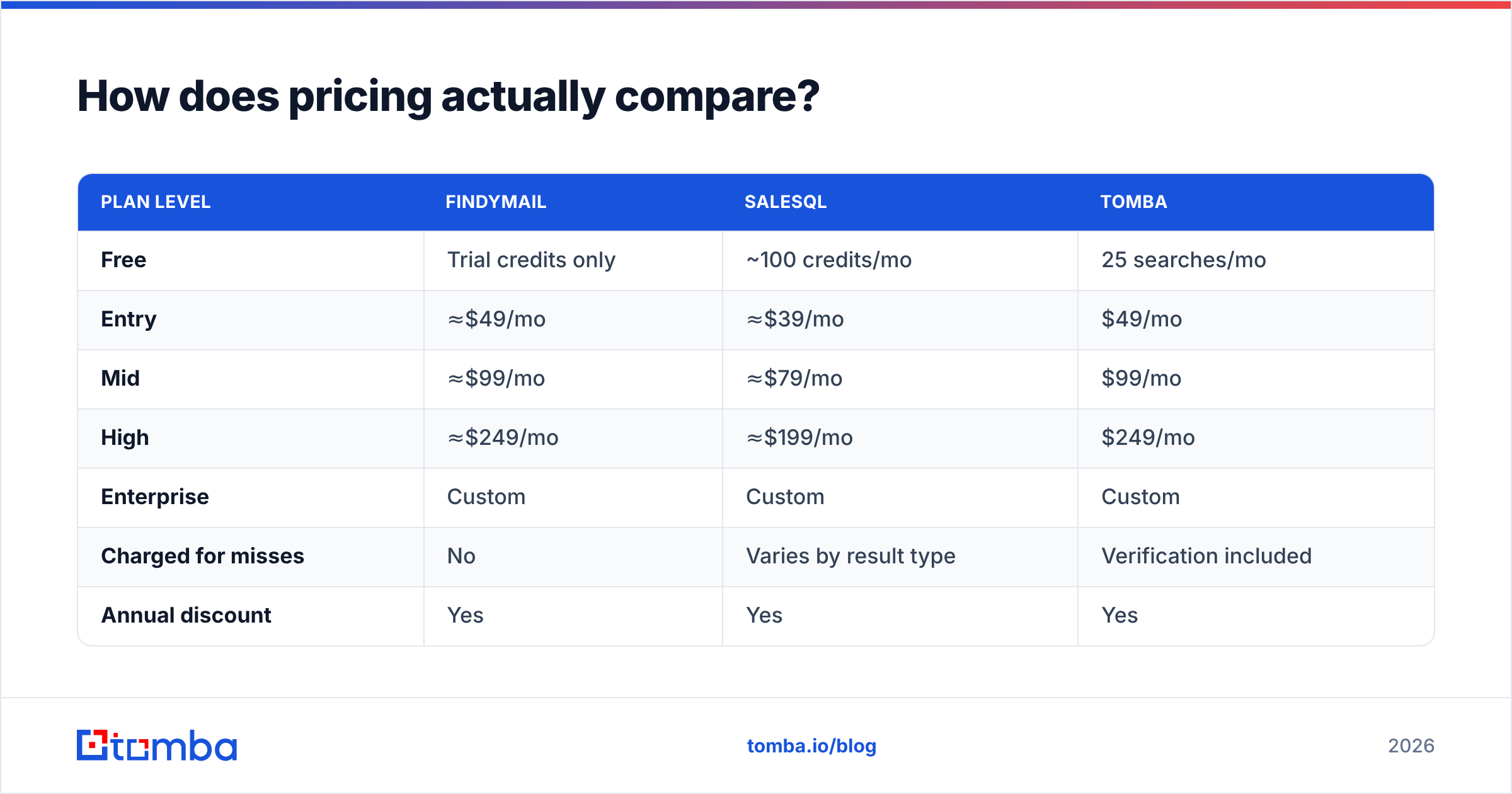
| Attribute | Findymail | SalesQL | Tomba |
|---|---|---|---|
| Primary interface | Web app + API | Chrome extension | Web app + API + extension |
| Core strength | Verified-only email finding | LinkedIn profile extraction | Domain search + verification |
| Domain-wide search | Yes | Limited | Yes (full domain crawl) |
| LinkedIn workflow | List/CSV import | Native, in-page | LinkedIn finder |
| Phone numbers | Limited | Yes (personal + direct) | Yes (phone finder) |
| Catch-all handling | Filters out, no charge | Returns as "risky" | Dedicated catch-all verifier |
| Built-in verification | Yes, pre-delivery | Basic validation | Standalone verifier + bulk |
| Bulk processing | CSV upload | Extension bulk extract | Bulk finder + verifier |
| API maturity | Solid REST API | Available, thinner docs | Full REST API, CLI, MCP |
| Free tier | Trial credits | ~100 credits/mo | 25 searches/mo |
| Entry paid price | ≈$49/mo | ≈$39/mo | $49/mo (Starter) |
Prices and credit limits move often. Treat the numbers above as directional, and check each vendor's own pricing page before you buy.
Which one finds more valid emails?#
Neither wins outright. The reason is structural.
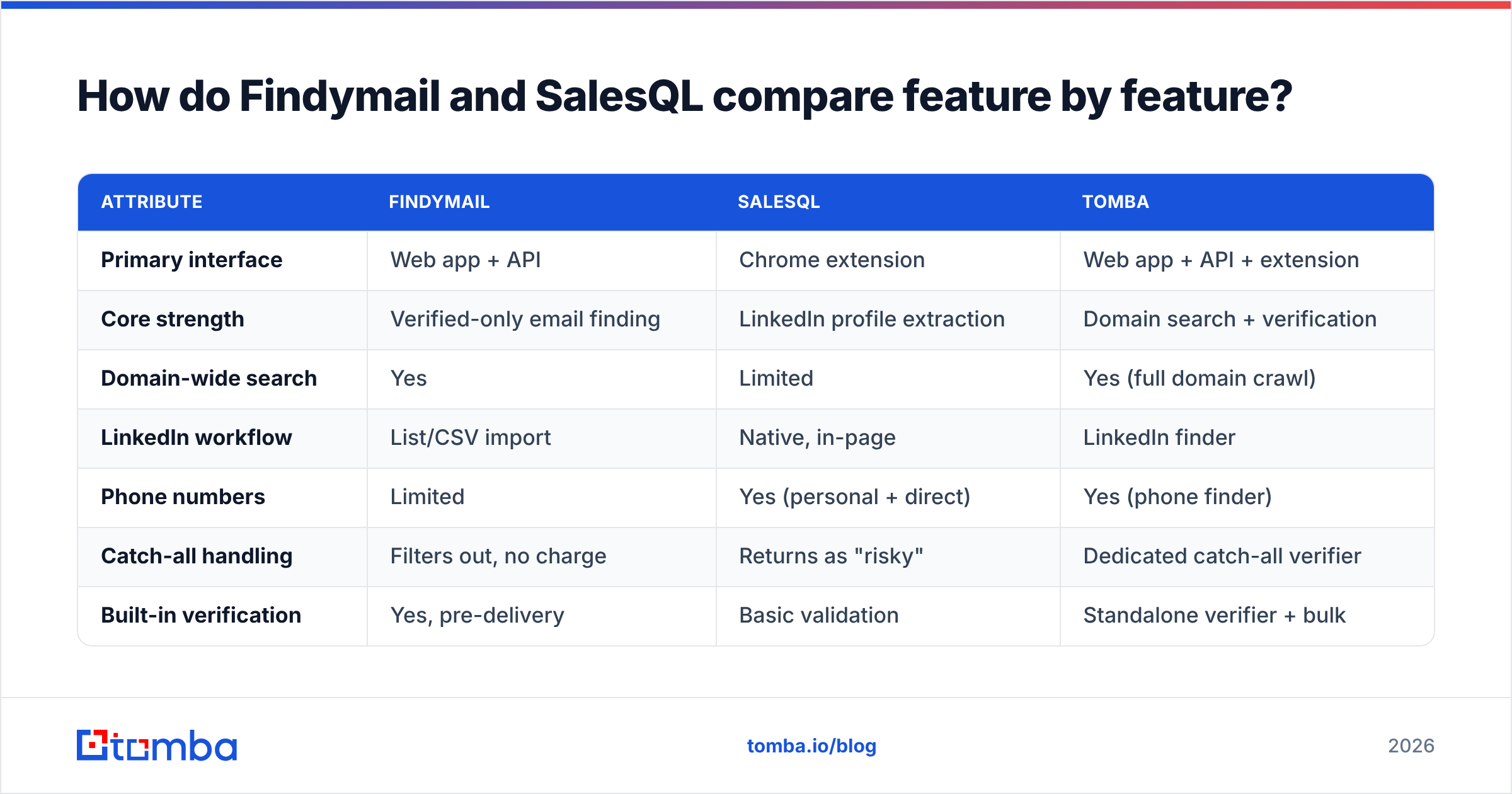
Findymail optimizes for precision. It would rather return nothing than return an address that might bounce. On enterprise and mid-market domains with clean public data, that keeps bounce rates very low. Teams often report under 3% on Findymail-sourced lists. The trade-off is coverage. If your ICP includes small agencies, regional firms, or catch-all mail servers, you will see blank rows where a rival would have guessed.
SalesQL optimizes for recall inside LinkedIn. It works from the profile you already have open, so it stitches together work email, personal email, and phone from several sources. You get more filled cells. You also get more addresses marked "probable". Do not send to those without a second verification pass.
That second pass is the part most comparison posts skip. A found email is not a deliverable email. Run SalesQL output straight into a sequence, and the bounce rate will show the guesswork. Send the export through an independent email verifier first. It costs a fraction of a cent per record, and it protects the domain reputation you spent months warming.

Four rules hold across every finder we have tested:
- Match rate depends on the domain, not the vendor. Any tool hits 80%+ on Fortune 5000 domains. The same tool drops to 40-55% on companies under 20 people. Vendors quote the first number.
- Verification status matters more than the raw find. A pool of 400 verified addresses beats 900 mixed-confidence ones on every metric that touches revenue.
- Catch-all domains are the real dividing line. About a fifth of B2B domains accept every address at the SMTP layer. How a tool handles those — skip, guess, or probe with a catch-all verifier — explains most of the accuracy gap.
- Test on your own list, not the vendor demo. Pull 100 target domains from your CRM. Run the same list through each trial. It takes an afternoon and beats any review site.
How does pricing actually compare?#
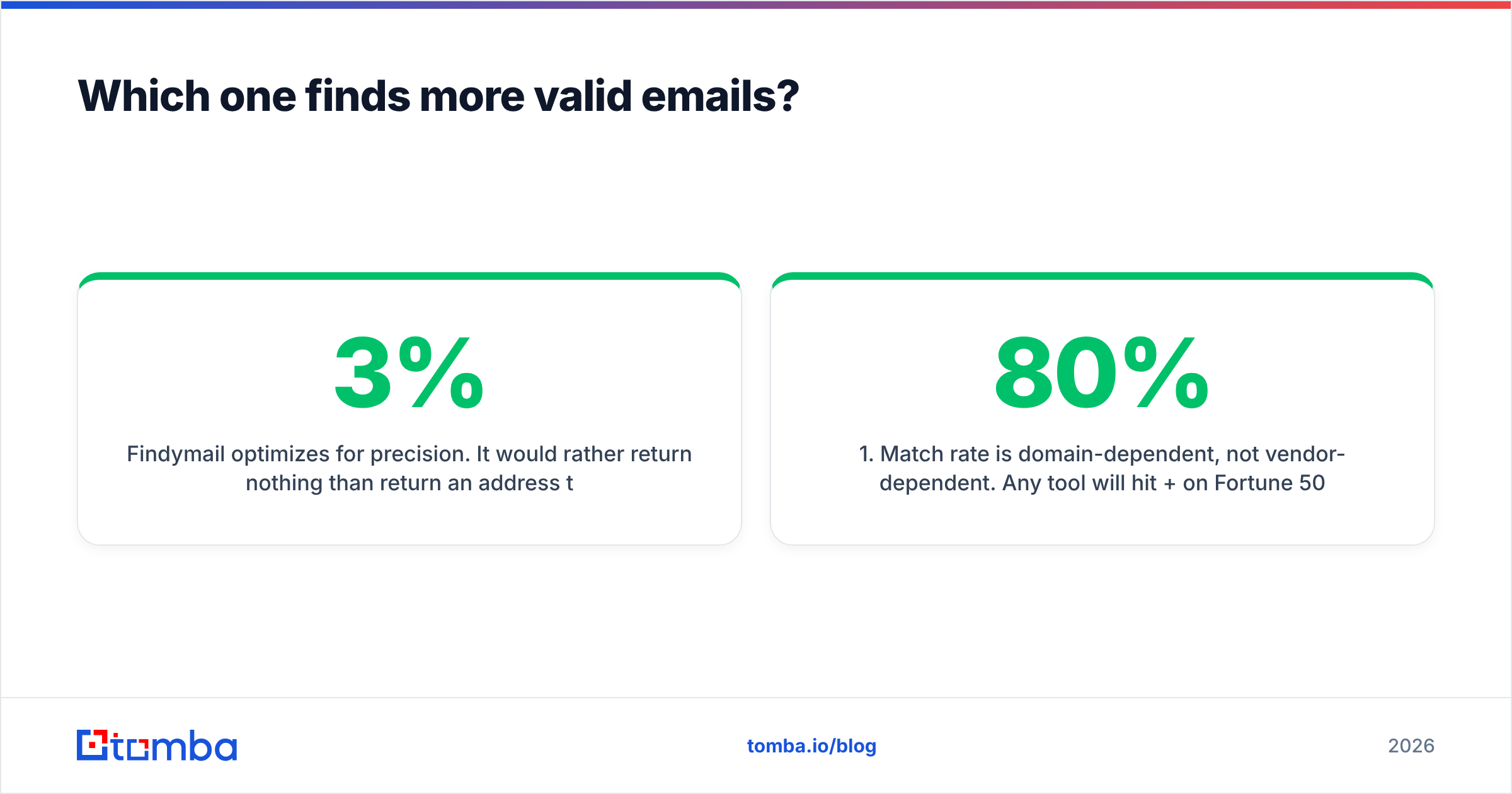
Both tools price by credits. Each one defines a credit a little differently, and that is where the comparison gets slippery.
| Plan level | Findymail | SalesQL | Tomba |
|---|---|---|---|
| Free | Trial credits only | ~100 credits/mo | 25 searches/mo |
| Entry | ≈$49/mo | ≈$39/mo | $49/mo |
| Mid | ≈$99/mo | ≈$79/mo | $99/mo |
| High | ≈$249/mo | ≈$199/mo | $249/mo |
| Enterprise | Custom | Custom | Custom |
| Charged for misses | No | Varies by result type | Verification included |
| Annual discount | Yes | Yes | Yes |
The sticker price is not the number to optimize. Work out cost per verified, sendable email:
- Take your monthly plan cost.
- Divide it by the addresses that came back and passed independent verification.
- Add the cost of that verification pass if the tool does not include it.
Run the math. A $39/mo plan with a 45% usable rate costs more than a $49/mo plan at 70%. Findymail's no-charge-for-misses policy helps here. SalesQL's lower price helps if your workflow is truly LinkedIn-bound and you were going to pay for a separate verifier anyway. Tomba's pricing sits in the same band, with verification bundled rather than billed on the side, which makes the per-email math simpler.
Which tool fits which workflow?#
Most of the Findymail vs SalesQL decision is a workflow question, not a data question.
Choose Findymail if:
- Your prospecting starts from a company list or a Sales Navigator export, not single profiles.
- Deliverability is a board-level concern, and you would rather have fewer, safer contacts.
- You want to script enrichment into a pipeline via API.
- You already run Lemlist, Instantly, or Smartlead and want a native handoff.
Choose SalesQL if:
- Your reps live inside LinkedIn all day and value in-page speed over batch throughput.
- You need mobile and personal numbers next to emails for a multichannel play.
- Your team is small, non-technical, and will never touch an API.
- You are fine adding a separate verification step before you send.
Look at a broader platform if:
- You need to sweep a whole domain for every public address, not just the profiles you opened.
- You want finding, verification, catch-all checks, enrichment, and phone lookup on one plan.
- You are building automation and need the API, CLI, and spreadsheet add-ons to share one credit pool.

Where do both tools leave gaps?#
Three gaps show up again and again in real deployments.
Domain-level discovery. Neither tool is built to answer one common question: give me every reachable contact at acme.com, plus the company's email pattern. SalesQL is profile-driven by design. Findymail's domain search exists, but it is not the headline feature. If your motion is account-based — pick 200 target accounts, map every stakeholder — a dedicated domain search tool covers that better than either.
Data freshness on job changes. B2B contact data decays at roughly 25-30% per year. The churn spiked with the last two years of layoffs and role shuffles. Both vendors refresh their data, and neither publishes a decay SLA. Re-verify anything older than 90 days, whoever sourced it.
Programmatic scale. Findymail's API is genuinely usable. SalesQL's is thinner, and the extension is the intended surface. If you enrich tens of thousands of records nightly, you want an email finder API with documented rate limits, bulk endpoints, and SDKs. A browser automation workaround breaks the next time LinkedIn ships a DOM change.

What do reviewers say about each?#
Check the marketing against user reviews on G2 before you commit. Public feedback lines up with what each product was built to do.
Findymail reviews cluster around low bounce rates and clean integrations. The recurring complaints are coverage on small companies and non-US domains. SalesQL reviews praise speed, the browser experience, and phone-number coverage. The recurring complaints are data accuracy on export and the odd extension break after a LinkedIn update.
Both are legitimate tools with real customers. The reviews mostly tell you that each product is good at the job it was designed for. That is more useful than any "winner" declaration.
How should you run the evaluation?#
Do not read another comparison post. Run a controlled test instead.
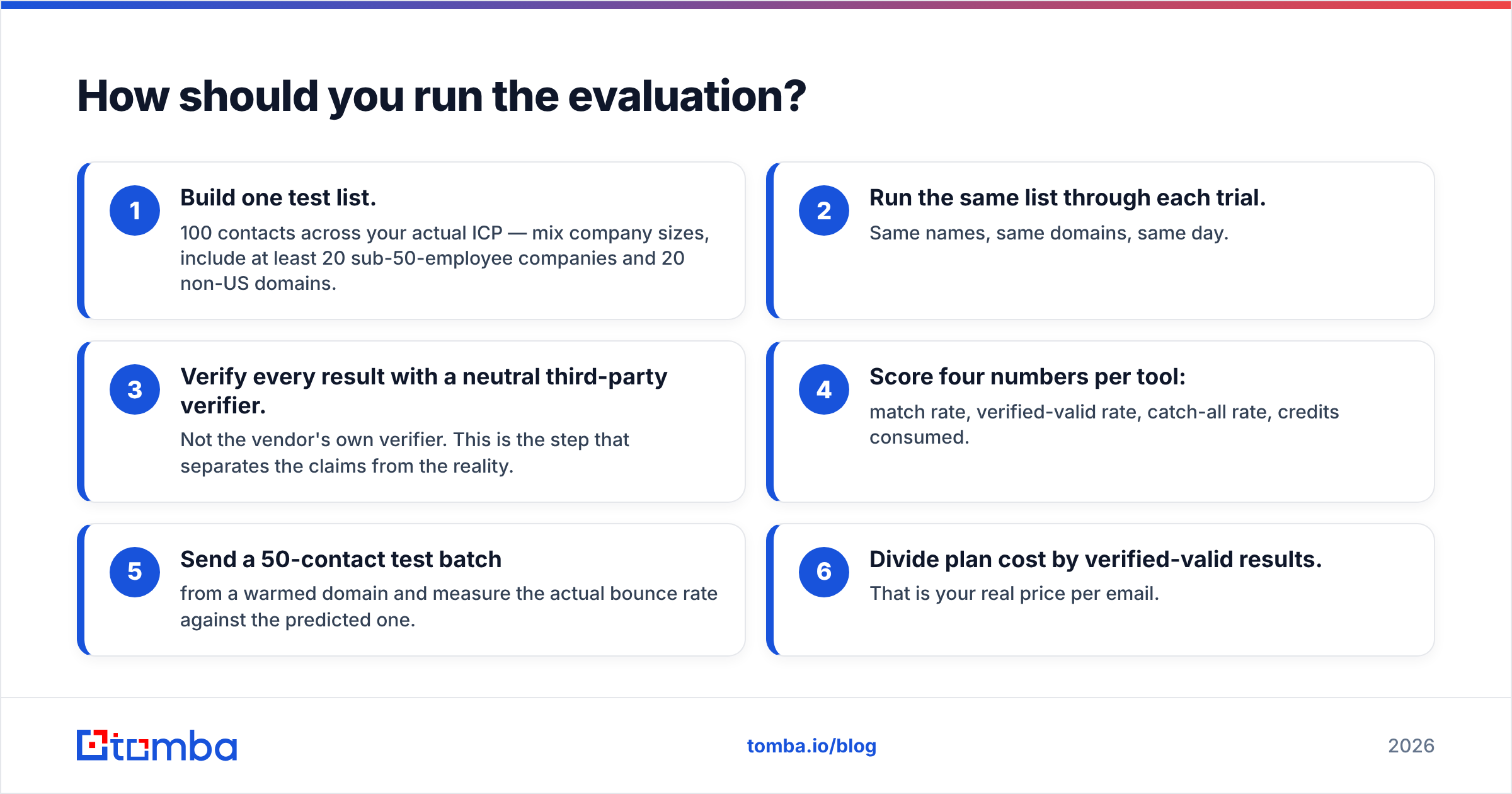
- Build one test list. Use 100 contacts across your real ICP. Mix company sizes. Include at least 20 companies under 50 people and 20 non-US domains.
- Run the same list through each trial. Same names, same domains, same day.
- Verify every result with a neutral third-party verifier. Not the vendor's own verifier. This step separates the claims from the reality.
- Score four numbers per tool: match rate, verified-valid rate, catch-all rate, credits consumed.
- Send a 50-contact test batch from a warmed domain. Measure the real bounce rate against the predicted one.
- Divide plan cost by verified-valid results. That is your real price per email.
An afternoon of this beats a quarter of arguing about vendor accuracy percentages. You also end up with a repeatable benchmark. Re-run it when your ICP shifts or a vendor swaps data partners.
Findymail vs SalesQL: which should you pick?#
If you must choose between these two, the rule is simple. Pick Findymail when your outbound is list-driven, API-connected, and deliverability-sensitive. Pick SalesQL when your reps prospect inside LinkedIn by hand and need phone numbers next to email.
Would you rather not stitch a finder to a verifier to a phone tool? Then add a consolidated platform to the same trial. Tomba's email finder handles name-and-domain lookups, full domain sweeps, and pattern detection. Verification and catch-all checks run on the same credit pool, so the "found" number and the "sendable" number stay close. The free tier gives you 25 searches a month to run against your own test list, and paid plans start at $49/mo. Put it in the bake-off, run the same 100 domains through all three, and let the verified-valid column decide.
Related guides#
Ready to find emails that actually work?
Join 150,000+ professionals who stopped guessing and started sending. Free credits on signup — no credit card required.
Get the Tomba newsletter
Practical outbound tactics and product updates — once every two weeks.
About the author