Findymail vs SignalHire: Which Email Finder Wins in 2026?
Findymail and SignalHire both promise verified B2B contacts, but they solve different problems. Here is how they compare on accuracy, credits, phone data, and real cost per usable lead.
Findymail vs SignalHire is really one question: do you need clean emails, or emails plus phone numbers? Answer that first. The rest of this guide covers accuracy, credits, and the true cost per usable lead.
TL;DR
- Findymail finds and verifies emails. It suits teams who export lists from Sales Navigator or Apollo and want low-bounce addresses back. No phone numbers, no big UI.
- SignalHire is a contact-data platform. You get emails and direct dials, plus a Chrome extension for LinkedIn and light recruiting features. Each contact you reveal costs a credit.
- Accuracy is close on normal company domains. The gap shows up on catch-all domains. There, the verification layer decides whether you bounce.
- Cost per usable lead beats list price. A cheap plan that returns 60% deliverable addresses costs more than a mid-tier plan returning 95%.
- Want one tool for finding, verifying, catch-all handling, and phone lookup? Tomba is the fuller third option. Starter is $49/mo, and there is a free tier to test first.
Findymail vs SignalHire: what does each tool do?#
They look alike on a pricing page. In a real workflow they behave very differently.
Findymail finds B2B emails and verifies them in the same step. Its core promise is a bounce guarantee. It will not hand you an address it cannot stand behind. The product is narrow on purpose. You upload names and domains, or connect a Sales Navigator export, and you get checked emails back. There is no phone data, no sequencer, no CRM.
SignalHire sits in another category. It reveals emails and direct phone numbers. Its browser extension works while you view a LinkedIn profile or a company page. It also carries recruiting features, such as candidate pipelines, because many of its users hire rather than sell.
So the real question is not which tool is better. It is this: do you need a clean email pipeline, or contact data across channels?

Findymail vs SignalHire: how do they compare head-to-head?#
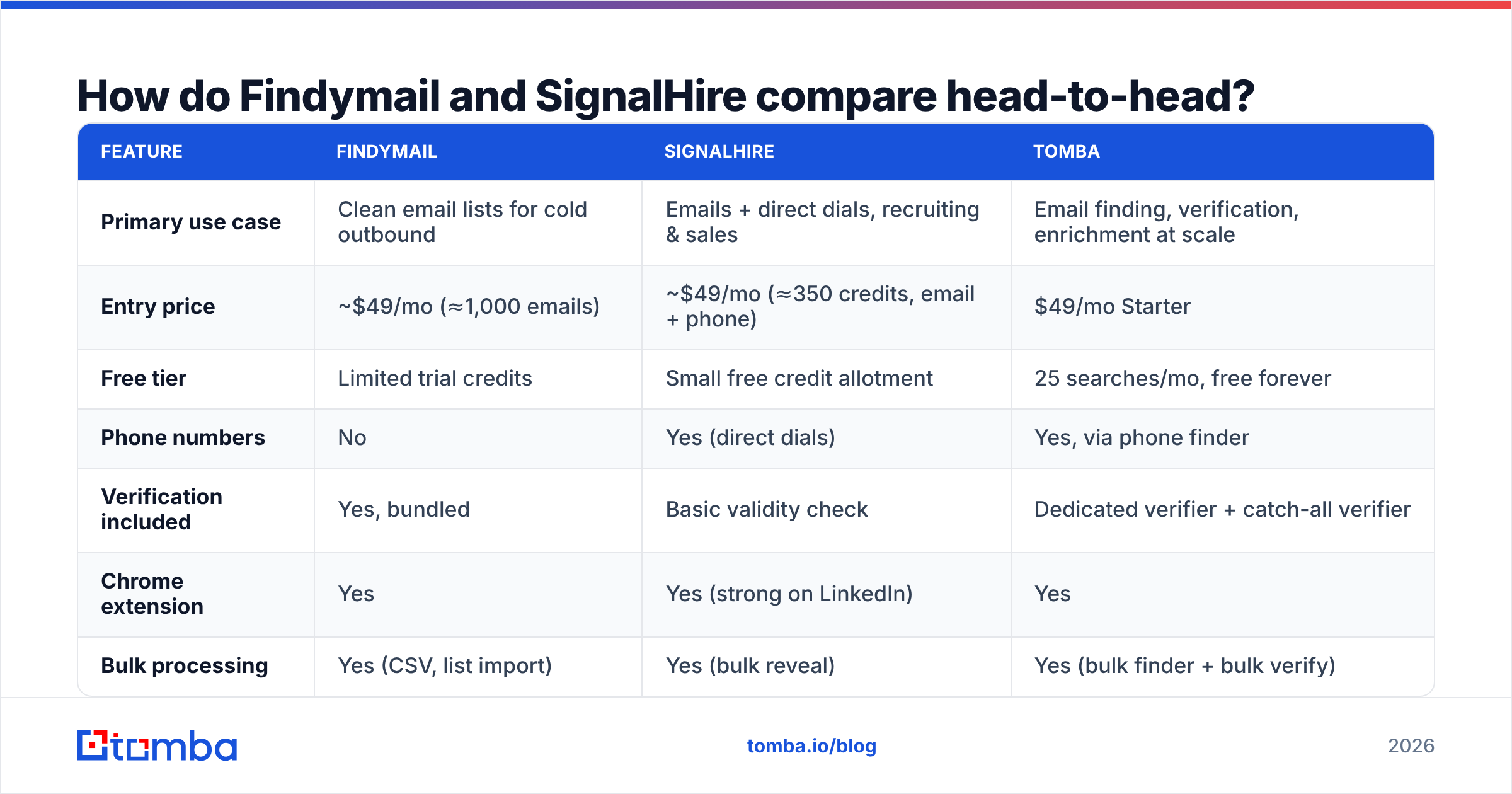
Here is the practical comparison, feature by feature. Treat every number as list price at the time of writing. Both vendors change their tiers, so check their own pages before you buy.
| Feature | Findymail | SignalHire | Tomba |
|---|---|---|---|
| Primary use case | Clean email lists for cold outbound | Emails + direct dials, recruiting & sales | Email finding, verification, enrichment at scale |
| Entry price | ~$49/mo (≈1,000 emails) | ~$49/mo (≈350 credits, email + phone) | $49/mo Starter |
| Free tier | Limited trial credits | Small free credit allotment | 25 searches/mo, free forever |
| Phone numbers | No | Yes (direct dials) | Yes, via phone finder |
| Verification included | Yes, bundled | Basic validity check | Dedicated verifier + catch-all verifier |
| Chrome extension | Yes | Yes (strong on LinkedIn) | Yes |
| Bulk processing | Yes (CSV, list import) | Yes (bulk reveal) | Yes (bulk finder + bulk verify) |
| Public API | Yes | Yes | Yes, documented + CLI + MCP |
| Sales Navigator / Apollo export support | Native, a headline feature | Via extension scraping | Via LinkedIn finder |
| Best for | Outbound teams who already have a list | Recruiters and multi-channel SDRs | Teams wanting one vendor for the whole data layer |
Two things jump out of that table.
First, credits are not the same unit. A Findymail credit buys one verified email. A SignalHire credit buys a contact reveal. That reveal may include an email, a phone number, or both. Comparing 1,000 credits with 350 credits, without adjusting for what a credit unlocks, is how teams overspend.
Second, SignalHire's phone data is the real differentiator, not its email finding. If you never dial, you pay a premium for capacity you will not use.
Which one finds more valid emails?#
On a standard company domain, both tools land in a similar band. Picture a 200-person SaaS company on Google Workspace with a first.last@ pattern. The pattern is easy to guess, the mail server answers honestly, and any decent finder resolves it.
The gap opens in three places:
- Catch-all domains. About a fifth of B2B domains accept mail to any address. A basic SMTP ping then returns a valid result for
asdkjh@company.com. Tools that stop there report inflated accuracy. Better tools score pattern confidence, check send history, and run a separate catch-all verifier. - Long-tail and non-US companies. Coverage on a 4,000-person US enterprise is a solved problem. Coverage on a 30-person agency in Lyon, or a manufacturer in Osaka, is where databases split apart.
- Data freshness. A contact who changed jobs eight months ago is technically found and practically useless. Job changes in B2B are frequent enough that a stale database quietly drags down your reply rate.

Track the valid-and-deliverable rate, not the hit rate. Run the same 500-row test list through every tool you are testing. Then push every returned address through an independent email verifier that you do not buy from the finder. Vendors grade their own homework, and that is the biggest source of inflated accuracy claims here. Ask each vendor how they measure it. If they will not explain, treat the number as marketing.
Findymail's bounce guarantee is a good structural incentive. It makes the vendor pay for being wrong. SignalHire makes no such promise. That fits a platform built for breadth across channels rather than email purity.
Do you actually need phone numbers?#
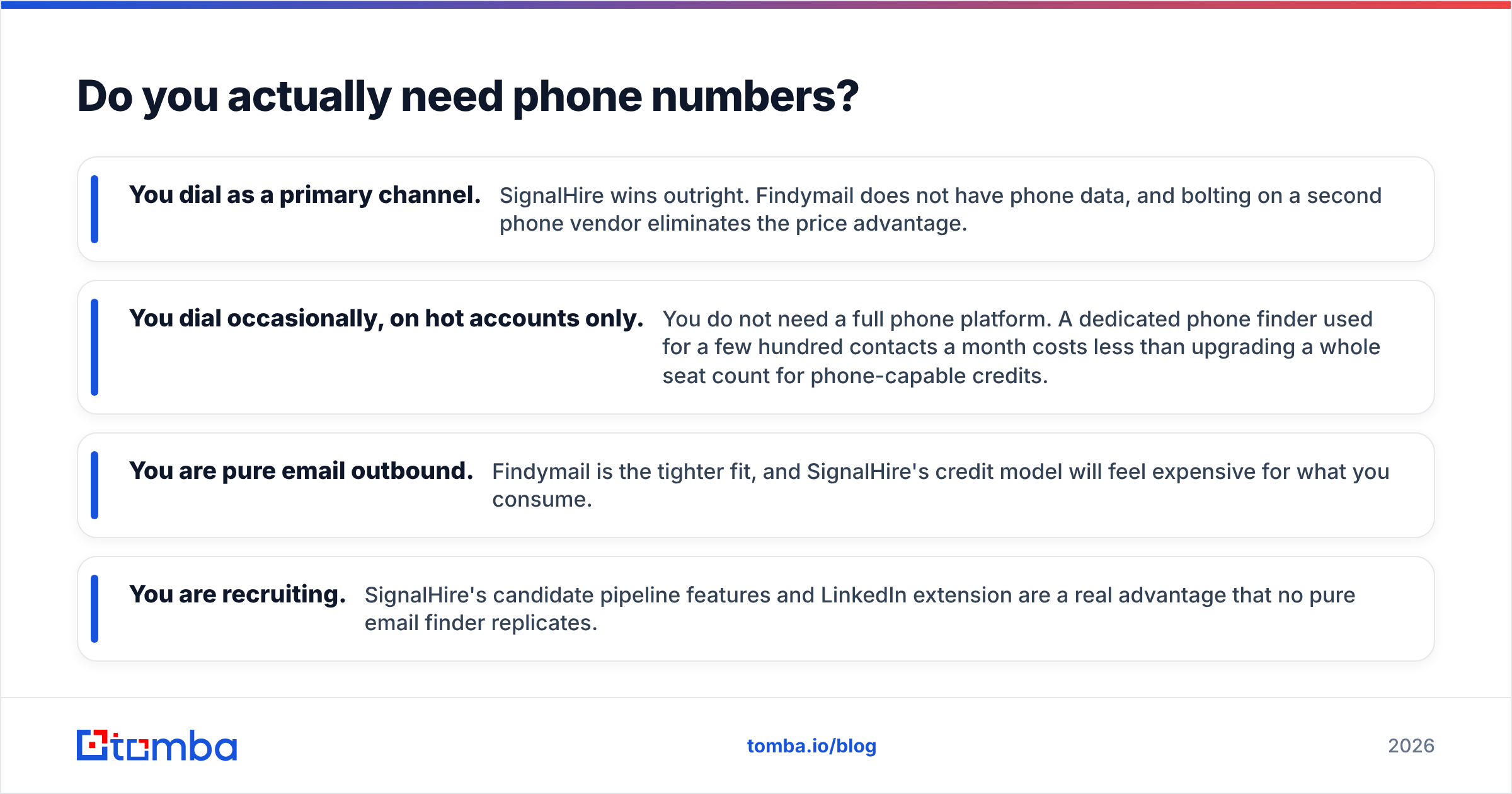
This question decides the comparison for most buyers. Answer it before you look at a single price.
- You dial as a main channel. SignalHire wins outright. Findymail has no phone data, and adding a second phone vendor wipes out the price gap.
- You dial now and then, on hot accounts. You do not need a full phone platform. A dedicated phone finder used for a few hundred contacts a month costs less than upgrading every seat.
- You are pure email outbound. Findymail is the tighter fit. SignalHire's credit model will feel expensive for what you use.
- You are recruiting. SignalHire's candidate pipeline and LinkedIn extension are a real edge. No pure email finder matches them.
Be honest about which bucket you are in. Teams often buy phone-inclusive plans, dial for two weeks, quietly stop, and keep paying for eighteen months.
How does the pricing really work?#
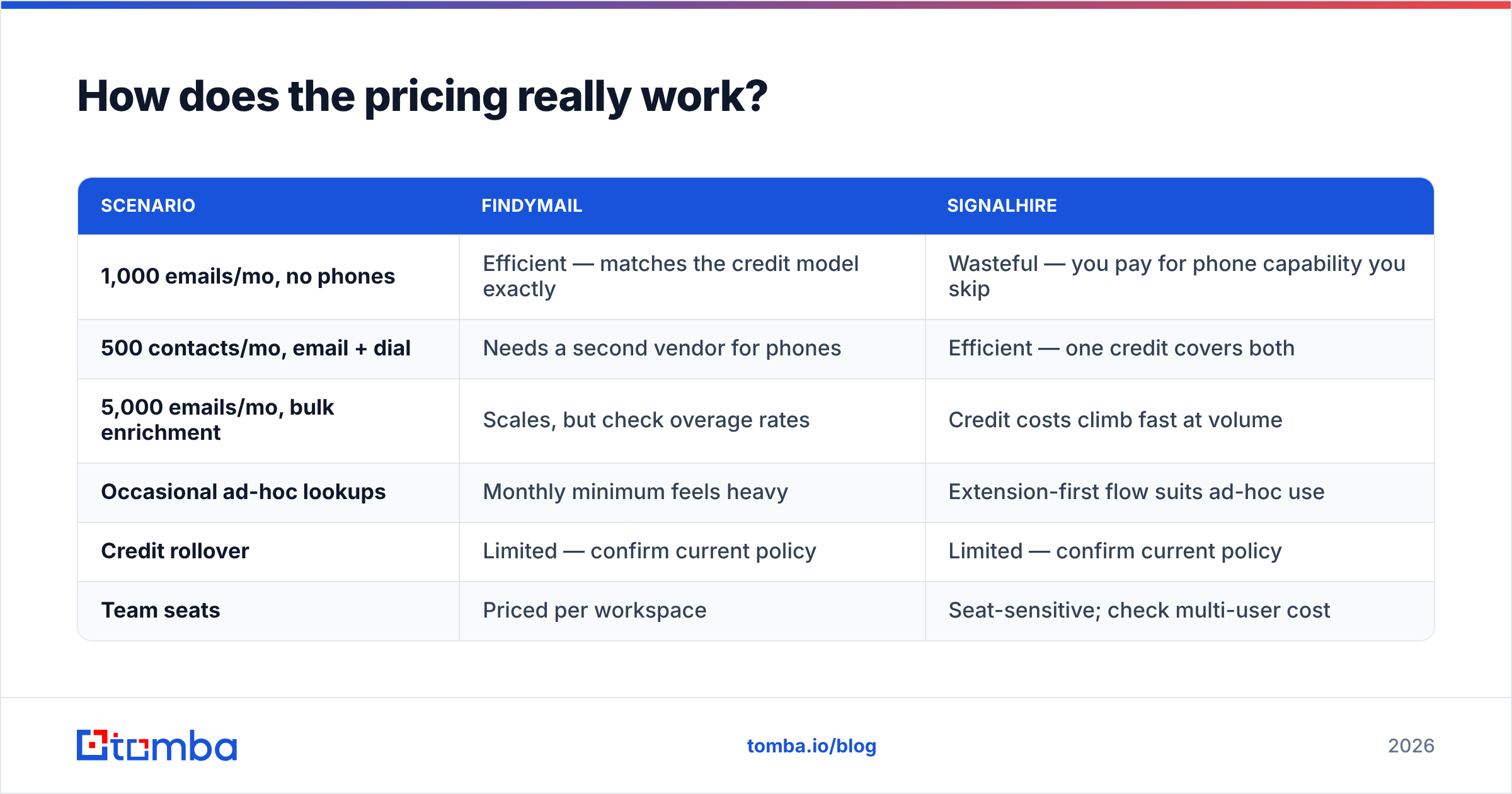
List price is the least useful number on a pricing page. What matters is the cost per usable contact, after bounces, duplicates, and misses.
| Scenario | Findymail | SignalHire |
|---|---|---|
| 1,000 emails/mo, no phones | Efficient — matches the credit model exactly | Wasteful — you pay for phone capability you skip |
| 500 contacts/mo, email + dial | Needs a second vendor for phones | Efficient — one credit covers both |
| 5,000 emails/mo, bulk enrichment | Scales, but check overage rates | Credit costs climb fast at volume |
| Occasional ad-hoc lookups | Monthly minimum feels heavy | Extension-first flow suits ad-hoc use |
| Credit rollover | Limited — confirm current policy | Limited — confirm current policy |
| Team seats | Priced per workspace | Seat-sensitive; check multi-user cost |

Three cost traps to check before you sign anything:
- Credit expiry. Most vendors here wipe unused credits every month. If your prospecting runs in campaigns or seasons, you burn budget in the quiet months.
- Charging for failures. Ask whether a search that returns nothing still costs a credit. Policies differ. At a 45% hit rate, the difference is huge.
- Seat multiplication. Some plans charge per user rather than per workspace. A five-person SDR team can turn a $49 line item into $245 with no change in volume.
Run the numbers on your own volume. Say you need 2,000 verified emails a month. Price all three vendors at that exact volume, and add a verification layer if the finder does not include one. Tomba pricing stays flat: Free (25 searches/mo), Starter $49/mo, Growth $99/mo, Pro $249/mo, and custom Enterprise. Finder, verifier, and enrichment share one balance instead of splitting across products.

Which tool fits your workflow?#
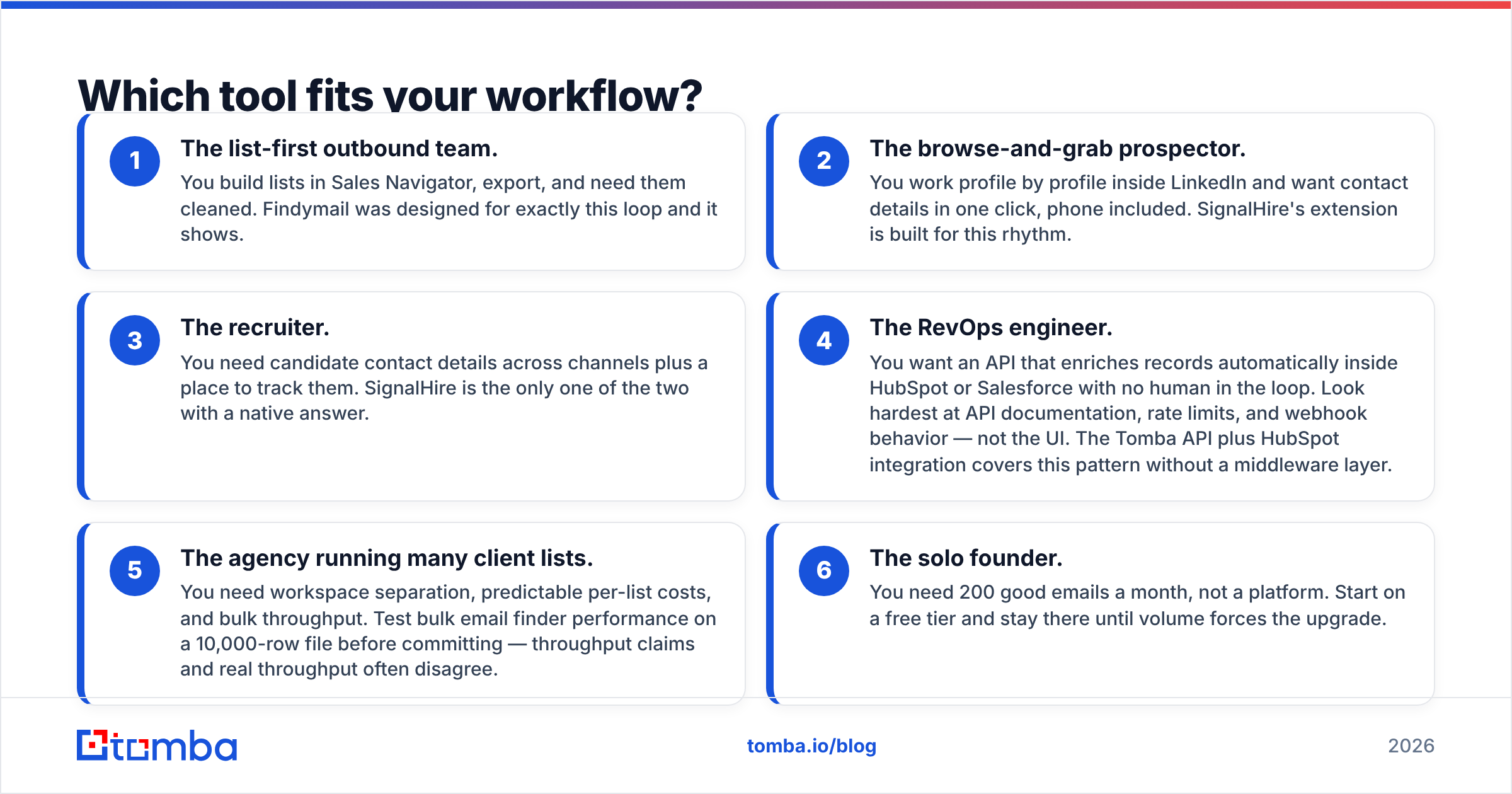
Workflow fit predicts renewal better than any feature checklist. Find yourself in this list:
- The list-first outbound team. You build lists in Sales Navigator, export them, and need them cleaned. Findymail was built for this loop, and it shows.
- The browse-and-grab prospector. You work profile by profile inside LinkedIn and want details in one click, phone included. SignalHire's extension suits that rhythm.
- The recruiter. You need candidate details across channels and a place to track them. Only SignalHire answers that here.
- The RevOps engineer. You want an API that enriches records inside HubSpot or Salesforce with no human involved. Read the API docs, rate limits, and webhook behavior first, not the UI. The Tomba API with the HubSpot integration covers this without a middleware layer.
- The agency running many client lists. You need workspace separation, predictable per-list costs, and bulk throughput. Test bulk email finder speed on a 10,000-row file before you commit. Claimed throughput and real throughput often disagree.
- The solo founder. You need 200 good emails a month, not a platform. Start on a free tier and stay there until volume forces the upgrade.
When is a third option the better call?#
When you would otherwise buy both.
That happens more often than teams expect. You start with Findymail for clean email lists. Then you need dials on enterprise accounts, so you add SignalHire. Now you run two subscriptions, two credit balances, and two APIs. You also inherit a dedupe problem, because the same contact resolves differently in each system.
One data layer avoids that. In a single vendor you want:
- Email finding by name, domain, or company via domain search
- Verification and catch-all handling in the same pipeline, not as a separate purchase
- Phone lookup for the accounts that warrant a call
- Data enrichment so CRM records stay current after the initial find
- One API key, one credit pool, one invoice
It also pays to check nearby options first. BookYourData sells prebuilt lists pay-as-you-go. That suits teams who want to buy a targeted list outright instead of running searches. It can cost less if your ICP is stable and you buy in bursts. Apollo bundles data with a sequencer if you want everything in one seat. None of these is simply better. They solve different problems.
What is the verdict?#
So, Findymail vs SignalHire — here is the call.
Choose Findymail if you run email-only outbound, already build lists, and value a bounce guarantee over feature breadth. It does one thing and does not pretend otherwise.
Choose SignalHire if phone numbers are non-negotiable, you work profile by profile inside LinkedIn, or you recruit. The credit premium buys real multi-channel coverage.
Choose a consolidated platform if you can already see yourself needing both. That is where the two-vendor tax hurts most, and where it is hardest to unwind later.
Whatever you pick, test it properly. Take 500 rows of your real ICP. Run the same list through every candidate. Verify the output with a tool you did not buy from the finder. Then work out the cost per deliverable contact. That test takes an afternoon, and it often overturns what the pricing page suggested.
Does your shortlist keep landing on email finding, verification, and the odd phone number without stacking subscriptions? Start with the Tomba Email Finder. The free tier gives you 25 searches a month with no card. That is enough to run the head-to-head test above on your own list before you commit a dollar. If the numbers favour Findymail or SignalHire for your motion, you will have the evidence either way.
Related guides#
Ready to find emails that actually work?
Join 150,000+ professionals who stopped guessing and started sending. Free credits on signup — no credit card required.
Get the Tomba newsletter
Practical outbound tactics and product updates — once every two weeks.
About the author