Findymail vs Thomson Data: Which B2B Data Source Wins?
Findymail vs Thomson Data: one finds emails on demand, the other sells you a list. They solve the same problem in opposite ways. Here is which one fits your outbound motion, and what each really costs.
Findymail vs Thomson Data comes down to one choice. Do you look up emails when you need them, or buy a list up front? Findymail finds and verifies an address on demand. Thomson Data sells you a file of contacts. This guide compares accuracy, cost and freshness, so you can decide before you spend.
TL;DR
- Findymail finds and verifies work emails in real time. You pay per credit, per month.
- Thomson Data sells contact lists. You describe an audience, they quote a file, and you own the CSV.
- The trade-off is freshness vs. volume. A finder checks data the second you ask. A bought list is a snapshot of the vendor's last refresh.
- Per-credit finders usually win on cost for SDR-scale outbound. Bulk files win for direct mail, events and market sizing — if you accept the decay.
- Want on-demand lookups and a searchable database without a five-figure invoice? Tools like Tomba sit in the middle on published pricing.
What are Findymail and Thomson Data, actually?#
Both promise "B2B contact data." But they are different kinds of product, and that changes how you buy.
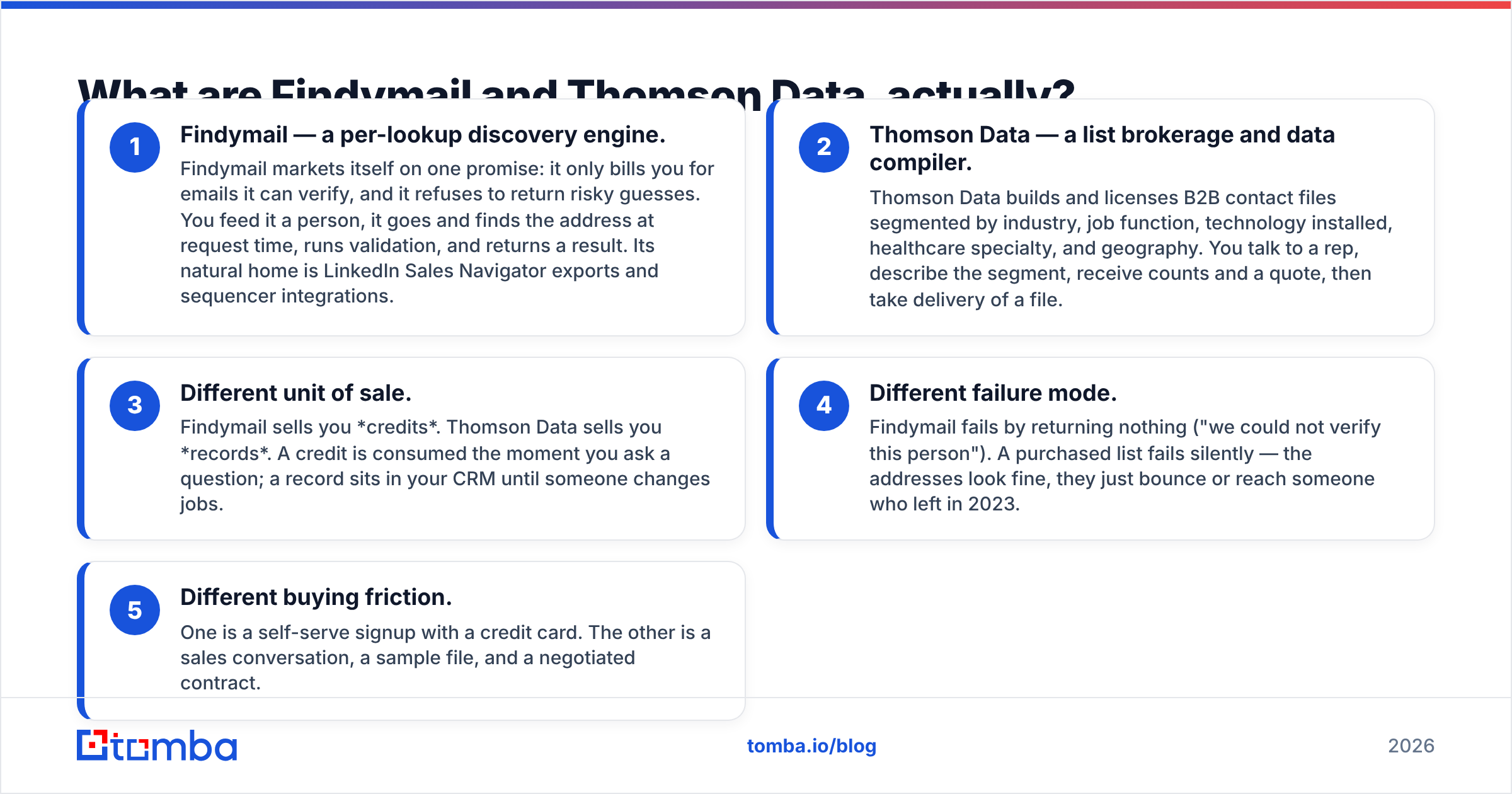
- Findymail — a per-lookup engine. Findymail only bills you for emails it can verify, and it refuses risky guesses. You feed it a person. It finds the address at request time, validates it, and returns a result. Its home turf is LinkedIn Sales Navigator exports and sequencer integrations.
- Thomson Data — a list compiler. Thomson Data licenses B2B files segmented by industry, job function, installed technology, healthcare specialty and geography. You talk to a rep, describe the segment, get counts and a quote, then take delivery of a file.
- Different unit of sale. Findymail sells you credits. Thomson Data sells you records. A credit is gone the moment you ask a question. A record sits in your CRM until someone changes jobs.
Two more gaps show up once you start buying:
- Different failure mode. Findymail fails loudly. It returns nothing and tells you it could not verify the person. A bought list fails quietly. The addresses look fine, then they bounce or reach someone who left in 2023.
- Different buying friction. One is a card and a self-serve signup. The other is a sales call, a sample file and a negotiated contract.
Those five differences settle most of the "which is better" argument before you compare a single feature.

Findymail vs Thomson Data: how do they compare head-to-head?#
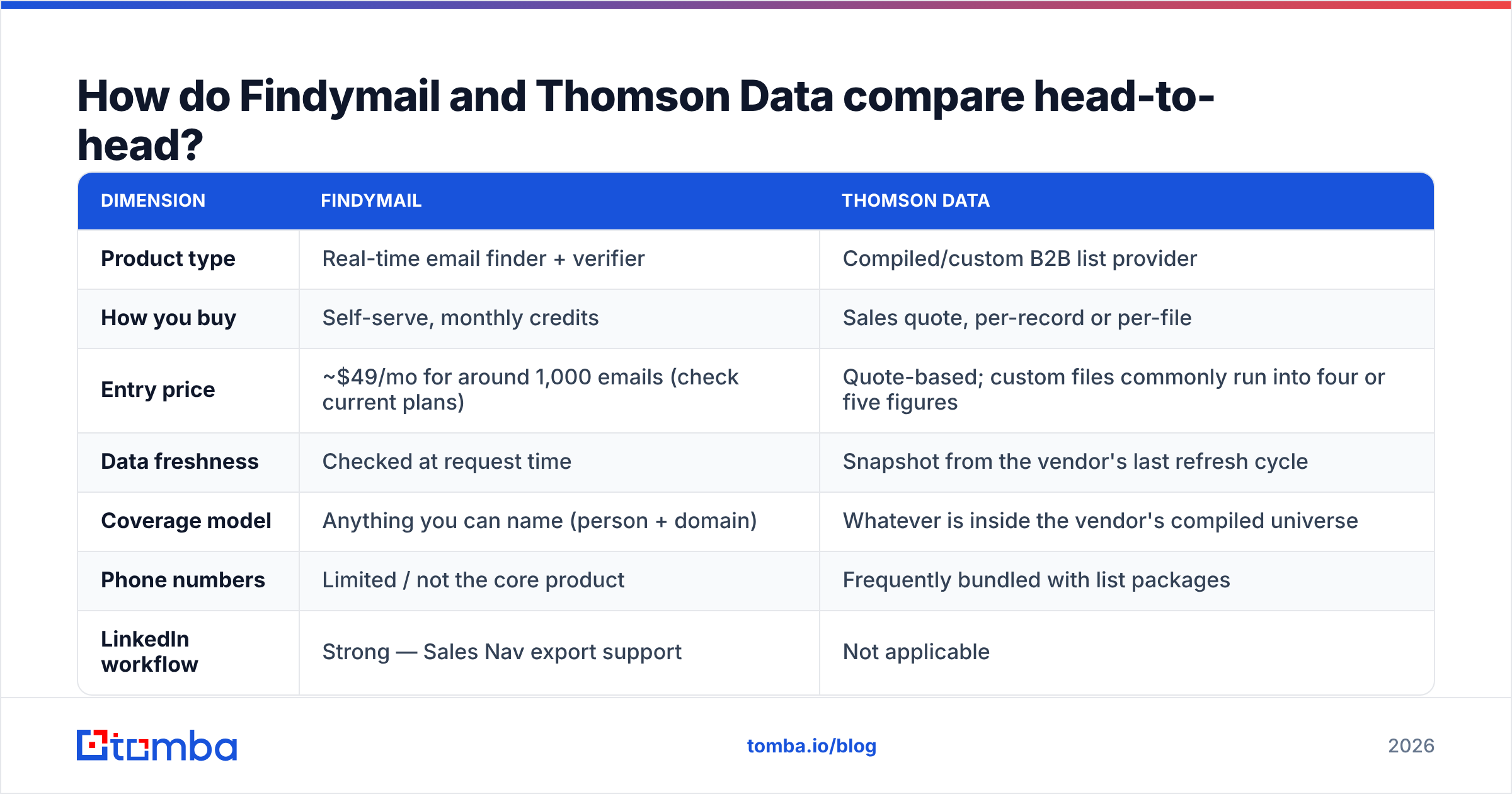
Here is the practical comparison. Prices and features move, so check each vendor's own site before you sign anything.
| Dimension | Findymail | Thomson Data |
|---|---|---|
| Product type | Real-time email finder + verifier | Compiled/custom B2B list provider |
| How you buy | Self-serve, monthly credits | Sales quote, per-record or per-file |
| Entry price | ~$49/mo for around 1,000 emails (check current plans) | Quote-based; custom files commonly run into four or five figures |
| Data freshness | Checked at request time | Snapshot from the vendor's last refresh cycle |
| Coverage model | Anything you can name (person + domain) | Whatever is inside the vendor's compiled universe |
| Phone numbers | Limited / not the core product | Frequently bundled with list packages |
| LinkedIn workflow | Strong — Sales Nav export support | Not applicable |
| Bounce guarantee | Only bills verified results | Vendor accuracy guarantee, varies by contract |
| Best for | SDR teams, agencies, founder-led outbound | Direct mail, ABM list building, events, market sizing |
| Ownership | You keep exported results, but access is metered | You own the delivered file |
Two rows matter most. "How you buy" sets your time to first email. A finder has you prospecting in ten minutes. A list purchase is a two-to-three-week cycle, sample review included. "Data freshness" sets your bounce rate six months from now.
Which one gives you more accurate data?#
Short answer: real-time lookup wins on email deliverability. Compiled lists win on field depth. Neither stays accurate forever.
Work emails decay fast. The B2B data industry puts annual decay at roughly 22–30%. People change jobs, companies rebrand, domains move. That is why the two models split:
- A finder re-derives and re-checks the address every time you ask. A result from this morning is a result from this morning.
- A compiled list was right on the vendor's refresh date. If that was nine months ago, about a fifth of it is already wrong — no matter how good the original build was.

Compiled lists do one thing better: breadth of attributes. A Thomson Data healthcare file may carry NPI numbers, specialty, facility size and licence state. A generic email finder will never return those fields. If your ICP is defined by attributes rather than by named accounts, list vendors solve a problem finders do not.
Either way, you validate. Run any file through an email verifier before it touches your sending domain. A purchased list that was never re-checked is the most common cause of a wrecked sender reputation in cold outbound. A 5% bounce rate on a fresh domain costs you more than the list did.
What does each actually cost per usable contact?#
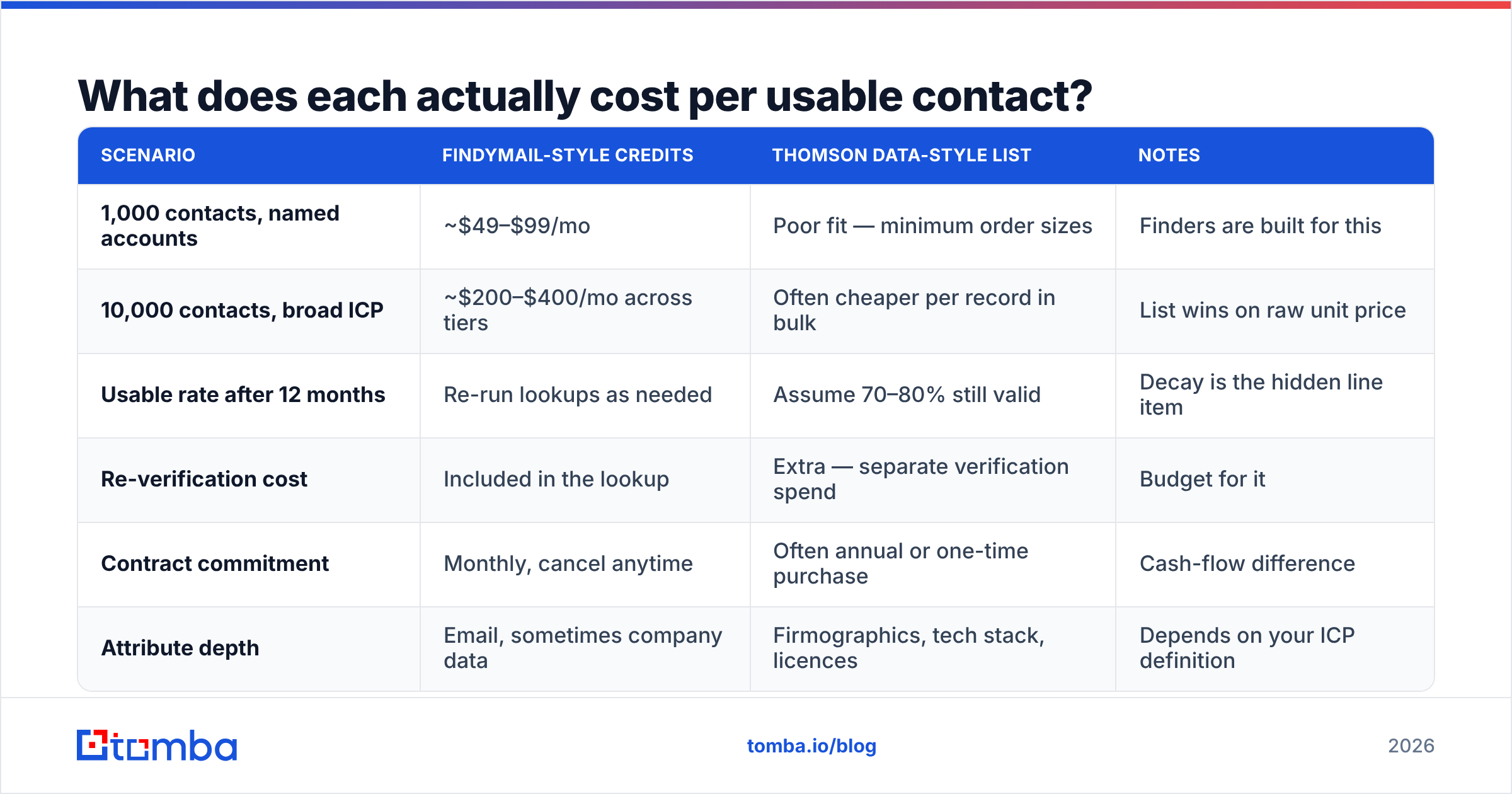
This is where the comparison stops being philosophical. Model it per usable contact, not per record delivered.
| Scenario | Findymail-style credits | Thomson Data-style list | Notes |
|---|---|---|---|
| 1,000 contacts, named accounts | ~$49–$99/mo | Poor fit — minimum order sizes | Finders are built for this |
| 10,000 contacts, broad ICP | ~$200–$400/mo across tiers | Often cheaper per record in bulk | List wins on raw unit price |
| Usable rate after 12 months | Re-run lookups as needed | Assume 70–80% still valid | Decay is the hidden line item |
| Re-verification cost | Included in the lookup | Extra — separate verification spend | Budget for it |
| Contract commitment | Monthly, cancel anytime | Often annual or one-time purchase | Cash-flow difference |
| Attribute depth | Email, sometimes company data | Firmographics, tech stack, licences | Depends on your ICP definition |
The trap in bulk list buying is the denominator. A file of 50,000 records at $0.15 each looks like $7,500 for 50,000 contacts. Then you dedupe against your CRM. You drop the roles you cannot sell to. You strip decayed records and bounces. Now you are sending to 28,000 people — $0.27 each, before the verification bill. Ask any vendor for net usable counts after suppression, not gross counts, and insist on a sample file you can test.
Per-credit tools are simpler: the published rate is the rate. Tomba's pricing is a useful yardstick because it is public. Free tier at 25 searches/month, Starter $49/mo, Growth $99/mo, Pro $249/mo, Enterprise custom. You can do the math before you talk to anyone.
Which fits your GTM motion better?#
Match the tool to the motion. In the Findymail vs Thomson Data choice, your outbound model decides — not the feature list.
Choose a real-time finder (Findymail-style) when:
- Your reps work named-account lists and need addresses for specific humans.
- You run LinkedIn-sourced outbound and want a Sales Navigator export to become a sending list the same day.
- Deliverability is the constraint — you're on newer domains and cannot absorb bounces.
- You want to start today without a procurement cycle.
Choose a list provider (Thomson Data-style) when:
- You need physical addresses, direct dials, or vertical-specific attributes at scale.
- You're sizing a market or planning a direct mail / event campaign where volume matters more than per-record recency.
- Your ICP is defined by attributes you cannot search for one prospect at a time.
- You have the budget and the process to re-verify before use.
Choose both when you're running a real ABM program. The list builds the universe. The finder keeps the priority tier current.
Where does Tomba fit in this comparison?#
Honestly: as the middle option, and not as the answer to every question here.
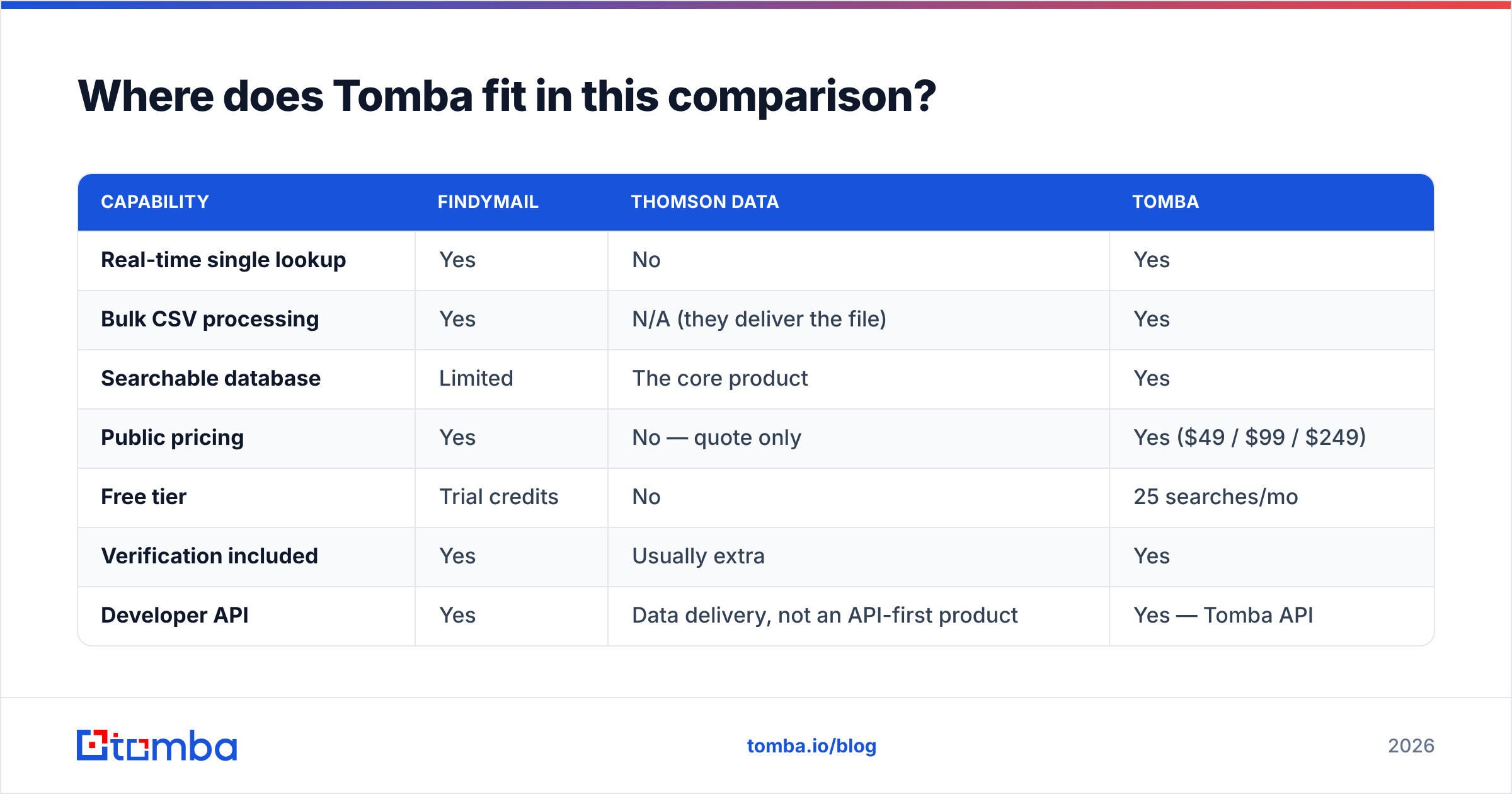
Tomba is a per-credit finder like Findymail. You get an email finder, domain search, verification and enrichment on published monthly pricing. It also ships a searchable B2B database and a bulk email finder for list-scale work. That narrows the gap with the list-vendor use case, without a negotiated contract.

| Capability | Findymail | Thomson Data | Tomba |
|---|---|---|---|
| Real-time single lookup | Yes | No | Yes |
| Bulk CSV processing | Yes | N/A (they deliver the file) | Yes |
| Searchable database | Limited | The core product | Yes |
| Public pricing | Yes | No — quote only | Yes ($49 / $99 / $249) |
| Free tier | Trial credits | No | 25 searches/mo |
| Verification included | Yes | Usually extra | Yes |
| Developer API | Yes | Data delivery, not an API-first product | Yes — Tomba API |
| Phone data | Limited | Strong | Yes, via phone finder |
| Deep vertical attributes | No | Yes | Partial |
Thomson Data wins outright in two places, and no finder competes. The first is regulated-vertical files with specialist attributes. The second is postal and direct-mail campaigns. Do not let anyone tell you a $49/month email tool replaces a healthcare-practitioner database. It doesn't.
Findymail wins on its own terms too. It is opinionated about charging only for verified results, and that has earned it a loyal base among agencies running high-volume outbound. Check current user sentiment on G2 rather than trusting any vendor's comparison page, including this one.
What about compliance and data provenance?#
This is the question buyers skip and legal asks about three months later.
- Know the sourcing. Ask where the data came from — public web, opt-in signups, partner exchanges, or compiled directories. Vendors who won't answer clearly are answering clearly.
- GDPR and legitimate interest. Purchased lists carry a heavier justification burden than data you derived for a specific, documented purpose. Read the GDPR framework basics before your first EU campaign, and get counsel for anything at scale.
- Suppression obligations. Unsubscribe and do-not-contact handling is yours, whoever supplied the data. A file you bought does not come with a compliance shield.
- Right-to-delete workflows. With a per-lookup tool, you delete the record. With a bought file, that record may live in three exports and two spreadsheets. Plan for it.
Both models can be run compliantly. Neither is compliant by default.
What is the verdict?#
The Findymail vs Thomson Data verdict, in one line: pick the finder if you sell to named accounts, and pick the list if your ICP is defined by attributes.
SDR team, agency, or founder doing named-account outbound? Pick the real-time finder. The data is fresher, there is no procurement cycle, and the cost is easy to forecast. Findymail is a solid choice. So is Tomba. The deciding factors are usually pricing tier, API needs, and whether you also want a searchable database. If you're weighing those two directly, there's a Findymail alternative breakdown worth reading alongside this.
Need vertical attributes, postal data, or a market-sizing universe? Talk to a list provider like Thomson Data. Then budget for verification on top, and negotiate on net usable counts rather than gross records.
Still unsure? Start with the cheaper, reversible option. A month of per-credit lookups costs less than the sample-review phase of a list purchase. It also teaches you what your real ICP looks like. Buy the big file second, once you know what you're buying.
Want to test the finder side without a sales call? Start with Tomba Email Finder — 25 free searches a month, no card. If it fits your ICP, the Starter plan is $49/mo. Run the same 50 prospects through it and through any quote you're weighing, then compare bounce rates on real sends. That test costs nothing and settles the argument better than any comparison table, including this one.
Related guides#
Ready to find emails that actually work?
Join 150,000+ professionals who stopped guessing and started sending. Free credits on signup — no credit card required.
Get the Tomba newsletter
Practical outbound tactics and product updates — once every two weeks.
About the author