Fireberry Pricing Reviews 2026: Pros, Cons and Real Costs
Fireberry pricing reviews agree on one thing: the seats are cheap. The setup is not. Here is what each plan costs per user, where the add-ons bite, and which teams should walk away.
Fireberry pricing reviews agree on one thing: the seats are cheap. The setup is not. Here is what each plan costs, what the add-ons add, and who should buy something else.
TL;DR
- Fireberry is a low-cost, highly customizable CRM for SMBs. Paid seats start near $9–$12 per user per month. The top self-serve tier sits around $39.
- Seat price is not the real cost. Setup time, automation limits, and add-ons drive the bill once you pass 10 users.
- Reviews praise the customization depth and the fast support. The common gripes: few native integrations, thin English docs, and a dated UI.
- It fits operations-heavy SMBs with unusual data models. It does not fit outbound teams that need sequencing, dialing, and contact data.
- No CRM creates pipeline. Budget separately for finding and verifying contacts.
What is Fireberry and who is it actually for?#
Fireberry (formerly Powerlink CRM) is a business platform built on custom objects, custom fields, and no-code automation. It does not ship one fixed sales pipeline. It hands you a schema builder instead. You model whatever your business runs on: projects, service tickets, insurance policies, equipment leases, tuition plans.
That matters for the pricing conversation. Fireberry does not compete on “cheapest CRM.” It competes on “cheapest CRM that lets you build a strange data model without a consultant.” You can check the current feature set on the official Fireberry site. The shape of the product stays the same: a flexible core, a solid automation engine, and a smaller ecosystem than the American incumbents.
The typical buyer is a 5–50 person company. They have outgrown spreadsheets. They tried a generic CRM and hit a wall, because their process is not “lead → opportunity → closed won.” Service businesses, agencies, and operations teams show up often in the review base.
Are you a pure outbound team running sequences at volume? Then Fireberry is the wrong shape of tool. You would buy a customization engine, then bolt sales execution onto it.
How much does Fireberry cost in 2026?#
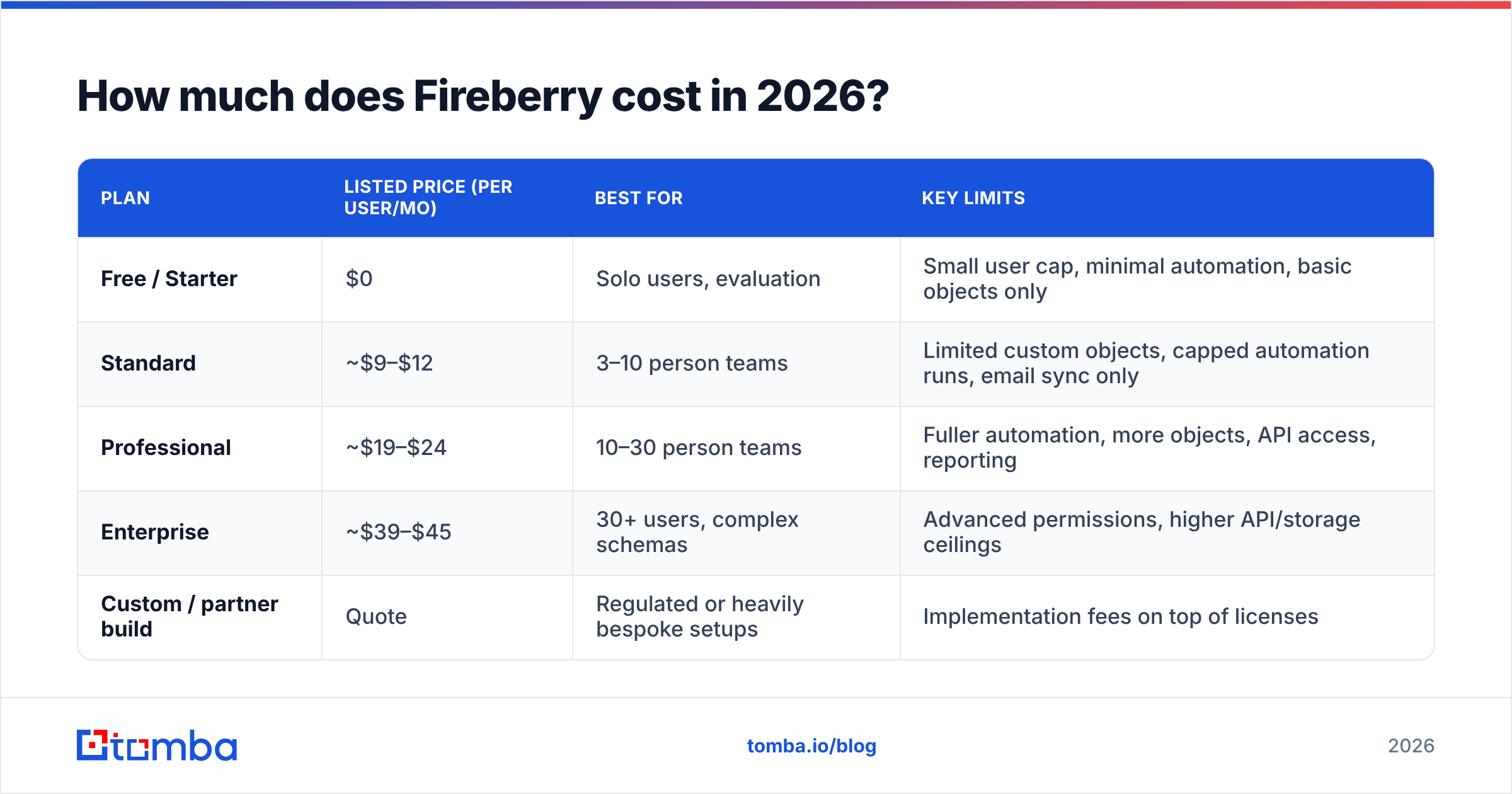
Fireberry publishes per-user, per-month pricing with the usual annual discount. The tiers below reflect the listed structure at the time of writing. Pricing pages change, so confirm the numbers on Fireberry's pricing page before you budget.
| Plan | Listed price (per user/mo) | Best for | Key limits |
|---|---|---|---|
| Free / Starter | $0 | Solo users, evaluation | Small user cap, minimal automation, basic objects only |
| Standard | ~$9–$12 | 3–10 person teams | Limited custom objects, capped automation runs, email sync only |
| Professional | ~$19–$24 | 10–30 person teams | Fuller automation, more objects, API access, reporting |
| Enterprise | ~$39–$45 | 30+ users, complex schemas | Advanced permissions, higher API/storage ceilings |
| Custom / partner build | Quote | Regulated or heavily bespoke setups | Implementation fees on top of licenses |
Two things matter before you compare this to anything else.
First, per-seat pricing at this level is cheap. Thirty users on Professional runs about $600–$720 a month. A comparable Salesforce Sales Cloud setup costs several times that. Even HubSpot's CRM gets pricey once you add Sales Hub Professional seats.
Second, cheap seats plus a costly rollout is still costly. The flexibility that justifies Fireberry eats 40–120 hours of someone's time during setup. If a partner consultant does that work, add $3,000–$15,000 to year one.
What do Fireberry pricing reviews actually say?#
Fireberry has far fewer reviews than the giants in the CRM category on G2. Sentiment is above average but thin. Each review carries more weight, and outliers skew the average. Read the text, not the star rating.
The patterns that repeat:
- Customization depth is the headline win. Users who came from Zoho or Monday built object models in days. Elsewhere that work needs a developer.
- Support scores unusually high. Smaller vendor, shorter queue. Many reviewers reach a human fast.
- Price-to-capability is the second-most cited pro. Teams who priced Salesforce first call it “80% of the capability at 20% of the cost.” That is fair for their use case.
- The integration ecosystem is the top con. There are fewer native connectors than HubSpot, Pipedrive, or Zoho offer. You will lean on Zapier, Make, or the API.
- Docs and localization lag. The product has deep roots in the Israeli market. English help content and community answers are thinner than the leaders'.
- The UI feels functional, not modern. Operations users shrug. Sales reps who used Pipedrive notice.
None of these kill the deal on their own. Together they describe a trade. You swap polish and ecosystem breadth for flexibility and price.
What are the pros and cons of Fireberry?#
Pros
- Object-level customization without code. Custom entities, relationships, and field types that most SMB CRMs keep locked.
- Automation that covers real workflows. Trigger rules, scheduled actions, and record-level logic handle most SMB processes.
- Low, published per-seat pricing. No “contact sales for a number” wall at the entry tiers.
- Responsive human support. The strongest theme in positive reviews.
- Multi-department fit. Sales, service, and operations share one schema instead of buying three tools.
Cons
- Thin native integration library. Budget for middleware. Check each niche SaaS tool before you sign.
- Reporting is capable, not best-in-class. Fine for pipeline and activity. Add a BI layer for real analysis.
- No native outbound stack. Sequencing, dialing, and contact enrichment are weak spots.
- Small talent pool. Fireberry admins are harder to hire than HubSpot or Salesforce admins.
- Add-ons push the real price up. Storage tiers, API ceilings, and premium support are the usual culprits.
Where do the hidden costs show up?#
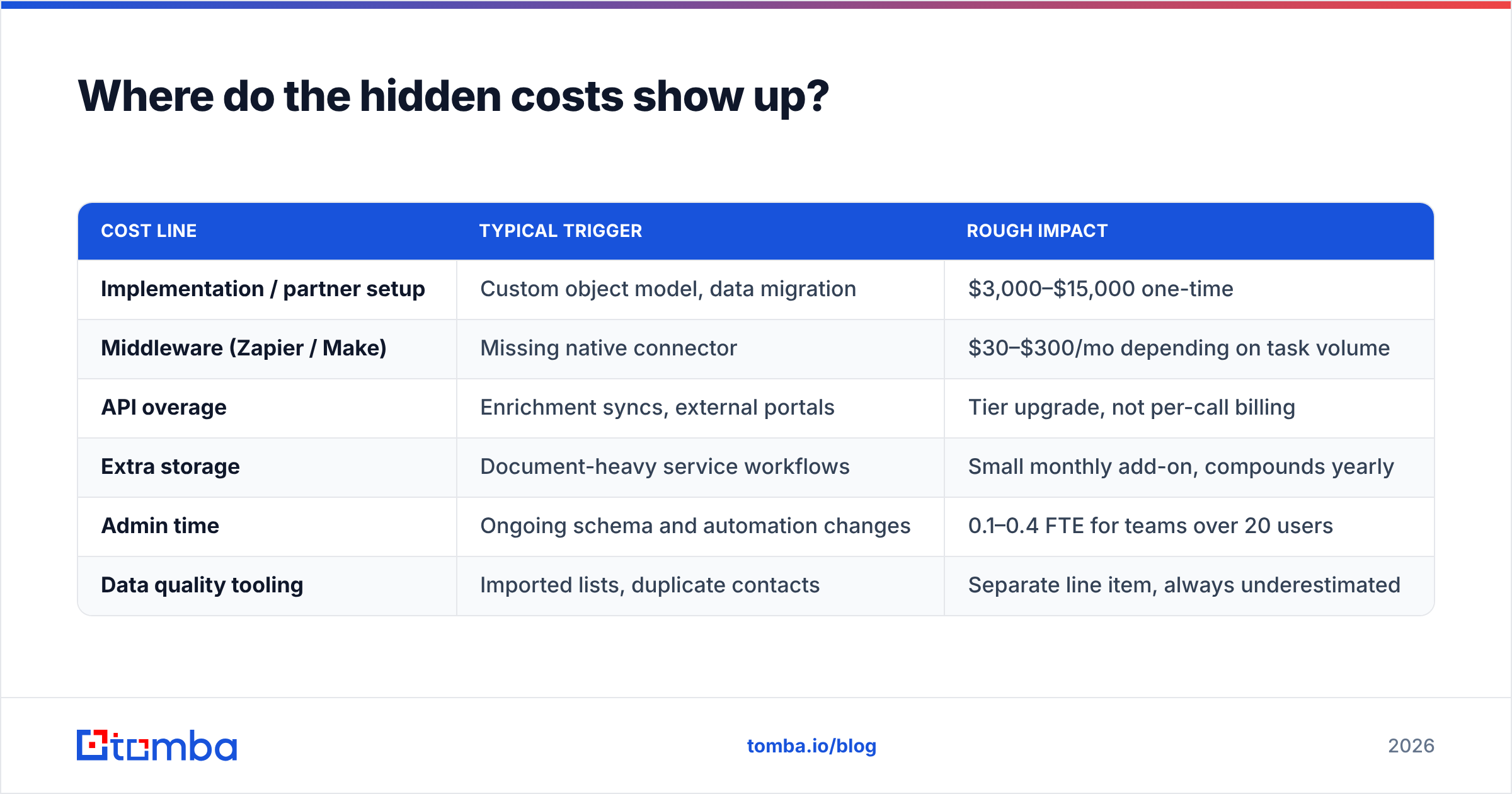
Seat price is the number in the ad. These are the numbers on the invoice.
| Cost line | Typical trigger | Rough impact |
|---|---|---|
| Implementation / partner setup | Custom object model, data migration | $3,000–$15,000 one-time |
| Middleware (Zapier / Make) | Missing native connector | $30–$300/mo depending on task volume |
| API overage | Enrichment syncs, external portals | Tier upgrade, not per-call billing |
| Extra storage | Document-heavy service workflows | Small monthly add-on, compounds yearly |
| Admin time | Ongoing schema and automation changes | 0.1–0.4 FTE for teams over 20 users |
| Data quality tooling | Imported lists, duplicate contacts | Separate line item, always underestimated |
Buyers skip the last row. A CRM inherits the quality of the data you load into it. If half your imported contacts bounce, you pay seats to manage dead records. Worse, the bounces damage your sender reputation long after you clean the list.
How does Fireberry compare to other CRMs?#
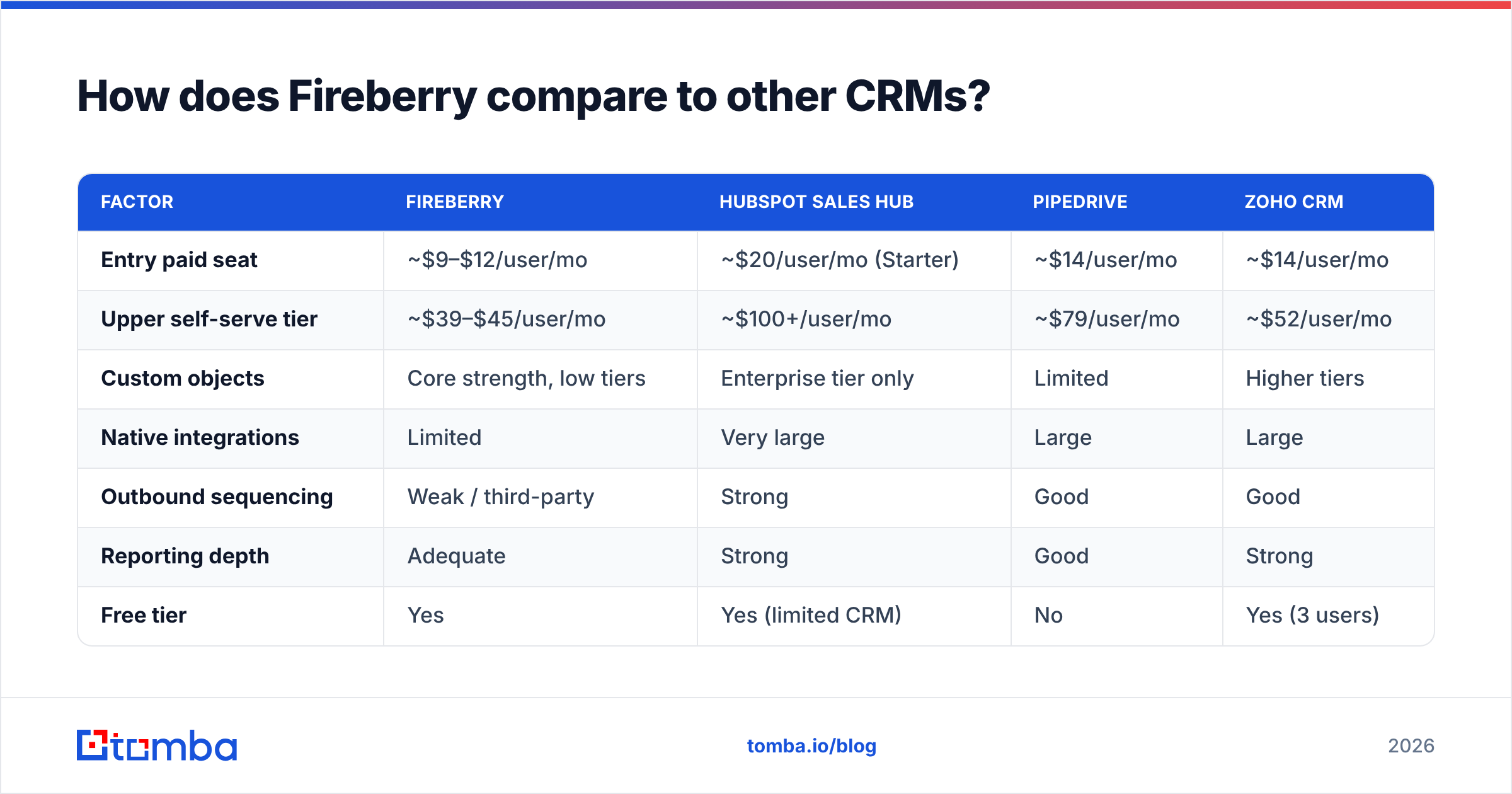
| Factor | Fireberry | HubSpot Sales Hub | Pipedrive | Zoho CRM |
|---|---|---|---|---|
| Entry paid seat | ~$9–$12/user/mo | ~$20/user/mo (Starter) | ~$14/user/mo | ~$14/user/mo |
| Upper self-serve tier | ~$39–$45/user/mo | ~$100+/user/mo | ~$79/user/mo | ~$52/user/mo |
| Custom objects | Core strength, low tiers | Enterprise tier only | Limited | Higher tiers |
| Native integrations | Limited | Very large | Large | Large |
| Outbound sequencing | Weak / third-party | Strong | Good | Good |
| Reporting depth | Adequate | Strong | Good | Strong |
| Free tier | Yes | Yes (limited CRM) | No | Yes (3 users) |
| Implementation effort | High (by design) | Low–medium | Low | Medium |
Read that table as a fork, not a scoreboard. Is your process standard? Then HubSpot or Pipedrive get you live in a week, and Fireberry's edge disappears. Is your process genuinely odd? Then Fireberry does at $19 a seat what HubSpot charges enterprise money for. That gap is the whole buying case.
Is Fireberry worth it for your team?#
Buy it if: your data model has more than two core objects beyond “contact” and “deal”; someone internally enjoys building systems; your integration list is short or API-friendly; and price matters at 15+ seats.
Skip it if: you are an outbound-first team that lives in sequences; you need forty native integrations on day one; nobody will own admin duties; or you need a slick UI to win over a skeptical sales floor.
A third case deserves a name: teams buying a CRM to fix a pipeline problem. That is a category error. A CRM organizes demand you already have. It does not create demand. If your pipeline is thin, custom object modeling will not help. You need more qualified contacts entering the top of the funnel. That is a data problem, not a CRM problem.

What does Fireberry not do — and how do you fill the gap?#
Fireberry assumes contacts arrive from somewhere else. Almost every CRM at this price does. It stores, routes, and automates them. Sourcing and verifying them is your job.
A practical stack for a Fireberry sales motion looks like this:
- Source contacts — build lists from company domains instead of buying static databases. A domain search returns the real people at a company, with role and email pattern. That is a live signal, not a two-year-old CSV row.
- Verify before import — run every address through an email verifier first. A record that bounces is worse than no record. It costs a seat's attention and it costs deliverability.
- Enrich the record — job title, company size, and social profile give your automation rules something to route on.
- Push into Fireberry by API or middleware — the native connector library is thin. Plan on the Tomba API or a Zapier/Make step instead of a one-click app.
- Re-verify on a schedule — B2B contact data decays 25–30% a year. Quarterly checks keep the CRM from rotting.
That loop costs a fraction of your CRM bill. It moves revenue more than any field you will ever customize. Teams that skip it buy a tidy CRM, fill it with garbage, then blame the CRM.
What's the honest verdict on Fireberry pricing reviews?#
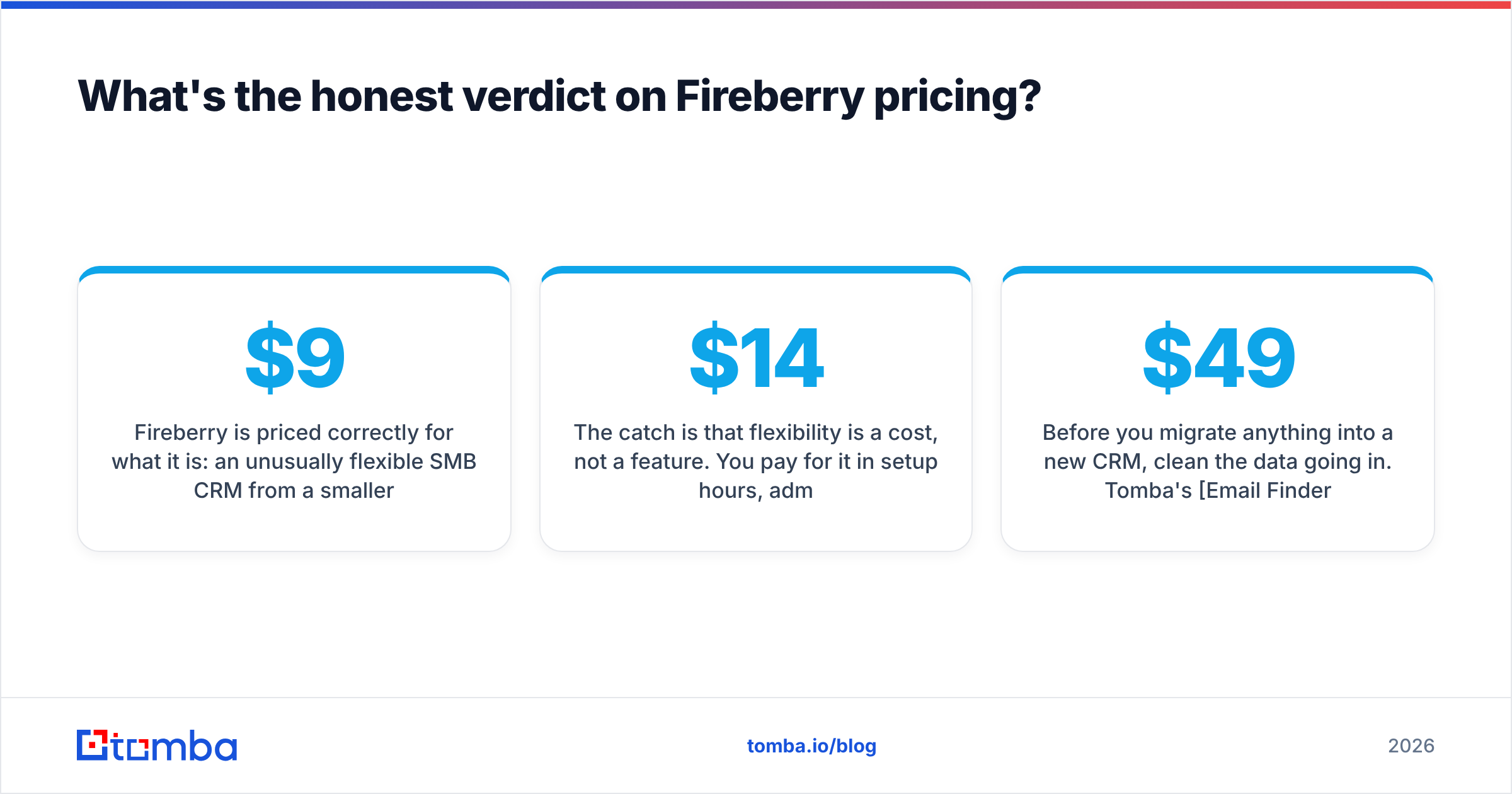
Fireberry is priced correctly for what it is. It is an unusually flexible SMB CRM from a smaller vendor. It competes on customization per dollar, not on ecosystem or polish. At $9–$45 a seat it undercuts every major rival at similar capability, and the Fireberry pricing reviews back that up.
The catch: flexibility is a cost, not a feature. You pay it in setup hours, admin ownership, and integration workarounds. If your team has that capacity, total cost of ownership beats HubSpot and Salesforce. If it does not, you will spend six months configuring a system that a $14-a-seat Pipedrive account would have handled on day three.
Price the implementation, not the license. Then decide.
Before you migrate anything into a new CRM, clean the data going in. Tomba's Email Finder locates verified professional addresses by name and domain. The contacts landing in Fireberry are real people who can receive your emails. Start free with 25 searches a month, or scale to bulk list building on the Starter plan at $49/mo. See full Tomba pricing for the plan that matches your list volume.
Related guides#
Ready to find emails that actually work?
Join 150,000+ professionals who stopped guessing and started sending. Free credits on signup — no credit card required.
Get the Tomba newsletter
Practical outbound tactics and product updates — once every two weeks.
About the author