9 Best Firecrawl Alternatives in 2026, Tested and Ranked
Firecrawl made LLM-ready scraping easy, but credit math, JS-heavy sites, and compliance push a lot of teams elsewhere. Here are nine alternatives compared on price, rendering, and what they are actually good at.
TL;DR
- Firecrawl is a scraping and crawling API that returns clean, LLM-ready markdown. It is genuinely good at that one job, and most complaints are about credit burn, not quality.
- The best Firecrawl alternatives split into three camps: cheap read-one-URL APIs (Jina Reader, Spider.cloud), industrial proxy platforms (Bright Data, Zyte, Oxylabs), and build-your-own frameworks (Crawlee, Playwright, Scrapy).
- Price per 1,000 pages ranges roughly 30x across this list. The right pick depends on whether you need JS rendering, residential proxies, or neither.
- If your real goal is contact data — emails, phone numbers, company records — scraping is the wrong layer. A dedicated data API returns verified records without you maintaining selectors.
- Self-hosting Firecrawl is free in license terms and expensive in engineer hours. Do the math before you commit.
What is Firecrawl and what does it actually do?#
Firecrawl is an API that takes a URL and gives you back clean markdown or structured JSON instead of raw HTML soup. It handles headless browser rendering, strips navigation and boilerplate, follows links across a domain, and outputs text a language model can ingest without a parsing layer in between.
The product exposes a handful of endpoints: /scrape for a single page, /crawl for a whole site, /map to list every discoverable URL fast, /search for query-driven retrieval, and /extract for schema-based structured pulls. It is open source under AGPL, which matters if you plan to self-host, and the hosted version is the default for most users. You can read the current docs at firecrawl.dev.
That combination is why it took off with RAG builders and AI agent developers in 2024 and 2025. Before Firecrawl, "give my LLM the contents of this site" meant gluing together Playwright, Readability, and a cleanup script. Firecrawl collapsed that into one call.
So why is "firecrawl alternatives" a search anybody runs? Three reasons, and none of them are that the tool is bad.
Why do teams look for Firecrawl alternatives?#
1. Credit math at volume. Credits are consumed per page, and expensive options multiply the cost. A page that needs JS rendering, a stealth proxy, and structured extraction can cost several times a plain fetch. Teams that estimated their monthly spend on static pages get a surprise once they hit real-world JavaScript-heavy targets.
2. Hard targets. Sites behind aggressive bot management — major retailers, job boards, some social platforms — need residential or mobile proxy pools and fingerprint rotation that a developer-first scraping API does not prioritize. That is a different product category.
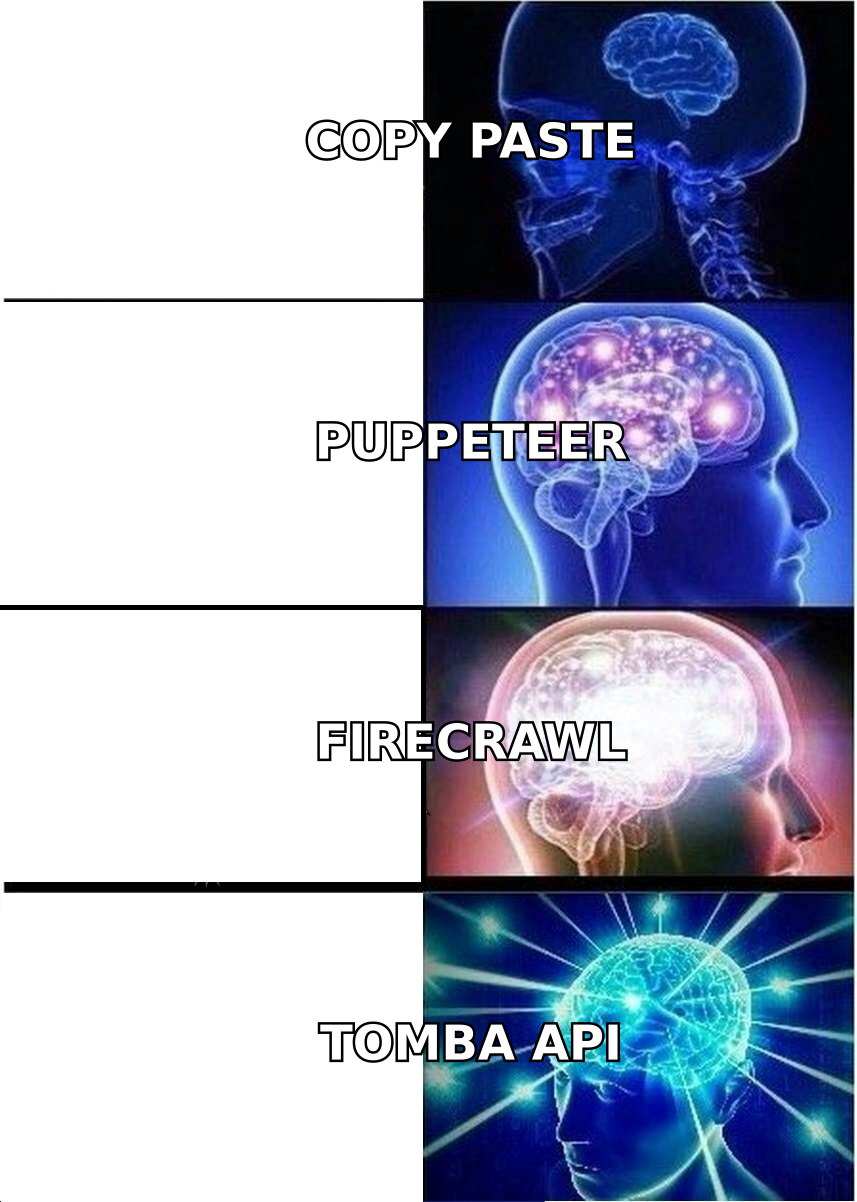
3. Wrong layer entirely. A large share of people scraping company websites are not building a search index. They want emails, names, job titles, or phone numbers. Scraping is a slow, brittle, legally awkward way to get data that is available through a purpose-built API. More on this below.
How do the top Firecrawl alternatives compare?#
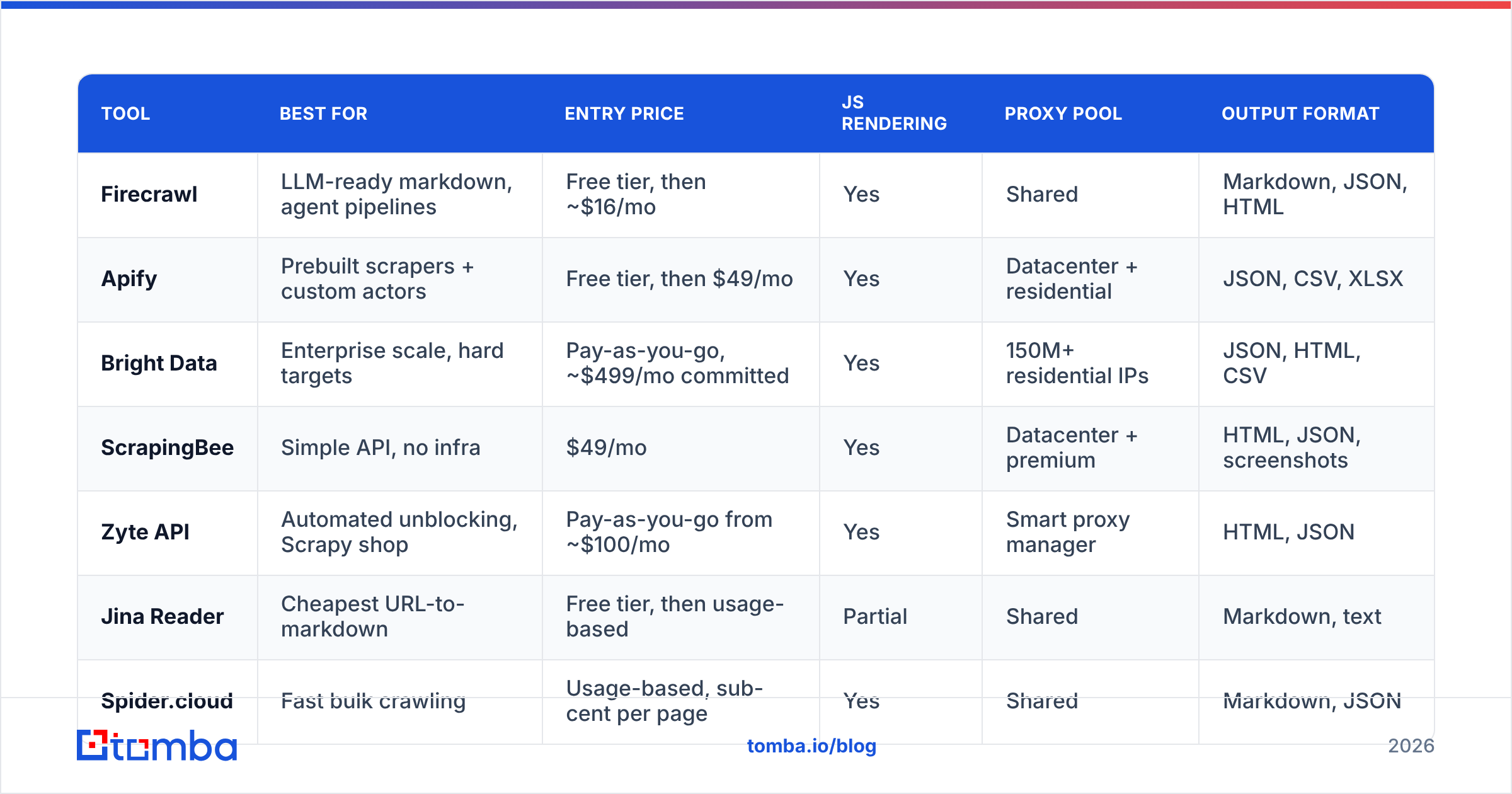
Pricing below reflects publicly listed entry tiers at the time of writing. Vendors change plans often — verify on their pricing pages before you commit budget.
| Tool | Best for | Entry price | JS rendering | Proxy pool | Output format |
|---|---|---|---|---|---|
| Firecrawl | LLM-ready markdown, agent pipelines | Free tier, then ~$16/mo | Yes | Shared | Markdown, JSON, HTML |
| Apify | Prebuilt scrapers + custom actors | Free tier, then $49/mo | Yes | Datacenter + residential | JSON, CSV, XLSX |
| Bright Data | Enterprise scale, hard targets | Pay-as-you-go, ~$499/mo committed | Yes | 150M+ residential IPs | JSON, HTML, CSV |
| ScrapingBee | Simple API, no infra | $49/mo | Yes | Datacenter + premium | HTML, JSON, screenshots |
| Zyte API | Automated unblocking, Scrapy shop | Pay-as-you-go from ~$100/mo | Yes | Smart proxy manager | HTML, JSON |
| Jina Reader | Cheapest URL-to-markdown | Free tier, then usage-based | Partial | Shared | Markdown, text |
| Spider.cloud | Fast bulk crawling | Usage-based, sub-cent per page | Yes | Shared | Markdown, JSON |
| Crawlee (OSS) | Full control, zero vendor cost | Free (self-hosted) | Yes (Playwright) | Bring your own | Anything you code |
| Tomba | Contact data, not page text | Free (25/mo), Starter $49/mo | N/A | N/A | Verified JSON records |
Read that table as a map of intent, not a leaderboard. Bright Data beating Jina Reader on proxy depth is like a freight train beating a bicycle on tonnage — true, irrelevant if you are going three blocks.
Which Firecrawl alternative fits which job?#
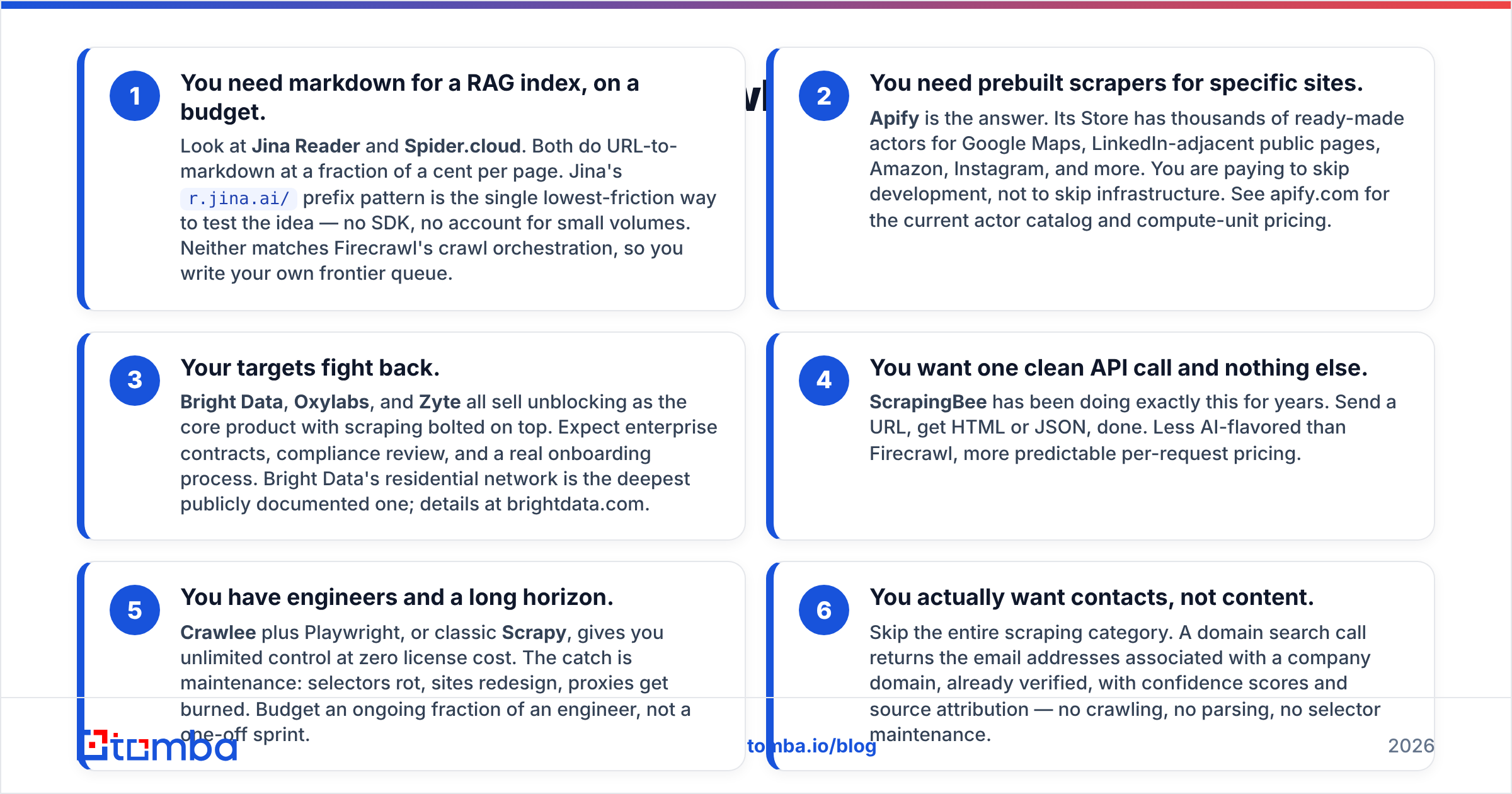
Here is the short version, by scenario:
You need markdown for a RAG index, on a budget. Look at Jina Reader and Spider.cloud. Both do URL-to-markdown at a fraction of a cent per page. Jina's
r.jina.ai/prefix pattern is the single lowest-friction way to test the idea — no SDK, no account for small volumes. Neither matches Firecrawl's crawl orchestration, so you write your own frontier queue.You need prebuilt scrapers for specific sites. Apify is the answer. Its Store has thousands of ready-made actors for Google Maps, LinkedIn-adjacent public pages, Amazon, Instagram, and more. You are paying to skip development, not to skip infrastructure. See apify.com for the current actor catalog and compute-unit pricing.
Your targets fight back. Bright Data, Oxylabs, and Zyte all sell unblocking as the core product with scraping bolted on top. Expect enterprise contracts, compliance review, and a real onboarding process. Bright Data's residential network is the deepest publicly documented one; details at brightdata.com.
You want one clean API call and nothing else. ScrapingBee has been doing exactly this for years. Send a URL, get HTML or JSON, done. Less AI-flavored than Firecrawl, more predictable per-request pricing.
You have engineers and a long horizon. Crawlee plus Playwright, or classic Scrapy, gives you unlimited control at zero license cost. The catch is maintenance: selectors rot, sites redesign, proxies get burned. Budget an ongoing fraction of an engineer, not a one-off sprint.
You actually want contacts, not content. Skip the entire scraping category. A domain search call returns the email addresses associated with a company domain, already verified, with confidence scores and source attribution — no crawling, no parsing, no selector maintenance.
Is self-hosting Firecrawl cheaper than the alternatives?#
Sometimes, and the crossover point is higher than people expect.
Firecrawl's AGPL license lets you run it yourself. Your costs become: container hosting, a headless browser fleet (memory-hungry — budget 1–2 GB per concurrent browser), proxy subscriptions, a queue, monitoring, and the engineer who gets paged when Chromium OOMs at 3 a.m.
A rough model: hosted scraping APIs land somewhere between $0.30 and $3.00 per 1,000 pages depending on tier and features. Self-hosted infra for a modest fleet runs a few hundred dollars a month in compute plus proxies. That means self-hosting starts winning on pure infra cost somewhere north of a few hundred thousand pages per month — and only if you value engineering time at zero, which you should not.
The honest rule: self-host when scraping is your product. Buy when scraping is an input to your product.
What does scraping cost you legally and operationally?#
Two things worth knowing before you scale any of these tools.
Terms of service and access controls are not the same as copyright. Public web scraping has been litigated repeatedly, and the general direction in US case law has favored access to publicly available data while leaving contract and trespass claims open. The hiQ Labs v. LinkedIn history is the reference point most legal teams start from. It is not a blanket permission slip, and it says nothing about GDPR.
Personal data is a separate regime. If you scrape names, emails, or phone numbers of EU or UK residents, you are processing personal data and you need a lawful basis, a privacy notice, and a way to honor deletion requests. Scraping it yourself puts the entire compliance burden on you. Sourcing it from a vendor with documented data sources moves part of that burden onto a party whose job it is to manage it.
That distinction is the single most-overlooked reason to not use a general scraper for contact discovery.
What if you only wanted emails in the first place?#
Be honest about the job to be done. A lot of Firecrawl crawls terminate in a regex hunting for mailto: links and @ symbols across a marketing site. That pipeline has three failure modes:
- Coverage is terrible. Most companies publish
info@and nothing else. The person you want to reach — the VP of Engineering, the Head of Ops — is not on the contact page. - Freshness is unknown. A scraped address on a 2021 press release tells you nothing about whether the mailbox still accepts mail.
- Cost per useful record is bad. You pay for hundreds of pages to surface a handful of generic inboxes.
A contact data API inverts that. You supply a domain or a person's name plus company, and you get back candidate addresses with a confidence score and verification status. Tomba's email finder covers the discovery half; the email verifier handles SMTP validation, catch-all detection, and role-account flagging so you are not sending into a black hole.
For enrichment on lists you already have — say, 5,000 rows from a scrape or a webinar export — bulk processing runs the whole file and returns statuses in one pass instead of you rate-limiting your own crawler.
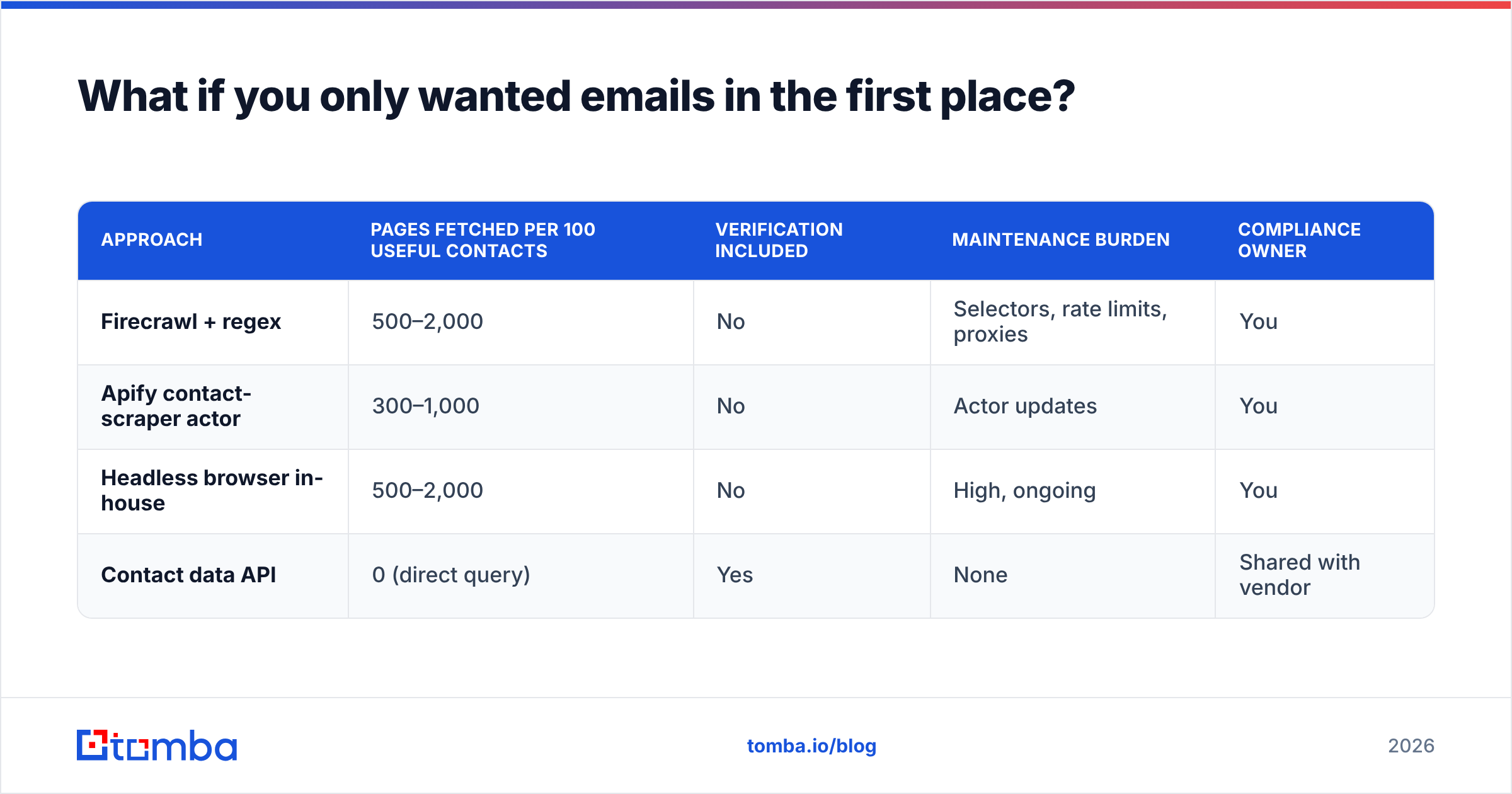
| Approach | Pages fetched per 100 useful contacts | Verification included | Maintenance burden | Compliance owner |
|---|---|---|---|---|
| Firecrawl + regex | 500–2,000 | No | Selectors, rate limits, proxies | You |
| Apify contact-scraper actor | 300–1,000 | No | Actor updates | You |
| Headless browser in-house | 500–2,000 | No | High, ongoing | You |
| Contact data API | 0 (direct query) | Yes | None | Shared with vendor |
Both approaches have a place. Use a scraper when you need page content — pricing changes, job postings, product catalogs, documentation for a RAG index. Use a data API when you need records about people and companies.
How should you evaluate these tools without wasting a month?#
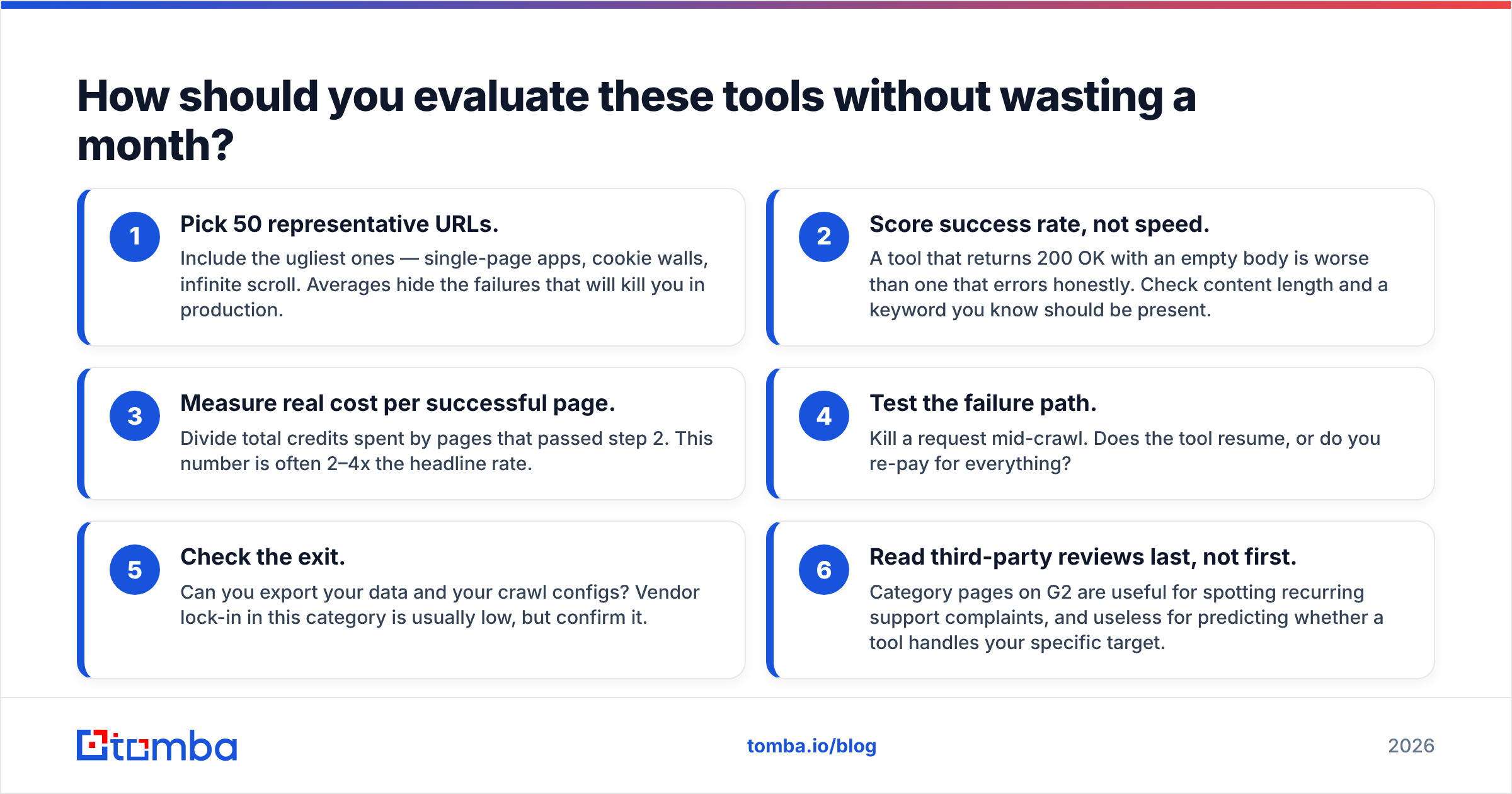
Run a bake-off on your actual targets, not on example.com. A tight process:
- Pick 50 representative URLs. Include the ugliest ones — single-page apps, cookie walls, infinite scroll. Averages hide the failures that will kill you in production.
- Score success rate, not speed. A tool that returns 200 OK with an empty body is worse than one that errors honestly. Check content length and a keyword you know should be present.
- Measure real cost per successful page. Divide total credits spent by pages that passed step 2. This number is often 2–4x the headline rate.
- Test the failure path. Kill a request mid-crawl. Does the tool resume, or do you re-pay for everything?
- Check the exit. Can you export your data and your crawl configs? Vendor lock-in in this category is usually low, but confirm it.
- Read third-party reviews last, not first. Category pages on G2 are useful for spotting recurring support complaints, and useless for predicting whether a tool handles your specific target.
If you are wiring any of this into an automated pipeline, the Tomba API and the various scraping APIs above all speak plain REST, so a proof of concept is an afternoon, not a quarter. And if cost is the deciding factor, compare against Tomba pricing — the free tier covers 25 searches a month, which is enough to validate whether contact-data-as-API beats your crawl before you spend anything.
Frequently asked questions#
Is Firecrawl free? There is a free tier with a limited credit allowance, and the codebase is open source under AGPL so you can self-host. The hosted paid plans start in the mid-teens per month and scale with credits.
What is the cheapest Firecrawl alternative? For simple URL-to-markdown, Jina Reader and Spider.cloud are the lowest cost per page. For anything needing residential proxies, cheap options do not exist — that cost is structural.
Can these tools scrape LinkedIn? Public profile scraping is heavily restricted by platform terms and technically difficult. Most reputable vendors decline it or route it through gray-area actors. For LinkedIn-sourced contact discovery, a compliant LinkedIn finder is a safer path than a general scraper.
Do I need JS rendering? Test first. A meaningful share of sites still ship server-rendered HTML, and rendering typically costs 3–10x more per page. Fetch the raw HTML, check whether your target text is in it, and only escalate the URLs that fail.
Which one is best for AI agents? Firecrawl remains strong here because of the markdown output and the /extract schema endpoint. Its closest functional competitor for that specific job is Spider.cloud, with Jina Reader as the minimalist option.
Where to start#
If you are building a RAG index or an agent that reads web pages, stay in the scraping category and pick by cost and target difficulty: Jina Reader or Spider.cloud for cheap volume, Apify for prebuilt coverage, Bright Data or Zyte when the targets fight back.
If your crawl exists to produce a list of people to contact, stop crawling. Point Tomba Email Finder at the domain or the person, get verified addresses with confidence scores and source attribution, and spend your engineering time on the outreach instead of on selector maintenance. The free tier is 25 searches a month with no card — enough to compare the hit rate against whatever your scraper is currently returning.
Related guides#
Ready to find emails that actually work?
Join 150,000+ professionals who stopped guessing and started sending. Free credits on signup — no credit card required.
Get the Tomba newsletter
Practical outbound tactics and product updates — once every two weeks.
About the author