Firecrawl Pricing 2026: Reviews, Pros and Cons Explained
Firecrawl turns websites into LLM-ready markdown, but the credit model makes real costs hard to predict. Here's an honest look at Firecrawl pricing, what reviewers praise, where it gets expensive, and when a different stack wins.
TL;DR
- Firecrawl is a scraping and crawling API that converts web pages into clean, LLM-ready markdown or structured JSON. It is not a contact database and it does not find email addresses.
- List pricing at the time of writing runs from a one-time free allowance of 500 credits up to roughly $19/mo (Hobby), $99/mo (Standard), and $399/mo (Growth), with annual billing knocking off around 20% and Enterprise quoted case by case.
- The pros reviewers repeat: excellent markdown output, a genuinely good
/crawlendpoint, fast setup, open-source core you can self-host. - The cons reviewers repeat: credit consumption is hard to forecast, JS-heavy and
/extractcalls burn far more than one credit per page, concurrency caps bite before credit caps do, and unused credits do not roll over. - Firecrawl is a great fit if your bottleneck is reading the web. If your bottleneck is reaching people, an email finder API is the cheaper and more direct tool.
What is Firecrawl, and who actually uses it?#
Firecrawl is a hosted API that takes a URL and gives you back something a language model can actually read. Point it at a page and you get markdown instead of a soup of divs, nav bars, and cookie banners. Point it at a domain and it will crawl the whole thing, respect robots rules, handle JavaScript rendering, and return a batch of documents.
Think of it as a translator between the messy web and your model's context window. The web speaks HTML with ads, modals, and lazy-loaded content. Your RAG pipeline speaks clean text. Firecrawl sits in the middle.
The typical buyers fall into four camps:
- AI application teams building RAG systems that need current documentation, product pages, or knowledge bases indexed on a schedule.
- Agent developers who want a tool call that reliably returns page content without maintaining a Playwright fleet.
- Data and research teams monitoring competitor pricing pages, changelogs, job boards, or regulatory filings.
- GTM engineers enriching account lists with signals scraped from company websites — tech stack mentions, hiring pages, funding announcements.
That fourth group is where a lot of confusion starts, and where the pricing math gets ugly. More on that later.
The core repo is open source and available on firecrawl.dev, which matters for the self-hosting conversation further down.
What does Firecrawl pricing look like in 2026?#
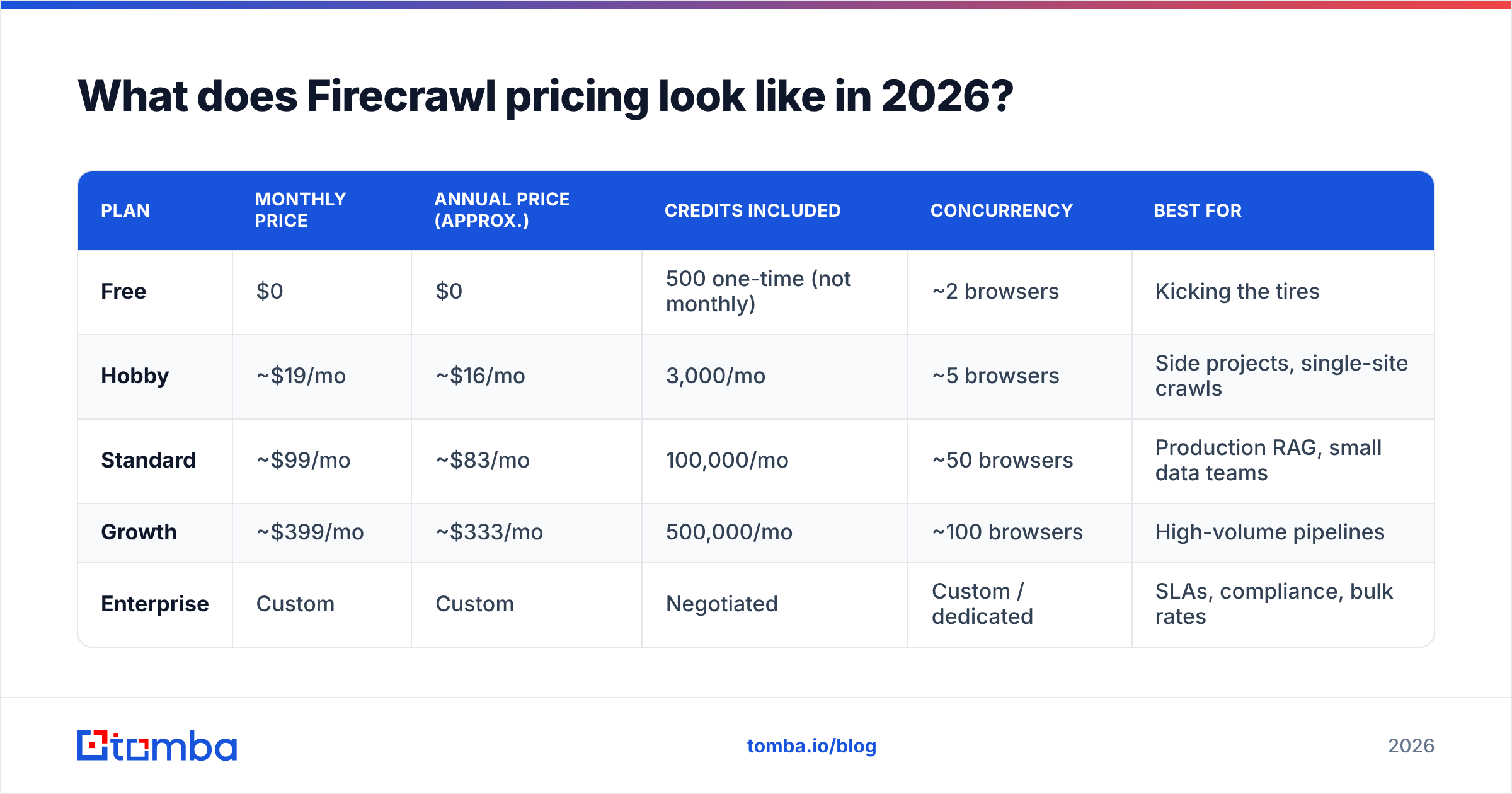
Firecrawl uses a credit model. You buy a monthly bucket of credits and every API operation draws from it. The published tiers at the time of writing look like this — always confirm against the official Firecrawl pricing page before you commit, because credit allocations on this category of tool move frequently.
| Plan | Monthly price | Annual price (approx.) | Credits included | Concurrency | Best for |
|---|---|---|---|---|---|
| Free | $0 | $0 | 500 one-time (not monthly) | ~2 browsers | Kicking the tires |
| Hobby | ~$19/mo | ~$16/mo | 3,000/mo | ~5 browsers | Side projects, single-site crawls |
| Standard | ~$99/mo | ~$83/mo | 100,000/mo | ~50 browsers | Production RAG, small data teams |
| Growth | ~$399/mo | ~$333/mo | 500,000/mo | ~100 browsers | High-volume pipelines |
| Enterprise | Custom | Custom | Negotiated | Custom / dedicated | SLAs, compliance, bulk rates |
Two details in that table cause most of the surprise on the first invoice.
First, the free tier's 500 credits are one-time, not monthly. It is a trial allowance, not a permanent free plan. If your mental model is "I'll just stay on free," that model is wrong.
Second, the jump from Hobby to Standard is roughly 5x the price for roughly 33x the credits. That is generous on paper, but it means there is no comfortable middle. If you outgrow 3,000 credits — and a single 2,000-page documentation crawl will do that in one afternoon — your next stop is $99/mo. There is no $40 tier.
How do Firecrawl credits actually get consumed?#
This is the section that decides whether Firecrawl is cheap or expensive for you. A credit is not simply "one page." The multipliers depend on what you ask for.
- Basic scrape — a plain
/scrapeon a static page is the cheapest unit, typically 1 credit per page. This is your baseline. - JavaScript rendering and stealth mode — pages that need a full browser session, proxy rotation, or anti-bot evasion cost multiples of the base rate. A protected e-commerce page can cost several times what a static blog post costs.
- Crawl operations —
/crawlcharges per page discovered and fetched, not per crawl job. Kick off a crawl on a domain with 8,000 URLs and you have committed 8,000+ credits before you see a single result. - Structured extraction — the
/extractendpoint runs an LLM over the fetched content to return typed JSON. That is the most expensive operation in the product, and it is also the one people reach for most, because it is the feature that makes Firecrawl feel magical. - Search and map —
/map(fast URL discovery) is cheap;/searchsits in between depending on how many results you materialize. - Retries and failures — behaviour varies by error class, but a pipeline with aggressive retry logic against flaky targets will quietly inflate consumption. Log your usage per job from day one.
The practical consequence: two teams on the same $99 plan can have wildly different effective costs per useful record. A team scraping static docs might get 100,000 pages. A team running /extract against JS-heavy retail pages might get closer to 8,000. Neither team is doing anything wrong — they are just buying different products from the same meter.
Before you commit to a tier, run a 300-credit pilot on your actual target URLs and measure credits-per-successful-record. That number, not the sticker price, is your real cost.
What do Firecrawl reviews say — what are the pros?#
Sentiment across developer communities and review sites like G2 is generally positive, and it clusters around a few consistent themes.
The markdown output is genuinely good. This is the number one thing users praise. Boilerplate stripping, heading preservation, table handling, and link retention are better than what most teams build in-house in a sprint. If you have ever fed raw HTML to a model and watched it hallucinate around a navigation menu, you understand the value.
Time-to-first-result is minutes, not days. The SDKs are clean, the docs are readable, and the mental model (scrape, crawl, map, search, extract) is small enough to hold in your head. Teams routinely ship a working prototype the same day they sign up.
The crawl endpoint handles the boring parts. Sitemap parsing, URL de-duplication, depth limits, path filtering, robots handling, and async job polling are all built in. Rebuilding that correctly takes real engineering weeks.
Open source and self-hostable. The core is public. You can inspect it, fork it, and run it on your own infrastructure. That answers a lot of procurement and data-residency questions before they get asked.
Agent-native design. Firecrawl was built in the era of tool-calling agents, and it shows. Response shapes, error handling, and the extraction schema all assume an LLM is on the other end.
What are the cons and hidden costs?#
Honest reviews raise the same five objections.
Credit forecasting is genuinely hard. This is the loudest complaint. Because cost varies by page type, rendering mode, and endpoint, you cannot look at "10,000 pages/month" and confidently pick a plan. Most teams over-buy or get throttled mid-month.
Concurrency limits bite before credit limits do. On the lower tiers, the number of simultaneous browser sessions is the real constraint. You may have plenty of credits left and still be waiting in a queue because your plan allows only a handful of parallel fetches. For time-sensitive jobs, that pushes you up a tier for reasons that have nothing to do with volume.
Credits do not roll over. Bursty workloads — a big quarterly refresh, a one-off migration — pay for capacity they cannot bank. If your usage is spiky rather than steady, you are subsidising your quiet months.
Extraction quality still needs a human check. LLM-driven JSON extraction is impressive until it silently returns a plausible-but-wrong price or a stale headcount. You need validation on the output, which is engineering work the pricing page does not mention.
Sites fight back. No scraping vendor fully solves anti-bot defences. Some targets will fail, and failures still consume time, retries, and — depending on the error — credits. Budget for a success rate below 100%.
Self-hosting is not free. More on that next, because it is the most misunderstood line in the whole cost analysis.
Is self-hosting Firecrawl cheaper than the cloud plan?#
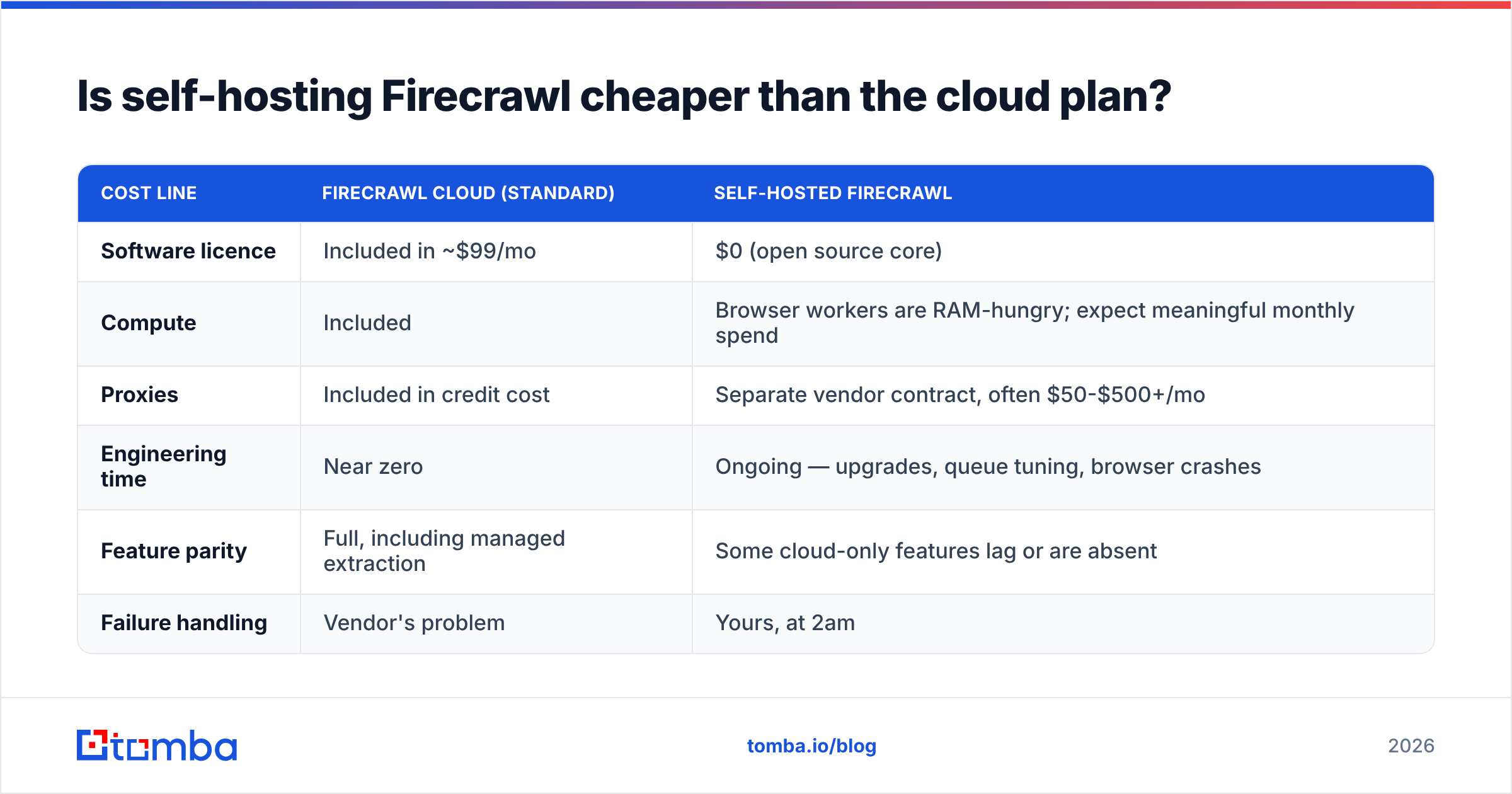
Short answer: rarely, unless you have a compliance mandate or you are running at Growth-plan volume and above.
Self-hosting removes the credit meter but adds a real bill:
| Cost line | Firecrawl Cloud (Standard) | Self-hosted Firecrawl |
|---|---|---|
| Software licence | Included in ~$99/mo | $0 (open source core) |
| Compute | Included | Browser workers are RAM-hungry; expect meaningful monthly spend |
| Proxies | Included in credit cost | Separate vendor contract, often $50-$500+/mo |
| Engineering time | Near zero | Ongoing — upgrades, queue tuning, browser crashes |
| Feature parity | Full, including managed extraction | Some cloud-only features lag or are absent |
| Failure handling | Vendor's problem | Yours, at 2am |
The honest framing: self-hosting trades a predictable software bill for an unpredictable infrastructure-plus-headcount bill. If a competent engineer spends four hours a month babysitting the deployment, you have already spent more than the Standard plan costs. Self-host for control and data residency, not for savings.
How does Firecrawl compare to other data-acquisition tools?#
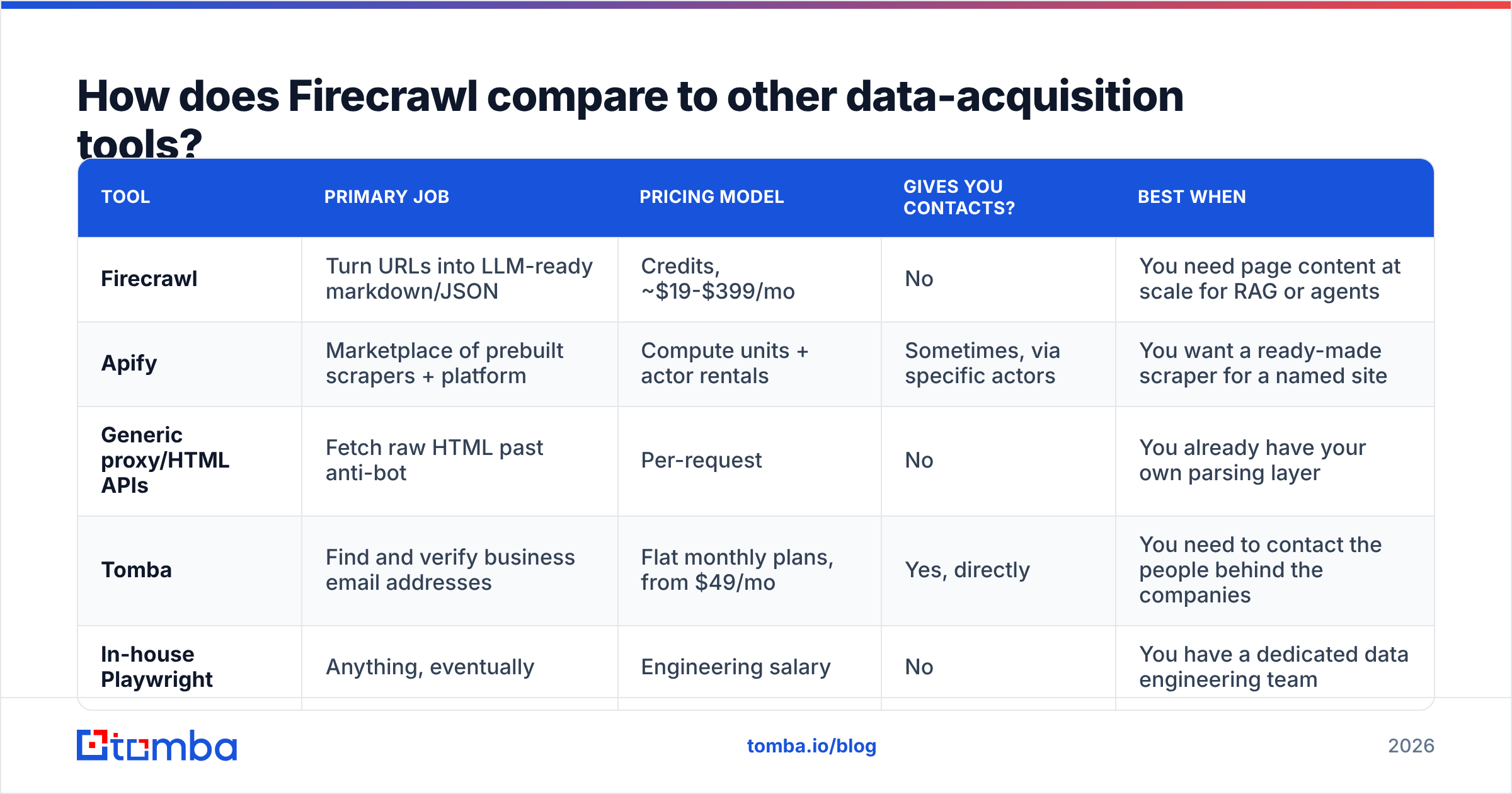
Firecrawl competes in a crowded space, but the competitors are not interchangeable — they solve different halves of the problem. This is the comparison that actually matters when you are scoping a budget.
| Tool | Primary job | Pricing model | Gives you contacts? | Best when |
|---|---|---|---|---|
| Firecrawl | Turn URLs into LLM-ready markdown/JSON | Credits, ~$19-$399/mo | No | You need page content at scale for RAG or agents |
| Apify | Marketplace of prebuilt scrapers + platform | Compute units + actor rentals | Sometimes, via specific actors | You want a ready-made scraper for a named site |
| Generic proxy/HTML APIs | Fetch raw HTML past anti-bot | Per-request | No | You already have your own parsing layer |
| Tomba | Find and verify business email addresses | Flat monthly plans, from $49/mo | Yes, directly | You need to contact the people behind the companies |
| In-house Playwright | Anything, eventually | Engineering salary | No | You have a dedicated data engineering team |
Notice the column that splits the table in two. Firecrawl, Apify, and proxy APIs all return pages. They tell you what a company says about itself. None of them return a verified, deliverable email address for the VP of Engineering you want to talk to.
That distinction is worth money, because plenty of teams buy a scraping plan to solve a prospecting problem and end up building a fragile contact-guessing layer on top of it.
Where does Firecrawl fit in a B2B prospecting stack?#
If your goal is outbound, Firecrawl is a signal layer, not a contact layer. It is very good at the first job and structurally incapable of the second.
A sane division of labour looks like this:
- Firecrawl crawls target company sites for signals: hiring pages, product launches, pricing changes, tech mentions, customer logos.
- A contact layer turns "Acme Corp looks like a fit" into "here is a verified inbox for the person who owns this problem."
For the second half, you want a purpose-built email finder API rather than a scraper plus regex. Scraping a website for mailto: links returns info@ and support@ addresses — the two mailboxes least likely to convert. A dedicated email finder resolves a person's name and company domain into a specific, deliverable address, then checks it. Running a domain search against the company you just crawled gives you the named contacts behind it in one call.
The cost comparison also favours splitting the stack. Guessing email patterns from scraped pages burns credits on rendering, burns LLM tokens on extraction, and still leaves you with unverified guesses that torch your sender reputation when they bounce. A flat-rate finder plan handles the same job with a known cost per lookup and a verification step built in.

For context on the other side of the ledger, Tomba pricing runs a free tier at 25 searches/month, Starter at $49/mo, Growth at $99/mo, and Pro at $249/mo — flat monthly plans rather than a variable credit meter, which makes forecasting a lot less exciting. If you also need firmographic fields appended to the accounts Firecrawl surfaced, data enrichment closes that gap without another scrape.
Who should buy Firecrawl, and who should skip it?#
Buy Firecrawl if:
- You are building RAG or an agent that needs fresh, clean web content on a schedule.
- Your targets are mostly documentation, blogs, or public product pages — cheap per credit, high success rate.
- You want to ship this month and would rather not maintain browser infrastructure.
- You have run a pilot and measured your actual credits-per-record, and the Standard plan covers it with headroom.
Skip Firecrawl if:
- Your real goal is finding people to email. Wrong tool, wrong meter.
- Your volume is a single small site refreshed monthly — a basic script and a proxy will do it for less.
- Your targets are aggressively defended commercial sites where success rates and per-page multipliers will wreck the math.
- You need strictly predictable monthly spend and cannot tolerate variance.
Start on Hobby, not Standard, even if you expect volume. Spend the first month instrumenting usage, then upgrade with data instead of a guess. The annual discount is real but locks you into a tier you have not yet validated.
What should you check before you sign up?#
Run this five-item checklist against your own workload:
- Measure credits-per-useful-record on 50 real target URLs, not the docs example.
- Check concurrency, not just credit count — it is the limit most teams actually hit.
- Price the failure rate. What percentage of your targets block you, and what does a retry cost?
- Confirm what you need extraction for. If a regex or a cheap parser gets 90% of the value, skip
/extractand save the multiplier. - Separate the scraping budget from the contact budget. They are different problems with different unit economics, and merging them hides waste in both.
The bottom line#
Firecrawl is a well-built product with an honest weakness: the pricing is transparent about what a credit costs and opaque about how many credits you will need. The output quality is worth paying for if reading the web is your bottleneck. The credit model is worth piloting carefully before you commit annually.
But if you landed on this page because you are building an outbound motion — scraping company sites hoping to reach the humans inside them — you are paying scraping prices for a contact problem. Content extraction gets you the company. It does not get you the inbox.
Start with the Tomba Email Finder for that half of the stack. The free tier gives you 25 searches a month to test accuracy against your own target accounts, and paid plans start at $49/mo with flat, predictable pricing — no credit multipliers, no concurrency surprises, and verification built into the same call. Pair it with Firecrawl for signals if you need them, and let each tool do the job it was actually built for.
Related guides#
Ready to find emails that actually work?
Join 150,000+ professionals who stopped guessing and started sending. Free credits on signup — no credit card required.
Get the Tomba newsletter
Practical outbound tactics and product updates — once every two weeks.
About the author