Firecrawl vs Scrapy: Which Web Scraper Wins in 2026?
Firecrawl is a managed scraping API that returns LLM-ready markdown. Scrapy is a free Python framework you host yourself. Here's the honest cost, speed, and maintenance breakdown for B2B data teams.
TL;DR
- Scrapy is a free, self-hosted Python framework built for high-volume structured crawling. You own the servers, the proxies, the parsers, and every selector that breaks.
- Firecrawl is a managed API that turns a URL into clean markdown or JSON for LLM pipelines. You pay per credit and skip the infrastructure entirely.
- Cost crossover sits around 50k–200k pages/month. Below it, Firecrawl is cheaper than an engineer's time. Above it, Scrapy plus proxies wins on unit economics.
- Neither one gives you contact data. Scraping a company site returns HTML, not verified work emails — that is a separate enrichment layer.
- Best combo for B2B teams: Firecrawl for research and unstructured pages, Scrapy for repeatable high-volume jobs, and a dedicated email finder for the contact layer.
What is Firecrawl and what is Scrapy?#
They solve overlapping problems from opposite directions.
Scrapy is an open-source Python framework, first released in 2008 and maintained by Zyte. It gives you a full crawling engine: request scheduler, async downloader, middleware pipeline, item exporters, and AutoThrottle for polite rate limiting. You write spiders in Python, define CSS or XPath selectors, and run them wherever you want. It costs nothing in licensing and everything in engineering hours. Full docs live at scrapy.org.
Firecrawl is a newer managed service. You send it a URL, it handles the headless browser, the proxy rotation, and the anti-bot dance, then returns the page as clean markdown, HTML, screenshot, or structured JSON extracted by an LLM. Its /crawl endpoint walks a whole domain; /scrape handles one page; /extract pulls typed fields against a schema you define. Details at firecrawl.dev.
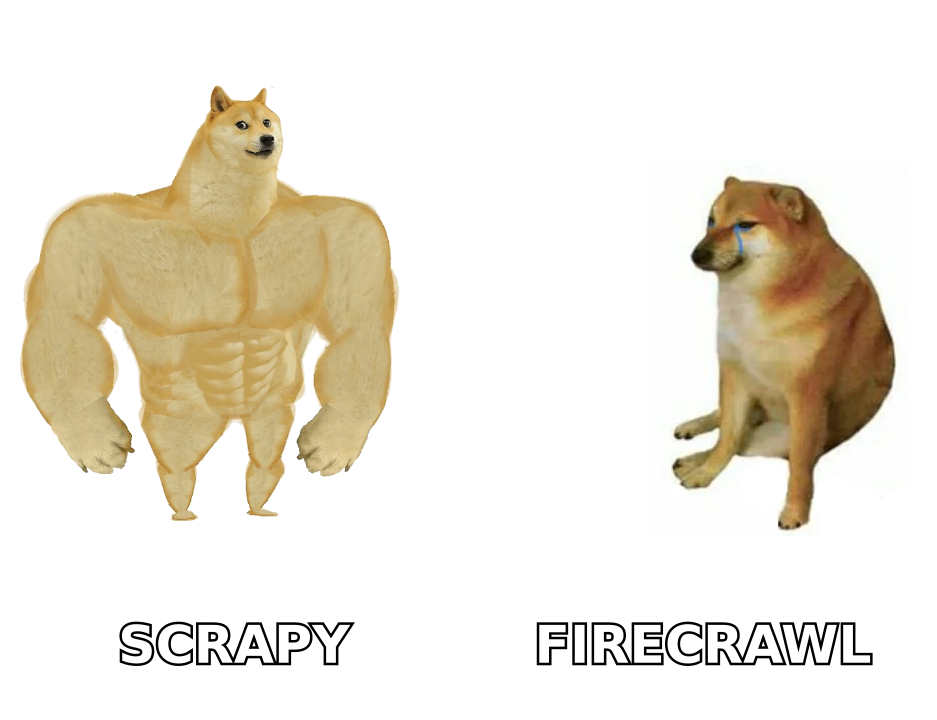
The mental model: Scrapy is buying a commercial kitchen. Firecrawl is ordering delivery. If you serve 4,000 meals a night, the kitchen pays for itself. If you eat out twice a week, delivery is obviously right — and pretending otherwise is how teams burn a quarter maintaining selectors nobody asked for.
How do Firecrawl and Scrapy compare head to head?#
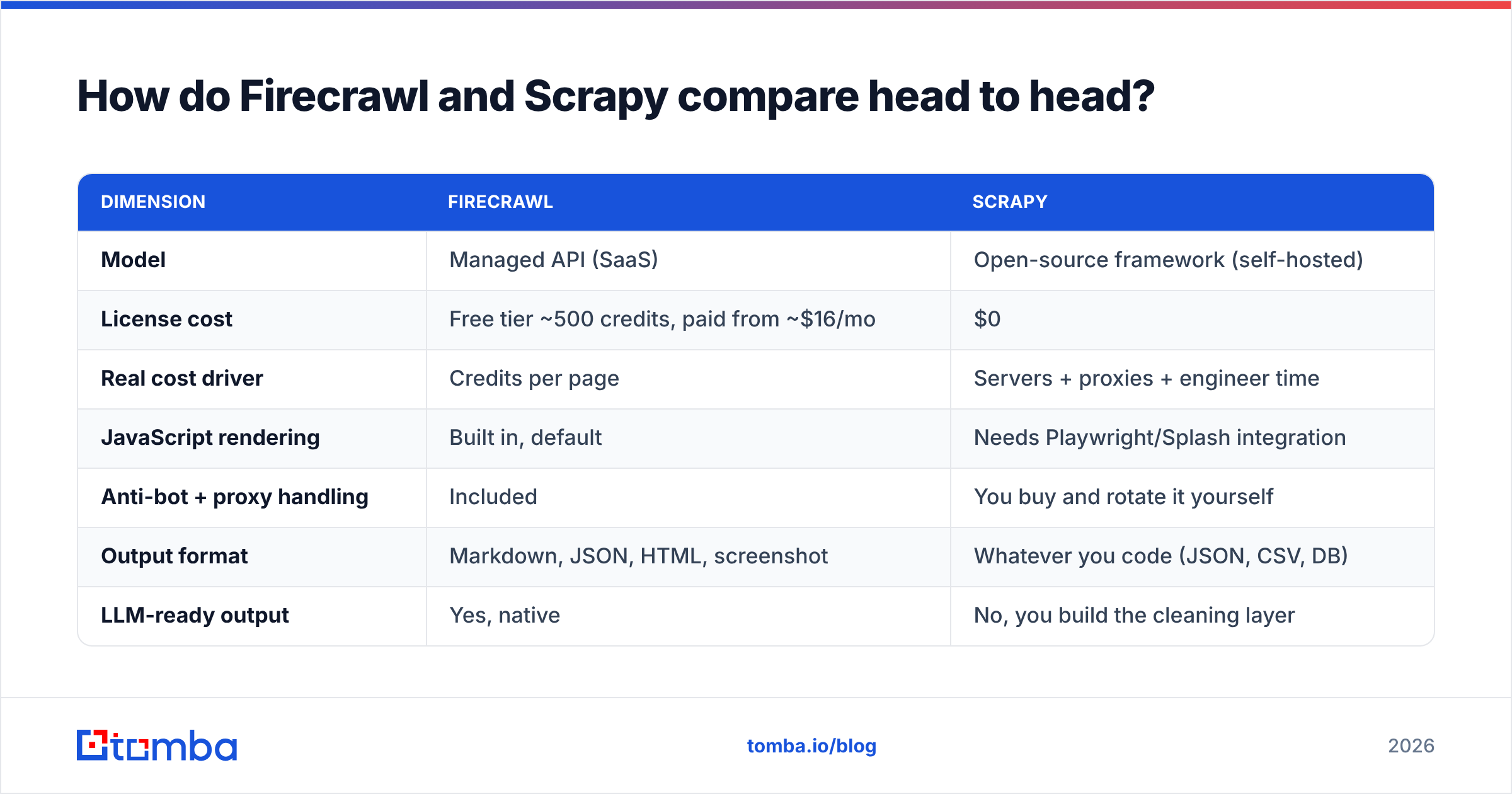
| Dimension | Firecrawl | Scrapy |
|---|---|---|
| Model | Managed API (SaaS) | Open-source framework (self-hosted) |
| License cost | Free tier ~500 credits, paid from ~$16/mo | $0 |
| Real cost driver | Credits per page | Servers + proxies + engineer time |
| JavaScript rendering | Built in, default | Needs Playwright/Splash integration |
| Anti-bot + proxy handling | Included | You buy and rotate it yourself |
| Output format | Markdown, JSON, HTML, screenshot | Whatever you code (JSON, CSV, DB) |
| LLM-ready output | Yes, native | No, you build the cleaning layer |
| Time to first result | Under 10 minutes | Half a day to a week |
| Throughput ceiling | Rate-limited by plan | Effectively unlimited on your hardware |
| Maintenance when a site changes | Vendor's problem (mostly) | Your problem (always) |
| Best for | Research, RAG, mixed-site crawling | Repeatable high-volume structured crawls |
The row that decides most evaluations is maintenance. Scrapy spiders break when a site ships a redesign, and B2B target sites redesign constantly. Firecrawl's markdown output is structurally forgiving — you get the page text regardless of whether the div class changed from product-title to product__title.
Which one is actually cheaper?#
Cheaper depends entirely on volume, and most teams model this wrong by counting only the invoice.
Scrapy's license is $0. Its real cost is:
- Proxies — residential proxies run roughly $3–$15/GB. Serious B2B crawling burns 20–100 GB/month.
- Compute — a modest crawler cluster is $50–$300/month on any cloud.
- Engineering — the big one. Budget 10–20 hours/month of a developer's time for spider maintenance, anti-bot fixes, and pipeline breakage. At a $90/hr loaded rate that's $900–$1,800/month before you scrape a single useful field.
- Opportunity cost — every hour spent fixing a selector is an hour not spent on the pipeline the data feeds.
Firecrawl's cost is a credit line. Roughly one credit per page scraped, more for JS-heavy or LLM-extracted pages. Plans scale from a free tier through mid-hundreds per month for serious volume.
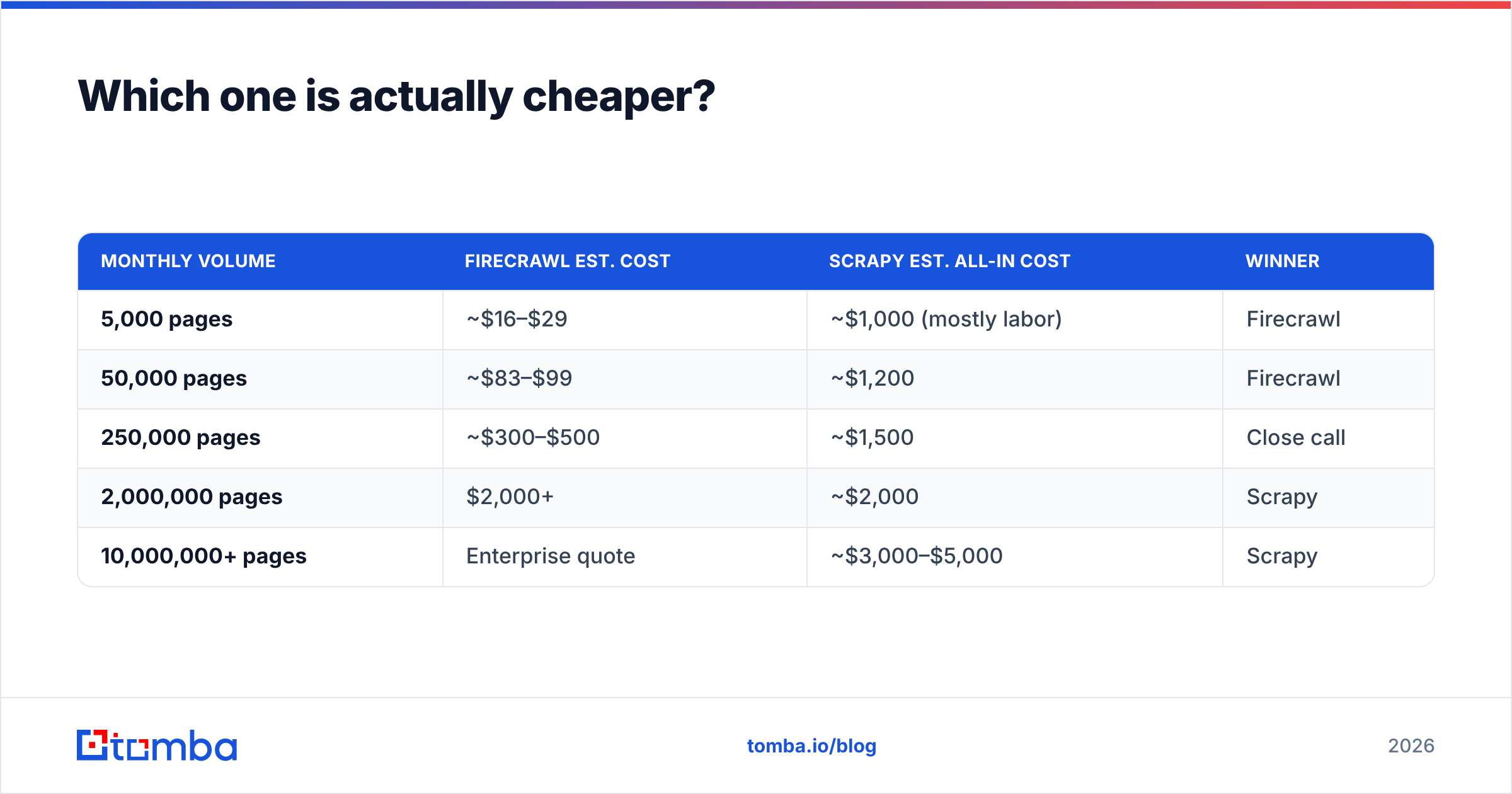
| Monthly volume | Firecrawl est. cost | Scrapy est. all-in cost | Winner |
|---|---|---|---|
| 5,000 pages | ~$16–$29 | ~$1,000 (mostly labor) | Firecrawl |
| 50,000 pages | ~$83–$99 | ~$1,200 | Firecrawl |
| 250,000 pages | ~$300–$500 | ~$1,500 | Close call |
| 2,000,000 pages | $2,000+ | ~$2,000 | Scrapy |
| 10,000,000+ pages | Enterprise quote | ~$3,000–$5,000 | Scrapy |
The crossover for most B2B teams lands somewhere between 200k and 500k pages/month. Below that line, the managed API is straightforwardly cheaper once you price your own team honestly. Above it, self-hosting wins — which is exactly why large data vendors run Scrapy-style infrastructure internally rather than buying scrape credits.
One caveat that skews the table: if you already employ a data engineering team running Scrapy for other jobs, the marginal cost of one more spider is near zero. Marginal cost, not average cost, is what should drive the decision.
When should you choose Firecrawl?#
Pick Firecrawl when speed to data beats cost per page.
- You are building an LLM or RAG pipeline. Markdown output drops straight into a vector store with no cleaning layer. This is Firecrawl's home turf and it is meaningfully better at it than a hand-rolled Scrapy + BeautifulSoup + readability stack.
- Your target sites are heterogeneous. Crawling 500 different company websites for pricing pages means 500 different DOM structures. Writing 500 spiders is absurd; sending 500 URLs to an extraction endpoint with one schema is not.
- You have no dedicated data engineer. If the person who wrote the spider is also the person shipping the product, Scrapy maintenance will silently eat their sprint.
- You need JavaScript rendering by default. Modern B2B sites are React apps. Firecrawl renders them without you configuring a headless browser fleet.
- The project is exploratory. Prototypes that die in two weeks should never accrue infrastructure.
When should you choose Scrapy?#
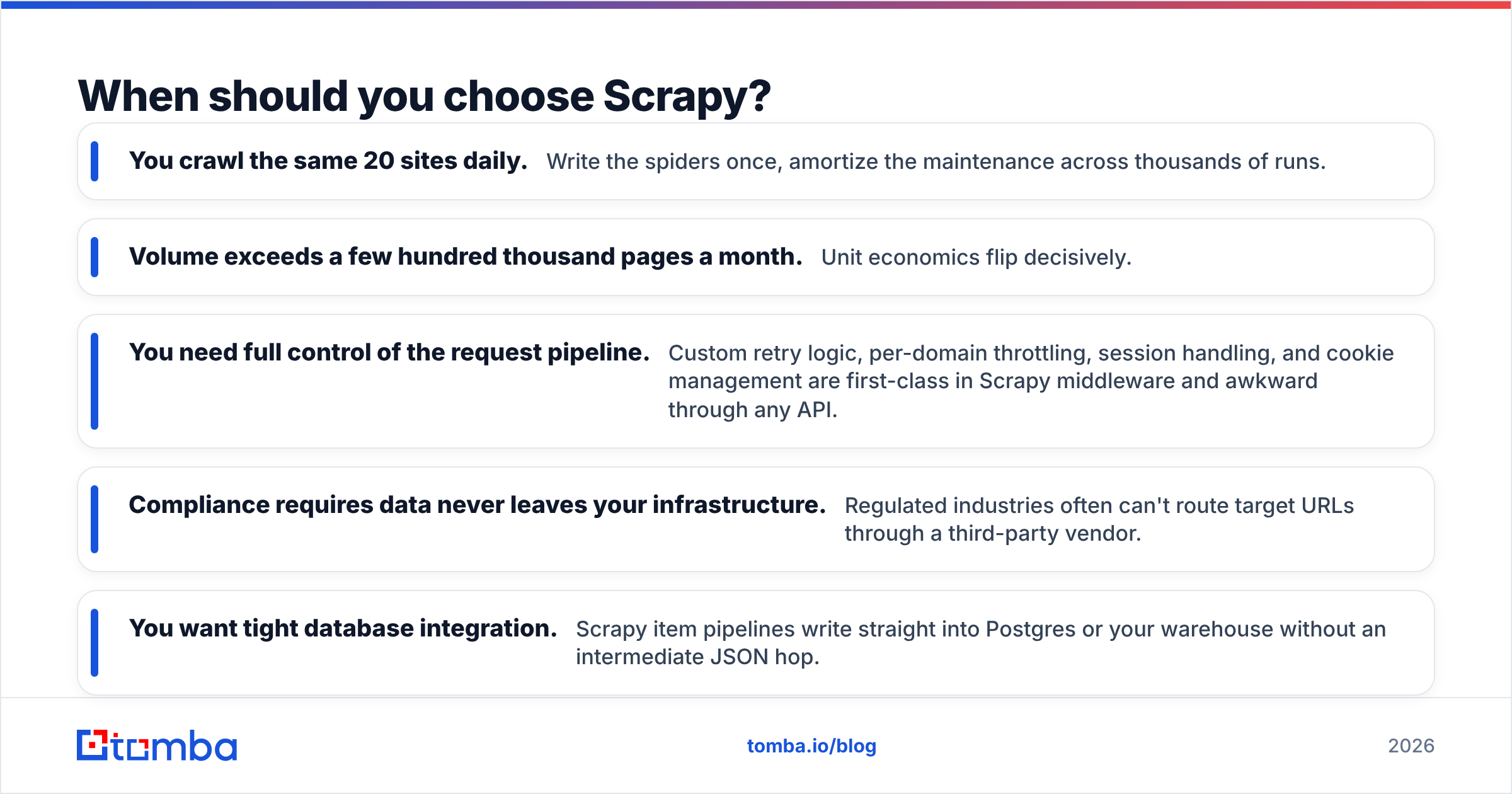
Pick Scrapy when the crawl is repeatable, high-volume, and structurally stable.
- You crawl the same 20 sites daily. Write the spiders once, amortize the maintenance across thousands of runs.
- Volume exceeds a few hundred thousand pages a month. Unit economics flip decisively.
- You need full control of the request pipeline. Custom retry logic, per-domain throttling, session handling, and cookie management are first-class in Scrapy middleware and awkward through any API.
- Compliance requires data never leaves your infrastructure. Regulated industries often can't route target URLs through a third-party vendor.
- You want tight database integration. Scrapy item pipelines write straight into Postgres or your warehouse without an intermediate JSON hop.
Scrapy also has a maturity advantage nothing new can match: 18 years of Stack Overflow answers, battle-tested extensions, and a genuinely deep Zyte-maintained ecosystem. When something breaks at 2 a.m., that matters.
What do both tools fail to give you?#
Contact data. This is the gap that catches B2B teams by surprise.
You can crawl a company's entire site — team page, about page, press releases, careers section — and still not have a single deliverable work email. What you get is:
- Names without addresses. A team page lists "Sarah Chen, VP Marketing." Neither tool tells you whether her address is
schen@,sarah.chen@, orsarah@. - Generic inboxes only.
info@,hello@,contact@are the addresses companies publish. They are also the addresses with the worst reply rates in outbound. - Stale data. A team page updated in 2023 lists three people who left. Scraping it faithfully returns three bounces.
- No verification signal. Even when you find an address in a mailto link, neither tool tells you if the mailbox still accepts mail. That is an SMTP-level check, not an HTML-level one.
- No catch-all handling. Many B2B domains accept everything at the MX layer, so a naive "it didn't bounce" test proves nothing without a dedicated catch-all verifier.
This is why scraping and contact enrichment are separate layers in every mature GTM stack. The crawler establishes which companies and which people; an enrichment API resolves how to reach them. Trying to collapse those two jobs into one Scrapy spider is the single most common reason homegrown prospecting pipelines produce 30% bounce rates and torch sender reputation.
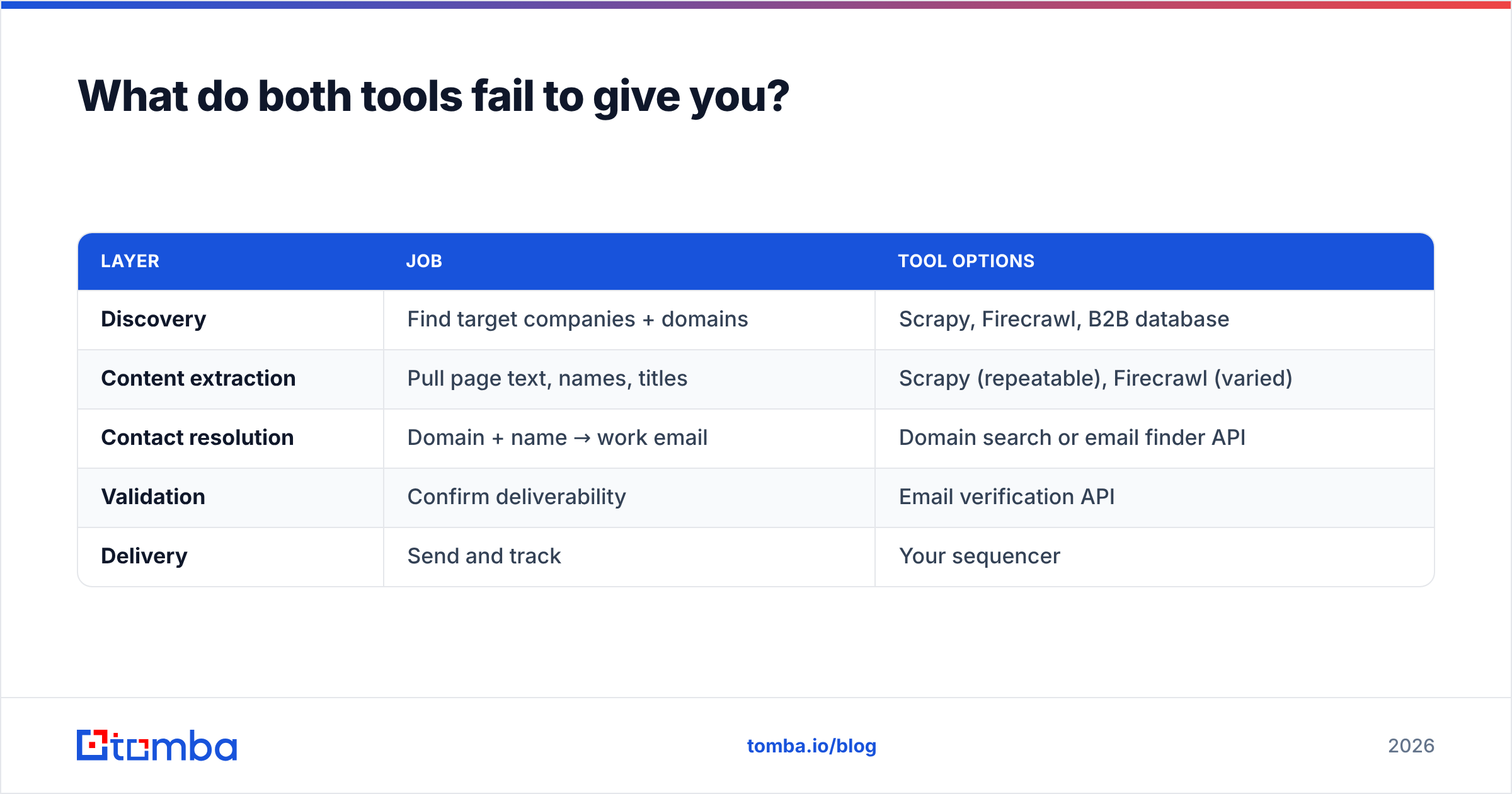
A practical architecture looks like this:
| Layer | Job | Tool options |
|---|---|---|
| Discovery | Find target companies + domains | Scrapy, Firecrawl, B2B database |
| Content extraction | Pull page text, names, titles | Scrapy (repeatable), Firecrawl (varied) |
| Contact resolution | Domain + name → work email | Domain search or email finder API |
| Validation | Confirm deliverability | Email verification API |
| Delivery | Send and track | Your sequencer |
Layers 3 and 4 are not scraping problems. They require a maintained pattern database, MX-level checks, and a feedback loop from real send data — none of which you get from parsing HTML, however cleanly.
Can you use them together?#
Yes, and the hybrid is what most serious teams actually run.
Pattern A — Firecrawl for reconnaissance, Scrapy for production. Use Firecrawl's crawl endpoint to explore a new target site and understand its structure, then codify the winning selectors into a Scrapy spider once you know the crawl is worth industrializing. This shortens spider development from days to hours.
Pattern B — Scrapy for volume, Firecrawl for the awkward 10%. Most crawls fail on a minority of sites with aggressive bot protection or heavy JS. Route those specific domains to Firecrawl as a fallback inside your Scrapy middleware, rather than building a headless browser fleet for the tail.
Pattern C — either one for discovery, an enrichment API for contacts. Crawl to build the company list, then hand domains to an enrichment endpoint. A bulk email finder turns a CSV of 5,000 domains and names into verified addresses without a single line of parsing code, and the Tomba API drops into a Scrapy item pipeline in about fifteen lines.
Here is the realistic decision matrix:
| Your situation | Recommended stack |
|---|---|
| Solo founder, no data engineer | Firecrawl + email finder API |
| Small GTM team, mixed sites | Firecrawl for crawl, enrichment API for contacts |
| Data team, 1M+ pages/month | Scrapy + proxies + enrichment API |
| Regulated industry, no third-party routing | Self-hosted Scrapy + on-prem-friendly vendors |
| Building a RAG/LLM product | Firecrawl, full stop |
| Need contacts, not content | Skip scraping — go straight to enrichment |
That last row deserves emphasis. A surprising number of teams build a scraper when what they actually needed was a contact database. If your end goal is "email addresses for marketing directors at 2,000 SaaS companies," writing a crawler is a detour. Ask what the output has to be before you pick the tool that produces it — the same discipline applies whether you're comparing crawlers or evaluating Clearbit alternatives for enrichment.
What about legal and ethical limits?#
Both tools put the compliance burden on you, not the vendor.
Respect robots.txt — Scrapy honors it by default via ROBOTSTXT_OBEY, and turning that off is a deliberate choice you should be able to justify. Rate-limit aggressively; AUTOTHROTTLE_ENABLED exists for a reason and the equivalent discipline applies to any managed API. Read terms of service on target sites, especially social platforms, which are explicit about prohibiting automated collection.
For personal data, GDPR and similar regimes apply to scraped contact information the same way they apply to purchased lists. Legitimate interest for B2B outreach is defensible, but only with a genuine opt-out path and honest sourcing. If you can't explain where a record came from, you shouldn't be emailing it. Vendors that publish their data sources make that explanation a lot easier than a spider whose provenance lives in a git commit from eight months ago.
The verdict#
Choose Firecrawl if you're under roughly 200k pages/month, your targets are varied, you're feeding an LLM, or you don't have an engineer to spare. The managed API is cheaper than it looks once you price your own time.
Choose Scrapy if you're running high-volume repeatable crawls, need pipeline-level control, have compliance constraints on third-party routing, or already have a team that knows it.
Choose neither if what you actually want is verified B2B contact data. Crawling gives you names and companies; it does not give you deliverable inboxes, and no amount of clever parsing changes that.
For the contact layer, the Tomba Email Finder resolves a domain and a name into a verified work email with a confidence score, backed by a pattern database and SMTP-level checks that no HTML parser can replicate. It runs standalone, as a bulk CSV job, or as an API call inside your existing Scrapy pipeline. The free tier covers 25 searches a month so you can test it against your own crawl output before committing; paid plans start at $49/mo, with full Tomba pricing published up front. Crawl for content, enrich for contacts — stop asking one tool to do both.
Related guides#
Ready to find emails that actually work?
Join 150,000+ professionals who stopped guessing and started sending. Free credits on signup — no credit card required.
Get the Tomba newsletter
Practical outbound tactics and product updates — once every two weeks.
About the author