Fireflies.ai Pricing in 2026: Reviews, Pros, and Cons
Fireflies.ai looks cheap at $10 a seat until storage caps, seat minimums, and annual-only discounts change the math. Here is the real cost, what reviewers complain about, and when a different tool wins.
TL;DR
- Fireflies.ai runs a four-tier model — Free, Pro, Business, Enterprise — and the headline per-seat prices only apply on annual billing. Monthly billing costs meaningfully more.
- The real cost driver is not the sticker price. It is seat count, storage/transcription caps on lower tiers, and the fact that most teams need Business-level features (unlimited storage, video capture, admin controls) within a quarter.
- Reviewers consistently praise transcription accuracy, integrations breadth, and the search experience. They consistently complain about speaker labeling on noisy calls, non-English accuracy, and support responsiveness on lower tiers.
- Fireflies is a strong buy for revenue teams that live in meetings and want conversation data in the CRM. It is a weak buy if you mostly need call coaching scorecards or deal intelligence — that is Gong and Chorus territory.
- Meeting intelligence only pays off if there are meetings to record. If your bottleneck is pipeline, not notes, spend the budget on contact data first.
What is Fireflies.ai and who actually buys it?#
Fireflies.ai is an AI meeting assistant. It joins your Zoom, Google Meet, or Microsoft Teams calls as a participant, records and transcribes them, then produces summaries, action items, and searchable transcripts that sync into your CRM and Slack.
Think of it as a court stenographer that never sleeps, never asks for clarification, and files everything into a searchable archive by the time you walk out of the room. That is the value proposition: nobody on your team has to choose between listening and taking notes.
The buyer profile splits into three groups:
- Sales teams who want discovery-call notes auto-logged to HubSpot or Salesforce so reps stop backfilling CRM fields on Friday afternoon.
- Customer success and support teams who need a record of what was promised on a renewal call.
- Product, recruiting, and consulting teams who run interview-heavy weeks and want searchable transcripts across dozens of conversations.
The sales use case is the one where pricing scrutiny matters most, because sales orgs buy per seat and headcount changes every quarter. A $10 difference per seat is invisible at five reps and a real line item at eighty.
What does Fireflies.ai pricing look like in 2026?#
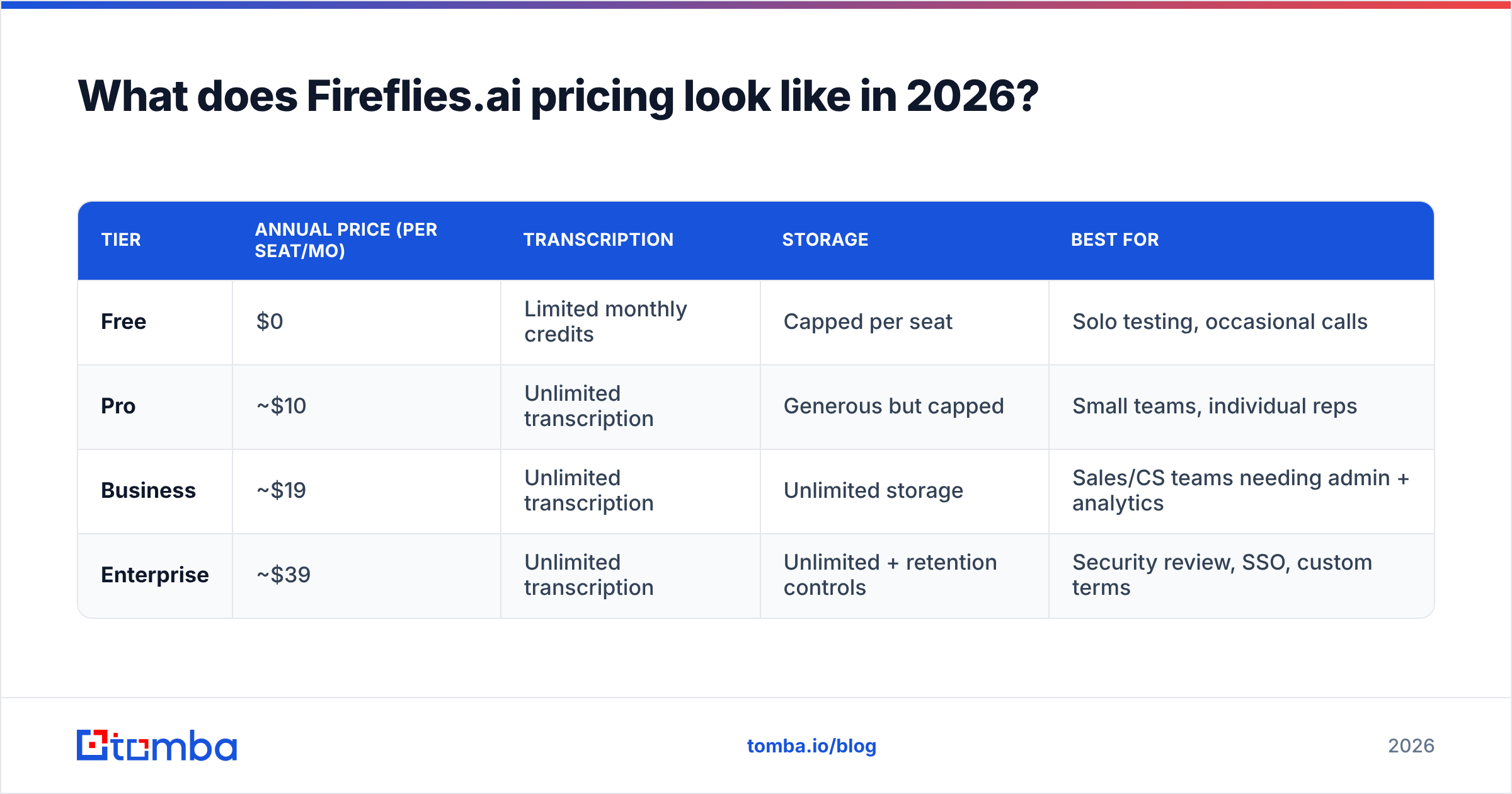
Fireflies uses a per-seat model with four tiers. Prices below reflect the published annual-billing rates at the time of writing; monthly billing carries a premium, and Fireflies adjusts packaging periodically, so confirm current numbers on the official Fireflies pricing page before you commit.
| Tier | Annual price (per seat/mo) | Transcription | Storage | Best for |
|---|---|---|---|---|
| Free | $0 | Limited monthly credits | Capped per seat | Solo testing, occasional calls |
| Pro | ~$10 | Unlimited transcription | Generous but capped | Small teams, individual reps |
| Business | ~$19 | Unlimited transcription | Unlimited storage | Sales/CS teams needing admin + analytics |
| Enterprise | ~$39 | Unlimited transcription | Unlimited + retention controls | Security review, SSO, custom terms |
Four things to understand about this structure before you model your budget:
- The advertised price assumes annual prepay. Month-to-month is typically 40-60% higher per seat. If you are testing with a pilot team, budget the monthly rate, not the annual one.
- Free is a demo, not a plan. The credit cap on the free tier is designed to be hit within a couple of weeks of normal meeting volume.
- Storage is the upgrade trigger. Pro's storage cap is the most common reason teams move to Business, not any single missing feature.
- Enterprise gates the compliance items. SSO, custom data retention, private storage, and dedicated support all sit above the Business line. If your security team reviews vendors, assume Enterprise pricing.
Where do the hidden costs actually show up?#
The sticker price is honest. The total cost of ownership is where teams get surprised. Five places to look:
- Seat inflation. Fireflies is priced per seat, and adoption spreads. You buy 10 seats for AEs, then SDRs want it, then CS wants it, then a founder wants it for board calls. Model 1.5x your initial seat count for year one.
- Annual lock-in. The discount that makes Pro attractive requires a 12-month commitment. If your headcount is volatile, you are paying for empty seats or paying the monthly premium.
- Storage and retention on lower tiers. Once you cross the cap, older recordings stop being available — which quietly destroys the "searchable archive" value that justified the purchase.
- Integration tier gates. Some CRM and dialer integrations, plus the API and advanced analytics, live on higher tiers. Verify that the specific integration you need is included at the tier you are pricing, not just "supported."
- The human cost of cleanup. AI summaries need review before they hit a shared CRM record. Budget a few minutes per call for a rep to correct speaker labels and action items, especially on multi-party or accented calls.
None of these are hostile pricing. They are standard per-seat SaaS mechanics. But they mean a "$10 a seat" tool routinely lands closer to $22-28 effective per seat once you factor annual-vs-monthly, tier upgrades, and seat spread.
What do Fireflies.ai reviews actually say?#
Public reviews on G2 and Capterra land Fireflies solidly in the 4.5-star range across thousands of ratings. That is a genuinely strong signal — but the aggregate score hides the pattern in the text. Here is what recurs.
What reviewers praise:
- Transcription accuracy on clean English audio. This is the most consistent positive. For one-on-one and small-group calls on a decent mic, the transcript is reliably usable without editing.
- Search across the whole meeting archive. The ability to type a competitor's name and see every call where it came up is the feature people describe as habit-forming.
- Integration breadth. Zoom, Meet, Teams, Slack, HubSpot, Salesforce, Notion, and Zapier coverage means it slots into most stacks without custom work.
- Setup speed. Most reviewers describe getting value on day one, which is rare for revenue tooling.
- Price relative to conversation-intelligence platforms. Against enterprise call-intelligence suites, Fireflies is an order of magnitude cheaper.
What reviewers complain about:
- Speaker diarization on group calls. When four people talk over each other on a conference-room mic, labels drift. Reviewers describe this as the single biggest accuracy problem.
- Non-English and heavily accented audio. Accuracy drops noticeably, and this is the most common reason non-US teams churn.
- The bot joining calls. Some prospects react badly to a visible "Fireflies Notetaker" participant. There are workarounds, but it is a real friction point in sensitive conversations.
- Support responsiveness on lower tiers. Free and Pro users report slow ticket resolution. Business and Enterprise users generally do not.
- Summary quality on long, rambling calls. A 75-minute unstructured call produces a summary that reviewers describe as accurate but shallow.
The honest read: Fireflies does the core job well and the edge cases adequately. If your calls are mostly two-to-four English speakers on headsets, complaints will not apply to you. If your calls are noisy, multilingual, or 90 minutes long, budget for manual review.
How does Fireflies.ai compare to the alternatives?#
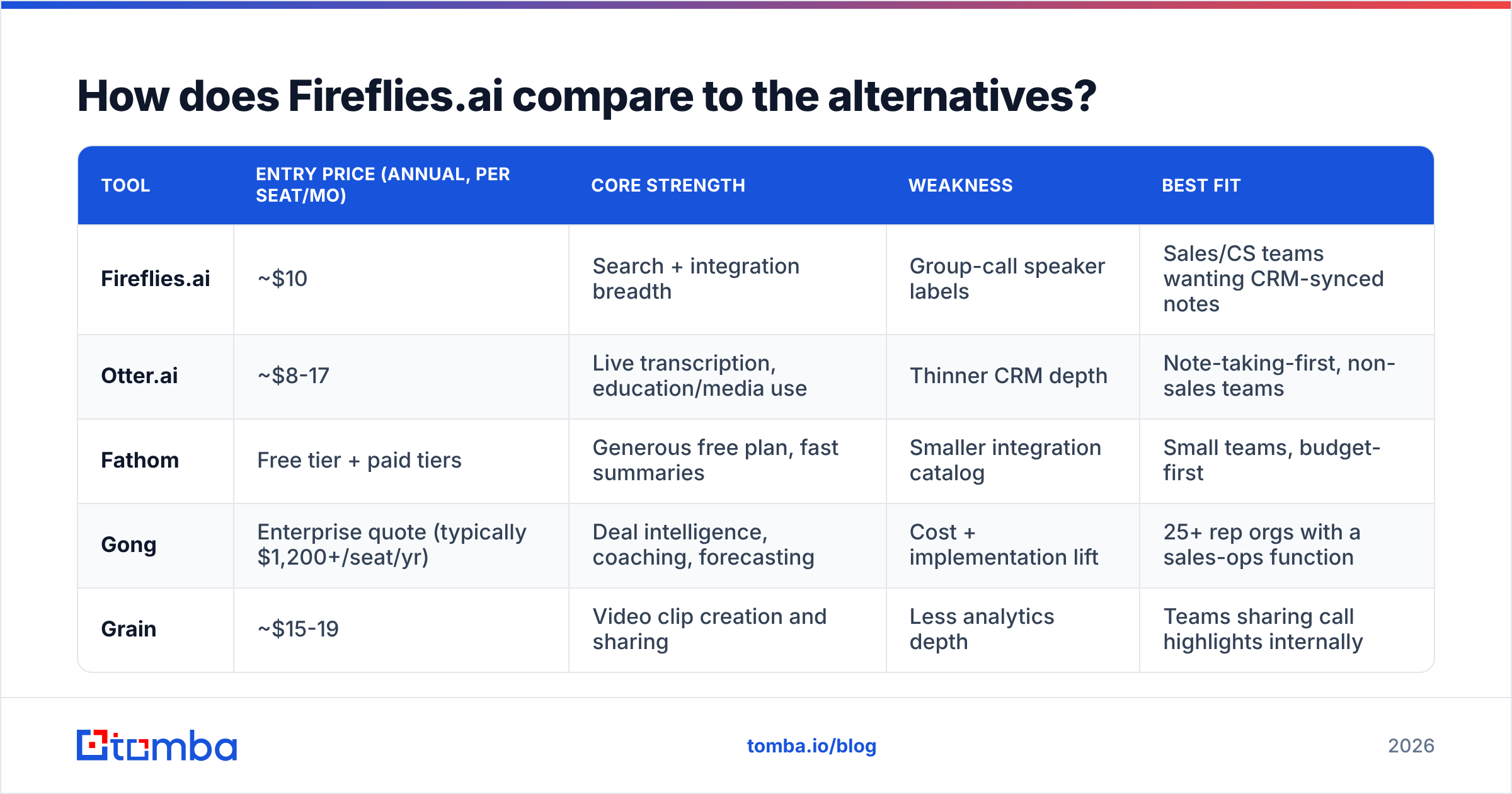
Meeting AI has stratified into three price bands, and picking the wrong band is more expensive than picking the wrong vendor inside a band.
| Tool | Entry price (annual, per seat/mo) | Core strength | Weakness | Best fit |
|---|---|---|---|---|
| Fireflies.ai | ~$10 | Search + integration breadth | Group-call speaker labels | Sales/CS teams wanting CRM-synced notes |
| Otter.ai | ~$8-17 | Live transcription, education/media use | Thinner CRM depth | Note-taking-first, non-sales teams |
| Fathom | Free tier + paid tiers | Generous free plan, fast summaries | Smaller integration catalog | Small teams, budget-first |
| Gong | Enterprise quote (typically $1,200+/seat/yr) | Deal intelligence, coaching, forecasting | Cost + implementation lift | 25+ rep orgs with a sales-ops function |
| Grain | ~$15-19 | Video clip creation and sharing | Less analytics depth | Teams sharing call highlights internally |
The band logic: if you want a record, buy Fireflies, Otter, or Fathom. If you want coaching and forecasting, you need Gong or Chorus and a five-figure budget. Buying Fireflies and expecting deal intelligence is the most common mismatch, and buying Gong for a six-person team is the most expensive one.
Fireflies wins the middle band on integration surface area. Fathom wins on free-tier generosity. Otter wins if transcription is the product rather than a feature of a revenue workflow.
Is Fireflies.ai worth it for a sales team?#
Yes — under three conditions.
Condition one: your reps are actually in meetings. Fireflies pays for itself by converting call time into structured data. A rep doing 15 discovery calls a week saves real hours. A rep doing three calls a week and 200 outbound emails saves almost nothing, and the seat is dead weight.
Condition two: someone owns the CRM sync. The value is not the transcript, it is the transcript landing on the right record with the right fields populated. That requires a one-time configuration and an owner. Without it, you have bought an expensive archive nobody opens.
Condition three: you buy the right tier the first time. Teams that start on Pro to save money and migrate to Business a quarter later pay the annual-commitment penalty twice. If you have more than five seats and any admin requirement, start on Business.
Where it is not worth it: if your team's problem is that reps do not have enough conversations to record. Meeting intelligence is a downstream tool. It optimizes what happens after a prospect says yes to a call. It does nothing about the top of the funnel — and no amount of transcript search fixes an empty calendar.
What should you spend the rest of the budget on?#
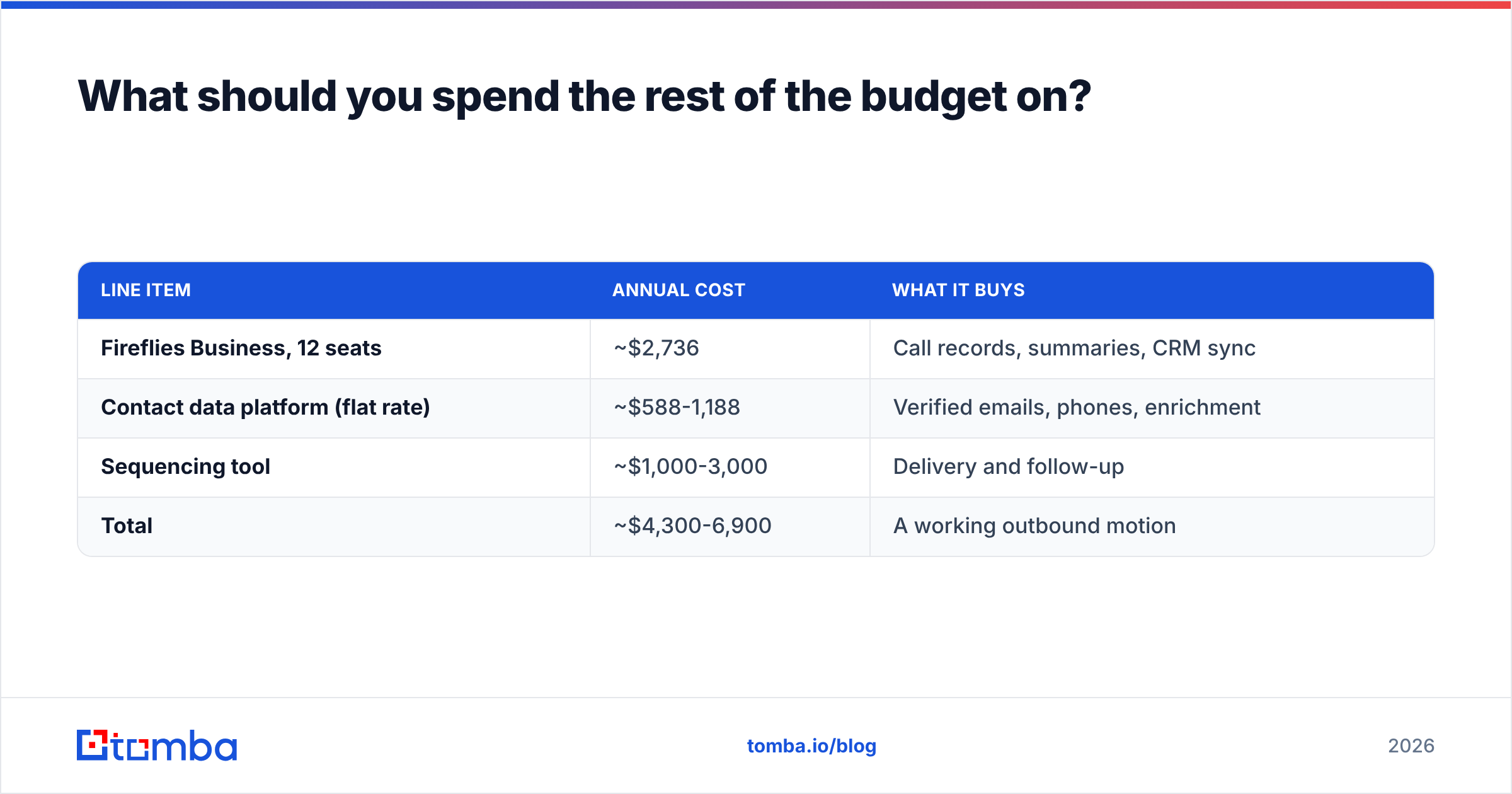
Run the arithmetic before you sign. Say you have 12 reps.
| Line item | Annual cost | What it buys |
|---|---|---|
| Fireflies Business, 12 seats | ~$2,736 | Call records, summaries, CRM sync |
| Contact data platform (flat rate) | ~$588-1,188 | Verified emails, phones, enrichment |
| Sequencing tool | ~$1,000-3,000 | Delivery and follow-up |
| Total | ~$4,300-6,900 | A working outbound motion |
The meeting layer is roughly half the budget and it only activates once a meeting exists. That ordering matters. If you are choosing between recording the calls you have and booking more calls, book more calls.
That is the honest reason a pricing post on a meeting tool ends up talking about data. A conversation-intelligence subscription with a thin pipeline is the most common wasted line item in early-stage revenue budgets. Fix contact coverage first — verified work emails, enriched lead records, and clean phone numbers — then layer meeting AI on top of a calendar that is actually full.
Practical sequencing for a team under 25 reps:
- Quarter one: contact data and outbound infrastructure. Get calendars filled.
- Quarter two: meeting intelligence on the reps with the highest call volume only. Do not buy company-wide seats on day one.
- Quarter three: expand seats based on measured call volume, and evaluate whether you have grown into the coaching-tier band.
How do you evaluate Fireflies before you commit?#
A tight five-step trial protocol beats a 30-day drift:
- Record ten real calls, not demo calls. Include your worst audio conditions — conference room, speakerphone, accented speakers. That is where accuracy is decided.
- Check the CRM record, not the Fireflies dashboard. Did the summary land where a rep would actually see it?
- Search for something specific a week later. "Show me every call where pricing objection came up." If search fails, the archive value fails.
- Time the cleanup. Measure how many minutes per call a rep spends fixing labels and action items. Multiply by call volume. That is your hidden cost.
- Price the tier you will need in six months, not the one that works today. Then compare against Fathom's free plan and Otter to make sure you are not overbuying.
If Fireflies clears all five, the annual commitment is a reasonable bet. If step one or step three fails, no discount makes it worth it.
Fill the calendar before you buy the notetaker#
Fireflies.ai is a good product at a fair price for teams with meeting volume. The pricing is transparent, the reviews are earned, and the middle-band positioning is defensible. Just make sure you are solving your actual bottleneck.
If your bottleneck is pipeline, start upstream. The Tomba Email Finder gets you verified work emails by domain, name, or company so your reps have someone to call in the first place — with a free tier at 25 searches a month, Starter at $49/mo, and Growth at $99/mo on flat, non-per-seat Tomba pricing. Pair it with the email verifier to keep bounce rates low, book the meetings, and then decide whether you need an AI notetaker on top.
Related guides#
Ready to find emails that actually work?
Join 150,000+ professionals who stopped guessing and started sending. Free credits on signup — no credit card required.
Get the Tomba newsletter
Practical outbound tactics and product updates — once every two weeks.
About the author