Firmographic and Technographic Data: The 2026 GTM Guide
Firmographics tell you who a company is. Technographics tell you what they run. Here is how to combine both layers into targeting that actually books meetings in 2026.
Firmographic and technographic data are the two halves of B2B targeting. One tells you who a company is. The other tells you what that company runs. This guide covers how to use both layers, what each one costs, and how fast each one goes stale.
TL;DR
- Firmographic data describes who a company is: industry, headcount, revenue, location, ownership, growth stage. It answers "should we sell to them at all?"
- Technographic data describes what a company runs: CRM, cloud provider, payment stack, analytics, security tools. It answers "why would they buy now, and what do we say?"
- Firmographics are stable but broad. Technographics are sharp but go stale fast. A detected tag can be six months old before you see it.
- The best segments stack both layers. Firmographic and technographic data work together: one sets the boundary, the other sets the trigger and the message.
- Neither layer means much without contacts you can reach. A perfect account profile plus a bounced email is still zero.
What is firmographic data?#
Firmographic data is demographic data for companies. B2C marketers segment by age, income, and zip code. B2B teams segment by industry, employee count, revenue band, funding stage, location, and company structure.
Think of it like sorting a library by section and shelf height. It tells you where a book sits and how big it is. It says nothing about whether the story is any good.
Here are the standard fields most vendors ship.
- Industry classification — NAICS, SIC, or a vendor's own labels. Many vendors now add AI-generated category tags. SIC codes were built for a manufacturing economy, and they handle SaaS badly.
- Company size — headcount bands (1-10, 11-50, 51-200…) and revenue estimates. Headcount is the more reliable of the two. Revenue for private companies is a model, not a fact.
- Location — HQ country, state, and city, plus other offices. This matters a lot for regulated selling and for routing leads to the right rep.
- Growth and funding — funding rounds, investor names, and headcount change over the last 6 to 12 months. Growth direction predicts budget better than raw size.
- Corporate structure — parent and subsidiary links, public or private, franchise or corporate-owned. Cheap datasets fall apart here. This is where costly providers earn their price.
Firmographics are the oldest layer of B2B data, and the most commoditized. Almost every provider has them. At the top of the market, they mostly agree with each other.
The gap now is freshness, plus the messy edges: subsidiary mapping, multi-location businesses, and companies that changed what they do without changing their website copy.

What is technographic data?#
Technographic data is the list of tools a company actually uses. CRM, marketing automation, cloud host, CDN, payment processor, analytics, helpdesk, security stack, and now AI vendors too.
If firmographics are the building's blueprint, technographics are the utility bills. Same address, very different picture of how the place is run.
Vendors build this data three ways. The method sets the accuracy.
- Website crawling — reading HTML, JavaScript tags, DNS records, and HTTP headers for fingerprints. Very accurate for front-end and marketing tools, like analytics scripts, chat widgets, and tag managers. It is blind to anything behind a login.
- Job posts and documents — scanning job ads, case studies, and engineering blogs for named tools. This is the only good route to back-office systems such as ERP or data warehouses. It is noisy and it lags. A job ad that names Snowflake tells you what the team wanted when the ad was written.
- Panels and partners — data pooled from install bases, review sites, and app marketplaces. Coverage is uneven. It is strong in popular categories and thin everywhere else.
So treat each field by its source. A tracking script found on the homepage is close to certain. A "uses Workday" tag pulled from a job ad is a guess with decent odds.
Firmographic vs technographic data: which one drives more pipeline?#
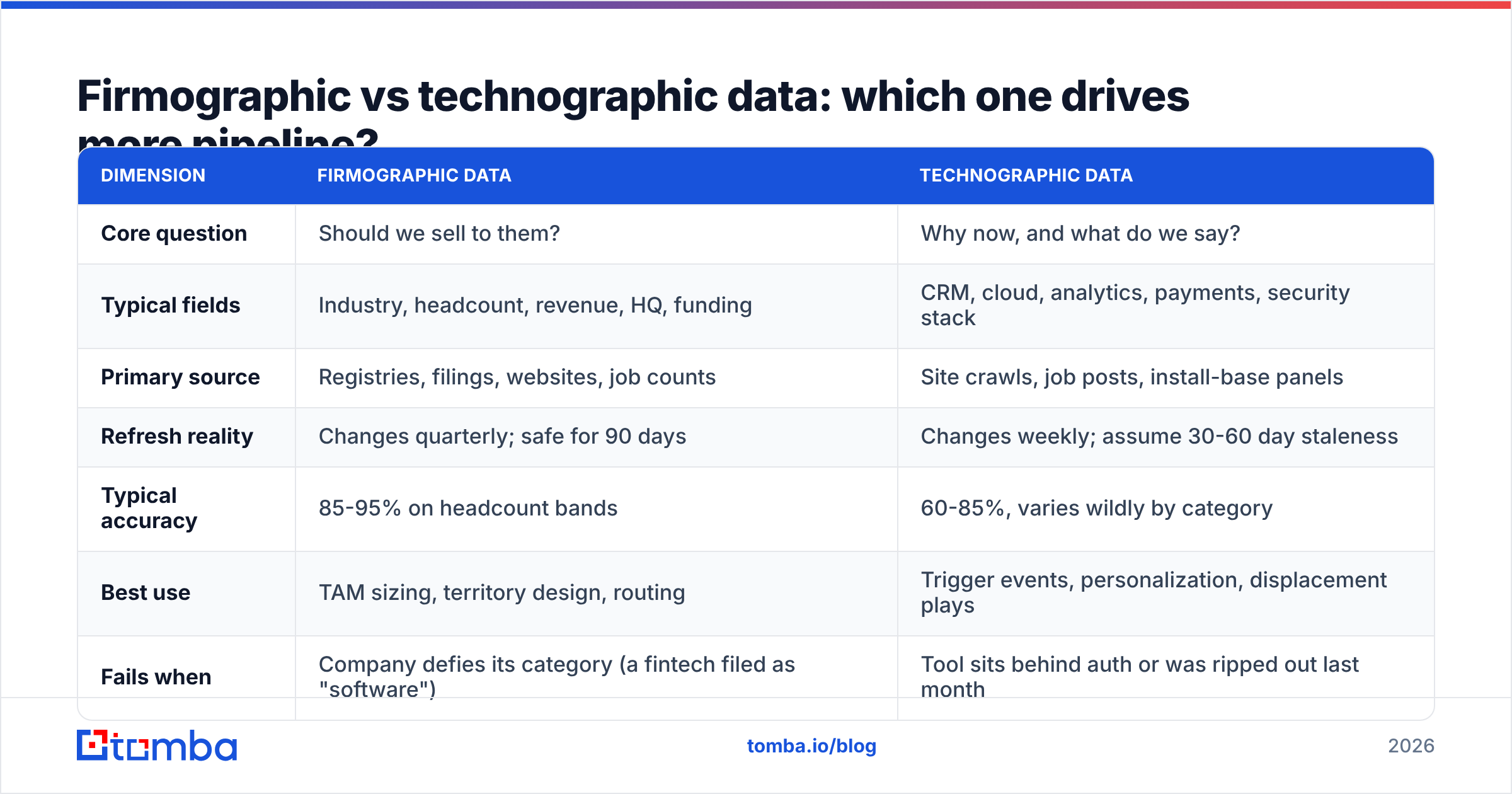
Neither one, on its own. Firmographic and technographic data answer different questions, and they fail in different ways.
| Dimension | Firmographic data | Technographic data |
|---|---|---|
| Core question | Should we sell to them? | Why now, and what do we say? |
| Typical fields | Industry, headcount, revenue, HQ, funding | CRM, cloud, analytics, payments, security stack |
| Primary source | Registries, filings, websites, job counts | Site crawls, job posts, install-base panels |
| Refresh reality | Changes quarterly; safe for 90 days | Changes weekly; assume 30-60 day staleness |
| Typical accuracy | 85-95% on headcount bands | 60-85%, varies wildly by category |
| Best use | TAM sizing, territory design, routing | Trigger events, personalization, displacement plays |
| Fails when | Company defies its category (a fintech filed as "software") | Tool sits behind auth or was ripped out last month |
| Cost signal | Cheap, near-commodity | Premium add-on at most vendors |
Read the table as a split of labor. Firmographics draw the fence around your market. Technographics tell you which accounts inside that fence are moving right now.
Here is a concrete example. You sell a warehouse monitoring tool.
Firmographics narrow you to US B2B SaaS companies with 200 to 2,000 staff, Series B or later. Call it 4,000 accounts.
Technographics then split that list into three plays. Accounts on Snowflake and dbt are your best fit, about 600 of them, so lead with cost control. Accounts on Redshift are migration plays, about 900, so lead with migration risk. Accounts with no warehouse found are too early, so park them.
Same 4,000 accounts. Three different opening lines, and one segment you skip on purpose. That is firmographic and technographic data working as one system.
How accurate is technographic data really?#
Treat every tag as a guess, not a fact. That one habit prevents most technographic mistakes.
Three failures show up with every vendor.
- Ghost installs. A tool was found once and never checked again. The company dropped it eight months ago. Your email opens with "I see you're on HubSpot" and they moved to Salesforce in Q1. You lose the room in one line.
- Shadow installs. One team of five pays for the tool on a company card. Your message assumes the whole company uses it. It lands with someone who has never heard of it.
- Subsidiary bleed. The parent runs SAP. The subsidiary you are emailing runs NetSuite. You see whichever entity the crawler locked onto, and that is usually the parent.
The fixes are dull, and they work.
Ask every vendor for a last verified date on each field, not just a yes or no. Ignore any signal older than 90 days.
Never state a tech finding as fact in your first line. Frame it as something the reader can correct: "if you're still running X, this is probably familiar."
Then check 50 accounts by hand before you trust a new provider. Coverage quality changes by category, and averages hide that.
Review sites help you sanity-check vendor claims about firmographic and technographic data. G2's data provider category and Capterra's listings both surface accuracy complaints that never reach a sales deck.
How do you combine firmographic and technographic data into an ICP?#
Build it in four passes. Each pass cuts on a different axis. Order matters, because filtering on costly signals first burns credits on accounts you would drop anyway.
- Firmographic boundary (cheap, broad). Set hard limits: industry, size band, location, business model. This pass removes the clearly wrong. It does not pick winners, so stay generous.
- Firmographic scoring (still cheap). Rank what is left by growth: headcount trend, recent funding, new offices, hiring in the team you sell to. A 300-person company that grew from 180 acts nothing like a 300-person company that shrank from 450.
- Technographic trigger (costly, narrow). Only now pay for tech detection, and only for the top tier. Look for three triggers: fit signals, where they run something you plug into; rival signals, where you can displace a competitor; and gap signals, where they run the rest of the stack but nothing in your category. Gap accounts are often the best segment, and the most ignored.
- Contact and delivery layer. Turn accounts into named people with verified addresses. Most stacks leak here. You build a lovely 400-account segment, and 30% of the emails bounce.
That fourth step is dull, and it decides whether the first three mattered.
Run the list through a domain search to map the real people at each account. Then push every address through an email verifier before it touches a sequence.
Plenty of mid-market companies now sit on catch-all domains. For those, a catch-all verifier is the line between a usable segment and a guessing game.

What does firmographic and technographic data cost in 2026?#
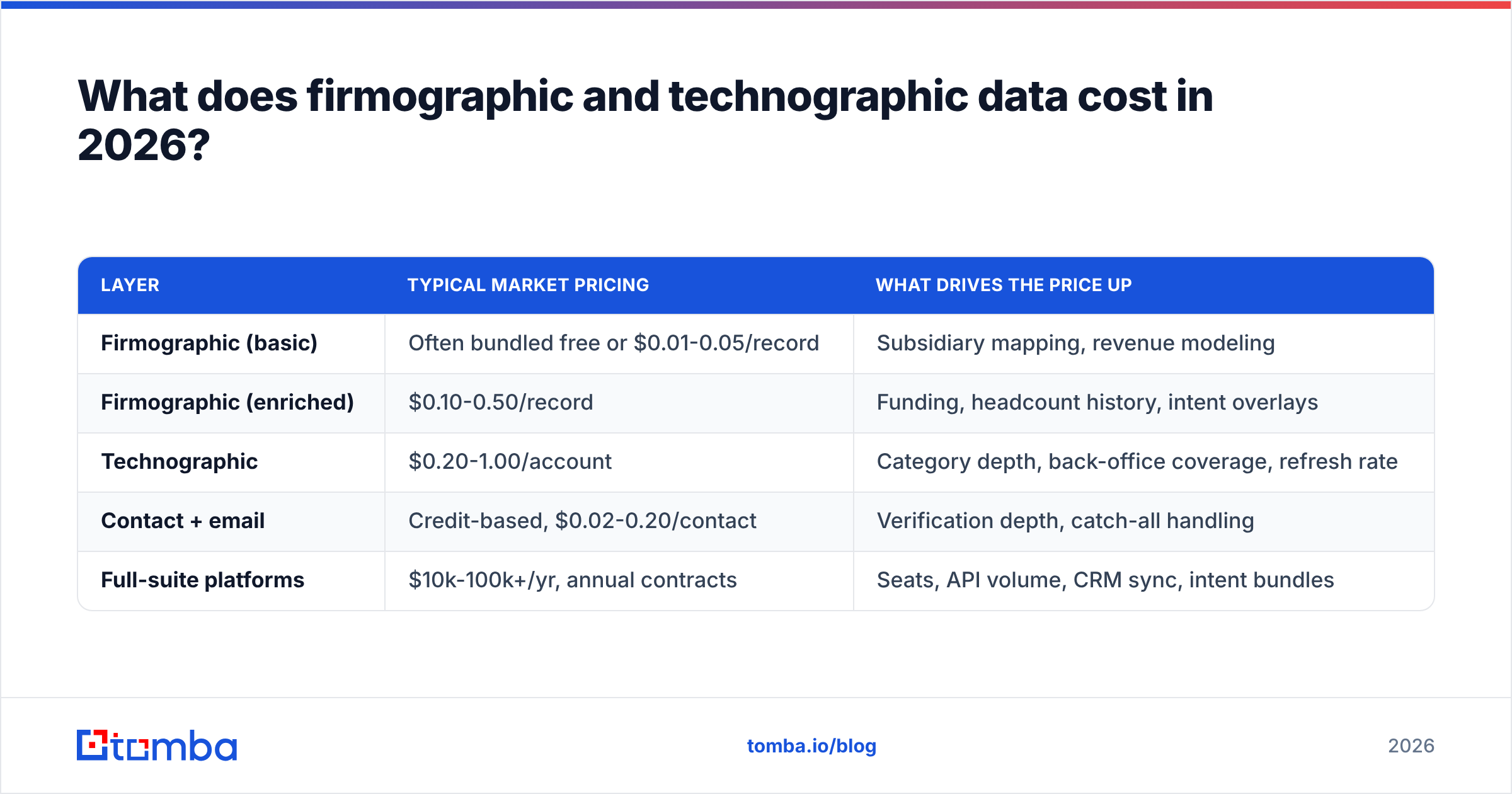
Pricing is murky across the whole category. The shape is still consistent. Firmographics are near-free. Technographics carry a premium. Contact data is sold per credit.
| Layer | Typical market pricing | What drives the price up |
|---|---|---|
| Firmographic (basic) | Often bundled free or $0.01-0.05/record | Subsidiary mapping, revenue modeling |
| Firmographic (enriched) | $0.10-0.50/record | Funding, headcount history, intent overlays |
| Technographic | $0.20-1.00/account | Category depth, back-office coverage, refresh rate |
| Contact + email | Credit-based, $0.02-0.20/contact | Verification depth, catch-all handling |
| Full-suite platforms | $10k-100k+/yr, annual contracts | Seats, API volume, CRM sync, intent bundles |
Two traps are worth naming.
First, annual lock-in. Most enterprise platforms will not sell by the month. One bad accuracy call then costs you a year.
Second, credit expiry. Unused monthly credits rarely roll over. That turns list building into a use-it-or-lose-it treadmill.
Self-serve tools flip both. Tomba pricing starts with a free tier at 25 searches a month. Starter is $49/mo, Growth is $99/mo, and Pro is $249/mo. You also get an API you can call from your own enrichment job, rather than a seat-based app you have to live inside.
Some teams would rather filter a ready-made account list than build one. Providers like BookYourData sell pay-as-you-go B2B lists with firmographic filters and no annual deal. That suits campaign-by-campaign buyers better than a platform subscription does.
Which providers cover firmographic and technographic data best?#
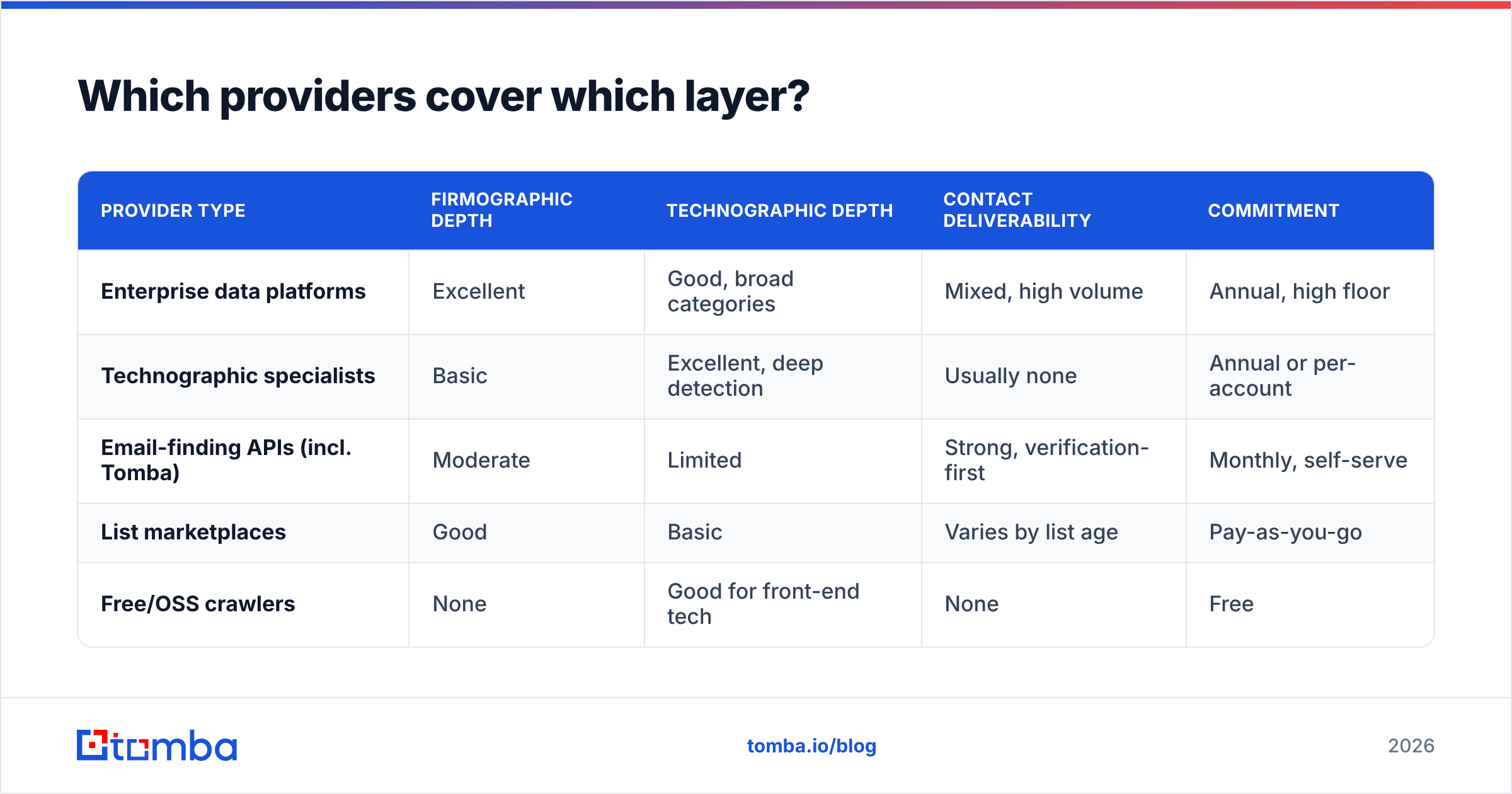
No single vendor wins all three layers. Buy for the layer you are weakest in.
| Provider type | Firmographic depth | Technographic depth | Contact deliverability | Commitment |
|---|---|---|---|---|
| Enterprise data platforms | Excellent | Good, broad categories | Mixed, high volume | Annual, high floor |
| Technographic specialists | Basic | Excellent, deep detection | Usually none | Annual or per-account |
| Email-finding APIs (incl. Tomba) | Moderate | Limited | Strong, verification-first | Monthly, self-serve |
| List marketplaces | Good | Basic | Varies by list age | Pay-as-you-go |
| Free/OSS crawlers | None | Good for front-end tech | None | Free |
Here is the practical 2026 stack for most mid-market teams. Use one account-level source for firmographics and triggers. Add one crawler or specialist for tech detection, if tech matters to your pitch. Then wire in a verification-first contact layer through an API, so nothing enters a sequence unchecked.
Three focused tools usually cost less than one enterprise suite. You can also swap out whichever piece gets worse.
Want to see how detection works without paying for it? BuiltWith's free lookup shows the front-end fingerprint of any domain. It is a quick way to check what your paid vendor claims.
How do you keep firmographic and technographic data from rotting?#
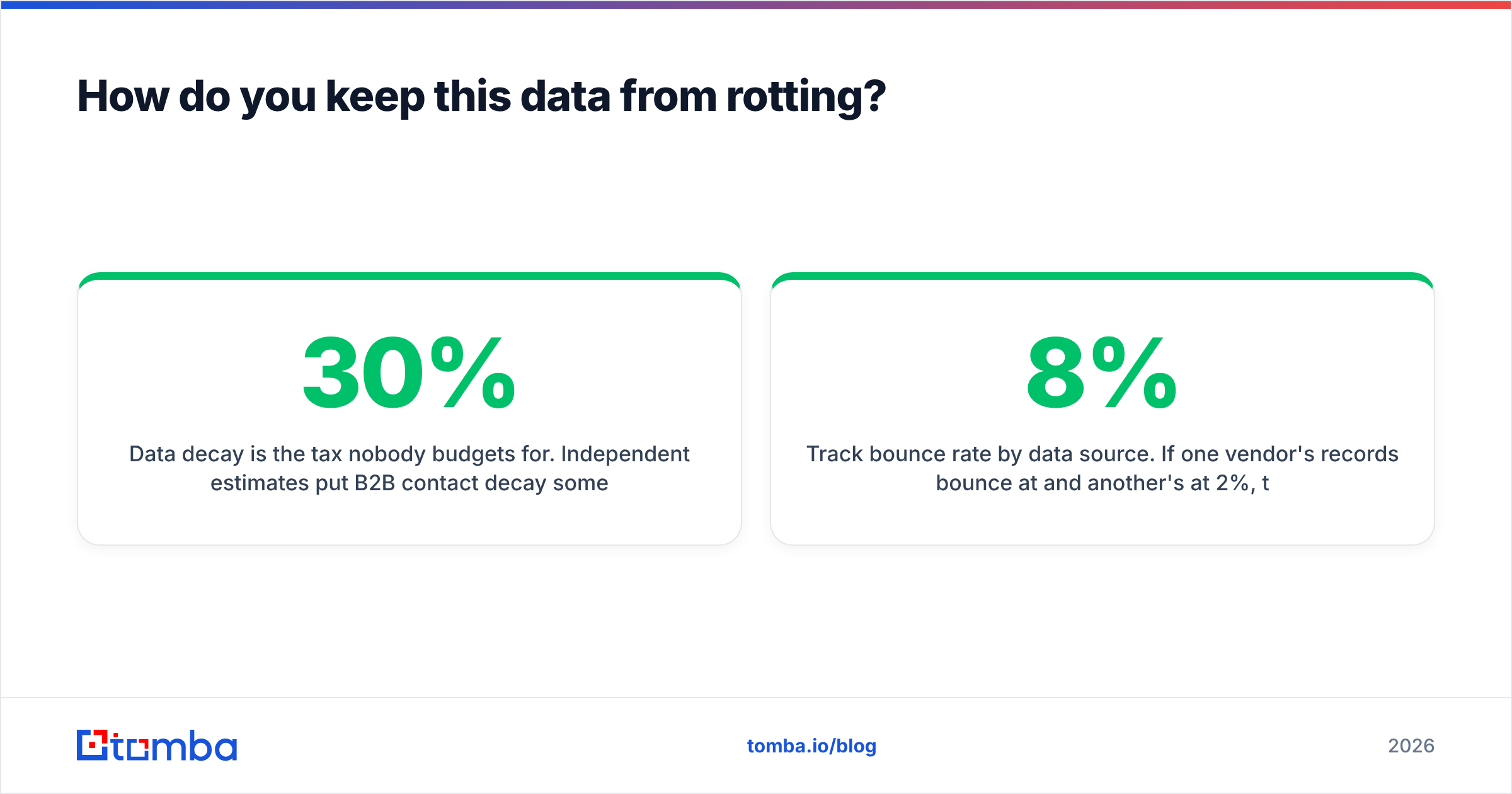
Data decay is the tax nobody budgets for. Public estimates put B2B contact decay near 25% to 30% a year. Tech tags move faster still.
Four habits keep a database honest.
- Timestamp everything. Every enriched field should carry a
last_verified_atdate. Fields without one are folklore. - Re-check on a schedule, not on a whim. Contacts each quarter. Tech tags every 30 to 60 days for live campaign accounts. Firmographics twice a year.
- Re-check at the moment of use. A quarterly sweep does not help if the address you are about to email was checked 89 days ago. Verify inline at send time with the Tomba API or your provider's equivalent.
- Track bounce rate by source. If one vendor's records bounce at 8% and another's at 2%, that is a renewal talk with hard numbers behind it.
Delivery sits downstream of all of this. Every bounce counts against your sender reputation, and the 2024 bulk sender rules made that penalty much harsher. Clean firmographic and technographic data is not only a data-team concern. It is a delivery concern wearing a different hat.
What should you actually do next?#
Start with the layer that is blocking you.
If your reps reach the right type of company but get no replies, you have a technographic and messaging gap. If replies are fine but the accounts never had budget, you have a firmographic gap. If both look right and your bounce rate is above 3%, neither layer is the problem. Your contact data is.
Most teams find the third case is the real one. The account targeting was fine. The emails just did not land.
That is the part Tomba is built for. Use the Tomba Email Finder to turn a list built from firmographic and technographic data into named contacts with verified, deliverable addresses. Work in the web app, the bulk uploader, or the API inside your own pipeline.
Start free with 25 searches a month. Check the accuracy on your own accounts first. Scale up only when the data has earned it.
Related guides#
Ready to find emails that actually work?
Join 150,000+ professionals who stopped guessing and started sending. Free credits on signup — no credit card required.
Get the Tomba newsletter
Practical outbound tactics and product updates — once every two weeks.
About the author