Firmographic Data for Leads: The 2026 Targeting Guide
Firmographic data decides who you email before a single word gets written. Here's what the fields actually mean, which sources hold up in 2026, and how to stop paying for stale company records.
TL;DR
- Firmographic data describes the company — industry, headcount, revenue, location, ownership, tech stack, growth signals. It answers "should we sell to this account at all?" before you ever look at a person.
- Six fields do most of the work: industry classification, employee count, revenue band, HQ + operating locations, funding/ownership stage, and technographics. Everything else is nice-to-have.
- Roughly 25–30% of B2B company records decay annually (headcount shifts, acquisitions, rebrands, domain changes), so any firmographic file you bought more than two quarters ago is already lying to you in places.
- Self-reported and scraped firmographics disagree constantly. Trust the domain, verify the rest, and treat employee count as a band, not a number.
- The practical stack in 2026: a firmographic source for account selection, an enrichment API for the fields you actually score on, and an email verification layer so good targeting doesn't die at the SMTP handshake.
What is firmographic data for leads?#
Firmographic data is demographic data for companies. Where B2C marketers segment on age, income, and zip code, B2B teams segment on industry, headcount, revenue, and location. Same idea, different unit of analysis: the account instead of the individual.
Think of it like scouting a neighborhood before you knock on doors. Demographics tell you who lives in the house. Firmographics tell you whether the street is even in your territory — whether the houses are the right size, the right age, and zoned for what you're selling. Knocking on 400 doors in the wrong neighborhood is expensive in a way no email template can fix.
The classic definition covers five categories: industry, company size, location, status/structure, and performance. In practice, modern B2B teams have stretched that to include technographics (what software the company runs), funding stage, hiring velocity, and web presence signals. Those additions matter more than the originals for most software companies — knowing a prospect runs Salesforce and just posted twelve SDR roles tells you far more than knowing their four-digit SIC code.
Firmographics sit upstream of everything else in outbound. You use them to build the total addressable market, cut it into a serviceable segment, then cut that into an ICP-matched target list. Only after that do you go find humans and their contact details.
Which firmographic fields actually predict pipeline?#
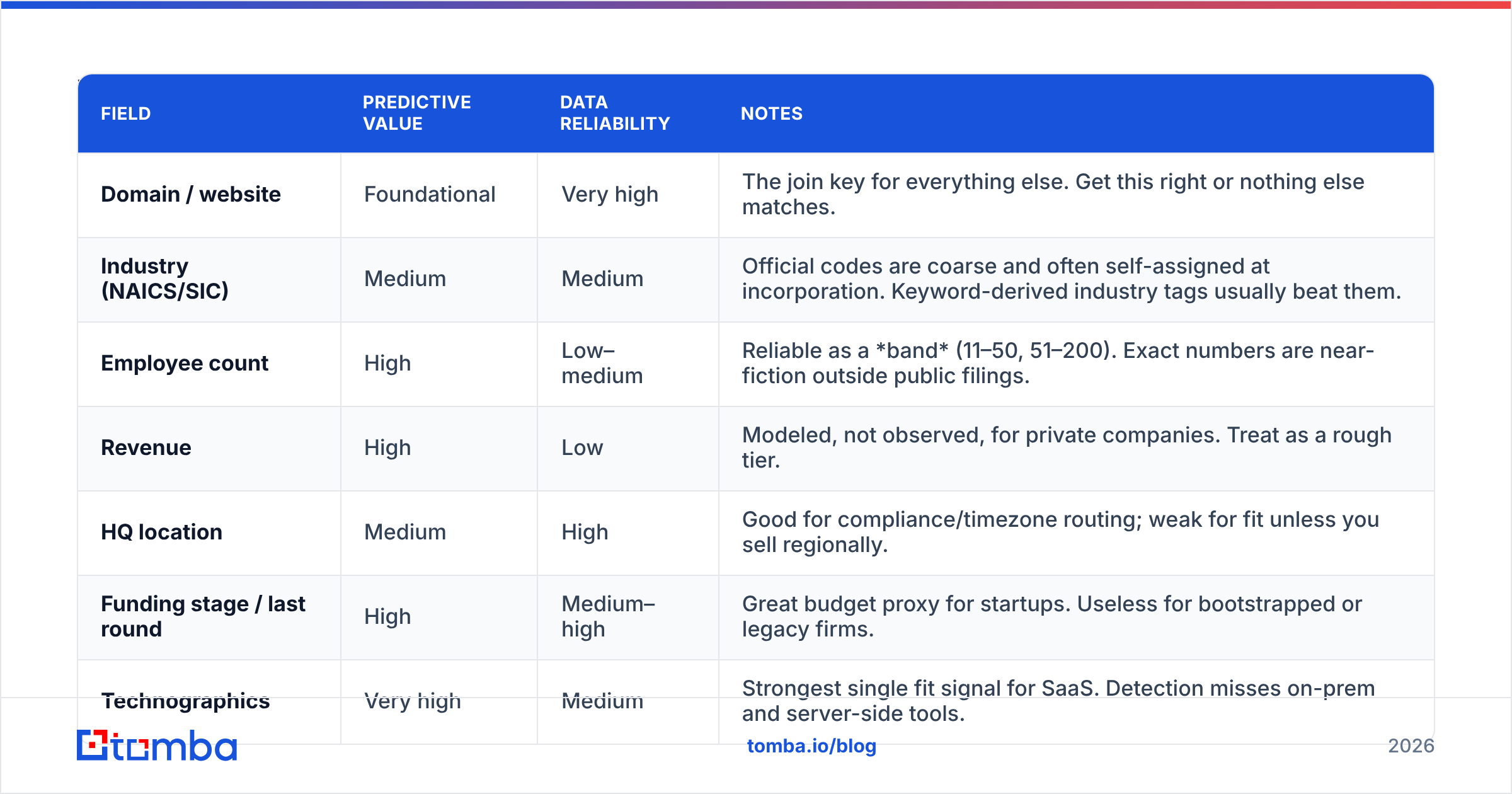
Not all fields earn their storage cost. Here's how the common ones break down by predictive value and how reliable they are in commercial datasets.
| Field | Predictive value | Data reliability | Notes |
|---|---|---|---|
| Domain / website | Foundational | Very high | The join key for everything else. Get this right or nothing else matches. |
| Industry (NAICS/SIC) | Medium | Medium | Official codes are coarse and often self-assigned at incorporation. Keyword-derived industry tags usually beat them. |
| Employee count | High | Low–medium | Reliable as a band (11–50, 51–200). Exact numbers are near-fiction outside public filings. |
| Revenue | High | Low | Modeled, not observed, for private companies. Treat as a rough tier. |
| HQ location | Medium | High | Good for compliance/timezone routing; weak for fit unless you sell regionally. |
| Funding stage / last round | High | Medium–high | Great budget proxy for startups. Useless for bootstrapped or legacy firms. |
| Technographics | Very high | Medium | Strongest single fit signal for SaaS. Detection misses on-prem and server-side tools. |
| Hiring velocity | Very high | High | Job postings are public, timestamped, and hard to fake. Underused. |
| Ownership / parent | Medium | High | Prevents you from pitching a subsidiary whose procurement runs through a parent. |
The pattern: the newest firmographic categories — technographics, hiring, funding — outperform the ones from the 1980s marketing textbooks. Industry codes and revenue estimates are the fields buyers ask about most and the ones that mislead most often.

If you only have budget to maintain three fields cleanly, pick domain, employee band, and technographics. Those three will separate your ICP from your not-ICP better than a fifteen-column enrichment file where twelve columns are three years old.
Where does firmographic data actually come from?#
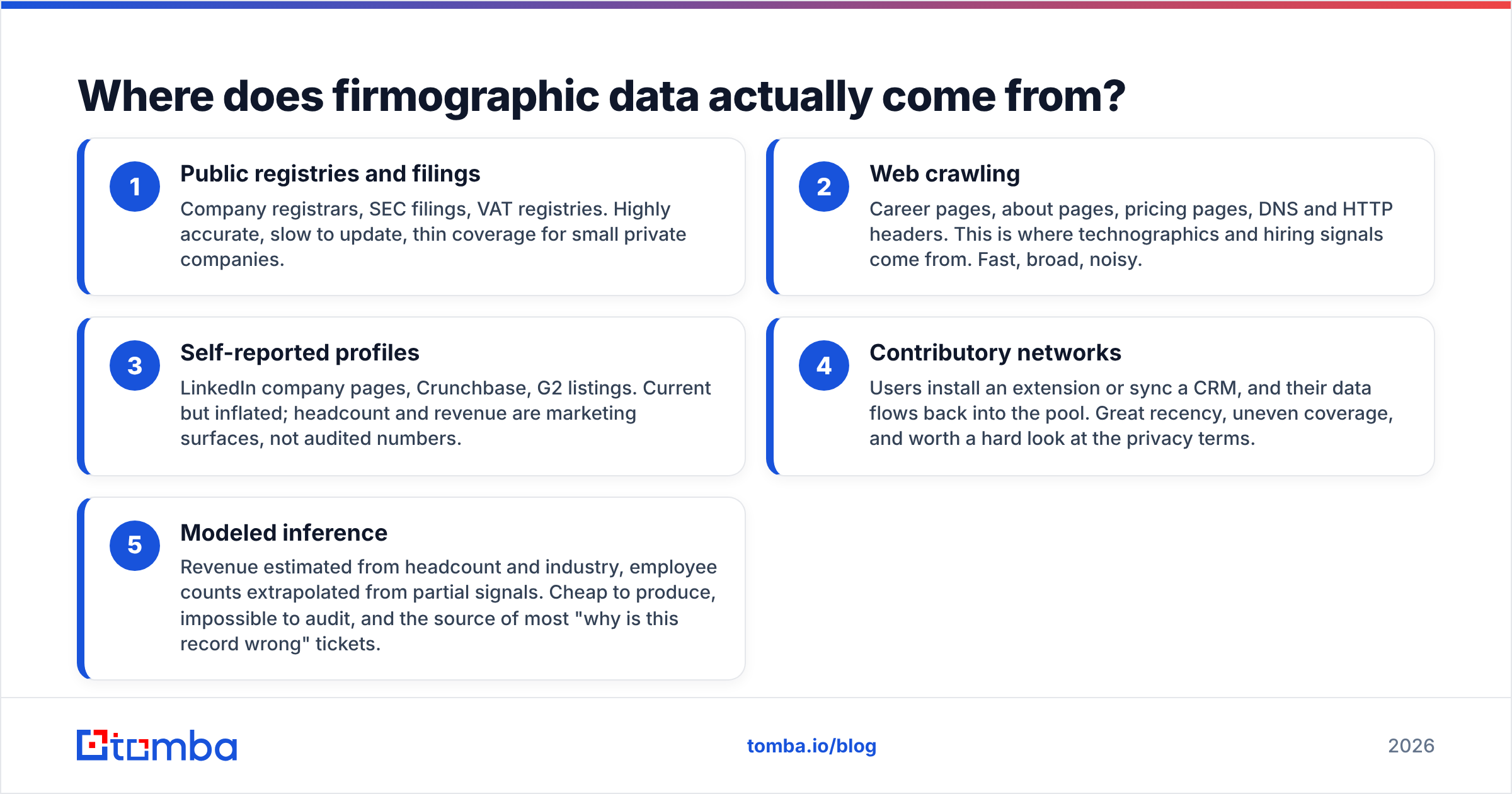
Every vendor's data comes from some blend of five sources, and knowing which blend you're buying explains most of the quality differences you'll see.
- Public registries and filings — Company registrars, SEC filings, VAT registries. Highly accurate, slow to update, thin coverage for small private companies.
- Web crawling — Career pages, about pages, pricing pages, DNS and HTTP headers. This is where technographics and hiring signals come from. Fast, broad, noisy.
- Self-reported profiles — LinkedIn company pages, Crunchbase, G2 listings. Current but inflated; headcount and revenue are marketing surfaces, not audited numbers.
- Contributory networks — Users install an extension or sync a CRM, and their data flows back into the pool. Great recency, uneven coverage, and worth a hard look at the privacy terms.
- Modeled inference — Revenue estimated from headcount and industry, employee counts extrapolated from partial signals. Cheap to produce, impossible to audit, and the source of most "why is this record wrong" tickets.
A vendor selling you "150M company profiles" is almost always leaning on 4 and 5 for the long tail. That's not automatically bad — modeled revenue bands are fine for coarse segmentation — but you should never build a hard qualification rule on a modeled field. Scoring rule of thumb: observed data can disqualify an account, modeled data can only re-rank it.
Cross-referencing helps more than picking a "best" vendor. If your crawl says the company runs HubSpot and their careers page lists a RevOps hire, you have two independent observations pointing the same direction. One field from one source is a guess with a confidence interval nobody printed.
How do firmographic and technographic data work together?#
Firmographics tell you the company could buy. Technographics tell you they're set up to buy. Combine them and your list shrinks by 80% while your reply rate roughly doubles — because you stopped emailing companies structurally incapable of using your product.
A worked example. Say you sell a data enrichment layer that plugs into sales engagement platforms.
- Firmographic filter: B2B SaaS, 50–500 employees, Series A through C, North America or EU. That's maybe 40,000 companies.
- Technographic filter: running Outreach, Salesloft, Apollo, or Instantly. Cuts to maybe 6,000.
- Signal filter: posted an SDR, BDR, or RevOps role in the last 60 days. Cuts to maybe 900.
Nine hundred accounts you can actually work, versus forty thousand you can only spam. The second list is what most teams buy, and it's why their response rate sits at 1%.
The compounding effect matters more than any single filter. Each layer is independently weak — plenty of Series B SaaS companies don't need you, plenty of Outreach users are happy — but stacked, they approximate the question a good AE asks in discovery: does this company have the problem, the tooling context, and the budget motion to solve it now?
How do you build a firmographic scoring model without overfitting?#
Start from closed-won, not from opinion. Pull your last 50–100 won deals, enrich them with the fields above, and look for the distributions that differ from your losses. Most teams discover their real ICP is narrower and weirder than their marketing site claims.
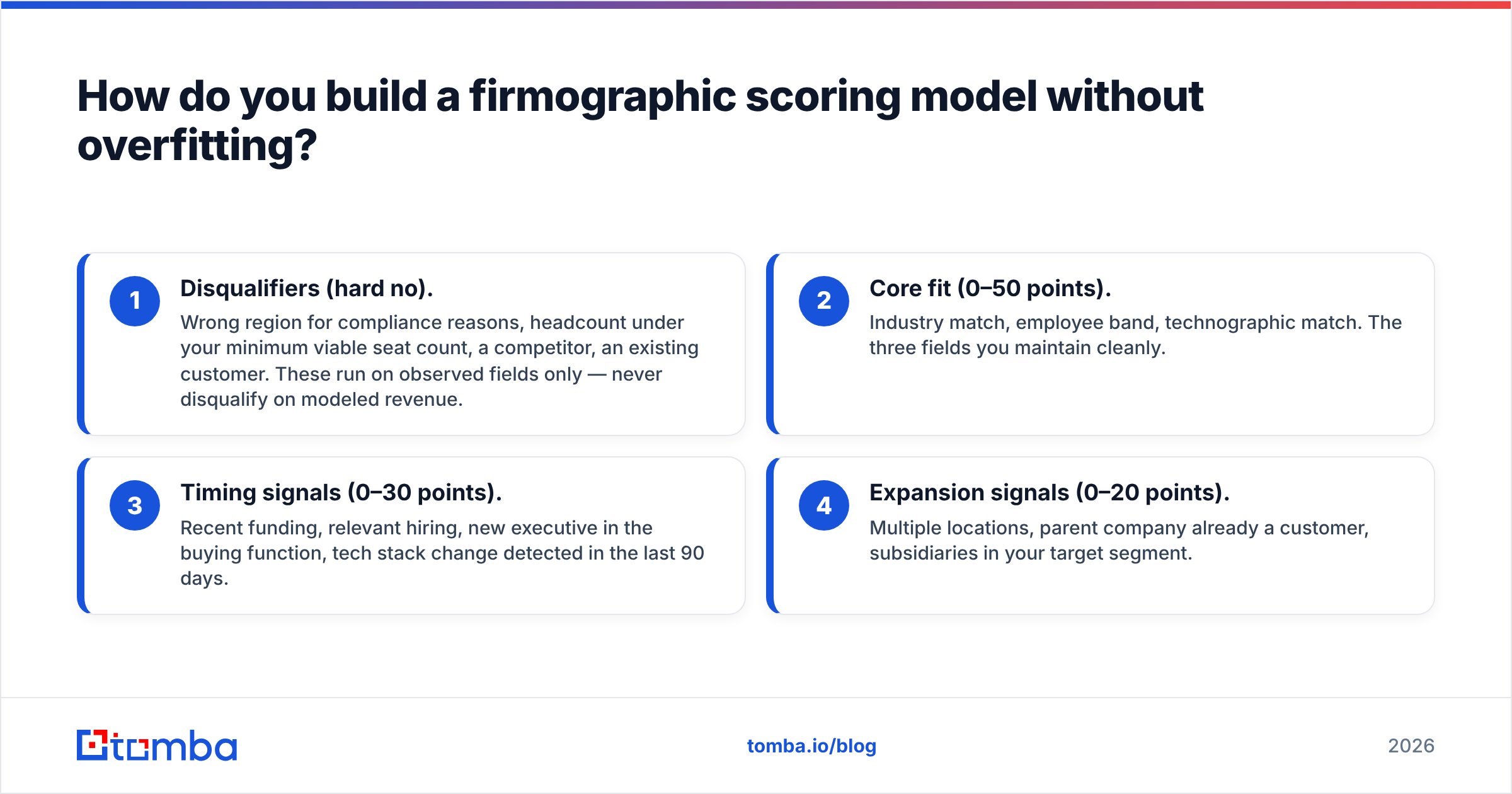
A workable four-tier model:
- Disqualifiers (hard no). Wrong region for compliance reasons, headcount under your minimum viable seat count, a competitor, an existing customer. These run on observed fields only — never disqualify on modeled revenue.
- Core fit (0–50 points). Industry match, employee band, technographic match. The three fields you maintain cleanly.
- Timing signals (0–30 points). Recent funding, relevant hiring, new executive in the buying function, tech stack change detected in the last 90 days.
- Expansion signals (0–20 points). Multiple locations, parent company already a customer, subsidiaries in your target segment.
Two guardrails. First, cap the number of scored fields at around eight — beyond that you're fitting noise, and nobody on the team can explain why an account scored 71. Second, re-fit quarterly against actual won deals. A model built on 2024 win data will happily route your reps toward a market that moved.
And keep the scoring auditable. If an SDR asks "why is this account tier 1," the answer should be a sentence, not a dashboard. Models nobody can explain get ignored, and ignored models are worse than no model because you paid for them.
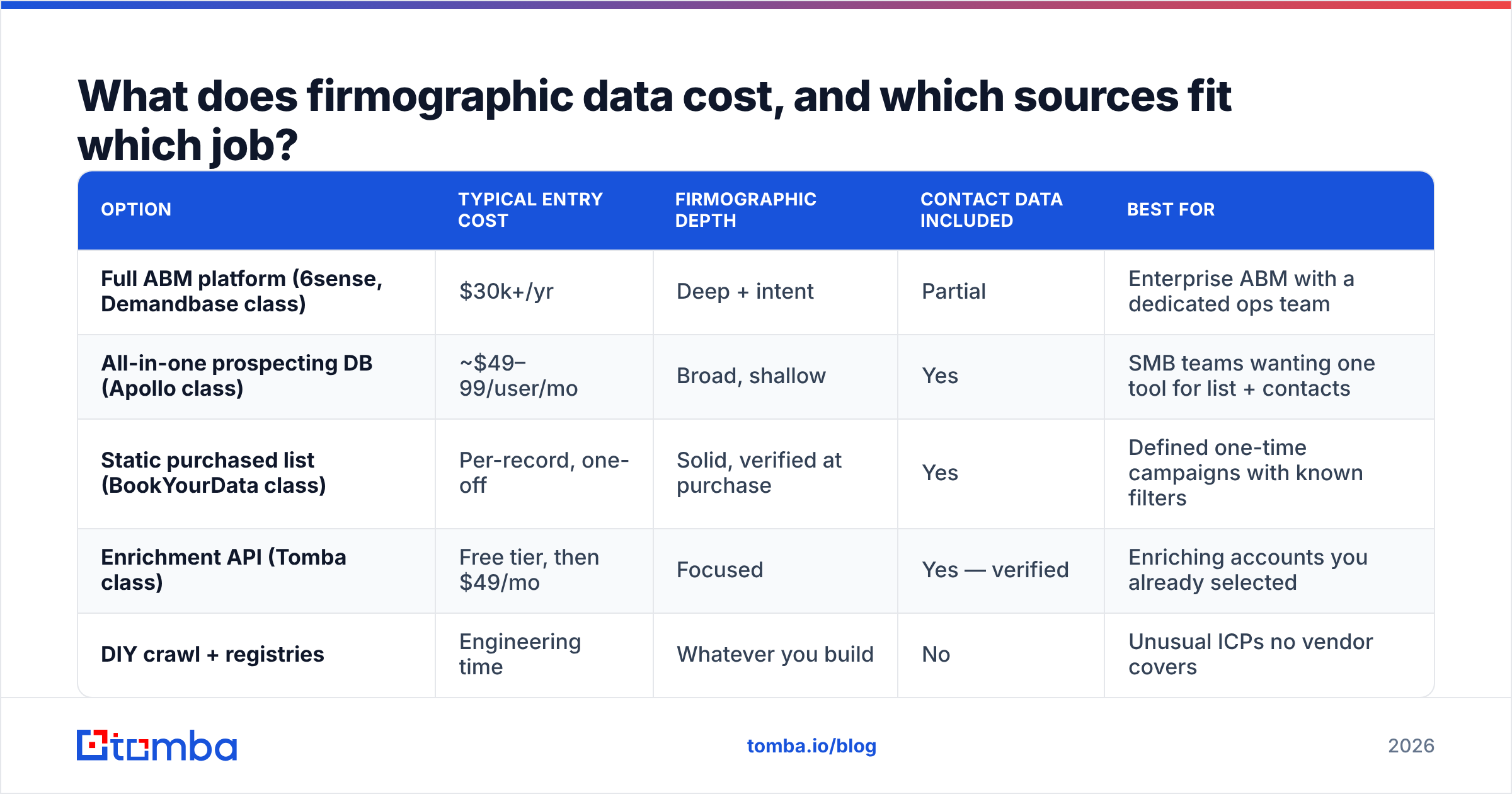
What does firmographic data cost, and which sources fit which job?#
Pricing in this category is deliberately opaque, but the shapes are consistent. Here's how the common options compare for a team building a 5,000-account target list.
| Option | Typical entry cost | Firmographic depth | Contact data included | Best for |
|---|---|---|---|---|
| Full ABM platform (6sense, Demandbase class) | $30k+/yr | Deep + intent | Partial | Enterprise ABM with a dedicated ops team |
| All-in-one prospecting DB (Apollo class) | ~$49–99/user/mo | Broad, shallow | Yes | SMB teams wanting one tool for list + contacts |
| Static purchased list (BookYourData class) | Per-record, one-off | Solid, verified at purchase | Yes | Defined one-time campaigns with known filters |
| Enrichment API (Tomba class) | Free tier, then $49/mo | Focused | Yes — verified | Enriching accounts you already selected |
| DIY crawl + registries | Engineering time | Whatever you build | No | Unusual ICPs no vendor covers |
Two honest notes. Purchased static lists like BookYourData are genuinely good at what they do — pay once, get verified records matching defined filters, no seat commitment — and they beat a subscription when your campaign is bounded and your filters are stable. They're a poor fit when your ICP is still moving, because the file starts decaying the moment it's exported.
And the all-in-one databases: their firmographic coverage is broad but their contact-level accuracy varies hard by region and company size. Check G2 reviews filtered to your own segment rather than reading the aggregate score — a tool that's excellent for US mid-market tech can be near-useless for European manufacturing.
For most teams the sane architecture is: one source for selecting accounts, one for enriching them, and verification on top. Tomba pricing starts free at 25 searches a month and moves to $49/mo, which makes it cheap to run as the enrichment-and-verification layer alongside whatever account source you already trust.
Why does good firmographic targeting still produce bad results?#
Because targeting and deliverability are separate problems, and teams routinely solve the first while ignoring the second.
You can pick 900 perfect accounts, find the right VP at each, and still land in spam if the addresses you pulled are stale, catch-all, or role-based. Bounce rates above 3% start damaging sender reputation, and once that slides, even your correctly-targeted messages stop reaching inboxes. Perfect firmographics into a burned domain is an expensive way to talk to nobody.

Three failure modes worth naming:
- Stale company records. A company that had 80 employees when the data was collected may have 30 now, or 300, or been acquired. Any firmographic file older than two quarters needs a refresh pass before you send.
- Domain drift. Rebrands and acquisitions break the domain join key. Your enrichment silently returns nothing, the row stays blank, and nobody notices until someone asks why the list shrank.
- Unverified emails. Firmographic accuracy says nothing about whether
firstname.lastname@is a live mailbox. Run every list through an email verifier before send, and route catch-all domains through a catch-all verifier rather than guessing.
The fix is procedural, not technological. Refresh firmographics quarterly, re-verify contact data before every campaign, and treat a blank enrichment result as a signal to investigate rather than a row to skip.
How do you operationalize this in a normal week?#
Here's a workflow that doesn't require an ops hire.
Monday — select. Pull accounts matching your firmographic filters from your primary source. Cap it at what your team can actually work in two weeks. A 300-account list you fully work beats a 5,000-account list you skim.
Tuesday — enrich and verify. Run the account list through domain search to surface the email pattern and available contacts per company, then verify. Anything that comes back catch-all or risky goes to a secondary channel — phone or LinkedIn — instead of email.
Wednesday — score and route. Apply your four-tier model. Tier 1 goes to AEs for manual research and personalized outreach; tier 2 and 3 go into sequenced outbound; tier 4 goes to marketing nurture or the discard pile.
Thursday and Friday — send and log. Every disqualification gets a reason code written back to the CRM. That reason-code file is what lets you re-fit the model next quarter with real evidence rather than vibes.
If you're running this at scale, the Tomba API handles the enrichment step programmatically so the whole loop can be a scheduled job instead of a weekly chore. For teams still in spreadsheets, the Google Sheets add-on covers the same ground with less setup.
One last discipline: keep a holdout. Reserve 10% of accounts that your model scores as poor fit and work them anyway, at low volume. If they convert at the same rate as your tier 1s, your model isn't capturing what actually predicts a deal — and you'd never find that out from a list where you only ever contact the accounts the model already liked.
Getting started#
Firmographic data is a filter, not an answer. It tells you which 900 accounts out of 40,000 deserve a human's attention, and that's genuinely most of the value in outbound. But the filter only pays off if the data underneath is fresh, the scoring is explainable, and the contact layer on top actually reaches inboxes.
Start with the three fields that matter — domain, employee band, technographics — build a scoring model from your own closed-won data, and refresh it quarterly. Then make sure the emails you find for those accounts are real before you send.
That last step is where Tomba Email Finder fits. Once your firmographic filters have narrowed the field to accounts worth working, Tomba finds and verifies the professional email addresses at those companies — by domain, by name, or in bulk — so your targeting work survives contact with the mail server. The free tier gives you 25 searches a month to test it against a slice of your current list; paid plans start at $49/mo when you're ready to run it across the whole pipeline.
Related guides#
Ready to find emails that actually work?
Join 150,000+ professionals who stopped guessing and started sending. Free credits on signup — no credit card required.
Get the Tomba newsletter
Practical outbound tactics and product updates — once every two weeks.
About the author