Firmographic vs Demographic Data: The B2B Targeting Guide
Demographic data describes people. Firmographic data describes companies. Mix them up in your B2B targeting and you burn budget on leads that were never going to buy. Here's how to use both.
TL;DR — the firmographic vs demographic split in one line: demographic data describes people, firmographic data describes companies.
- Demographic data describes a person (job title, seniority, age, location). Firmographic data describes a company (industry, headcount, revenue, tech stack, funding).
- In B2B, firmographics decide whether an account can buy. Demographics decide who inside that account you talk to. You need both, in that order.
- Scoring demographics first is the most common targeting mistake. It fills your pipeline with VPs at companies that will never hit your minimum contract value.
- Firmographic fields decay faster than you think: headcount, funding stage, and tech stack all shift quarterly. Refresh at least every 90 days.
- The practical stack is firmographic filter → demographic persona match → contact discovery → verification before send.
Firmographic vs demographic data: what is the difference?#
Think of it like renting an apartment. Firmographics are the building: how many units, what neighborhood, what year it was built, whether it has an elevator. Demographics are the person answering the door: their age, their job, whether they're the leaseholder or a roommate. You would not pitch a building-wide fiber upgrade to a roommate in a four-unit walk-up. The building is wrong. The person is wrong too, and for a different reason.
Demographic data is the older concept, borrowed from consumer marketing and census work. In a B2C context it means age, gender, income, education, household size, and location. In B2B, "demographic" has drifted to mean the person-level attributes attached to a business contact: job title, seniority, function, department, tenure, and geography. Some teams call this persona data or contact-level data to avoid the B2C baggage.
Firmographic data is the B2B-native equivalent. It describes the organization as a unit. The classic five are industry (SIC/NAICS code), company size (headcount), revenue, location, and ownership structure. Modern firmographics go well past that list. Add funding rounds, growth rate, hiring velocity, technographics (what software they run), and office count. Parent-versus-subsidiary status counts too.
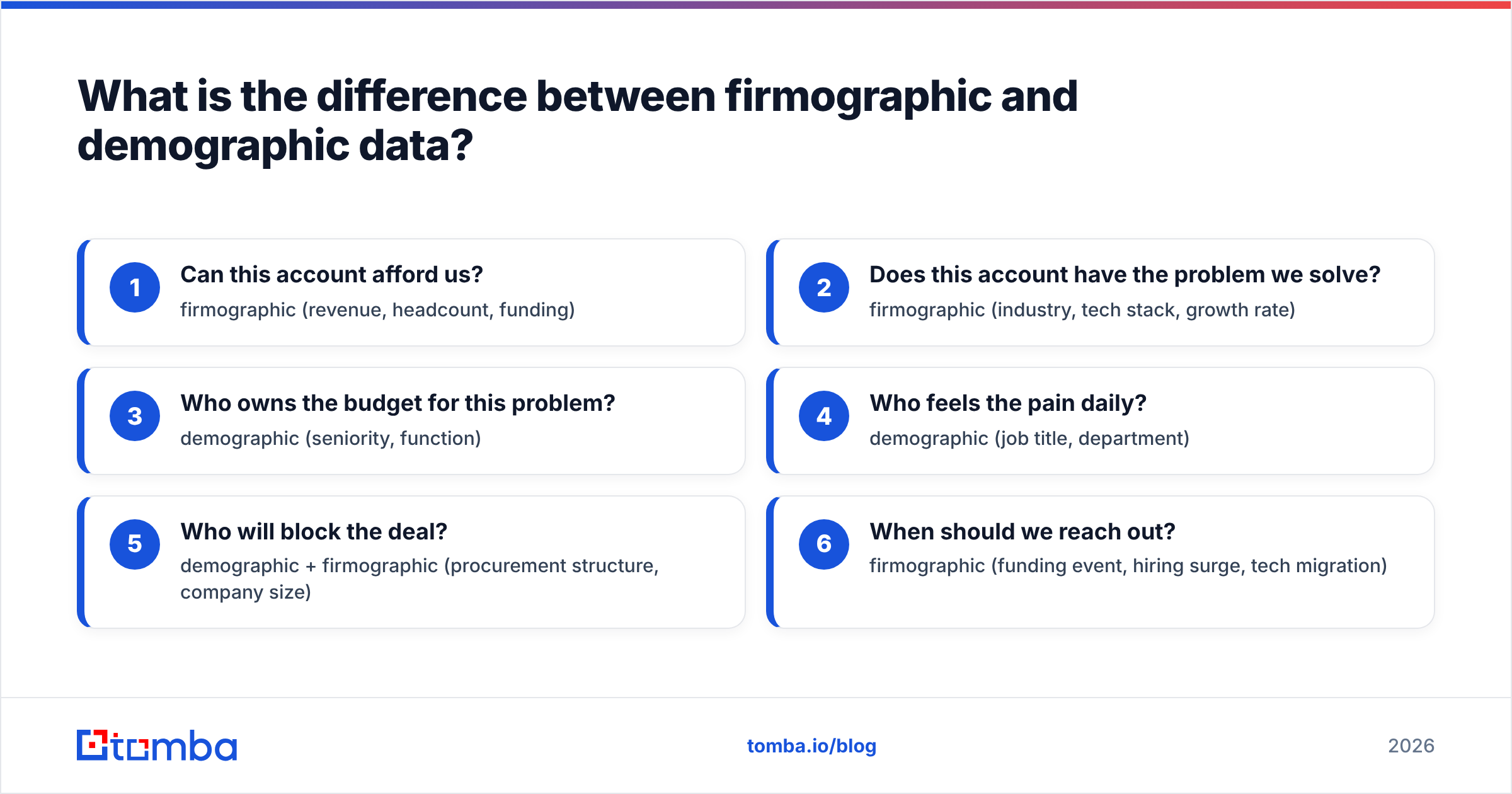
The distinction matters because the two data types answer different questions:
- Can this account afford us? — firmographic (revenue, headcount, funding)
- Does this account have the problem we solve? — firmographic (industry, tech stack, growth rate)
- Who owns the budget for this problem? — demographic (seniority, function)
- Who feels the pain daily? — demographic (job title, department)
- Who will block the deal? — demographic + firmographic (procurement structure, company size)
- When should we reach out? — firmographic (funding event, hiring surge, tech migration)
Notice that four of those six lean firmographic. That ratio is roughly how your qualification effort should be weighted in most B2B motions.

Which data type should you filter on first?#
Firmographics, almost always. Here's the arithmetic that makes it obvious.
Say your addressable market is companies with 200–2,000 employees in SaaS and fintech. Your buyer persona is "Director of RevOps or above." Start demographic-first and you search for every RevOps Director on earth. That is hundreds of thousands of people. Most of them sit at companies too small to need you, or too large to buy the way you sell. Then you filter that huge list by company attributes anyway, and you have already paid credits for the contacts you throw away.
Firmographic-first, you build the account list once: maybe 8,000 companies match. Then you find the two or three right people at each. Same outcome, far less enrichment spend. Better still, sales gets a list of accounts rather than a pile of loose names.
There's one honest exception. Some tools are bought by one person: a $19/seat productivity app, a certification course, a freelancer service. There, demographic-first works fine, because company attributes barely shape the purchase. Bottom-up PLG products live in this exception. Everything with a procurement process does not.
How do firmographic and demographic data compare head-to-head?#
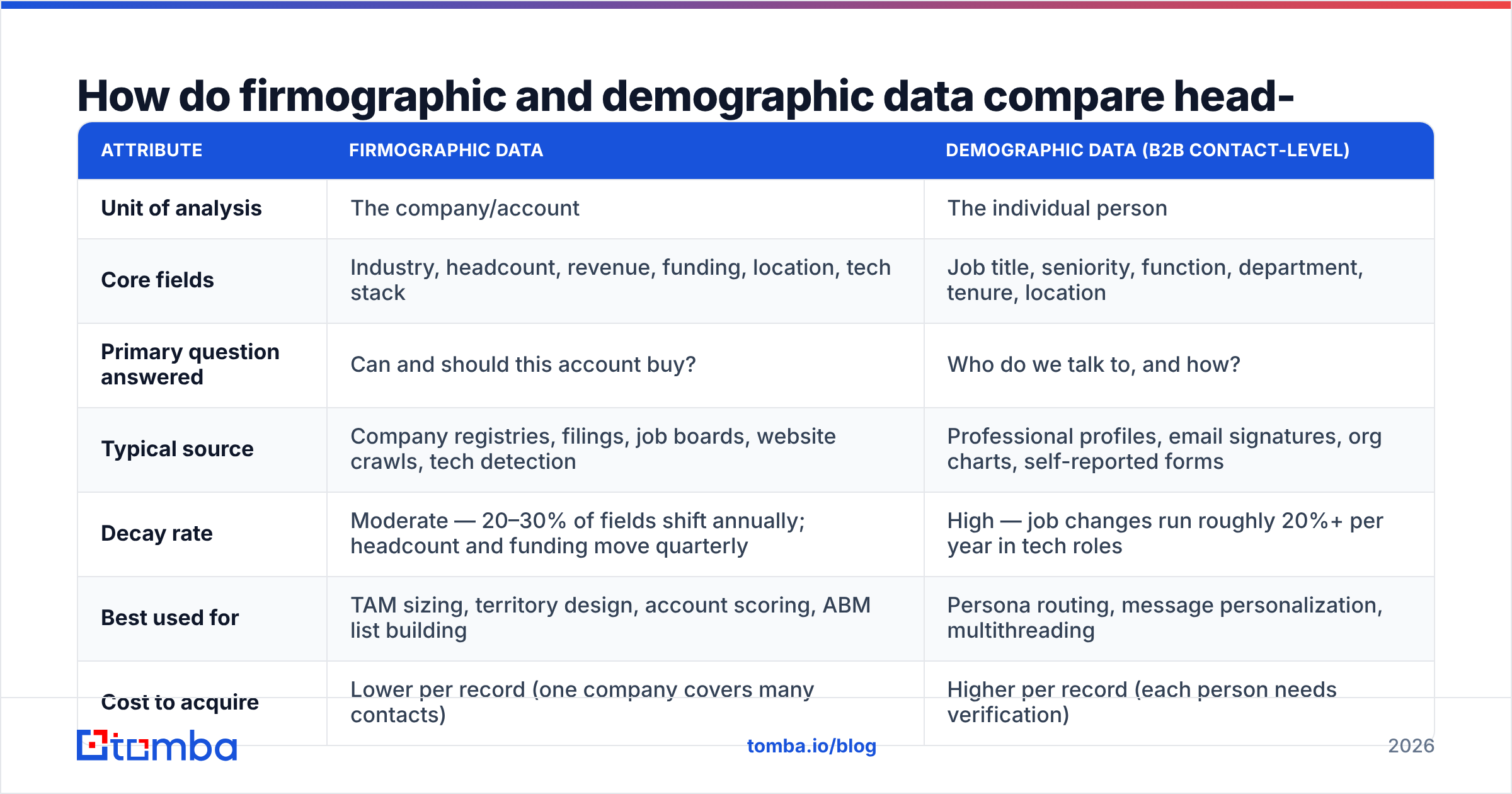
| Attribute | Firmographic data | Demographic data (B2B contact-level) |
|---|---|---|
| Unit of analysis | The company/account | The individual person |
| Core fields | Industry, headcount, revenue, funding, location, tech stack | Job title, seniority, function, department, tenure, location |
| Primary question answered | Can and should this account buy? | Who do we talk to, and how? |
| Typical source | Company registries, filings, job boards, website crawls, tech detection | Professional profiles, email signatures, org charts, self-reported forms |
| Decay rate | Moderate — 20–30% of fields shift annually; headcount and funding move quarterly | High — job changes run roughly 20%+ per year in tech roles |
| Best used for | TAM sizing, territory design, account scoring, ABM list building | Persona routing, message personalization, multithreading |
| Cost to acquire | Lower per record (one company covers many contacts) | Higher per record (each person needs verification) |
| Fails when | You sell to individuals inside large orgs regardless of company profile | You skip account fit and email everyone with the right title |
| Refresh cadence | Every 90 days for growth fields | Every 30–60 days for contact validity |
One line sums up the firmographic vs demographic tradeoff: companies change slowly, people change fast. The decay row is the one most teams underestimate. A contact record with a stale job title is worse than useless. Your personalization now names a role the person already left. Company records fail more kindly. A headcount that is 15% out of date still lands the account in the right tier.
What firmographic fields actually predict revenue?#
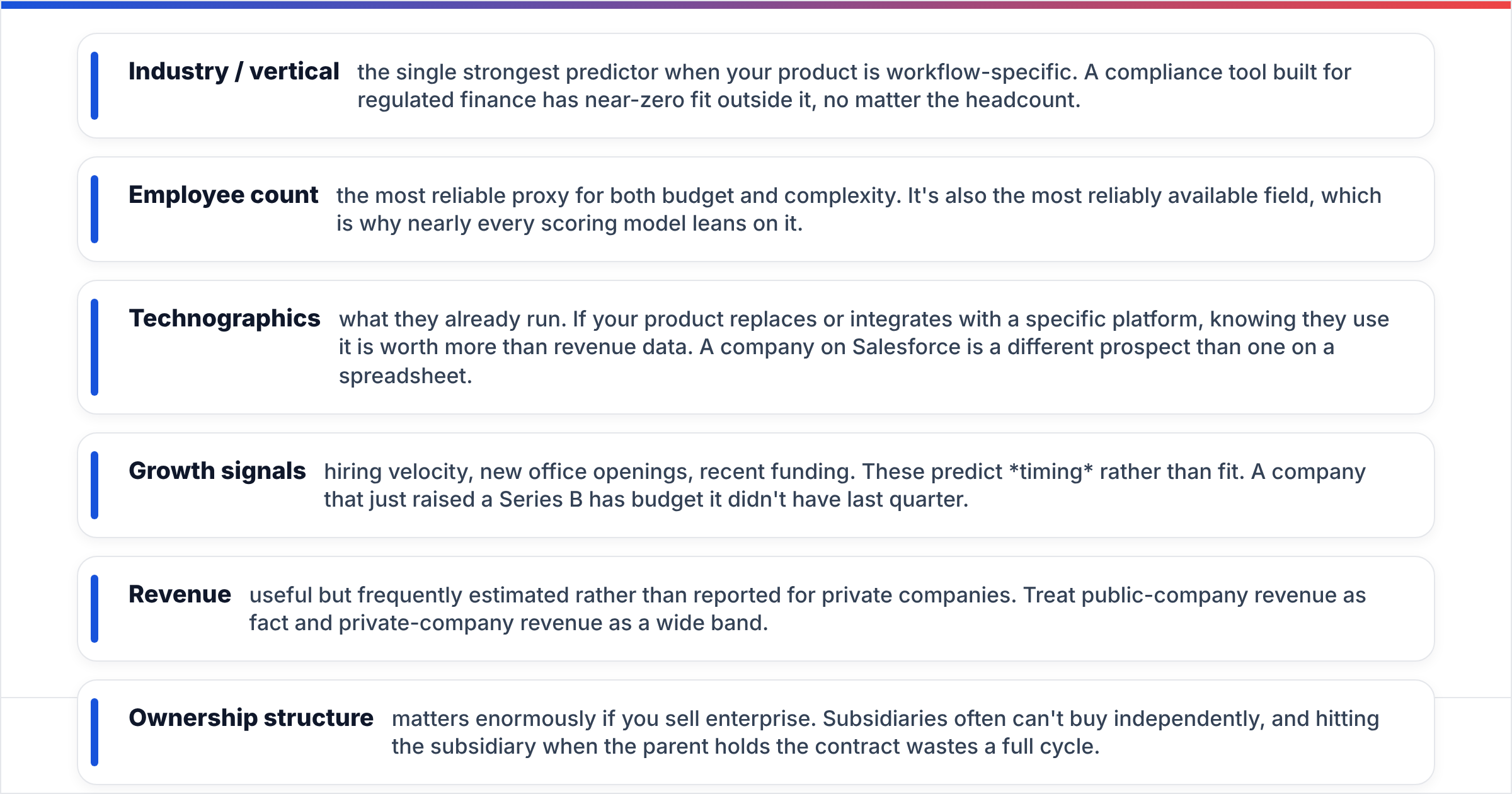
Not all firmographics carry equal weight. Based on how B2B scoring models typically shake out, three fields do most of the work:
- Industry / vertical — the single strongest predictor when your product is workflow-specific. A compliance tool built for regulated finance has near-zero fit outside it, no matter the headcount.
- Employee count — the most reliable proxy for both budget and complexity. It is also the field you can almost always get. That is why nearly every scoring model leans on it.
- Technographics — what they already run. Does your product replace or plug into a specific platform? Then knowing they run it beats knowing their revenue. A company on Salesforce is a different prospect than one on a spreadsheet.
The next three fields matter less often, but they decide the edge cases:
- Growth signals — hiring velocity, new office openings, recent funding. These predict timing rather than fit. A company that just raised a Series B has budget it didn't have last quarter.
- Revenue — useful, but usually estimated rather than reported for private companies. Treat public-company revenue as fact and private-company revenue as a wide band.
- Ownership structure — matters enormously if you sell enterprise. Subsidiaries often cannot buy on their own. Pitch the subsidiary when the parent holds the contract and you waste a full cycle.
Building your first scoring model? Weight industry and headcount heavily. Add technographics as a simple yes/no bonus. Use growth signals to decide when to reach out, not whether to.
What demographic fields matter in a B2B context?#
Person-level data earns its keep in two places: routing and relevance.
Routing means getting the message to someone with the authority to act. Seniority does the heavy lifting here. "Director+" is a crude filter, but it works. Function matters just as much. A Director of Engineering and a Director of Finance sit in the same company but live in different worlds.
Relevance means the message itself. Tenure is underrated here. Someone 90 days into a role is hunting for tools to prove themselves. Someone eight years in already picked their platforms and defends them. That single field changes your entire opening line.
Geography does double duty — it affects both compliance (GDPR consent rules for EU contacts) and timing (send windows). Don't treat it as a nice-to-have. A send timed to the right time zone is one of the cheapest wins an outbound team has, and it moves your response rate.
What demographic data cannot do is tell you whether the account is worth pursuing. The same job title at a 6-person agency and at a 2,000-person enterprise is not the same lead. Any model that treats them alike will mislead your reps.
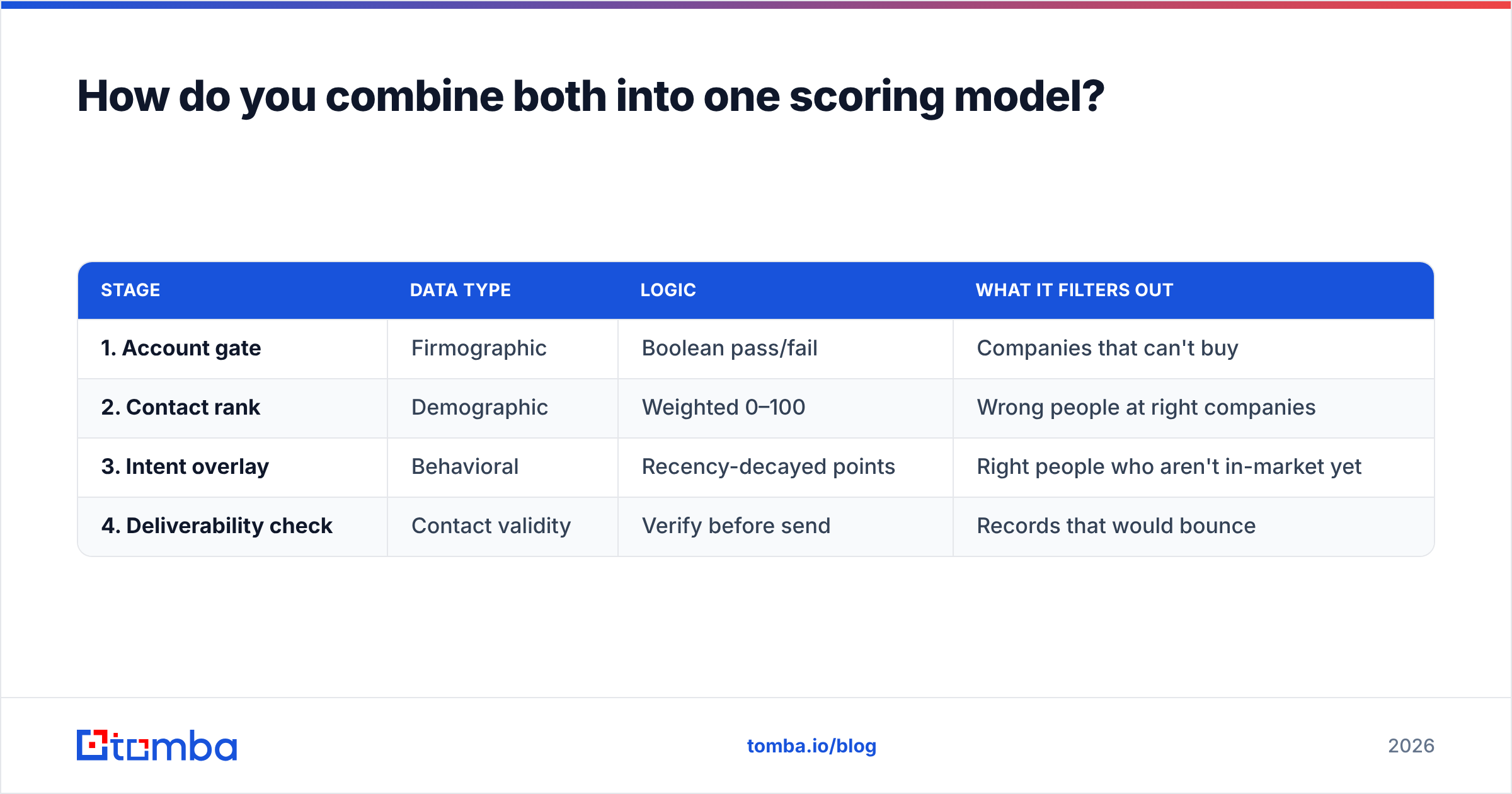
How do you combine both into one scoring model?#
The clean pattern is a two-stage gate, not a single blended score.
Stage one — firmographic gate (pass/fail). Does the account meet your minimum viable criteria? Industry in list, headcount in band, geography servable, no disqualifying tech. This is binary. Accounts that fail don't proceed regardless of how good the contacts look. Roughly 60–80% of a raw list dies here, and that's the point.
Stage two — demographic scoring (weighted). Among accounts that passed, rank contacts by persona fit. Seniority weight, function weight, tenure bonus, and a penalty for generic role titles that suggest a mismatched record.
Stage three — behavioral overlay (optional). Site visits, content downloads, event attendance. This is where an MQL definition properly lives — behavior on top of confirmed fit, not behavior alone.
Where teams go wrong is collapsing all three into one number. A 92-point lead might be a bad-fit company with a great persona. Or a great-fit company with a so-so persona. At that point the score has stopped carrying information. Keep the gate separate from the ranking.
| Stage | Data type | Logic | What it filters out |
|---|---|---|---|
| 1. Account gate | Firmographic | Boolean pass/fail | Companies that can't buy |
| 2. Contact rank | Demographic | Weighted 0–100 | Wrong people at right companies |
| 3. Intent overlay | Behavioral | Recency-decayed points | Right people who aren't in-market yet |
| 4. Deliverability check | Contact validity | Verify before send | Records that would bounce |
That fourth row is the step most models skip entirely. A perfectly scored lead with a dead mailbox is worth zero. Enough of them drag your sender reputation down, and then even your good leads stop landing.

Where do you actually get this data?#
Three broad sources, each with a different failure mode.
Public registries and filings give you the most reliable firmographics — legal entity, registered address, ownership, and for public companies, real revenue. They're also slow. A registry reflects reality as of the last filing, which can be a year old. Free, authoritative, stale.
Web-derived data — crawling company sites, job postings, and press releases — captures growth signals and technographics that registries never will. A jump from 4 open roles to 40 is a firmographic event no filing will report for months. The tradeoff is inference: derived fields carry error rates, and vendors rarely publish them.
Contact data providers handle the demographic layer. This is where quality varies most, because person-level records are the fastest-decaying asset in the stack. Judge a provider on three things: coverage in your segment, how recently records were verified, and how openly they explain where the data came from. Compare a few on G2 before committing budget — segment coverage differs more than the marketing pages suggest.
For a practical stack, start with firmographic filters and build the account list. Then use a domain search to pull the contacts at each qualifying company. Then run data enrichment to fill in the person-level fields you're scoring on. Prefer to start from a database instead of a list? Tools like BookYourData sell prebuilt B2B contact sets filtered by both firmographic and demographic fields. That shortcuts the list-building stage when your ICP is broad and well defined.
Whatever the source, verify before you send. Email verification is the cheapest insurance in the stack. It costs a fraction of a cent per record, and it protects the domain reputation everything else rests on.
What are the most common mistakes teams make?#
Treating "enterprise" as a firmographic. It isn't a field, it's a bucket you invented. Define it with numbers: headcount over 1,000, or revenue over $250M. Otherwise every rep uses their own definition and your reporting turns into fiction.
Using job title as a proxy for authority. Titles are wildly inconsistent across companies. "Head of Growth" can mean a solo marketer at a 20-person startup or a 40-person org leader at a scaleup. Pair title with headcount before you assume budget.
Ignoring subsidiary structure. Say you sell into large organizations and your data flattens parent/child links. You then pitch three divisions of the same conglomerate on their own, and you look uncoordinated. Worse, you may violate an existing master agreement.
Never refreshing. A firmographic list built 18 months ago has drifted. A good chunk of your "perfect fit" accounts no longer fit. Set a refresh cadence and treat it as maintenance, not a project.
Buying demographic data before validating firmographic fit. This is the expensive one. Contact records cost more per unit and decay faster. Filter accounts first, buy contacts second. When you do, run a bulk email finder against the qualified account list instead of pulling a generic title-based export.
Which one matters more in 2026?#
Firmographics, and the gap is widening. The firmographic vs demographic race is not close this year.
Two things changed. First, AI has made person-level personalization cheap. Cheap means everyone does it, so it no longer stands out. Anyone can reference your job title now. But noting that a company just opened a second office in Austin and posted six ops roles? That takes real firmographic data, and it still cuts through.
Second, deliverability rules have tightened. Major mailbox providers now hold bulk senders to stricter standards. Blasting a loosely qualified list of job titles carries real risk. The winning motion is fewer, better-qualified accounts — which is a firmographic discipline. Google's own bulk sender guidelines make the direction of travel clear.
Demographics aren't going away. They're just no longer the differentiator; they're table stakes. The teams pulling ahead are the ones with sharper account definitions, faster refresh cycles, and trigger-based timing off firmographic events.
Getting started without overbuilding#
You don't need a data warehouse to do this well. Start here:
- Write down your firmographic gate as five concrete criteria with numbers, not adjectives.
- Pull a list of 200 companies that pass it. Manually check 20 of them — if more than three are wrong, your criteria are too loose.
- Define two personas per account: economic buyer and daily user.
- Find contacts for both at each account, verify them, and only then start writing.
- Re-run the gate every quarter and log how many accounts moved in or out. That number tells you your real decay rate.
Step four is where most workflows stall. Finding two verified contacts at 200 companies by hand is a week of work. That's the piece to automate first.
Ready to turn your account list into contacts? Once your firmographic gate is set, the Tomba Email Finder handles the demographic layer. It returns verified professional emails by domain, name, or company, so you spend your time on messaging rather than on lookups. The free tier includes 25 searches a month. Paid plans start at $49/mo on Tomba pricing, with the API and bulk tools included from the Starter tier up. Build the account list right, then let the contact discovery run itself.
Related guides#
Ready to find emails that actually work?
Join 150,000+ professionals who stopped guessing and started sending. Free credits on signup — no credit card required.
Get the Tomba newsletter
Practical outbound tactics and product updates — once every two weeks.
About the author