First Meeting Invitation Email: Templates That Get a Yes
A first meeting invitation email has one job: make saying yes easier than saying no. Here is the structure, the timing, the subject lines, and six templates you can send today.
TL;DR
- A first meeting invitation email is not a pitch. Its only job is to make accepting a specific block of time cheaper than ignoring you.
- The highest-performing invites name one reason, one duration, and one time — not three options and a paragraph of context.
- Subject lines that reference the recipient's world ("Q3 pipeline reporting") beat subject lines that reference yours ("Intro call — Acme").
- Booking links convert well with warm leads and poorly with cold ones. Propose a time first, drop the link as the fallback.
- None of it matters if the address bounces. Verify before you send: a single hard bounce on a small domain can suppress every follow-up you send after it.
What is a first meeting invitation email?#
A first meeting invitation email is the message you send to move a contact from "aware of you" to "on your calendar." It sits between a cold email and a calendar event: warmer than pure outreach, more concrete than a nurture touch.
Think of it like asking someone to hold a door open. If you shout "can you help me with something?" from across the parking lot, they have to guess how long it takes and whether it's worth it, so they keep walking. If you say "can you hold the door for ten seconds," the cost is legible and they say yes. Your invite works the same way: legible cost, legible payoff, one decision.
Technically, the email does three things at once. It states a reason the meeting exists, it proposes a specific container of time, and it lowers the friction of replying to a single word. Everything else — the case study, the pricing, the deck — belongs after the meeting is booked, not before.
Why do most first meeting invitation emails get ignored?#
Because they ask the recipient to do work. Every extra decision you push onto them multiplies the chance the email gets archived.
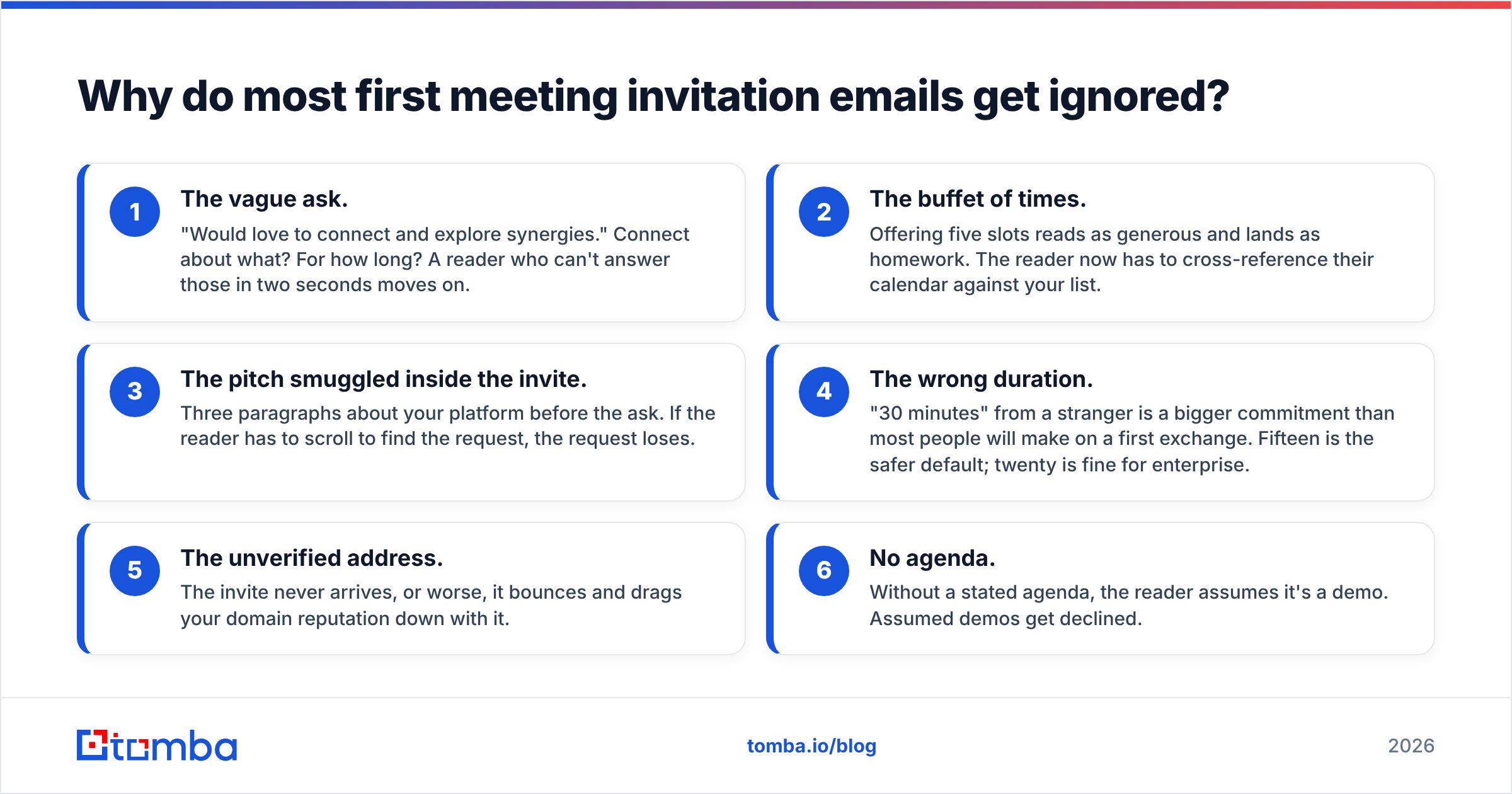
Here are the failure modes that show up over and over in real sequences:
- The vague ask. "Would love to connect and explore synergies." Connect about what? For how long? A reader who can't answer those in two seconds moves on.
- The buffet of times. Offering five slots reads as generous and lands as homework. The reader now has to cross-reference their calendar against your list.
- The pitch smuggled inside the invite. Three paragraphs about your platform before the ask. If the reader has to scroll to find the request, the request loses.
- The wrong duration. "30 minutes" from a stranger is a bigger commitment than most people will make on a first exchange. Fifteen is the safer default; twenty is fine for enterprise.
- The unverified address. The invite never arrives, or worse, it bounces and drags your domain reputation down with it.
- No agenda. Without a stated agenda, the reader assumes it's a demo. Assumed demos get declined.
Fix those six and you're already ahead of most of the invites in your prospect's inbox. HubSpot's sales research library has years of data on reply behavior worth skimming if you want the broader numbers behind this — see the HubSpot sales blog for their ongoing benchmarks.
What are the seven parts of a first meeting invitation email?#
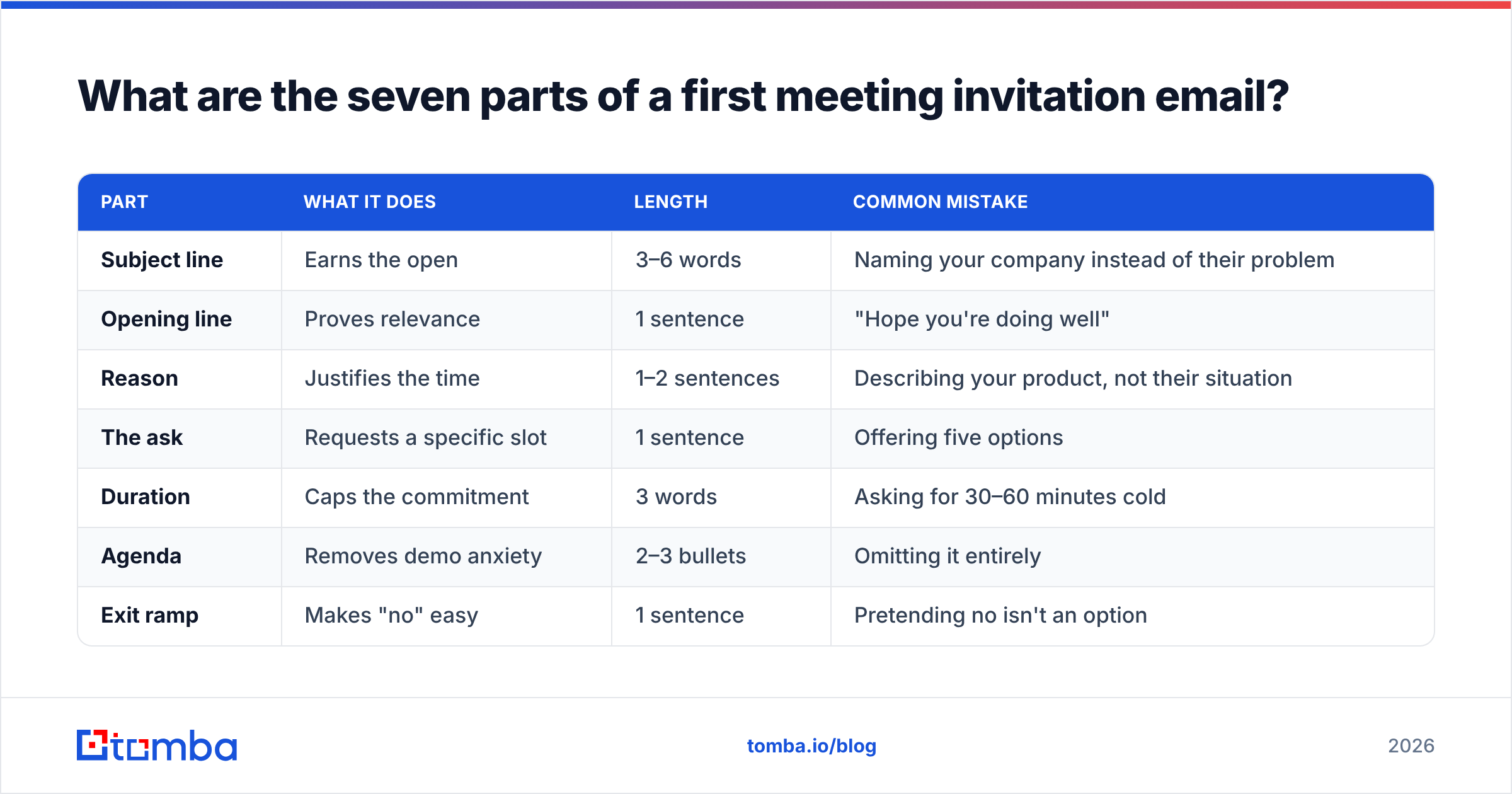
Every invite that consistently books meetings contains the same components. You can reorder them, but you can't skip them.
| Part | What it does | Length | Common mistake |
|---|---|---|---|
| Subject line | Earns the open | 3–6 words | Naming your company instead of their problem |
| Opening line | Proves relevance | 1 sentence | "Hope you're doing well" |
| Reason | Justifies the time | 1–2 sentences | Describing your product, not their situation |
| The ask | Requests a specific slot | 1 sentence | Offering five options |
| Duration | Caps the commitment | 3 words | Asking for 30–60 minutes cold |
| Agenda | Removes demo anxiety | 2–3 bullets | Omitting it entirely |
| Exit ramp | Makes "no" easy | 1 sentence | Pretending no isn't an option |
The exit ramp is the part people cut first and shouldn't. A line like "If this isn't your area, point me to whoever owns it and I'll stop cluttering your inbox" routinely produces internal referrals that a pure ask never would.
Cold, warm, or internal: which invitation format wins?#
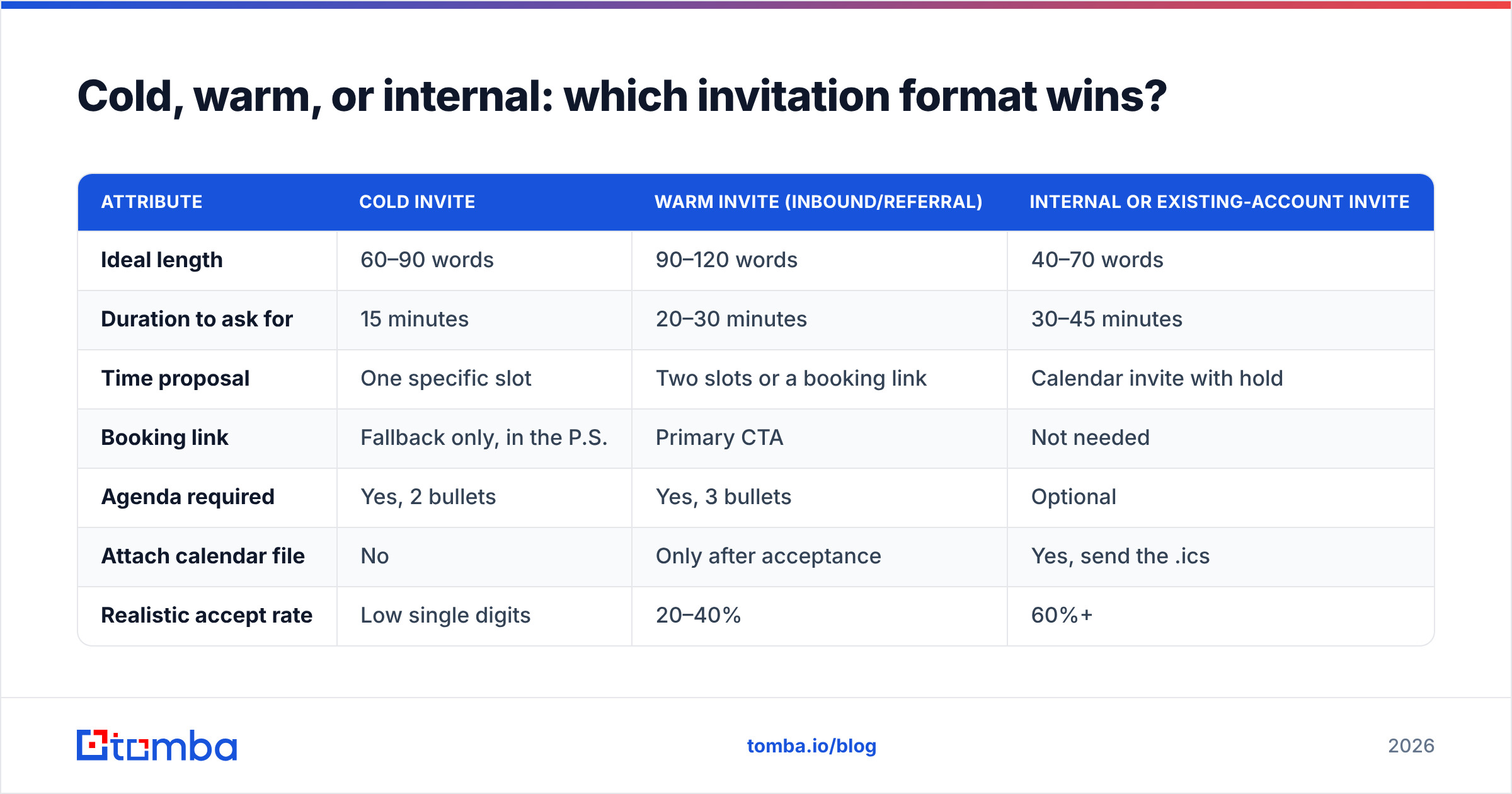
The same template does not work across contexts. A cold invite to a VP who has never heard of you needs a different shape than a follow-up to someone who downloaded your report last week.
| Attribute | Cold invite | Warm invite (inbound/referral) | Internal or existing-account invite |
|---|---|---|---|
| Ideal length | 60–90 words | 90–120 words | 40–70 words |
| Duration to ask for | 15 minutes | 20–30 minutes | 30–45 minutes |
| Time proposal | One specific slot | Two slots or a booking link | Calendar invite with hold |
| Booking link | Fallback only, in the P.S. | Primary CTA | Not needed |
| Agenda required | Yes, 2 bullets | Yes, 3 bullets | Optional |
| Attach calendar file | No | Only after acceptance | Yes, send the .ics |
| Realistic accept rate | Low single digits | 20–40% | 60%+ |
| Follow-up cadence | 3 touches over 12 days | 2 touches over 7 days | 1 nudge |
The pattern is straightforward: the colder the relationship, the smaller the ask and the more of the decision you make on the recipient's behalf. The warmer it is, the more control you can hand back.
What should the subject line say?#
Name their world, not yours. A subject line is a filing decision, not a sales moment — the reader is deciding which mental folder this goes in.
Strong patterns:
- The topic subject:
Q3 pipeline reporting— reads like an internal thread, not a vendor email. - The referral subject:
Priya suggested I reach out— borrowed trust does the opening work. - The specific-time subject:
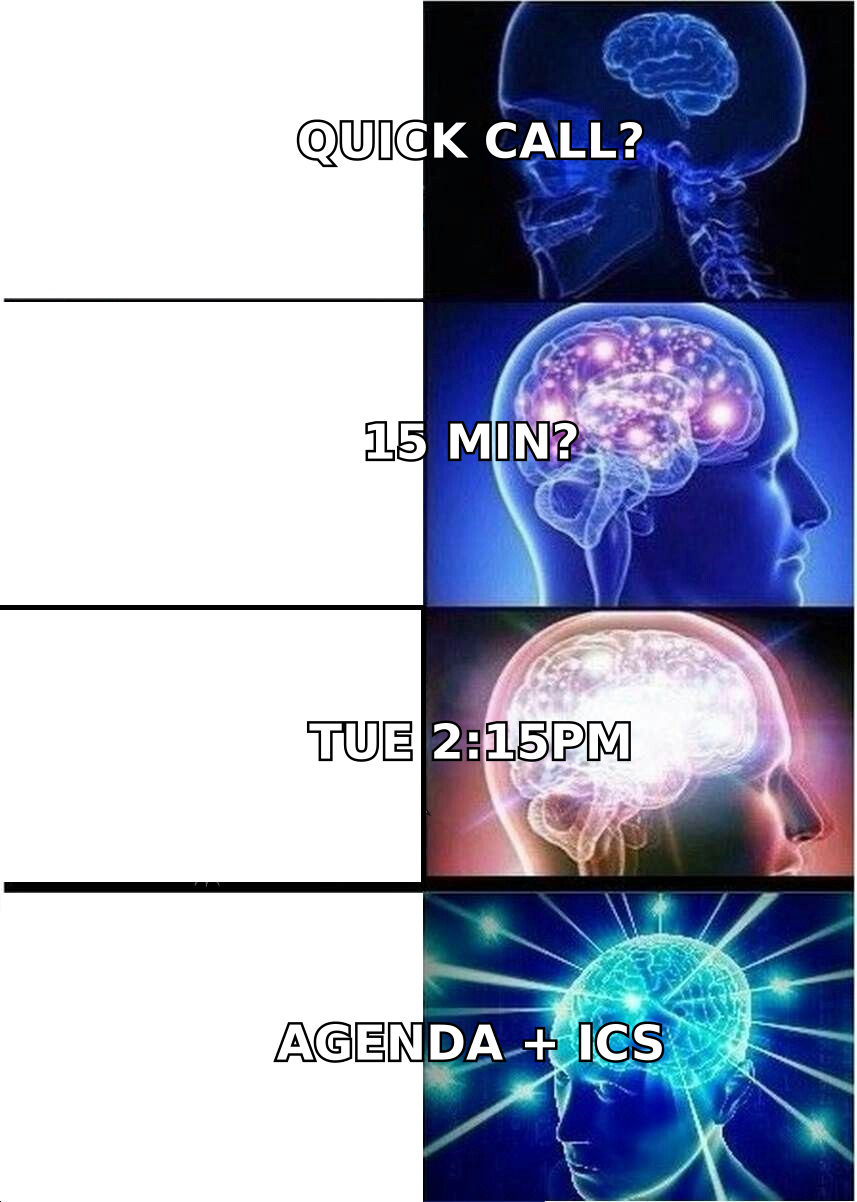
Tuesday 2:15pm?— unusual enough to open, concrete enough to answer. - The observation subject:
Your careers page — 9 SDR roles— proves you did homework before you asked for time.
Weak patterns to retire: "Quick question," "Touching base," "Intro call — [Your Company] x [Their Company]," and anything with "synergy" or "circle back." They get opened by people who open everything and ignored by everyone else.
If you want to sanity-check variants before a send, run them through a subject line tester rather than arguing about it in a Slack thread. Small deltas in open rate compound across a quarter of sending.
Which first meeting invitation email templates actually book meetings?#
Six templates, each mapped to a different situation. Swap the brackets, keep the structure.
1. The cold single-slot ask
Subject: Q3 pipeline reporting
Hi [Name] — noticed [Company] is hiring three RevOps analysts. Usually that means reporting is being rebuilt from scratch.
We help teams in that spot cut manual pipeline reporting from days to hours. Worth 15 minutes on Tuesday at 2:15pm your time?
Two things I'd cover: how [similar company] handled the same rebuild, and where the usual data gaps show up.
If reporting isn't yours, tell me who owns it and I'll stop here.
2. The referral invite
Subject: Priya suggested I reach out
Hi [Name] — Priya at [Company] mentioned you're the one thinking about [problem] this quarter. She thought a conversation would be useful.
Do you have 20 minutes Thursday morning? I'll come with the two things she said were most relevant to your setup, and we can drop it there if it isn't a fit.
3. The post-content invite
Subject: The benchmark you downloaded
Hi [Name] — you grabbed our [report] last week. The number most people ask about is [specific stat], because it depends heavily on [variable].
Happy to walk through how it maps to [Company] specifically. 20 minutes Wednesday, or grab any slot here: [link].
4. The event follow-up
Subject: Following up from [Event] — booth conversation
Hi [Name] — good talking at [Event] about [specific thing they said]. You mentioned [pain point] was the blocker.
I pulled two examples from teams that solved it. 15 minutes next week to walk through them? Tuesday or Thursday after 1pm both work here.
5. The re-engagement invite
Subject: Picking this back up?
Hi [Name] — we talked in [month] and you said the timing was wrong because of [reason]. That reason has probably changed by now.
If it has, 15 minutes on Monday? If it hasn't, reply "not yet" and I'll check back in the new quarter.
6. The executive invite
Subject: 15 minutes on [strategic topic]
[Name] — I'll be direct. Three companies your size moved [process] in-house this year and cut [cost] by [percentage].
I'd like 15 minutes to show you what they did and what it cost them. Tuesday 9am or Friday 4pm. If neither works, my calendar is here: [link].
Should you propose one time, two times, or a booking link?#
Propose one time when the relationship is cold. Offer two when it's warm. Lead with a booking link only when the person already wants the meeting.
The logic is about who absorbs the cognitive load. A single proposed slot means you did the deciding — the reader either accepts or counters, and both are one-word replies. Two slots is still manageable. A booking link, despite feeling frictionless to you, asks a stranger to leave their inbox, load a page, and pick from a grid. That's a context switch, and cold readers don't make context switches for people they don't know yet.
The exception is inbound. Someone who filled out a form or downloaded a report has already decided they want to talk; a link removes the back-and-forth they were dreading. Tools like Calendly exist precisely for that half of the funnel, and they're excellent there.
A practical compromise that works across both: propose one specific time in the body, then add a one-line P.S. — "If that's bad, here's my calendar: [link]." You keep the low-friction ask and still catch the people who prefer self-service.
When should you send a first meeting invitation email, and how do you follow up?#
Send Tuesday through Thursday, between 7–9am or 1–3pm in the recipient's timezone. Not because those windows are magic, but because Monday inboxes are triage mode and Friday afternoons are already gone.
The follow-up sequence for a cold invite that got no reply:
- Day 0 — the invite. One reason, one slot, one agenda.
- Day 3 — the shorter version. Reply in the same thread, two sentences, same slot moved forward a week. No new pitch.
- Day 8 — the angle change. Different reason to meet, different proof point. Fresh subject line.
- Day 12 — the close. "I'll assume the timing is wrong and stop here. If that changes, reply and I'll pick it back up."
Four touches, then stop. Sequences that run twelve deep don't book more meetings; they train recipients to mark you as spam, which quietly damages every future send from your domain. If you're unclear on how that spiral works, our glossary entry on response rate covers how reply behavior and sender reputation feed each other.
One more rule: once someone accepts, send the calendar invite within an hour, with the agenda pasted into the description and a dial-in that doesn't require a download. The gap between "yes" and "confirmed on calendar" is where a surprising number of booked meetings quietly die.
How do you make sure the invitation actually reaches the inbox?#
Copy is the second problem. Address quality is the first.
An invite sent to a guessed address does one of three things: it bounces, it lands in a catch-all void where nobody reads it, or it hits a role account like info@ that gets triaged by someone with no authority to accept meetings. All three look identical from your side — silence — which is why teams keep rewriting subject lines when the real issue is data.
The fix is a two-step hygiene pass before any invitation sequence goes out:
- Find the address properly. Use an email finder that returns a confidence score and the source pattern rather than a permutation guess. Knowing the domain uses
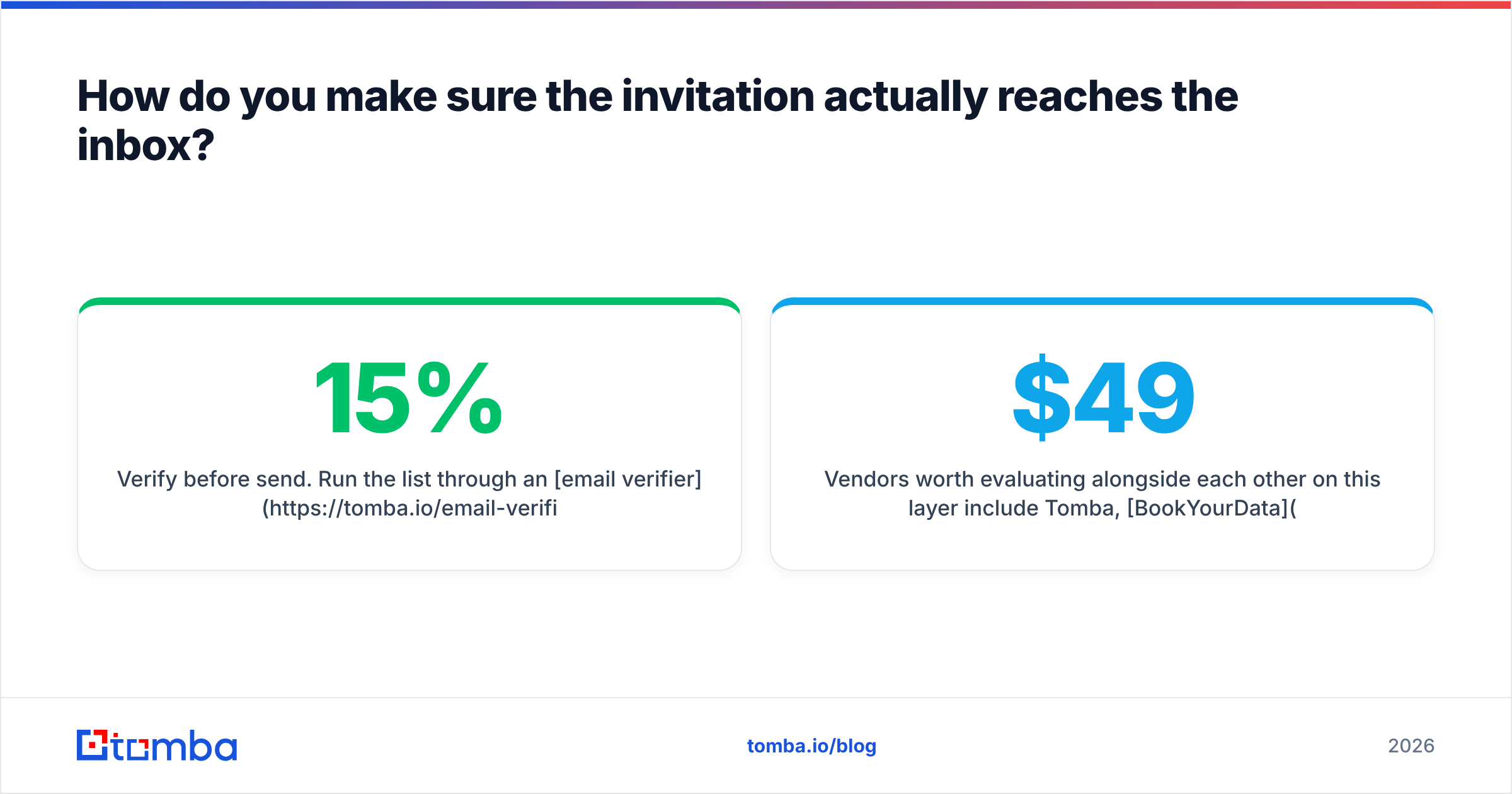
first.last@versusflast@is the difference between a delivered invite and a bounce. - Verify before send. Run the list through an email verifier and drop everything that isn't deliverable. On a 500-contact list, this typically removes 8–15% and saves your domain from the bounce rate that gets you filtered.
For teams sending at volume, the practical workflow is: build the list, enrich, verify, then split into sending batches so a bad segment can't poison the whole domain. Salesforce's sales resource library has good material on structuring that hand-off between data ops and reps if you're formalizing the process.
Vendors worth evaluating alongside each other on this layer include Tomba, BookYourData, and the usual verification-first players — each optimizes for a different mix of coverage, freshness, and price. Compare on your own domains rather than on published accuracy claims, since accuracy varies wildly by geography and company size. Tomba's own pricing starts free at 25 searches per month, with Starter at $49/mo, Growth at $99/mo, and Pro at $249/mo, which is enough to test coverage against a real list before committing.
What does a good first meeting invitation email look like in one sentence?#
One reason, one time, one exit ramp — sent to a verified address.
That's the whole discipline. Most invites fail on the fourth clause, not the first three: beautifully written asks pointed at addresses that were never real. Fix the data layer first, then optimize the copy, and your accept rate moves for reasons you can actually attribute.
If your invitations are going to prospects you found manually or guessed at, start there. Tomba Email Finder returns verified, source-attributed professional addresses by name and domain, so the invite you spent twenty minutes writing actually reaches the person who can say yes to it. Free tier gets you 25 searches to check coverage on your own target accounts before you spend anything.
Related guides#
Ready to find emails that actually work?
Join 150,000+ professionals who stopped guessing and started sending. Free credits on signup — no credit card required.
Get the Tomba newsletter
Practical outbound tactics and product updates — once every two weeks.
About the author