First Party Data Sources: The Complete 2026 B2B Guide
Most B2B teams already own more usable data than they buy. It sits unmapped in product logs, CRM notes, and web sessions. Here is how to inventory your first party data sources, enrich them, and turn them into pipeline.
TL;DR — first party data sources at a glance:
- These are the signals your own company collects directly: product usage, CRM history, website sessions, support tickets, billing records, event sign-ups, and email replies.
- They beat bought lists on freshness and intent. But they are almost always incomplete. You get a domain and a behavior, not a named buyer with a working inbox.
- The winning pattern in 2026 is not "first-party instead of third-party." It is first-party for targeting, enrichment for contact details.
- Start with an inventory. List every system that stores a visitor or customer signal. Score each one on volume, freshness, and how well it names the company. Most teams find 8-12 sources. Most use three.
- Budget honestly. A workable stack runs $200-$800 a month for a 5-person GTM team. Most of that goes to enrichment and storage, not to collection.
What are first party data sources?#
First party data is what your company collects directly, from your own audience, on your own properties. No broker sits in the middle. No one resells the same records to eleven rivals.
Think of a restaurant's reservation book versus a bought mailing list. The book tells you who came in, what they ordered, and when they last visited. The list tells you that 40,000 people in a city eat food. One brings a guest back. The other funds a coupon nobody uses.
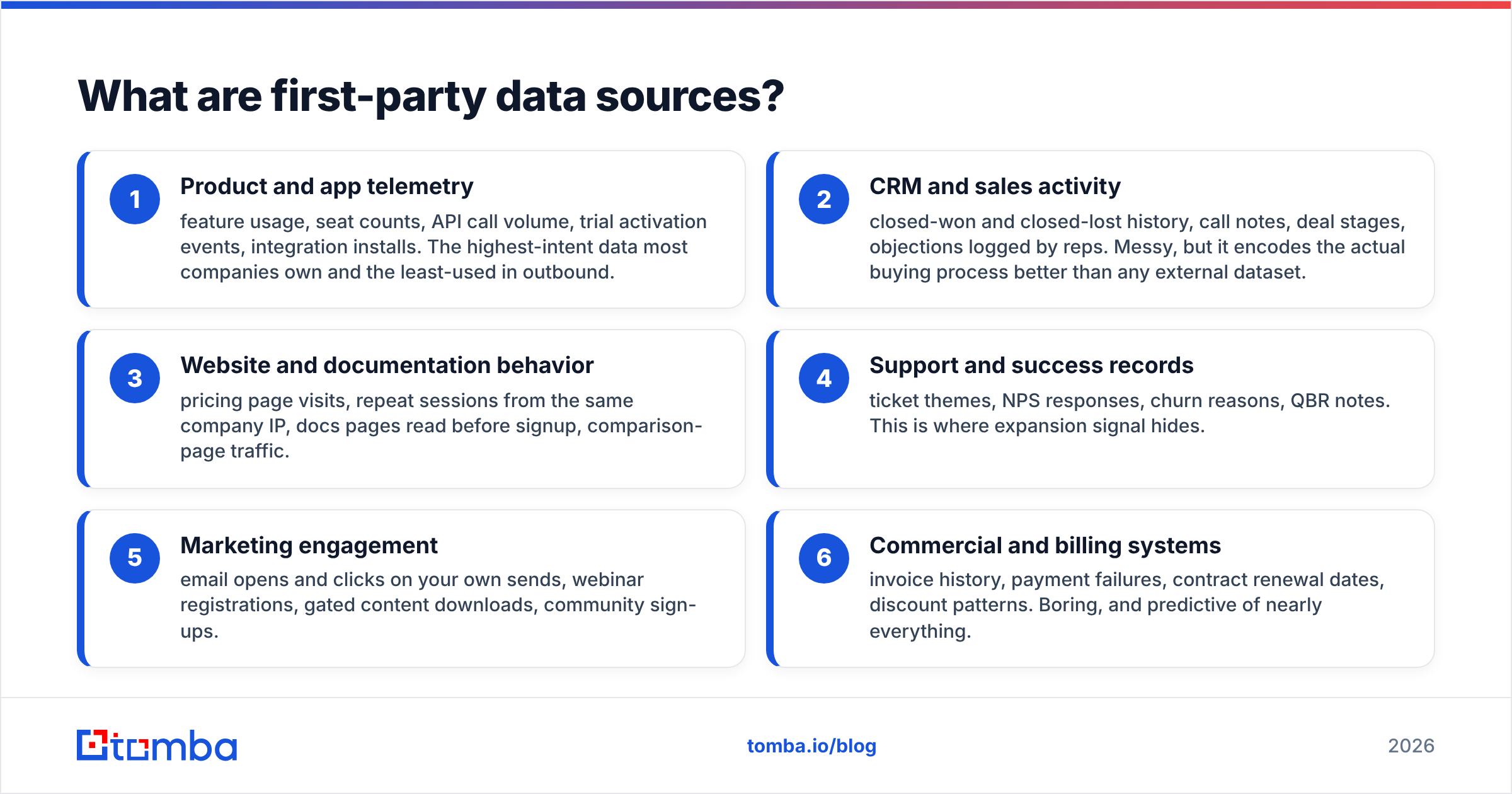
In B2B, first party data sources fall into six buckets:
- Product and app telemetry — feature usage, seat counts, API calls, trial events, integration installs. This is the highest intent data most companies own. It is also the least used in outbound.
- CRM and sales activity — won and lost deals, call notes, deal stages, objections logged by reps. It is messy. It still maps the real buying process better than any bought dataset.
- Website and docs behavior — pricing page visits, repeat sessions from one company, docs read before signup, comparison page traffic.
- Support and success records — ticket themes, NPS replies, churn reasons, QBR notes. Expansion signal hides here.
- Marketing engagement — opens and clicks on your own sends, webinar sign-ups, gated downloads, community joins.
- Billing systems — invoices, failed payments, renewal dates, discount patterns. Dull, and oddly good at predicting the rest.
Does a system store something a person at another company did in relation to you? Then it is a first party data source. Most teams own far more of them than they think. They sit in tools nobody has checked since 2023.
Why does first party data matter more in 2026?#
Three forces converged. None of them are reversing.
Bought data decays fast. People change jobs often in tech and SaaS. A static contact record goes stale by roughly 25-30% a year. A list bought in January is wrong by autumn. Your own product logs are correct the moment they are written.
Privacy rules got stricter. GDPR and CCPA set consent rules. Browsers and mailbox providers added their own. Loosely sourced data is now riskier to hold and harder to use. Data you collected yourself, with a clear lawful basis, carries far less exposure. The Customer Data Platform category exists largely because of this shift.
AI is only as good as its input. Every team wants lead scoring, next best action, and AI-drafted outreach. Feed those tools generic company facts and you get generic output. Feed them "this account added four seats last week and read the migration docs twice" and the draft earns a reply.

Here is the catch. Your own data is rich on behavior and poor on identity. Your analytics tool knows someone at acme.com read the pricing page four times. It does not know the reader was the VP of Engineering. It certainly does not know her email address. That gap is where enrichment lives.
How do first party, second party, and third party data compare?#
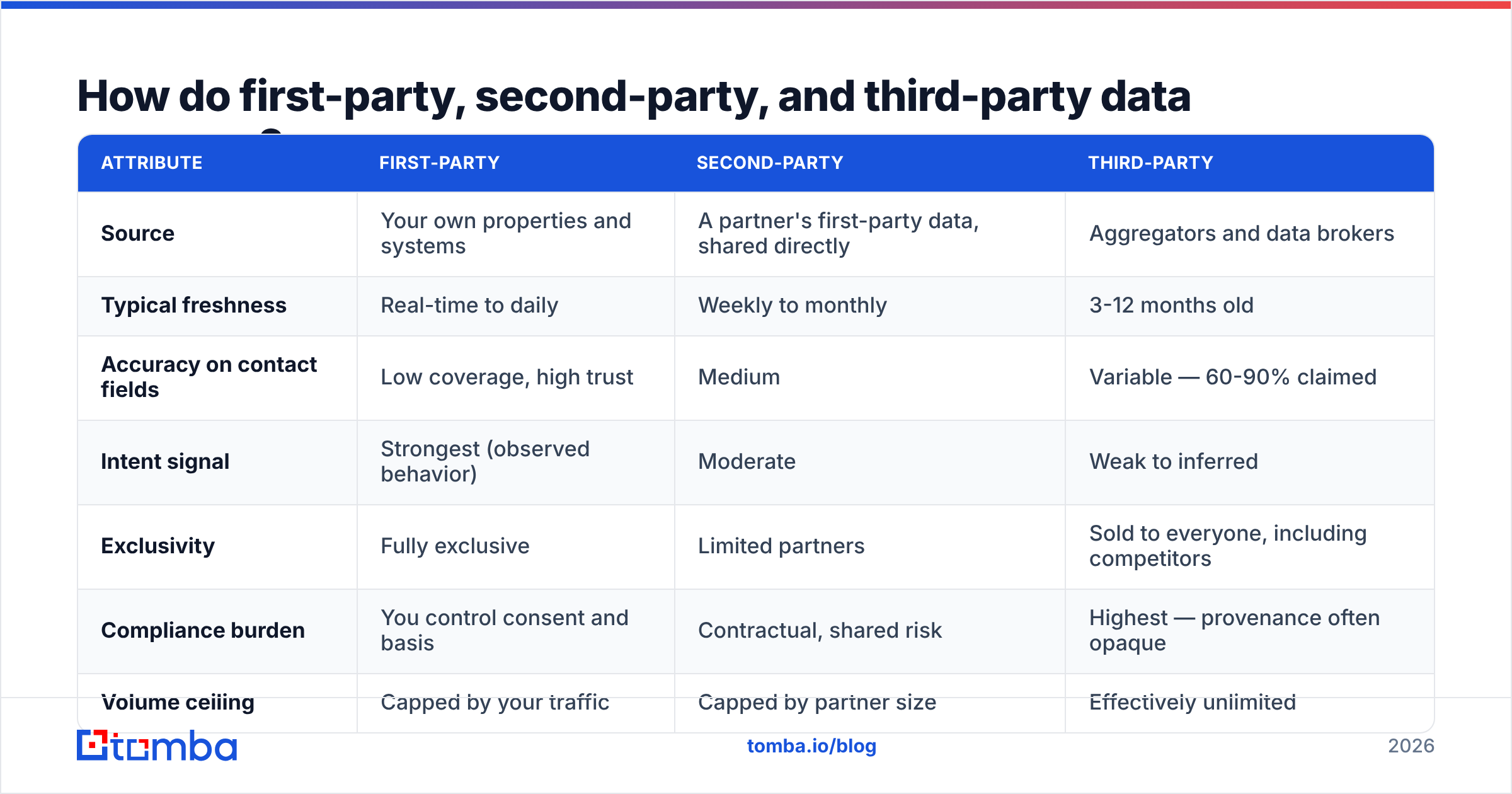
| Attribute | First-party | Second-party | Third-party |
|---|---|---|---|
| Source | Your own properties and systems | A partner's own data, shared directly | Aggregators and data brokers |
| Typical freshness | Real-time to daily | Weekly to monthly | 3-12 months old |
| Accuracy on contact fields | Low coverage, high trust | Medium | Varies — 60-90% claimed |
| Intent signal | Strongest (observed behavior) | Moderate | Weak or guessed |
| Exclusivity | Fully exclusive | Limited partners | Sold to everyone, rivals included |
| Compliance burden | You control consent and basis | Shared risk, set by contract | Highest — the trail is often unclear |
| Volume ceiling | Capped by your traffic | Capped by partner size | Effectively unlimited |
| Best use | Prioritizing, expansion, retention | Co-marketing, ABM overlap | Cold market coverage, gap-filling |
Read that table as a portfolio, not a ranking. Your own data tells you who to talk to and why now. Bought data tells you who else is out there. Second party data sits in the middle: co-marketing partners, integration ecosystems, joint webinars. Most B2B teams skip it.
The common mistake is to treat these as rival camps. Teams that swore off outside data spent 2025 with tidy warehouses and empty pipelines. Their own traffic simply did not hold enough accounts to hit a number. Teams that ignored their own data burned domains instead. They sent cold sequences to accounts that were already customers.
Which first party data sources are you already sitting on?#
Run this inventory before you buy anything. For each system, note the owner, the refresh rate, and whether records carry a company identifier such as a domain, an IP, or an account ID.
- Analytics and session tools — Google Analytics, Plausible, PostHog, Amplitude. Naming the company takes IP-to-company or reverse-DNS matching. Tools like website visitor reveal exist to turn anonymous sessions into named accounts.
- CRM — HubSpot, Salesforce, Pipedrive. Even a neglected CRM holds lost-deal reasons and old contacts worth re-mining. HubSpot's CRM docs are a decent reference for which fields to standardize.
- Product database — signup records, workspace domains, seat additions, feature flags. Usually the highest value source. Usually owned by engineering, not GTM.
- Support desk — Zendesk, Intercom, Front. Ticket volume by account predicts churn better than most health scores.
- Billing — Stripe, Chargebee. Renewal dates and failed payments are triggers with a date on them.
- Email platform — your own sends, not a vendor's benchmark. Opens are noisy in 2026. Clicks and replies still mean something.
Score each source 1-5 on three axes: records per month, freshness, and how well it names the company. A source that scores 4+ on the first two and 1-2 on the third goes into your enrichment queue. That is almost always web traffic and product signups.
How do you turn first party signals into contactable records?#
This is the operational core. It takes four steps.
Step 1 — Resolve to a company. Turn what you have into one clean domain. It might be an IP, an email domain, a form fill, or a workspace URL. Normalize hard. acme.co.uk, www.acme.co.uk, and mail.acme.co.uk are one account. If your warehouse counts three, every metric downstream is wrong.
Step 2 — Find the right people there. A domain gives you a company, not a buyer. A domain search turns acme.com into named people with roles and verified formats. Filter by team and seniority. Contact the two people who own the problem, not the twenty who do not.
Step 3 — Verify before you send. Owning the data does not excuse you from hygiene. A signup email from eighteen months ago may belong to a former employee. Run every address through an email verifier. Drop anything that fails or lands on a risky catch-all. Bounce rates above 2-3% put your sending domain at risk, no matter how you sourced the address.
Step 4 — Enrich and write back. Add company size, tech stack, and role data. Then push the record back into the source system so the CRM stays the single source of truth. Run data enrichment on a schedule: weekly for live pipeline, monthly for the long tail. Wiring this into a warehouse or a reverse-ETL job? Use the Tomba API instead of exporting CSVs by hand.
The order matters. Teams that enrich before they resolve pay for the same company four times, under three spellings and a subdomain.
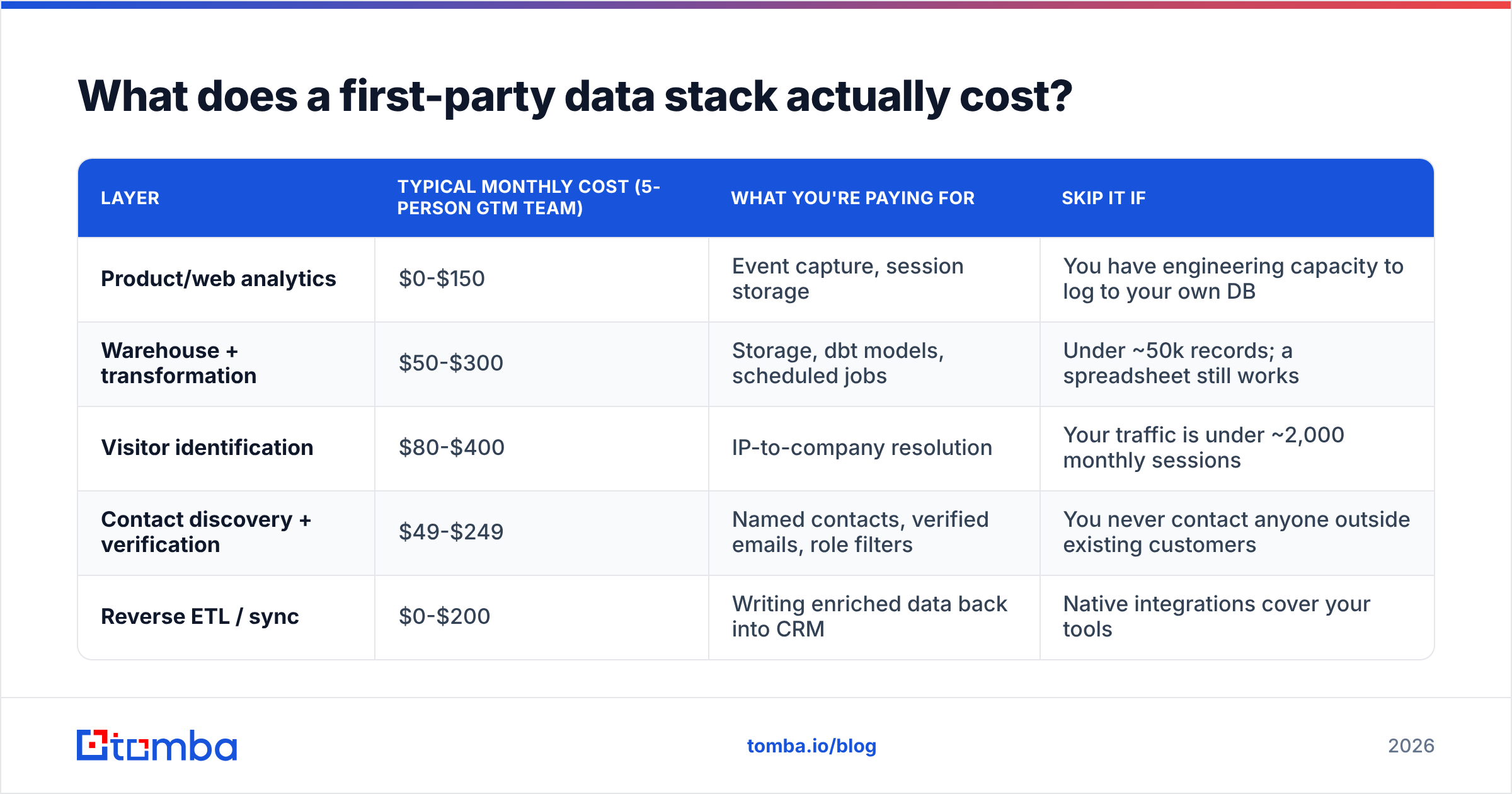
What does a first party data stack actually cost?#
Collection is cheap. Putting the data to work is where the money goes.
| Layer | Typical monthly cost (5-person GTM team) | What you're paying for | Skip it if |
|---|---|---|---|
| Product/web analytics | $0-$150 | Event capture, session storage | You have engineers who can log to your own DB |
| Warehouse + transformation | $50-$300 | Storage, dbt models, scheduled jobs | Under ~50k records; a spreadsheet still works |
| Visitor identification | $80-$400 | IP-to-company matching | Your traffic is under ~2,000 sessions a month |
| Contact discovery + verification | $49-$249 | Named contacts, verified emails, role filters | You never contact anyone outside your customers |
| Reverse ETL / sync | $0-$200 | Writing enriched data back into the CRM | Native integrations cover your tools |
On the contact layer, Tomba pricing starts free at 25 searches a month. Starter is $49/mo, Growth is $99/mo, and Pro is $249/mo, with Enterprise custom. Most teams enriching their own signals land on Starter or Growth. You process hundreds of high intent accounts a month, not hundreds of thousands of cold ones. That flip is the whole money argument for first party data sources: smaller volume, better conversion, lower spend.
Compare that with an unlimited-credit prospecting tool. You pay for breadth you rarely touch, and each extra record is a stranger. Want to sanity-check vendor claims? Read the category reviews on G2 rather than any single vendor's own chart. Ours included.
What are the most common first party data mistakes?#
Collecting without a schema. Six teams each define "active user" their own way. Nobody notices for a year. Write the definitions down before you build the pipelines.
Treating consent as a checkbox. Consent scope decides what you may do, not just what you may store. Data gathered for product analytics is not automatically fair game for cold outbound. Ask counsel to map each source to a lawful basis and a permitted use. Once, in a table.
Assuming your own data is accurate. Your signup form holds typos, personal Gmail addresses, and test@test.com. Self-reported job titles drift. Validate at the boundary, the same way you would check any outside input.
Ignoring dead records. Contacts you collected fairly still decay. A quarterly re-verification pass across the CRM is dull work. It also stops the slow poisoning of your sender reputation.
Building the warehouse before the workflow. The classic 2026 failure is a lovely data stack that no rep opens. Start from one question: which accounts showed buying behavior last week, and who should we contact there? Build only what answers it.
How do you measure whether first party data is working?#
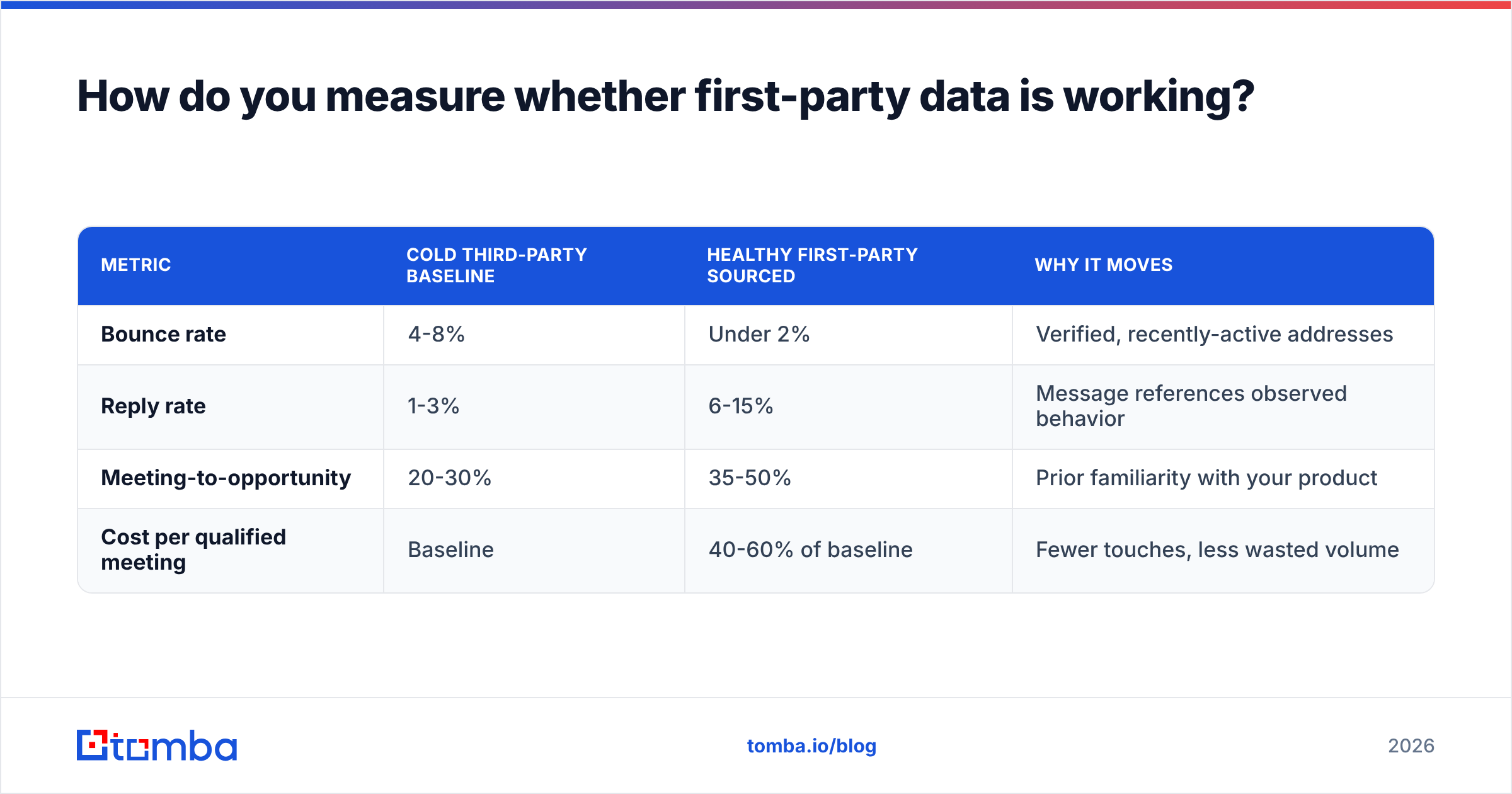
Track four numbers each month. Compare them with your cold baseline.
| Metric | Cold third-party baseline | Healthy first-party sourced | Why it moves |
|---|---|---|---|
| Bounce rate | 4-8% | Under 2% | Verified, recently active addresses |
| Reply rate | 1-3% | 6-15% | The message cites real behavior |
| Meeting-to-opportunity | 20-30% | 35-50% | They already know your product |
| Cost per qualified meeting | Baseline | 40-60% of baseline | Fewer touches, less wasted volume |
Is your first party motion losing on three of the four? The problem is usually step 2 or step 3 above. You resolved the account but reached the wrong person. Or you skipped verification and half the sends never landed. Both take about a week to fix. For more on that third row, our glossary entry on response rate breaks down what to count and what to ignore.
Where should you start this quarter?#
Pick one source and one workflow. For nearly every B2B team the best starting point is the same: anonymous pricing page traffic. It is the clearest intent signal you own. It is wasted by default. The fix is three steps. Resolve the visit to a company. Find the two right people there. Verify and reach out within 24 hours.
Do that for a month. Measure it against whatever your team does cold today. Then add product telemetry, then lost-deal re-engagement, then expansion triggers from support data. Each addition reuses the same resolve-find-verify-enrich spine, so the second workflow costs a fraction of the first.
First party data is not a philosophy. It is a sequencing choice. Use the signals you already own to decide who and when. Then buy only the identity data you need to make contact.
Ready to close the identity gap in your own data? The Tomba Email Finder turns the domains already sitting in your analytics, CRM, and product database into named, verified contacts. The free tier gives you 25 searches a month, so you can test the workflow on last week's pricing page visitors before you commit to a plan.
Related guides#
Ready to find emails that actually work?
Join 150,000+ professionals who stopped guessing and started sending. Free credits on signup — no credit card required.
Get the Tomba newsletter
Practical outbound tactics and product updates — once every two weeks.
About the author