8 Best Folk Alternatives in 2026: CRMs Compared Honestly
Folk is a clean, relationship-first CRM — until you need deeper pipeline logic, richer data, or more seats. Here are 8 Folk alternatives compared on price, data quality, automation, and who each one actually fits.
TL;DR
- Folk is a lightweight, relationship-first CRM built for founders, agencies, and small GTM teams who hate heavy pipelines. It is genuinely good at that job and bad at almost everything else.
- Most teams start hunting for Folk alternatives for three reasons: per-seat cost as headcount grows, shallow reporting and forecasting, and enrichment credits that run out faster than expected.
- The best replacement depends on your bottleneck: Attio for flexible data models, HubSpot for a full GTM suite, Pipedrive for classic pipeline selling, Close for high-volume calling, Salesflare for zero-admin follow-up.
- A CRM swap rarely fixes bad contact data. Whichever tool you pick, pair it with a dedicated finder and verifier so the records you migrate are actually deliverable.
- Budget reality check: a 5-seat team pays roughly $1,200–$4,200/year for a mid-tier CRM. Data tooling on top usually runs $49–$249/month.
What is Folk and who is it actually for?#
Folk is a contact-centric CRM that treats your network as the primary object, not the deal. You import contacts from LinkedIn, Gmail, or a CSV, group them into lists, and let the tool auto-log emails and meetings. The Chrome extension and the shared-inbox-style interface are the two things users consistently praise on G2 and Capterra.
Think of Folk as a very well-organised address book with a pipeline bolted on the side — the way a Moleskine notebook with tabs beats a filing cabinet when you only have 200 contacts. That framing tells you exactly who it fits:
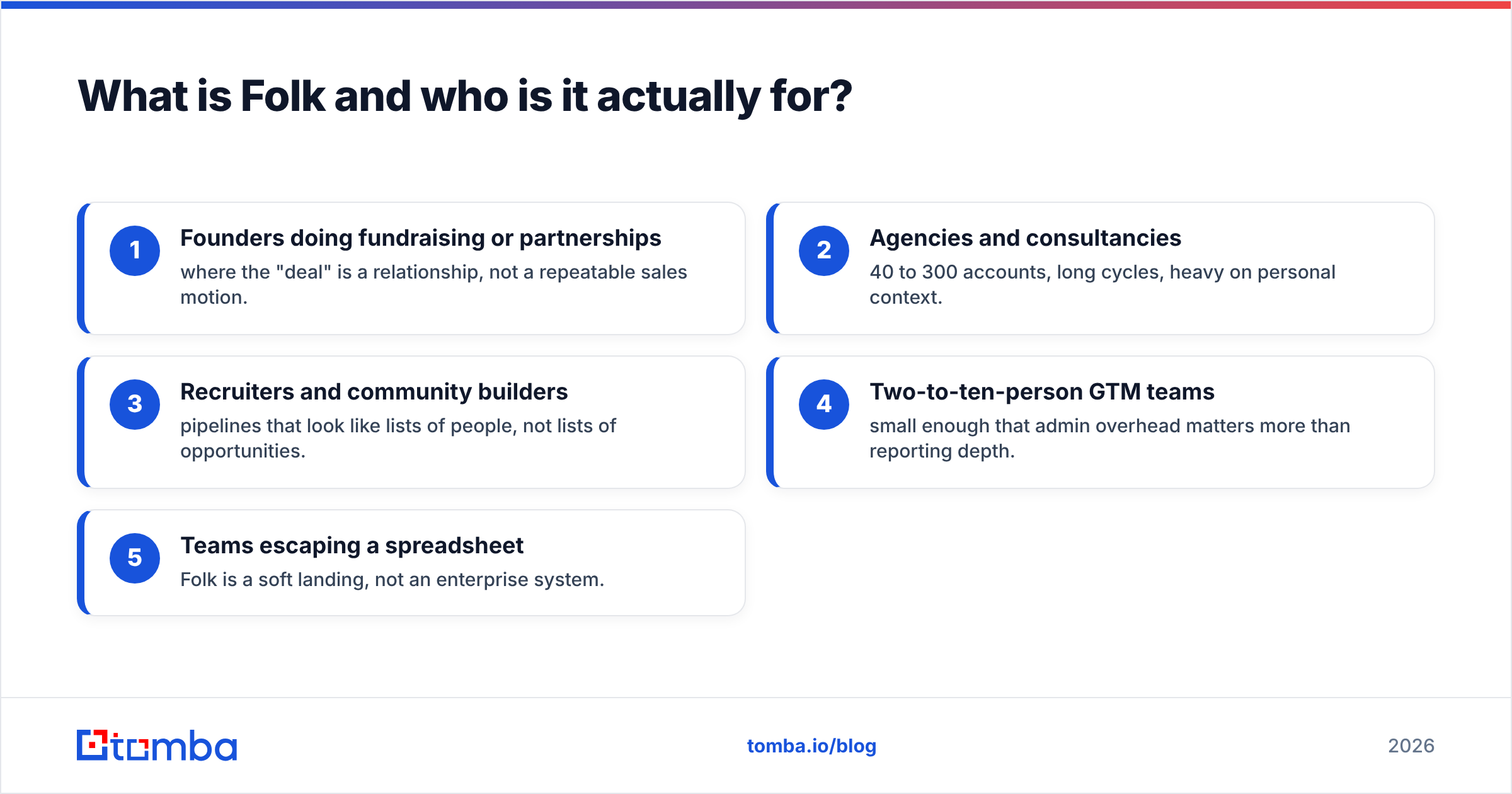
- Founders doing fundraising or partnerships — where the "deal" is a relationship, not a repeatable sales motion.
- Agencies and consultancies — 40 to 300 accounts, long cycles, heavy on personal context.
- Recruiters and community builders — pipelines that look like lists of people, not lists of opportunities.
- Two-to-ten-person GTM teams — small enough that admin overhead matters more than reporting depth.
- Teams escaping a spreadsheet — Folk is a soft landing, not an enterprise system.
If your motion is "50 outbound sequences a week, forecast by stage, route leads by territory," Folk will fight you. That is the honest starting point for this comparison.
Why do teams look for Folk alternatives?#
Four complaints show up repeatedly in review sites and community threads:
Per-seat pricing scales badly. Folk's paid tiers sit in the roughly $20–$25/user/month range on annual billing for the entry plan, with the premium tier costing meaningfully more (check folk.app for current numbers — CRM pricing changes quarterly). At 3 seats that is trivial. At 15 seats you are paying HubSpot-adjacent money for a fraction of the functionality.
Enrichment credits are a metered resource. Folk's built-in enrichment is convenient but consumption-based. Teams that prospect seriously burn through the allowance in the first week of the month, then either buy top-ups or bolt on a dedicated data source anyway.
Reporting is thin. You get list views, basic pipeline counts, and activity logs. You do not get cohort analysis, weighted forecasting, or the kind of revenue reporting a RevOps lead expects.
Automation stops at the shallow end. Reminders and simple sequences exist. Multi-branch workflows, lead scoring, and territory routing do not.
None of that makes Folk a bad product. It makes Folk a product with a ceiling — and once you hit that ceiling, you migrate.
Which Folk alternatives are worth comparing in 2026?#
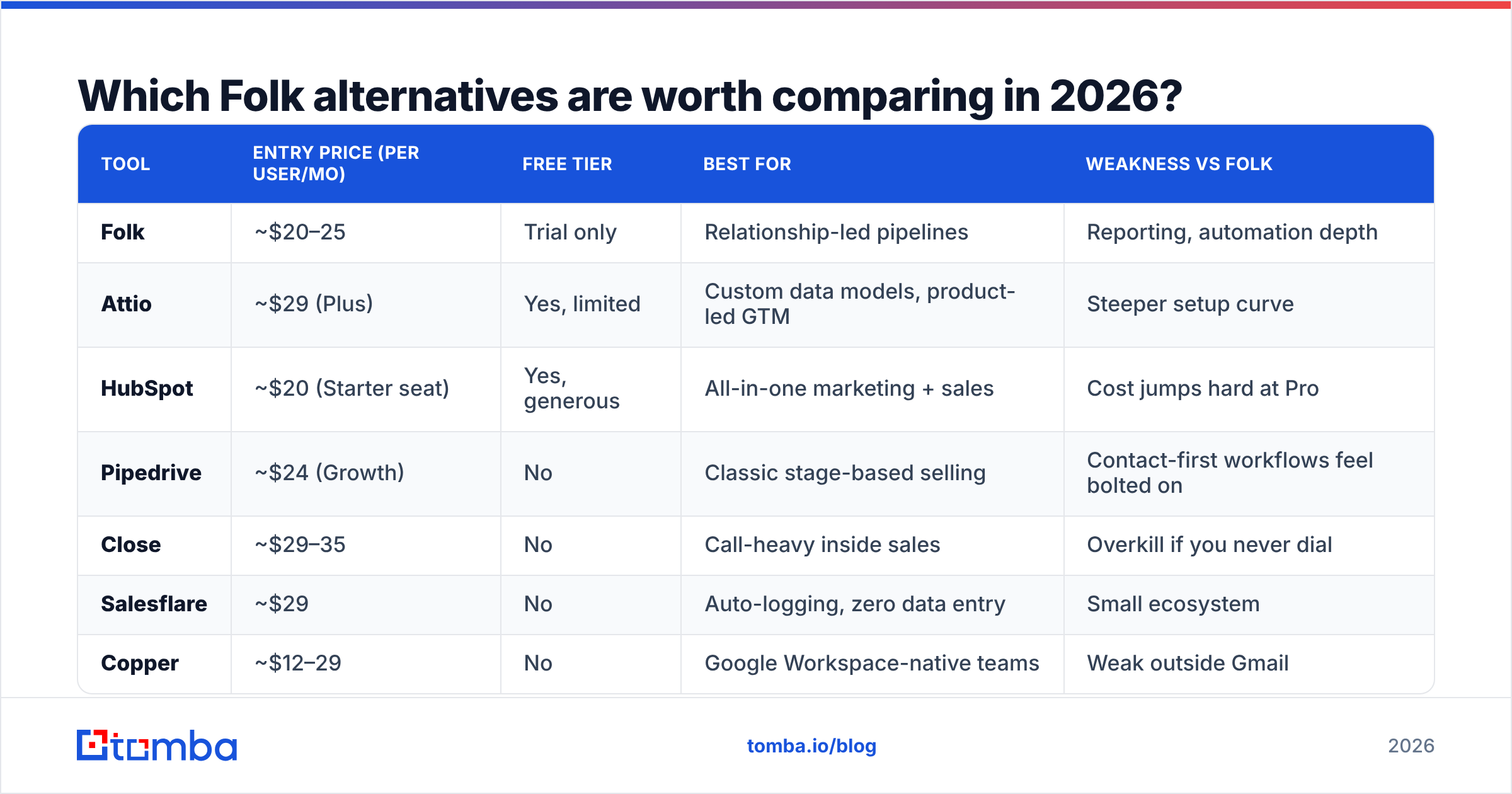
Here is the shortlist, scored on the dimensions that actually drive switching decisions. Prices are indicative entry-tier list prices as of early 2026 and should be verified on each vendor's page before you commit.
| Tool | Entry price (per user/mo) | Free tier | Best for | Weakness vs Folk |
|---|---|---|---|---|
| Folk | ~$20–25 | Trial only | Relationship-led pipelines | Reporting, automation depth |
| Attio | ~$29 (Plus) | Yes, limited | Custom data models, product-led GTM | Steeper setup curve |
| HubSpot | ~$20 (Starter seat) | Yes, generous | All-in-one marketing + sales | Cost jumps hard at Pro |
| Pipedrive | ~$24 (Growth) | No | Classic stage-based selling | Contact-first workflows feel bolted on |
| Close | ~$29–35 | No | Call-heavy inside sales | Overkill if you never dial |
| Salesflare | ~$29 | No | Auto-logging, zero data entry | Small ecosystem |
| Copper | ~$12–29 | No | Google Workspace-native teams | Weak outside Gmail |
| Streak | ~$19–49 | Yes | Living inside Gmail | Not a team system of record |
| Clay | ~$149/mo (flat) | Yes, limited | Data orchestration, not CRM | Not a CRM at all |
Two clarifications before you read that table as a ranking. First, Clay and Folk solve different problems — Clay is an enrichment and workflow engine you point at a CRM. Second, HubSpot's cheap seat price is real, but the jump from Starter to Professional is where most teams get surprised; model the two-year cost, not the first invoice.
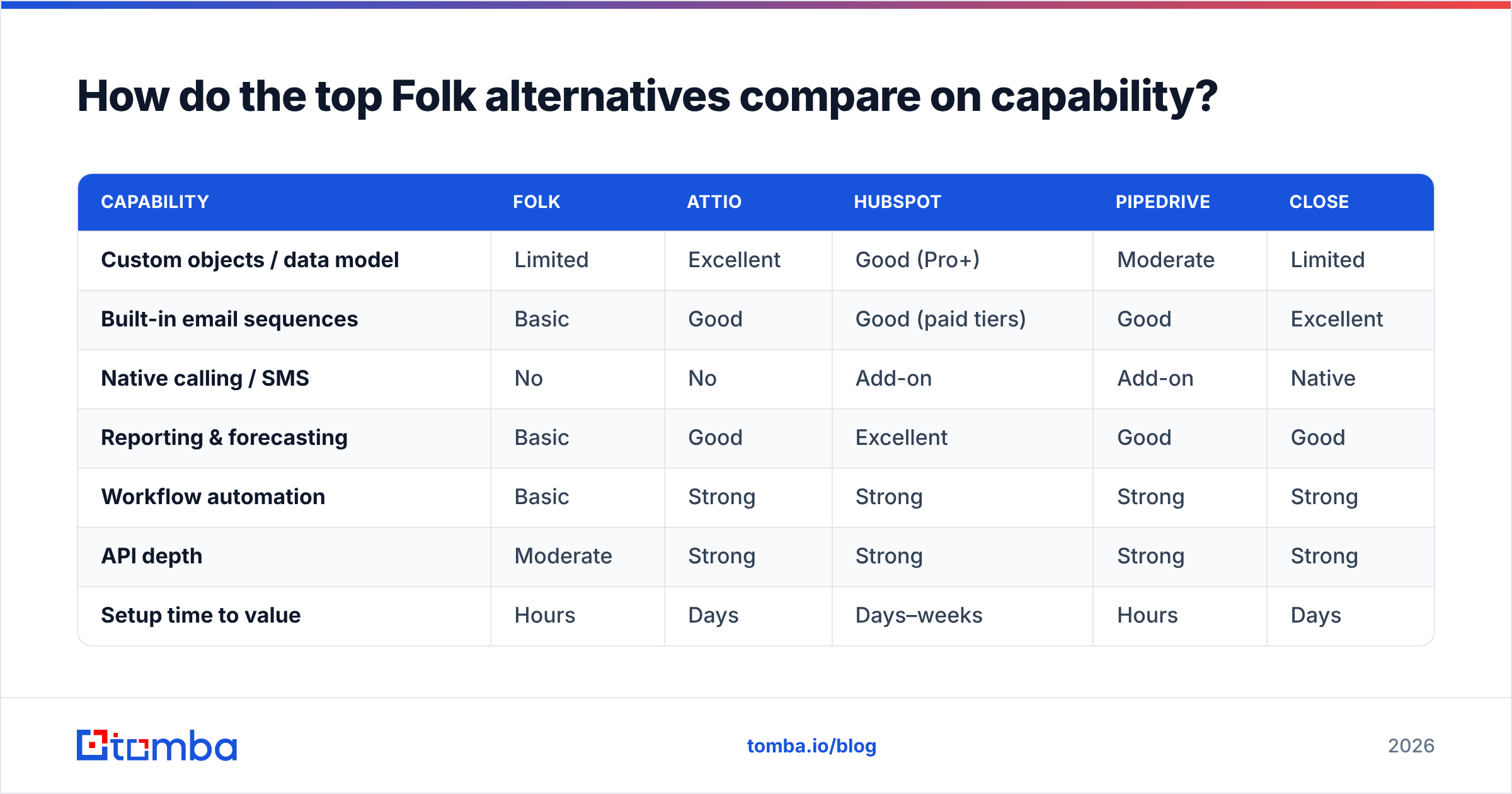
How do the top Folk alternatives compare on capability?#
Price is the easy axis. Capability is where the decision actually gets made.
| Capability | Folk | Attio | HubSpot | Pipedrive | Close |
|---|---|---|---|---|---|
| Custom objects / data model | Limited | Excellent | Good (Pro+) | Moderate | Limited |
| Built-in email sequences | Basic | Good | Good (paid tiers) | Good | Excellent |
| Native calling / SMS | No | No | Add-on | Add-on | Native |
| Reporting & forecasting | Basic | Good | Excellent | Good | Good |
| Workflow automation | Basic | Strong | Strong | Strong | Strong |
| API depth | Moderate | Strong | Strong | Strong | Strong |
| Setup time to value | Hours | Days | Days–weeks | Hours | Days |
Read that grid against your own bottleneck rather than totalling the checkmarks. A recruiter who never dials should not pay the Close premium for native calling. A seed-stage founder does not need HubSpot's forecasting.
Is Attio the best Folk alternative for most teams?#
For teams outgrowing Folk specifically — yes, more often than not. Attio is the closest philosophical successor: contact-first, fast, modern, and built on a flexible data model where you define objects (workspaces, investors, candidates, accounts) rather than being handed a fixed "deal" schema.
Where Attio wins over Folk:
- Real custom objects. Model your business the way it works, not the way a template assumed.
- Stronger automations. Multi-step workflows with conditional logic.
- Better reporting. Still not Salesforce, but a real step up.
- Free tier that is usable for solo operators evaluating the switch.
Where Folk still wins: setup speed and the sheer simplicity of the list-and-group mental model. If your team is three people and nobody wants to configure anything, Attio is more machine than you need.
Do you need a new CRM, or better data going into it?#
This is the question most teams skip, and it costs them a migration.
A CRM is a filing cabinet. It stores what you put in it — it does not go find contacts, and with the exception of metered add-ons, it does not fix stale records. If your real complaint is "our contact data is incomplete and bouncy," swapping Folk for Attio changes the cabinet and keeps the bad files.
Signs your problem is data, not CRM:
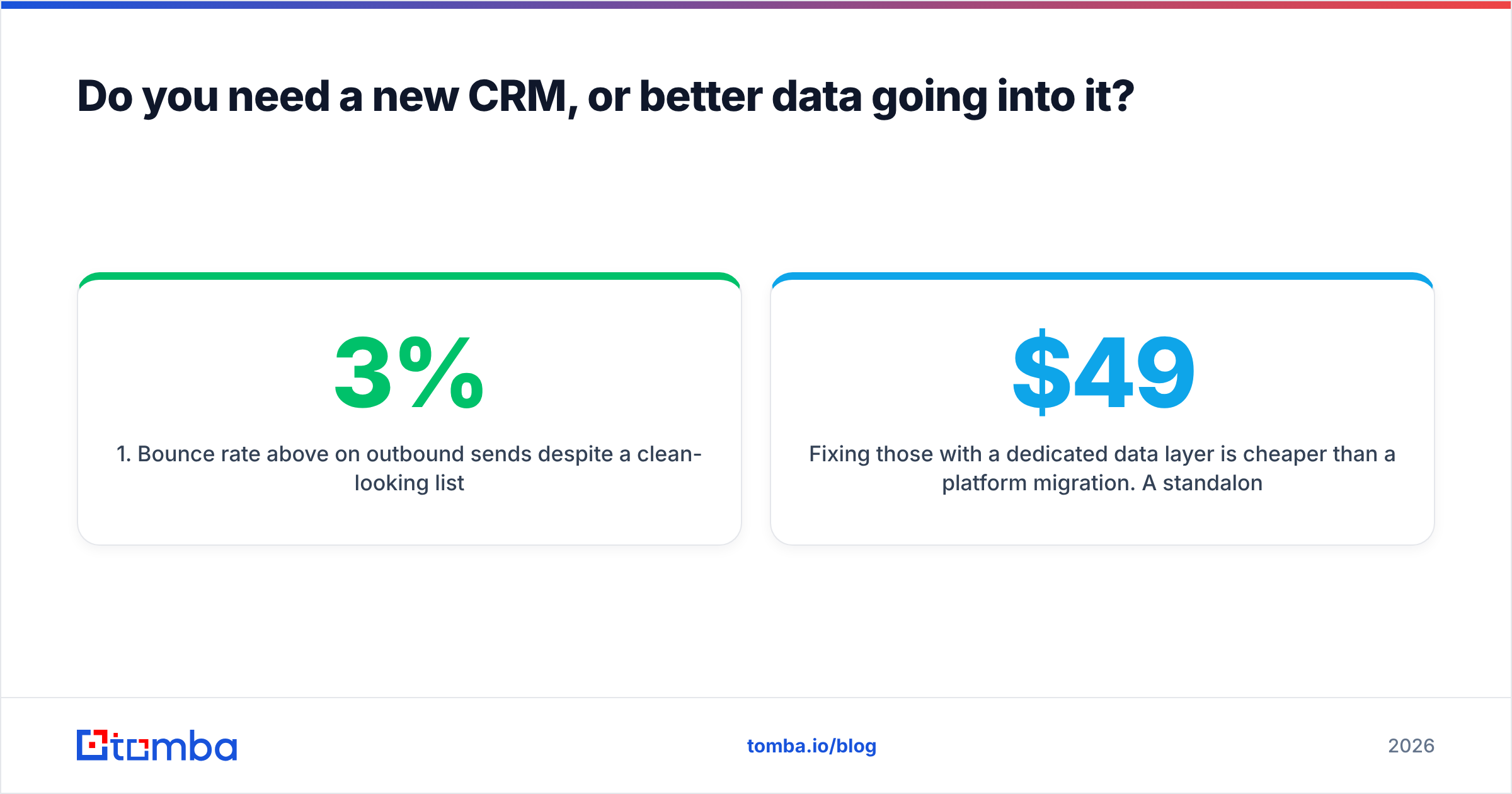
- Bounce rate above 3% on outbound sends despite a clean-looking list.
- Missing decision-maker emails — you have companies but not people.
- Enrichment credits exhausted mid-month, every month.
- Duplicate contacts multiplying because two tools write to the same records.
- Manual LinkedIn-to-CRM copy-paste eating an hour a day per rep.
Fixing those with a dedicated data layer is cheaper than a platform migration. A standalone email finder plus an email verifier gives you unmetered-feeling volume at a predictable price, and pushes clean records into whatever CRM you already run. Tomba's plans start at $49/month (Starter), with a free tier at 25 searches/month for testing and Growth at $99/month for teams running real outbound volume — see Tomba pricing for the full breakdown.

What about non-CRM Folk alternatives?#
Some teams leave Folk for something that is not a CRM at all, and that is a legitimate outcome.
Notion or Airtable + automation. If your "CRM" is really a tracker with 200 rows, a database tool plus a Zapier or Make connection may be all you need. You lose email logging and gain total flexibility. Push contact data in automatically via the Airtable integration rather than typing it.
Clay. Not a system of record — a data orchestration layer. Teams use it to enrich, waterfall, and score, then sync results into a CRM. Expensive relative to a single-purpose finder, but powerful if you are building complex enrichment logic.
A B2B contact database. If your gap is volume of net-new contacts rather than managing existing ones, a database subscription answers it directly. Providers such as BookYourData sell verified contact lists outright, which suits teams that want a bulk file rather than a search-as-you-go API. Tomba's B2B database covers the same need with search-first access when you'd rather query than buy in bulk.
Nothing. Some two-person teams genuinely run better on a shared inbox and a spreadsheet until they hit 500 contacts. That is not a failure of tooling discipline.
How do you migrate off Folk without losing data?#
Run this sequence and a migration takes a day, not a quarter:
- Export everything first. CSV of contacts, companies, notes, and custom fields. Do this before you cancel anything — export access disappears with the subscription.
- Audit before you import. Deduplicate, then verify every email. Importing dead addresses into a fresh CRM poisons your new sender reputation on day one. Run the file through a bulk verify pass first.
- Map fields deliberately. Folk's tags and groups rarely map one-to-one to another tool's objects. Decide what becomes a custom object, a tag, or a list before the import wizard forces the choice.
- Import in a test workspace. Load 50 records, inspect them, then load the rest. Every CRM has a field-mapping quirk that only appears at scale.
- Rebuild automations from scratch. Do not try to port them conceptually. List the outcomes you need, then build them natively.
- Keep Folk read-only for 30 days. Cheap insurance against a mapping mistake you discover in week three.
Step 2 is the one teams skip and the one that causes damage. Deliverability problems created during a migration take months to unwind, and no CRM feature compensates for a burned domain.
Which Folk alternative should you actually pick?#
Short answers, by situation:
- Outgrowing Folk but love the philosophy → Attio.
- Marketing and sales need one system → HubSpot, and model the Pro-tier cost now.
- Classic stage-based B2B pipeline → Pipedrive.
- Reps are on the phone all day → Close.
- Nobody will ever update the CRM → Salesflare, which logs automatically.
- Everything lives in Gmail → Streak or Copper.
- The real problem is contact data → keep your CRM, fix the data layer.
That last bullet is the one worth sitting with. In most teams under 20 people, the CRM is not the constraint — the pipeline is starved of accurate, reachable contacts, and switching filing cabinets does nothing about it.
Ready to fix the data, not just the CRM?#
Whichever tool wins your evaluation, it is only as good as the records inside it. Start with Tomba Email Finder to source verified, deliverable contacts by domain, name, or company — then push them into Folk, Attio, HubSpot, or whatever you migrate to. The free tier gives you 25 searches a month to test accuracy against your own known-good list before you spend anything, and Starter at $49/month covers most small teams' monthly prospecting without the metered-credit anxiety that pushed you to look at Folk alternatives in the first place.
Related guides#
Ready to find emails that actually work?
Join 150,000+ professionals who stopped guessing and started sending. Free credits on signup — no credit card required.
Get the Tomba newsletter
Practical outbound tactics and product updates — once every two weeks.
About the author