Folk vs HubSpot in 2026: Which CRM Fits Your Sales Team?
Folk is a fast, lightweight relationship CRM. HubSpot is a full go-to-market platform with a price tag to match. Here is how they compare on cost, data, automation, and the migration pain nobody warns you about.
TL;DR
- Folk wins on speed and price. A small team can be live in an afternoon, and per-seat cost sits in the $20–$40 range with no onboarding fee.
- HubSpot wins on depth. Reporting, workflows, quoting, ticketing, and a 1,500+ app marketplace are things Folk simply does not attempt.
- The real cost gap shows up at Professional tier. HubSpot Sales Hub Professional lists around $100/seat/month plus a one-time onboarding fee in the $1,500 range. Folk has no equivalent cliff.
- Neither tool finds you contacts. Both enrich records you already have. You still need a source of verified emails and phone numbers feeding the top of the funnel.
- Pick Folk if you sell relationships; pick HubSpot if you sell process. Under ~10 reps with a founder-led motion, Folk. Multi-team, multi-stage, marketing-attribution-dependent, HubSpot.
What is Folk and who actually uses it?#
Folk is a lightweight CRM built around contacts and relationships rather than around a rigid sales process. Think of it as the difference between a well-organized address book with memory and a factory production line. Folk assumes you already know who you want to talk to and want to keep track of the conversation. It syncs your inbox and calendar, pulls in contacts through a Chrome extension that works on LinkedIn and company sites, and lets you build custom "groups" that behave like flexible pipelines.
The typical Folk customer is a team of 2–20 people: agencies, VC and PE firms, recruiters, boutique consultancies, and founder-led startups doing outbound before they have a sales ops function. The product is designed so that nobody has to be trained. You open it, you see people, you add a note, you move a card.
Folk's own positioning on folk.app leans hard into this: a CRM that "your team will actually use." That is a direct shot at the category's biggest failure mode — expensive systems that reps ignore.
What is HubSpot and where does it stop being cheap?#
HubSpot is a full go-to-market platform. Sales Hub is one product inside a suite that also includes Marketing Hub, Service Hub, Content Hub, and Operations Hub, all sitting on a shared contact database called the Smart CRM. That shared database is the whole point: a marketing email open, a support ticket, a website visit, and a deal stage all live on the same record.
HubSpot is free to start, and the free CRM is genuinely usable — unlimited users, contact management, deal pipelines, meeting links, basic email tracking. That free tier is the reason HubSpot has such enormous market share among small teams.
The cost curve appears when you need the things you actually bought a CRM for. Sequences, custom reporting, forecasting, and multiple deal pipelines sit behind Professional. Per the HubSpot Sales Hub pricing page, Starter runs roughly $20/seat/month, Professional around $100/seat/month with a one-time onboarding fee in the $1,500 range, and Enterprise roughly $150/seat/month with a larger onboarding requirement. Contact-tier pricing on the marketing side adds another axis of cost that catches teams off guard at renewal.

Folk vs HubSpot: how do they compare feature by feature?#
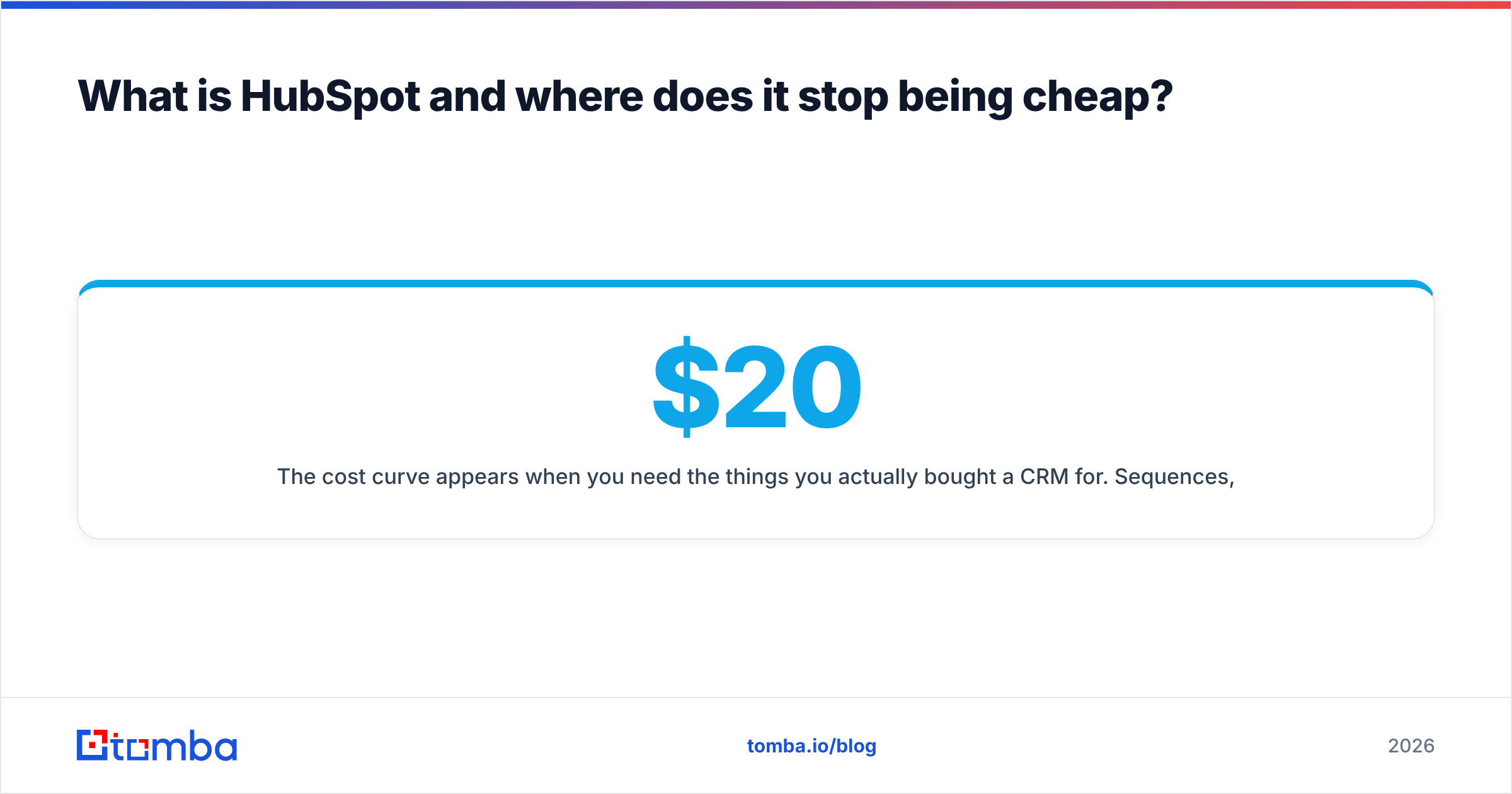
Here is the head-to-head on the attributes that actually change your buying decision. Prices are list prices at time of writing and are billed annually where noted — always confirm on the vendor's own page before signing.
| Attribute | Folk | HubSpot Sales Hub |
|---|---|---|
| Free tier | Trial only (no permanent free plan) | Yes — free CRM, unlimited users |
| Entry paid price | ~$20/user/mo (annual) | ~$20/seat/mo (Starter) |
| Mid tier | ~$40/user/mo (Premium) | ~$100/seat/mo (Professional) |
| Mandatory onboarding fee | None | ~$1,500 one-time at Professional |
| Time to first working pipeline | Under an hour | 1–3 days (weeks with migration) |
| Custom reporting / dashboards | Basic | Deep, custom report builder |
| Sequences & cadences | Light (via integrations) | Native, with A/B and enrollment logic |
| Marketing automation | No | Yes (separate Marketing Hub cost) |
| Quotes, invoices, ticketing | No | Yes |
| Contact enrichment | Built-in credits | Breeze Intelligence credits (add-on) |
| App marketplace | ~100 integrations + Zapier | 1,500+ apps |
| Best fit team size | 1–20 | 10–1,000+ |
| Admin overhead | Near zero | Requires an owner, often a RevOps hire |
The pattern is consistent. Folk optimizes for the first ninety days. HubSpot optimizes for year three, when you have four teams, twelve pipelines, and a VP asking why win rates dropped in EMEA.
Which one is cheaper at 10 seats?#
Cheaper is the wrong question. The right question is cheaper for what capability. Run both scenarios.
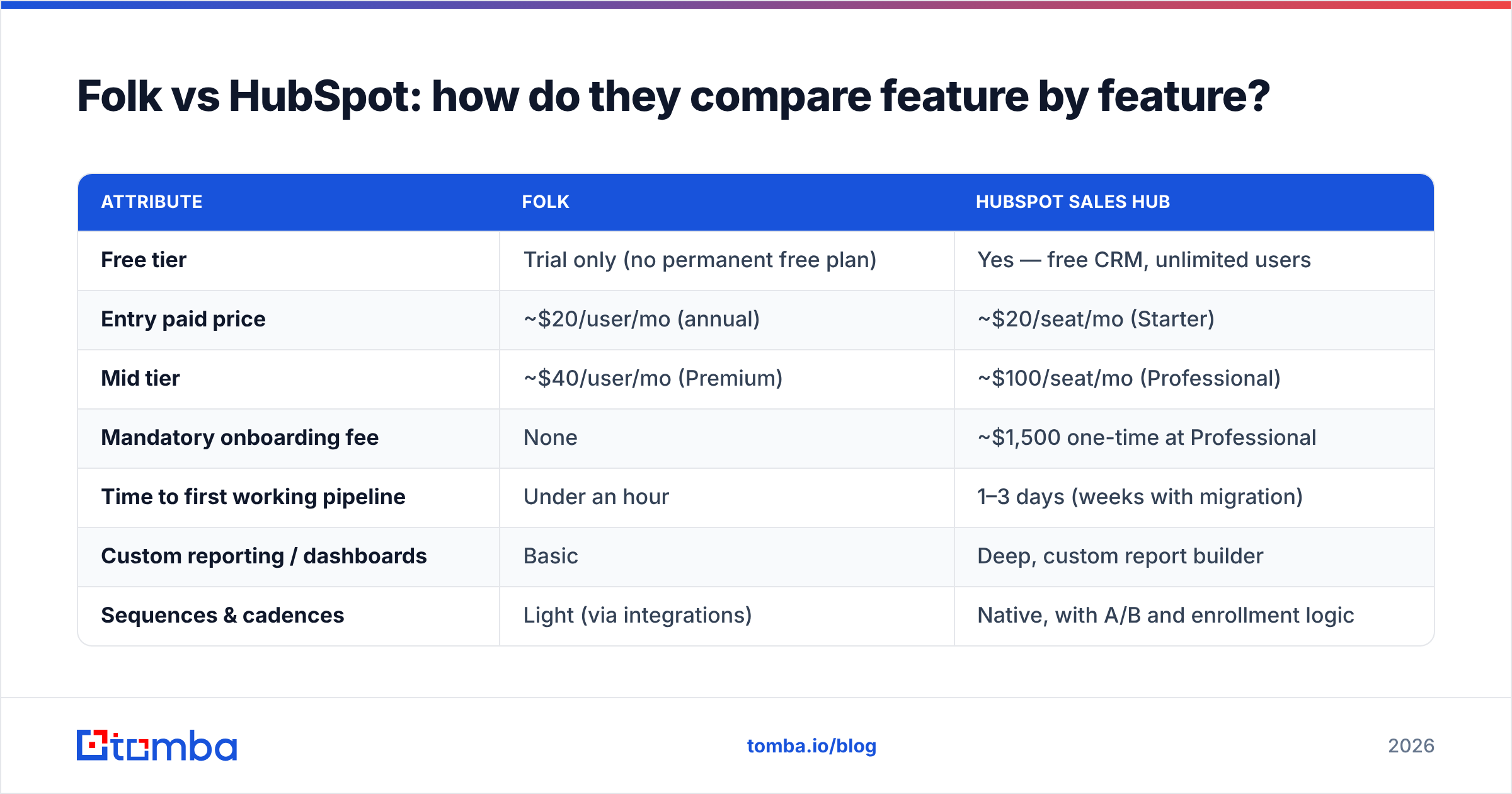
- Folk at 10 seats, Premium tier. Roughly $400/month, or $4,800/year. No onboarding fee, no contact-tier surcharge, no implementation partner. Your total year-one cost is close to your list price.
- HubSpot at 10 seats, Starter. Roughly $200/month, or $2,400/year. Cheaper than Folk on paper — but Starter has one deal pipeline, no sequences worth the name, and no custom reporting. Most teams outgrow it in two quarters.
- HubSpot at 10 seats, Professional. Roughly $1,000/month, or $12,000/year, plus the ~$1,500 onboarding fee. Year one lands near $13,500 before you add Marketing Hub or Breeze credits.
- The hidden line item nobody budgets. Someone has to own HubSpot. At 10 seats that's usually 20–30% of an ops person's week. Folk's admin burden is closer to zero, which is worth real money at small headcount.
- The data line item both plans need. Neither CRM generates net-new contacts. Budget separately for finding and verifying email addresses, or your expensive CRM becomes an expensive list of blanks.
So: HubSpot Starter is cheapest, Folk Premium is the middle, HubSpot Professional is roughly 2.8x Folk. If you need Professional's features, HubSpot is not overpriced — it is priced for a different job. If you don't, you are paying for a factory to make three sandwiches.
Is Folk better than HubSpot for outbound prospecting?#
For pure outbound, this is closer than the feature table suggests — because outbound performance depends far more on data quality and sending infrastructure than on which CRM stores the record.
Folk's advantage in outbound is friction. The Chrome extension pulls contacts from LinkedIn into a group in two clicks, and Folk's message assistant drafts the first touch without leaving the record. For a founder or a two-person BDR team running 200 targeted accounts, that loop is fast.
HubSpot's advantage is sequencing. Native sequences with enrollment triggers, task queues, and reply-detection let you run structured multi-touch cadences at volume, and the reporting tells you which step is killing your response rate. Folk cannot match that natively; you bolt on a dedicated sending tool.
But both platforms share the same blind spot: they enrich records you already have. Neither one goes out and discovers that the new VP of Engineering at a 300-person Series B is the person you should be emailing. That gap is where a dedicated email finder sits in the stack — you source and verify the contact first, then push a clean record into whichever CRM you chose. Tomba's HubSpot integration handles the push directly, and for Folk, a Zapier or CSV path does the same job.
The practical rule: your CRM should never be the place where bad data enters your process. Verify before import, not after.
What does the data layer look like in each?#
HubSpot's enrichment is now branded Breeze Intelligence and sold in credit packs on top of your seat cost. It's strongest on firmographics — company size, industry, revenue band, technologies — and on buyer-intent signals for accounts already in your database. It is weaker at finding a specific person's work email at a company you have never touched.
Folk ships enrichment credits inside its paid plans, which is generous at the price point, but the coverage is narrower and the credit ceiling is real. Teams doing heavy volume burn through them.
Neither is a substitute for a purpose-built data enrichment layer when you're prospecting cold. A realistic 2026 stack looks like:
- Discovery layer — find the people and their verified contact details (email finder, domain search, LinkedIn extraction).
- Verification layer — validate deliverability before the address ever touches the CRM, including catch-all domains.
- CRM layer — Folk or HubSpot, storing the relationship and the deal.
- Sending layer — the sequencer, whether native to HubSpot or a separate tool alongside Folk.
Keep those layers separate and you can swap any one of them without a migration. Collapse them into one vendor and you have bought a very comfortable cage.

How painful is switching between them?#
Switching to Folk is easy. It's a shallower data model, so you're mapping fewer fields, and most teams import from CSV in a morning.
Switching to HubSpot from anything is a project. Custom properties, deal stage mapping, associations, workflow rebuilds, historical activity import, permission sets, and reporting rebuilds. Teams routinely underestimate this by a factor of three. HubSpot's mandatory onboarding at Professional exists precisely because unassisted migrations fail often enough to hurt retention.
Switching away from HubSpot is harder still. Once marketing attribution, ticketing, and forms live in the same database as your deals, unpicking one thread pulls the whole sweater. That's not a criticism — it's the intended design of a platform play — but price it into your decision now, not in year three.
Three rules that save real money here:
- Never migrate mid-quarter. Do it in the first two weeks of a new quarter, when pipeline pressure is lowest.
- Export a clean, verified contact file before you move. Migration is the cheapest moment to run a full email verification pass — you're touching every record anyway.
- Freeze custom field creation for 30 days post-migration. Most CRM sprawl is created in the first month by people recreating their old system's habits.
Which should you actually buy in 2026?#
Buy Folk if: you have fewer than roughly 15 people touching the CRM, your sales motion is relationship-led rather than process-led, you don't need marketing automation in the same system, and your biggest risk is that nobody logs anything. Agencies, VC firms, recruiters, and early-stage founders are the sweet spot. The strongest argument for Folk isn't a feature — it's adoption. A CRM used at 90% beats a better CRM used at 30%.
Buy HubSpot if: you need marketing and sales on one contact record, you need custom reporting to run forecast calls, you have or will have a RevOps owner, or you need quoting, ticketing, and territory management. Also buy HubSpot if you expect to double headcount in eighteen months — outgrowing Folk mid-scale is a worse outcome than paying for headroom early. Independent review volume on G2 reflects this split clearly: HubSpot dominates the mid-market, Folk indexes strongly on ease of use.
Buy neither yet if: your problem is that you don't have enough qualified contacts. A CRM organizes demand; it does not create it. Fix the top of the funnel first, then choose the container.
What should you do next?#
Run a two-week parallel test with real data. Take 200 target accounts, load them into Folk's trial and HubSpot's free tier, and run the same motion in both. Measure three things: how many records your reps actually update without being nagged, how long it takes to build the report your manager asks for on Monday, and how many of your emails bounce. The third number is a data problem, not a CRM problem — and it will be the same in both tools if you skip verification.
Before you load either CRM, make sure the contacts going in are real. The Tomba Email Finder locates verified professional email addresses by name, domain, or company, with a free tier of 25 searches per month to test coverage on your own target list, and paid plans from $49/month on the Starter tier up through Growth at $99/month and Pro at $249/month — see full Tomba pricing for credit volumes. Verify first, import second, and whichever CRM you pick will look a lot smarter than it did on the demo call.
Related guides#
Ready to find emails that actually work?
Join 150,000+ professionals who stopped guessing and started sending. Free credits on signup — no credit card required.
Get the Tomba newsletter
Practical outbound tactics and product updates — once every two weeks.
About the author