Follow Back Email: How to Write Replies That Reopen Deals
A follow back email is the reply you send after a prospect goes quiet or circles back late. Here is the timing, structure, and templates that actually get answers in 2026.
TL;DR
- A follow back email is any reply you send to restart a stalled thread — after silence, after a "circle back in Q3," or after someone finally responds weeks late. It is not the same as a generic follow-up sequence step.
- Timing beats wording. Threads reopened within 48 hours of a trigger event convert far better than calendar-driven nudges sent on day 7, 14, and 21.
- Every follow back email needs a reason to exist that is not "just checking in." New information, a new person, a deadline, or a graceful close.
- Bad data ruins good follow-ups. If the original address bounced or the contact changed jobs, you are following back with a ghost.
- Four to six touches is the practical ceiling on most threads. Past that, switch channels or send a break-up email and move on.
What Is a Follow Back Email?#
A follow back email is the message you send to re-engage a conversation that already started but stalled. Think of it like calling someone back after a dropped phone call — the context exists, you are not introducing yourself again, and pretending otherwise makes you sound like a stranger.
That distinction matters because most advice online conflates three different things:
- Cold follow-up — touch 2 through 5 of an outbound sequence to someone who never replied at all. No relationship, no context, high volume.
- Follow back email — a reply inside a live or recently-live thread. The prospect engaged at least once: they opened a demo, asked a question, said "send me pricing," then went quiet.
- Re-engagement / win-back — reaching a contact who explicitly closed the loop months ago ("not now, ask me in Q4"). Longest gap, warmest context.
- Break-up email — the deliberate last touch that gives the prospect permission to say no and often produces the highest single-touch reply rate in the whole sequence.
Confusing #1 with #2 is the single most common reason follow-ups read badly. You send a cold-style pitch into a warm thread, the prospect feels like a row in a spreadsheet, and the thread dies for good.
Why Do Most Follow Back Emails Get Ignored?#
Because they contain no new information. "Just following up" and "bumping this to the top of your inbox" transfer zero value to the reader — they ask the prospect to do work (remember, decide, reply) while giving nothing back.
Here are the failure modes, ranked by how often they show up in real sequences:
- No trigger. The email exists because a calendar reminder fired, not because anything changed on the prospect's side. Readers can feel the difference.
- Wrong thread hygiene. Starting a fresh thread with a new subject line strips the context that made the message warm in the first place. Reply in-thread unless the original is 6+ weeks stale.
- Asking for the same thing again. If "book a 30-minute call" did not work the first time, repeating it verbatim will not work the fourth time. Downgrade the ask: a yes/no question, a one-line reply, a resource with no strings.
- Guilt framing. "I haven't heard back from you" makes the silence the prospect's fault. Nobody replies to feel accused.
- Dead or wrong address. You cannot follow back with a contact who left the company in March. Roughly a quarter to a third of B2B contact records decay per year, so a thread that goes quiet after two solid replies is sometimes a job change, not disinterest.
- Volume without pacing. Five touches in nine days reads as pressure. The same five touches over six weeks reads as diligence.
That last point ties directly to email deliverability. Aggressive re-sends into unengaged inboxes push spam complaints up and inbox placement down, which quietly degrades every thread you own — not just the one you are chasing.
When Should You Send a Follow Back Email?#
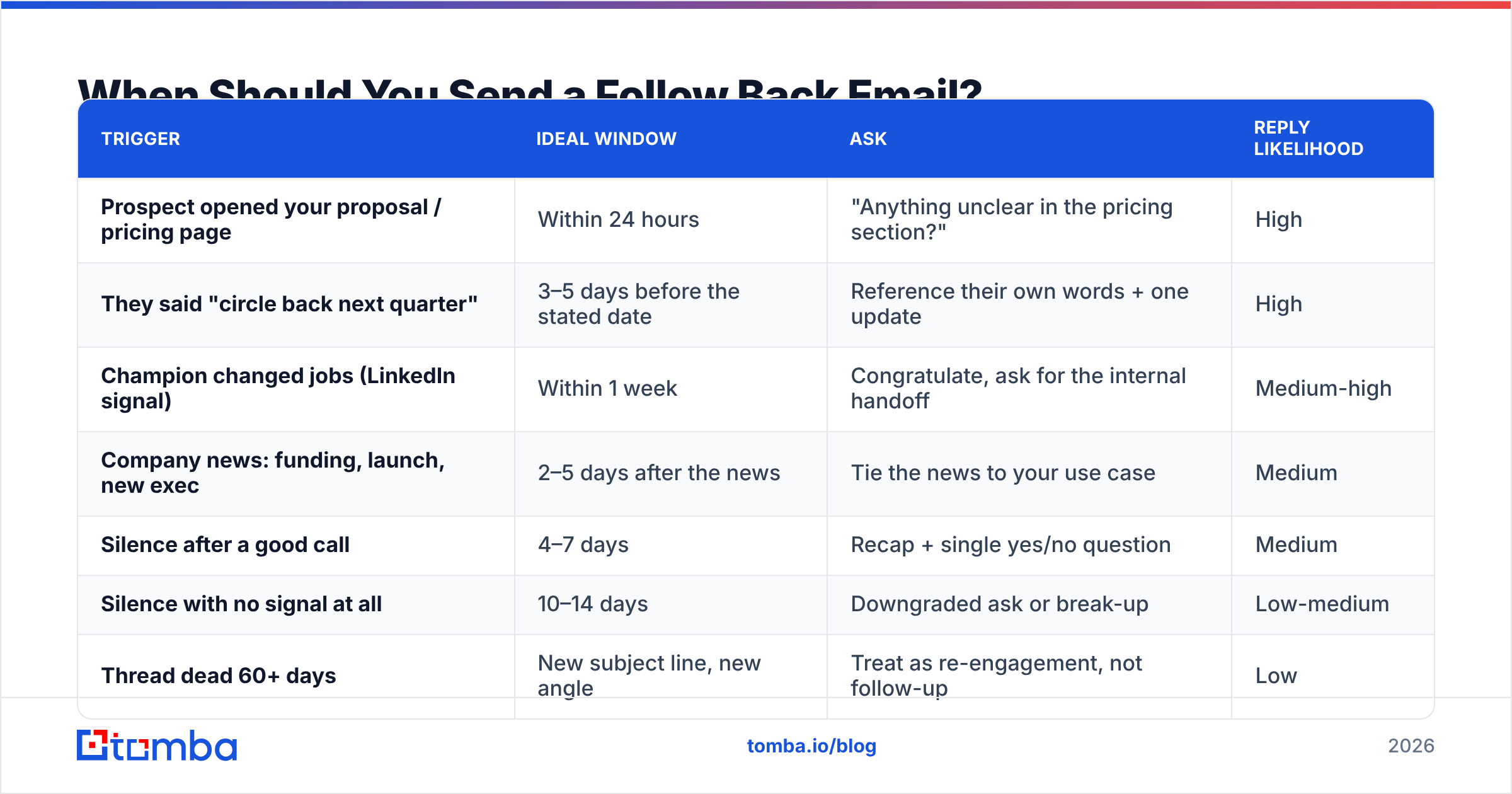
Send it when something changed, not when the clock said so. Trigger-based timing consistently beats fixed intervals because the email arrives with a built-in reason.
| Trigger | Ideal window | Ask | Reply likelihood |
|---|---|---|---|
| Prospect opened your proposal / pricing page | Within 24 hours | "Anything unclear in the pricing section?" | High |
| They said "circle back next quarter" | 3–5 days before the stated date | Reference their own words + one update | High |
| Champion changed jobs (LinkedIn signal) | Within 1 week | Congratulate, ask for the internal handoff | Medium-high |
| Company news: funding, launch, new exec | 2–5 days after the news | Tie the news to your use case | Medium |
| Silence after a good call | 4–7 days | Recap + single yes/no question | Medium |
| Silence with no signal at all | 10–14 days | Downgraded ask or break-up | Low-medium |
| Thread dead 60+ days | New subject line, new angle | Treat as re-engagement, not follow-up | Low |
The general rule: the warmer the last interaction, the shorter the wait. A prospect who asked you a question on Tuesday expects an answer, not a nudge two weeks later. A prospect who ghosted after a cold reply needs breathing room.
Time of day matters less than people claim, but weekday matters. Tuesday through Thursday mornings in the recipient's timezone remain the safest default for B2B, with Monday morning and Friday afternoon the weakest slots. If your tool cannot send in local time, that is a real gap.
What Does a Good Follow Back Email Look Like?#
Four parts, in order, under 120 words total.
- Context anchor (1 line). Reference the specific thing they said or did. "You mentioned the migration was blocked until the new CTO started."
- New information (1–2 lines). The reason this email exists. A case study from their industry, a feature that shipped, a deadline, a change in their world.
- Downgraded ask (1 line). Make the reply cost less than the last time. Yes/no beats "when are you free?" every time.
- Easy exit (optional, 1 line). "If this is dead, say the word and I'll stop." Counterintuitively, this raises response rate because it removes the social cost of declining.
Template 1 — After a good call, then silence#
Subject: (reply in thread)
Hi Maya — you flagged that the SOC 2 timeline was the main blocker. We published the updated report last Thursday; I attached it here so you have it for the security review.
Worth restarting the conversation this month, or is it a 2027 problem?
Either answer is useful.
Template 2 — The "circle back in Q3" callback#
Subject: (reply in thread)
Hi Dan — back in April you said Q3 was the right time to revisit this. That's now.
Since then two things changed on our side: the HubSpot sync is live, and pricing for teams under 20 seats dropped.
Want me to send a 3-minute walkthrough, or is this off the table for the year?
Template 3 — Champion left the company#
Subject: Quick handoff question re: [Company] + [Vendor]
Hi Priya — I was working with Sam on evaluating [Vendor] for the RevOps team before he moved on. Saw you picked up the function.
Do you want the context we built up, or should I close the file?
Happy to send a one-page summary either way — no pitch attached.
Template 4 — The break-up#
Subject: (reply in thread)
Hi Alex — I've sent a few notes and haven't wanted to be the person cluttering your inbox.
I'll assume the timing isn't right and stop here. If that changes, reply to this thread any time and I'll pick it straight back up.
Template 4 is the one people skip, and it is frequently the best performer in the whole sequence. It is honest, it costs the reader nothing, and it triggers the mild loss aversion that "just checking in" never does.
How Many Follow Back Emails Are Too Many?#
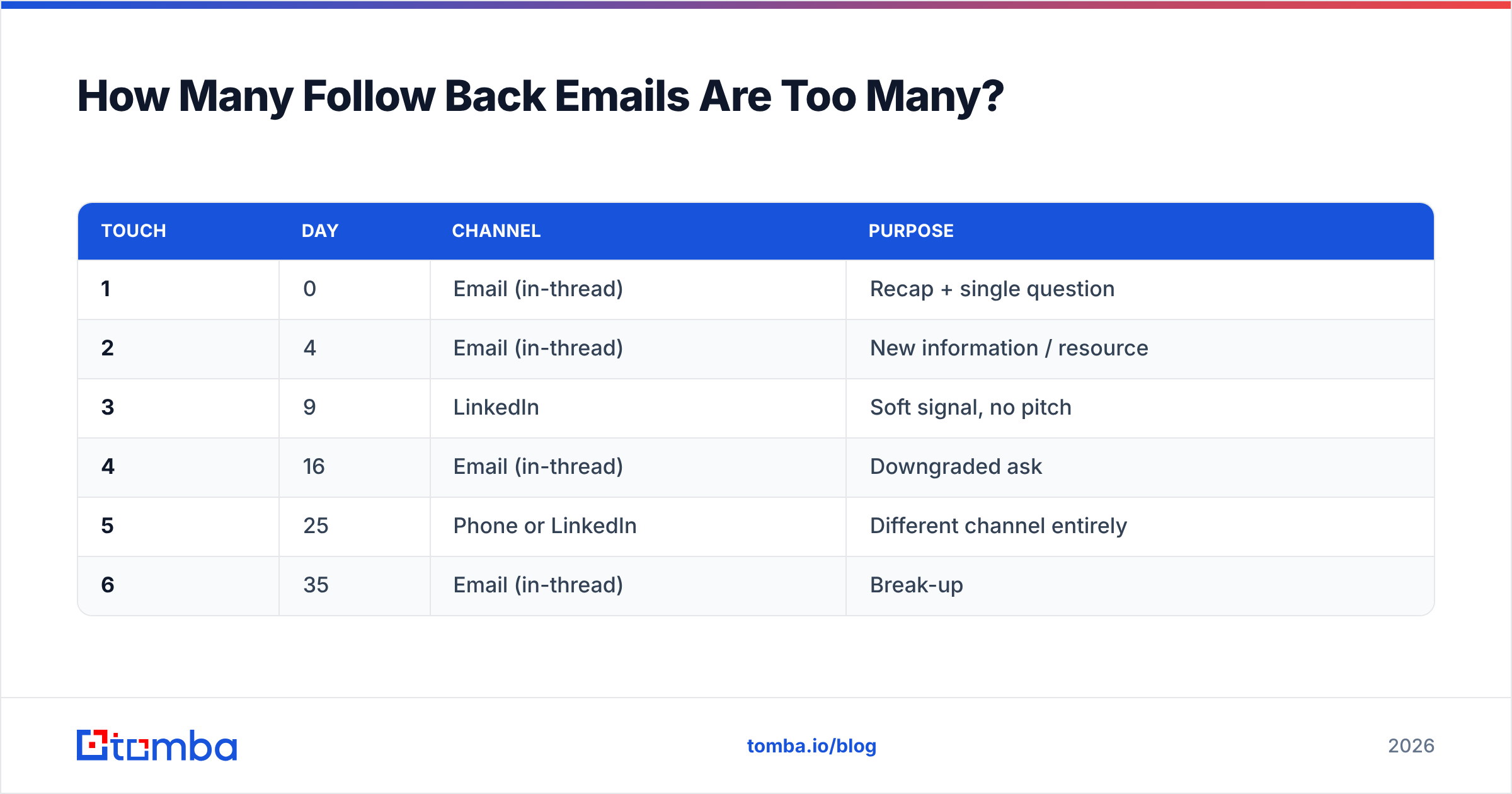
Four to six touches per thread, spread over four to six weeks, is where most B2B teams land before returns collapse.
Here is a cadence that respects both the prospect and your sender reputation:
| Touch | Day | Channel | Purpose |
|---|---|---|---|
| 1 | 0 | Email (in-thread) | Recap + single question |
| 2 | 4 | Email (in-thread) | New information / resource |
| 3 | 9 | Soft signal, no pitch | |
| 4 | 16 | Email (in-thread) | Downgraded ask |
| 5 | 25 | Phone or LinkedIn | Different channel entirely |
| 6 | 35 | Email (in-thread) | Break-up |
Two rules make this work. First, never send two consecutive touches with the same ask — the sequence has to escalate in value while de-escalating in demand. Second, switch channels at least once. A prospect who ignores email may answer a LinkedIn message in 20 seconds; LinkedIn outreach and phone touches also break the pattern that makes your emails feel automated.
If you are running this at scale, the constraint is not creativity — it is data hygiene. Every bounce inside a follow-back cadence hits your sender reputation harder than a cold-list bounce, because the volume is lower and the ratio is what mailbox providers measure. Run addresses through an email verifier before a sequence starts, and re-check any contact whose thread has been quiet for 30+ days.
How Do You Follow Back When the Contact Has Changed?#
Treat it as a new opening, not a continuation. Job changes are the most under-used trigger in B2B outbound — the person who championed you now sits at a new company with budget and a mandate to change things, and the seat they vacated is filled by someone with no history with you.
The play has two halves:
- Follow the person. Their old address is dead, so you need their new one. A domain search on the new employer plus their name usually resolves the pattern in seconds. Open with the move, not the pitch.
- Cover the seat. Find the replacement in the same function and send Template 3. You are not restarting the sale; you are offering to hand over context, which is a genuinely useful thing for someone three weeks into a new job.
For teams doing this systematically, the workflow is: detect the change (LinkedIn, news, or a bounce), re-resolve the address, verify it, and only then write. Skipping the verification step is how a thoughtful follow-back turns into a hard bounce on a brand-new domain.
What Tools Help You Run Follow Back Emails at Scale?#
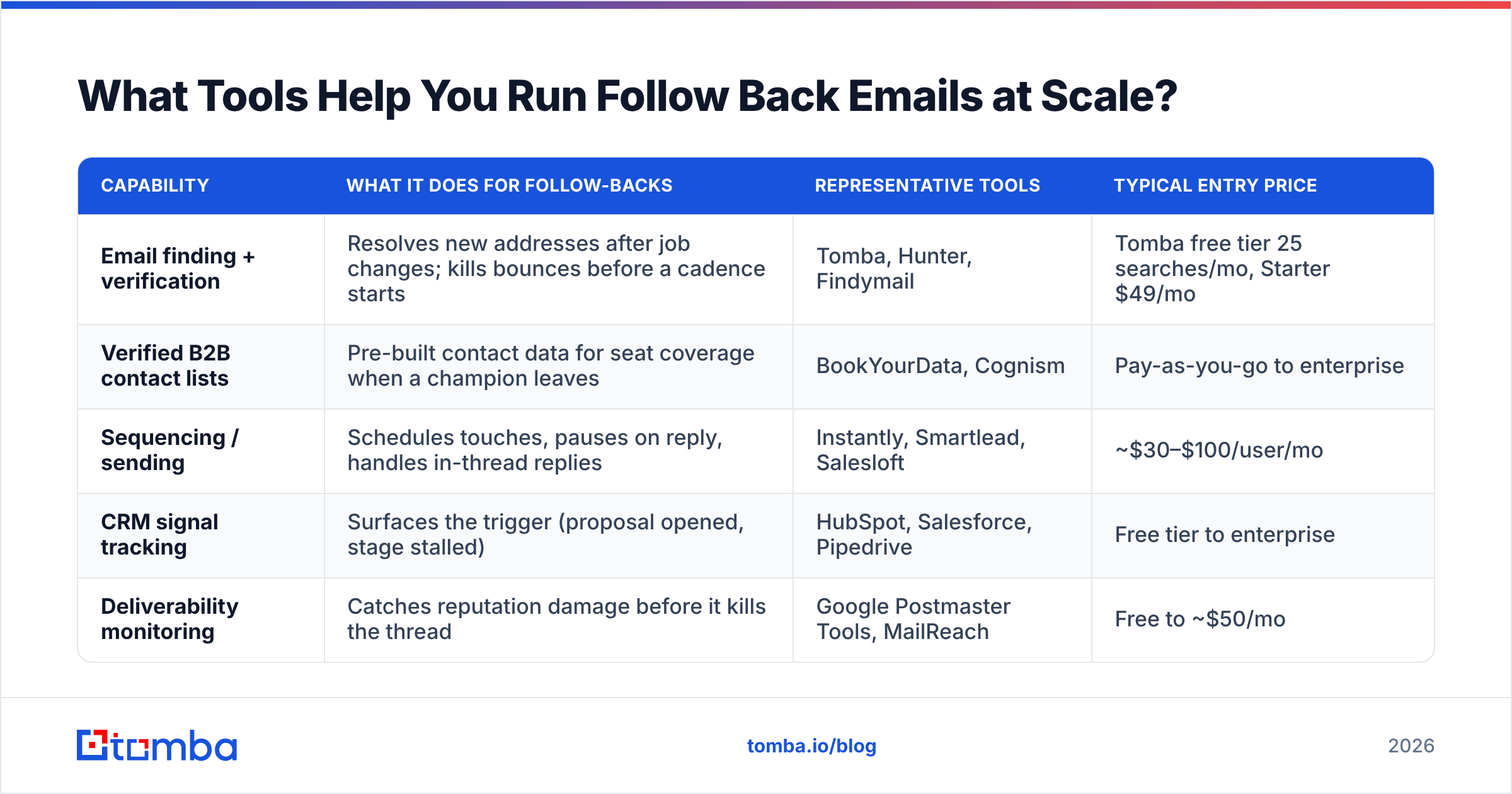
The stack splits into three jobs: finding and verifying the address, sending and sequencing, and knowing when to send. Most teams over-invest in the middle one.
| Capability | What it does for follow-backs | Representative tools | Typical entry price |
|---|---|---|---|
| Email finding + verification | Resolves new addresses after job changes; kills bounces before a cadence starts | Tomba, Hunter, Findymail | Tomba free tier 25 searches/mo, Starter $49/mo |
| Verified B2B contact lists | Pre-built contact data for seat coverage when a champion leaves | BookYourData, Cognism | Pay-as-you-go to enterprise |
| Sequencing / sending | Schedules touches, pauses on reply, handles in-thread replies | Instantly, Smartlead, Salesloft | ~$30–$100/user/mo |
| CRM signal tracking | Surfaces the trigger (proposal opened, stage stalled) | HubSpot, Salesforce, Pipedrive | Free tier to enterprise |
| Deliverability monitoring | Catches reputation damage before it kills the thread | Google Postmaster Tools, MailReach | Free to ~$50/mo |
Screenshot placeholder: Instantly sequence builder showing a 6-touch follow-back cadence with reply-pause enabled.
Screenshot placeholder: HubSpot deal timeline highlighting a "proposal viewed" activity as the follow-back trigger.
A note on ordering: sequencing tools are the loudest category and the least differentiated. If your reply rate is low, the fix is almost never a different sender — it is either the data going in or the reason for the email. Google Postmaster Tools will tell you whether the problem is placement; a verification pass will tell you whether the problem is the list.
For sourcing addresses at the moment a contact moves, an email finder that works off name + new domain is faster than manual pattern-guessing, and pairing it with a bulk email finder run keeps a whole book of stalled accounts current without one-by-one lookups. If you evaluate several vendors, G2's sales intelligence category is a reasonable neutral starting point for coverage and pricing comparisons.
What Metrics Tell You a Follow Back Email Is Working?#
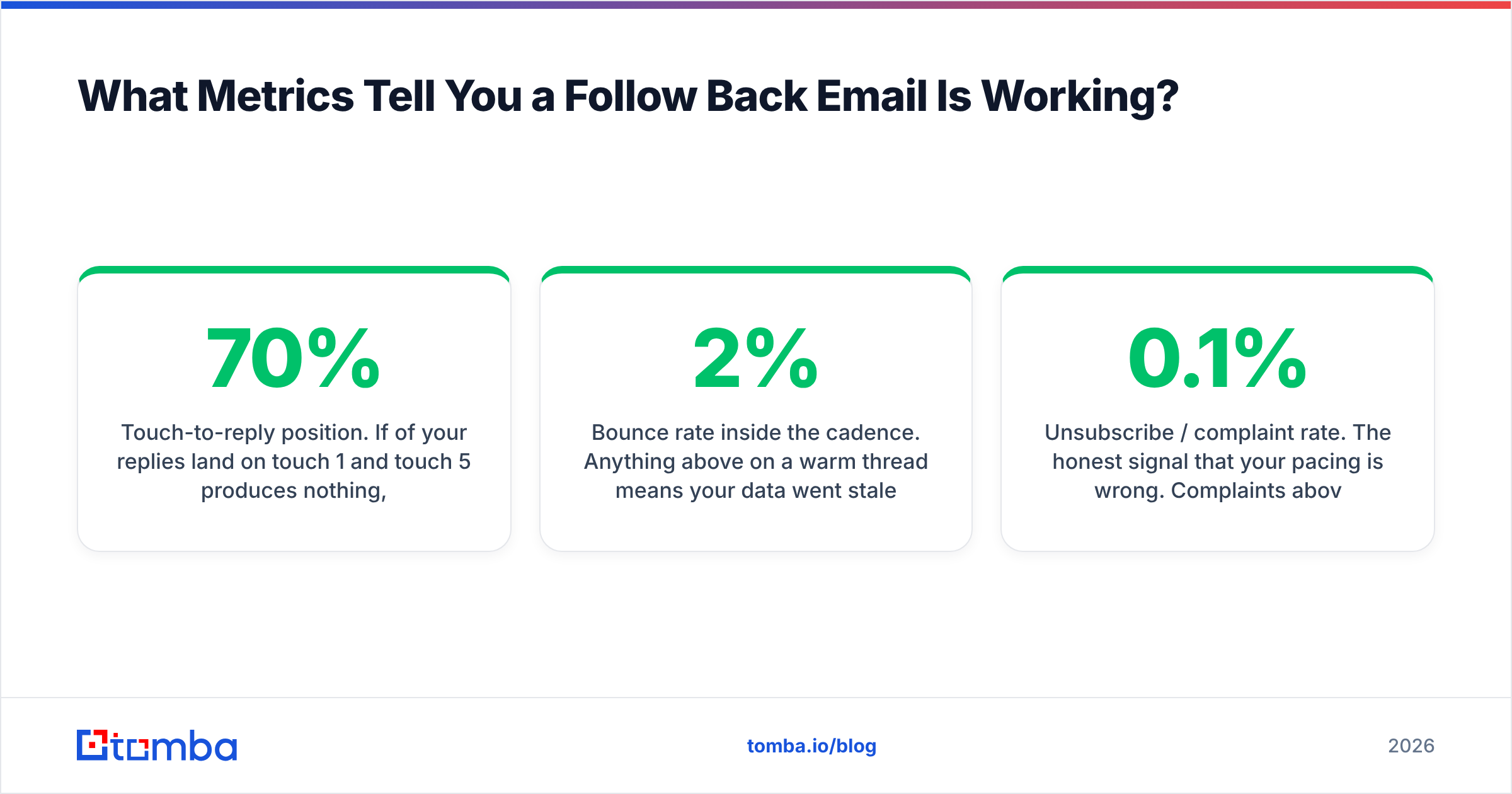
Reply rate is the headline, but three secondary numbers tell you why.
- Positive reply rate, not total replies. "Not interested" is still a reply and still closes the loop, but only positive replies feed pipeline. Track them separately or you will optimise for annoyance.
- Touch-to-reply position. If 70% of your replies land on touch 1 and touch 5 produces nothing, your sequence is too long. If touch 4 and 5 carry the volume, your first email is under-built.
- Bounce rate inside the cadence. Anything above 2% on a warm thread means your data went stale mid-sequence. Above 5% and you should stop sending until you re-verify.
- Unsubscribe / complaint rate. The honest signal that your pacing is wrong. Complaints above 0.1% will start affecting inbox placement across your whole domain, per Google's bulk sender guidelines.
Benchmark yourself against your own baseline rather than published industry averages — those numbers vary wildly by segment, list source, and whether the publisher is selling a sequencing tool.
Follow Back Email Mistakes to Stop Making#
- "Just bumping this." Zero information. Delete the phrase from your snippets.
- Increasing urgency without increasing value. Three exclamation marks do not create a deadline.
- Changing the subject line mid-thread. It breaks threading in Gmail and Outlook and makes the message look cold.
- Following back on a bounced address. Verify first; a second bounce compounds the reputation damage.
- Sending at 5:47pm Friday. It is not "getting ahead of Monday." It is getting buried.
- Nine touches. If six well-spaced, well-differentiated emails did not land, the answer is no. Respect it and reallocate the time.
Put Better Data Behind Every Follow Back#
The best-written follow back email in the world fails if it lands on an address the prospect abandoned four months ago. That is the part you control most cheaply.
Use Tomba Email Finder to re-resolve contacts the moment a champion changes jobs, verify the address before the first touch goes out, and keep stalled threads pointed at inboxes that are actually staffed. The free tier covers 25 searches a month if you just want to clean up your current stalled deals; Tomba pricing starts at $49/mo on Starter when you are ready to run it across the whole book. Fix the data, then fix the copy — in that order.
Related guides#
Ready to find emails that actually work?
Join 150,000+ professionals who stopped guessing and started sending. Free credits on signup — no credit card required.
Get the Tomba newsletter
Practical outbound tactics and product updates — once every two weeks.
About the author