Follow Up Boss vs HubSpot: Which CRM Wins for Sales in 2026
One CRM is built for agents who live on the phone. The other is a full go-to-market platform with a price tag to match. Here is the honest head-to-head on pricing, automation, data, and who should actually pick which.
TL;DR
- Follow Up Boss is a speed-to-lead CRM built for high-volume phone teams — especially real estate. It is opinionated, fast to adopt, and priced per user in a way that gets expensive past ~10 seats.
- HubSpot Sales Hub is a general-purpose go-to-market platform. Deeper automation, real reporting, a genuine free tier, and an ecosystem no niche CRM matches — but onboarding fees and seat costs escalate hard at Professional and Enterprise.
- Pick Follow Up Boss if your reps' day is calls, texts, and lead routing from portals, and you want a system running this week.
- Pick HubSpot if you need marketing, sales, and service in one object model, custom reporting, and room to grow beyond one channel.
- Neither tool finds contact data for you. Both are containers. If your pipeline depends on outbound, budget separately for an email finder and verification layer.
What are Follow Up Boss and HubSpot, actually?#
They solve different problems that happen to share a category name.
Follow Up Boss is a lead-management CRM built around one job: get a human on the phone with a new lead before the competition does. It ingests leads from Zillow, Realtor.com, Facebook forms, and hundreds of other sources, routes them by round-robin or pond, and starts an action plan of calls, texts, and emails within seconds. Zillow acquired it in 2023, which tells you exactly where its center of gravity sits.
HubSpot started as a marketing automation platform and grew into a five-hub suite. Sales Hub is the CRM piece: deals, pipelines, sequences, quotes, forecasting, and a shared contact record with Marketing Hub and Service Hub. It is horizontal by design — SaaS, agencies, manufacturing, and yes, some real estate teams run on it.
The short version: Follow Up Boss is a scalpel. HubSpot is a workshop. Asking which is "better" without naming your motion is a category error.
How do Follow Up Boss and HubSpot compare head to head?#
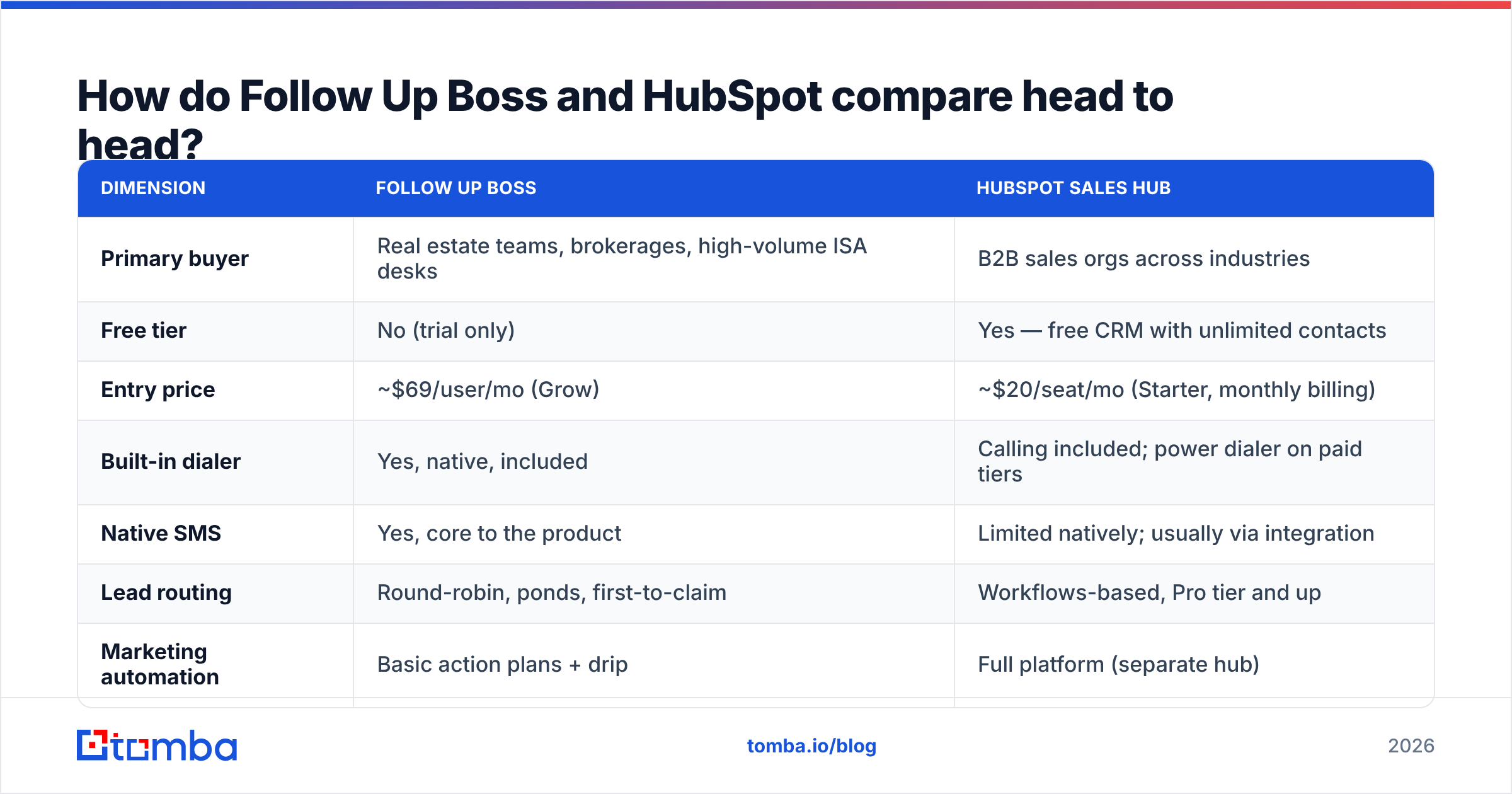
| Dimension | Follow Up Boss | HubSpot Sales Hub |
|---|---|---|
| Primary buyer | Real estate teams, brokerages, high-volume ISA desks | B2B sales orgs across industries |
| Free tier | No (trial only) | Yes — free CRM with unlimited contacts |
| Entry price | ~$69/user/mo (Grow) | ~$20/seat/mo (Starter, monthly billing) |
| Built-in dialer | Yes, native, included | Calling included; power dialer on paid tiers |
| Native SMS | Yes, core to the product | Limited natively; usually via integration |
| Lead routing | Round-robin, ponds, first-to-claim | Workflows-based, Pro tier and up |
| Marketing automation | Basic action plans + drip | Full platform (separate hub) |
| Custom reporting | Limited, fixed dashboards | Custom report builder, forecasting |
| Custom objects | No | Enterprise tier |
| App marketplace | ~250 integrations | 1,500+ apps |
| Onboarding fee | None | $1,500 (Pro), $3,500 (Enterprise) typical |
| Time to first value | Days | Weeks to months |
List prices move — check both vendor pricing pages before you build a budget. The pattern, though, is stable: Follow Up Boss is cheap to start and linear to scale; HubSpot is free to start and steep to scale.
Which one actually costs more as your team grows?#
This is where most comparisons go wrong. They quote entry prices and stop.
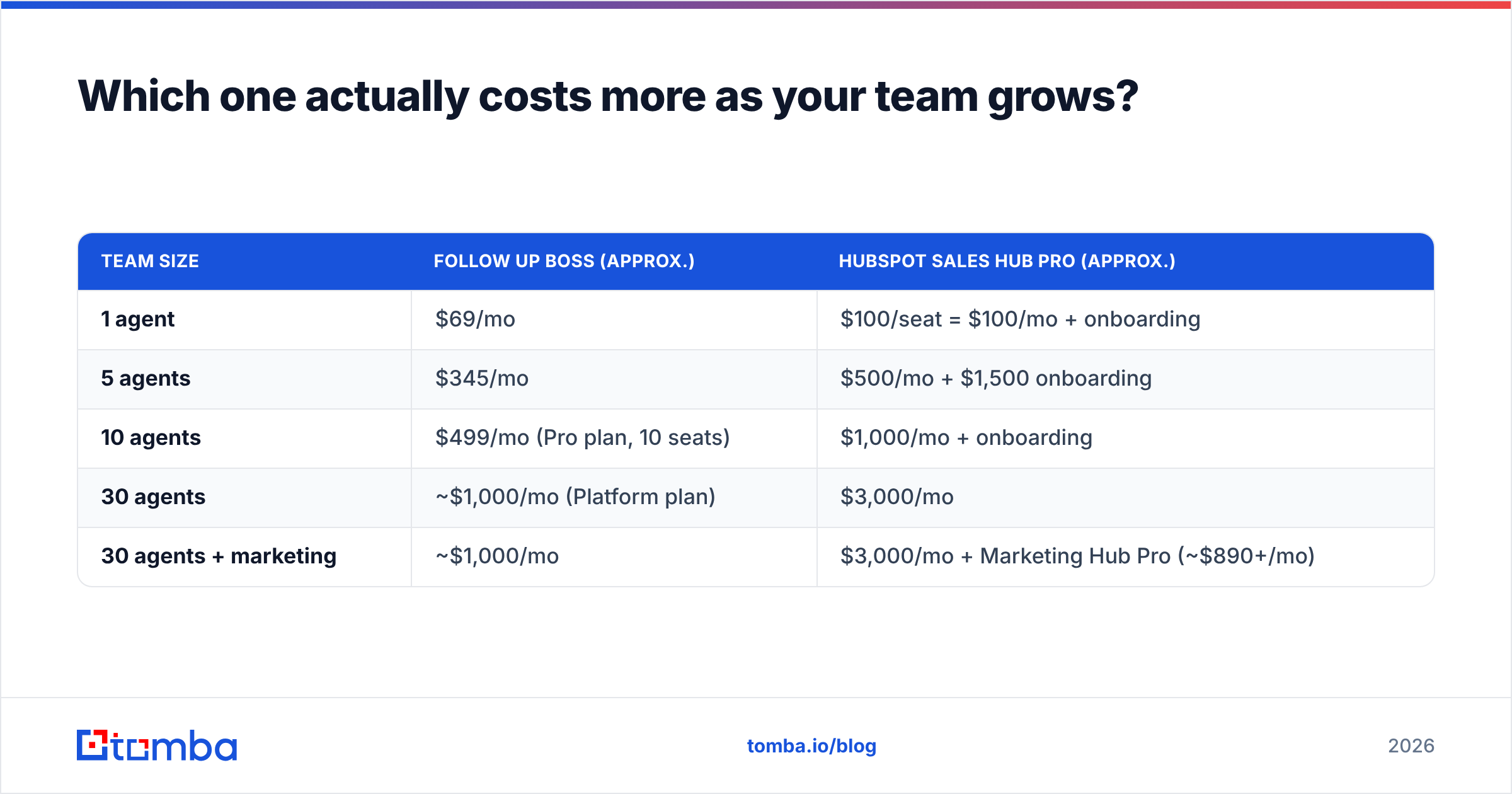
| Team size | Follow Up Boss (approx.) | HubSpot Sales Hub Pro (approx.) |
|---|---|---|
| 1 agent | $69/mo | $100/seat = $100/mo + onboarding |
| 5 agents | $345/mo | $500/mo + $1,500 onboarding |
| 10 agents | $499/mo (Pro plan, 10 seats) | $1,000/mo + onboarding |
| 30 agents | ~$1,000/mo (Platform plan) | $3,000/mo |
| 30 agents + marketing | ~$1,000/mo | $3,000/mo + Marketing Hub Pro (~$890+/mo) |
Follow Up Boss flips from per-seat to flat-bundle pricing at its Pro and Platform tiers, which is why a 30-agent brokerage can land near $1,000/month. HubSpot stays per-seat all the way up, and the moment you want marketing email, landing pages, or attribution reporting, you are buying a second hub.
Two caveats that cut the other direction:
- HubSpot's free CRM is genuinely usable. Unlimited contacts, deals, tasks, email tracking, and meeting links at $0. A two-person team can run real pipeline on it for a year. Follow Up Boss has no equivalent.
- HubSpot Starter Customer Platform bundles light versions of all hubs for roughly $20/seat/month. For a small team that needs a bit of everything, that bundle beats any niche CRM on raw feature-per-dollar.
The honest framing: Follow Up Boss is cheaper at 20-50 seats if you only need CRM. HubSpot is cheaper at 1-5 seats and cheaper at any size if it replaces three other tools.
Is Follow Up Boss better for real estate and high-volume calling?#
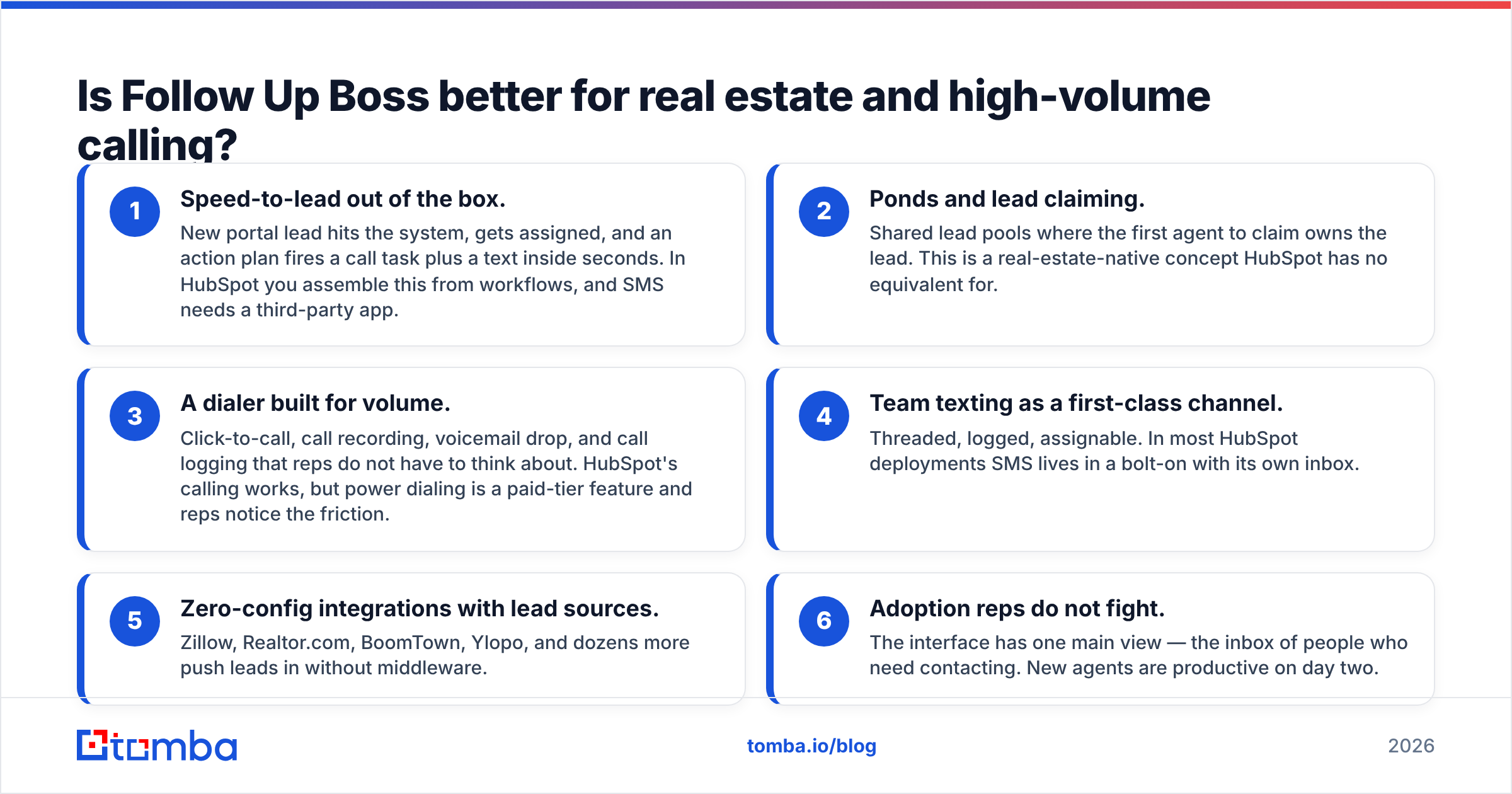
Yes, and it is not close. Here is what it does that HubSpot makes you build:
- Speed-to-lead out of the box. New portal lead hits the system, gets assigned, and an action plan fires a call task plus a text inside seconds. In HubSpot you assemble this from workflows, and SMS needs a third-party app.
- Ponds and lead claiming. Shared lead pools where the first agent to claim owns the lead. This is a real-estate-native concept HubSpot has no equivalent for.
- A dialer built for volume. Click-to-call, call recording, voicemail drop, and call logging that reps do not have to think about. HubSpot's calling works, but power dialing is a paid-tier feature and reps notice the friction.
- Team texting as a first-class channel. Threaded, logged, assignable. In most HubSpot deployments SMS lives in a bolt-on with its own inbox.
- Zero-config integrations with lead sources. Zillow, Realtor.com, BoomTown, Ylopo, and dozens more push leads in without middleware.
- Adoption reps do not fight. The interface has one main view — the inbox of people who need contacting. New agents are productive on day two.
If your team's KPI is dials per day and minutes-to-first-contact, Follow Up Boss is the correct answer and you can stop reading the comparison section.
Where does HubSpot pull clearly ahead?#
Everywhere the job is not "call this lead right now."
Reporting and forecasting. HubSpot's custom report builder lets you slice by any property on any object, build funnel and attribution reports, and forecast by weighted stage. Follow Up Boss dashboards answer "who called how much" well and "why did Q3 miss" badly.
Data model flexibility. Custom objects at Enterprise mean you can model properties, listings, units, subscriptions, or whatever your business actually sells. Follow Up Boss models people and deals, full stop.
Sequences and multi-step outbound. HubSpot sequences with A/B tested templates, enrollment triggers, and automatic un-enrollment on reply are a different weight class from action plans.
Ecosystem. 1,500+ marketplace apps, a mature API, and every consultant on earth knowing the platform. Check the G2 category listings and the difference in review volume is stark — that matters when you need to hire an admin.
One record across marketing, sales, and service. If a lead downloads an ebook, books a demo, and files a support ticket, that is one timeline. Stitching that together around Follow Up Boss means integration work.
Free tier as an escape hatch. You can prove HubSpot works before spending anything. That de-risks the decision in a way no trial does.
How does each handle the data problem?#
Neither one solves it, and this is the trap.
A CRM is a container. It stores and orchestrates records you already have. Follow Up Boss assumes leads arrive from portals with a phone number attached. HubSpot assumes leads arrive from your website forms. Both assumptions break the moment you run outbound.
HubSpot does sell Breeze Intelligence credits for enrichment, and it is decent for firmographics on companies you already know about. It is not a prospecting database, and credits are consumed fast. Follow Up Boss has no enrichment layer at all.
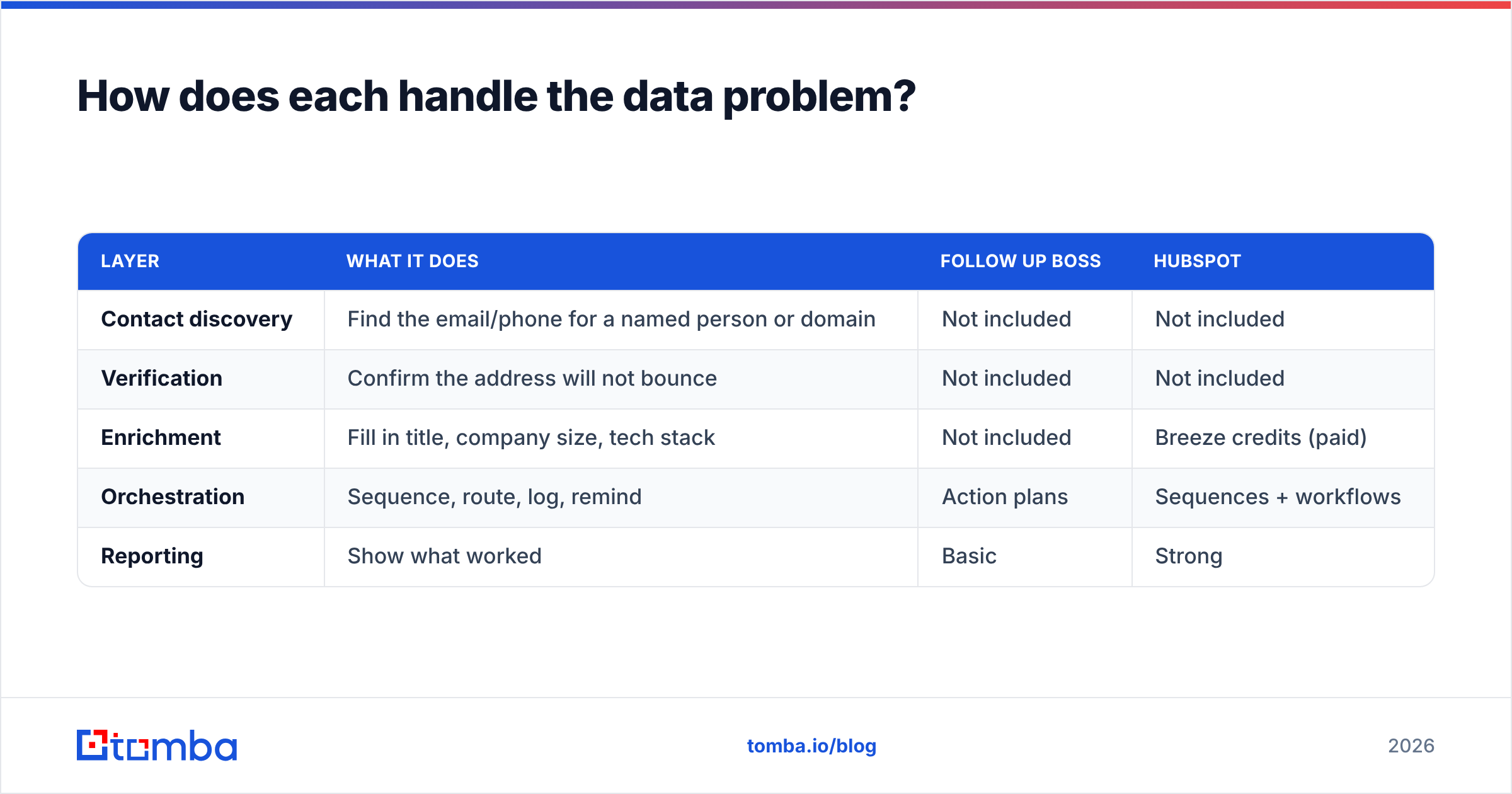
So the outbound stack looks like this regardless of which CRM you pick:
| Layer | What it does | Follow Up Boss | HubSpot |
|---|---|---|---|
| Contact discovery | Find the email/phone for a named person or domain | Not included | Not included |
| Verification | Confirm the address will not bounce | Not included | Not included |
| Enrichment | Fill in title, company size, tech stack | Not included | Breeze credits (paid) |
| Orchestration | Sequence, route, log, remind | Action plans | Sequences + workflows |
| Reporting | Show what worked | Basic | Strong |
That top half of the table is where deliverability is won or lost. Sending to unverified addresses tanks sender reputation inside a week, and no CRM will warn you before it happens. Running a bulk verify pass before import is the cheapest insurance in the entire stack — and if you are on HubSpot, the HubSpot integration pushes verified contacts straight into the CRM instead of through a CSV round trip.
What do real users complain about?#
Follow Up Boss, common gripes:
- Reporting depth. Teams outgrow the dashboards and start exporting to Sheets.
- Price at mid-size. The jump from Grow per-seat to the Pro bundle is a cliff, not a ramp.
- Zillow ownership. Some brokerages are uncomfortable routing their lead data through a portal-owned platform. Whether that concern is technical or competitive, it is real and it affects procurement.
- Email marketing is thin. It is not built to send newsletters.
HubSpot, common gripes:
- Onboarding fees that are mandatory and non-trivial at Pro and above.
- Seat math. Every rep who needs to send a sequence needs a paid seat, and the bill compounds.
- Annual contracts with limited mid-term downgrade options.
- Complexity. A poorly configured HubSpot is worse than a well-configured spreadsheet, and configuring it well takes an admin.
Neither list is disqualifying. Both are predictable, which means you can plan around them.
Which should you choose in 2026?#
Pick based on your motion, not on feature counts.
Choose Follow Up Boss if:
- You are a real estate team, brokerage, or ISA desk
- Inbound portal leads are your primary source
- Speed-to-lead is the metric your comp plan runs on
- You want reps productive this week, not this quarter
- You do not need marketing automation in the same tool
Choose HubSpot if:
- You sell B2B with multi-stakeholder deals and long cycles
- You need marketing, sales, and service on one contact record
- Custom reporting and forecasting drive board conversations
- You have or will hire someone to own the system
- You want to start free and prove value before committing
Choose neither if your actual bottleneck is that you do not have enough qualified contacts to call. A CRM will organize an empty pipeline beautifully. Fix the top of the funnel first with a proper domain search workflow, then decide which container to pour it into.
Can you run both?#
Some teams do, and it is less absurd than it sounds. A brokerage might run Follow Up Boss for agent-level lead handling and HubSpot Marketing Hub for brand-level nurture, syncing via native integration or Zapier. The cost is duplicated records and a sync you have to babysit. The benefit is each tool doing what it is genuinely good at.
If you go this route, decide explicitly which system is the source of truth for contact records. Ambiguity there is how you end up with three versions of the same lead and a rep calling someone who closed last month.
FAQ#
Is Follow Up Boss only for real estate? No, but its vocabulary, integrations, and workflows are built around it. Mortgage, insurance, and home services teams use it successfully. A B2B SaaS team would find it constraining.
Does HubSpot's free CRM have limits that matter? Unlimited contacts and deals, but capped on the things that make you productive at scale: two email templates per user per day, no sequences, no automation, HubSpot branding on forms and emails. It is a real CRM with training wheels.
Which has better email deliverability? Neither platform controls this meaningfully — your domain authentication, list hygiene, and sending behavior do. Both support SPF/DKIM setup. Verify your list before you import it into either one and check that your records are clean with an SPF checker.
Can I migrate from Follow Up Boss to HubSpot later? Yes, via CSV export and import, or a migration partner. Expect to lose action plan logic and some activity history granularity. Plan for a week of cleanup, not an afternoon.
Is there a cheaper middle option? Pipedrive and Close both sit between the two on price and complexity. If the honest answer to "what do I need" is "a pipeline and a dialer," look at those before paying for HubSpot Pro.
Get the contacts before you get the CRM#
The Follow Up Boss vs HubSpot decision matters less than most people think. Both will hold your data, remind your reps, and report on activity. What actually moves revenue is whether the records inside them are real, reachable, and current.
That part is on you — and it is the part Tomba's Email Finder exists to solve. Find verified professional emails by name and domain, confirm them before they hit your CRM, and push clean records into HubSpot or export them for Follow Up Boss. Start on the free tier at 25 searches a month, or check Tomba pricing — Starter is $49/mo — when your outbound outgrows it. Verify first, import second, and let the CRM argument be the easy part.
Related guides#
Ready to find emails that actually work?
Join 150,000+ professionals who stopped guessing and started sending. Free credits on signup — no credit card required.
Get the Tomba newsletter
Practical outbound tactics and product updates — once every two weeks.
About the author