Follow Up Boss vs LionDesk: Real Estate CRM Comparison 2026
One CRM costs $69 per user and owns the lead-routing category. The other is cheap, feature-dense, and being folded into a bigger platform. Here is how Follow Up Boss and LionDesk actually compare in 2026.
Follow Up Boss vs LionDesk is really one question: do you pay more for speed, or pay less and carry platform risk? Here is the short version.
TL;DR
- Follow Up Boss is the speed-to-lead CRM. It runs about $69 per user/month on Grow, and its best work all flows from one job: route a new lead to a human fast.
- LionDesk was the budget pick. Entry plans sat near $25/user/month, with texting, video email, and drip campaigns included.
- The 2026 deciding factor is platform risk, not features. Lone Wolf owns LionDesk and keeps folding it into its wider agent stack. Get the roadmap in writing before you sign.
- Pick Follow Up Boss for teams of 3+ agents who buy leads at volume. Pick LionDesk only if you are a solo agent and cost rules the decision.
- Neither CRM fills your pipeline. Both assume the contact already exists. Sourcing verified data is a separate job — that is where an email finder sits.
What are Follow Up Boss and LionDesk?#
Both are real estate CRMs, but they were built for different buyers.
Follow Up Boss launched in 2011. It became the default CRM for high-volume lead buyers — teams that pour Zillow, Realtor.com, and Facebook leads into one funnel and need instant distribution. Zillow Group bought it in 2023. That cut both ways: deeper Zillow lead flow, but a competitor now owns the system of record for teams that also buy leads elsewhere.
LionDesk started in 2014 as the value play. It bundled texting, video email, a power dialer, and transaction management at a price solo agents could stomach. Lone Wolf Technologies bought it in 2021 and has been folding those features into its wider brokerage platform. That fact matters more than any feature list. It is why "which has better drip campaigns" is the wrong first question.

Follow Up Boss vs LionDesk: how do the prices and features compare?#
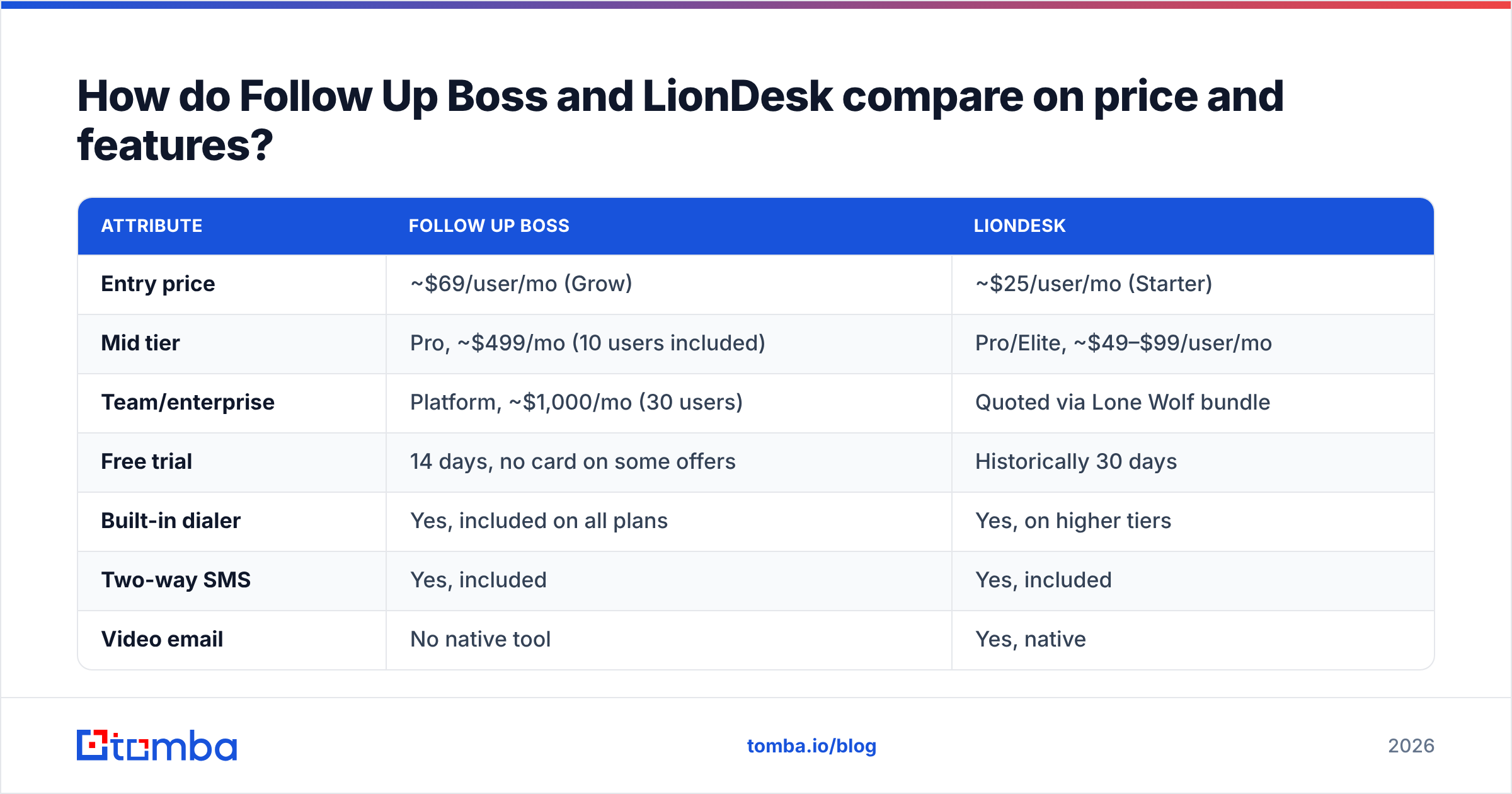
The prices below are publicly listed rates. Verify them directly: both vendors adjust tiers, and Lone Wolf now quotes LionDesk-adjacent products as part of a bundle rather than standalone.
| Attribute | Follow Up Boss | LionDesk |
|---|---|---|
| Entry price | ~$69/user/mo (Grow) | ~$25/user/mo (Starter) |
| Mid tier | Pro, ~$499/mo (10 users included) | Pro/Elite, ~$49–$99/user/mo |
| Team/enterprise | Platform, ~$1,000/mo (30 users) | Quoted via Lone Wolf bundle |
| Free trial | 14 days, no card on some offers | Historically 30 days |
| Built-in dialer | Yes, included on all plans | Yes, on higher tiers |
| Two-way SMS | Yes, included | Yes, included |
| Video email | No native tool | Yes, native |
| Lead routing rules | Best-in-class (round robin, ponds, conditions) | Basic assignment rules |
| Transaction management | Light; relies on integrations | Included |
| Native integrations | 250+ lead sources | Solid, fewer lead-source parsers |
| Ownership | Zillow Group | Lone Wolf Technologies |
| Platform risk | Low, actively invested | Elevated — consolidation underway |
The price gap is real and it is not subtle. A five-agent team pays roughly $345/month on Follow Up Boss Grow versus roughly $125/month on LionDesk Starter. Over three years that is a $7,900 difference. Anyone telling you price doesn't matter is not the one signing the invoice.
But per-seat cost is the wrong yardstick in real estate. Say you pay $200–$400 per Zillow lead. A CRM that lifts your contact rate by four points pays for itself in a month. That is the whole Follow Up Boss argument, and it holds up.
Which CRM handles speed-to-lead better?#
Follow Up Boss, clearly, and it isn't close.
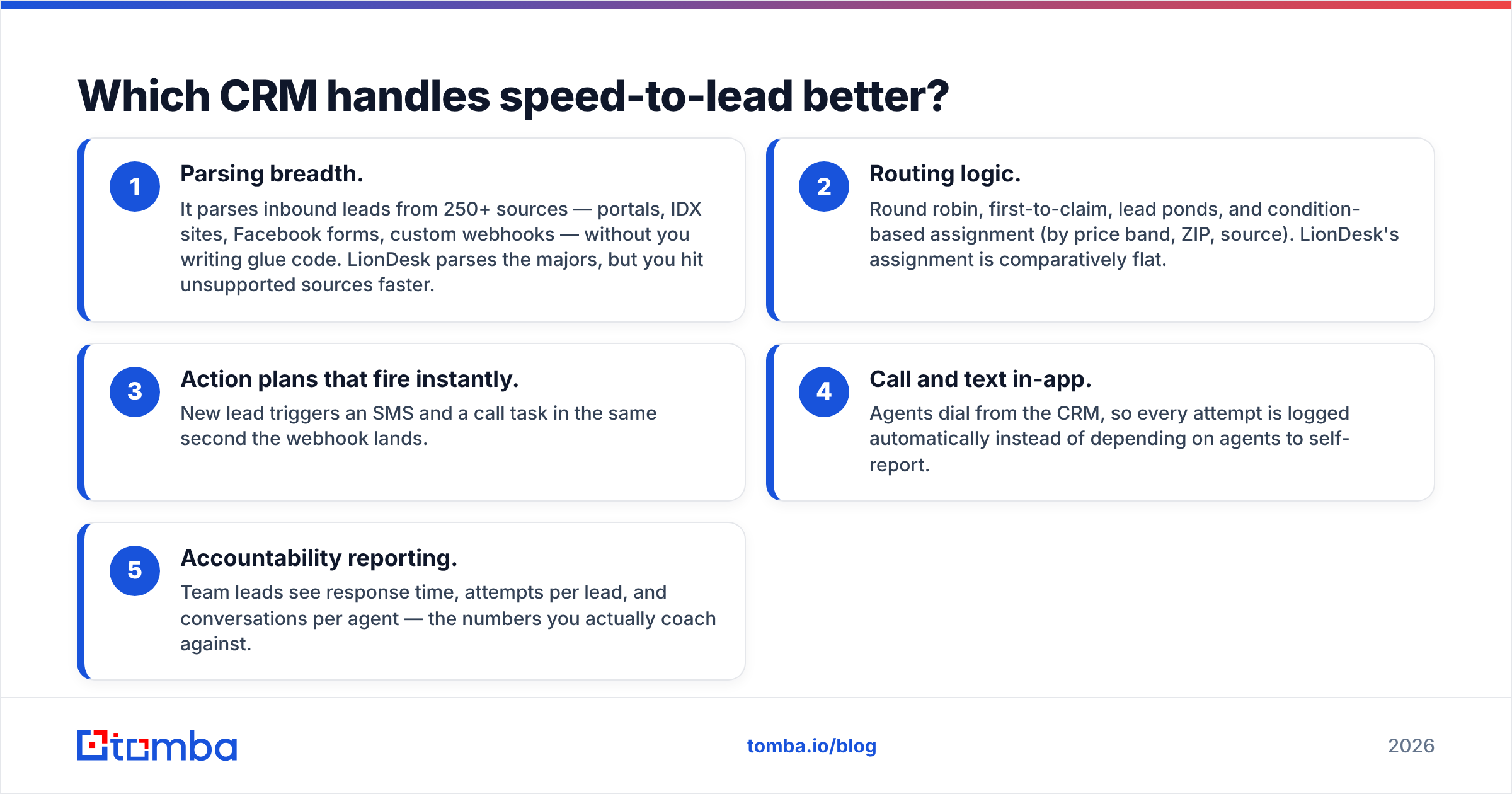
Speed-to-lead is the one metric with consistent research behind it. Leads you reach in the first five minutes convert far better than leads you reach at 30 minutes. Follow Up Boss is built around that single number:
- Parsing breadth. It parses inbound leads from 250+ sources — portals, IDX sites, Facebook forms, custom webhooks — without you writing glue code. LionDesk parses the majors, but you hit unsupported sources faster.
- Routing logic. Round robin, first-to-claim, lead ponds, and condition-based assignment (by price band, ZIP, source). LionDesk's assignment is comparatively flat.
- Action plans that fire instantly. New lead triggers an SMS and a call task in the same second the webhook lands.
- Call and text in-app. Agents dial from the CRM, so every attempt is logged automatically instead of depending on agents to self-report.
- Accountability reporting. Team leads see response time, attempts per lead, and conversations per agent — the numbers you actually coach against.
LionDesk does have texting, drips, and a dialer. What it lacks is the deeper routing and the reporting layer that lets a team lead run a real accountability meeting on Monday morning. If you are a solo agent, that gap costs you nothing. If you manage eight agents, it costs you deals every week.
Is LionDesk still a safe choice in 2026?#
This is the question that should decide your evaluation, and it deserves a direct answer: proceed with caution and get the roadmap in writing.
Lone Wolf has been consolidating its acquired products into a unified agent and brokerage platform, and LionDesk customers have been pointed toward that broader stack. Before you commit, ask the sales rep three questions and require written answers:
- Is LionDesk being sold as a standalone product on a renewable contract in 2026, and for how long is that guaranteed?
- If migration to another Lone Wolf product is required, who pays for it and what data fields transfer?
- What happens to my SMS history, drip campaign logic, and custom fields on migration?
Migration is where CRMs quietly punish you. Contacts and emails usually move. Text message threads, task history, campaign enrollment state, and custom field mappings frequently do not. If your whole follow-up system lives in a tool that may be restructured, you are carrying real operational risk. Price that risk into the "cheaper" option.
To be fair to Lone Wolf: it is a serious company with deep brokerage ties. Consolidation is not the same as abandonment, and its transaction management products are genuinely strong. But "the cheap CRM" and "the CRM being folded into a bigger suite" are different purchases, and you should know which one you're making.
What does each tool actually do well?#
Strip the marketing away and each has a clear zone of competence.
Follow Up Boss wins on:
- Team management. Lead ponds, agent leaderboards, and call reporting that a team lead can actually run a business on.
- Lead source integrations. The parser library is the moat. New source, new deal, no engineering.
- Zillow connectivity. If Zillow Flex or Premier Agent is a meaningful channel for you, ownership is an advantage here, not a drawback.
- Ecosystem. A large third-party app marketplace, plus an open API for the workflows you want to automate yourself.
LionDesk wins on:
- Price per feature. Video email, texting, and drip campaigns at a solo-agent price point is a genuinely good deal.
- Video messaging. Native video email is built in — Follow Up Boss expects you to bolt on a third-party tool.
- Transaction management. Included rather than integrated, which matters for solo agents who don't want a second subscription.
- Simplicity. A single agent can be productive in an afternoon. Follow Up Boss rewards configuration; LionDesk mostly just runs.
Read third-party reviews on G2 before you decide, but read them by date. CRM reviews age badly. Anything written before an ownership change describes a product that no longer exists in the same form.
Follow Up Boss vs LionDesk: how should you choose?#
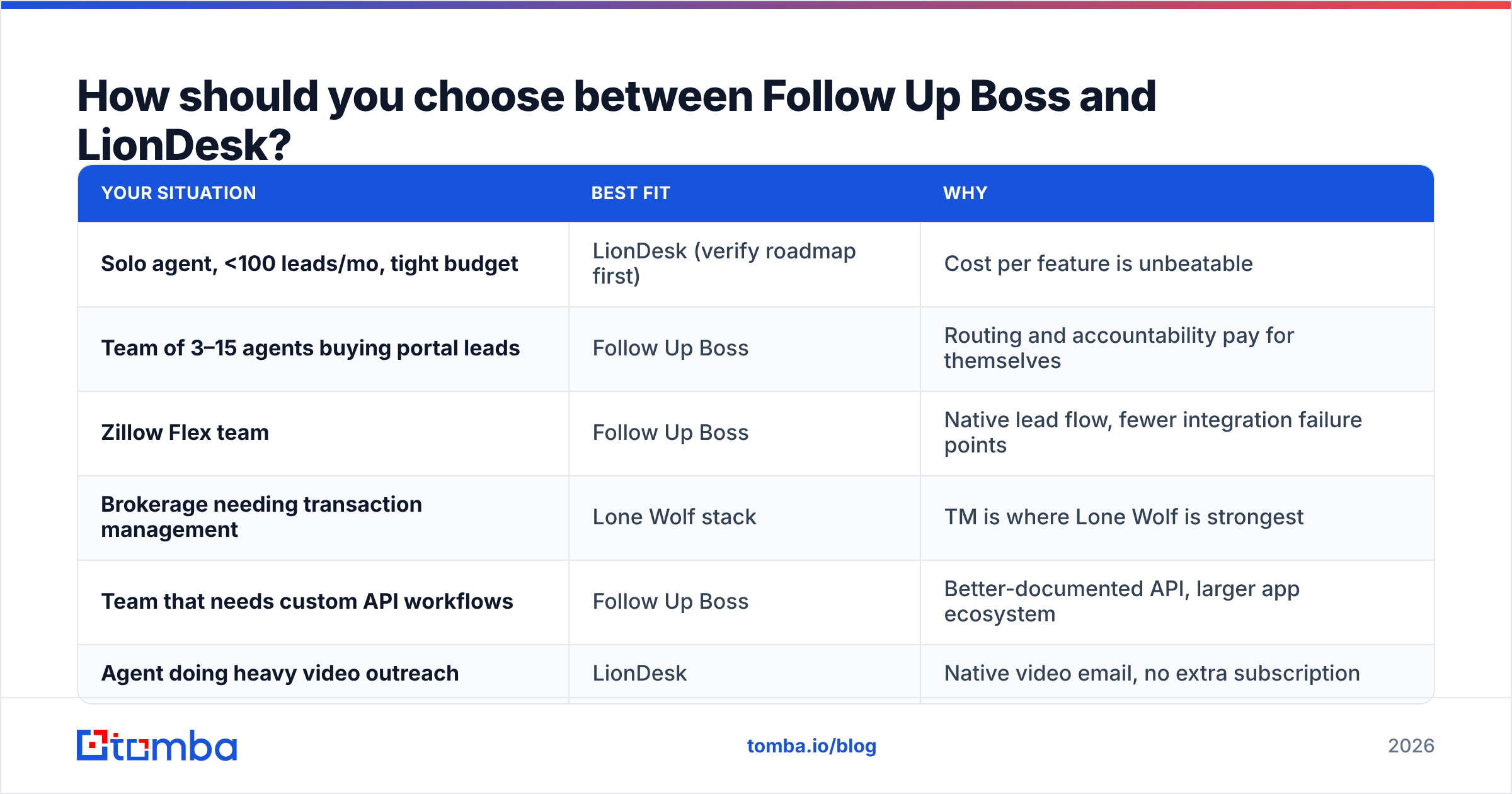
Match the tool to your operating model, not to a feature grid.
| Your situation | Best fit | Why |
|---|---|---|
| Solo agent, <100 leads/mo, tight budget | LionDesk (verify roadmap first) | Cost per feature is unbeatable |
| Team of 3–15 agents buying portal leads | Follow Up Boss | Routing and accountability pay for themselves |
| Zillow Flex team | Follow Up Boss | Native lead flow, fewer integration failure points |
| Brokerage needing transaction management | Lone Wolf stack | TM is where Lone Wolf is strongest |
| Team that needs custom API workflows | Follow Up Boss | Better-documented API, larger app ecosystem |
| Agent doing heavy video outreach | LionDesk | Native video email, no extra subscription |
One more filter: how much does your business depend on the CRM being the same product in 24 months? If the answer is "completely" — you've built action plans, smart lists, and team routing on top of it — weight platform stability heavily. If the answer is "it's a contact list with reminders," take the cheaper option and move on.
Where does contact data fit into this decision?#
Neither CRM finds contacts. Both assume the record already exists.
That distinction matters more than most agents realize. A CRM full of stale or malformed contacts quietly wrecks two things at once: your conversion math and your sender reputation. Bounce rates above 2% put your domain at risk with Gmail and Outlook filters. And every action plan you built is worthless if the emails inside it never land.
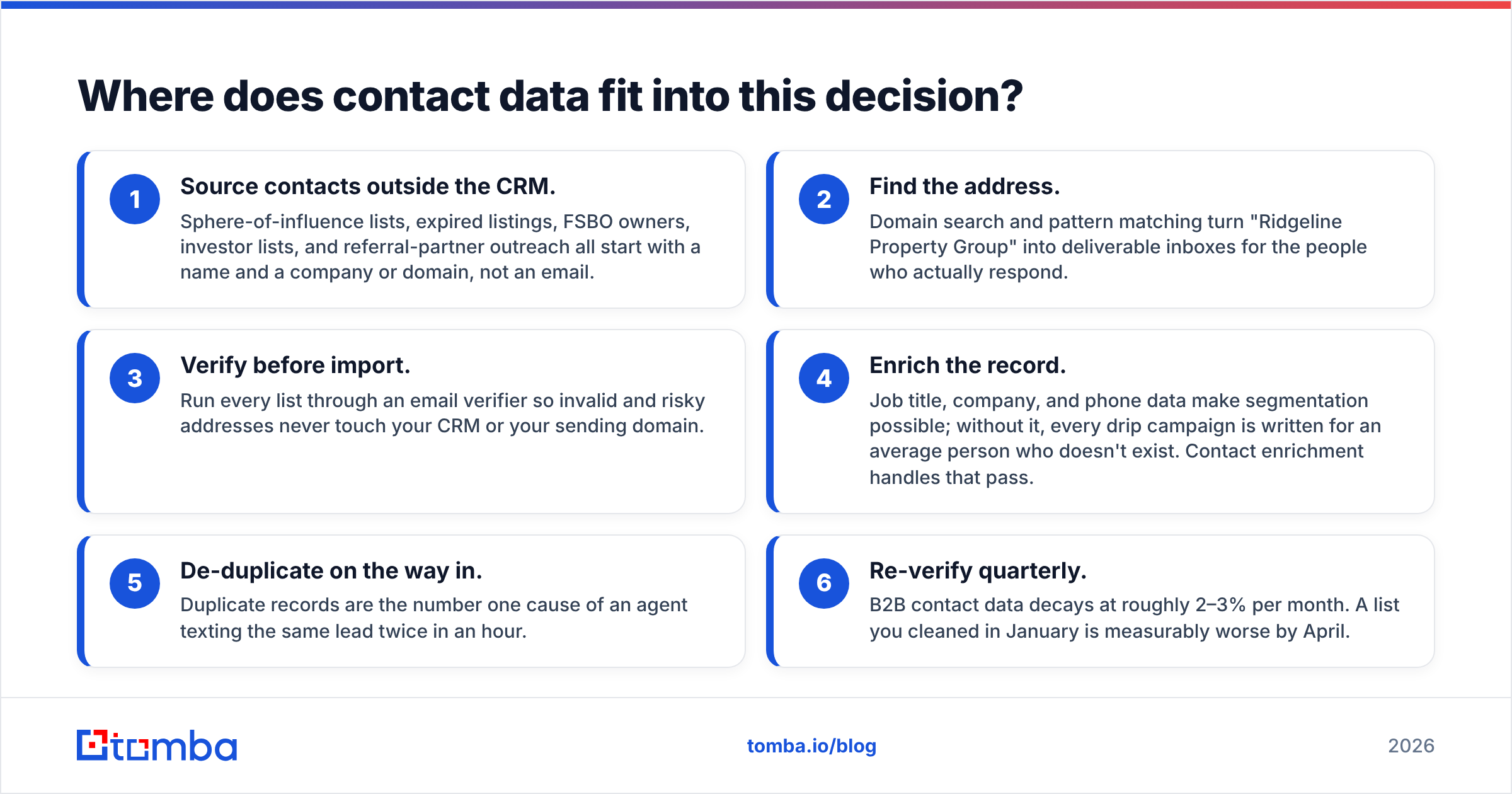
A practical data hygiene loop around either CRM looks like this:
- Source contacts outside the CRM. Sphere-of-influence lists, expired listings, FSBO owners, investor lists, and referral-partner outreach all start with a name and a company or domain, not an email.
- Find the address. Domain search and pattern matching turn "Ridgeline Property Group" into deliverable inboxes for the people who actually respond.
- Verify before import. Run every list through an email verifier so invalid and risky addresses never touch your CRM or your sending domain.
- Enrich the record. Job title, company, and phone data make segmentation possible. Without it, every drip campaign is written for an average person who doesn't exist. Contact enrichment handles that pass.
- De-duplicate on the way in. Duplicate records are the number one cause of an agent texting the same lead twice in an hour.
- Re-verify quarterly. B2B contact data decays at roughly 2–3% per month. A list you cleaned in January is measurably worse by April.
Do this outside the CRM, in bulk, before import. Both Follow Up Boss and LionDesk will happily store garbage — that is not what they are for. Bulk email finding and verification is a separate, cheap step that makes whichever CRM you choose measurably more effective.
What's the verdict?#
Follow Up Boss vs LionDesk comes down to one call: pay for speed, or pay less and carry platform risk.
For teams: Follow Up Boss. The routing engine, integration breadth, and accountability reporting justify the premium if you buy leads at volume. The $69/user price is the cost of not losing deals to a 40-minute response time.
For solo agents on a budget: LionDesk, with a roadmap conversation first. The feature-per-dollar ratio is legitimately strong. Just get written clarity on product continuity and migration terms before you build your entire follow-up system on top of it.
For brokerages: evaluate the full Lone Wolf stack against Follow Up Boss plus a dedicated transaction management tool. That is the real head-to-head, and it usually comes down to whether you value one integrated vendor or two best-in-class ones.
Whichever you pick, the CRM is the second half of the problem. The first half is getting accurate, deliverable contact data into it. Start with the Tomba Email Finder — find verified professional email addresses by name, company, or domain, verify them before they hit your pipeline, and push clean records into whichever CRM wins your evaluation. The free tier includes 25 searches per month, with paid plans starting at $49/mo, so you can test the data quality on your own prospect list before spending anything.
Related guides#
Ready to find emails that actually work?
Join 150,000+ professionals who stopped guessing and started sending. Free credits on signup — no credit card required.
Get the Tomba newsletter
Practical outbound tactics and product updates — once every two weeks.
About the author