Follow Up Email After Free Trial: Templates That Convert
Most trial users never say no — they just go quiet. Here is the exact follow-up email sequence, timing, and segmentation that turns expired free trials into paid accounts.
TL;DR
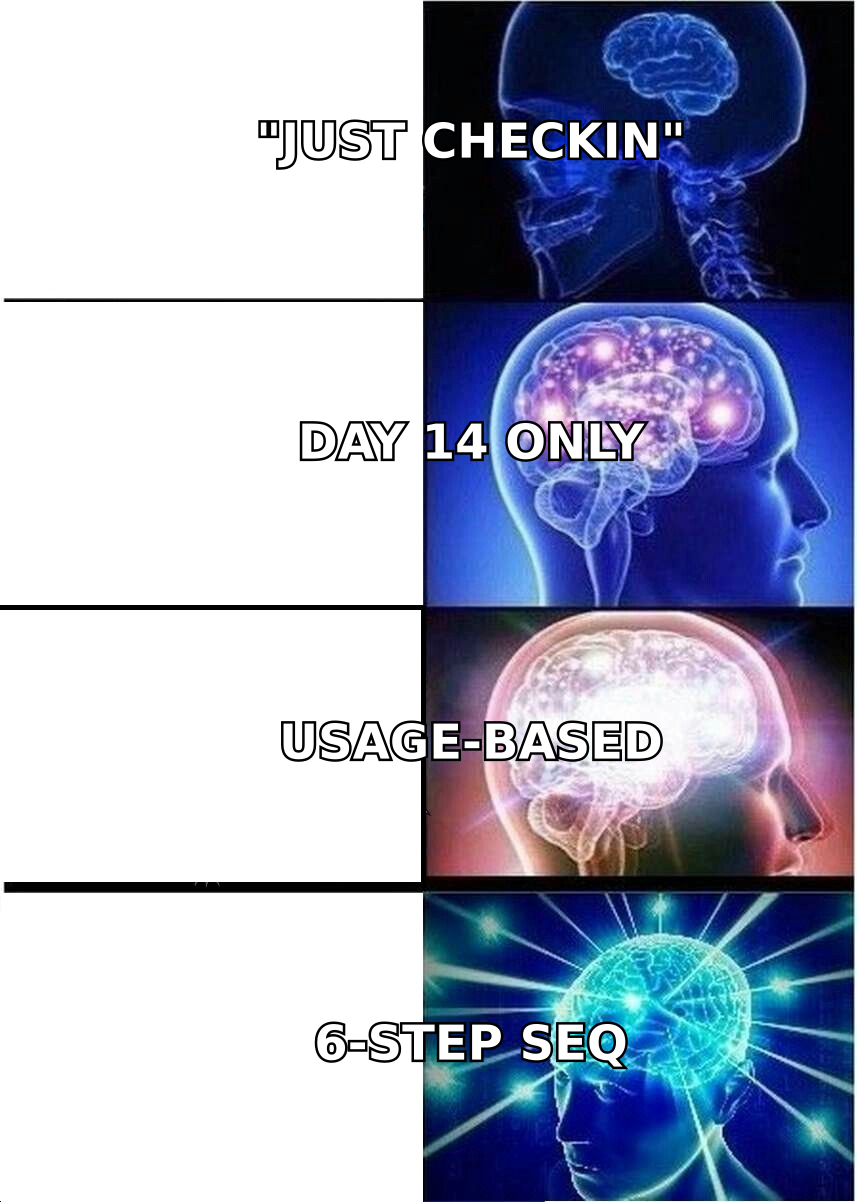
- Most free-trial users don't reject you — they stall. A single "just checking in" email on day 14 converts far worse than a sequenced, usage-aware follow-up.
- The highest-leverage window is 48 hours before expiry through 7 days after, not the day the trial dies.
- Segment by behavior, not by date: power users, partial activators, and ghosts each need a different email.
- Six emails over 21 days beats three emails over 5 days in almost every SaaS benchmark you'll find — provided each one carries a distinct job.
- Bad contact data quietly kills trial follow-up. If the trial signup used a personal alias or a role address, you need a verified work email before the sequence even starts.
What Is a Follow Up Email After a Free Trial?#
A follow up email after free trial is any message you send to a user whose trial is ending, has just ended, or has gone dormant mid-trial — with the goal of converting them to a paid plan, restarting the trial, or getting an honest "no."
That last part matters more than people admit. A clean "no, we picked a competitor" is worth more than three months of silence, because it frees the seat, the CS time, and the sequence slot.
Here's the mental model: a free trial is a restaurant tasting menu. The customer sampled everything, and now the check is coming. If you say nothing, they walk out awkwardly. If you say "hope you enjoyed it!" they nod and leave. If you say "you went back for the short rib twice — want me to put it on the regular order?", you get a decision.
Most trial follow-up fails because it's the second one.
The four jobs a trial follow-up sequence must do#
- Remind — surface the expiry date before it happens, without sounding like a billing bot.
- Prove value — show the user what they actually did in the product, using their own numbers.
- Remove friction — kill the specific objection blocking them (price, migration, buy-in, security review).
- Force a decision — give a clean, low-pressure exit so silent leads self-identify.
If an email in your sequence doesn't own one of those four jobs, delete it. Sending more email is not a strategy; sending differently-jobbed email is.
When Should You Send Trial Follow-Up Emails?#
Send the first one before the trial ends — day 3 of a 14-day trial, not day 13. Then keep going for at least two weeks after expiry.
The single most common mistake is treating the expiry date as the start of the conversation. By then, the user has either already decided or already forgotten you exist. Both are hard to reverse with one email.
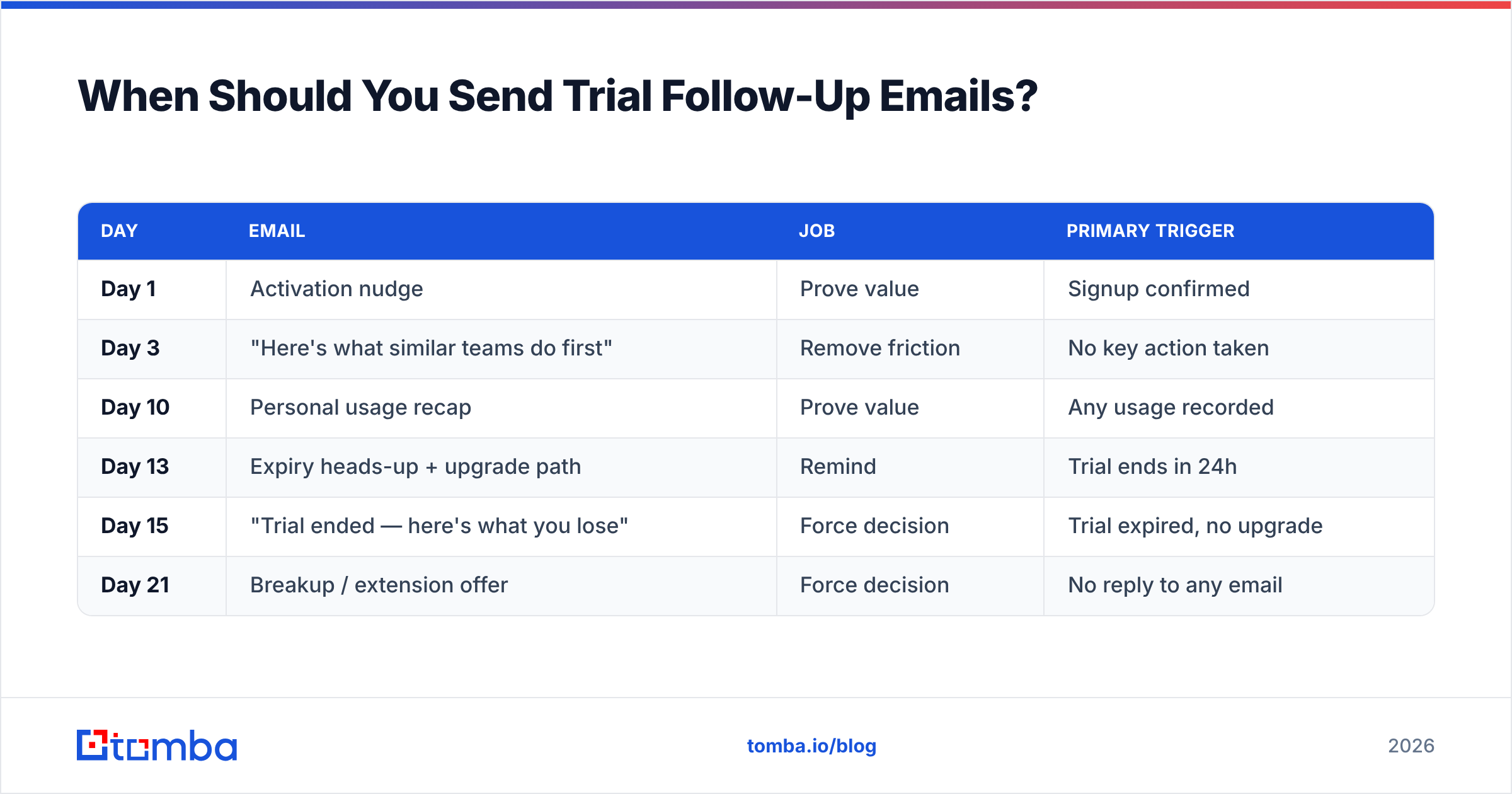
Here's a timing structure that works for a standard 14-day SaaS trial:
| Day | Job | Primary trigger | |
|---|---|---|---|
| Day 1 | Activation nudge | Prove value | Signup confirmed |
| Day 3 | "Here's what similar teams do first" | Remove friction | No key action taken |
| Day 10 | Personal usage recap | Prove value | Any usage recorded |
| Day 13 | Expiry heads-up + upgrade path | Remind | Trial ends in 24h |
| Day 15 | "Trial ended — here's what you lose" | Force decision | Trial expired, no upgrade |
| Day 21 | Breakup / extension offer | Force decision | No reply to any email |
Two notes on this table. First, day 10 and day 13 are separate on purpose — one is about them, one is about logistics, and merging them dilutes both. Second, day 21 is the highest-reply email in most sequences people publish, which tells you something uncomfortable: your prospects respond to endings, not to enthusiasm.
For 7-day trials, compress to days 1, 3, 6, 8, and 14. For 30-day enterprise trials, stretch it and add a mid-trial call invite around day 12.
How Do You Segment Trial Users Before Following Up?#
Segment on activation depth, not on plan size. Three buckets cover 90% of trials:
- Power users — hit the core action repeatedly, invited teammates, integrated something. They are buying; your job is to remove procurement friction, not to sell.
- Partial activators — logged in, did one or two things, never reached the aha moment. This is your biggest and most winnable group. They need a specific unblock, not a feature tour.
- Ghosts — signed up, logged in once or never. Most are tire-kickers. A meaningful minority got pulled into a fire drill and genuinely meant to come back.
Sending the same "your trial is ending" email to all three is why trial conversion averages look bad. The power user reads it as spam; the ghost reads it as irrelevant; only the partial activator is even remotely in-market for that message.
What each segment should actually receive#
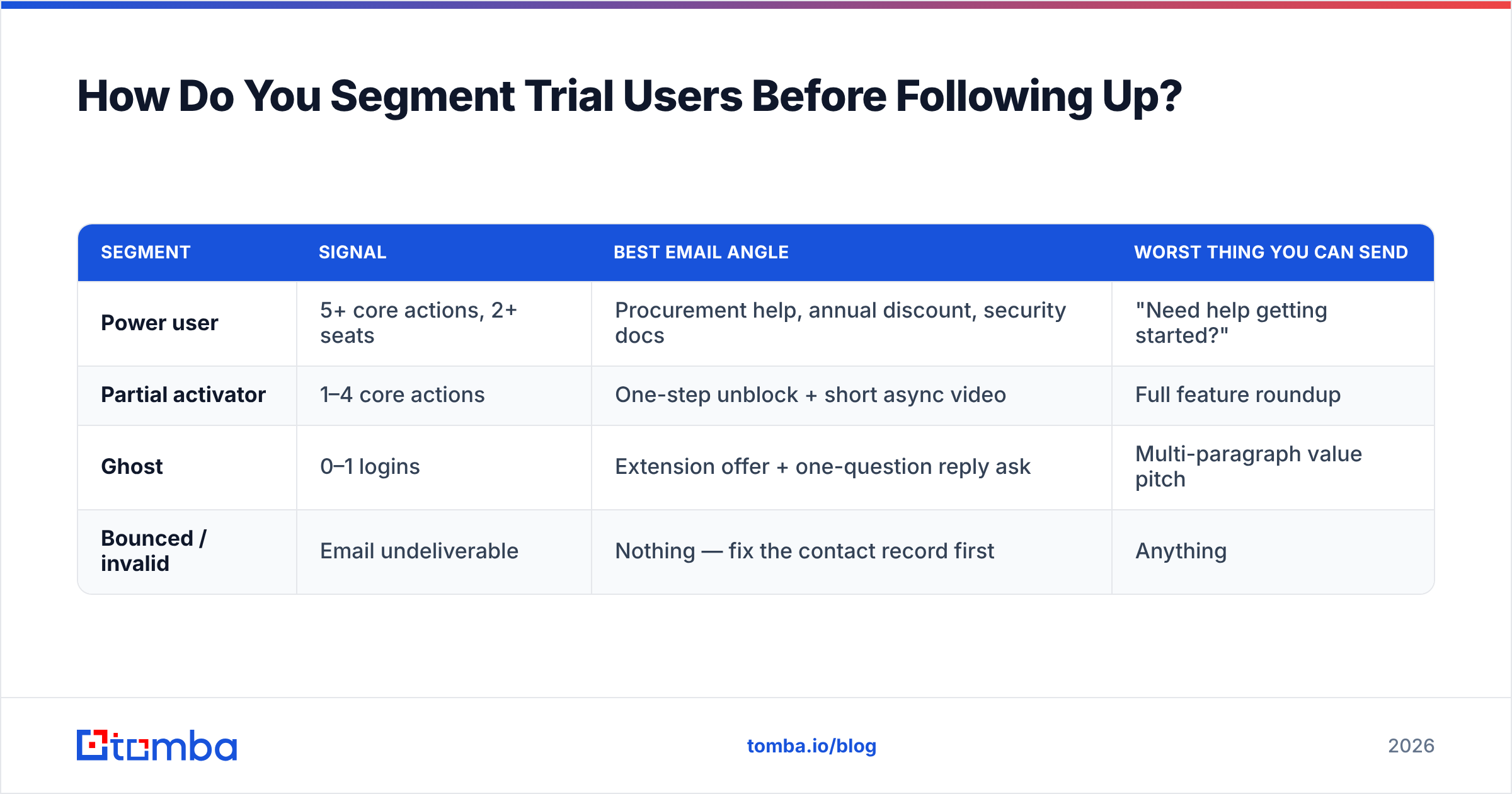
| Segment | Signal | Best email angle | Worst thing you can send |
|---|---|---|---|
| Power user | 5+ core actions, 2+ seats | Procurement help, annual discount, security docs | "Need help getting started?" |
| Partial activator | 1–4 core actions | One-step unblock + short async video | Full feature roundup |
| Ghost | 0–1 logins | Extension offer + one-question reply ask | Multi-paragraph value pitch |
| Bounced / invalid | Email undeliverable | Nothing — fix the contact record first | Anything |
That last row is the one teams skip. If a chunk of your trial list is bouncing, your "poor trial conversion" number is partly a data problem wearing a marketing costume. Run the list through an email verifier before you blame the copy — and if signups came in on personal Gmail addresses, use a domain search to find the work address where a purchase decision would actually be made.
What Should a Follow Up Email After Free Trial Actually Say?#
Short, specific, one ask. Here are templates for each stage — steal them, but replace every bracket with something only you could know about that account.
Template 1 — Day 10, usage recap (partial activator)#
Subject: you ran 42 searches — here's the part you missed
Hi [First name],
You ran 42 searches during your trial, mostly on [industry] domains. Nice.
One thing most people miss: bulk mode. Same job, 300 rows at a time instead of one. Takes about 90 seconds to set up — here's a 40-second clip: [link]
Trial ends [date]. Want me to extend it a week so you can test bulk properly?
[Your name]
Why it works: it opens with their data, names one specific unused feature, and the ask is an extension — which is easy to say yes to and re-opens the sales window.
Template 2 — Day 13, expiry heads-up (power user)#
Subject: [Company] trial ends tomorrow — plan question
Hi [First name],
Your trial ends tomorrow. Based on your usage — [X actions], [Y] teammates added — the [plan name] tier fits, not the tier above it. Didn't want you to over-buy.
Two things I can send if procurement needs them: SOC 2 report and DPA.
Want me to keep the workspace warm while that clears?
[Your name]
Why it works: it recommends down, which is the fastest credibility purchase in B2B, and it pre-empts the actual blocker for a converted power user — internal paperwork.
Template 3 — Day 15, post-expiry#
Subject: your workspace is paused (not deleted)
Hi [First name],
Your trial ended [date]. Your [N] saved lists and [N] enriched contacts are still there — we hold them for 30 days, then they're gone.
Restarting takes one click: [link]
If you went with something else, no hard feelings — just reply "went elsewhere" and I'll stop emailing.
[Your name]
Template 4 — Day 21, breakup#
Subject: closing your file
Hi [First name],
I'll assume the timing wasn't right and close this out.
If it was price, say "price." If it was a missing feature, say the feature. Either one helps me more than silence, and I'll leave you alone after.
[Your name]
The breakup email consistently outperforms everything before it. That's not because breakups are magic — it's because it's the first email in the sequence that asks for something the recipient can answer in one word. If you want more variations to test, our cold email templates library covers adjacent sequences.
Which Metrics Tell You the Sequence Is Working?#
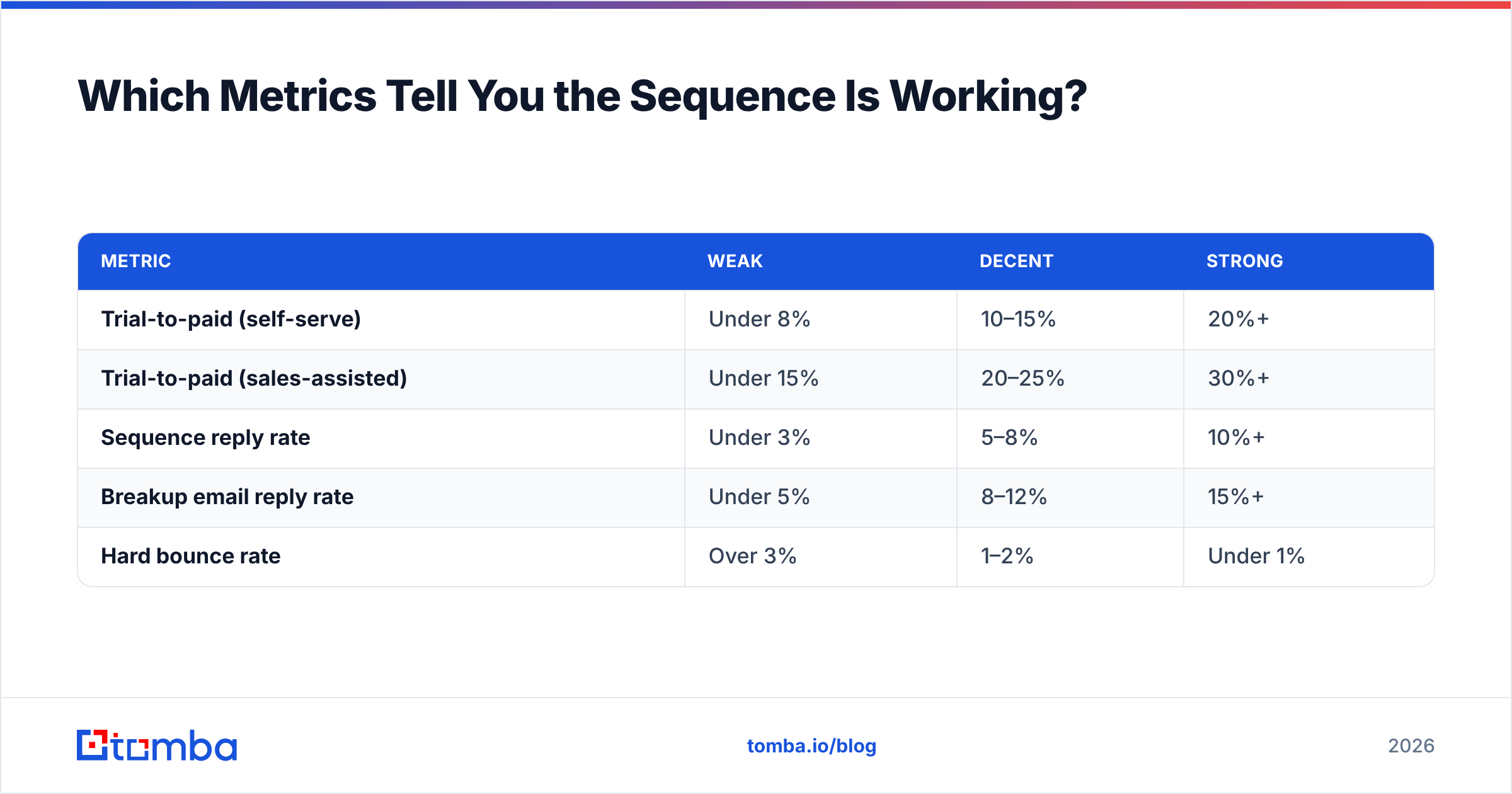
Reply rate first, conversion second, open rate never.
Open rate has been unreliable since Apple's Mail Privacy Protection started pre-fetching images, and any team still optimizing subject lines against open rate alone is tuning a broken instrument. Track these instead:
| Metric | Weak | Decent | Strong |
|---|---|---|---|
| Trial-to-paid (self-serve) | Under 8% | 10–15% | 20%+ |
| Trial-to-paid (sales-assisted) | Under 15% | 20–25% | 30%+ |
| Sequence reply rate | Under 3% | 5–8% | 10%+ |
| Breakup email reply rate | Under 5% | 8–12% | 15%+ |
| Hard bounce rate | Over 3% | 1–2% | Under 1% |
Those ranges vary by ACV and motion — a $40/month product and a $40,000/year product will not share a trial-to-paid number. Use them as a directional gut check, not a scorecard. G2 and HubSpot's research library publish updated SaaS benchmarks if you want something more specific to your segment.
The bounce rate row deserves attention. If more than 2% of your trial follow-ups hard bounce, you have two problems, not one: the immediate lost revenue, and the sender reputation damage that quietly reduces inbox placement for every other email you send, including product notifications and invoices.
What Are the Most Common Trial Follow-Up Mistakes?#
Sending only to the signup email. The person who starts a trial is frequently not the person who approves the spend. A developer signs up; a VP pays. If your sequence only ever touches the trial account's email address, you're negotiating with someone who has no budget authority. Identify the likely economic buyer at the same domain and run a light parallel thread.
Writing "just following up." It carries zero information and signals that you had nothing new to say. Every email needs a fresh reason to exist — a new data point, a new resource, a new deadline, or a new question.
Extending trials automatically and silently. A trial that never ends has no urgency, and urgency is the only free lever you have. Extend on request, name the new end date, and hold it.
Over-relying on discounts. Discounting a trial user who never activated doesn't fix anything — they didn't decline because of price, they declined because they never saw value. Discounts convert power users who are stuck on budget, and almost no one else.
Ignoring the catch-all problem. Plenty of B2B domains accept every address at the SMTP layer, so a naive check marks them valid and your email vanishes. A dedicated catch-all verifier separates real mailboxes from black holes before you burn a sequence slot on them.
Treating the sequence as marketing's job alone. The best-converting trial follow-ups read like they came from one person who looked at the account. Templated-but-personalized beats fully automated, every time, at any list size that matters.
How Do Data Quality and Follow-Up Interact?#
Directly and expensively. Your sequence is downstream of your contact record; if the record is wrong, nothing above matters.
Three failure modes show up over and over:
- Personal-domain signups. Someone trials on a Gmail address. You never learn the company, so you can't research the account, can't route it to the right rep, and can't reach the buyer. A reverse email lookup can often tie that address back to a person and employer.
- Role addresses.
info@,sales@,support@— these get low engagement and inflate your bounce and complaint rates. Replace them with a named contact. - Stale records. B2B email data decays roughly 20–30% per year through job changes alone. A trial list from six months ago is meaningfully worse than it was.
Enriching the trial record at signup — company, size, role, verified work email — is the cheapest upgrade available to most trial sequences, because it makes segmentation possible at all. You can't send the power-user email to the right person if you don't know who the right person is. Tools that handle data enrichment alongside verification let you do both in one pass instead of stitching two vendors together.
For teams evaluating vendors here, the field is crowded and mostly honest. Tomba pricing starts with a free tier at 25 searches per month, then $49/mo for Starter, $99/mo for Growth, and $249/mo for Pro. Competitors like BookYourData take a different approach — prepaid, pay-per-record credits with no monthly commitment — which suits teams buying a list once rather than enriching continuously. Neither model is wrong; they solve different purchasing problems, and plenty of teams run both.
What Does a Complete 21-Day Sequence Look Like?#
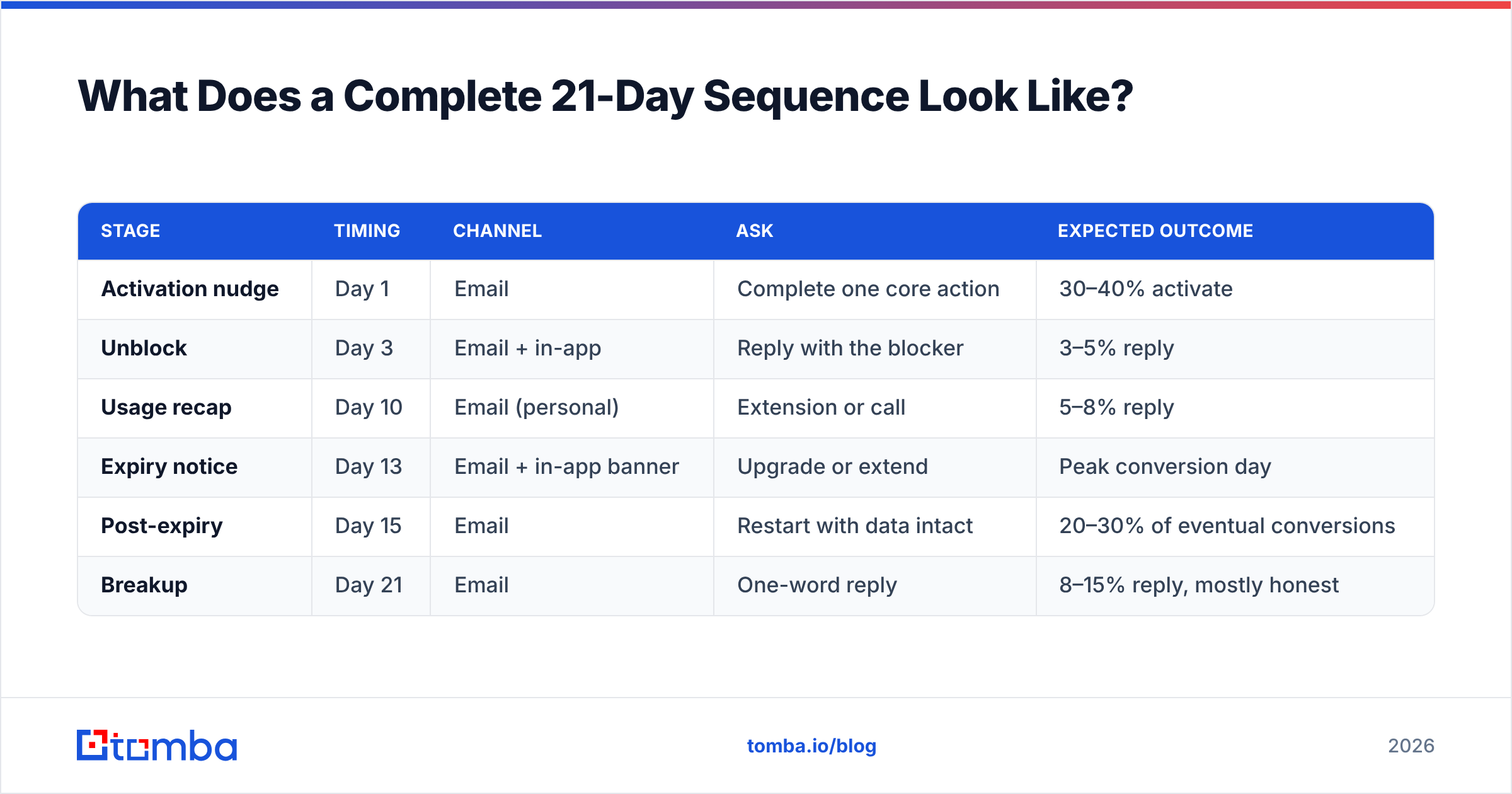
Putting it together, for a 14-day trial with a sales-assisted motion:
| Stage | Timing | Channel | Ask | Expected outcome |
|---|---|---|---|---|
| Activation nudge | Day 1 | Complete one core action | 30–40% activate | |
| Unblock | Day 3 | Email + in-app | Reply with the blocker | 3–5% reply |
| Usage recap | Day 10 | Email (personal) | Extension or call | 5–8% reply |
| Expiry notice | Day 13 | Email + in-app banner | Upgrade or extend | Peak conversion day |
| Post-expiry | Day 15 | Restart with data intact | 20–30% of eventual conversions | |
| Breakup | Day 21 | One-word reply | 8–15% reply, mostly honest |
Run it, measure reply rate per stage, and cut or rewrite any stage under 2%. Don't add a seventh email until all six are earning their slot — sequence length is the last thing to tune, not the first.
One more structural point: build the sequence so a reply at any stage pulls the contact out of automation and into a human thread. Nothing damages a warm trial lead faster than replying "yes, let's talk" and receiving the day-15 breakup on schedule.
Ready to Fix the Data Under Your Trial Sequence?#
Great trial follow-up copy sent to the wrong address converts at zero. Before you rewrite a single subject line, make sure you know who actually signed up, where they work, and which mailbox reaches the person with budget.
The Tomba Email Finder finds and verifies work emails by name and domain, so a personal-address trial signup becomes a routable, segmentable account record. Start on the free tier at 25 searches a month, or move to Starter at $49/mo when your trial volume justifies it — either way, your sequence stops guessing.
Related guides#
Ready to find emails that actually work?
Join 150,000+ professionals who stopped guessing and started sending. Free credits on signup — no credit card required.
Get the Tomba newsletter
Practical outbound tactics and product updates — once every two weeks.
About the author