Follow Up Email After Inquiry: Templates, Timing, Examples
An inquiry is the warmest signal you will ever get — and most teams waste it with a slow, generic reply. Here is the timing, structure, and nine templates that actually pull responses in 2026.
TL;DR
- A follow up email after inquiry is not cold email. The prospect already raised their hand, so speed and specificity beat persuasion tricks every time.
- Respond inside one hour if you can. Response quality decays fast — by day three you are competing with three vendors the buyer contacted after you.
- The winning structure is five parts: reference the exact inquiry, answer the actual question, add one piece of proof, propose one next step, keep it under 120 words.
- Plan four to six touches over 14 days across email and phone, then move the contact to a nurture track instead of deleting it.
- Track reply rate and time-to-first-response separately. Most teams have a timing problem, not a copywriting problem.
What Is a Follow Up Email After Inquiry?#
A follow up email after inquiry is the message you send to someone who has already contacted you — through a contact form, a pricing-page request, a demo booking, a live-chat drop-off, an event scan, or a reply to a marketing email — where your goal is to convert stated interest into a scheduled conversation.
Three things separate it from cold outreach:
- Permission already exists. You do not need to justify why you are in their inbox. Spending two sentences on that wastes the opening.
- Context is known. You have the form fields, the page they were on, or the question they typed. Ignoring that context is the single most common failure.
- The clock is running. An inquiry usually means the buyer is in an active evaluation window. They contacted you and, very likely, two or three competitors on the same afternoon.
That last point reframes everything. You are not persuading a stranger. You are racing for the first useful conversation.
Why Do Most Inquiry Follow-Ups Fail?#
Four failure modes account for nearly every dead inquiry thread.
- The delay. Sales teams routinely take a day or more to reply to inbound requests. The buyer has already booked a call with whoever answered first, and your email now arrives as noise.
- The generic auto-reply. "Thanks for your interest! A member of our team will be in touch shortly." This trains the buyer to expect nothing and gives them nothing to reply to. It is a receipt, not a follow-up.
- The wall of text. A three-paragraph company overview attached to a PDF deck. The buyer asked one question. Answer that question.
- The single attempt. One follow-up, no reply, contact abandoned. A meaningful share of closed inbound deals come from the second, third, or fourth touch — not because persistence is magic, but because people go on holiday, get pulled into quarter-end, and forget.
There is also a quieter failure: the inquiry arrives with a personal Gmail address or a half-filled form, nobody can identify the company, and the lead dies in a queue. That is a data problem, and it is solvable — contact enrichment turns a bare email or company domain into a role, a company size, and a routing decision before a human touches it.
How Fast Should You Respond to an Inquiry?#
Fast. Faster than feels necessary.
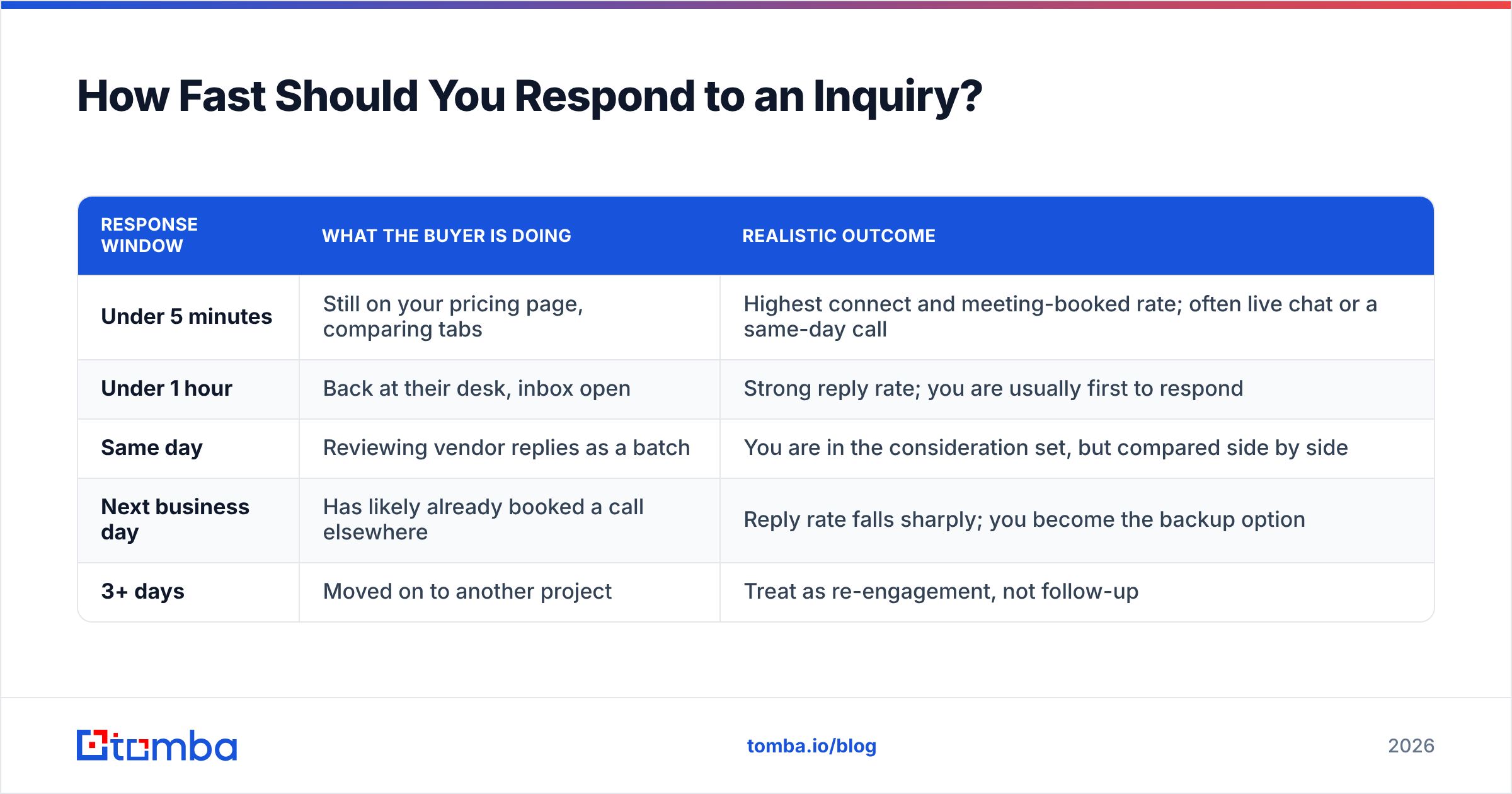
The pattern is consistent across sales research from HubSpot and Gartner's sales practice: the odds of connecting with and qualifying an inbound lead drop sharply within the first hour and keep falling for days afterward. The mechanism is not mysterious. Attention is highest while the buyer is still on your site with the tab open.
| Response window | What the buyer is doing | Realistic outcome |
|---|---|---|
| Under 5 minutes | Still on your pricing page, comparing tabs | Highest connect and meeting-booked rate; often live chat or a same-day call |
| Under 1 hour | Back at their desk, inbox open | Strong reply rate; you are usually first to respond |
| Same day | Reviewing vendor replies as a batch | You are in the consideration set, but compared side by side |
| Next business day | Has likely already booked a call elsewhere | Reply rate falls sharply; you become the backup option |
| 3+ days | Moved on to another project | Treat as re-engagement, not follow-up |
Two practical implications. First, route inquiries to a person, not a shared inbox nobody owns. Second, build one pre-written reply per inquiry type so speed does not depend on someone finding the right words at 4:50pm on a Friday.
What Should Go in the First Follow-Up?#
Keep it to five components. Anything else is padding.
- A specific reference to their inquiry — the form question, the page, the event, the exact words they used. This proves a human read it.
- A direct answer to what they asked — including a price range if they asked about pricing. Deflecting a pricing question to "let's get on a call" is the fastest way to lose a warm lead.
- One piece of relevant proof — a customer in their industry, a specific number, or a short link. One, not five.
- A single, low-friction next step — one clear ask. "Does Tuesday 2pm or Thursday 10am work for a 15-minute call?" beats "let me know if you'd like to chat."
- A short signature and no attachments — attachments on a first reply hurt deliverability and get filtered.
Target 80 to 120 words. If you cannot answer their question in 120 words, answer the part you can and say what the call will cover.
What Do Good Follow Up Emails After Inquiry Look Like?#
Nine templates covering the common inquiry types. Replace bracketed text; do not send them verbatim.
1. Pricing-page inquiry (send within the hour)
Subject: Re: your pricing question
Hi [Name] — you asked about pricing for [product] for a team of [size]. Plans for that size land between [$X] and [$Y] per month depending on [the one variable that matters]. No setup fee.
The one thing that usually changes the number is [variable]. Happy to give you an exact figure — is Tuesday 2pm or Wednesday 10am easier for 15 minutes?
[Name]
2. Demo request
Subject: Your demo — two times this week
Hi [Name], thanks for requesting a demo. So I can skip the generic tour: are you mainly looking at [use case A] or [use case B]?
Two slots open: [day/time] and [day/time]. Pick either and I'll send an invite with a short agenda.
3. Content download, no reply yet
Subject: The [guide title] you downloaded
Hi [Name] — you grabbed our guide on [topic]. Most people who read it are trying to fix [specific problem].
If that's you, [Customer] cut [metric] by [%] doing it. Worth 15 minutes to compare notes?
4. Second touch, no response (day 3)
Subject: Re: your pricing question
Hi [Name], bumping this in case it got buried. The short answer to your question was [one-line answer].
Still worth a conversation, or has this moved to next quarter?
5. Third touch with new value (day 7)
Subject: How [Similar Company] handled [problem]
Hi [Name] — no reply needed. [Similar Company] had the same [problem] you asked about and solved it by [approach]. Two-minute write-up here: [link].
If it's useful, reply and I'll walk you through how it maps to [their company].
6. Event or webinar inquiry
Subject: Following up from [Event]
Hi [Name], good to talk at [Event] about [specific thing they mentioned]. You said [their words].
Here's the [resource] I promised. Want to pick up where we left off next week?
7. Live-chat drop-off
Subject: Your question from chat
Hi [Name] — we got cut off in chat before I answered your question about [topic]. The answer: [answer].
Anything else I can settle over email?
8. Inquiry from a personal email address
Subject: Quick check before I send details
Hi [Name], thanks for reaching out about [topic]. So I send the right numbers — is this for [Company] and roughly [team size] users?
Reply with a yes and I'll send pricing plus a one-page comparison today.
9. Break-up / final touch (day 14)
Subject: Closing the loop
Hi [Name] — I'll stop following up on this. If [problem] comes back on the list, reply to this email and I'll pick it straight back up.
Either way, here's [resource] — genuinely useful whether or not you use us.
If you want a starting library to adapt rather than writing from a blank page, the cold email templates collection covers adjacent scenarios you can rework for inbound.
What Cadence Should You Use After an Inquiry?#
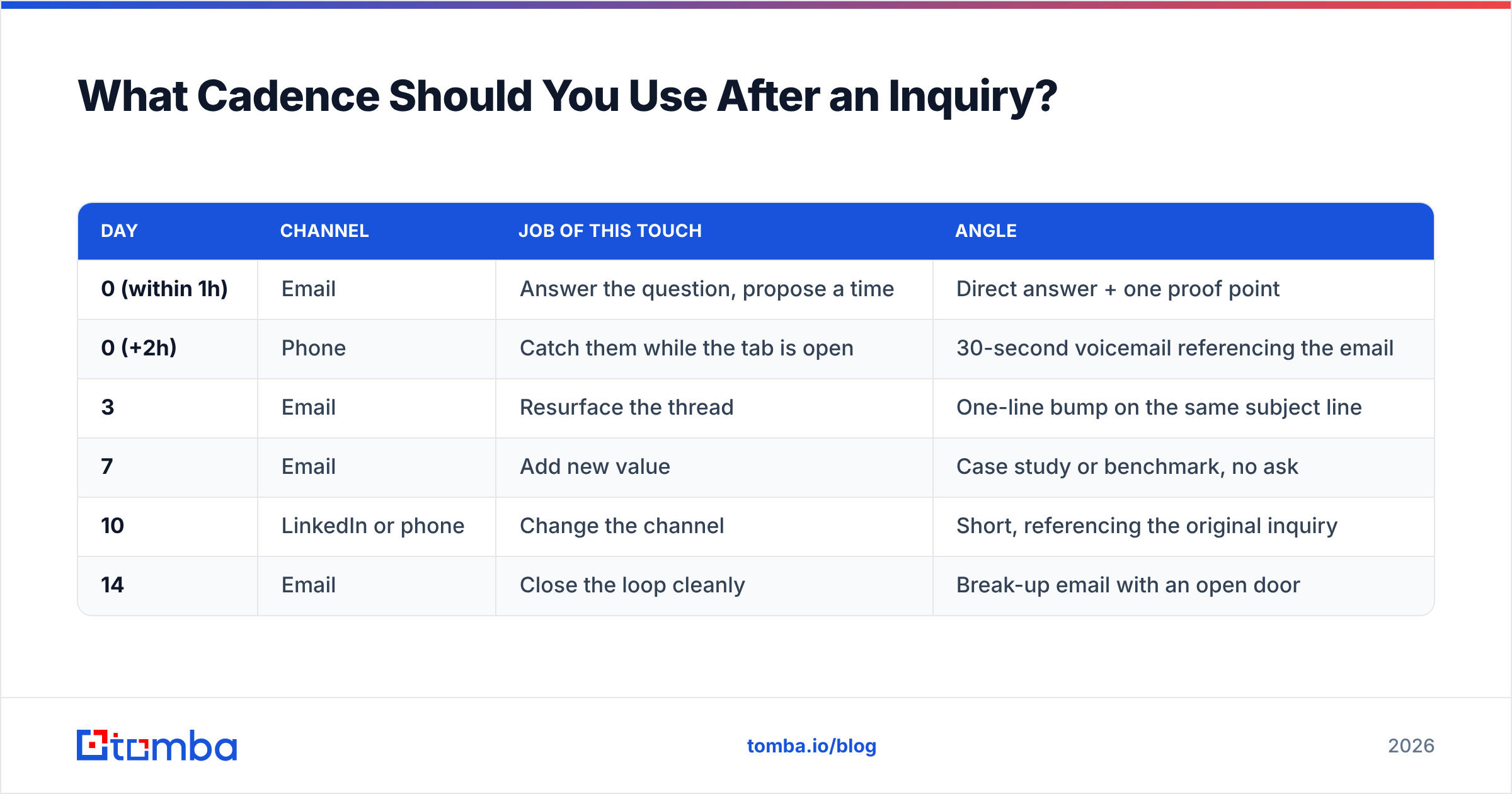
Four to six touches over 14 days, mixing channels. Each touch needs a distinct job — repeating "just checking in" four times is why people mute threads.
| Day | Channel | Job of this touch | Angle |
|---|---|---|---|
| 0 (within 1h) | Answer the question, propose a time | Direct answer + one proof point | |
| 0 (+2h) | Phone | Catch them while the tab is open | 30-second voicemail referencing the email |
| 3 | Resurface the thread | One-line bump on the same subject line | |
| 7 | Add new value | Case study or benchmark, no ask | |
| 10 | LinkedIn or phone | Change the channel | Short, referencing the original inquiry |
| 14 | Close the loop cleanly | Break-up email with an open door |
Two rules that matter more than the schedule itself. Keep the first three emails on the same thread so the buyer sees continuity. And stop immediately when they reply "not now" with a date — move them to a calendar reminder, not another sequence.
How Is This Different From Cold Outreach Follow-Up?#
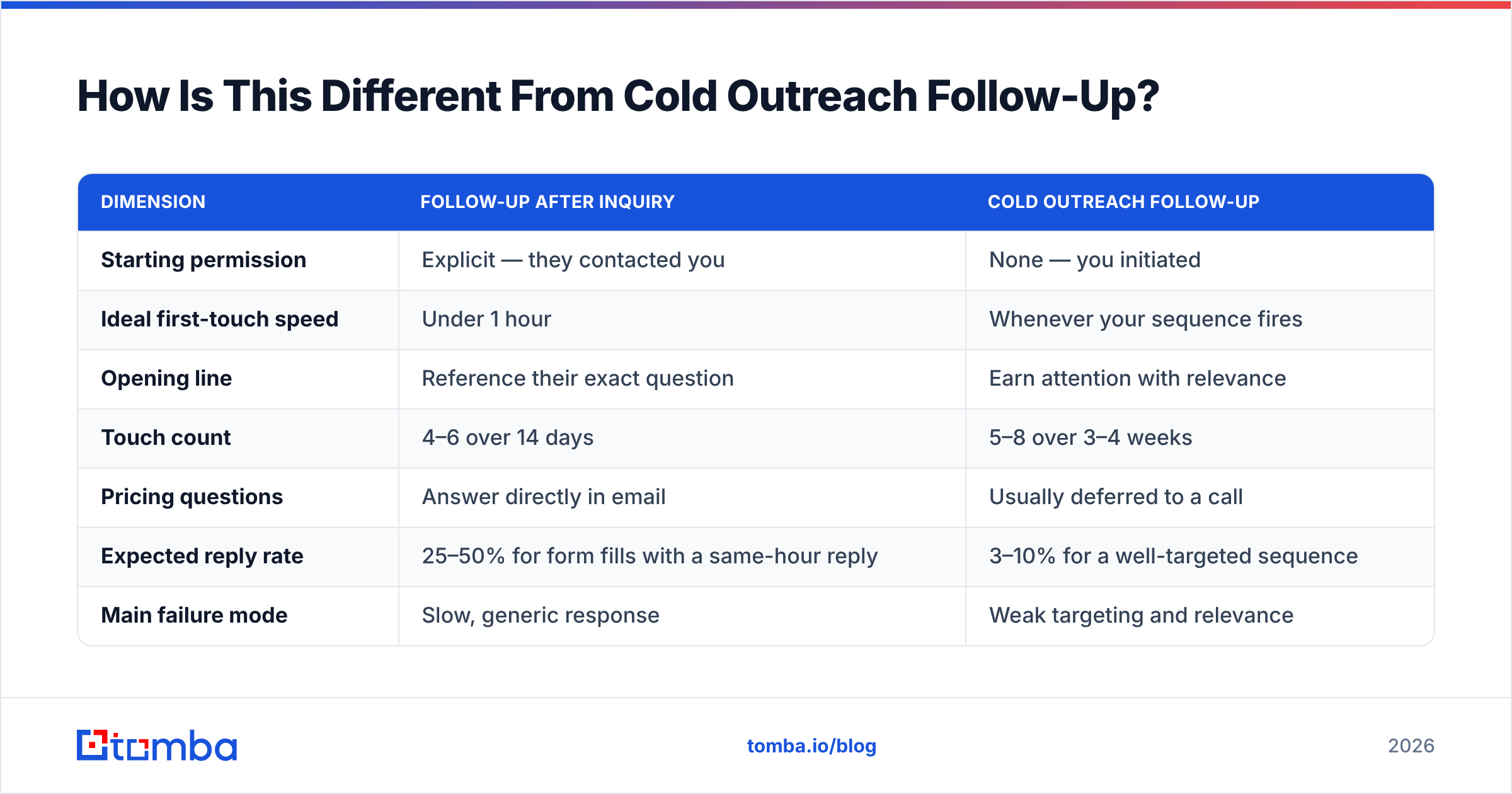
Treating an inquiry like cold email is the most common structural mistake. The two require different assumptions.
| Dimension | Follow-up after inquiry | Cold outreach follow-up |
|---|---|---|
| Starting permission | Explicit — they contacted you | None — you initiated |
| Ideal first-touch speed | Under 1 hour | Whenever your sequence fires |
| Opening line | Reference their exact question | Earn attention with relevance |
| Touch count | 4–6 over 14 days | 5–8 over 3–4 weeks |
| Pricing questions | Answer directly in email | Usually deferred to a call |
| Expected reply rate | 25–50% for form fills with a same-hour reply | 3–10% for a well-targeted sequence |
| Main failure mode | Slow, generic response | Weak targeting and relevance |
| Data need | Enrich and verify the submitted address | Find and verify addresses from scratch |
That last row is worth expanding. Inbound forms produce typos, role aliases, and disposable addresses at a surprising rate. Running submissions through an email verifier before they enter a sequence protects your sender reputation — because a bounce from a mistyped form fill damages your domain exactly the same way a bad cold list does.
How Do You Measure Whether Your Follow-Ups Work?#
Track four numbers, and separate them so you fix the right problem.
- Median time to first response. Measured in minutes, not "same day." If this is above two hours, fix it before touching your copy.
- Reply rate on touch one. Anything under 25% on a genuine form-fill inquiry points at a relevance problem — usually a template that ignores what they asked.
- Meetings booked per 100 inquiries. The number your revenue actually depends on.
- Touch number at conversion. If most meetings come from touches three and four, cutting your cadence to two touches is quietly deleting pipeline. If nothing ever converts after touch four, stop at four.
Benchmarks vary enormously by industry and inquiry type, so weight your own historical data over any published average. Peer reviews on G2 are useful for judging which tools actually surface these metrics without a custom report build. For definitions and how to calculate them consistently across your team, the response rate entry in the B2B glossary is a reasonable reference point.
What Should You Automate and What Should Stay Manual?#
Automate the plumbing, keep the first sentence human.
Automate: routing to an owner, enrichment of the submitted email, address verification, reminder timing, the day-7 and day-14 touches, and logging into your CRM. Salesforce, HubSpot, and Pipedrive all handle the workflow side; Salesforce's sales resources cover the routing patterns in depth.
Keep manual: the specific reference to their inquiry in touch one, the answer to their actual question, and any reply after they respond. The moment a buyer replies, sequences should stop and a human should take over.
The gap most teams miss sits between those two lists — the enrichment step. A form fill with just "name + email" cannot be routed intelligently or personalized quickly. Resolving that email to a company, a role, and a headcount takes milliseconds through an API and changes what your first sentence can say.
Where Tomba Fits#
If your inquiry follow-up stalls because the contact data is thin — personal Gmail addresses, missing company context, unreachable stakeholders, or forms that only capture one person from a five-person buying committee — start with the Tomba Email Finder. It resolves names and domains into verified professional addresses so you can reach the rest of the committee, not just the person who filled the form.
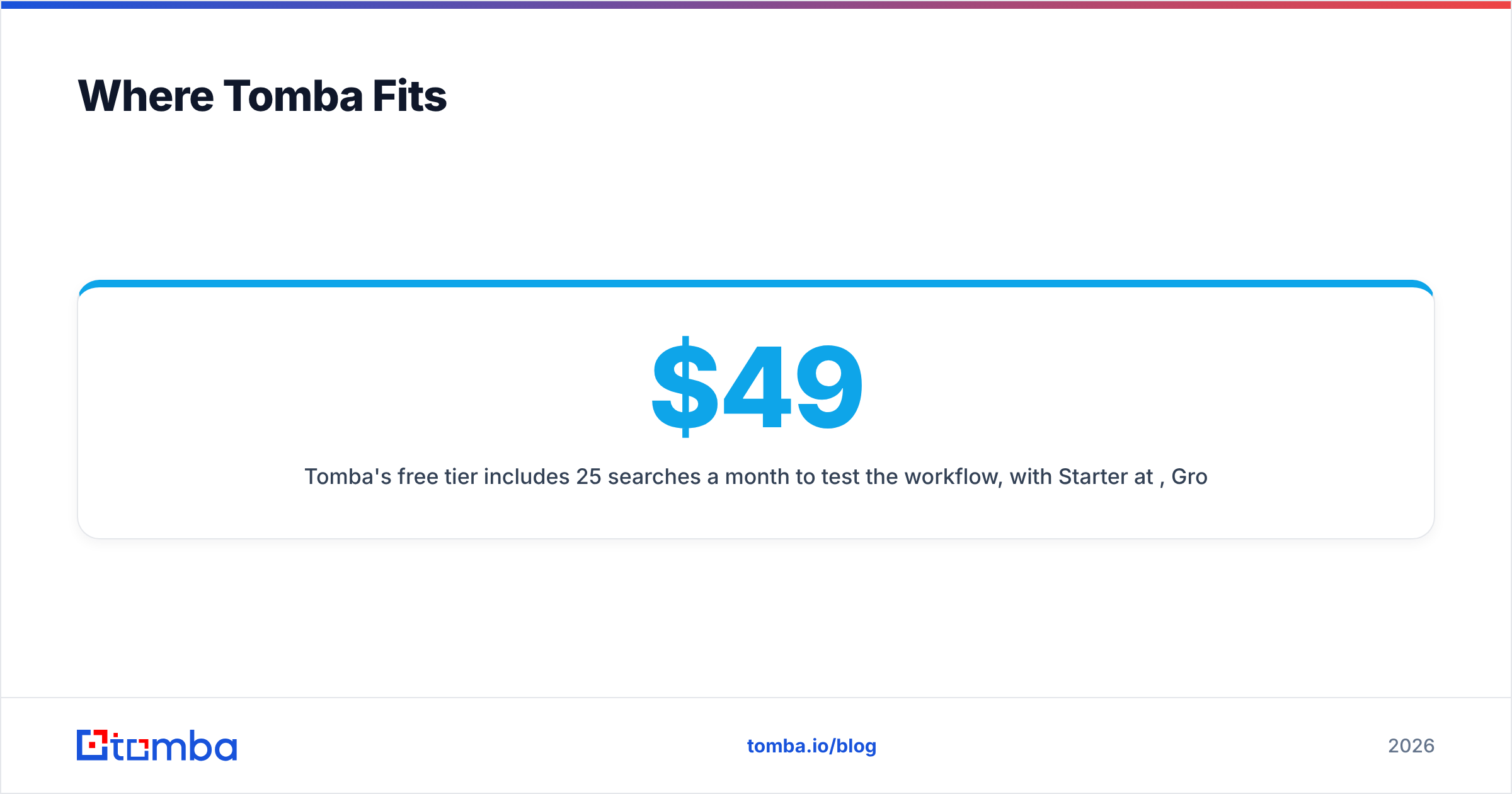
Tomba's free tier includes 25 searches a month to test the workflow, with Starter at $49/mo, Growth at $99/mo, and Pro at $249/mo as volume grows; full Tomba pricing is on the site. Pair it with the email verifier so every address entering your follow-up sequence is deliverable before the first send — and let your reps spend their minutes writing the one sentence that actually earns the reply.
Related guides#
Ready to find emails that actually work?
Join 150,000+ professionals who stopped guessing and started sending. Free credits on signup — no credit card required.
Get the Tomba newsletter
Practical outbound tactics and product updates — once every two weeks.
About the author