Follow Up Email After No Response From Client: 2026 Playbook
Most client deals die in the silence after the first email. Here are the timing rules, 9 tested templates, and the exit script that gets a reply — or a clean no.
TL;DR
- Silence usually means your email lost a priority contest, not that the client hates you. Roughly 70% of unanswered threads never get a second touch — that's the cheapest revenue on your desk.
- Send follow-up #1 at 48-72 hours, #2 at day 5-7, #3 at day 12-14, then a breakup at day 21. Four touches total for a warm client; stop after that.
- Never write "just following up." Every follow-up must add a new reason to reply: a new fact, a new asset, a shorter ask, or an exit.
- Reply in the same thread for touches 1-2, then start a fresh thread with a new subject line for touch 3. Threads go stale in crowded inboxes.
- If nothing lands, check the address before you blame the copy. A dead or role-based inbox produces the exact same silence as disinterest.
Why does a client go silent after a good conversation?#
Because your email lost a triage contest it never knew it entered.
The average knowledge worker handles well over a hundred emails a day. Your proposal is competing with payroll, a legal review, a fire in production, and their own boss's request. When your message arrives at 4:47 PM on a Thursday and requires 20 minutes of thought, it gets archived-by-scroll. That is not rejection. That is queue mechanics.
The three most common real reasons for silence, in order of frequency:
- Your email required too much work to answer. You asked five questions, attached a 14-page PDF, and proposed three meeting times. The cognitive cost of replying exceeded the cost of ignoring.
- The decision moved without you. Budget got frozen, a champion left, a competing priority ate the quarter. Your contact is embarrassed to say so, so they say nothing.
- The email never arrived. Spam filtering, a typo'd address, a departed employee's inbox, or a catch-all domain that swallows mail without bouncing. This is more common than most reps believe.
Only after those three do you get to "they aren't interested." Which means your follow-up sequence should be designed to diagnose, not to plead.
When should you send a follow up email after no response from client?#
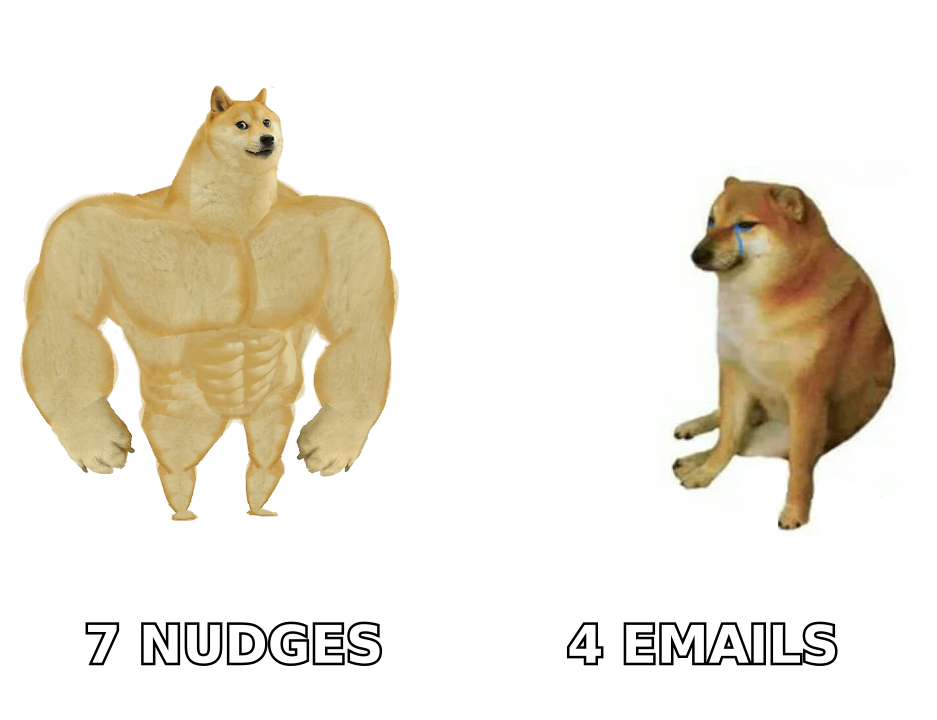
Timing rules beat intuition. Here's the cadence that works for a warm client — someone who already replied at least once, took a call, or requested a proposal.
| Touch | Timing | Channel | Goal | Ask size |
|---|---|---|---|---|
| Follow-up 1 | 48-72 hours | Reply in thread | Surface the email again | Yes/no question |
| Follow-up 2 | Day 5-7 | Reply in thread | Add new value (case study, benchmark) | One sentence reply |
| Follow-up 3 | Day 12-14 | New thread, new subject | Reframe the problem | Pick one of two options |
| Follow-up 4 | Day 21 | New thread | Breakup / permission to close | Reply "no" and I'll stop |
| Optional revive | Day 90 | New thread | Trigger-based re-entry | Fresh, low-stakes ask |
Three timing details that move reply rates more than copy does:
- Tuesday-Thursday, 7-9 AM local time to the recipient. Not your time zone. If you're selling across continents, schedule sends rather than firing at your own convenience.
- Never follow up the same day. A same-day bump reads as anxiety and trains the client that your urgency is manufactured.
- Stop the sequence the second they reply. Automation that keeps firing after a human answers is the fastest way to lose a warm deal.
For cold prospects who have never replied, the spacing stretches: 3 days, 7 days, 14 days, then out. Cold sequences also need clean sending infrastructure — a warm client will forgive a mediocre subject line, a cold one won't forgive landing in Promotions. If you run cold volume, check your email deliverability fundamentals before you blame the copy.
What makes a follow-up email actually get a reply?#
Four things, in order of impact.
- A new reason to open. "Following up" is not a reason. "The benchmark data you asked about" is. Every touch must carry something the previous one didn't — a number, an asset, a customer story, or a change in your offer.
- A single, tiny ask. The best follow-up ends with a question that can be answered in one word. "Is this still on the table for Q3?" beats "Let me know your thoughts and availability for a call next week."
- An explicit out. Giving the client permission to say no raises reply rates because it removes the social cost of disappointing you. "If the timing's wrong, just say 'not now' and I'll circle back in the fall" gets answered.
- Length under 90 words. Follow-ups are read on phones between meetings. If it doesn't fit on one screen without scrolling, it gets deferred, and deferred means dead.
What kills replies: guilt-tripping ("I've reached out three times"), fake urgency ("this price expires Friday" when it doesn't), passive-aggression ("I assume you're no longer interested"), and the dreaded "checking in" with no payload.
Which follow-up templates work in 2026?#
Nine templates, mapped to the situation you're actually in. Swap the brackets, keep the structure.
1. The 48-hour bump (reply in thread)
Subject: Re: [original subject]
Hi [Name] — putting this back at the top of your inbox in case it slipped.
One question: is [project] still targeting a [Q3] start, or has the timeline moved?
Either answer helps me plan on my side.
2. The value-add (day 5-7)
Subject: Re: [original subject]
Hi [Name] — no pressure on the proposal. Separately, [similar company] just published how they cut [metric] by [X%] doing roughly what we discussed. Two-minute read: [link]
Worth 15 minutes to walk through how it maps to your setup?
3. The reframe (day 12-14, new subject)
Subject: A cheaper way to test [outcome]
Hi [Name] — I may have proposed too big a first step.
Instead of the full [engagement], we could run a [2-week pilot on one team] for [$X]. If it doesn't move [metric], you walk.
Want the one-pager?
4. The internal-blocker probe
Subject: Who else should be on this?
Hi [Name] — if this needs sign-off from [Finance/IT/Legal], happy to put together the two things they always ask for: [security doc] and [ROI model].
Should I send those, or is the holdup somewhere else?
5. The trigger-based re-entry
Subject: Saw the [funding round / new hire / product launch]
Congrats on [event]. Usually [that milestone] means [predictable pain] shows up within a quarter.
Still worth a conversation, or is that owned elsewhere now?
6. The post-meeting silence
Subject: Re: [meeting name] — next step?
Hi [Name] — on our call you mentioned [specific quote]. I built [the thing] around exactly that: [one-line summary].
Do you want it on a call, or should I just send it over?
7. The proposal chaser
Subject: Re: Proposal — one question
Hi [Name] — rather than resend the proposal: is the sticking point the price, the timeline, or the scope?
Reply with one word and I'll rework it around that.
8. The breakup (day 21)
Subject: Closing the loop on [project]
Hi [Name] — I don't want to keep landing in your inbox, so this is my last note on this.
I'll assume the timing isn't right and close the file. If that's wrong, one line back and I'll pick it straight up.
Either way, good luck with [initiative].
9. The 90-day revive
Subject: Different angle on [problem]
Hi [Name] — we spoke back in [month] about [problem]. Since then we shipped [new capability], which changes the [cost/effort] math a lot.
Worth another look, or should I stop pinging you on this one?
Template 8 is the highest-converting message in most sequences, which surprises people every time. Breakup emails work because they convert silence into a decision — and about a fifth of the replies they generate are "wait, don't close it."
Is it the copy, or is the email address dead?#
Run this diagnostic before you rewrite another template.
If you're getting zero replies across an entire segment — not low replies, zero — the problem is usually mechanical, not creative. Three checks, in order:
- Did it deliver? Open tracking is unreliable in 2026 thanks to privacy proxies, but hard bounces and total absence of any engagement across a batch are meaningful signals. Run a list through an email verifier before assuming your copy failed.
- Is it a catch-all domain? Catch-all servers accept everything and bounce nothing, so a wrong address looks identical to a right one. This is the single most common cause of "my emails vanish into nothing." A catch-all verifier resolves the ambiguity that standard SMTP checks can't.
- Is the contact still there? B2B contact data decays roughly 25-30% per year through job changes alone. Your champion from January may not have an inbox in August. Re-run key accounts through a domain search to find the current owner of that role.
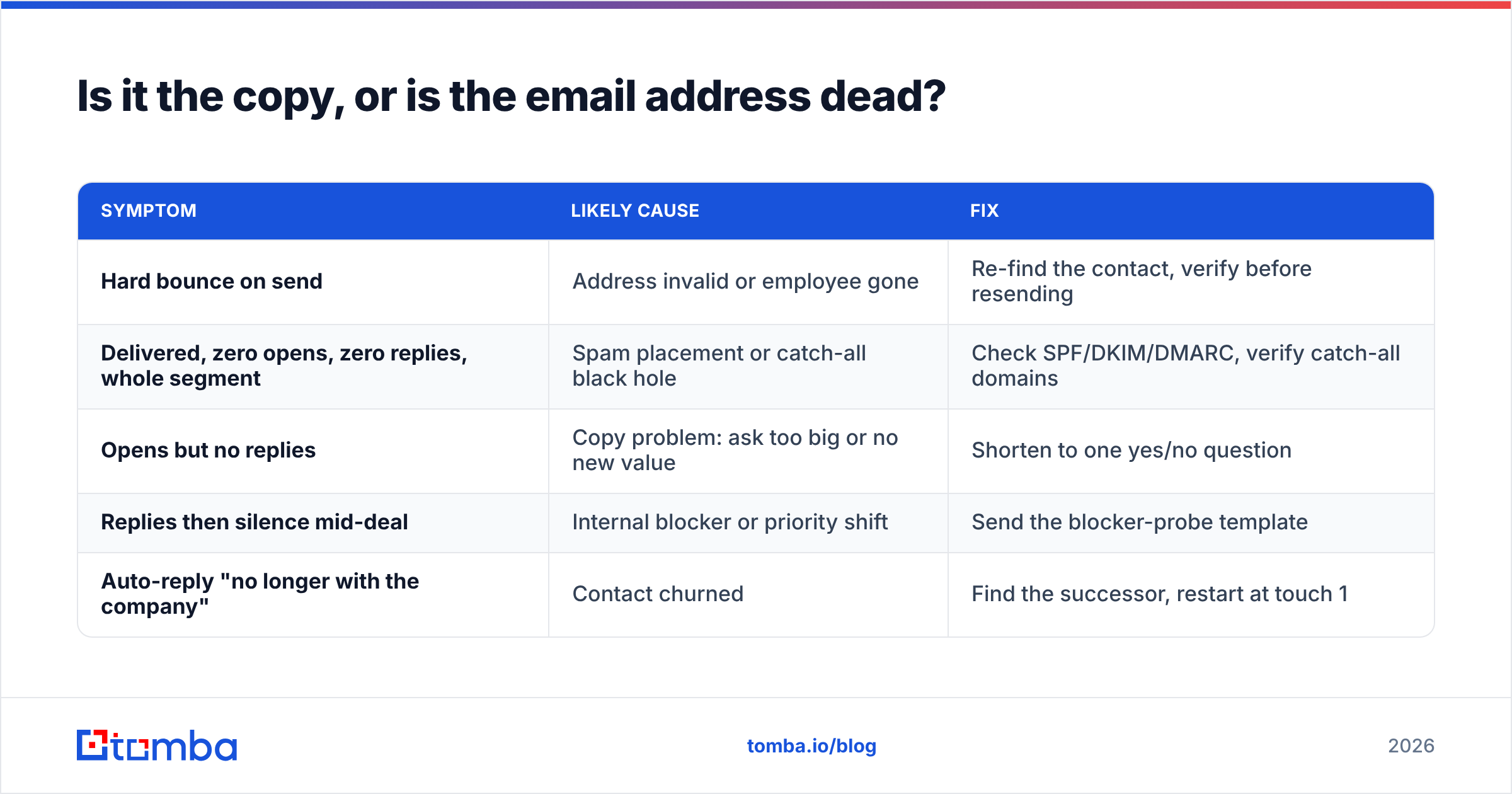
| Symptom | Likely cause | Fix |
|---|---|---|
| Hard bounce on send | Address invalid or employee gone | Re-find the contact, verify before resending |
| Delivered, zero opens, zero replies, whole segment | Spam placement or catch-all black hole | Check SPF/DKIM/DMARC, verify catch-all domains |
| Opens but no replies | Copy problem: ask too big or no new value | Shorten to one yes/no question |
| Replies then silence mid-deal | Internal blocker or priority shift | Send the blocker-probe template |
| Auto-reply "no longer with the company" | Contact churned | Find the successor, restart at touch 1 |
Getting this order right saves weeks. Rewriting subject lines when the real problem is a dead mailbox is the most expensive mistake in outbound.
How many follow-ups is too many?#
Four to a warm client. Six to a cold prospect. Then stop and let time do the work.
The data across cold outreach studies is consistent: reply rates climb through touch three or four, plateau, then contribute mostly negative sentiment. HubSpot's sales research and most sequence-tool benchmarks land in the same band — the marginal value of touch seven is near zero, and the reputational cost is real.
More useful than raw count is the new-information test: can you name what this email adds that the previous one didn't? If the answer is "it reminds them," don't send it. Wait for a trigger — funding, a hire, a product launch, a competitor announcement — and re-enter with template 5 or 9.
Also respect the channel mix. Four emails plus two LinkedIn touches plus a call reads as thorough. Seven emails alone reads as automated. If you're layering channels, a solid LinkedIn outreach rhythm alongside email carries more weight than adding email volume.
What should you measure to know it's working?#
Track four numbers per sequence, not per email:
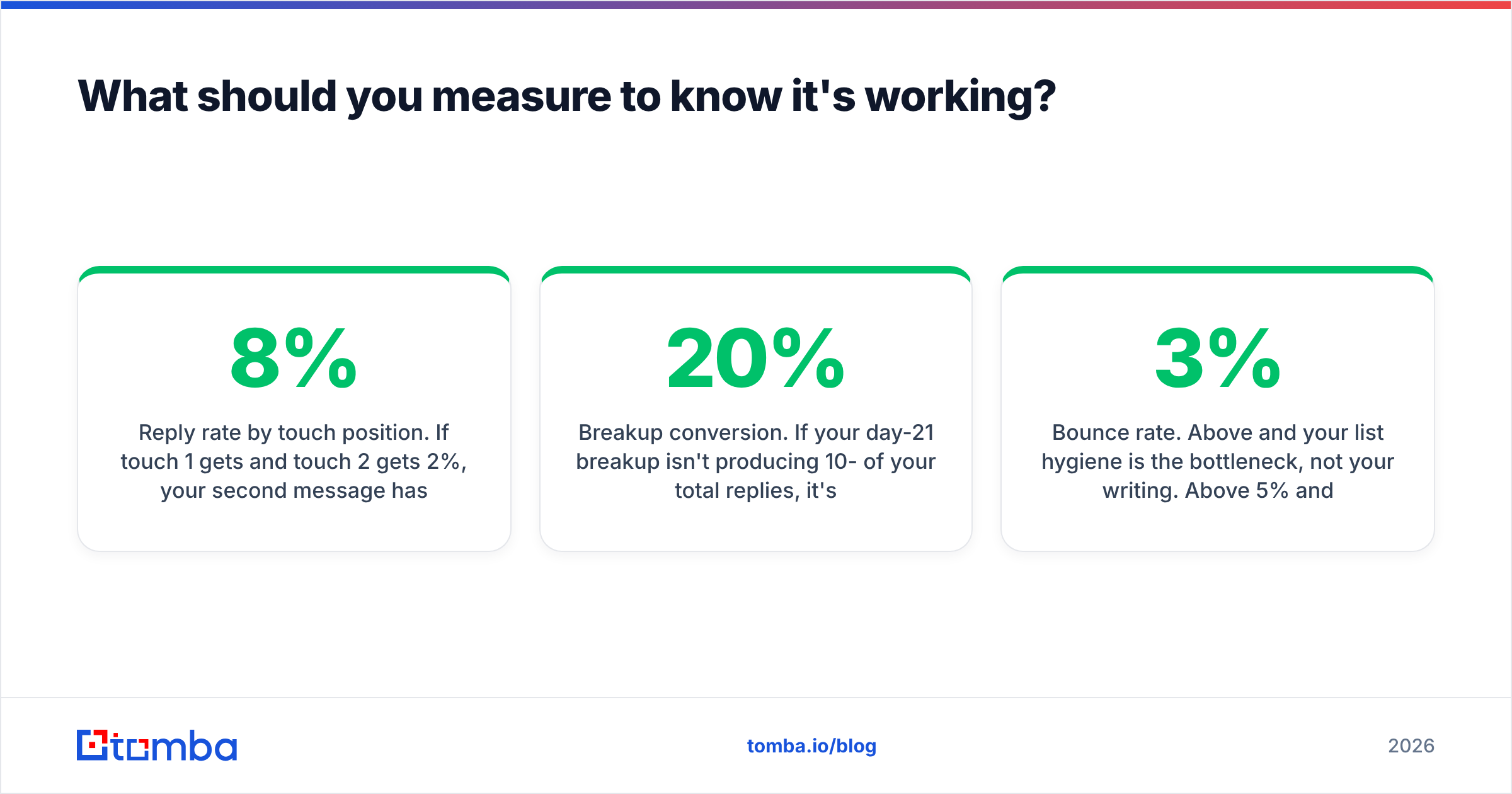
- Reply rate by touch position. If touch 1 gets 8% and touch 2 gets 2%, your second message has no new value. Rewrite it, don't add a third.
- Positive-to-negative reply ratio. A sequence that generates replies but they're all "please stop" is worse than silence — it damages sender reputation over time.
- Breakup conversion. If your day-21 breakup isn't producing 10-20% of your total replies, it's too soft or too passive-aggressive. Rewrite it neutral.
- Bounce rate. Above 3% and your list hygiene is the bottleneck, not your writing. Above 5% and mailbox providers start throttling you regardless of content quality.
Log these in your CRM at the sequence level. Per-email stats hide the pattern; sequence-level stats show you exactly which touch to fix. G2's sales engagement category is a reasonable place to compare tools if your current stack can't report at that grain.
What's the fastest way to fix a silent pipeline this week?#
Do these four things, in this order:
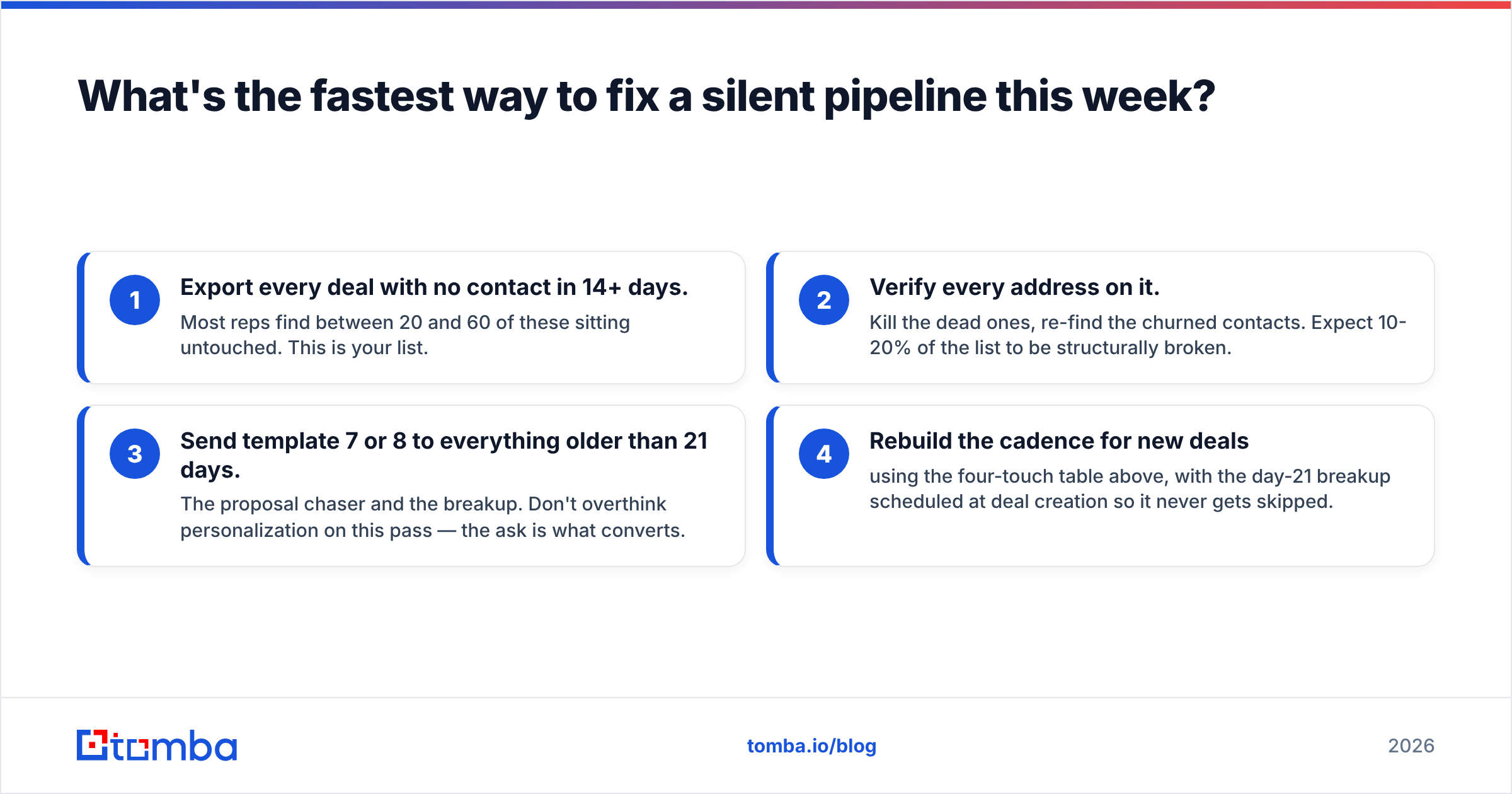
- Export every deal with no contact in 14+ days. Most reps find between 20 and 60 of these sitting untouched. This is your list.
- Verify every address on it. Kill the dead ones, re-find the churned contacts. Expect 10-20% of the list to be structurally broken.
- Send template 7 or 8 to everything older than 21 days. The proposal chaser and the breakup. Don't overthink personalization on this pass — the ask is what converts.
- Rebuild the cadence for new deals using the four-touch table above, with the day-21 breakup scheduled at deal creation so it never gets skipped.
Step 2 is the one people skip and the one that changes the numbers most. If you're finding that a chunk of your contacts are stale or that you're re-hunting the same emails by hand every quarter, that's a tooling problem, not a discipline problem. Tomba's Email Finder finds and verifies current work addresses by name and domain, so your follow-up sequence starts from a live inbox instead of a guess — free tier covers 25 searches a month, and paid plans start at $49/mo on the Starter tier if you need volume. Full Tomba pricing is public if you want to size it against your list.
Fix the address first. Then fix the copy. In that order, a silent pipeline usually isn't silent for long.
Related guides#
Ready to find emails that actually work?
Join 150,000+ professionals who stopped guessing and started sending. Free credits on signup — no credit card required.
Get the Tomba newsletter
Practical outbound tactics and product updates — once every two weeks.
About the author