Follow Up Email After Rejection: Templates That Reopen Doors
A rejection is rarely a permanent no. Here is how to write a follow up email after rejection that keeps the relationship alive, plus timing rules, templates, and the mistakes that get you blocked.
TL;DR
- A rejection is a timestamp, not a verdict. Roughly a quarter of closed-lost B2B deals re-enter a buying cycle within 12 months, usually because budget, headcount, or the incumbent contract changed — not because your pitch improved.
- The single highest-value follow up email after rejection is the one you send within 24 hours: gracious, zero-pressure, and designed to extract why.
- Never re-pitch in the first message. Your only jobs are to close the loop cleanly, capture the reason, and earn permission to return on a specific date.
- Timing beats persuasion. Map the follow-up to the trigger that caused the no (contract renewal, fiscal year, headcount, tooling change) instead of an arbitrary 90-day nudge.
- Rejection follow-ups collapse when your contact leaves the company. Keep the account alive, not just the person — re-verify the address before every re-entry send.
What Counts as a "Rejection" in B2B Email?#
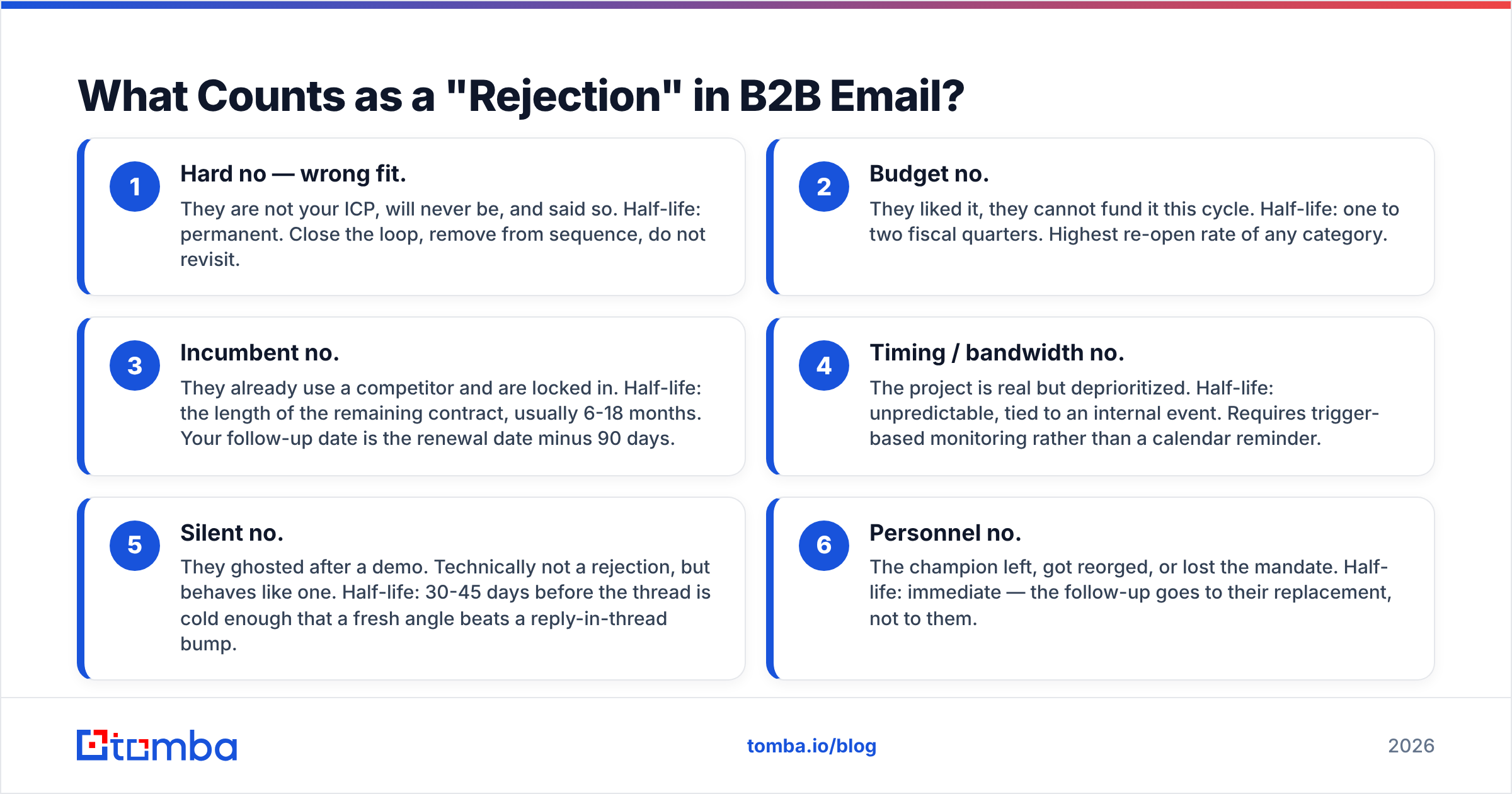
Not all no's are the same, and treating them identically is why most follow-up sequences read as tone-deaf. There are four distinct rejection types, and each one has a different half-life.
- Hard no — wrong fit. They are not your ICP, will never be, and said so. Half-life: permanent. Close the loop, remove from sequence, do not revisit.
- Budget no. They liked it, they cannot fund it this cycle. Half-life: one to two fiscal quarters. Highest re-open rate of any category.
- Incumbent no. They already use a competitor and are locked in. Half-life: the length of the remaining contract, usually 6-18 months. Your follow-up date is the renewal date minus 90 days.
- Timing / bandwidth no. The project is real but deprioritized. Half-life: unpredictable, tied to an internal event. Requires trigger-based monitoring rather than a calendar reminder.
- Silent no. They ghosted after a demo. Technically not a rejection, but behaves like one. Half-life: 30-45 days before the thread is cold enough that a fresh angle beats a reply-in-thread bump.
- Personnel no. The champion left, got reorged, or lost the mandate. Half-life: immediate — the follow-up goes to their replacement, not to them.
Sorting every closed-lost record into one of those six buckets is the entire job. Everything downstream — copy, timing, channel — is determined by the bucket. If your CRM only records "Closed Lost" with no reason field, you have no follow-up strategy; you have a mailing list.
Should You Send a Follow Up Email After Rejection at All?#
Yes — and the data on why is less about persuasion than about churn in the buyer's world. Gartner's B2B buying research has consistently found that a typical purchase involves 6-10 stakeholders, each bringing their own information, and that buying groups loop backwards through the journey rather than moving in a straight line. A no from one stakeholder at one moment says very little about the group's position six months later.
There is also a pure economics argument. You already paid the acquisition cost for this contact: research time, data credits, sequencing, and in many cases a demo. A closed-lost record with a known reason and a verified email is materially more valuable than a cold name from a list — you know their stack, their objection, and their calendar. Rebuying that context from scratch is the most expensive thing an outbound team does.
The failure mode is not following up. It is following up badly: a "just circling back" email with no new information, sent on a schedule the prospect can feel is automated. That does not just fail to convert — it teaches the buyer that your emails carry no signal, which poisons every future send.
What Should the First Follow-Up Say?#
Send it within 24 hours of the no. It has exactly three jobs, and re-pitching is not one of them.
Job 1 — accept the decision without friction. One sentence. No "I understand, but…" No "before you finalize…" A clean acceptance is what makes the next two jobs possible.
Job 2 — ask one diagnostic question. Not "can I ask why?" — too open, gets a polite non-answer. Ask a forced-choice question that is easy to answer in five words: "Was it mostly budget timing, or was the product missing something you needed?" People who will not write a paragraph will happily pick option A or B.
Job 3 — propose a specific return date and get a yes/no. "Would it be reasonable to check back in early Q1 when budgets reset?" A confirmed date converts your future email from an interruption into a kept promise.
Here is the shape:
Subject: Understood — one quick question
Hi Dana,
Appreciate the straight answer, that saves us both time. No pitch here.
To make sure I'm reading it right: was this mostly a budget-timing thing, or was there something the platform didn't cover that you needed?
And if it's the former — would it be unreasonable to check back in early January when the new budget lands?
Either way, thanks for the time on the call.
Sam
Word count: 71. Ask count: two, both binary. Pitch count: zero. That is the ratio to aim for. If you want variations to adapt, the cold email templates library has structures you can retrofit for post-rejection use, and a subject line tester is worth running on the re-entry email specifically — that is the one competing hardest for an open.
How Long Should You Wait Before Re-Engaging?#
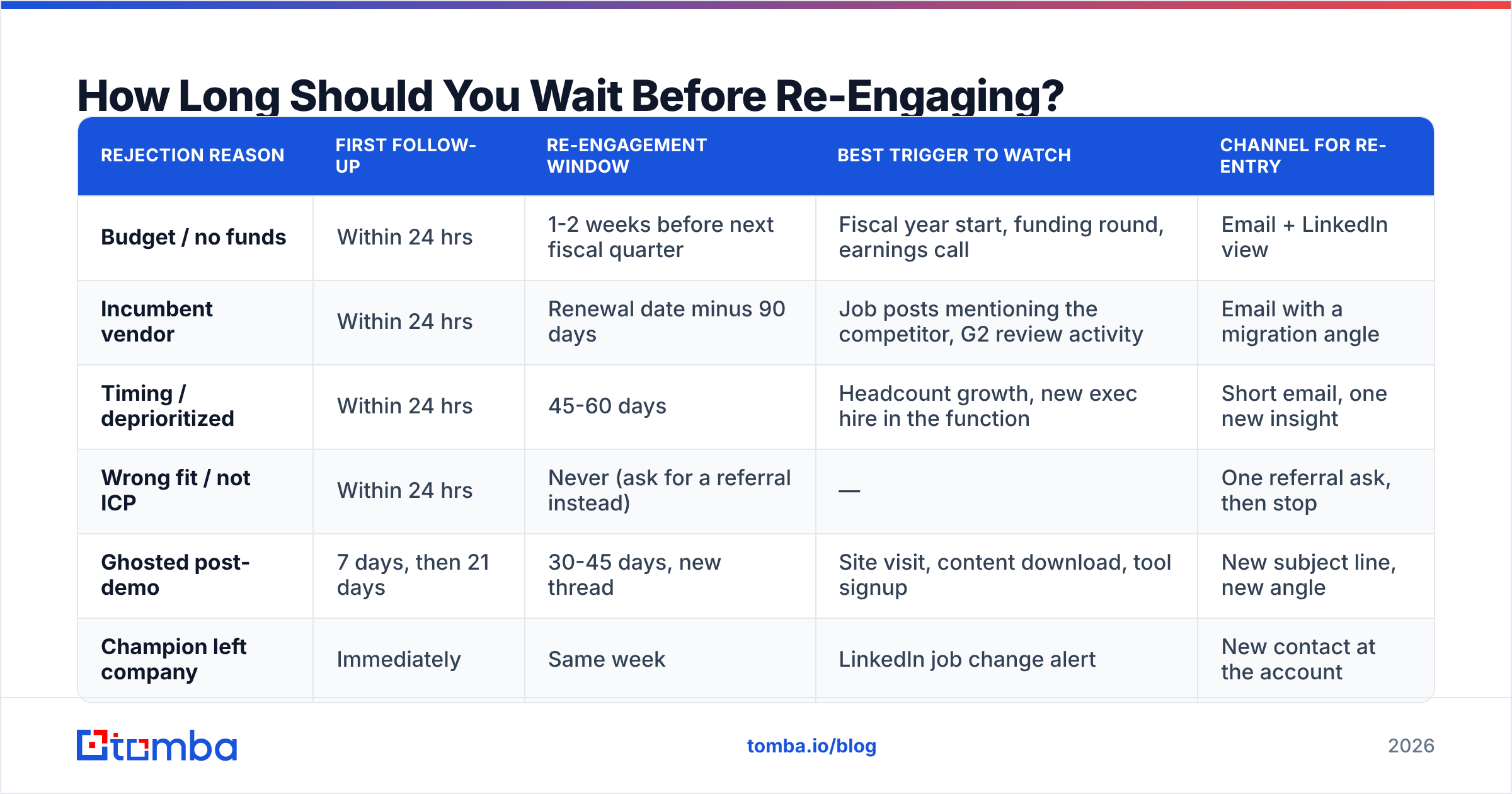
Stop using a fixed 90-day rule. Match the interval to the rejection reason.
| Rejection reason | First follow-up | Re-engagement window | Best trigger to watch | Channel for re-entry |
|---|---|---|---|---|
| Budget / no funds | Within 24 hrs | 1-2 weeks before next fiscal quarter | Fiscal year start, funding round, earnings call | Email + LinkedIn view |
| Incumbent vendor | Within 24 hrs | Renewal date minus 90 days | Job posts mentioning the competitor, G2 review activity | Email with a migration angle |
| Timing / deprioritized | Within 24 hrs | 45-60 days | Headcount growth, new exec hire in the function | Short email, one new insight |
| Wrong fit / not ICP | Within 24 hrs | Never (ask for a referral instead) | — | One referral ask, then stop |
| Ghosted post-demo | 7 days, then 21 days | 30-45 days, new thread | Site visit, content download, tool signup | New subject line, new angle |
| Champion left company | Immediately | Same week | LinkedIn job change alert | New contact at the account |
The right-hand columns matter more than the timing column. An email that lands because something changed at their company reads as attentive. The same email sent on day 90 because a sequence fired reads as automated, and buyers have gotten very good at spotting the difference.
For the "champion left" row, note that this is often your best re-entry of all: the departing champion may now be a warm buyer at a new company, and their replacement inherits an unsolved problem with no vendor loyalty. Both halves need current contact data, which is where a reverse email lookup or a fresh domain search against the account earns its keep.
What Does a Good Re-Entry Email Look Like?#
The re-entry email — the one you send weeks or months later — has a harder job than the first follow-up. It must justify its own existence in the first line.
Three structures that work, ranked by reply rate in most teams' data:
1. The kept promise. "You said January — it's January." Highest reply rate because you are not asking for attention, you are returning something they granted. Only available if you got the yes/no in follow-up one.
Subject: Circling back as promised (January)
Hi Dana — you asked me to check back once the new budget landed. Doing that.
One thing that changed since we last spoke: we shipped bulk verification for catch-all domains, which was the gap you flagged on the call.
Worth 15 minutes, or is this still a next-year thing?
2. The trigger. Anchored to an observable change at their company. "Saw you're hiring three SDRs" or "noticed you moved off [tool]." Requires monitoring, converts well because the relevance is self-evident.
3. The gift. No ask at all — a benchmark, a teardown of their competitor's outbound, a relevant data point. Lowest immediate reply rate, highest downstream conversion, because it resets the relationship from vendor to peer.
What does not work: the pure bump ("any update?"), the guilt trip ("I've reached out three times"), the fake urgency ("prices go up Friday"), and the breakup email sent to someone who already explicitly rejected you — they broke up with you, saying you are breaking up with them is theatre.
How Do You Keep the Data Alive Between Touches?#
This is where most rejection follow-up programs quietly die. You write a beautiful re-entry email for March, and in February your contact changed jobs, or their company migrated domains after an acquisition, or the address you had was a role-based alias that got retired.
LinkedIn's own workforce data and most tenure studies put average job tenure in sales and marketing roles well under three years, with a large share of moves happening inside any given 12-month span. If your closed-lost list is a year old, assume a meaningful chunk of it is now undeliverable.
Practical hygiene between touches:
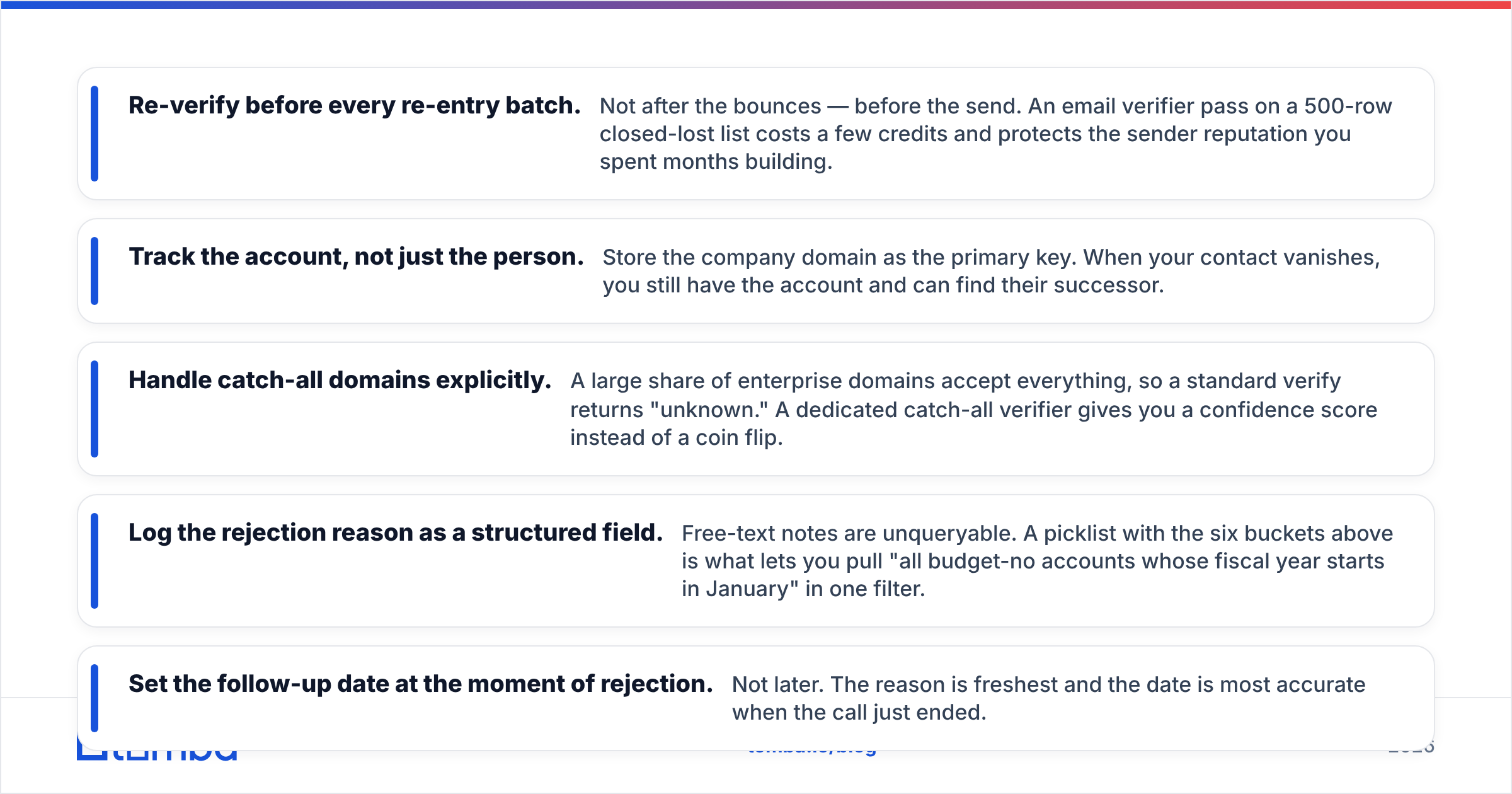
- Re-verify before every re-entry batch. Not after the bounces — before the send. An email verifier pass on a 500-row closed-lost list costs a few credits and protects the sender reputation you spent months building.
- Track the account, not just the person. Store the company domain as the primary key. When your contact vanishes, you still have the account and can find their successor.
- Handle catch-all domains explicitly. A large share of enterprise domains accept everything, so a standard verify returns "unknown." A dedicated catch-all verifier gives you a confidence score instead of a coin flip.
- Log the rejection reason as a structured field. Free-text notes are unqueryable. A picklist with the six buckets above is what lets you pull "all budget-no accounts whose fiscal year starts in January" in one filter.
- Set the follow-up date at the moment of rejection. Not later. The reason is freshest and the date is most accurate when the call just ended.
Which Tools Fit Which Part of the Workflow?#
Rejection follow-up spans three jobs — remembering, finding, and sending — and no single tool covers all three well. What matters is where the data lives and how fresh it stays.
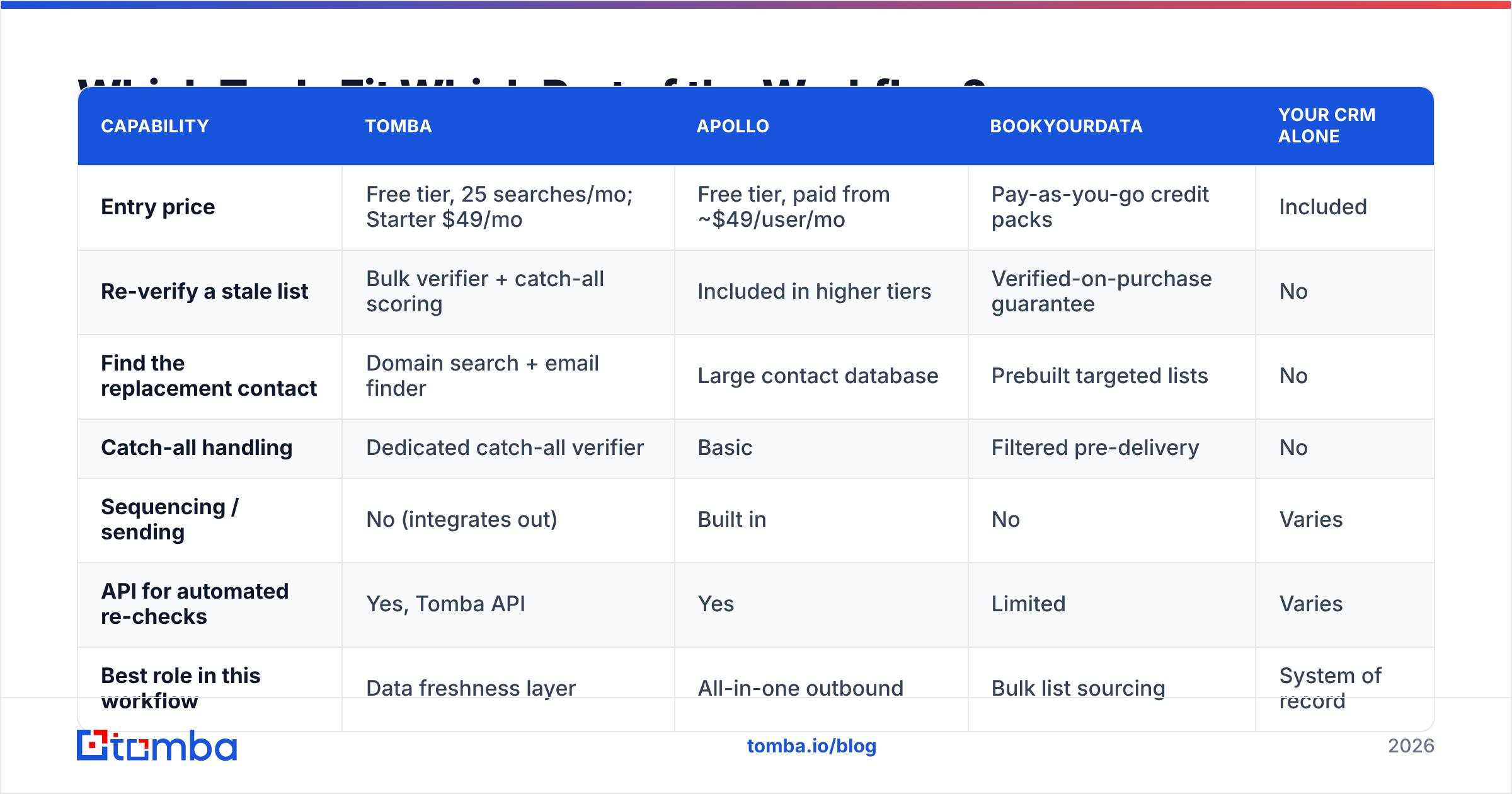
| Capability | Tomba | Apollo | BookYourData | Your CRM alone |
|---|---|---|---|---|
| Entry price | Free tier, 25 searches/mo; Starter $49/mo | Free tier, paid from ~$49/user/mo | Pay-as-you-go credit packs | Included |
| Re-verify a stale list | Bulk verifier + catch-all scoring | Included in higher tiers | Verified-on-purchase guarantee | No |
| Find the replacement contact | Domain search + email finder | Large contact database | Prebuilt targeted lists | No |
| Catch-all handling | Dedicated catch-all verifier | Basic | Filtered pre-delivery | No |
| Sequencing / sending | No (integrates out) | Built in | No | Varies |
| API for automated re-checks | Yes, Tomba API | Yes | Limited | Varies |
| Best role in this workflow | Data freshness layer | All-in-one outbound | Bulk list sourcing | System of record |
Read that table as complementary rather than competitive. Your CRM remembers the rejection, a sourcing tool like BookYourData or Apollo's database fills gaps at the account, and a verification layer keeps the addresses deliverable at the moment you actually send. Teams that skip the third column are the ones who discover a 14% bounce rate on their reactivation campaign — after it has already damaged their domain.
If you want to see how the pieces connect without rebuilding your stack, most of this runs through existing tools: a HubSpot integration can enrich closed-lost records on a schedule, and Google Sheets is enough for teams working a list of a few hundred accounts.
What Are the Most Common Mistakes?#
Re-pitching in the acceptance email. The most common and most damaging. It signals you did not actually accept the no, which means every future message gets read defensively.
Sending on a fixed cadence with no new information. Three "just checking in" emails train the recipient to archive on sight. One well-timed, trigger-anchored email beats six bumps.
Asking "why" too broadly. "Can I ask what led to the decision?" gets "we went another direction." Forced-choice questions get real answers.
Emailing an unverified address after a long gap. Reactivation campaigns have the worst bounce profiles of any send type because the data is by definition old. Verify first. If you need a single-address gut check before a manual send, the free email checker handles one-offs.
Ignoring the referral path on wrong-fit rejections. A prospect who is not your ICP often knows three companies who are, and they are unusually willing to say so — because there is nothing in it for them and no awkwardness in helping.
Treating the departing champion as a loss. They are a warm contact at a new account with a known problem. That is one of the best leads on your list, and almost nobody works it.
How Do You Measure Whether This Is Working?#
Three metrics, in order of usefulness:
- Reason-capture rate — what percentage of closed-lost records have a structured rejection reason. If this is under 60%, fix it before you touch copy. Everything else depends on it.
- Re-engagement reply rate — replies to re-entry emails, tracked separately from cold outbound. Healthy programs run well above cold reply rates because the relationship already exists; if yours is at or below cold, your timing is wrong, not your copy.
- Closed-lost revival rate — closed-lost accounts that re-enter pipeline within 12 months. This is the number to report upward. It is also the number that justifies the data-hygiene spend to finance.
Bounce rate on reactivation sends is the leading indicator for all three. Watch it per batch, not per quarter.
Start With the Data You Already Paid For#
Every rejected deal in your CRM is a contact you already researched, qualified, and pitched. The only thing standing between that list and a reactivation campaign is whether the addresses still work.
Run your closed-lost list through the Tomba Email Finder to fill in the accounts where your champion moved on, then verify the survivors before you send. The free tier covers 25 searches a month if you want to test the workflow on a handful of accounts first; Tomba pricing starts at $49/mo on Starter when you are ready to run the whole list. Fix the data, then write the email — that order matters more than anything in the copy.
Related guides#
Ready to find emails that actually work?
Join 150,000+ professionals who stopped guessing and started sending. Free credits on signup — no credit card required.
Get the Tomba newsletter
Practical outbound tactics and product updates — once every two weeks.
About the author