Follow Up Email After Webinar: Templates That Convert in 2026
Most webinar follow-ups are one generic replay blast sent to everyone. Here is the segmented five-email sequence, the send timing, and the copy that turns registrants into pipeline.
TL;DR#
- The single "thanks for attending, here's the replay" blast is why most webinar pipeline evaporates. Attendees, no-shows, and late-leavers need different emails.
- Send the first follow up email after webinar within 2 to 4 hours, while the session is still the most recent thing in the prospect's head. Not tomorrow. Not Monday.
- A working sequence is five emails over 14 days: replay, resource, objection-handler, proof, and a single clear ask.
- Registration forms leak bad data — typos, personal Gmail addresses, and role accounts. Verify and enrich the list before the first send or your bounce rate will torch the sending domain you also use for cold outreach.
- Measure reply rate and meetings booked per 100 registrants, not open rate. Opens have been unreliable since Apple Mail Privacy Protection started prefetching images.
What is a follow up email after a webinar, and why do most of them fail?#
A follow up email after a webinar is the message (or sequence) you send registrants once the session ends, designed to convert attention into a next step — a demo, a trial, a reply, a second meeting.
Think of it like the last five minutes of a dinner party. The conversation went well, everyone's warm, and then you either exchange numbers or you don't. The webinar was the dinner. The follow-up is the exchange. Most teams skip it and send a postcard three days later.
Here's the failure pattern, and it's remarkably consistent:
- One email to one list. The person who watched 58 minutes and asked two questions gets the exact same message as the person who registered and never showed.
- Sent too late. Marketing waits for the recording to be edited, captioned, and uploaded. That takes 48 hours. Interest decays much faster than that.
- The CTA is the replay link. Watching a recording is not a buying signal, it's a content consumption event. You've asked for nothing.
- No sender continuity. The invite came from the marketing address, the follow-up comes from a sales rep the attendee has never seen. Different name, different domain, straight to Promotions.
- Dirty registration data. Free webinar forms attract typos and throwaway addresses. Blast 2,000 unverified addresses and you'll hard-bounce enough to damage your sender reputation for weeks.
Fixing points 1 and 2 alone tends to move the needle more than any amount of copy polish.
Who should get which follow-up email after a webinar?#
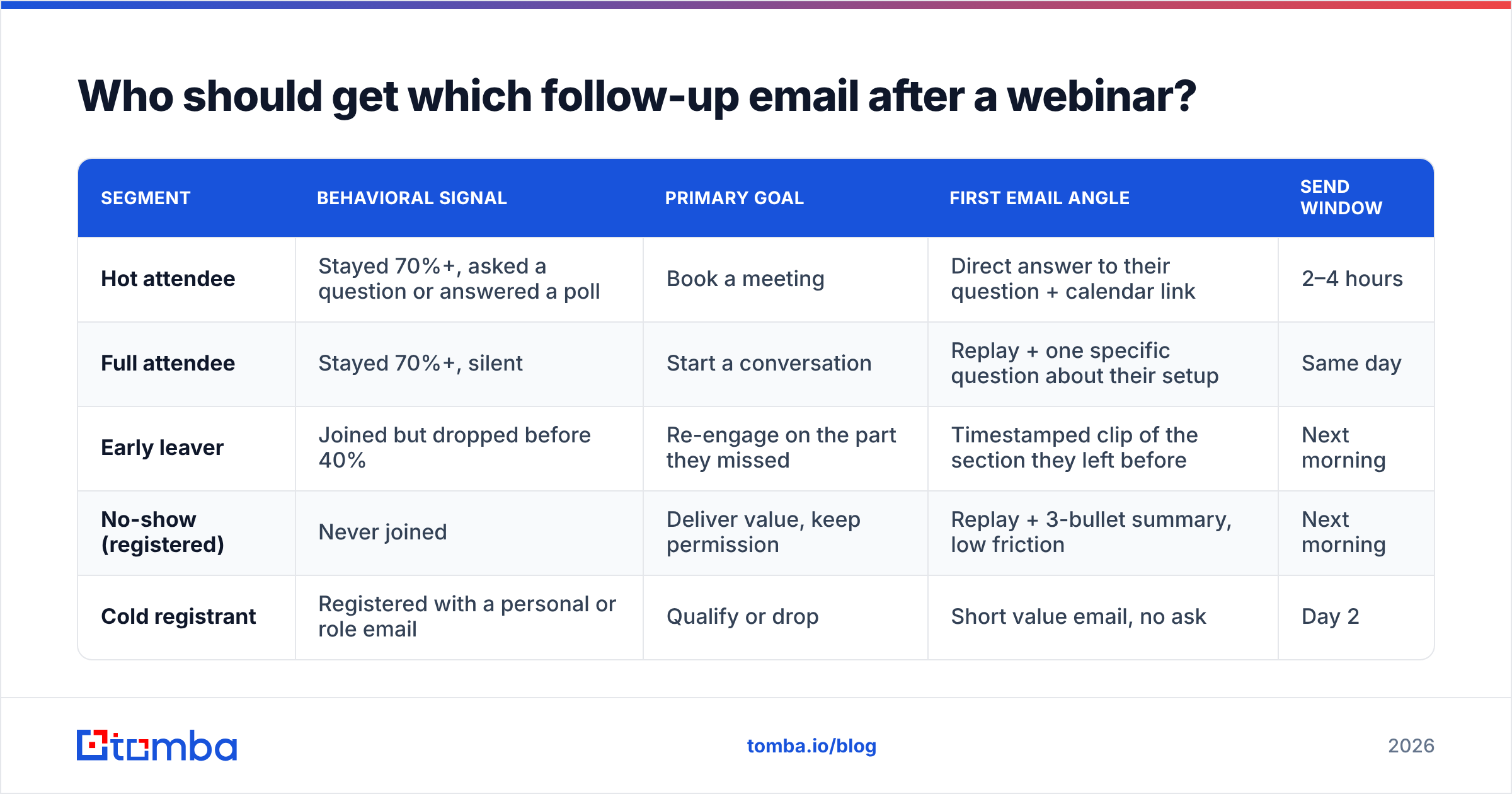
Segment on behavior, not on title. Your webinar platform already exports attendance duration, poll answers, and question submissions — that's your intent data, free.
| Segment | Behavioral signal | Primary goal | First email angle | Send window |
|---|---|---|---|---|
| Hot attendee | Stayed 70%+, asked a question or answered a poll | Book a meeting | Direct answer to their question + calendar link | 2–4 hours |
| Full attendee | Stayed 70%+, silent | Start a conversation | Replay + one specific question about their setup | Same day |
| Early leaver | Joined but dropped before 40% | Re-engage on the part they missed | Timestamped clip of the section they left before | Next morning |
| No-show (registered) | Never joined | Deliver value, keep permission | Replay + 3-bullet summary, low friction | Next morning |
| Cold registrant | Registered with a personal or role email | Qualify or drop | Short value email, no ask | Day 2 |
Five segments feels like a lot until you realise it is five copies of one template with three lines swapped. The lift is small; the delta in reply rate is not.
When should you send each follow-up email after a webinar?#
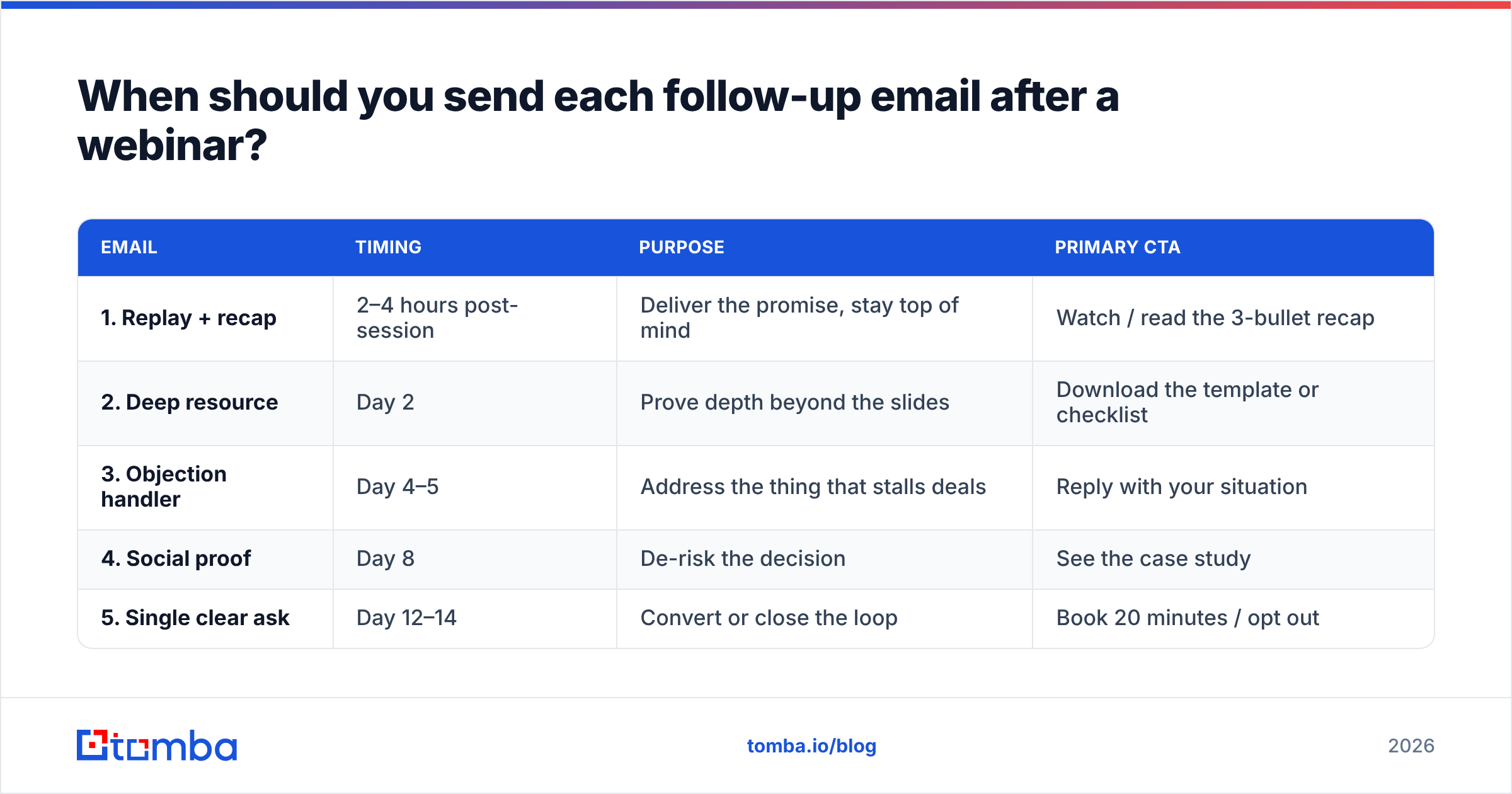
Timing beats copy. A mediocre email sent three hours after the session outperforms a beautiful one sent on day four.
| Timing | Purpose | Primary CTA | |
|---|---|---|---|
| 1. Replay + recap | 2–4 hours post-session | Deliver the promise, stay top of mind | Watch / read the 3-bullet recap |
| 2. Deep resource | Day 2 | Prove depth beyond the slides | Download the template or checklist |
| 3. Objection handler | Day 4–5 | Address the thing that stalls deals | Reply with your situation |
| 4. Social proof | Day 8 | De-risk the decision | See the case study |
| 5. Single clear ask | Day 12–14 | Convert or close the loop | Book 20 minutes / opt out |
Two rules that matter more than the grid:
- One ask per email. If the message contains a replay link, a case study, a newsletter signup, and a demo button, the reader picks none of them.
- Stop when they engage. Any reply, demo booking, or pricing-page visit should pull the contact out of the sequence and into a human conversation. Sequences that keep firing after a reply are how you turn a warm lead cold.
What does a five-email webinar follow-up sequence look like?#
Copy these and rewrite them in your own voice. Plain text, no header image, no HTML wrapper — they render identically on mobile and they don't look like a newsletter.
Email 1 — Replay + recap (2–4 hours after)
Subject: your 3 takeaways from today (+ replay)
Hi {{first_name}},
Thanks for joining today's session on {{topic}}. Three things worth keeping:
- {{takeaway_1}}
- {{takeaway_2}}
- {{takeaway_3}}
Full replay here: {{link}} — the part on {{specific_section}} starts at 14:20.
Quick question: which of the three is closest to what you're dealing with at {{company}} right now?
{{sender}}
The last line is the entire email. It's answerable in four words, which is why people answer it.
Email 2 — Deep resource (day 2)
Subject: the {{asset_name}} we mentioned
{{first_name}} — during the Q&A someone asked how to actually implement {{topic}} without rebuilding the stack. Here's the {{checklist/template}} we use internally: {{link}}.
No form. Steal whatever's useful.
Email 3 — Objection handler (day 4–5)
Subject: "we already have a tool for this"
The most common pushback we hear after this session is that you've already got something in place. Fair. Usually the gap isn't the tool, it's {{specific_gap}} — here's how {{customer}} handled it: {{one_paragraph}}.
Does that match what you're seeing, or is your blocker somewhere else?
Email 4 — Social proof (day 8)
Subject: {{customer}} — {{concrete_result}}
Short one. {{Customer}} was in a similar spot to what you described on the registration form ({{their_use_case}}). After {{change}}, they hit {{metric}} in {{timeframe}}. Two-minute read: {{link}}.
Email 5 — Single clear ask (day 12–14)
Subject: worth 20 minutes?
{{first_name}}, I've sent a few things since the {{topic}} session. If it's useful, the fastest next step is 20 minutes where I map {{specific_outcome}} to your setup — no deck.
If it isn't relevant, reply "not now" and I'll close the loop. Either answer is genuinely fine.
That last permission-to-decline line consistently outperforms a hard close, because it lowers the cost of replying. A "not now" is worth more than silence: it tells your CRM something real.
What should every webinar follow-up email contain?#
Regardless of which email in the sequence you're writing, the same six components decide whether it works:
- A subject line that references the session, not your product. "your 3 takeaways from today" beats "Thanks for attending the ACME Q3 Webinar!" — the first sounds like a person, the second like a marketing automation platform. If you're stuck, run variants through a subject line tester before you send.
- Proof you were in the room. A timestamp, a poll result, a question someone asked. This is the single fastest way to prove the email isn't a template, even when it is one.
- One link, one ask. Multiple CTAs split attention and reduce clicks on all of them.
- A reply-friendly close. Ask something answerable in one line. Replies train inbox providers that your domain sends wanted mail, which protects email deliverability across everything else you send.
- A real signature from a real person. Name, role, company, one link. No banner graphics, no six social icons. Generate a clean one with an email signature generator if you don't have a standard.
- Plain text or near-plain text. Heavy HTML templates get classified as bulk mail. The follow-up should look like the rep typed it, because ideally the rep did.
How do you stop webinar follow-ups from bouncing or landing in spam?#
This is where most webinar programs quietly self-destruct. Registration forms are a magnet for bad data: fat-fingered domains, info@-style role accounts, personal addresses from people who wanted the content but not the conversation, and outright fake entries from prospects who just wanted the replay link.
Send to that list raw and three things happen: hard bounces spike, spam complaints climb, and the domain you also use for cold outreach starts landing in Promotions.
The fix is a pre-send hygiene pass:
- Verify every address before the first send. Run the export through an email verifier to strip hard bounces, disposables, and role accounts. Anything under a 97% deliverable rate on the remaining list means the form is leaking.
- Handle catch-all domains separately. Big enterprises frequently accept everything at the MX layer, so standard verification returns "unknown". A catch-all verifier gives you a confidence tier instead of a coin flip — send to high-confidence catch-alls, hold the rest.
- Replace personal addresses with work addresses. If
sarah.klein@gmail.comregistered from a company IP and listed her employer, a domain search against that company will usually surface the corporate pattern and the real inbox. Corporate addresses reply far more often than personal ones for B2B offers. - Enrich for routing. Registration forms capture name and email; they rarely capture headcount, title, or tech stack. Running the list through data enrichment tells you which 40 of the 800 registrants are actually ICP and deserve a rep, not a sequence.
- Check your authentication before the campaign, not after. A quick SPF record check plus DKIM and DMARC alignment takes ten minutes. Google and Yahoo's bulk-sender requirements have made this non-negotiable — Google's own sender guidelines spell out the thresholds.
Which tools do you actually need for webinar follow-up?#
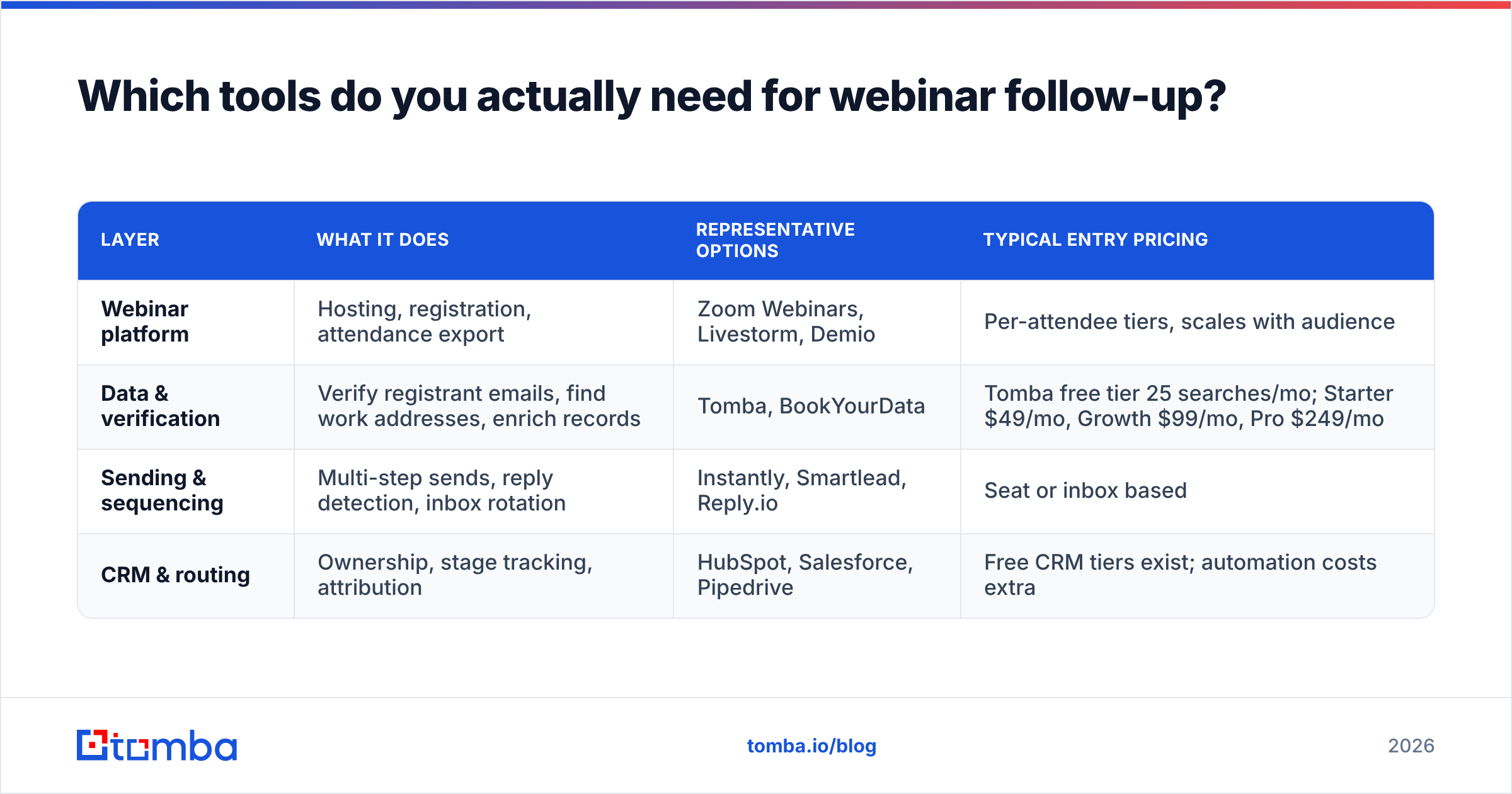
You need four layers: a webinar platform, a data/verification layer, a sending layer, and a CRM. Most teams overbuy on the first and underbuy on the second.
| Layer | What it does | Representative options | Typical entry pricing |
|---|---|---|---|
| Webinar platform | Hosting, registration, attendance export | Zoom Webinars, Livestorm, Demio | Per-attendee tiers, scales with audience |
| Data & verification | Verify registrant emails, find work addresses, enrich records | Tomba, BookYourData | Tomba free tier 25 searches/mo; Starter $49/mo, Growth $99/mo, Pro $249/mo |
| Sending & sequencing | Multi-step sends, reply detection, inbox rotation | Instantly, Smartlead, Reply.io | Seat or inbox based |
| CRM & routing | Ownership, stage tracking, attribution | HubSpot, Salesforce, Pipedrive | Free CRM tiers exist; automation costs extra |
A few practical notes on assembling this:
- Don't pay twice for verification. If your sending platform includes verification, check whether it actually runs SMTP-level checks or just regex validation. They are not the same thing, and only one of them prevents bounces.
- Push data to where reps live. A HubSpot integration or Salesforce integration that writes verified emails and enrichment fields back to the contact record beats a CSV nobody opens.
- Automate the boring hop. Webinar platform → verification → CRM is a three-step chain that runs the same way every time. Wire it once with a Zapier integration or the Tomba API and stop doing it by hand at 8pm after every session.
- Check reviews before committing. Vendor pages promise 99% accuracy universally; category reviews on G2 give you a less flattering and more useful picture.
How do you measure whether your webinar follow-up worked?#
Stop reporting open rate. Apple Mail Privacy Protection prefetches images for a large share of consumer and mixed-device traffic, which inflates opens and makes the metric close to decorative for B2B.
Track these instead:
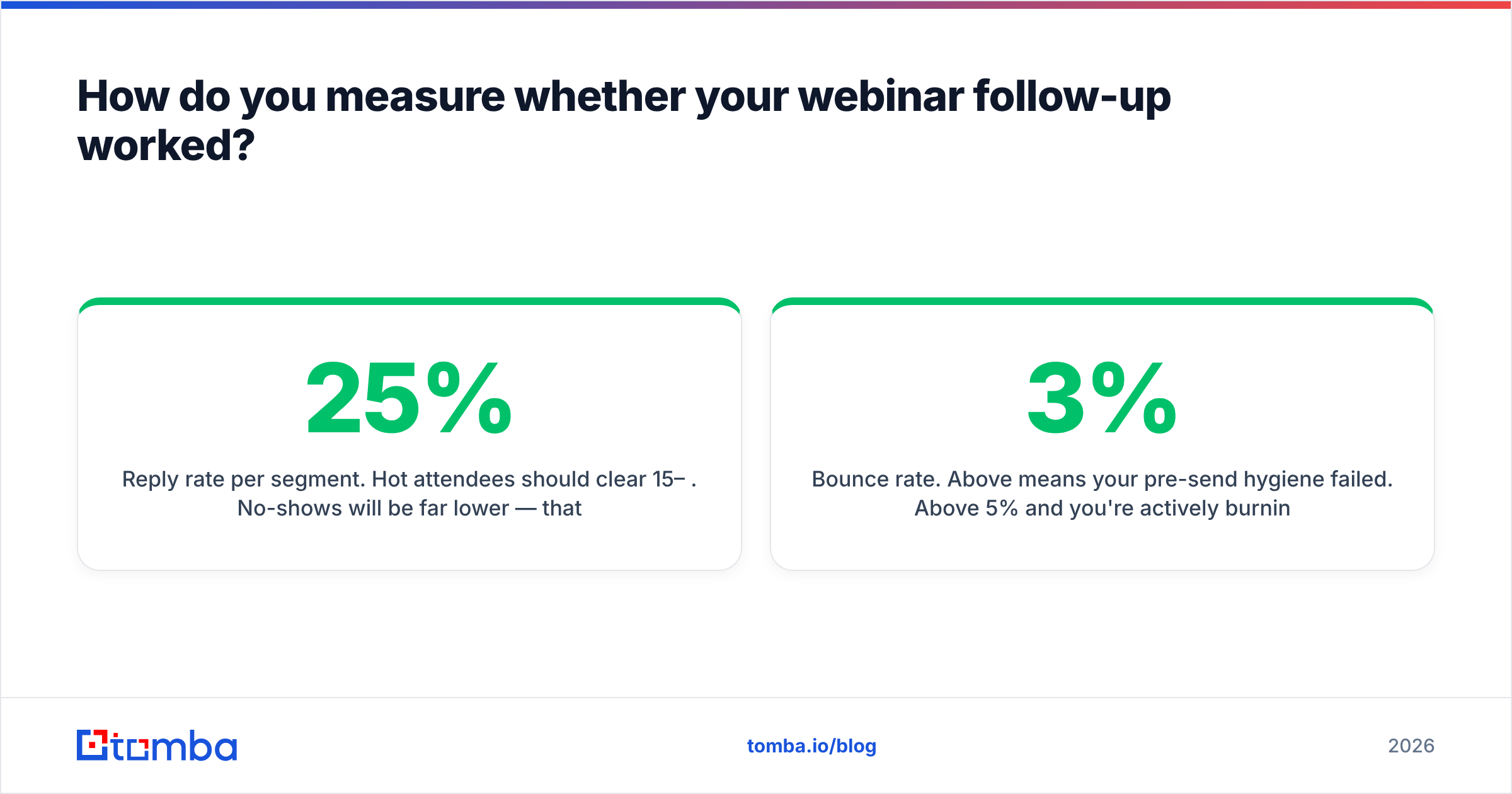
- Reply rate per segment. Hot attendees should clear 15–25%. No-shows will be far lower — that's expected, and it's why they're a separate segment.
- Meetings booked per 100 registrants. The only number your CFO cares about. It also normalizes across webinars of different sizes.
- Bounce rate. Above 3% means your pre-send hygiene failed. Above 5% and you're actively burning the domain.
- Time-to-first-touch. Median hours between session end and first email. Drive it under four.
- Sequence exit reason. What percentage exited on a reply versus ran to completion? High completion rates mean nobody's engaging and the copy needs work, not more emails.
Run one experiment per webinar, not five. Change the send delay this month, the email-1 subject line next month. With typical B2B webinar volumes you won't get significance any faster than that, and pretending otherwise just generates noise you'll later mistake for insight. Gartner's research on B2B buying behavior is a useful reminder here: buyers spend a small fraction of their time with any single vendor, so the goal of the sequence is to be useful in that sliver, not to dominate the inbox.
Where should you start?#
Pick your last webinar's registrant list, split it into the five segments above, and rewrite email 1 for each. That's a 45-minute exercise that will outperform a full redesign of your email template.
Then fix the data underneath it — because segmentation and copy don't matter if a third of the list bounces. Run your registrant export through Tomba's Email Finder to convert personal addresses into verified work inboxes and fill the gaps your form left behind. The free tier covers 25 searches a month if you just want to sanity-check how leaky your registration data really is; Starter is $49/mo when you're ready to run it on every session. Your follow-up sequence can only be as good as the addresses it lands on.
Related guides#
Ready to find emails that actually work?
Join 150,000+ professionals who stopped guessing and started sending. Free credits on signup — no credit card required.
Get the Tomba newsletter
Practical outbound tactics and product updates — once every two weeks.
About the author