Follow Up Email After Zoom Meeting: Templates That Get Replies
Most Zoom calls die in the 48 hours after the meeting ends. Here are the timing rules, structures, and 7 tested templates that turn a good call into a booked next step.
TL;DR
- Send your follow up email after a Zoom meeting within 24 hours — reply rates drop sharply once the call fades from working memory, and by day three you're competing with everything else in the inbox.
- The winning structure is fixed: subject line referencing the call, one-line thank you, 3-5 bullet recap, explicit next step with a date, then attachments or links.
- Recap bullets should mirror the prospect's own words. If they said "onboarding is the bottleneck," write "onboarding is the bottleneck" — not "implementation friction."
- Never end with "let me know your thoughts." Close with a specific, low-friction ask: a proposed time, a yes/no question, or a document to approve.
- The follow-up is also where you fix bad data. If the decision-maker wasn't on the call, find and verify their address before you loop them in — a bounced CC is worse than no CC.
Why does a follow up email after a Zoom meeting matter more than the call itself?#
Because the call is where you gather information and the follow-up is where you create commitment.
Think of it like leaving a restaurant without the check. The meal happened, everyone enjoyed it, but nothing is settled until someone puts a number on the table. A Zoom call ends with a warm "this was great, let's talk soon" — and then nobody talks soon. The follow-up email is the check.
Three things make post-Zoom follow-ups structurally different from a normal cold or warm email:
- You have permission. They agreed to spend 30 minutes with you. That earns a reply-rate baseline a cold email never gets — if you use it before it expires.
- You have shared context. You can quote them. Specificity is the single biggest lever on reply rates, and you just spent half an hour collecting it.
- Attention decays fast. Video calls generate less durable memory than in-person meetings. Research on video conferencing fatigue collected by academic groups and summarized on Wikipedia's Zoom fatigue entry points at reduced non-verbal signalling and cognitive overload — meaning your prospect remembers less of your call than you assume. Your recap isn't a courtesy. It's their memory.
What is the ideal timing for a post-Zoom follow-up?#
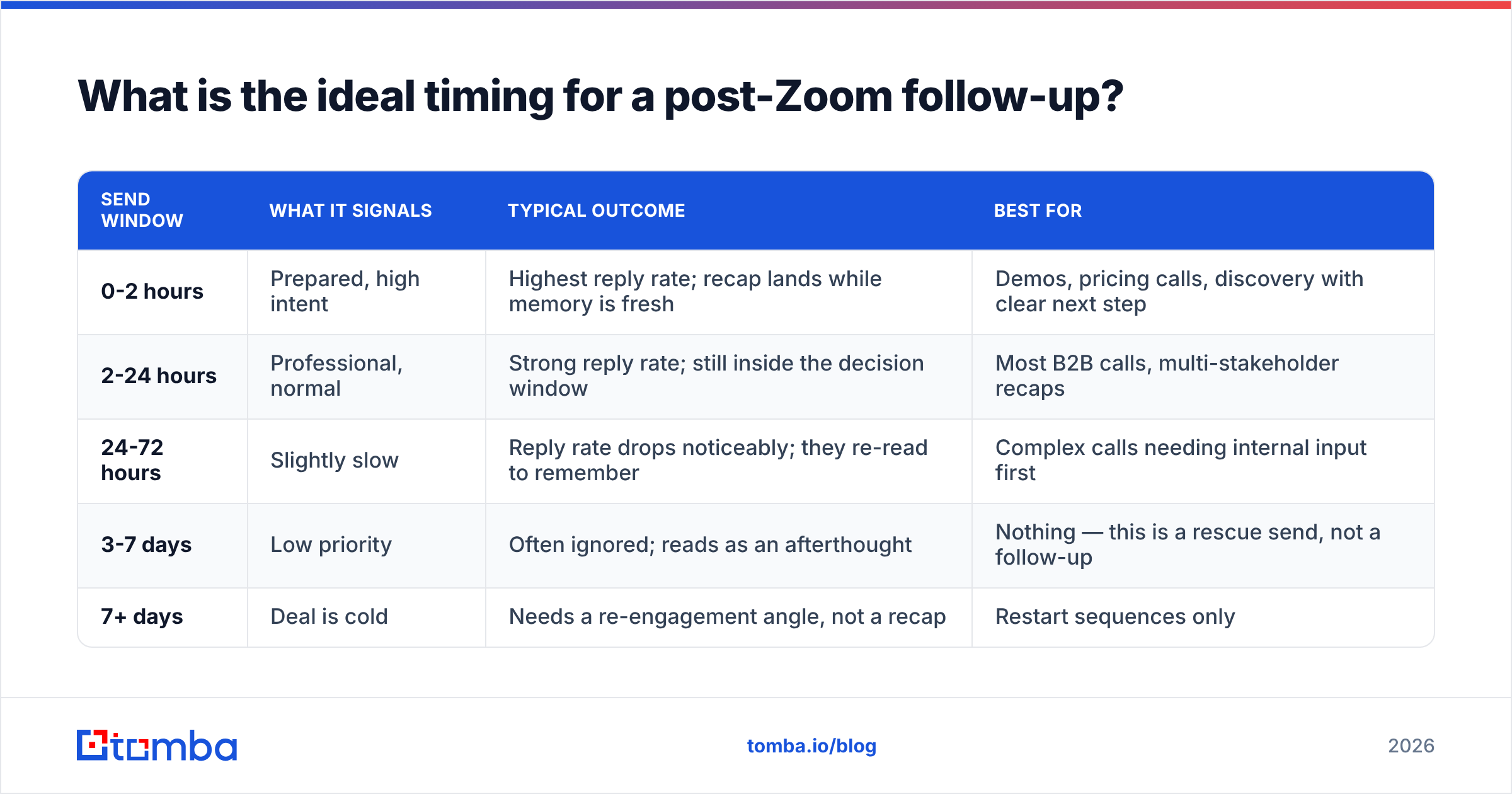
Same business day if you can, within 24 hours as the hard rule. Here's how the windows actually behave:
| Send window | What it signals | Typical outcome | Best for |
|---|---|---|---|
| 0-2 hours | Prepared, high intent | Highest reply rate; recap lands while memory is fresh | Demos, pricing calls, discovery with clear next step |
| 2-24 hours | Professional, normal | Strong reply rate; still inside the decision window | Most B2B calls, multi-stakeholder recaps |
| 24-72 hours | Slightly slow | Reply rate drops noticeably; they re-read to remember | Complex calls needing internal input first |
| 3-7 days | Low priority | Often ignored; reads as an afterthought | Nothing — this is a rescue send, not a follow-up |
| 7+ days | Deal is cold | Needs a re-engagement angle, not a recap | Restart sequences only |
The practical rule: block 10 minutes immediately after every Zoom call in your calendar. Not "later today." The follow-up written 90 seconds after hangup is always better than the one written at 6pm, because you still have the exact phrasing they used.
If the call ended with an action item on your side ("send me the security docs"), and the docs will take two days, still send the recap within 24 hours and say the docs are coming Thursday. Silence while you prepare a perfect email is the most common self-inflicted wound in B2B sales.
What should a follow up email after a Zoom meeting contain?#
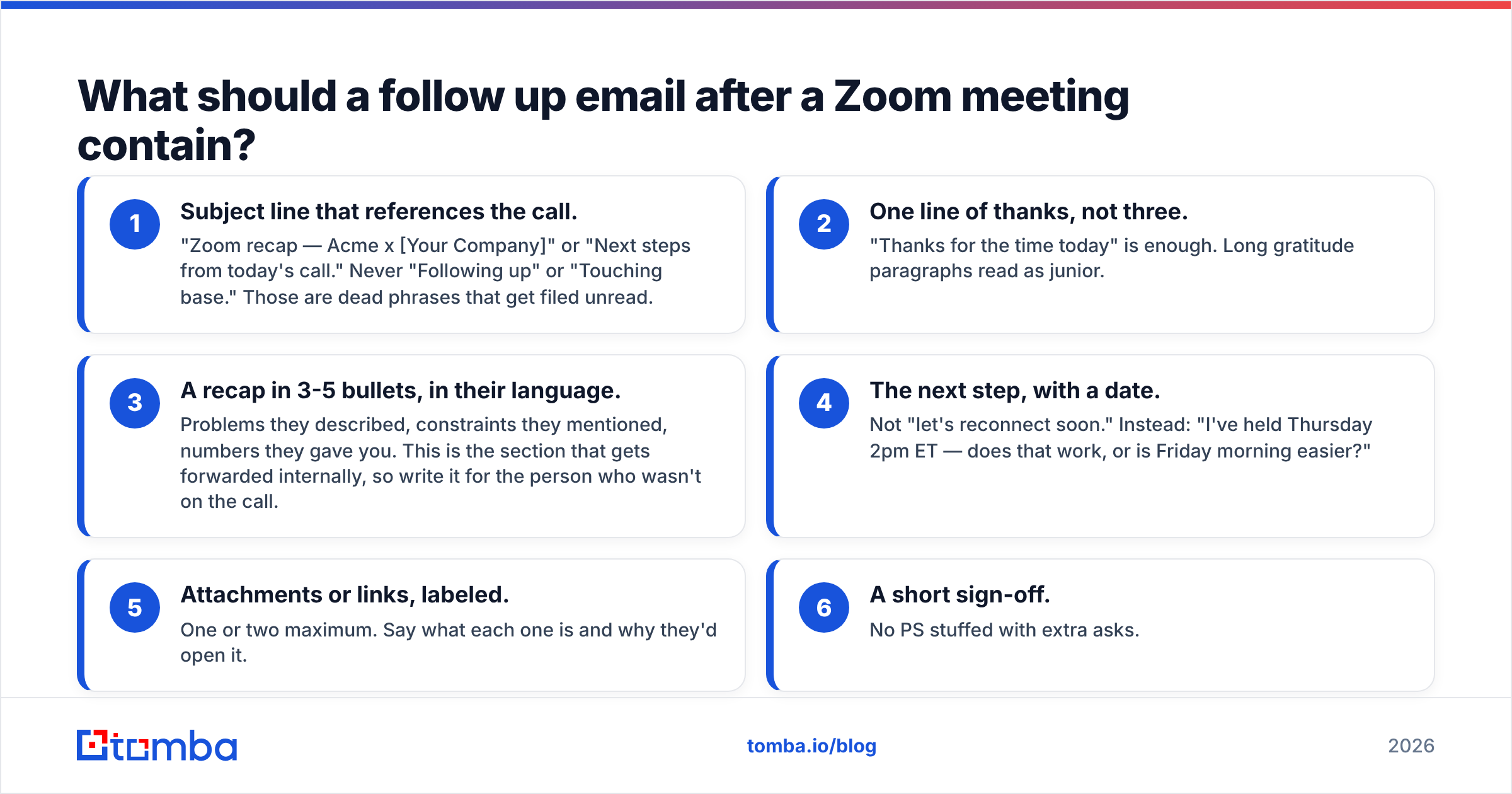
Six components, in this order. Every template further down is a variation on this skeleton.
- Subject line that references the call. "Zoom recap — Acme x [Your Company]" or "Next steps from today's call." Never "Following up" or "Touching base." Those are dead phrases that get filed unread.
- One line of thanks, not three. "Thanks for the time today" is enough. Long gratitude paragraphs read as junior.
- A recap in 3-5 bullets, in their language. Problems they described, constraints they mentioned, numbers they gave you. This is the section that gets forwarded internally, so write it for the person who wasn't on the call.
- The next step, with a date. Not "let's reconnect soon." Instead: "I've held Thursday 2pm ET — does that work, or is Friday morning easier?"
- Attachments or links, labeled. One or two maximum. Say what each one is and why they'd open it.
- A short sign-off. No PS stuffed with extra asks.
Total length: 120-180 words. If you need 400 words, you're writing a proposal, not a follow-up — send the proposal as an attachment and keep the email short.
What does a good follow up email look like in practice?#
Seven templates. Adapt the bracketed parts; keep the structure.
1. Discovery call recap#
Subject: Recap — [Their Company] x [Your Company]
Hi [Name],
Thanks for walking me through the current setup today. Capturing what I heard so we're aligned:
- Your SDR team of 8 is spending ~6 hours/week on manual list building
- Data accuracy is the blocker — you estimated 20-25% bounce on current lists
- Budget conversation happens with [CFO name] in early Q4
- You want a decision before the new fiscal year starts
Next step: I'll pull together a short accuracy comparison against your current provider using 100 of your real target accounts. I can have that Thursday — worth a 20-minute call Friday at 11am ET to walk through it?
[Your name]
2. Demo follow-up#
Subject: The [feature] workflow you asked about
Hi [Name],
Good session. Three things you flagged during the demo, with answers:
- CRM sync: yes, bi-directional with HubSpot, field mapping is configurable
- Seat pricing: per-seat, and unused credits roll for 30 days
- Security review: SOC 2 report attached, happy to loop in your IT lead
You mentioned [Colleague] needs to see the bulk workflow before you can move. Want me to run a 15-minute version for them next week? I have Tuesday and Wednesday afternoon open.
[Your name]
3. Pricing/proposal call#
Subject: Proposal — [Their Company], as discussed
Hi [Name],
Proposal attached, built around the 3 things you prioritized: [X], [Y], [Z]. Summary:
- Recommended plan: [tier] at [price]/month
- Included: [key items]
- Start date assumption: [date]
One open item: you weren't sure whether [Team B] would need access in phase one. The pricing holds either way — I've noted both scenarios on page 2.
Can you get this in front of [Decision maker] this week? Happy to join that conversation if useful.
[Your name]
4. No clear next step (the recovery email)#
Subject: One question from our call
Hi [Name],
Thanks for the time yesterday. I want to make sure I don't push something you don't need — so one direct question:
Is solving [their stated problem] a priority this quarter, or is it a next-year item?
Either answer is genuinely fine. If it's next year, I'll stop emailing and check in around [month]. If it's now, I'll send the implementation outline today.
[Your name]
5. Multi-stakeholder recap#
Subject: Notes from today's call — for [absent stakeholder]
Hi [Name],
Adding [Absent stakeholder] here so they have the same context. Quick summary of today:
- [Problem stated]
- [Constraint or timeline]
- [What we agreed to explore]
- [Open question owned by them]
[Absent stakeholder] — anything above that looks wrong from your side is worth flagging now rather than later.
Next: [specific step + date].
[Your name]
6. They went quiet after a good call#
Subject: Closing the loop on [project name]
Hi [Name],
We had a strong call on [date] and then things went quiet — which usually means priorities shifted, not that you lost interest.
If [project] moved down the list, tell me and I'll move on. If it's still live but stalled internally, tell me what's blocking it — I've seen this pattern at [similar company type] and might be able to help unstick it.
[Your name]
7. Post-call, before a trial#
Subject: Your trial account is live
Hi [Name],
Trial is set up under [email]. Based on what you described, start here:
- Run a domain search on your top 20 target accounts
- Bulk verify the list before it hits your sequencer
- Check the bounce rate against your current provider's list
That comparison takes about 20 minutes and answers the accuracy question directly. I'll check in Thursday — reply anytime before then if something breaks.
[Your name]
How do you make the recap section actually useful?#
Use their words, their numbers, and their order of priority.
The most common failure is translation. The prospect says "our reps waste half their day chasing bad phone numbers," and the rep writes "inefficiencies in contact data hygiene." That translation destroys the whole point. When your email gets forwarded to a VP who wasn't on the call, the VP recognizes the original sentence and doesn't recognize the corporate paraphrase.
Three rules for recap bullets:
- Quote, don't summarize. Keep their metric ("20-25% bounce"), their timeline ("before fiscal year end"), their name for things ("the Salesforce cleanup project").
- Include what you don't know. A bullet like "Open: whether procurement needs to review before signature" makes you look thorough and often triggers the answer.
- Order by their priority, not yours. If they spent 20 minutes on security and 2 minutes on pricing, security goes first.
If you're taking notes live during Zoom, a simple discipline helps: keep a second window open with two columns — "their words" and "next step." Everything else is noise you can reconstruct later.
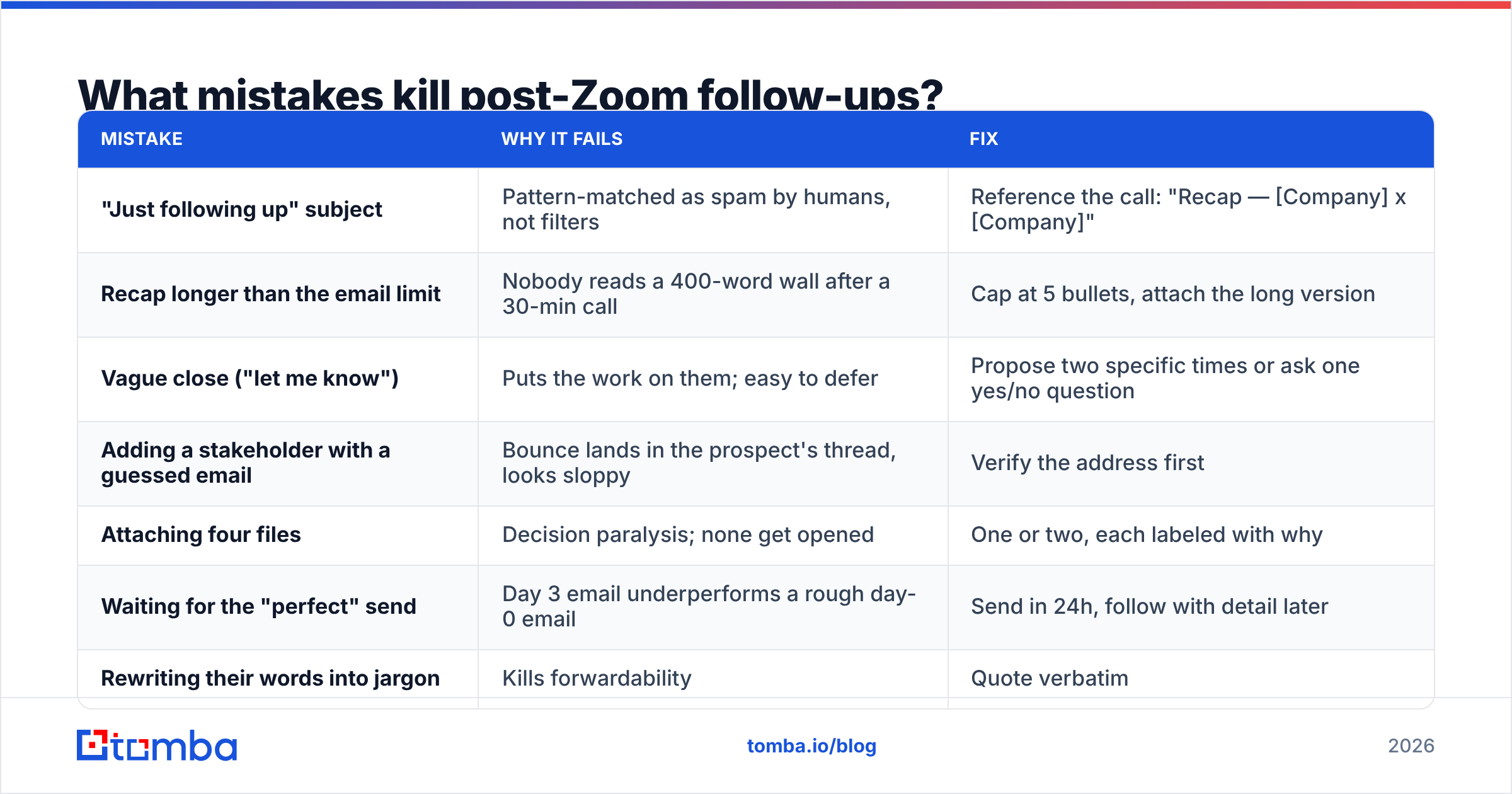
What mistakes kill post-Zoom follow-ups?#
| Mistake | Why it fails | Fix |
|---|---|---|
| "Just following up" subject | Pattern-matched as spam by humans, not filters | Reference the call: "Recap — [Company] x [Company]" |
| Recap longer than the email limit | Nobody reads a 400-word wall after a 30-min call | Cap at 5 bullets, attach the long version |
| Vague close ("let me know") | Puts the work on them; easy to defer | Propose two specific times or ask one yes/no question |
| Adding a stakeholder with a guessed email | Bounce lands in the prospect's thread, looks sloppy | Verify the address first |
| Attaching four files | Decision paralysis; none get opened | One or two, each labeled with why |
| Waiting for the "perfect" send | Day 3 email underperforms a rough day-0 email | Send in 24h, follow with detail later |
| Rewriting their words into jargon | Kills forwardability | Quote verbatim |
How do you handle the people who weren't on the Zoom call?#
Half of B2B deals stall because the follow-up only reaches the person who took the meeting. According to Gartner's B2B buying research, a typical buying group for a complex solution involves six to ten decision makers, each arriving with their own independently gathered information. Your recap email is the cheapest way to reach the other five.
Two ways to do this, and the order matters:
Option A — ask first. "Should I loop in anyone else on this, or would you rather share internally?" Safest, and often the answer tells you where power sits.
Option B — add them directly when the prospect already named them on the call ("I'll need to run this past Dana in security"). Then you need Dana's actual address, spelled correctly, deliverable.
That second case is where data quality decides whether the follow-up works. Guessing dana@company.com and getting a bounce inside a thread your champion can see is a real credibility hit. Running the name through an email finder and then a quick email verification pass takes under a minute and removes the risk entirely. If the company runs a catch-all domain — common in enterprise — a catch-all verifier tells you whether the address is genuinely deliverable or just accepted by a permissive server.
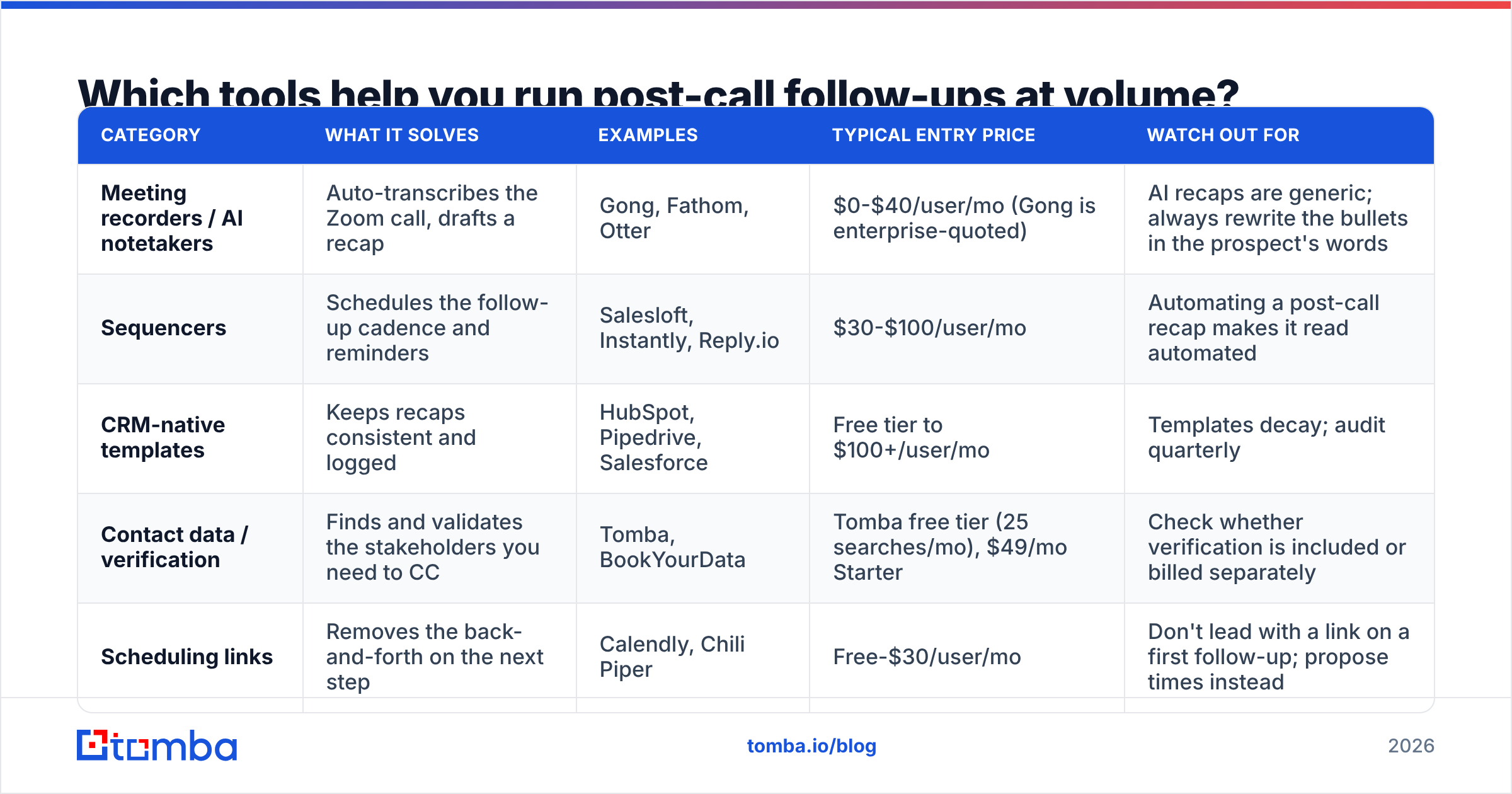
Which tools help you run post-call follow-ups at volume?#
Once you're doing 15-25 calls a week, follow-up quality becomes a systems problem, not a willpower problem. Here's how the common tool categories compare:
| Category | What it solves | Examples | Typical entry price | Watch out for |
|---|---|---|---|---|
| Meeting recorders / AI notetakers | Auto-transcribes the Zoom call, drafts a recap | Gong, Fathom, Otter | $0-$40/user/mo (Gong is enterprise-quoted) | AI recaps are generic; always rewrite the bullets in the prospect's words |
| Sequencers | Schedules the follow-up cadence and reminders | Salesloft, Instantly, Reply.io | $30-$100/user/mo | Automating a post-call recap makes it read automated |
| CRM-native templates | Keeps recaps consistent and logged | HubSpot, Pipedrive, Salesforce | Free tier to $100+/user/mo | Templates decay; audit quarterly |
| Contact data / verification | Finds and validates the stakeholders you need to CC | Tomba, BookYourData | Tomba free tier (25 searches/mo), $49/mo Starter | Check whether verification is included or billed separately |
| Scheduling links | Removes the back-and-forth on the next step | Calendly, Chili Piper | Free-$30/user/mo | Don't lead with a link on a first follow-up; propose times instead |
A realistic stack for a mid-market AE: an AI notetaker for the transcript, a CRM template for structure, and a contact-data layer for the stakeholders you need to add. That last piece is the one most teams skip — and it's the one that quietly causes bounced CCs and missing decision-makers.
If you want the workflow inside a spreadsheet instead of a CRM, the Google Sheets add-on handles find-and-verify in bulk on the same tab where you're tracking calls. For teams pushing it into an existing pipeline, the Tomba API does the same programmatically. Pricing across plans is on the Tomba pricing page — the free tier is enough to test whether verification actually reduces your bounce rate before you commit.
For a broader view of what buyers say about each category, G2's sales engagement grid is a reasonable neutral starting point — filter by company size, because enterprise reviews rarely reflect what a 5-person team experiences.
How many follow-ups should you send before giving up?#
Three after the call, then a clean exit.
- Email 1 (0-24h): the recap with a specific next step.
- Email 2 (day 4-5): one new piece of value — a case study matching their industry, a benchmark number, an answer to something they raised. Not "just bumping this."
- Email 3 (day 10-14): the direct question. "Is this still a priority this quarter?" Give them an easy no.
After that, stop and move them to a quarterly check-in. Sending a fourth, fifth, and sixth "just checking in" email doesn't recover the deal; it converts a warm contact into someone who filters your domain. The exit email in template 6 above works well here — it gives them permission to say no, which is exactly what produces replies from people who've been avoiding you.
One nuance: if the deal has multiple stakeholders, the cadence resets per person. Your champion going quiet doesn't mean the security lead you added on email 1 has heard from you at all.
Bottom line#
The follow up email after a Zoom meeting is the highest-leverage 10 minutes in your sales day. Send it within 24 hours, recap in their exact words, propose one specific next step with a date, and verify any address before you add it to the thread. Everything else — templates, tools, cadence — is secondary to those four habits.
And when the call ends with "let me loop in a couple of people from my side," that's your cue to get the names right. Use the Tomba Email Finder to find and confirm those addresses before you hit send — a follow-up that reaches the whole buying group with zero bounces is worth more than any subject-line trick. Start on the free tier at 25 searches a month, and upgrade only once the workflow is proving itself.
Related guides#
Ready to find emails that actually work?
Join 150,000+ professionals who stopped guessing and started sending. Free credits on signup — no credit card required.
Get the Tomba newsletter
Practical outbound tactics and product updates — once every two weeks.
About the author