Follow Up Email for Meeting Confirmation: Templates That Work
A confirmed meeting is not a booked meeting. Here are the confirmation follow-up sequences, timing windows, and templates that cut B2B no-show rates without sounding needy.
TL;DR
- A calendar invite is not a confirmation. Roughly a quarter to a third of B2B discovery meetings booked cold never happen, and most of those no-shows are preventable with two short emails.
- Send the first confirmation within 15 minutes of booking, and the second 24 hours before the call. A third same-morning nudge only helps for meetings booked more than seven days out.
- The best confirmation emails restate the value of the meeting, not the logistics. "Here's what I'll bring" beats "just confirming Tuesday at 2."
- Ask a question that requires a one-word answer. Confirmation emails that end in a yes/no question get replies; ones that end in "let me know if anything changes" do not.
- Bad contact data is a hidden no-show driver. If your confirmation email lands in a catch-all void or an ex-employee's inbox, no template will save the meeting.
Why do confirmed meetings still turn into no-shows?#
Because "yes" in a booking flow costs nothing. Your prospect clicked a Calendly slot on a Thursday afternoon between two other tasks, and by the following Tuesday the context that made them curious has evaporated. Nothing about the calendar entry reminds them why they said yes.
Think of it like a restaurant reservation. Nobody feels guilty skipping a table they booked three weeks ago for a place they can barely remember choosing. But if the restaurant texts you the day before with "we're holding the corner table and the chef's putting the short rib on for you," suddenly cancelling feels like a decision rather than a shrug.
That's the whole job of a follow up email for meeting confirmation: convert a passive calendar entry into an active commitment. Four forces are working against you between booking and call time.
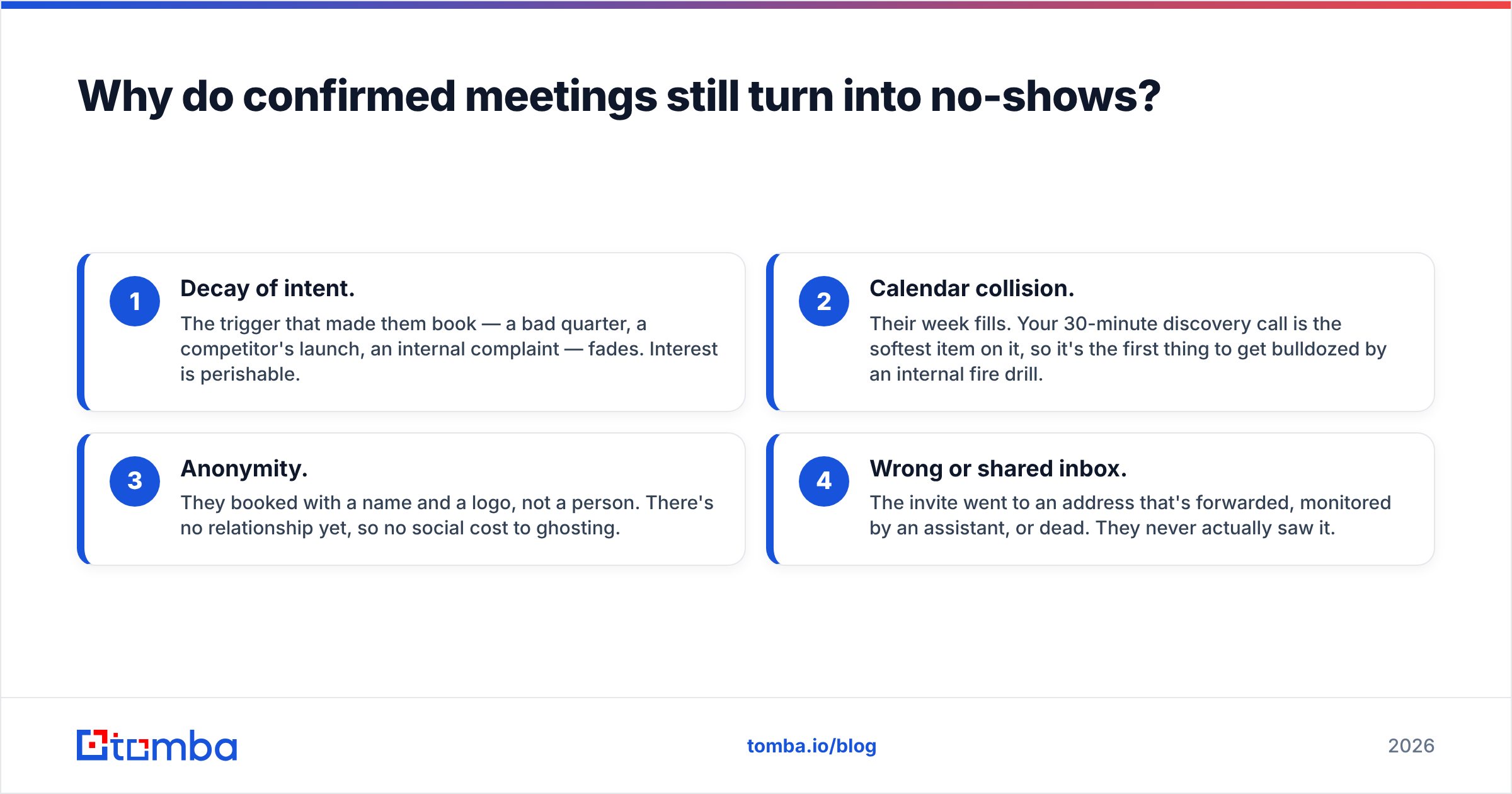
- Decay of intent. The trigger that made them book — a bad quarter, a competitor's launch, an internal complaint — fades. Interest is perishable.
- Calendar collision. Their week fills. Your 30-minute discovery call is the softest item on it, so it's the first thing to get bulldozed by an internal fire drill.
- Anonymity. They booked with a name and a logo, not a person. There's no relationship yet, so no social cost to ghosting.
- Wrong or shared inbox. The invite went to an address that's forwarded, monitored by an assistant, or dead. They never actually saw it.
You can only fix the first three with copy. The fourth is a data problem, and it's the one most teams never audit.
What should a meeting confirmation follow-up actually contain?#
Five elements, in this order. Anything else is padding.
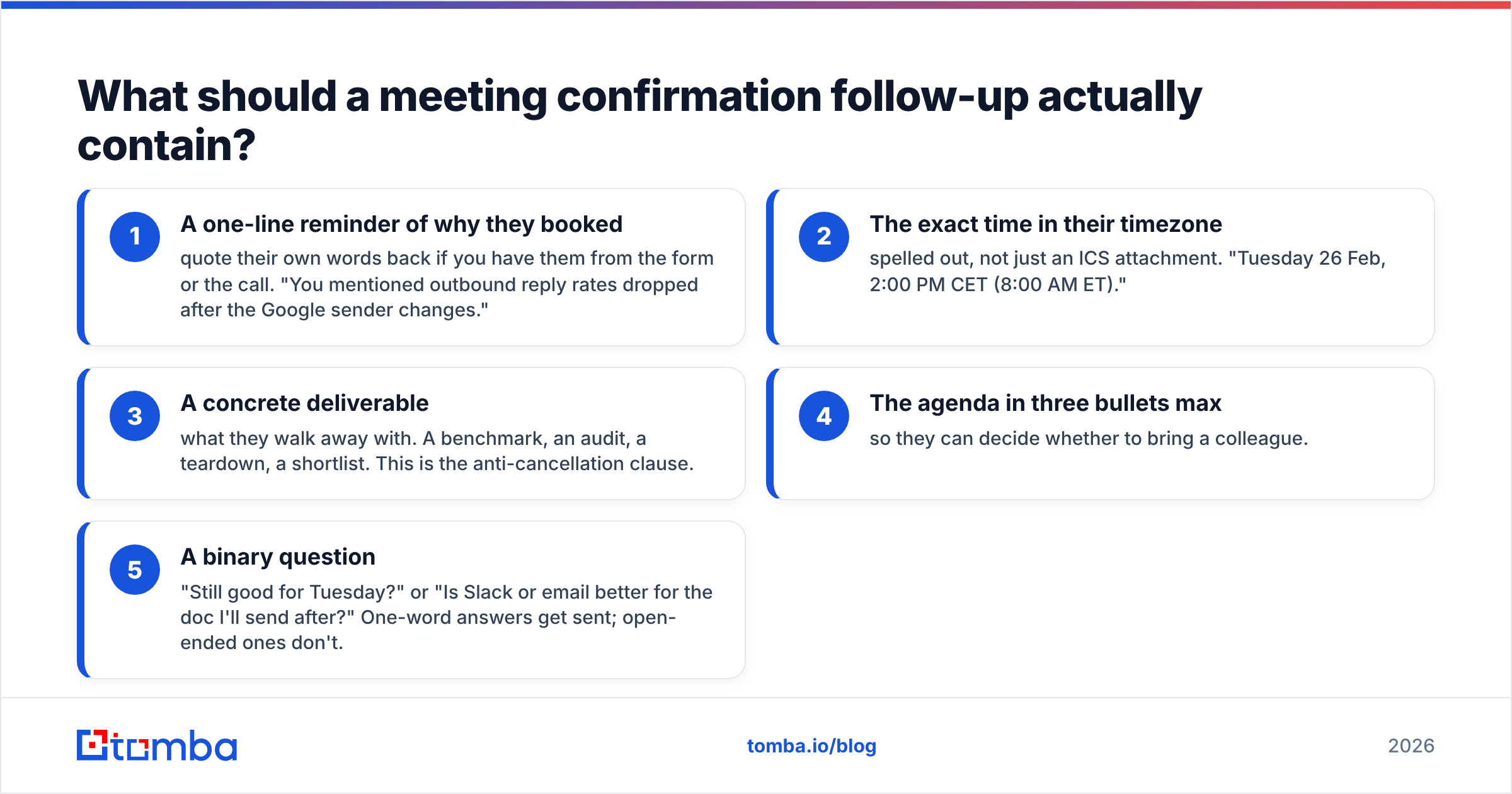
- A one-line reminder of why they booked — quote their own words back if you have them from the form or the call. "You mentioned outbound reply rates dropped after the Google sender changes."
- The exact time in their timezone — spelled out, not just an ICS attachment. "Tuesday 26 Feb, 2:00 PM CET (8:00 AM ET)."
- A concrete deliverable — what they walk away with. A benchmark, an audit, a teardown, a shortlist. This is the anti-cancellation clause.
- The agenda in three bullets max — so they can decide whether to bring a colleague.
- A binary question — "Still good for Tuesday?" or "Is Slack or email better for the doc I'll send after?" One-word answers get sent; open-ended ones don't.
What to leave out: your company's founding story, a pitch deck attachment, a video link they won't click, and any sentence beginning "I just wanted to." The confirmation email is a commitment device, not a second touch of your sequence.
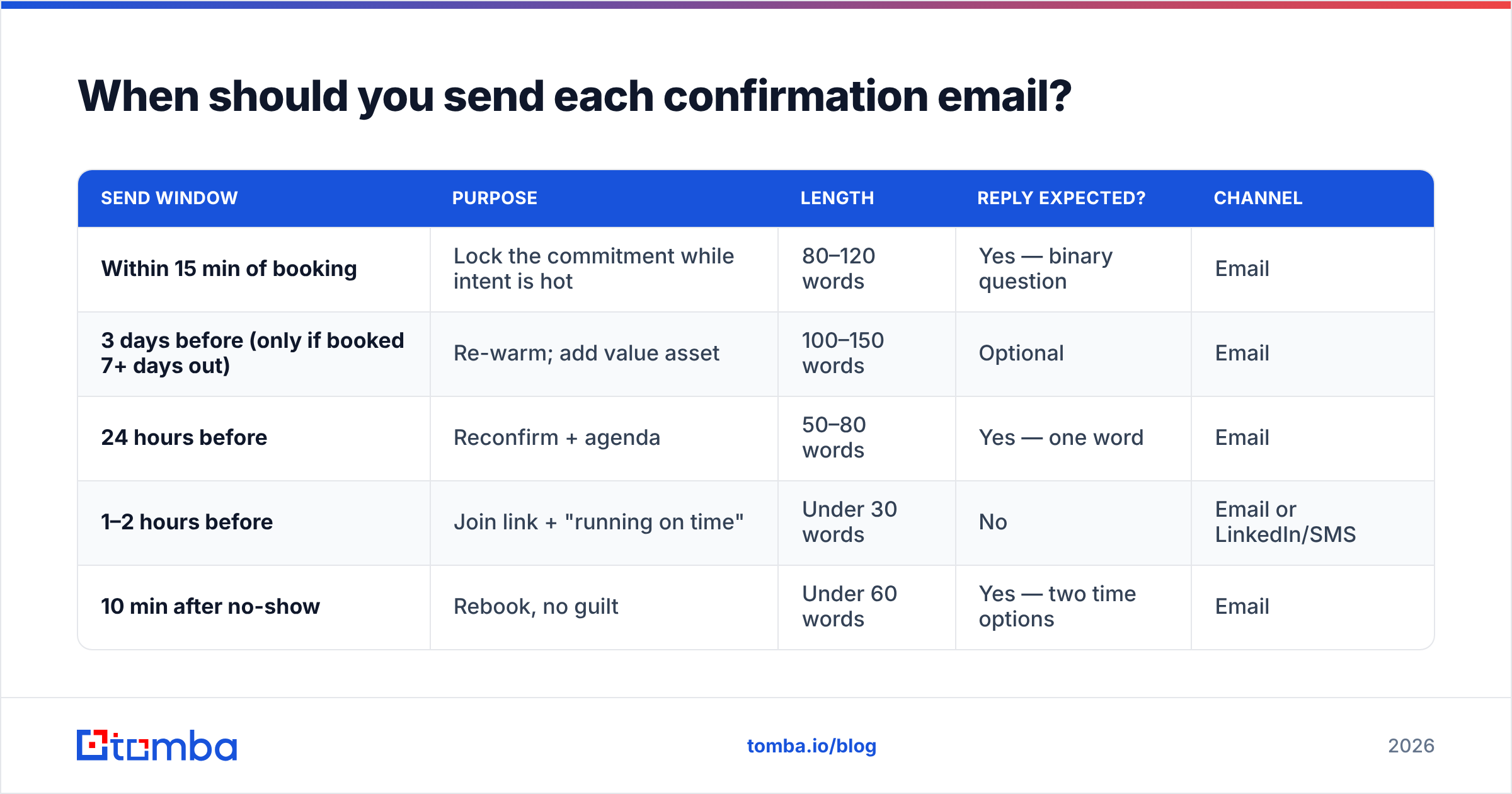
When should you send each confirmation email?#
Timing matters more than wording. Here's the cadence that holds up across most B2B outbound and inbound-demo motions.
| Send window | Purpose | Length | Reply expected? | Channel |
|---|---|---|---|---|
| Within 15 min of booking | Lock the commitment while intent is hot | 80–120 words | Yes — binary question | |
| 3 days before (only if booked 7+ days out) | Re-warm; add value asset | 100–150 words | Optional | |
| 24 hours before | Reconfirm + agenda | 50–80 words | Yes — one word | |
| 1–2 hours before | Join link + "running on time" | Under 30 words | No | Email or LinkedIn/SMS |
| 10 min after no-show | Rebook, no guilt | Under 60 words | Yes — two time options |
Two rules that people get wrong:
- Don't send the 24-hour and 1-hour emails if the meeting was booked yesterday. Three touches inside 48 hours reads as anxious and lowers your perceived seniority.
- Never send the 24-hour nudge on a Friday afternoon for a Monday meeting. Move it to Monday 8:00 AM local. Friday-evening emails are the most reliably ignored message in B2B.
Which templates actually get replies?#
Nine, grouped by the moment you're in. Adapt the specifics — the structure is the part that transfers.
1. Immediate confirmation (inbound demo booking)#
Subject: Tuesday 2pm — here's what I'll bring
Hi Dana,
Locked in for Tuesday 26 Feb, 2:00 PM CET (8:00 AM ET). Thanks for booking.
You noted on the form that your team is scaling outbound to three new markets. I'll come with a breakdown of how two similar teams handled routing and data coverage in those regions, so you get something usable even if we're not a fit.
Agenda: current setup (10 min), what's breaking (10 min), options (10 min).
Anyone else from your side joining?
— Marc
2. Immediate confirmation (outbound cold-booked)#
Subject: Confirmed — Thu 11:30, and one question
Hi Sam,
Thursday 11:30 AM ET is on the calendar. Invite sent to sam@ — let me know if a different address works better.
Quick question so I don't waste the first ten minutes: is the pain more on lead volume or lead quality right now? One word is enough.
— Priya
3. Confirmation with a stakeholder ask#
Subject: Should we pull in ops for Tuesday?
Hi Dana,
Still set for Tuesday 2pm. Based on what you described, half of this is going to be a routing and data-hygiene conversation. Worth having whoever owns your CRM on the call?
Happy either way — just easier than repeating it next week.
— Marc
4. Three-day re-warm (long booking lead time)#
Subject: Ahead of Thursday — the benchmark I mentioned
Hi Sam,
We're on for Thursday 11:30. Sending the reply-rate benchmark ahead of time so we can spend the call on your numbers instead of mine: [link].
Skim the second page — the segment breakdown is the part most teams argue with.
— Priya
5. The 24-hour reconfirm#
Subject: Tomorrow 2pm still good?
Hi Dana,
Quick check — still good for tomorrow at 2:00 PM CET?
Agenda unchanged: current setup, what's breaking, options. I'll send the routing teardown after.
Yes/no is fine.
— Marc
6. The 1-hour "running on time"#
Subject: See you at 2 — link
On for 2pm. Here's the link: [zoom]. I'll be on two minutes early.
7. Reschedule offer (they went quiet at the 24-hour mark)#
Subject: Tuesday or push it?
Hi Dana,
No reply on tomorrow, which usually means the week got heavy. Totally fine.
Want to keep 2pm, or should I move it to Thursday 10am or next Tuesday same time? I'll hold Tuesday until 5pm today.
— Marc
8. Post-no-show, first attempt (send within 10 minutes)#
Subject: Missed you — rebook?
Hi Sam,
Waited ten minutes on the link, then figured something came up. No problem at all.
Thursday 11:30 or Friday 9:00 — which is easier?
— Priya
9. Post-no-show, final attempt (four days later)#
Subject: Closing the loop on this
Hi Sam,
I'll stop chasing the calendar. If the outbound data problem is still live in Q2, reply "ping me" and I'll come back then with the market benchmarks rather than a meeting request.
Either way, good luck with the launch.
— Priya
If you want a starting library to fork rather than writing from scratch, Tomba's cold email templates and subject line generator cover the confirmation and rebook moments alongside first-touch copy.
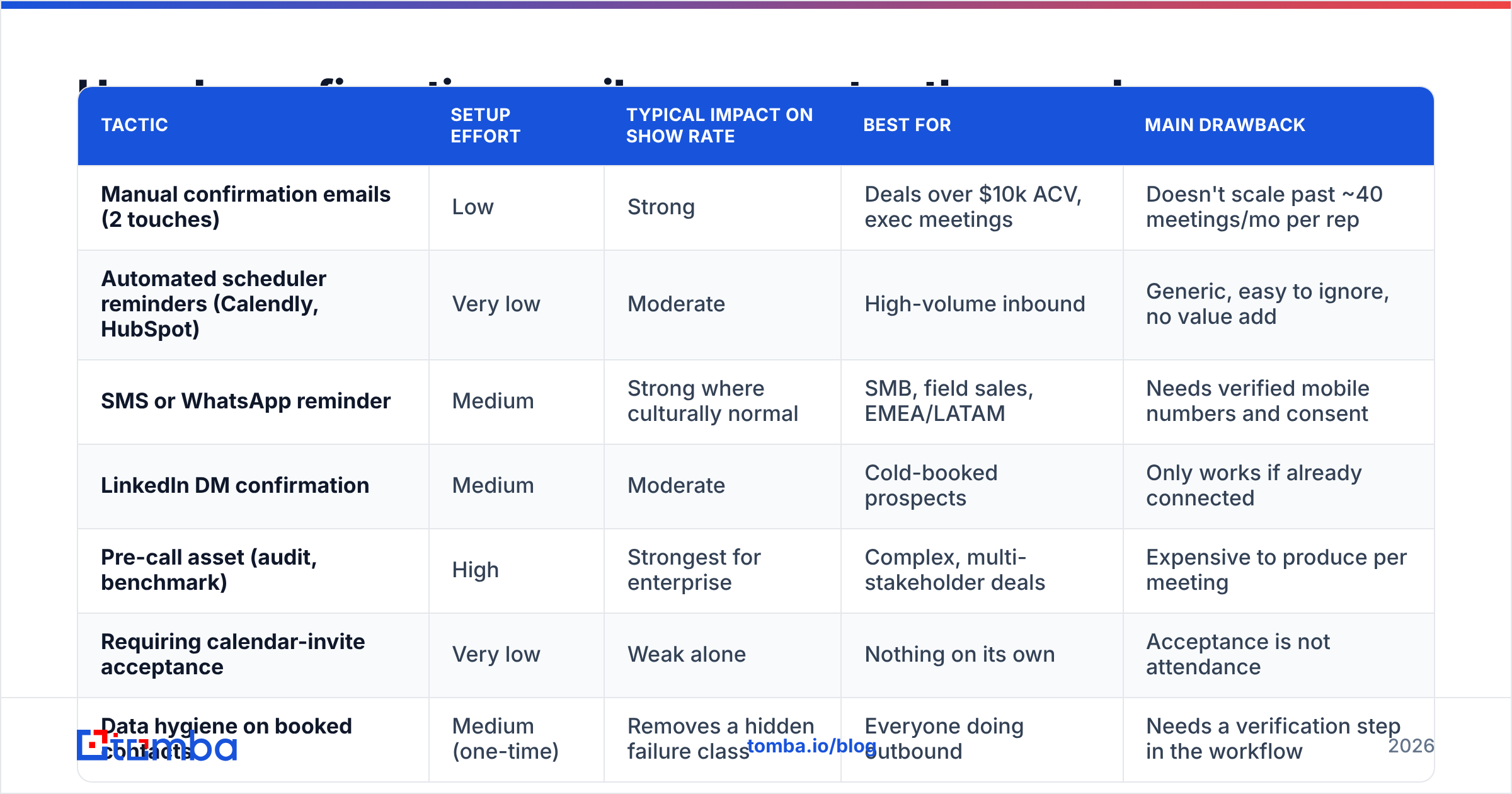
How do confirmation emails compare to other no-show fixes?#
Email confirmation isn't the only lever. Here's how the common tactics stack up on effort, effect, and where they break.
| Tactic | Setup effort | Typical impact on show rate | Best for | Main drawback |
|---|---|---|---|---|
| Manual confirmation emails (2 touches) | Low | Strong | Deals over $10k ACV, exec meetings | Doesn't scale past ~40 meetings/mo per rep |
| Automated scheduler reminders (Calendly, HubSpot) | Very low | Moderate | High-volume inbound | Generic, easy to ignore, no value add |
| SMS or WhatsApp reminder | Medium | Strong where culturally normal | SMB, field sales, EMEA/LATAM | Needs verified mobile numbers and consent |
| LinkedIn DM confirmation | Medium | Moderate | Cold-booked prospects | Only works if already connected |
| Pre-call asset (audit, benchmark) | High | Strongest for enterprise | Complex, multi-stakeholder deals | Expensive to produce per meeting |
| Requiring calendar-invite acceptance | Very low | Weak alone | Nothing on its own | Acceptance is not attendance |
| Data hygiene on booked contacts | Medium (one-time) | Removes a hidden failure class | Everyone doing outbound | Needs a verification step in the workflow |
The pattern: automated reminders keep meetings that were already going to happen, and human confirmation emails recover the ones that were quietly slipping. Most teams over-invest in the first and skip the second.
For scheduling-side mechanics, HubSpot's meeting scheduling documentation and Calendly's own workflow guides cover reminder automation in detail. Cross-check any vendor claim about show-rate lift against user reviews on G2 rather than the vendor's landing page.
What kills a confirmation email?#
Six failure modes, roughly in order of how often they show up in real sequences.
- "Just circling back." It signals that you have nothing new to say and the email exists for your benefit. Every confirmation email must carry one new piece of information — an agenda, an asset, a question, a timezone clarification.
- Burying the time. If the date and time aren't in the first two lines, you've made the reader work. Put the time in the subject line where possible.
- Attaching the deck. Sending the pitch deck before the call reliably reduces show rate. They now have the information without the meeting cost.
- Multiple asks. "Confirm the time, fill this form, review the doc, and add your CTO" gets zero of four completed. One ask per email.
- Over-apologizing. "Sorry to bother you again" invites them to treat you as a bother. State the fact, ask the question, sign off.
- Sending to an unverified address. The most common invisible cause. A confirmation email that bounces or lands in a monitored alias never registers as a missed touch — it registers as a no-show you blame on the prospect.
That last one deserves specifics. If a prospect books with a personal Gmail but you're following up on a guessed work address, or if the domain is catch-all so nothing bounces, your confirmation sequence is running into a wall silently. Running booked contacts through an email verifier before the confirmation sequence fires — and a catch-all verifier for the domains that accept everything — turns a mysterious no-show rate into a measurable one.
How do you automate this without sounding automated?#
Split the sequence by what actually needs a human.
Automate: the 1-hour join-link email, the calendar invite itself, the timezone conversion, and the logging of send/open events to your CRM.
Keep human (or heavily variable): the immediate confirmation, the 24-hour reconfirm, and both no-show recovery emails. These carry the prospect-specific detail that does the persuading.
A workable middle ground is templated-with-slots: your automation fills name, time, timezone, and meeting link, but the rep writes one sentence — the "why you booked" line — before it sends. That single sentence is doing most of the work, and it takes 20 seconds.
Two operational details that quietly improve results:
- Send from a human address, not noreply@. Confirmation emails from automation domains get filtered more aggressively and can't be replied to, which defeats the purpose of asking a question.
- Keep confirmation emails off your cold-outreach sending domain. They're transactional in nature and deserve your main domain's sender reputation, not a burner. Mixing them means a bad cold campaign can take down your meeting confirmations.
If your booking flow captures a work email you haven't validated, or you're confirming with contacts sourced from a list, build a validation step into the handoff. A single bulk verify pass on the week's booked meetings takes minutes and tells you which confirmations were never deliverable in the first place.
What should you measure?#
Track four numbers, weekly, by rep and by source.
- Confirmation reply rate — percentage of booked prospects who reply to the first confirmation email. Below 30% usually means your email carries no new information.
- Show rate by booking lead time — meetings booked same-week versus 8+ days out. If your long-lead show rate is far worse, add the three-day re-warm.
- Show rate by source — inbound demo requests should meaningfully outperform cold-booked meetings. If they don't, your inbound confirmation flow is too automated.
- Rebook rate after no-show — how many of your missed meetings you recover within ten days. Anything above a quarter means your recovery emails are doing real work.
Log these against your response rate baseline so you can tell the difference between a copy problem and a targeting problem. A confirmation email can't rescue a meeting booked with someone who was never going to buy.
Where does contact data fit into all of this?#
Directly upstream of everything above. Your confirmation sequence is only as good as the address it's aimed at, and in outbound the address is frequently a guess.
Three checks worth building into the booking-to-confirmation handoff:
- Verify the address the invite goes to, not just the one in your CRM. People book with one email and work from another.
- Capture a second channel. A verified mobile number turns your 1-hour reminder into a text, which for SMB and field-heavy segments is the single biggest show-rate lever available. A phone finder plus consent-compliant usage handles this.
- Re-check contacts older than 90 days. B2B contact data decays fast — job changes, domain migrations, and restructures mean a meeting booked from a three-month-old list is confirming into a dead inbox more often than teams assume.
None of this is glamorous. It's also the difference between a 62% show rate and an 84% one, and no amount of subject-line tuning closes that gap on its own.
Ready to stop confirming meetings into dead inboxes?#
Write the two emails. Send the first within 15 minutes and the second 24 hours out, both ending in a question a busy person can answer with one word. That alone recovers a meaningful chunk of your no-shows.
Then fix the layer underneath it. Use Tomba Email Finder to source and confirm the working address before the meeting is even booked, so your confirmation sequence lands in an inbox someone actually reads. The free tier covers 25 searches a month if you want to test it against your last batch of no-shows; paid plans start at $49/mo on the Starter tier, with full Tomba pricing laid out per credit volume. Verify first, confirm second, and the meeting takes care of itself.
Related guides#
Ready to find emails that actually work?
Join 150,000+ professionals who stopped guessing and started sending. Free credits on signup — no credit card required.
Get the Tomba newsletter
Practical outbound tactics and product updates — once every two weeks.
About the author