Follow Up Email Greetings: 25 Openers That Get Replies
Your follow-up greeting decides whether the rest of the email gets read. Here are 25 tested openers, the ones that kill reply rates, and how to match greeting to touch number.
TL;DR
- The greeting is the second thing a prospect reads after the subject line, and it's where most follow-ups signal "mass send" before the pitch even starts.
- "Just following up" and "Bumping this to the top of your inbox" are the two highest-frequency openers in B2B outbound — which is exactly why they're ignored.
- Match the greeting to the touch number: touch 1 earns a name, touch 3 earns a new angle, touch 5 earns a permission-to-close line.
- Personalized greetings need a verified first name. A
Hi {{first_name}}that renders asHi ,costs more than a generic "Hi there" ever would. - Formality is regional and role-dependent: "Hey" works for a 28-year-old growth lead in Austin and torpedoes you with a German procurement director.
Why do follow up email greetings matter more than the rest of the email?#
Because of how inboxes render. In Gmail's list view, a recipient sees the sender name, the subject, and roughly 60–90 characters of preview text. On mobile, closer to 40. Your greeting plus your first four or five words are the preview. If those characters read "Just following up on my last email," you've spent your entire preview budget telling someone you have nothing new.
The follow-up problem is compounding. Research aggregated across outbound platforms consistently puts follow-ups at 2–4× the reply volume of the first touch — but only when each touch adds something. A follow-up that opens by referencing its own previous failure is not adding anything. It's asking the recipient to feel guilty.
So the practical job of a follow-up greeting is narrow:
- Prove a human picked this recipient. A correct first name, correct spelling, correct formality register.
- Signal that this email is different from the last one. Not "checking in" — a new hook.
- Cost the reader under two seconds. Long greetings read as throat-clearing.
- Survive rendering. No broken merge fields, no double commas, no "Hi Dr. John Smith, PhD."

What are the best follow up email greetings by touch number?#
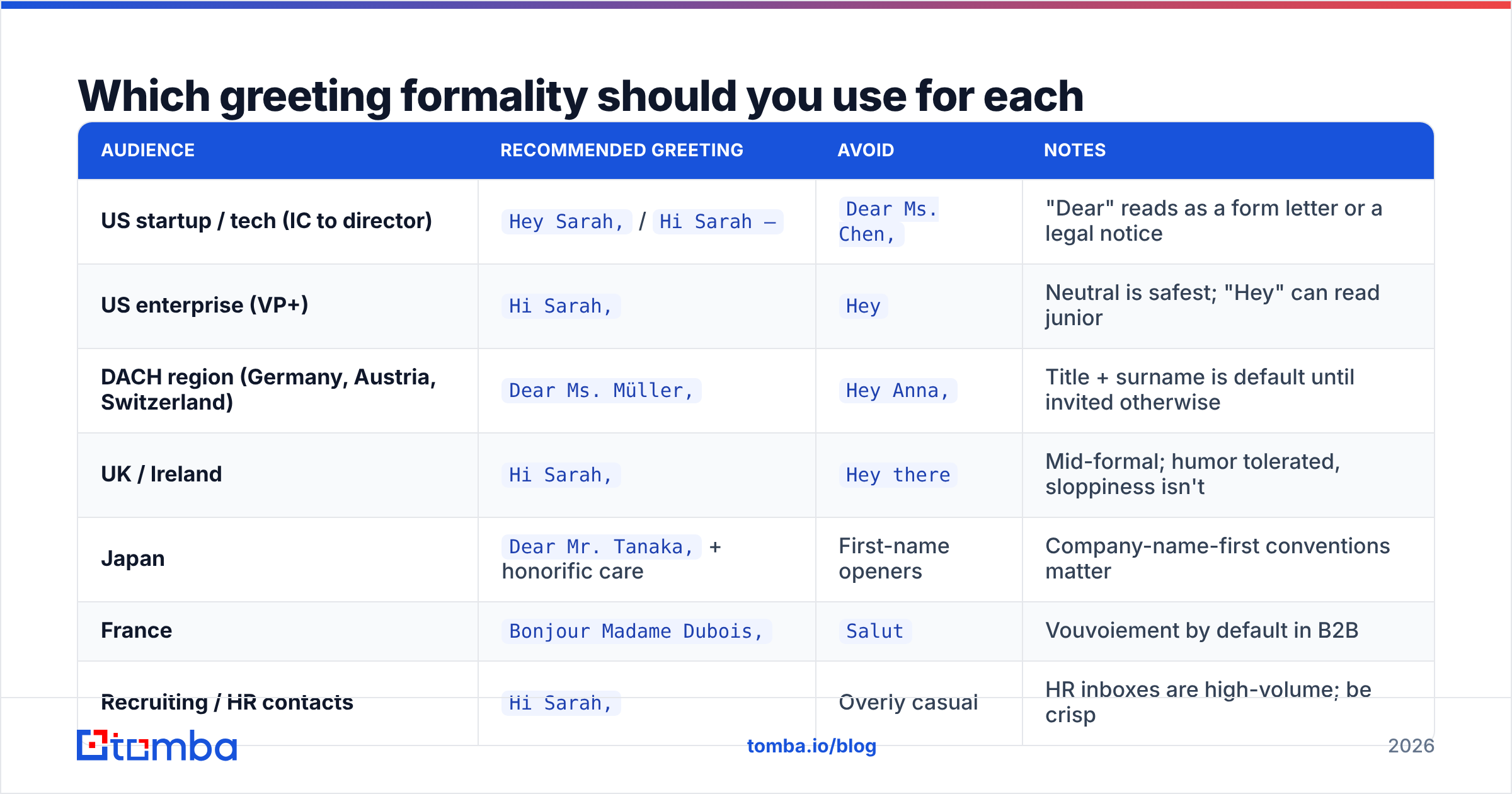
Not all follow-ups deserve the same opener. The relationship changes with each touch, and the greeting should reflect that. Here's how the sequence should escalate.
| Touch | Timing | Greeting style | Example opener | Why it works |
|---|---|---|---|---|
| 1 (initial) | Day 0 | Name + specific hook | Hi Sarah — saw Northwind opened two SDR roles this month. |
Establishes research, no apology |
| 2 | Day 3 | Name + new information | Sarah, one thing I left out: |
Implies value, not a nudge |
| 3 | Day 7 | Name + reframed angle | Hi Sarah — different angle on this. |
Signals the pitch changed |
| 4 | Day 12 | Name + social proof | Sarah — Cadence hit the same wall last quarter. |
Third-party credibility |
| 5 (breakup) | Day 20 | Name + permission to close | Hi Sarah — closing the loop on this one. |
Low pressure, high reply rate |
The pattern: the greeting gets shorter and more direct as the sequence progresses. Touch 1 can afford a clause of context. Touch 5 should be four words and a period.
Openers that consistently underperform#
- "Just following up" — appears in an enormous share of B2B follow-ups. It's pattern-matched to "ignore" before the eye reaches word four.
- "I wanted to reach out" — past tense about your own intent. Nobody cares what you wanted.
- "Hope this email finds you well" — burns preview text on zero information. Also strongly flagged by AI-written-copy detectors.
- "Per my last email" — reads as passive-aggressive to almost everyone.
- "Quick question" — overused to the point that it now signals a long pitch.
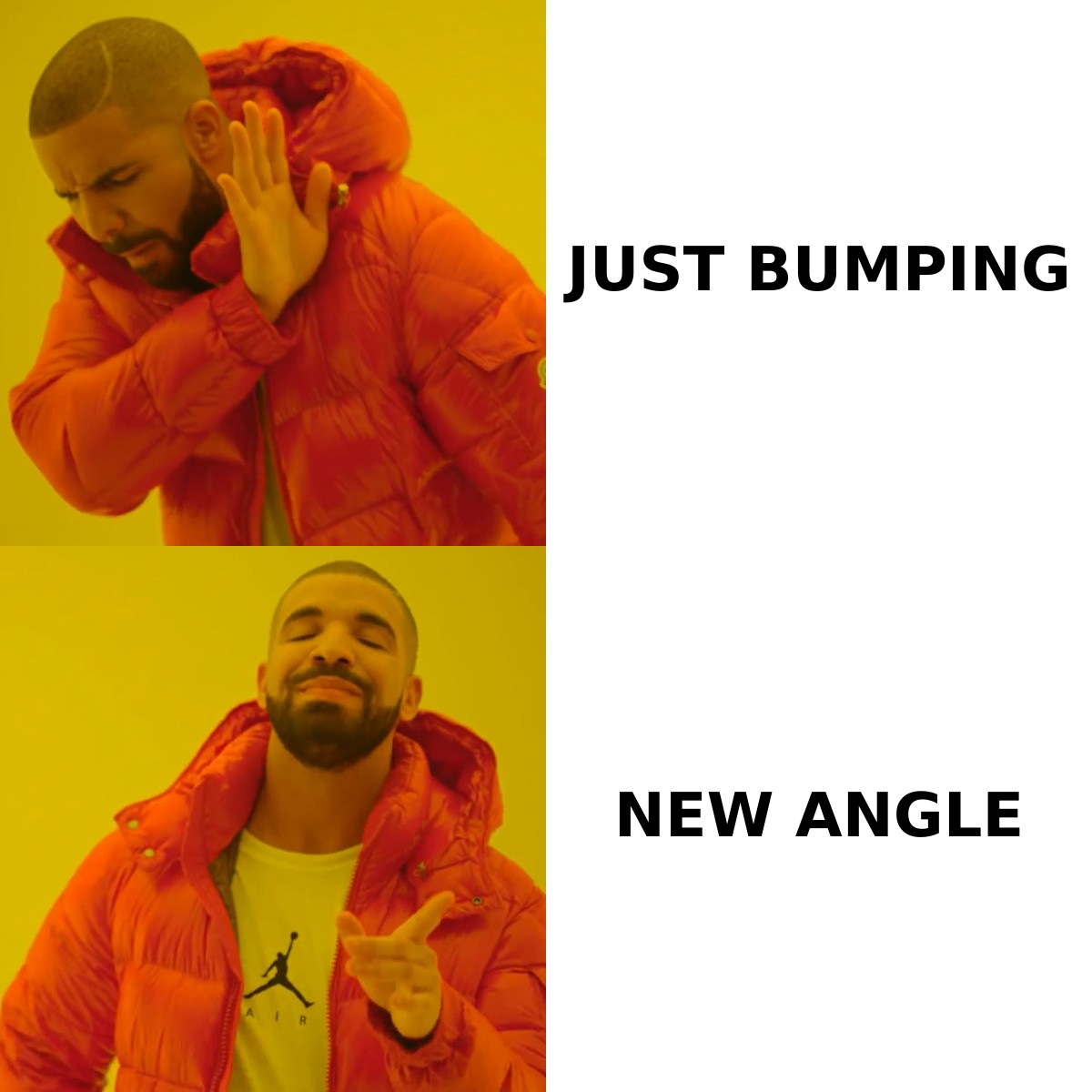
- "Bumping this up" — tells the reader your email failed and you're re-sending it anyway.
Which greeting formality should you use for each audience?#
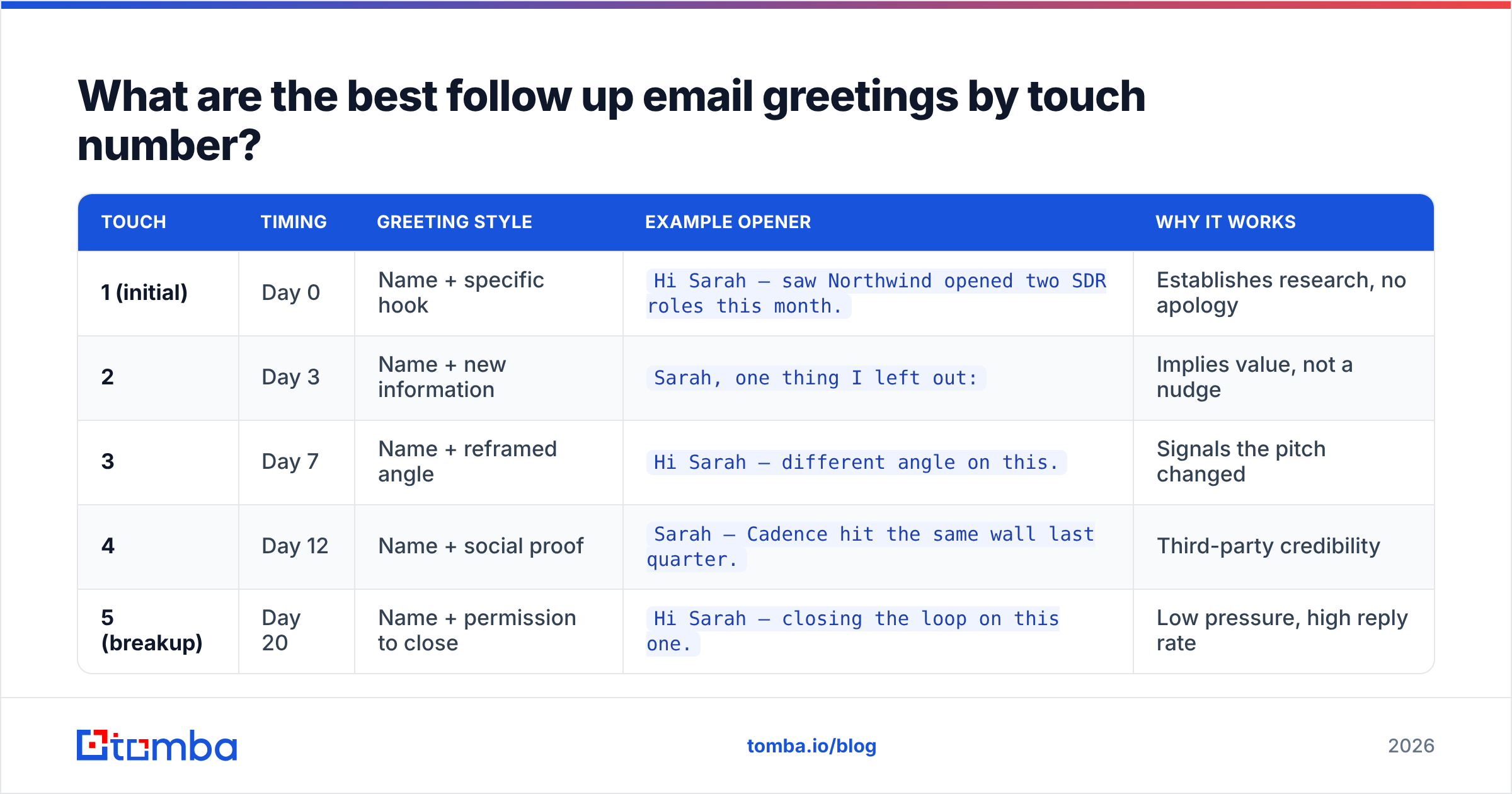
Formality is not a style preference. It's a signal about whether you understand your buyer's culture. Get it wrong and the rest of the email is read defensively.
| Audience | Recommended greeting | Avoid | Notes |
|---|---|---|---|
| US startup / tech (IC to director) | Hey Sarah, / Hi Sarah — |
Dear Ms. Chen, |
"Dear" reads as a form letter or a legal notice |
| US enterprise (VP+) | Hi Sarah, |
Hey |
Neutral is safest; "Hey" can read junior |
| DACH region (Germany, Austria, Switzerland) | Dear Ms. Müller, |
Hey Anna, |
Title + surname is default until invited otherwise |
| UK / Ireland | Hi Sarah, |
Hey there |
Mid-formal; humor tolerated, sloppiness isn't |
| Japan | Dear Mr. Tanaka, + honorific care |
First-name openers | Company-name-first conventions matter |
| France | Bonjour Madame Dubois, |
Salut |
Vouvoiement by default in B2B |
| Recruiting / HR contacts | Hi Sarah, |
Overly casual | HR inboxes are high-volume; be crisp |
| Unknown gender / name ambiguity | Hi Sarah, (first name only) |
Dear Sir/Madam |
Never guess an honorific |
One rule that overrides all of the above: never use an honorific you can't verify. "Dear Mrs. Patel" when she's Dr. Patel is a worse outcome than "Hi Priya."
How do you personalize a greeting without a verified name?#
You don't — you fix the data first. The single most common follow-up failure isn't a weak greeting; it's a merge field that renders as Hi , or Hi {FirstName}, or Hi sarah.chen,.
Three failure modes worth auditing before any send:
- Empty first name. The record has an email but no parsed name. Renders as
Hi ,— instant delete. - Lowercase or full-string names. Scraped data often stores
sarah chenorSarah Chen Jr.Normalize casing and strip suffixes. - Email-derived names.
s.chen@becomes "S" in some enrichment tools. Suppress rather than send. - Role accounts.
info@,sales@,hello@should never receive a first-name greeting. Route them to a company-level opener likeHi Northwind team —. - Stale records. Sarah left eight months ago. The greeting is perfect; the recipient is gone.
The fix is upstream of copywriting. Run your list through an email verifier to strip dead addresses, then use data enrichment to backfill missing first names and job titles before a single merge field gets rendered. If you're building the list from scratch, a domain search returns names alongside addresses, which sidesteps the empty-field problem entirely.
A quick fallback hierarchy when the name is genuinely unavailable:
- Best: verified first name —
Hi Sarah, - Good: team-level —
Hi Northwind team, - Acceptable: role-level —
Hi there —followed immediately by a specific, researched hook - Never:
Dear Sir or Madam,To Whom It May Concern,Hi [Company] Owner
What does a full follow-up look like with a strong greeting?#
Greetings don't work in isolation. Here are three complete short follow-ups where the opener does real work.
Touch 2 — new information
Sarah, one thing I left out of Tuesday's note: Northwind's careers page lists three SDR openings, which usually means the current team is at capacity on list-building.
Most teams at that stage lose 6–9 hours a week to manual prospect research. Worth 12 minutes to see how that gets cut?
Touch 3 — reframed angle
Hi Sarah — different angle on this.
Forget the tooling question. If your SDRs are pulling contacts manually, your data decay rate is probably running 25–30% annually, which means a quarter of your CRM is already wrong.
Want the two-minute version of how we audit that?
Touch 5 — breakup
Hi Sarah — closing the loop on this one.
I'll assume list quality isn't a priority this quarter and stop filling your inbox. If that changes, reply "later" and I'll follow up in Q3.
Notice what's absent from all three: no apology, no "sorry to bother you," no reference to previous emails going unanswered. Each greeting opens a new conversation rather than resurrecting a dead one.
Should you use "Hi" or "Hey" or a dash instead of a comma?#
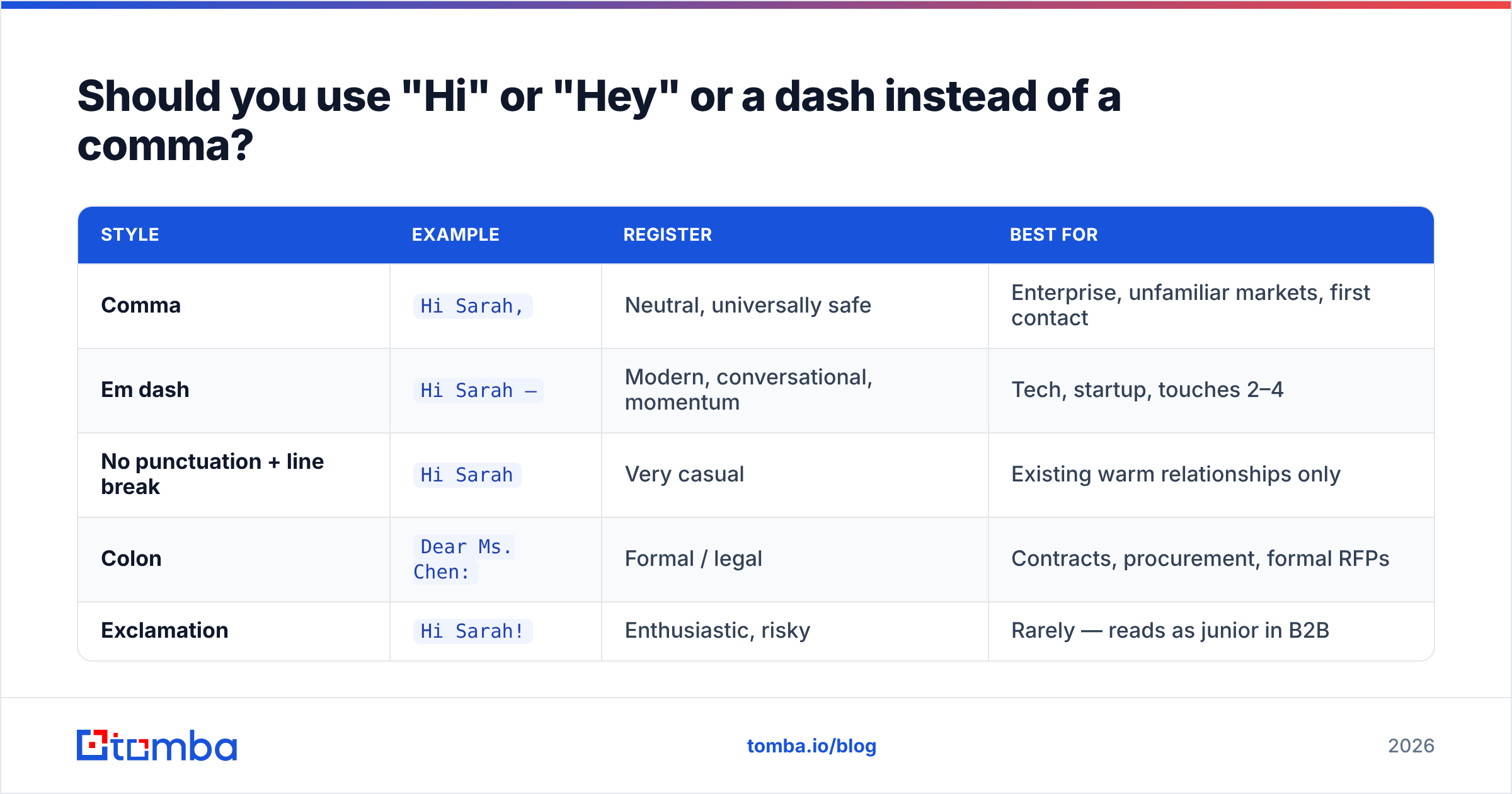
Punctuation after the greeting is a small signal that reps overthink and buyers do notice.
| Style | Example | Register | Best for |
|---|---|---|---|
| Comma | Hi Sarah, |
Neutral, universally safe | Enterprise, unfamiliar markets, first contact |
| Em dash | Hi Sarah — |
Modern, conversational, momentum | Tech, startup, touches 2–4 |
| No punctuation + line break | Hi Sarah |
Very casual | Existing warm relationships only |
| Colon | Dear Ms. Chen: |
Formal / legal | Contracts, procurement, formal RFPs |
| Exclamation | Hi Sarah! |
Enthusiastic, risky | Rarely — reads as junior in B2B |
The em dash version has a mechanical advantage: it lets the greeting and the hook share a single line, so more of your actual content lands in the mobile preview. Hi Sarah — saw the three SDR openings fits where Hi Sarah,\n\nI saw that... would show only the name.
Skip the exclamation point in cold contexts. HubSpot's sales research has repeatedly found that over-enthusiastic openers correlate with lower reply rates among senior buyers, and spam-filtering heuristics treat clusters of exclamation marks as a weak negative signal.
How do greetings affect deliverability and spam filtering?#
Indirectly, but measurably. The greeting itself rarely trips a filter. What trips filters is the pattern the greeting belongs to.
- Identical openers across thousands of sends create content fingerprints. Mailbox providers cluster near-identical messages. Varying the greeting across your sequence breaks the fingerprint.
- Broken merge fields correlate with higher delete-without-reading rates, and engagement is now the dominant deliverability input.
Hi ,doesn't get filtered — it gets deleted, and the deletion hurts you. - Bounces from stale contacts are the real killer. A perfect greeting sent to a dead mailbox still damages sender reputation.
- Excessive punctuation and all-caps names (
HI SARAH!!!) are genuine content-filter signals.
If your follow-ups are landing in Promotions or Spam, the greeting is the last place to look. Start with authentication and list hygiene — Google's Postmaster Tools documentation covers the sender requirements that actually determine placement. Then use a spam checker on the full message body before scaling a sequence.
How do you test greetings without wrecking your sample size?#
Greeting A/B tests fail more often than they succeed, because the effect size is small relative to the noise of subject line, offer, and list quality. Test them anyway, but structure it correctly.
Do this:
- Hold everything else constant. Same subject, same body, same send time. Only the first line changes.
- Split at the sequence level, not the email level. Compare "personalized greeting sequence" vs. "generic greeting sequence" across all five touches.
- Use reply rate, not open rate. Apple Mail Privacy Protection made open rates unreliable in 2021 and they haven't recovered. Greetings affect replies, not opens.
- Require 400+ sends per variant minimum before reading anything into the result. Below that, you're reading noise.
- Segment by seniority. A greeting that wins with directors often loses with VPs, and a blended average hides both effects.
Don't do this: test greetings and subject lines in the same experiment, declare a winner at 80 sends, or roll a "winner" from one vertical into a different one. Reply-rate benchmarks vary enough by industry that a cross-vertical transfer is basically an untested change. G2's sales engagement software category reviews are a reasonable place to see how different teams report on this, though treat vendor-published benchmarks skeptically.
What tools help you get the greeting right at scale?#
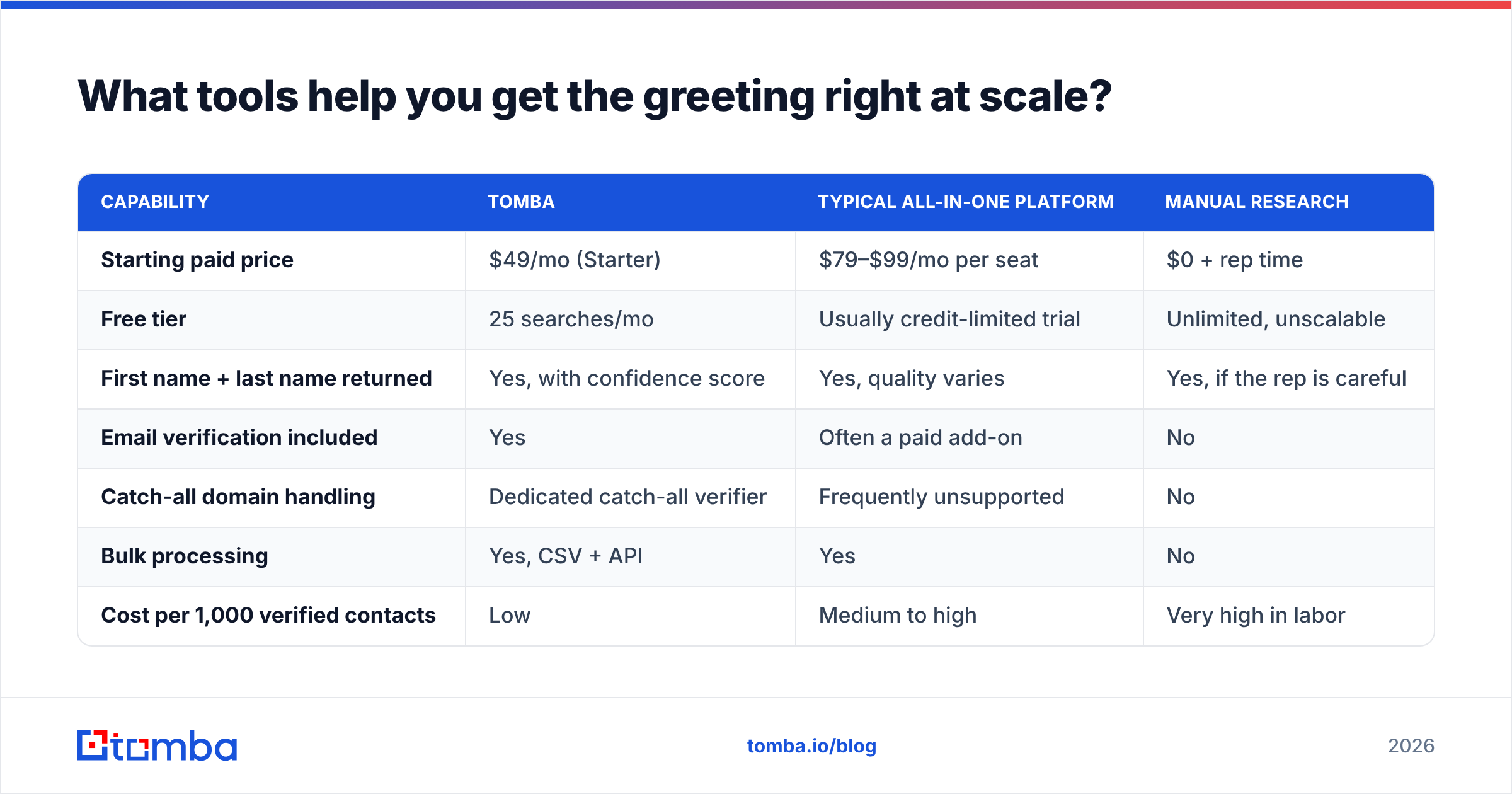
The copywriting side is cheap. The data side is where the money goes. Here's how the common options compare for the specific job of "having a correct first name attached to a deliverable address."
| Capability | Tomba | Typical all-in-one platform | Manual research |
|---|---|---|---|
| Starting paid price | $49/mo (Starter) | $79–$99/mo per seat | $0 + rep time |
| Free tier | 25 searches/mo | Usually credit-limited trial | Unlimited, unscalable |
| First name + last name returned | Yes, with confidence score | Yes, quality varies | Yes, if the rep is careful |
| Email verification included | Yes | Often a paid add-on | No |
| Catch-all domain handling | Dedicated catch-all verifier | Frequently unsupported | No |
| Bulk processing | Yes, CSV + API | Yes | No |
| Cost per 1,000 verified contacts | Low | Medium to high | Very high in labor |
| Best fit | Teams that want accurate contact data without a full sales-engagement suite | Teams needing sequencing + dialer + CRM in one | One-off, high-value accounts |
If you're doing genuinely high-value account research — ten accounts, not ten thousand — manual is fine and often better. The tooling question only matters when your sequence volume makes manual name verification impossible.
For teams working from published content or author bylines, an author finder pulls the writer's name and address together, which removes the merge-field guesswork entirely. And if a chunk of your list sits on catch-all domains, a catch-all verifier will tell you which of those addresses are actually safe to send to, rather than forcing you to choose between bouncing and skipping.
Also worth noting: some teams prefer buying pre-verified lists over building them. Providers like BookYourData sell contact data with name fields already normalized, which sidesteps the enrichment step for teams who'd rather pay per record than per lookup. That's a legitimate path — the trade-off is freshness versus convenience, and it depends on how fast your target market churns.
What's the checklist before you send a follow-up sequence?#
Run this before you press send on anything above 200 recipients.
- Render a test with three real records. One long name, one hyphenated name, one record with a missing field. Confirm none of them break.
- Suppress role accounts. No first-name greeting to
info@. - Check formality against geography. Segment DACH, France, and Japan into their own greeting variants.
- Vary the greeting across touches. Five identical openers is a fingerprint.
- Verify deliverability of the list — bounces undo everything the greeting accomplished.
- Read the first 45 characters out loud. That's your mobile preview. If it says nothing, rewrite it.
The greeting is a small lever with an outsized effect on whether anyone reads the sentence after it. Treat it as the first line of the pitch, not as a formality you clear before the pitch starts.
Get the name right before you get the copy right. Every greeting tactic in this post assumes you have a verified first name attached to a deliverable address — and that's a data problem, not a writing problem. Tomba's Email Finder returns first name, last name, job title, and a confidence score for every address it finds, so your merge fields render correctly on the first send instead of the third. Start on the free tier with 25 searches a month, or check Tomba pricing — Starter runs $49/mo — if you're ready to run full sequences.
Related guides#
Ready to find emails that actually work?
Join 150,000+ professionals who stopped guessing and started sending. Free credits on signup — no credit card required.
Get the Tomba newsletter
Practical outbound tactics and product updates — once every two weeks.
About the author