Follow Up Email Opening Lines That Actually Get Replies
Most follow-ups open with a bump, an apology, or a guilt trip — and die there. Here are 27 opening lines that earn replies, the 5 that torch them, and a framework for picking the right one at each stage.
TL;DR
- The first 8–10 words of a follow-up are visible in the inbox preview. If they say "just following up," the thread is already dead.
- The highest-reply openers do one of three things: deliver new information, reference something the prospect did, or make it trivially easy to say no.
- Guilt ("did you get my last email?"), apology ("sorry to bother you"), and filler ("hope you're doing well") all correlate with lower reply rates because they spend the reader's attention before earning it.
- Opening lines matter more on follow-ups than on first touches — the subject line is usually a reused thread, so the preview text is your only new hook.
- None of it works on a bad address. A follow-up sequence sent to unverified contacts inflates bounce rates and drags your whole domain down before the copy ever gets read.
What is a follow up email opening line, and why does it carry so much weight?#
A follow-up opening line is the first sentence of any email after your initial outreach. Think of it like the second knock on a door. The first knock can be generic — nobody was expecting you. The second knock has to say why you're still standing there, or it reads as noise.
Mechanically, it carries weight for a reason most people miss: most follow-ups reply to the original thread, so the subject line is recycled ("Re: Quick question about onboarding"). That means the only fresh text your prospect sees in the inbox list is the first 8–10 words of your body copy — the preview snippet. Gmail shows roughly 40–90 characters depending on device and window width. Your opening line is your subject line on the second touch.
That has three practical consequences:
- Front-load the new information. Whatever changed since your last email goes in words 1–10, not paragraph 2.
- Never open with the greeting alone. "Hi Sarah, hope you're well" burns the entire preview on zero content.
- Write for the scanner, not the reader. Assume the prospect decides whether to open based on the snippet, then decides whether to reply based on the next 20 words.
Why do most follow up email opening lines fail?#
They fail because they're about the sender, not the recipient. Here are the five patterns that show up most often in underperforming sequences, and what each one actually communicates:
- "Just following up on my last email." Translation: I have nothing new to say, but I want something from you. It also implies the prospect owes you a response, which they don't.
- "Did you get my last email?" A yes/no question with a guilt hook. Everyone knows the answer is "yes, and I ignored it." It forces the prospect to either lie or feel rude — so they do neither and delete.
- "Sorry to bother you again." Apologizing pre-frames your message as an imposition. If your outreach is worth sending, don't lead by conceding it isn't.
- "Hope this email finds you well." Zero information, and it eats the preview snippet. It's the email equivalent of clearing your throat for four seconds.
- "Bumping this to the top of your inbox." Announces that you're manipulating thread position rather than adding value. Prospects who get 60 cold emails a week recognize this instantly.
The common thread: each of these spends the reader's attention before earning it. HubSpot's sales research has long made the same point about follow-up structure — the message needs a reason to exist independent of the fact that you didn't get a reply.
What are the best follow up email opening lines by scenario?#
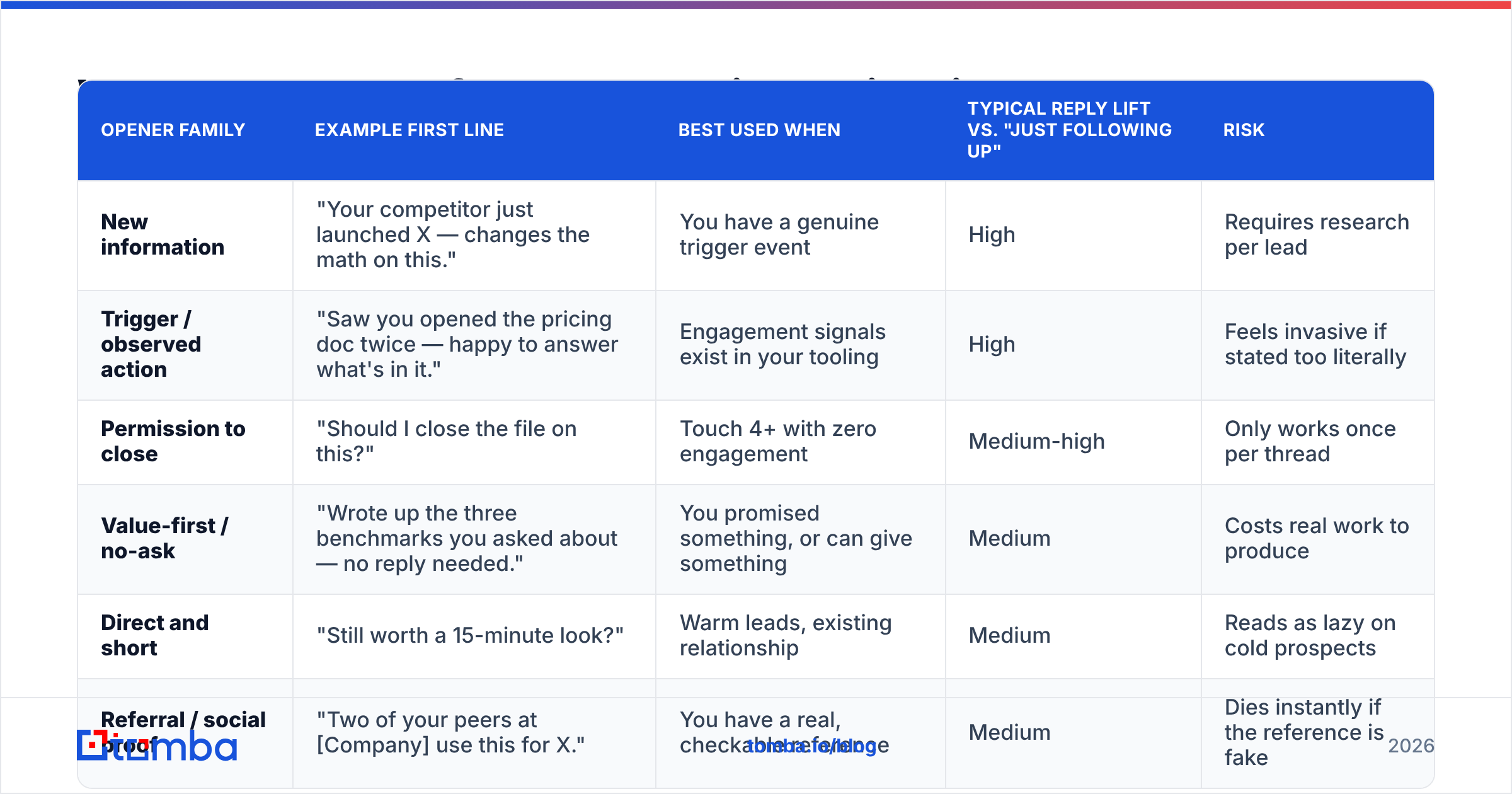
Openers aren't interchangeable. The right one depends on what happened before. Here's a comparison of the five families that consistently outperform, with the trade-offs of each:
| Opener family | Example first line | Best used when | Typical reply lift vs. "just following up" | Risk |
|---|---|---|---|---|
| New information | "Your competitor just launched X — changes the math on this." | You have a genuine trigger event | High | Requires research per lead |
| Trigger / observed action | "Saw you opened the pricing doc twice — happy to answer what's in it." | Engagement signals exist in your tooling | High | Feels invasive if stated too literally |
| Permission to close | "Should I close the file on this?" | Touch 4+ with zero engagement | Medium-high | Only works once per thread |
| Value-first / no-ask | "Wrote up the three benchmarks you asked about — no reply needed." | You promised something, or can give something | Medium | Costs real work to produce |
| Direct and short | "Still worth a 15-minute look?" | Warm leads, existing relationship | Medium | Reads as lazy on cold prospects |
| Referral / social proof | "Two of your peers at [Company] use this for X." | You have a real, checkable reference | Medium | Dies instantly if the reference is fake |
Now the specific lines. Copy these, but rewrite them in your own voice — the exact wording matters far less than the structural move behind it.
New-information openers (touch 2)
- "Something changed since I emailed — [specific development]."
- "New data point that's relevant to your [team/stack]: [stat]."
- "You mentioned [problem] on the [podcast/webinar/post]. Here's how three teams solved it."
- "We just shipped the [feature] that was missing when I first reached out."
- "Quick correction to my last email — the number is actually [X], which makes this better for you."
Trigger-based openers (touch 2–3)
- "Congrats on the [funding round / new role / product launch]."
- "Noticed you're hiring [role] — that usually means [pain] is on the roadmap."
- "Your team's post about [topic] lines up almost exactly with what I emailed about."
- "Saw [Company] moved to [tool]. That's usually when [problem] shows up."
Permission-to-close openers (touch 4+)
- "Should I close the file on this?"
- "Fair to assume this isn't a priority this quarter?"
- "Last one from me — is [problem] still worth solving on your side?"
- "I'll stop here unless you tell me otherwise."
- "Wrong person, wrong timing, or wrong problem? Any of the three is a useful answer."
Value-first openers (any touch)
- "No ask here — put together the [benchmark/teardown] I mentioned."
- "Made you a two-minute Loom walking through [specific thing on their site]."
- "Here's the template we use for [process]. Yours to keep either way."
- "Skip this email if you're set. Sharing it because [reason]."
Direct openers (warm threads)
- "Still worth 15 minutes?"
- "Are we a no for now?"
- "Picking this back up — did [initiative] move forward?"
- "Reviving this because [reason it's newly relevant]."
Referral and proof openers
- "[Mutual contact] suggested I loop back with you."
- "Two teams at [Company size/industry] started using this since my last email."
- "[Peer company] hit [result] with the same setup — thought it was worth one more email."
Which opener should you use at each follow-up stage?#
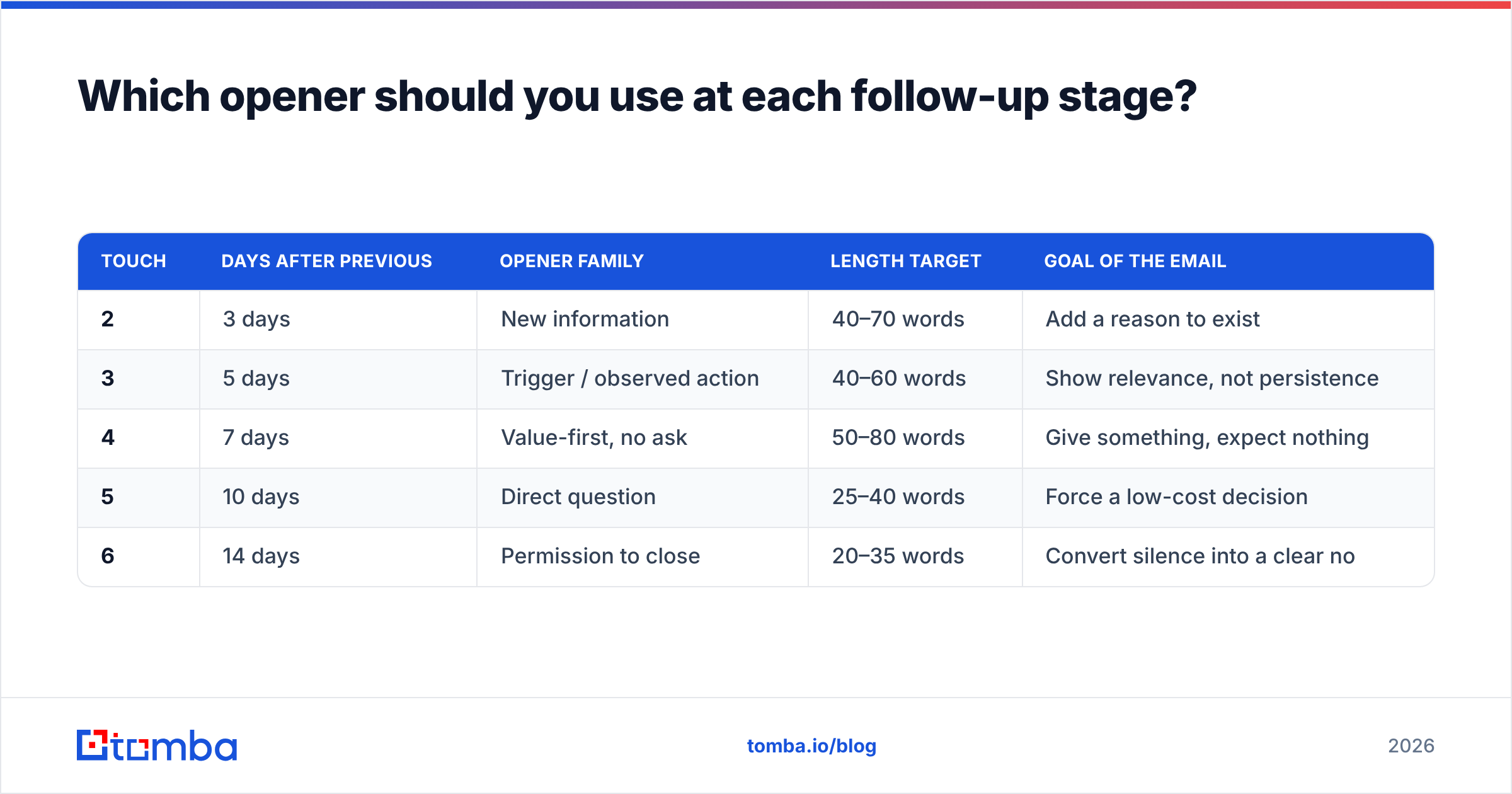
Sequence position changes what's appropriate. A permission-to-close line at touch 2 wastes your best card. A value-first line at touch 6 looks desperate. Map it:
| Touch | Days after previous | Opener family | Length target | Goal of the email |
|---|---|---|---|---|
| 2 | 3 days | New information | 40–70 words | Add a reason to exist |
| 3 | 5 days | Trigger / observed action | 40–60 words | Show relevance, not persistence |
| 4 | 7 days | Value-first, no ask | 50–80 words | Give something, expect nothing |
| 5 | 10 days | Direct question | 25–40 words | Force a low-cost decision |
| 6 | 14 days | Permission to close | 20–35 words | Convert silence into a clear no |
Two rules that make this table work in practice. First, shorten as you go. Touch 6 should be one or two sentences. Second, never repeat an opener family within the same sequence. If touch 2 and touch 4 both open with new information, the prospect reads it as one template with variables swapped.
Why does the Zeigarnik effect make short openers work?#
Because unfinished business sticks in memory better than finished business. The Zeigarnik effect describes how people recall interrupted or incomplete tasks more readily than completed ones — which is why a short, open-ended opener ("Should I close the file on this?") lingers where a fully-explained pitch does not.
A three-paragraph follow-up closes the loop for the reader. They've absorbed everything, nothing is pending, and they can archive it guilt-free. A one-line opener that poses a genuine question leaves the loop open. That's the mechanism behind the disproportionate reply rate on breakup emails — the shortest email in most sequences routinely outperforms the longest.
Practical translation: your opener should raise a question your body copy answers only partially. Leave the specific number, the exact mechanism, or the case study detail for the reply.
How do you personalize openers without spending 10 minutes per lead?#
You separate the research layer from the writing layer. Most reps burn time hunting for a personalization hook one lead at a time. Do it in batch instead:
- Build the opener library first. Write 6–8 openers per family, in your voice. This is a one-time cost. Store them alongside your cold email templates so the whole team pulls from the same set.
- Enrich in bulk, not one by one. Pull job titles, company size, tech stack, and recent funding for the whole list at once with data enrichment rather than opening 200 LinkedIn tabs. The enrichment fields become your merge variables.
- Segment before you personalize. Ten segments with a tailored opener each beats 200 individually-written lines that all say "loved your recent post."
- Reserve manual research for tier-1 accounts. If the deal is worth $50k, spend the ten minutes. If it's worth $500, use the segment-level opener and move on.
- Verify before you send. A perfectly personalized opener sent to a dead mailbox is a bounce, and bounces compound. Run the list through an email verifier so your sender reputation survives the sequence.
Do opening lines matter more than subject lines on follow-ups?#
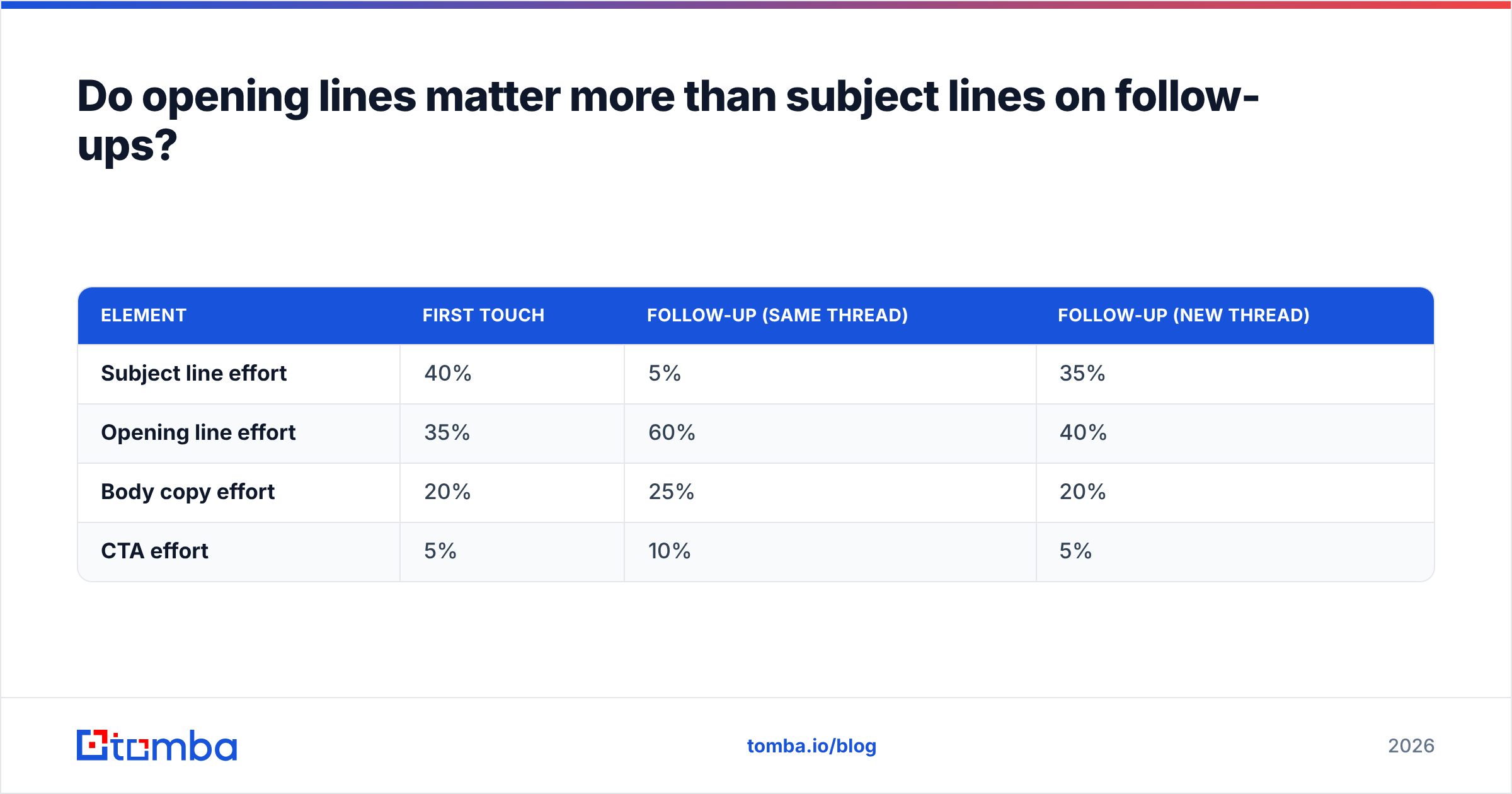
Yes — and this is the single most common misallocation of effort in outbound.
On a first touch, the subject line does the heavy lifting because it's the only thing the prospect sees. On a follow-up inside an existing thread, the subject is prefixed with "Re:" and inherits whatever you wrote days ago. The prospect has already seen and ignored it once. The new signal in the inbox row is the preview snippet — your opening line.
So the sensible split of effort looks like this:
| Element | First touch | Follow-up (same thread) | Follow-up (new thread) |
|---|---|---|---|
| Subject line effort | 40% | 5% | 35% |
| Opening line effort | 35% | 60% | 40% |
| Body copy effort | 20% | 25% | 20% |
| CTA effort | 5% | 10% | 5% |
If you're starting a fresh thread instead of replying — which is worth testing, since it resets the "already ignored" signal — the subject matters again. Run candidates through a subject line tester before committing a whole sequence to one.
How do you test follow up email opening lines properly?#
Most teams "test" by changing five things at once and declaring a winner off 40 sends. That's noise.
Test one variable at a time. Hold the subject, body, CTA, send time, and list segment constant. Change only the opening line. If you change the opener and the CTA, you learn nothing about either.
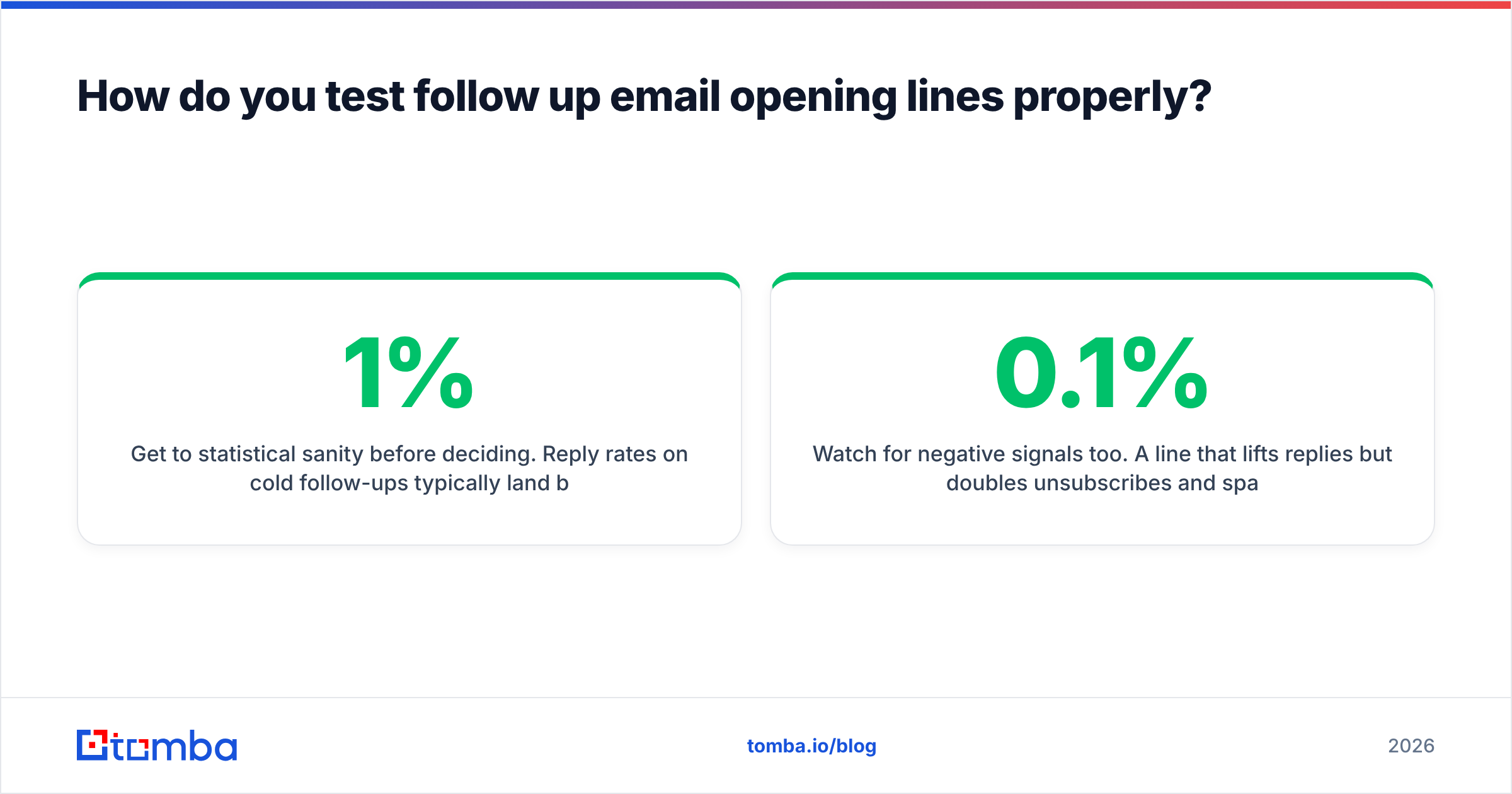
Get to statistical sanity before deciding. Reply rates on cold follow-ups typically land between 1% and 8%. Detecting a real difference between 3% and 5% takes roughly 1,000+ sends per variant. Below a few hundred sends per arm, you're reading randomness. Analyst coverage of sales engagement tooling from firms like Gartner consistently flags the same problem: teams optimize on samples far too small to support the conclusion.
Measure replies, not opens. Open tracking has been unreliable since Apple Mail Privacy Protection started pre-fetching images. Positive-reply rate and meetings booked are the only metrics worth optimizing. Track them per opener family, not per individual line — you want to learn which move works on your ICP, not which of two synonyms won.
Watch for negative signals too. A line that lifts replies but doubles unsubscribes and spam complaints is a net loss. Keep complaint rate under 0.1% or your deliverability erodes regardless of how sharp the copy gets.
Re-test quarterly. Openers decay. "Congrats on the funding round" worked well when few people used it; it's now common enough to read as automated. Rotate.
What should you do next?#
Pick three openers from the families above, rewrite them in your own voice, and assign them to touches 2, 4, and 6 of your current sequence. Kill every instance of "just following up," "hope you're well," and "did you get my last email." That single sweep usually moves reply rate more than a full rewrite of the body copy.
Then fix the layer underneath the copy. The best opening line in the world can't survive a wrong address — it bounces, your sender reputation drops, and the next 500 emails land in spam regardless of how good they are. Start with accurate, verified contacts: the Tomba Email Finder pulls professional email addresses by name, domain, or company, with verification built into the same workflow, so your follow-ups reach real inboxes. The free tier includes 25 searches a month, and paid plans start at $49/mo — see Tomba pricing for the full breakdown. Get the deliverability right, then let the openers do their job.
Related guides#
Ready to find emails that actually work?
Join 150,000+ professionals who stopped guessing and started sending. Free credits on signup — no credit card required.
Get the Tomba newsletter
Practical outbound tactics and product updates — once every two weeks.
About the author