Follow Up Email Sequence Strategy: A Practical 2026 Playbook
Most replies come from follow-ups, not the first email. Here is a tested follow up email sequence strategy: cadence, message count, angles, and the exit rules that keep your domain safe.
TL;DR
- Between 40% and 60% of replies in a well-built cold sequence arrive after the first email — the follow-up is the campaign, not an afterthought.
- Four to six touches over 14–21 business days is the range that consistently performs. Beyond seven touches, reply rate flatlines while spam complaints climb.
- Every follow-up needs a new reason to exist. "Just bumping this" is the single most common reason sequences underperform.
- Your sequence is only as good as your list. Bad addresses inflate bounce rates, wreck sender reputation, and make good copy look broken.
- Exit rules matter as much as entry rules. Define what triggers a stop — reply, meeting booked, hard bounce, out-of-office, unsubscribe — before you launch.
What is a follow up email sequence strategy?#
A follow up email sequence strategy is the deliberate plan behind every message you send after the first one: how many, how far apart, what each one says, and when you stop.
Think of it like a doctor's follow-up call. The first appointment gets the diagnosis on the table. The follow-up isn't a repeat of the diagnosis — it checks whether anything changed, offers a next step, and eventually closes the file if the patient doesn't engage. Sending "just checking in" five times is the equivalent of calling to re-read the same chart.
Technically, a sequence is a set of scheduled, conditionally-branched messages tied to a single prospect record. Each step has three variables you control:
- Delay — business days since the previous send, not calendar days. A three-day gap that lands on Saturday is really a five-day gap.
- Angle — the specific new information, proof, or question that justifies the email existing at all.
- Exit condition — the event that pulls the prospect out of the sequence (reply, click-through to a booking page, bounce, unsubscribe).
Most teams get delay right, half-get angle right, and almost nobody writes exit conditions down.
Why do most follow-up sequences fail?#
Because they're written as reminders instead of as arguments.
Here's the pattern that kills sequences. Email one makes a real pitch. Email two says "wanted to bump this to the top of your inbox." Email three says "following up on the below." Email four is a breakup note. Three of the four messages contain zero new information, which trains the prospect that opening your emails is a waste of time.
The second failure mode is data quality. If 12% of your list bounces, mailbox providers read that as a signal you're sending to a scraped or stale list — and your inbox placement drops for everyone on that list, including the prospects with valid addresses. Bounce rate above 3% is the threshold where reputation damage starts compounding. Run every list through an email verifier before the first send, not after the first bounce report.
Third: sending on autopilot with no reply-detection. If a prospect answers email two and your tool still fires email three, you've just demonstrated that nobody is reading their responses. Most modern sequencers handle this natively — but verify it in a test campaign before you trust it with real accounts.
How many follow-up emails should you send?#
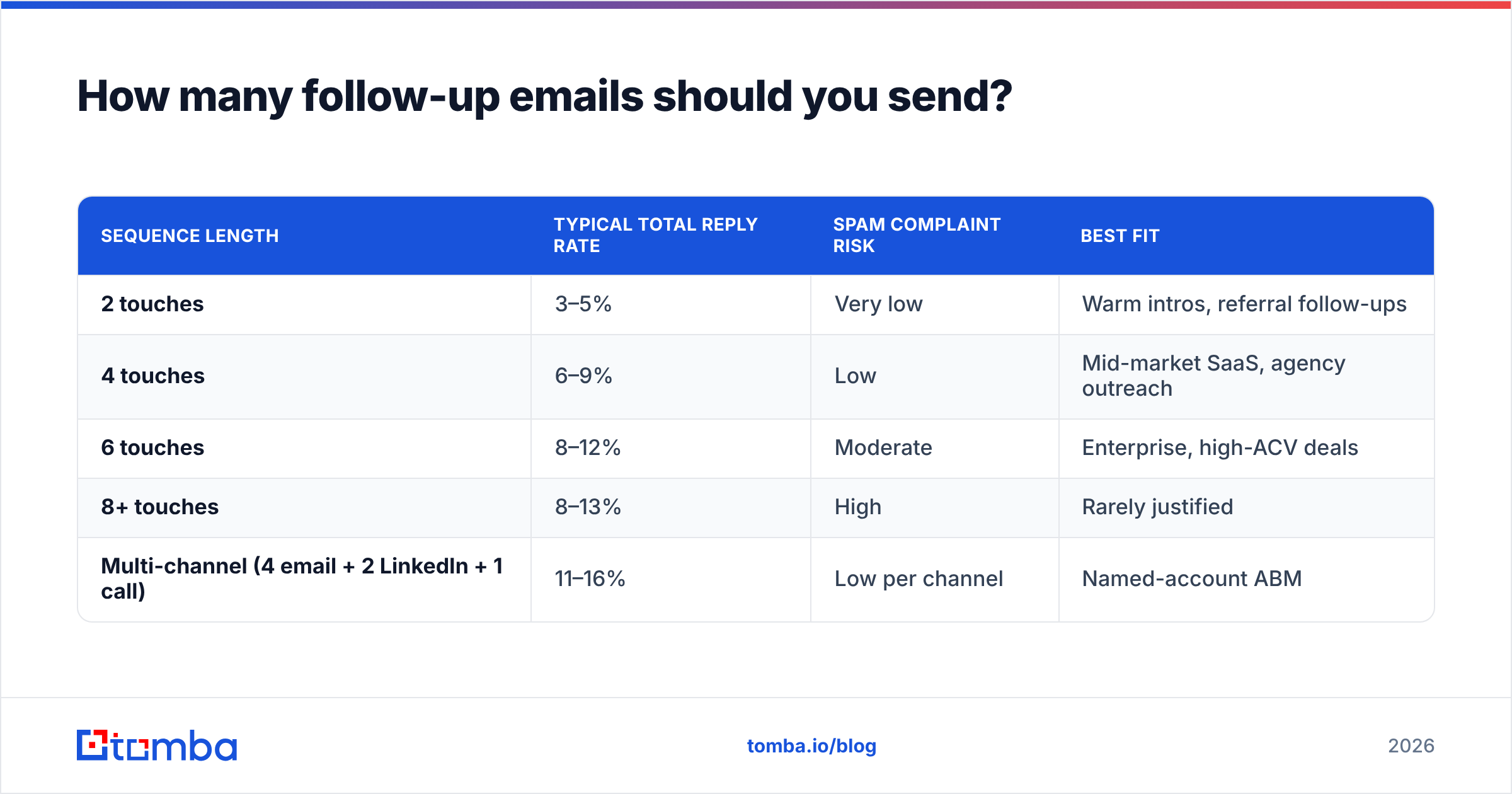
Four to six total touches, spread over 14 to 21 business days. That range shows up consistently across published outbound benchmarks and across our own campaign data.
Here's the reasoning behind each count:
- 1–2 touches — you're leaving replies on the table. A prospect who was on vacation or in a quarter-close crunch never sees you again.
- 3–4 touches — the safe minimum. Captures most of the "I meant to reply" segment.
- 5–6 touches — the sweet spot for high-ACV B2B where a single deal justifies the effort.
- 7+ touches — diminishing returns. Incremental reply rate per touch drops below the incremental spam-complaint rate. You're borrowing from your domain's future to squeeze out one more meeting.
| Sequence length | Typical total reply rate | Spam complaint risk | Best fit |
|---|---|---|---|
| 2 touches | 3–5% | Very low | Warm intros, referral follow-ups |
| 4 touches | 6–9% | Low | Mid-market SaaS, agency outreach |
| 6 touches | 8–12% | Moderate | Enterprise, high-ACV deals |
| 8+ touches | 8–13% | High | Rarely justified |
| Multi-channel (4 email + 2 LinkedIn + 1 call) | 11–16% | Low per channel | Named-account ABM |
The multi-channel row is the important one. Spreading seven touches across three channels keeps email volume per prospect at four while more than doubling total surface area. Email fatigue is channel-specific; a LinkedIn view followed by an email reads as persistence, whereas seven emails read as spam.
What should each follow-up email actually say?#
Each step should carry one distinct job. Assign the job first, write the copy second.
- Touch 1 — The premise. Why this person, why now, what specific outcome you're claiming. Under 90 words. One ask.
- Touch 2 (day 3) — The proof. A customer result, a benchmark number, a screenshot. This is where you answer "why should I believe you" without repeating the pitch.
- Touch 3 (day 7) — The reframe. Same problem, different angle. If touch 1 sold time savings, touch 3 sells risk reduction. Prospects self-select on the frame, not the product.
- Touch 4 (day 12) — The low-friction ask. Drop the meeting request. Ask a question they can answer in five words: "Is this on your roadmap for Q3, or should I close the loop?"
- Touch 5 (day 18) — The resource drop. Send something useful with no ask attached. A teardown, a template, a relevant data point about their competitor's hiring.
- Touch 6 (day 21) — The close-out. State that you're stopping. No guilt, no "I guess you're not interested." Just: "Closing this out — if timing changes, reply to this thread."
The close-out email reliably produces the second-highest reply rate in the sequence, behind touch 1. Loss aversion is real, and a clean exit reads as professional rather than desperate. Do not fake it — if you say you're stopping, stop.
Two copy rules that apply to every step:
- Reply in-thread for touches 2–4, break thread for 5–6. Threading preserves context early; a fresh subject line gets past the "I already ignored this" reflex late.
- Never open with an apology. "Sorry to bother you again" tells the reader the email is a bother. Open with the new information.
If you need a starting point for the copy itself, our cold email templates library has step-by-step variants you can adapt, and the subject line tester will flag the spam-trigger phrasings before you send.
How do you time a follow-up sequence?#
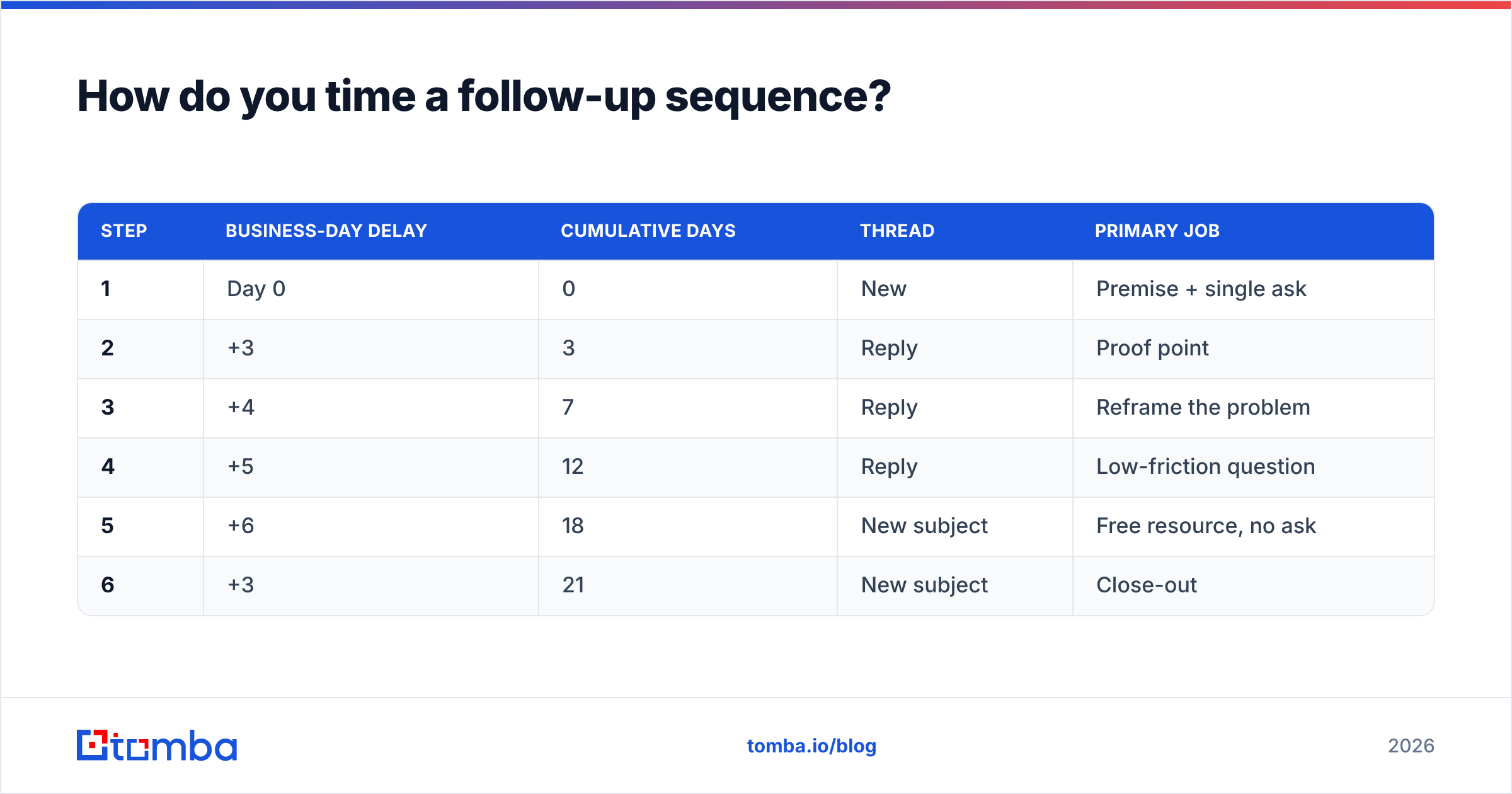
Use business-day spacing with widening gaps. Tight early, loose late.
| Step | Business-day delay | Cumulative days | Thread | Primary job |
|---|---|---|---|---|
| 1 | Day 0 | 0 | New | Premise + single ask |
| 2 | +3 | 3 | Reply | Proof point |
| 3 | +4 | 7 | Reply | Reframe the problem |
| 4 | +5 | 12 | Reply | Low-friction question |
| 5 | +6 | 18 | New subject | Free resource, no ask |
| 6 | +3 | 21 | New subject | Close-out |
Why widening gaps? Early follow-ups catch people who genuinely intended to reply — that intent decays fast, so a three-day bump works. Later follow-ups are fishing for a change in circumstance (new budget, new priority, new pain), and circumstances change on a weekly-to-monthly clock, not a daily one.
Send-time details that measurably matter:
- Tuesday through Thursday, 7–9am recipient local time outperforms midday in most B2B verticals. It's not magic — it's just when inbox triage happens.
- Avoid Monday morning and Friday afternoon. Monday is backlog-clearing; Friday is checkout.
- Respect out-of-office replies. Parse the return date and pause the sequence until then. Sending three emails into an OOO auto-responder wastes touches and looks automated.
- Cap daily volume per mailbox at 30–50 sends during warmup, and hold there unless your sender reputation metrics are clean. Google Postmaster Tools shows domain reputation directly; check it weekly.
[Screenshot placeholder: Google Postmaster Tools domain reputation graph showing a "High" reputation trend line across 30 days]
[Screenshot placeholder: Instantly sequence builder showing a 6-step cadence with widening business-day delays and reply-based exit conditions]
Which tools handle follow-up sequences best?#
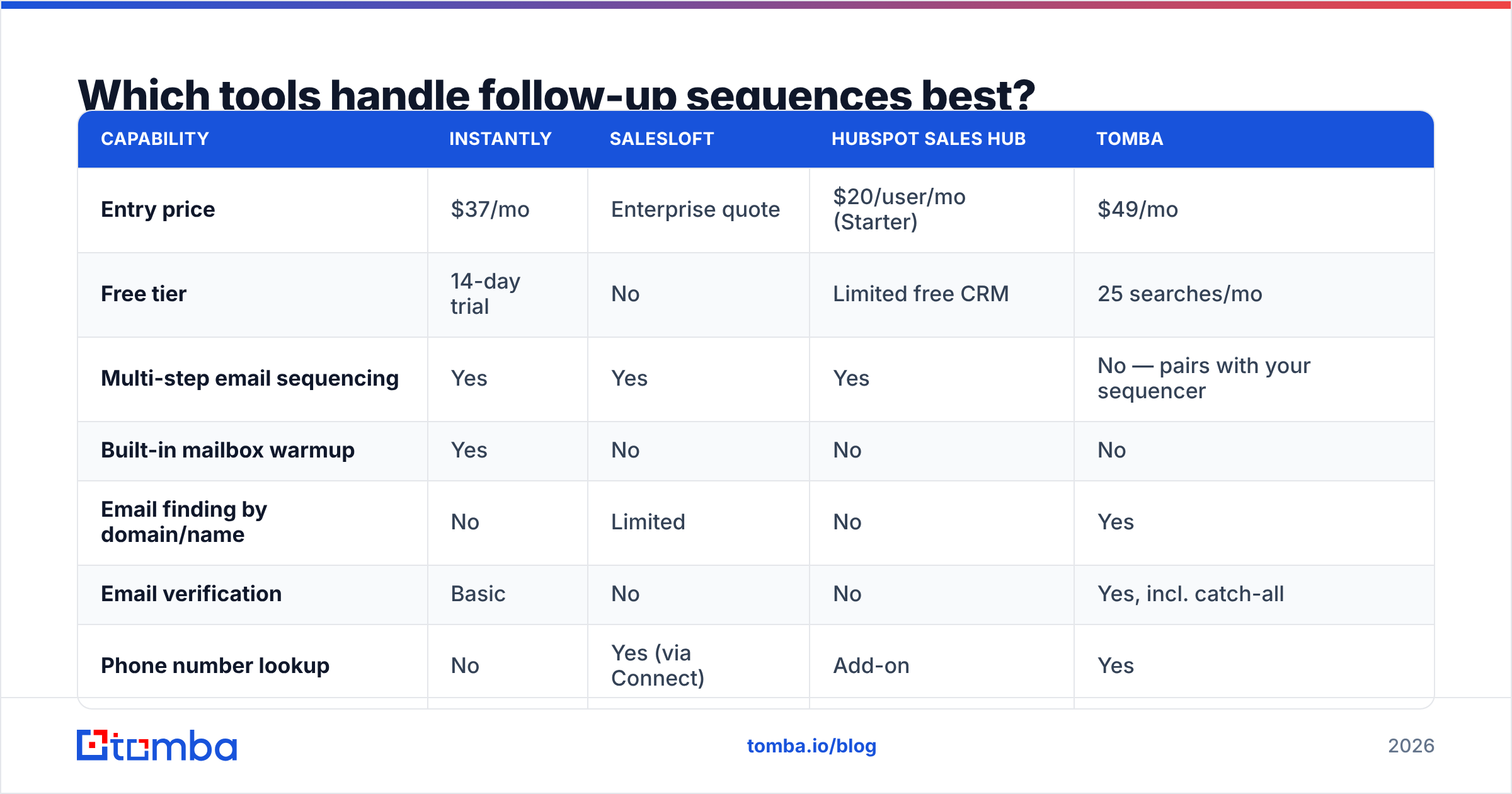
The sequencer, the data source, and the verification layer are three separate jobs. Some vendors do all three; most do one well.
| Capability | Instantly | Salesloft | HubSpot Sales Hub | Tomba |
|---|---|---|---|---|
| Entry price | $37/mo | Enterprise quote | $20/user/mo (Starter) | $49/mo |
| Free tier | 14-day trial | No | Limited free CRM | 25 searches/mo |
| Multi-step email sequencing | Yes | Yes | Yes | No — pairs with your sequencer |
| Built-in mailbox warmup | Yes | No | No | No |
| Email finding by domain/name | No | Limited | No | Yes |
| Email verification | Basic | No | No | Yes, incl. catch-all |
| Phone number lookup | No | Yes (via Connect) | Add-on | Yes |
| API access | Yes | Yes | Yes | Yes |
| Best for | High-volume cold email | Enterprise rep workflows | CRM-native sellers | List building + data hygiene |
The practical stack for most teams: build and verify the list in a data tool, sequence in a dedicated sender, and keep the CRM as the record of truth. Trying to force one vendor to do all three usually means accepting a weak link — most often the data, because sequencer-bundled contact data tends to be older and less rigorously verified.
If you're evaluating specific swaps, the Instantly alternative and Salesloft alternative breakdowns go deeper on feature-by-feature parity. For independent user reviews across the category, G2's sales engagement grid is the least vendor-influenced source available.
How do you know your sequence is working?#
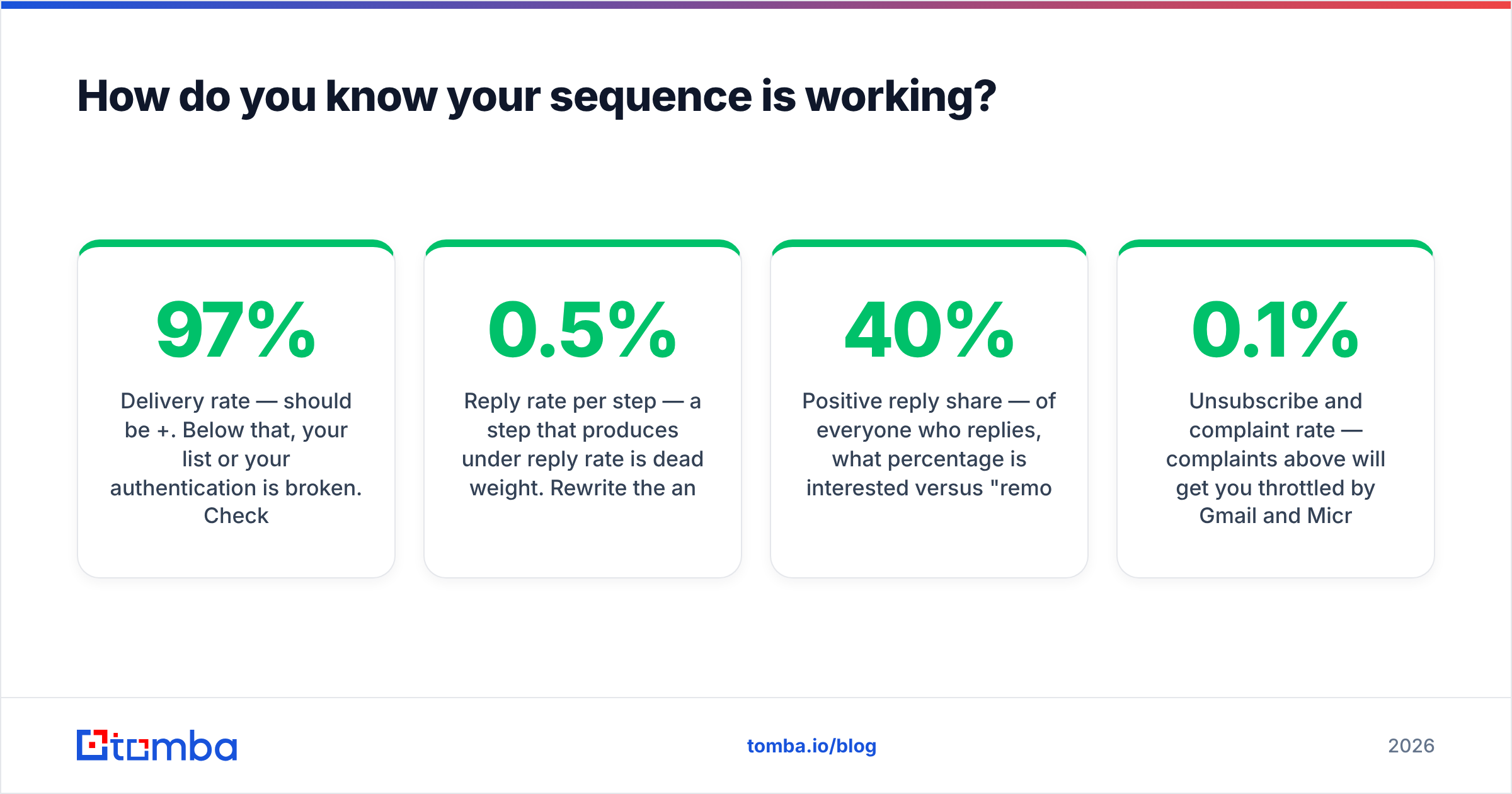
Track four numbers per step, not just per campaign. Campaign-level averages hide the step that's dragging everything down.
- Delivery rate — should be 97%+. Below that, your list or your authentication is broken. Check your SPF record and DMARC alignment first.
- Reply rate per step — a step that produces under 0.5% reply rate is dead weight. Rewrite the angle or cut it.
- Positive reply share — of everyone who replies, what percentage is interested versus "remove me"? Under 40% positive means your targeting is off, not your copy.
- Unsubscribe and complaint rate — complaints above 0.1% will get you throttled by Gmail and Microsoft. Treat it as a hard stop, not a warning.
Run one variable at a time. If you change the delay and the copy on touch 3 simultaneously, you learn nothing. Give each variant at least 200 sends per arm before calling a winner — smaller samples produce noise that looks like insight.
One underrated diagnostic: read the actual reply text from your negative responses. "We already use X" is a targeting problem. "Who are you?" is a personalization problem. "Stop emailing me" after touch 5 is a cadence problem. The words tell you which lever to pull.
What breaks a follow-up sequence fastest?#
Five failure modes, in order of how often we see them:
- Unverified lists. A 10% bounce rate on touch 1 poisons deliverability for touches 2–6. Verify before launch, then re-verify quarterly — B2B contact data decays roughly 25–30% per year as people change jobs.
- No personalization beyond the first name. Merge-tag-only personalization is transparent to anyone who's been prospected before. One specific, verifiable detail per prospect beats five generic ones.
- Identical copy across segments. A sequence written for VPs of Sales will not land with technical founders. Split the sequence before you split the list.
- Ignoring reply detection. Test it. Send yourself through the sequence, reply at step 2, and confirm step 3 never fires.
- Running six touches on a list you can't afford to burn. For your top 50 named accounts, cap at four emails and add LinkedIn and phone. You only get one first impression per domain.
For the data-decay problem specifically, running your existing CRM contacts through contact enrichment on a quarterly cadence catches job changes before they become bounces — and a job change is itself one of the strongest follow-up triggers there is. Someone who just moved into a new role has budget authority and a mandate to change things.
Frequently asked questions#
How long should I wait between follow-ups? Three business days for the first bump, then widen to four, five, and six. Anything under 48 hours reads as pressure; anything over ten days loses the thread entirely.
Should follow-ups be in the same thread? Yes for touches 2 through 4 — threading preserves context and shows you're not blasting. Break to a new subject line for the final one or two touches to escape the "already ignored" pattern.
Do breakup emails actually work? Yes, when they're honest. A clean close-out ("I'll stop here — reply if timing changes") consistently ranks second-highest for reply rate. A fake breakup you follow up on three days later destroys credibility.
What's a good reply rate for a full sequence? 6–12% total across four to six touches is a solid B2B benchmark. Above 15% usually means excellent targeting; below 3% means your list or your offer needs work before your cadence does.
Where should you start?#
Start with the list, not the copy. The best-written six-touch sequence sent to stale addresses will underperform a mediocre four-touch sequence sent to verified, well-targeted contacts — every time. Deliverability is the floor everything else stands on.
Build that floor with Tomba Email Finder: find verified professional addresses by domain, name, or company, with catch-all detection and confidence scoring on every result so you know what you're sending into before touch 1 goes out. The free tier gives you 25 searches a month to test the accuracy on your own target accounts, and paid plans start at $49/mo — see full Tomba pricing for bulk and API limits. Get the list right, then let the sequence do its job.
Related guides#
Ready to find emails that actually work?
Join 150,000+ professionals who stopped guessing and started sending. Free credits on signup — no credit card required.
Get the Tomba newsletter
Practical outbound tactics and product updates — once every two weeks.
About the author