Follow Up Email Template: 12 Proven Formats That Get Replies
Most deals die in the follow-up, not the first email. Here are 12 follow up email templates, the send cadence that works in 2026, and the data behind why reply rates climb after touch three.
TL;DR
- Roughly half of all replies to a cold sequence arrive after the first email — the follow-up is the campaign, not an afterthought.
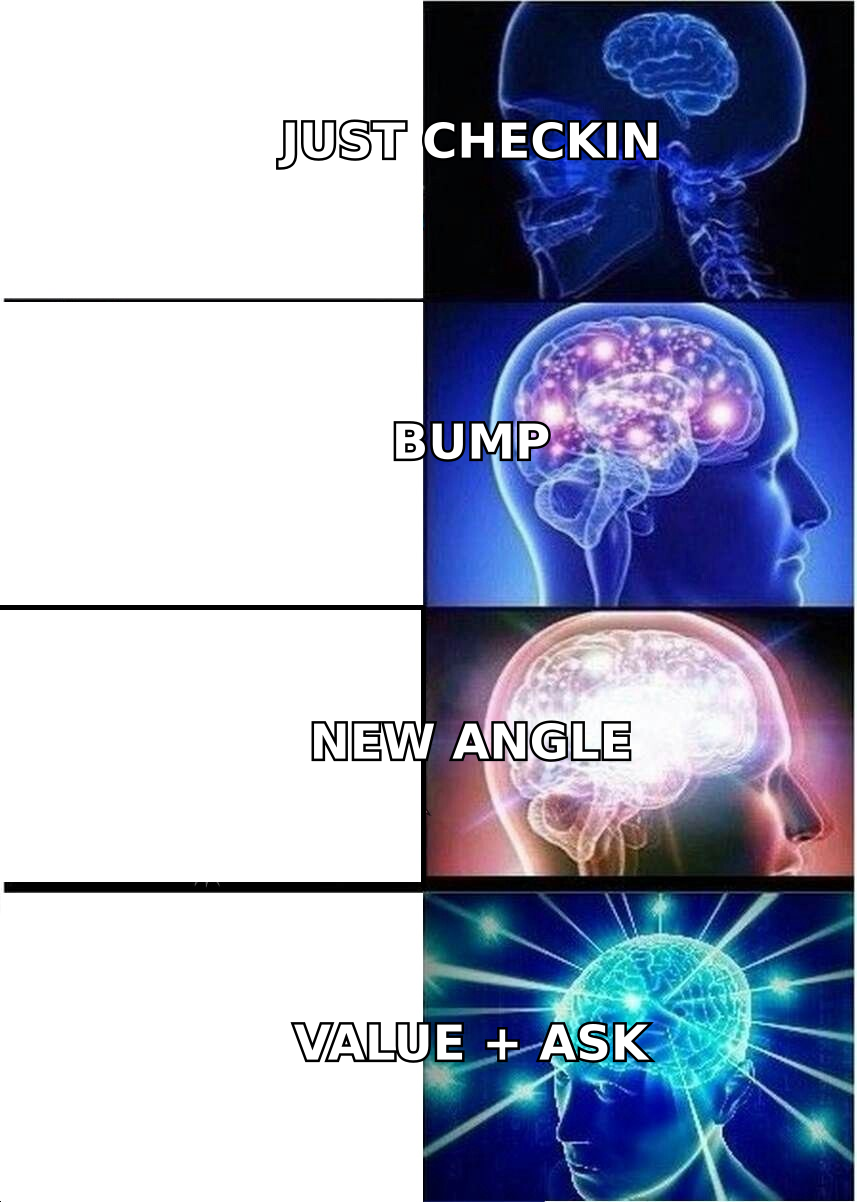
- The best follow up email template adds a new reason to reply. "Just checking in" adds nothing, so it converts like nothing.
- A workable 2026 cadence: Day 0 → Day 3 → Day 7 → Day 14 → Day 21, then a breakup. Four to six touches total, spaced wider as you go.
- Keep follow-ups shorter than the original. 40–90 words is the sweet spot on touches 2 through 5.
- None of it matters if the address bounces. Verify before you send — a 5% bounce rate will torch your domain faster than bad copy ever will.
Why do follow up emails outperform the first send?#
Because attention is a lottery and you only bought one ticket.
Your first email landed at 11:04 a.m. while your prospect was in a QBR. It got scanned, deprioritized, and buried under 60 other messages by lunch. Nothing about that email was wrong — it was just badly timed. The follow-up is a second ticket. The third is another.
Vendors publish wildly different numbers here, so treat any single stat with suspicion. But the direction is consistent across every large cold-email dataset published in the last few years: sequences with three or more touches meaningfully outperform single sends, and the incremental gain flattens somewhere around touch five or six. Past that you are mostly annoying people who already decided.
The practical read: build four to six touches, make each one earn its place, and stop.
Wait — that markdown is wrong. Here it is properly:
What makes a follow up email template actually work?#
Four things, in order of impact:
- A new reason to exist. Every touch must carry information the previous one didn't — a customer story, a relevant trigger event, a different angle on the pain, a shorter ask. If you delete the follow-up and nothing is lost, you wrote a bump, not a follow-up.
- Brevity that escalates. Touch 1 can be 110 words. Touch 4 should be 35. The longer your sequence runs, the shorter each message gets. This mirrors how people actually skim.
- A single, low-friction ask. "Worth a 12-minute call Thursday?" beats "let me know if you'd like to explore how we might help." One question, one verb, one calendar reference.
- Thread continuity. Reply to your own thread for touches 2 and 3 so the prospect sees the original context. Break into a fresh thread with a new subject line at touch 4 when the old one is clearly dead.
- A real deadline or a real exit. The breakup email works because it removes the obligation to respond. Paradoxically, that's when a lot of people respond.
Which follow up email template should you use, and when?#
Here are the 12 formats worth keeping. Copy them, then rewrite them in your own voice — templates sent verbatim read like templates.
Touch 2 — The Value Add (Day 3)
Subject: Re: [original subject]
Hi [First name],
Following up with something more useful than a nudge. [Company in same vertical] had the same [specific problem] and fixed it by [one-line approach] — here's the two-minute writeup: [link].
If this isn't a priority this quarter, say so and I'll stop. If it is, worth 15 minutes Thursday?
[Your name]
Touch 3 — The Different Angle (Day 7)
Subject: Re: [original subject]
[First name] — I may have aimed at the wrong problem.
I pitched [angle A]. Talking to other [job title]s at [company size] companies, the sharper pain is usually [angle B] — specifically [concrete symptom].
Which one is closer to your reality?
Touch 4 — The One-Liner (Day 14)
Subject: quick one
[First name] — is [problem] on your roadmap for H2, or should I close the file?
Touch 5 — The Breakup (Day 21)
Subject: closing the loop
[First name], I've sent a few notes about [problem] with no reply, which I read as "not now." Closing this out so I stop cluttering your inbox.
If it becomes relevant, the resource that most [job title]s find useful is here: [link]. Good luck with [specific initiative you noticed].
The other eight formats, in brief:
- The trigger-event follow-up — fires when the prospect raises funding, hires a relevant role, ships a product, or changes a page on their site. Highest reply rate of any format, because the timing argument writes itself.
- The referral redirect — "If [problem] isn't yours, who owns it?" Sent to a wrong-persona contact. Converts to a warm internal intro surprisingly often.
- The post-meeting recap — sent within two hours. Bullets what was agreed, names the owner of each next step, restates the date. Prevents 80% of deals going dark after a good first call.
- The post-proposal nudge — references a specific line item, not "the proposal." "You mentioned the onboarding timeline was the sticking point — here's how the last three rollouts sequenced."
- The content follow-up — sends a genuinely relevant asset with zero ask attached. Use once per sequence, max, or it reads as drip marketing.
- The social-proof follow-up — one named customer, one number, one sentence. "Ramp cut research time 6 hours/week." Not a case-study dump.
- The reply-bait question — a single question they can answer in four words. Lowers reply cost to near zero and restarts the thread.
- The re-engagement (90 days later) — for closed-lost and gone-dark. New quarter, new budget, new trigger. Fresh subject line, acknowledge the gap explicitly.
How should the cadence be spaced?#
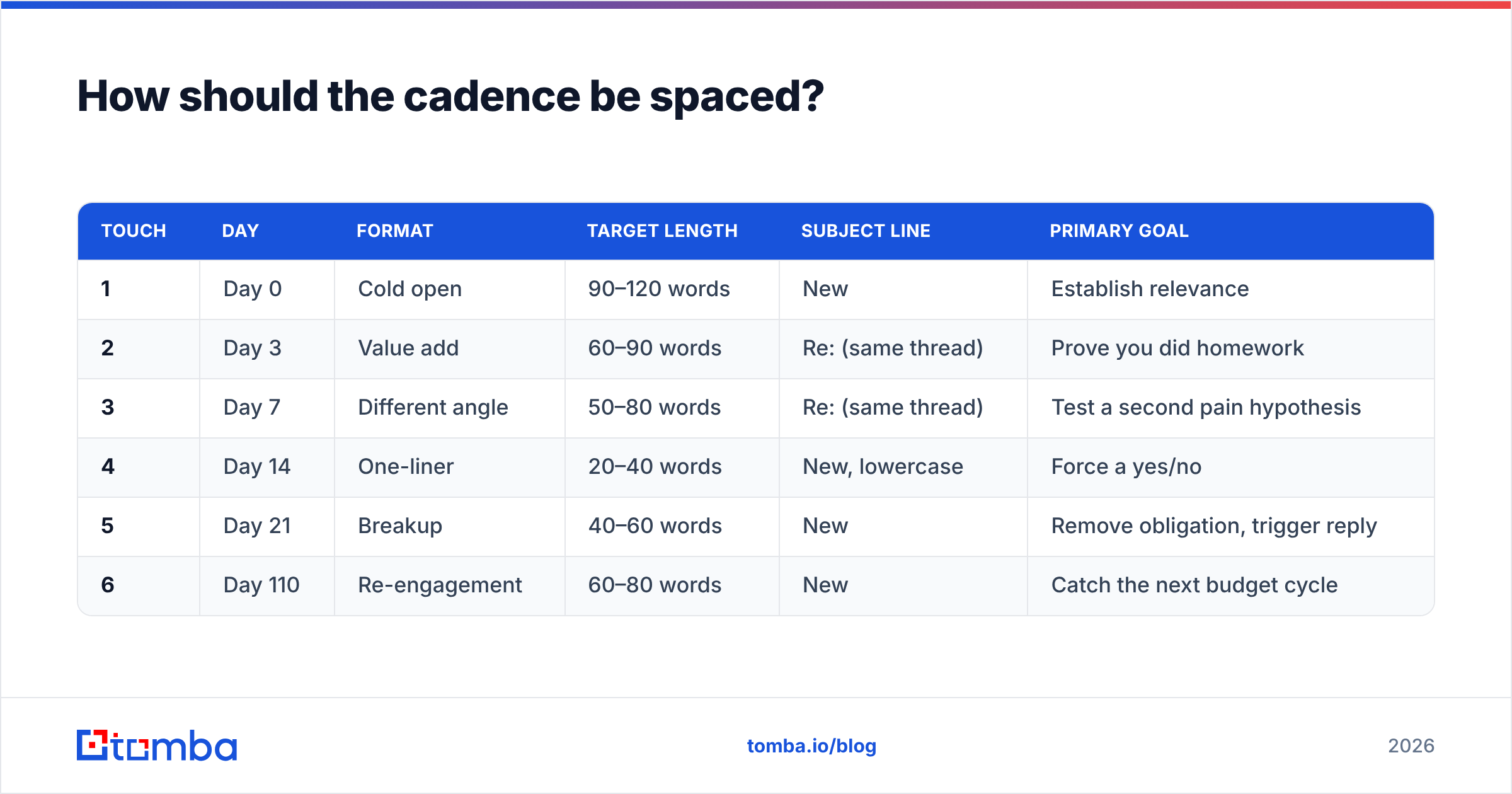
Wider as you go. Compressed cadences read as desperation and get marked as spam; cadences that are too loose lose the thread entirely.
| Touch | Day | Format | Target length | Subject line | Primary goal |
|---|---|---|---|---|---|
| 1 | Day 0 | Cold open | 90–120 words | New | Establish relevance |
| 2 | Day 3 | Value add | 60–90 words | Re: (same thread) | Prove you did homework |
| 3 | Day 7 | Different angle | 50–80 words | Re: (same thread) | Test a second pain hypothesis |
| 4 | Day 14 | One-liner | 20–40 words | New, lowercase | Force a yes/no |
| 5 | Day 21 | Breakup | 40–60 words | New | Remove obligation, trigger reply |
| 6 | Day 110 | Re-engagement | 60–80 words | New | Catch the next budget cycle |
Two rules that override the table. Skip forward if a trigger event fires — a funding round on Day 5 means you send the trigger email on Day 5, not the scheduled angle test. And stop entirely on any negative reply. "Not interested" is a complete sentence, and honoring it protects your domain more than any warmup tool.
Which follow-up mistakes kill reply rates?#
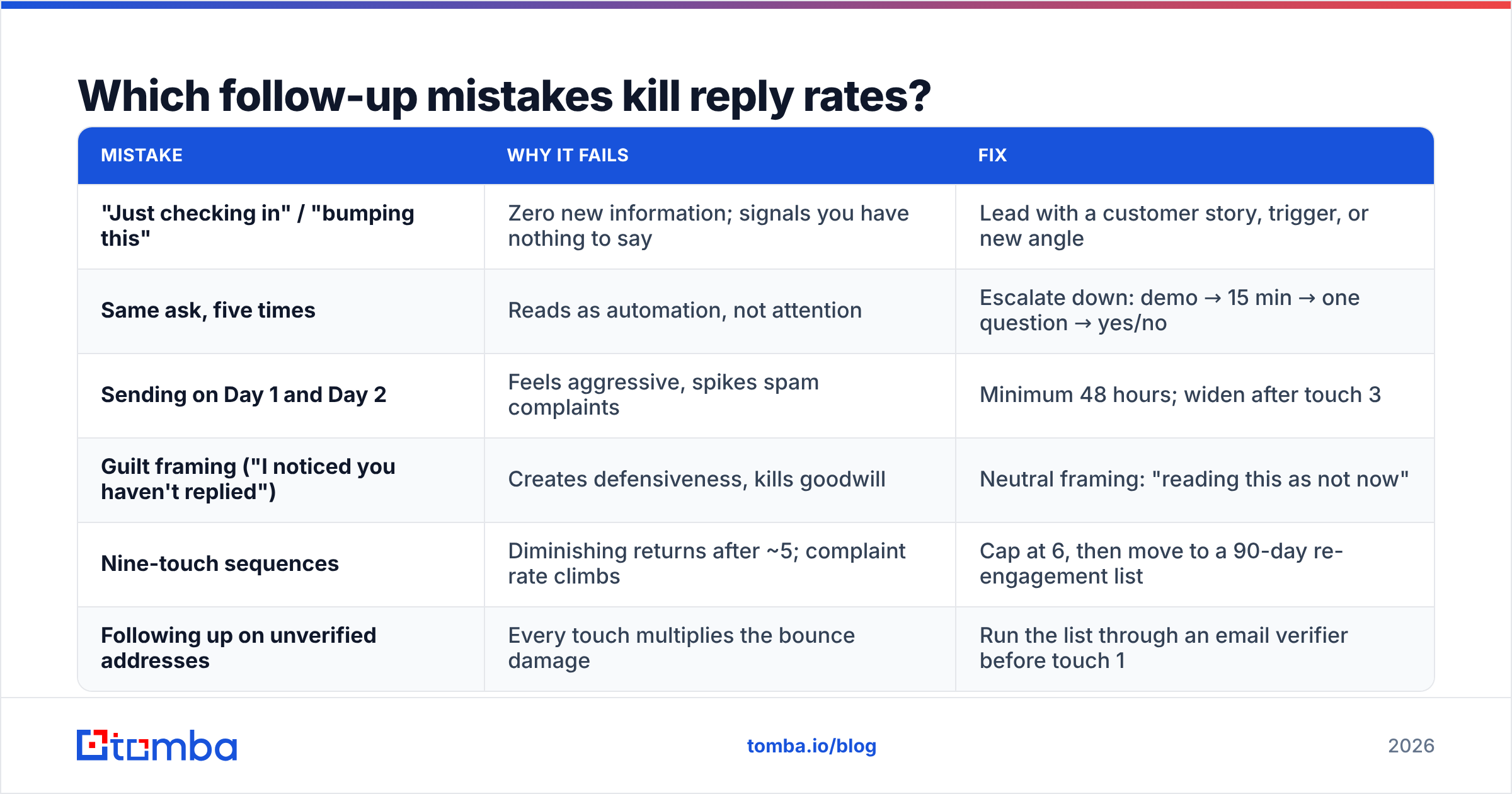
The failure modes are boringly consistent across the thousands of sequences public teardowns have covered:
| Mistake | Why it fails | Fix |
|---|---|---|
| "Just checking in" / "bumping this" | Zero new information; signals you have nothing to say | Lead with a customer story, trigger, or new angle |
| Same ask, five times | Reads as automation, not attention | Escalate down: demo → 15 min → one question → yes/no |
| Sending on Day 1 and Day 2 | Feels aggressive, spikes spam complaints | Minimum 48 hours; widen after touch 3 |
| Guilt framing ("I noticed you haven't replied") | Creates defensiveness, kills goodwill | Neutral framing: "reading this as not now" |
| Nine-touch sequences | Diminishing returns after ~5; complaint rate climbs | Cap at 6, then move to a 90-day re-engagement list |
| Following up on unverified addresses | Every touch multiplies the bounce damage | Run the list through an email verifier before touch 1 |
That last one is the quiet killer. A sequence of five touches to a 10% invalid list produces five times the bounce signal of a single send to the same list. Mailbox providers read that as spray-and-pray. Your sender reputation degrades, and by the time you notice, your good prospects stopped seeing you too.
Verify once, at list build. Re-verify anything older than 90 days — B2B contact data decays roughly 20–30% a year as people change jobs, which is also why your Q1 list underperforms in Q4.
How do you personalize follow-ups without spending 10 minutes each?#
Personalize the variable, not the paragraph.
Most reps try to write a bespoke second sentence for every prospect and burn out by contact 40. The scalable version: pick one variable slot per touch and fill it from structured data.
- Touch 2 variable: a named customer in their vertical. Requires only industry on the record.
- Touch 3 variable: a job-title-specific pain. Requires only title.
- Touch 4 variable: their stated initiative. Requires one field pulled from their careers page, funding announcement, or homepage copy.
- Touch 5 variable: something specific and human — a product launch, a conference talk, a hire.
That means the quality of your follow-ups is capped by the quality of your record. If all you have is firstname@company.com, every touch will read generic no matter how good the copy is. Running contacts through data enrichment before the sequence starts — company size, industry, title, seniority — is what makes the variable slots fillable at volume.
For teams building lists from scratch, the sequence is: find the domain, pull the pattern, get the contact, verify, enrich, then write. Domain search handles the first three in one pass when you're working account-by-account.
Should you follow up by email only?#
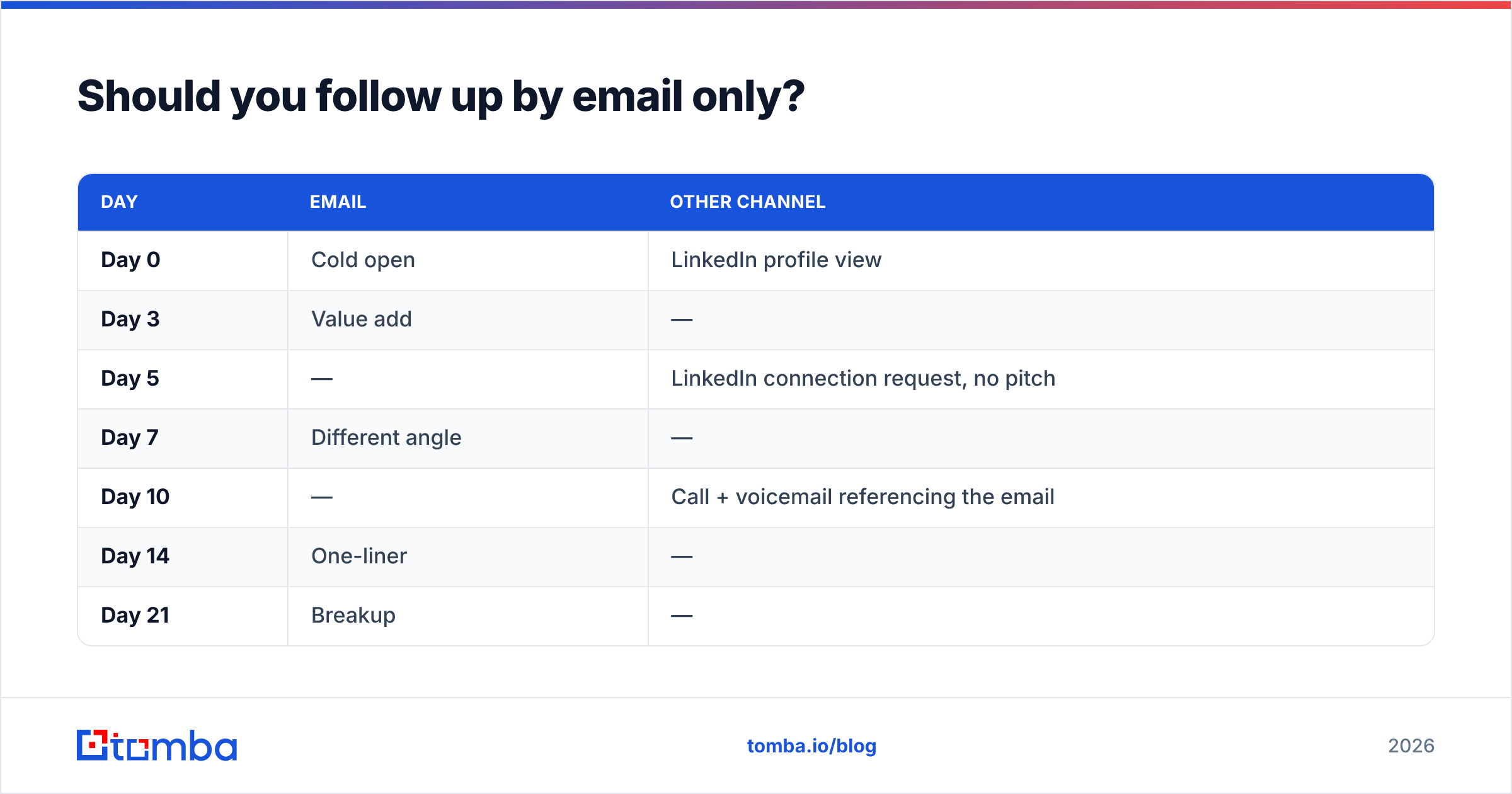
No, and the data on multichannel is one of the few places vendors and analysts broadly agree. HubSpot's sales research and G2's category reviews both point the same direction: sequences that mix email with a second channel outperform email-only, largely because a LinkedIn view or a voicemail primes the next email to get opened.
A practical multichannel overlay on the cadence above:
| Day | Other channel | |
|---|---|---|
| Day 0 | Cold open | LinkedIn profile view |
| Day 3 | Value add | — |
| Day 5 | — | LinkedIn connection request, no pitch |
| Day 7 | Different angle | — |
| Day 10 | — | Call + voicemail referencing the email |
| Day 14 | One-liner | — |
| Day 21 | Breakup | — |
The voicemail is the underrated slot. "I sent you a note last week about [problem] — subject line is [X] if it's worth a look" converts email into a thing they now recognize. If you're layering calls in, you need mobile numbers on the record, which is a separate data problem from email — a phone finder fills that gap without you rebuilding the list.
What does a follow-up stack cost to run?#
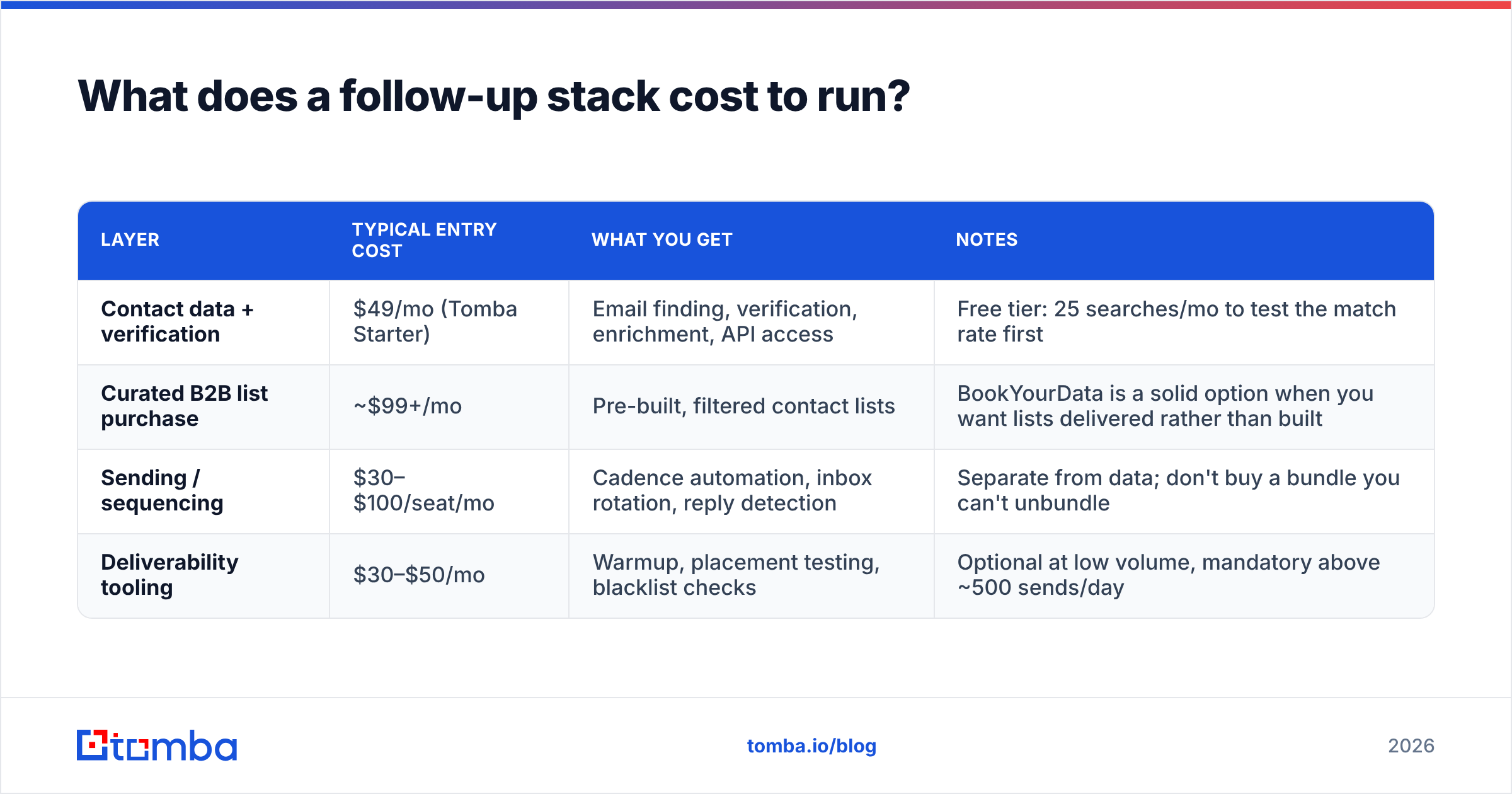
You need three things: contact data, a sending tool, and verification. Sequencing tools (Instantly, Smartlead, Reply.io, Outreach) handle the sending. The data layer is where budgets actually diverge.
| Layer | Typical entry cost | What you get | Notes |
|---|---|---|---|
| Contact data + verification | $49/mo (Tomba Starter) | Email finding, verification, enrichment, API access | Free tier: 25 searches/mo to test the match rate first |
| Curated B2B list purchase | ~$99+/mo | Pre-built, filtered contact lists | BookYourData is a solid option when you want lists delivered rather than built |
| Sending / sequencing | $30–$100/seat/mo | Cadence automation, inbox rotation, reply detection | Separate from data; don't buy a bundle you can't unbundle |
| Deliverability tooling | $30–$50/mo | Warmup, placement testing, blacklist checks | Optional at low volume, mandatory above ~500 sends/day |
Two spending mistakes to avoid. First, buying a large sequencing seat count before you've proven a single sequence converts — the tool doesn't fix the copy. Second, skipping verification to save $49 and then paying for it in domain reputation, which costs weeks to rebuild. Run a free email checker on a sample before you commit budget anywhere.
How do you know your follow-ups are working?#
Track four numbers per touch, not per campaign. Campaign-level averages hide which touch is doing the work.
- Reply rate by touch. If touch 4 outperforms touch 2, your touch 2 copy is the problem — rewrite it, don't add a touch 7.
- Positive reply rate. Total replies include "unsubscribe" and "wrong person." Only positive replies matter for forecasting.
- Bounce rate. Above 2% means your list build broke. Above 5%, pause the sequence entirely and re-verify.
- Spam complaint rate. Above 0.1% is a warning; above 0.3% and providers start filtering you globally. Cadence compression is the usual cause.
Benchmark honestly: a well-targeted B2B cold sequence in a normal vertical lands somewhere around 3–8% total reply rate and 1–3% positive. Anyone promising 30% is either selling something or counting out-of-office autoresponders. Check the response rate definition you're using before comparing yourself to anyone else's numbers — half the disagreement in this space is definitional.
What should you do next?#
Pick three of the twelve formats — value add, different angle, breakup — and rebuild your current sequence around them this week. Cut any touch you can't justify with a one-sentence "here's what's new in this one." Then verify the list before you turn it on.
If the bottleneck is the data rather than the copy, that's the part to fix first. Tomba Email Finder finds verified professional addresses by domain, name, or company, with the verification step built into the same workflow — so the follow-up sequence you just rewrote actually reaches a human. The free tier gives you 25 searches a month to check the match rate on your own accounts before spending anything; Starter runs $49/mo when you're ready to scale it.
Good follow-ups are cheap. Bad data isn't.
Related guides#
Ready to find emails that actually work?
Join 150,000+ professionals who stopped guessing and started sending. Free credits on signup — no credit card required.
Get the Tomba newsletter
Practical outbound tactics and product updates — once every two weeks.
About the author