Follow Up Email Template After Meeting: 12 That Work
Most post-meeting emails die because they recap instead of advance. Here are 12 follow up email templates after a meeting, plus the timing, subject lines, and structure that get replies.
TL;DR
- Send the follow-up within 24 hours. Reply rates drop hard after 48 — the meeting is still fresh in their head on day one and a blur by day three.
- A recap is not a follow-up. Every post-meeting email needs one decision, one owner, and one date. If those three things are missing, you wrote a diary entry.
- Subject lines that reference the meeting itself ("Next steps from Tuesday") outperform generic ones ("Following up") because they thread visually in a crowded inbox.
- Different meetings need different templates: discovery, demo, pricing conversation, no-show, ghosted-after-good-call, and internal-champion enablement all have different jobs.
- Templates below are copy-paste ready. Swap the bracketed variables, cut anything that doesn't move the deal, and keep it under 150 words.
Why do most follow-up emails after a meeting fail?#
Because they're written for the sender, not the reader.
The typical post-meeting email reads like meeting minutes: "Great speaking with you today. As discussed, we covered X, Y, and Z. Let me know if you have any questions." That email asks the prospect to do the hardest possible thing — invent the next step themselves — while giving them nothing new.
Think of it like leaving a restaurant. If the server says "thanks for coming, let me know if you want to come back," you probably won't. If they hand you a card for a wine tasting next Thursday at 7, you might. Same interaction, wildly different conversion.
Three specific failure modes account for most dead follow-ups:
- No forward motion. The email summarizes the past and never proposes the future. If your last line is "let me know if you have questions," you have written a dead end.
- Too many asks. Deck, case study, security doc, intro to procurement, and a meeting request in one email. Cognitive load kills replies. One ask per email.
- Wrong recipient. You send to the person in the room and ignore the two people who actually sign. If you didn't capture the economic buyer's address during the call, use a domain search to map the org before you hit send.
- Delay. A follow-up sent Friday for a Monday meeting has lost the emotional context that made the call good.
What should a follow-up email after a meeting actually contain?#
Five parts, in this order. Every template below is a variation on this skeleton.
- Context line — one sentence proving you were paying attention. Reference something specific they said, not something you said.
- Value add — one artifact, benchmark, or insight they did not have before the email arrived. This is what separates a follow-up from a nag.
- Confirmed decisions — a two- to four-item bulleted list of what was agreed, each with an owner.
- Single next step — a proposed date and time, or a named action you are taking, or one question with a binary answer.
- Easy exit — a low-friction way to say no or reschedule. Counterintuitively this raises reply rates because it removes the fear of commitment.
Total: 120–160 words. If you cross 200, you're recapping.
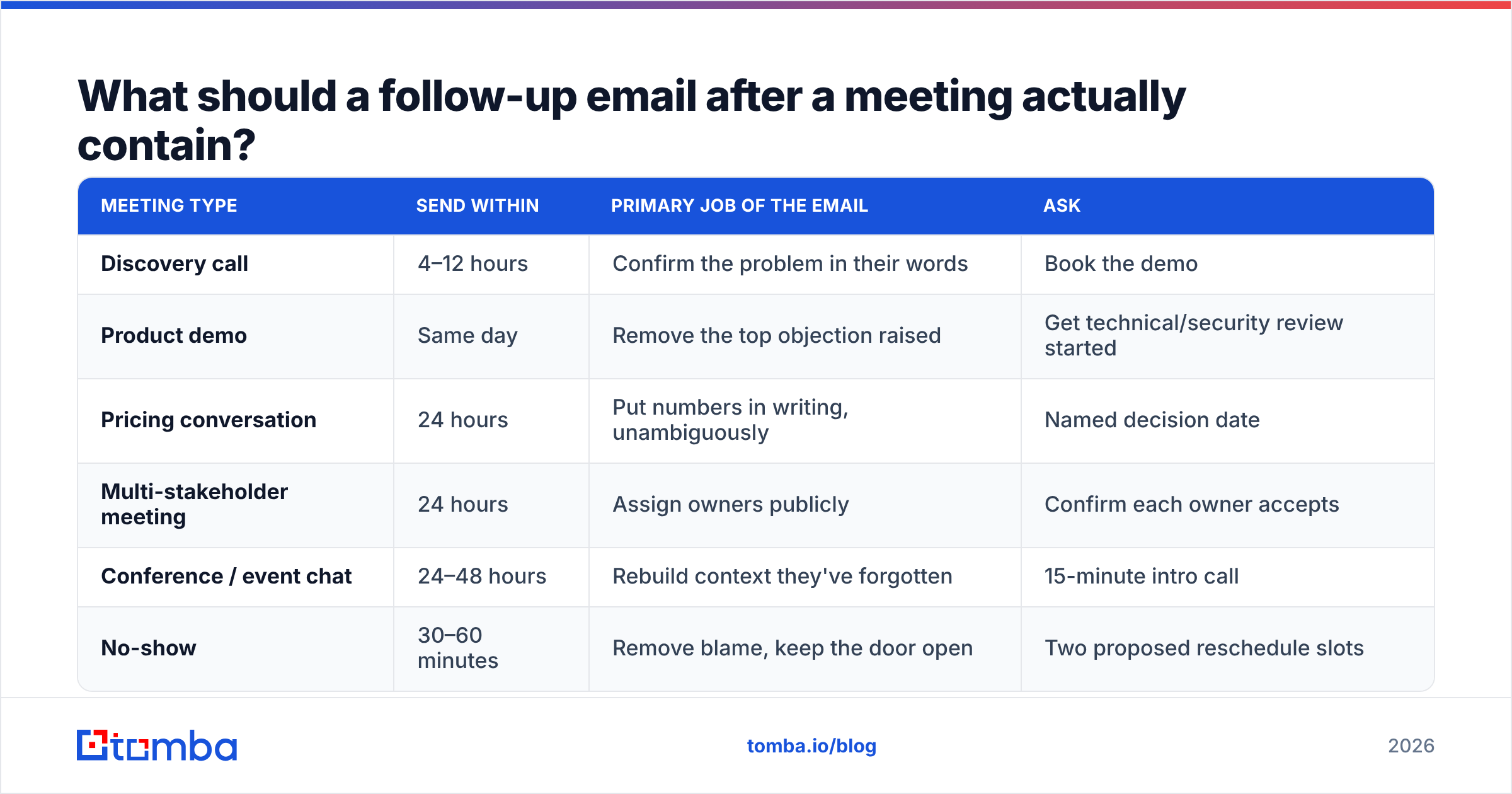
How the five parts map to meeting types#
| Meeting type | Send within | Primary job of the email | Ask |
|---|---|---|---|
| Discovery call | 4–12 hours | Confirm the problem in their words | Book the demo |
| Product demo | Same day | Remove the top objection raised | Get technical/security review started |
| Pricing conversation | 24 hours | Put numbers in writing, unambiguously | Named decision date |
| Multi-stakeholder meeting | 24 hours | Assign owners publicly | Confirm each owner accepts |
| Conference / event chat | 24–48 hours | Rebuild context they've forgotten | 15-minute intro call |
| No-show | 30–60 minutes | Remove blame, keep the door open | Two proposed reschedule slots |
What is the best follow up email template after meeting a prospect for the first time?#
Discovery follow-ups win by proving you understood the problem better than they articulated it.
Template 1 — Post-discovery
Subject: Your [specific problem] + next steps
Hi [Name],
Thanks for walking me through how [team] currently handles [process]. The part that stuck with me: you're losing roughly [X hours/week] to [specific manual step], and it gets worse every time you add a rep.
I pulled together how two companies in [industry] solved the same thing — attached, 2 pages, no pitch.
Agreed next steps:
- I send the [artifact] by Thursday (me)
- You confirm whether [stakeholder] should join (you)
Does Tuesday 10:00 or Wednesday 14:00 work for a 30-minute walkthrough with [stakeholder]?
If the timing is wrong, tell me and I'll circle back in [quarter].
Template 2 — Post-demo, objection-first
Subject: The [objection] question from today
Hi [Name],
You asked whether [product] can handle [specific edge case]. Short answer: yes — here's exactly how [link/screenshot], and here's the one scenario where it can't [honest limitation].
Everything else we covered is in the recording: [link].
To move forward you mentioned needing [security review / IT sign-off]. I've attached the SOC 2 summary so [IT contact] can start. Want me to send it to them directly?
Template 3 — Pricing conversation
Subject: Pricing in writing — [Company] × [Vendor]
Hi [Name],
Putting numbers in writing so nothing gets lost:
Plan
Seats
Annual
Notes
[Tier]
[N]
[$]
[what's included]
This quote holds through [date]. Two things I need from you to lock it: [item 1] and [item 2].
What's a realistic decision date on your side?
Template 4 — Meeting no-show
Subject: Missed you — my fault on timing?
Hi [Name],
Looks like we crossed wires at [time]. No problem at all — these weeks are brutal.
Two slots that are open on my end: [Day 10:00] or [Day 15:30]. Grab whichever, or send me a link and I'll work around you.
Template 5 — Ghosted after a good call
Subject: Closing the loop on [project]
Hi [Name],
We had a strong conversation on [date] about [problem], and I haven't heard back — which usually means one of three things: priorities shifted, budget moved, or I dropped the ball on something.
Whichever it is, a one-line reply helps me stop cluttering your inbox. Should I close this out for now?
That last one is a permission-to-close email, and it consistently pulls the highest reply rate of any template on this list — because it's the only one that costs the recipient nothing to answer.
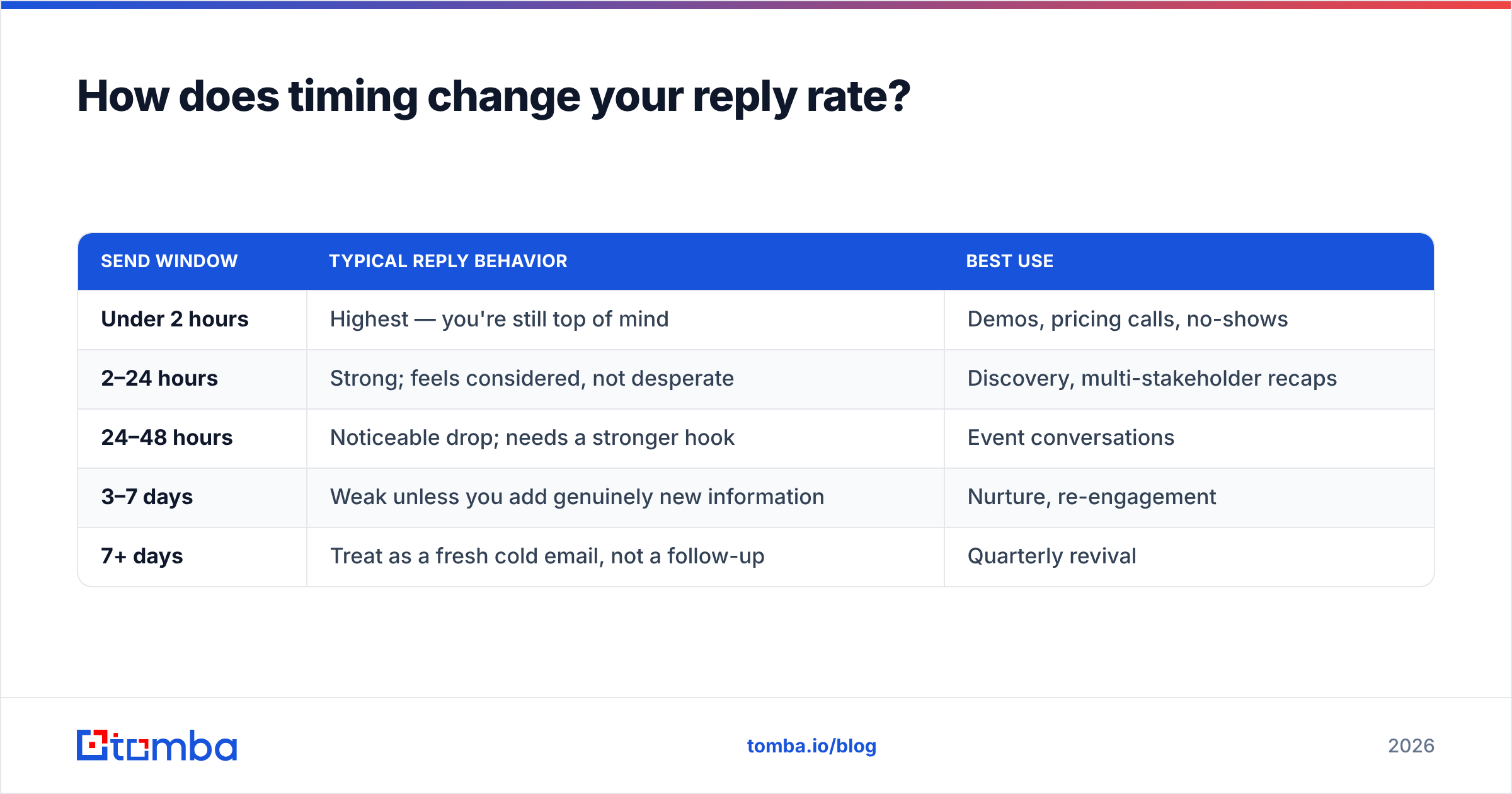
How does timing change your reply rate?#
Speed compounds. Here's the practical hierarchy most outbound teams observe, and it lines up with what HubSpot's sales research has published on response decay.
| Send window | Typical reply behavior | Best use |
|---|---|---|
| Under 2 hours | Highest — you're still top of mind | Demos, pricing calls, no-shows |
| 2–24 hours | Strong; feels considered, not desperate | Discovery, multi-stakeholder recaps |
| 24–48 hours | Noticeable drop; needs a stronger hook | Event conversations |
| 3–7 days | Weak unless you add genuinely new information | Nurture, re-engagement |
| 7+ days | Treat as a fresh cold email, not a follow-up | Quarterly revival |
The practical rule: draft the email during the last five minutes of the call. You have the context, the exact phrasing they used, and the agreed actions in front of you. Schedule it to land 90 minutes later so it doesn't look automated.
How do you scale follow-ups without sounding like a robot?#
You template the structure and personalize the first two lines. Nothing else.
Sequencing tools handle the sending. Where teams actually get stuck is upstream — the contact data. Half of "follow-up" work is really "find the three other people who need this email." A meeting with one manager becomes a deal when the VP, the technical owner, and the finance approver are all in the thread.
That's a data problem, not a copywriting problem:
- Find the missing stakeholders. Use an email finder or domain search to map who else sits in that function at the account.
- Verify before you send. A bounced follow-up to a CFO does more damage than no follow-up. Run addresses through an email verifier first — bounce rates above 3% start degrading sender reputation.
- Enrich the record. Job title, seniority, and department decide which template you use. Basic data enrichment turns "someone at Acme" into "VP RevOps, reports to CRO."
- Batch the pre-work. If you ran twelve meetings this week, do stakeholder mapping once on Friday rather than twelve times in the moment.

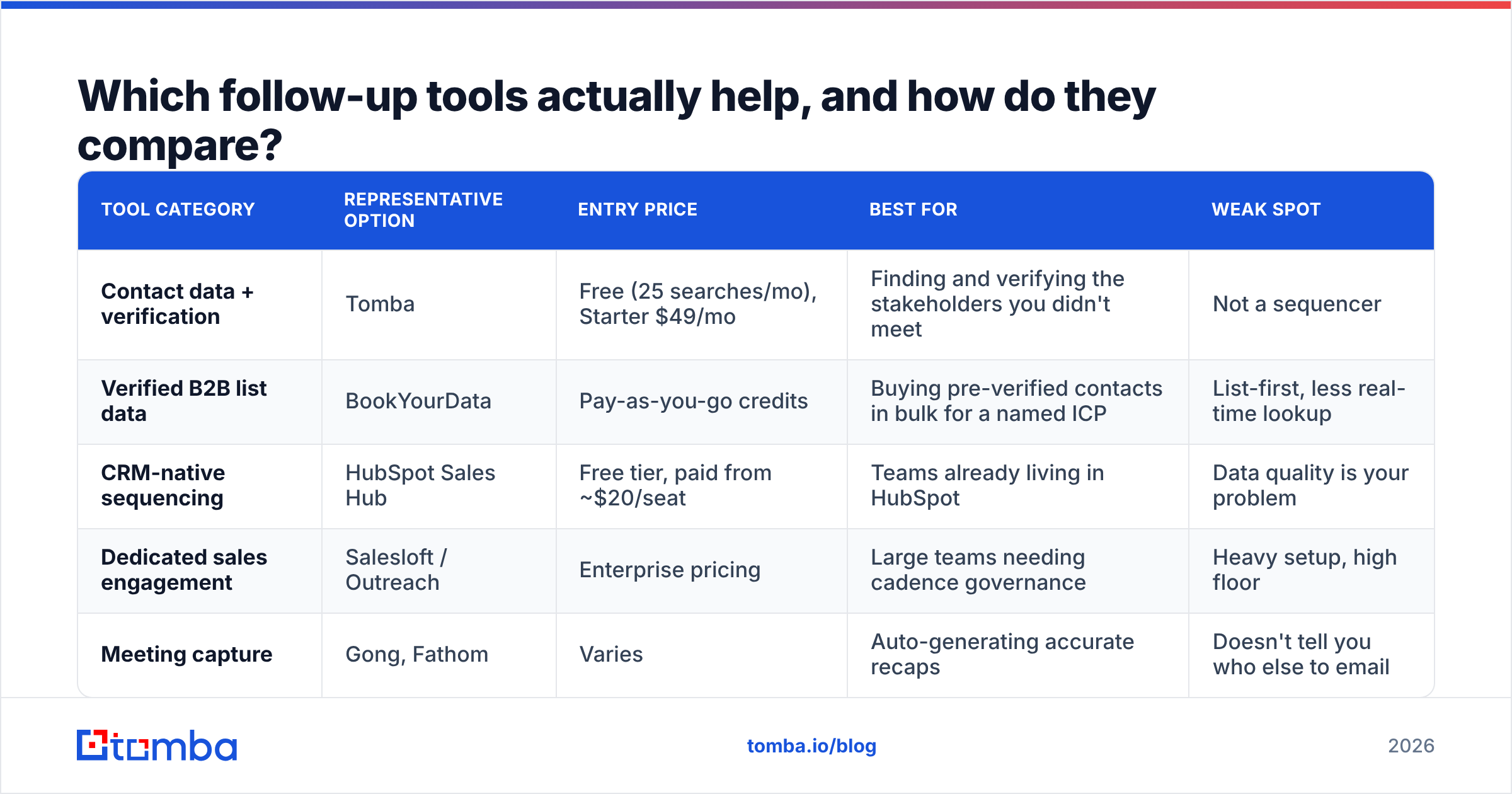
Which follow-up tools actually help, and how do they compare?#
Different problems, different tools. Most teams over-buy sequencing and under-buy data quality.
| Tool category | Representative option | Entry price | Best for | Weak spot |
|---|---|---|---|---|
| Contact data + verification | Tomba | Free (25 searches/mo), Starter $49/mo | Finding and verifying the stakeholders you didn't meet | Not a sequencer |
| Verified B2B list data | BookYourData | Pay-as-you-go credits | Buying pre-verified contacts in bulk for a named ICP | List-first, less real-time lookup |
| CRM-native sequencing | HubSpot Sales Hub | Free tier, paid from ~$20/seat | Teams already living in HubSpot | Data quality is your problem |
| Dedicated sales engagement | Salesloft / Outreach | Enterprise pricing | Large teams needing cadence governance | Heavy setup, high floor |
| Meeting capture | Gong, Fathom | Varies | Auto-generating accurate recaps | Doesn't tell you who else to email |
A sensible starter stack for a small team: meeting recorder for accurate recaps, a contact-data layer for stakeholder mapping, and your CRM's native sequencing. Add a dedicated engagement platform when you cross roughly eight reps and cadence consistency becomes a management problem rather than an individual one.
If you're evaluating engagement platforms specifically, G2's sales engagement category is the least biased place to compare feature depth, and worth cross-checking against a Salesloft alternative shortlist before committing to an annual contract.
What subject lines work for post-meeting follow-ups?#
Specific beats clever. Your subject line's only job is to signal "this is the thread from our meeting."
Tested patterns that hold up:
- "Next steps from [day]" — plain, threads well, hard to ignore
- "[Their words] — the part we didn't finish" — uses their own phrasing from the call
- "Pricing in writing: [Company] × [Vendor]" — signals a concrete artifact inside
- "Quick one: [binary question]?" — sets the expectation of a 10-second reply
- "Should I close this out?" — for the ghosted sequence only, and only once
Avoid: "Touching base," "Just following up," "Checking in," and anything with an exclamation mark. They telegraph that the email contains nothing new. If you want to sanity-check a line before sending, a subject line tester will flag spam triggers and length problems in a few seconds.
One structural note: reply inside the existing thread when there is one. Threading preserves context, keeps the meeting invite visible, and inherits the deliverability of an already-engaged conversation. Start a new thread only when you're deliberately re-opening after a long gap.
How do you know if your follow-ups are working?#
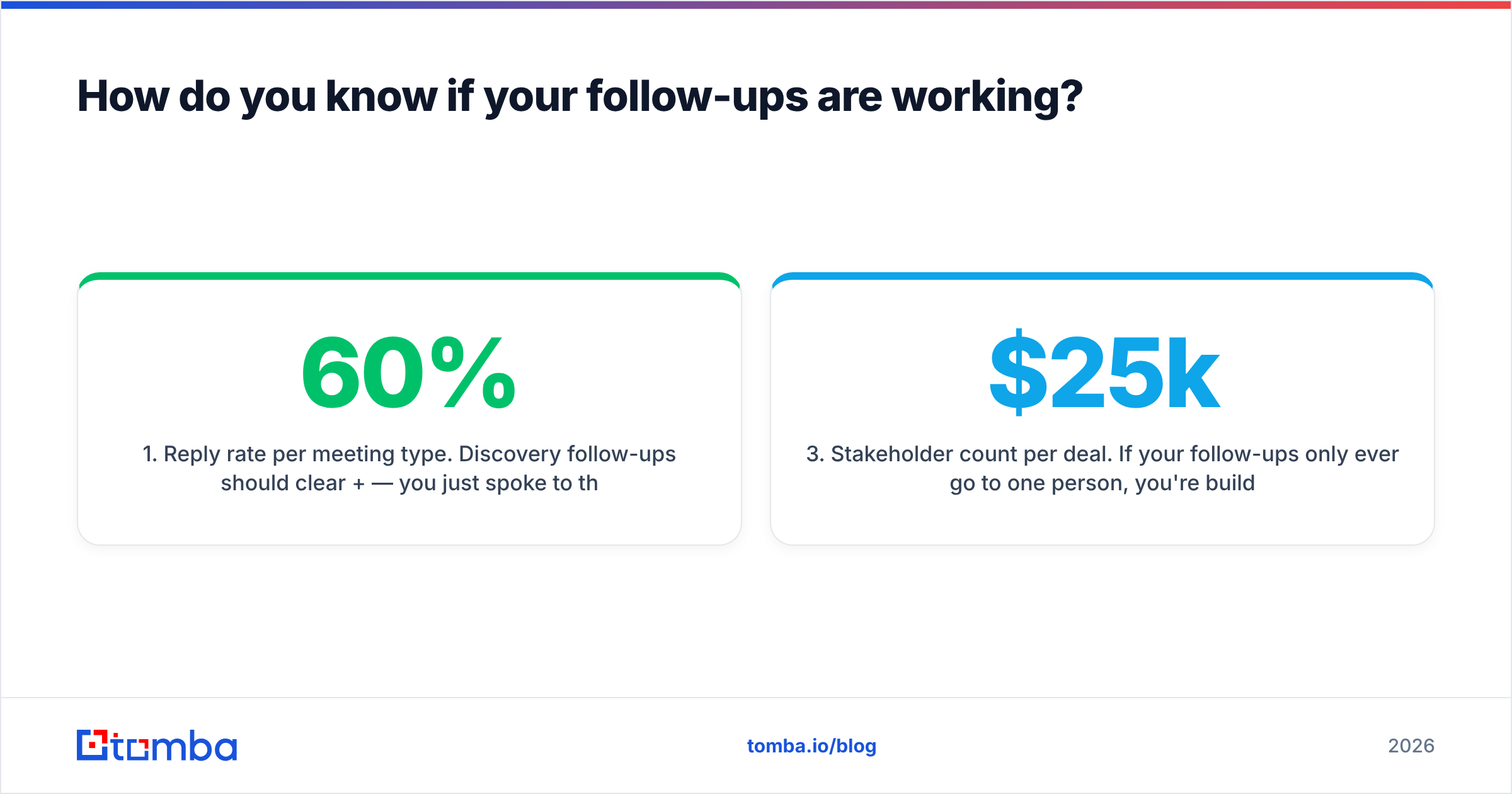
Track three numbers, not ten:
- Reply rate per meeting type. Discovery follow-ups should clear 60%+ — you just spoke to these people. If yours are under 40%, your emails aren't proposing anything.
- Time-to-next-meeting. The gap between "call ended" and "next call booked." Shrinking this by two days across a quarter moves more pipeline than any subject-line experiment.
- Stakeholder count per deal. If your follow-ups only ever go to one person, you're building single-threaded deals. Two-plus contacts per opportunity is the floor; four is healthy for anything above $25k.
Run a monthly audit: pull twenty sent follow-ups, and mark each one for whether it contained a specific next step with a date. Most teams discover under half do. That single fix — one date in every email — usually beats a full template rewrite.
Also watch the boring stuff. If follow-ups from a good meeting are landing in spam, the problem isn't the copy — it's authentication and list hygiene. Check your SPF record and keep bounce rates low, because a warm meeting means nothing if the email never renders.
Where should you start this week?#
Pick one template, use it for every meeting for two weeks, and change nothing else. Measure the reply rate before and after. Templates fail when you rotate through six of them and never learn which one works for your market.
Then fix the upstream gap. The reason most follow-ups underperform isn't the wording — it's that they reach one person when the decision needs four. Before your next round of meetings, map the account: who owns the budget, who owns the implementation, who blocks on security.
Tomba Email Finder does that mapping in a few seconds per account — search by domain or by name and get verified, deliverable addresses for the stakeholders who weren't in the room. Start on the free tier with 25 searches a month, or check Tomba pricing if you're running enough meetings that stakeholder mapping has become the bottleneck. Write the follow-up once; send it to everyone who actually decides.
Related guides#
Ready to find emails that actually work?
Join 150,000+ professionals who stopped guessing and started sending. Free credits on signup — no credit card required.
Get the Tomba newsletter
Practical outbound tactics and product updates — once every two weeks.
About the author