Follow Up Email To Schedule Meeting: Templates That Book
Most meeting requests die in the follow-up. Here are the timing rules, 7 copy-paste templates, and the sequence structure that turns a silent prospect into a booked calendar slot.
TL;DR
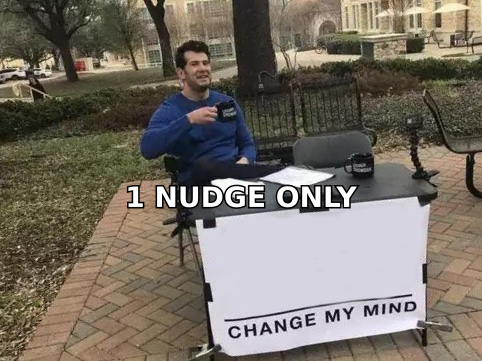
- Most meeting requests fail at follow-up number two, not at the first email. Reply rates keep climbing through roughly the fifth touch — stopping at one nudge throws away the majority of your bookings.
- The single biggest fix is removing the decision cost: propose one specific time instead of asking "when works for you?" A concrete slot converts far better than an open-ended question.
- "Just following up" is the weakest sentence in B2B email. Every follow up email to schedule meeting attempts should add a new reason to reply — a resource, an insight, a deadline, or a shorter ask.
- Timing beats cleverness: day 3, day 7, day 12, day 20 is a sane cadence for a cold sequence; 24-48 hours is right after a call, demo, or event conversation.
- None of it matters if the address is wrong. Verify before you send — bounces poison your domain reputation and hide behind what looks like "no reply."
Why do most meeting follow-ups get ignored?#
Because they ask the recipient to do work you should have done for them.
Think of it like handing someone a blank form versus a pre-filled one that just needs a signature. "Let me know when you're free for 30 minutes" is a blank form. It requires the prospect to open their calendar, compare it against a stranger's unknown availability, pick a time, and write a sentence. That's four steps of cognitive load for a meeting they haven't yet decided they want.
The second reason is that most follow-ups carry zero new information. If your email adds nothing beyond "did you see my last email?", you've given the recipient a reason to feel guilty and no reason to act. Guilt doesn't book calendars.
The third reason is invisible: the email never arrived. Somewhere between 20-30% of B2B contact data decays every year as people change jobs, companies get acquired, and email formats change. When you send to a stale address, you get silence that looks exactly like disinterest — and a hard bounce that quietly damages your sender reputation for every future send.
What structure should a follow up email to schedule meeting use?#
Five parts, in this order. Skip any one and the reply rate drops.
- A subject line that continues the thread. Reply in the existing thread when possible — it keeps context visible and improves deliverability versus a fresh cold send. If you must start new, keep it under 45 characters and specific ("Tuesday 2pm re: your Q3 pipeline" beats "Following up").
- A one-line memory jog. Reference the concrete thing that connects you: their LinkedIn post, the webinar they attended, the specific pain you named. One sentence, no throat-clearing.
- New value, not a repeat. A benchmark, a relevant customer result, a short teardown, a link to something genuinely useful. This is the part 90% of follow-ups skip.
- One specific proposed time. "Does Thursday at 10:15 ET work? If not, I'll send my calendar link." Naming an odd time (10:15, 2:45) signals you actually looked at a calendar rather than blasting.
- A frictionless out. "If this isn't a priority right now, just reply 'not now' and I'll close the loop." Giving permission to decline raises reply rates and cleans your list.
That last one feels counterintuitive. It works because a "no" is worth more than silence — it frees the slot in your sequence and tells you something real about the account.
How long should you wait between follow-ups?#
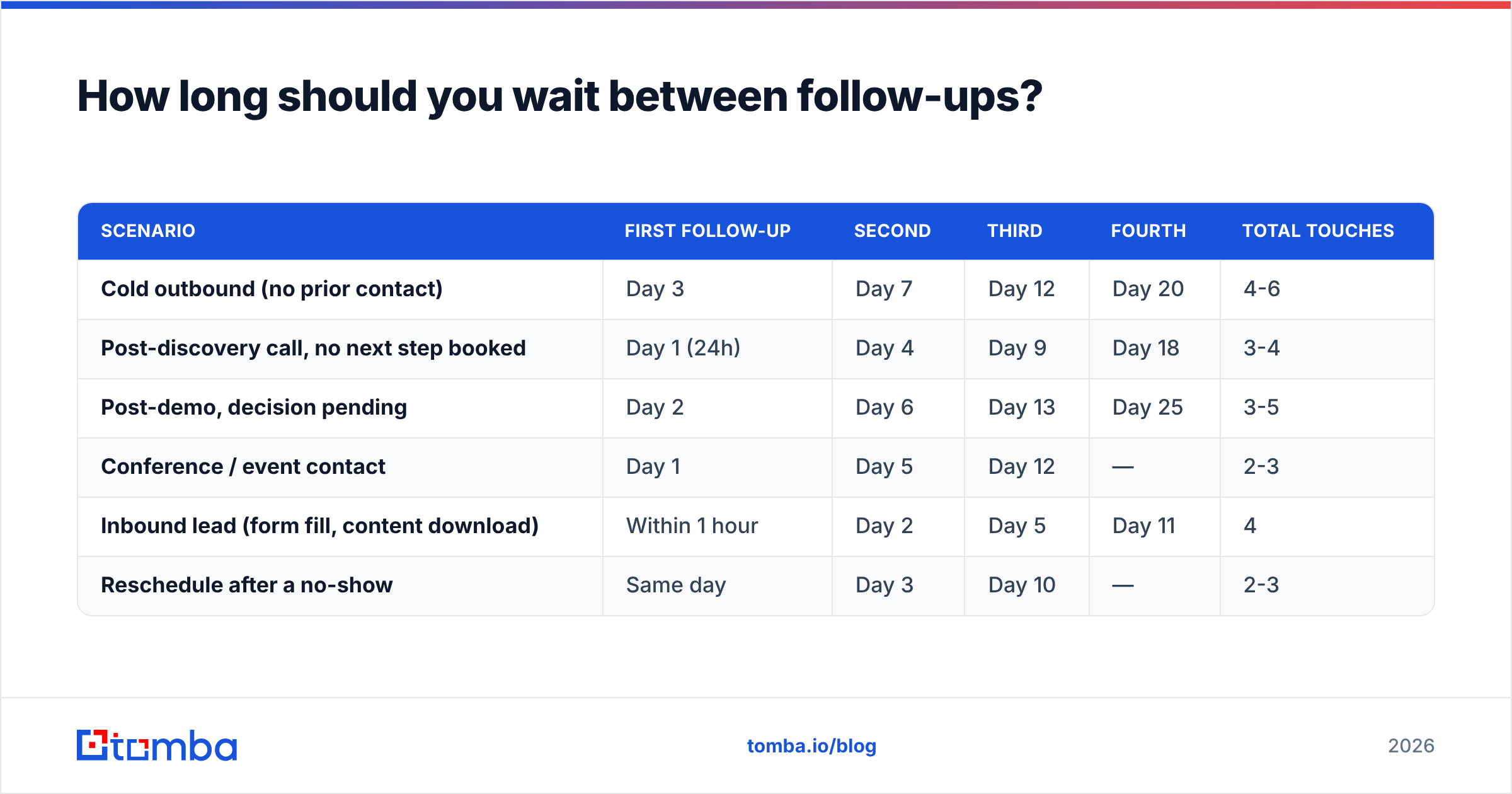
Different contexts need different clocks. Here's the cadence matrix that most B2B teams converge on:
| Scenario | First follow-up | Second | Third | Fourth | Total touches |
|---|---|---|---|---|---|
| Cold outbound (no prior contact) | Day 3 | Day 7 | Day 12 | Day 20 | 4-6 |
| Post-discovery call, no next step booked | Day 1 (24h) | Day 4 | Day 9 | Day 18 | 3-4 |
| Post-demo, decision pending | Day 2 | Day 6 | Day 13 | Day 25 | 3-5 |
| Conference / event contact | Day 1 | Day 5 | Day 12 | — | 2-3 |
| Inbound lead (form fill, content download) | Within 1 hour | Day 2 | Day 5 | Day 11 | 4 |
| Reschedule after a no-show | Same day | Day 3 | Day 10 | — | 2-3 |
Two rules govern the whole table. First, speed matters most where intent is hottest — an inbound lead contacted within an hour converts dramatically better than one contacted the next day. Second, gaps should widen as the sequence progresses. Tight early spacing catches people who were genuinely busy; wide late spacing avoids reading as desperate.
Send windows matter less than most people claim, but Tuesday through Thursday, 7-9am or 1-3pm in the recipient's timezone, remains a reasonable default. Test it against your own data rather than trusting a blog post — including this one.
What are the best follow-up templates for booking a meeting?#
Seven templates covering the situations that come up most. Change the specifics; keep the structure.
1. The cold second touch (day 3)
Subject: re: [their initiative]
Hi [Name] — following my note Monday. Quick context on why I reached out: [Competitor/peer company] cut their [metric] by [X%] after fixing [specific problem]. Given [specific observation about their company], I suspect the same gap exists on your side.
Worth 15 minutes Thursday at 10:15 ET to find out? If the timing's off, say the word and I'll stop here.
2. The value-add nudge (day 7)
Subject: re: [their initiative]
[Name] — put together a quick teardown of how three companies in [their vertical] handle [problem]. No pitch, just the patterns: [link].
If any of it resonates, I've got Tuesday 2:45 or Wednesday 11:00 open.
3. The post-call recap (24 hours)
Subject: Recap + the two things we said we'd nail down
[Name] — great talking yesterday. Recapping so nothing slips:
- You're trying to [goal] by [timeline]
- The blocker is [blocker]
- Next step: I show [specific thing] to [stakeholder]
I've blocked Tuesday 3pm and Thursday 10am for that session. Which one should I send an invite for?
4. The no-show reschedule (same day)
Subject: Missed you — my fault for not confirming
[Name] — looks like we crossed wires at 2pm. Entirely possible my invite landed badly. Same conversation, new time: Thursday 10:15 or Friday 9:30? Either works on my end.
5. The stakeholder redirect (day 12)
Subject: Wrong person?
[Name] — I may have aimed this at the wrong desk. If [topic] sits with someone else on your team, could you point me their way? Happy to stop emailing you either way.
This one is quietly the highest-ROI template in the set. It converts a dead thread into a warm internal referral, and it works because answering it costs the recipient one name.
6. The deadline-anchored ask (day 18)
Subject: Closing this out before [date]
[Name] — we're finalizing [Q3 onboarding cohort / pricing for the quarter / capacity for new accounts] on [date]. If [outcome] is on your roadmap this half, a 15-minute call before then makes sense. After that I'll assume it's a next-year conversation.
Only use a real deadline. Manufactured urgency is the fastest way to lose credibility with a buyer who's seen the trick fifty times.
7. The breakup (final touch)
Subject: Closing the loop
[Name] — I've reached out a few times about [topic] and haven't heard back, which usually means it's not a priority. Closing your file. If that changes, my calendar's here: [link]. Good luck with [specific initiative].
Breakup emails reliably generate replies — sometimes more than the touches before them. The reason is loss aversion, not charm. Keep it short and genuinely final; don't send a "breakup" and then email again next week.
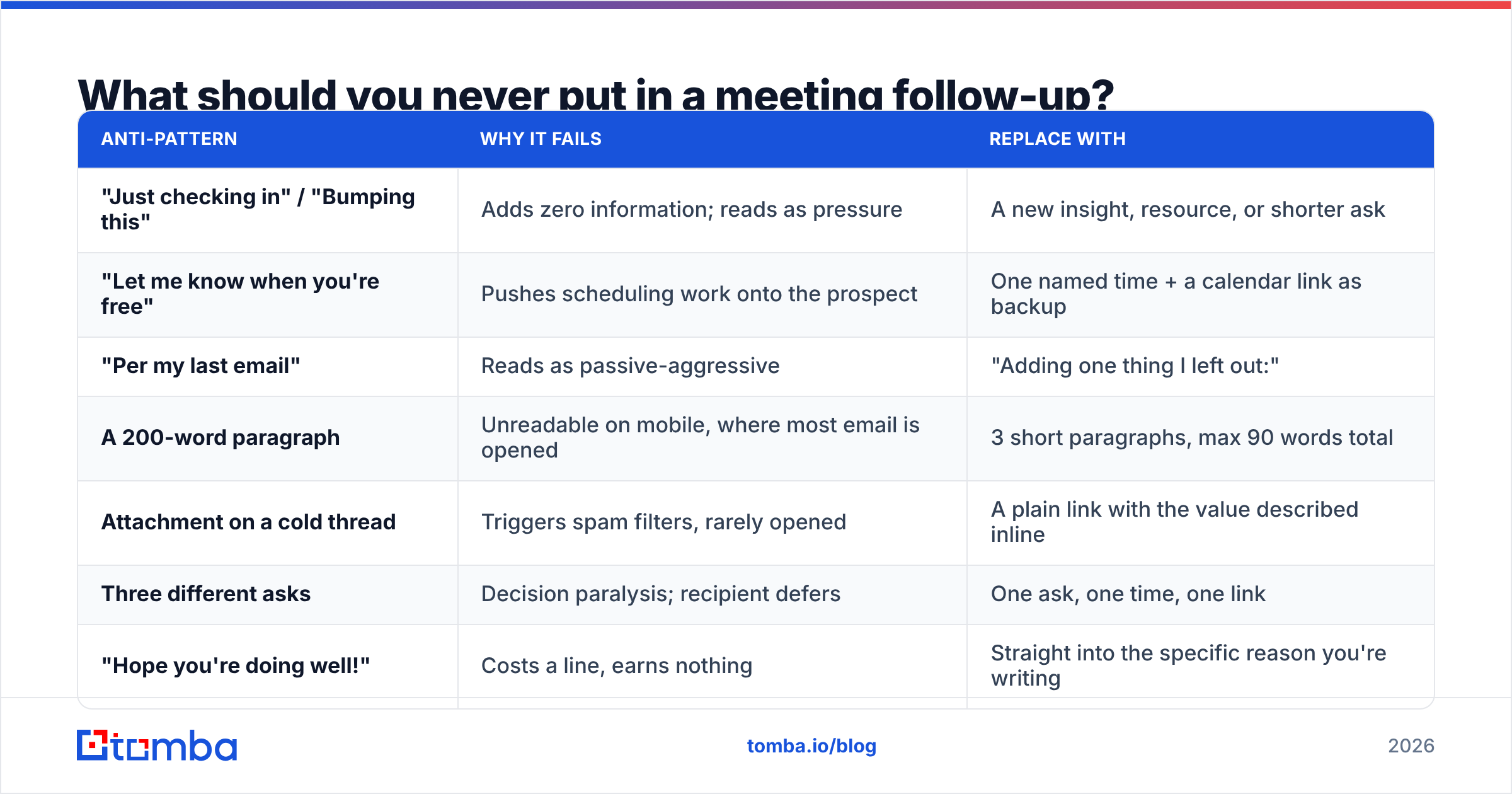
What should you never put in a meeting follow-up?#
| Anti-pattern | Why it fails | Replace with |
|---|---|---|
| "Just checking in" / "Bumping this" | Adds zero information; reads as pressure | A new insight, resource, or shorter ask |
| "Let me know when you're free" | Pushes scheduling work onto the prospect | One named time + a calendar link as backup |
| "Per my last email" | Reads as passive-aggressive | "Adding one thing I left out:" |
| A 200-word paragraph | Unreadable on mobile, where most email is opened | 3 short paragraphs, max 90 words total |
| Attachment on a cold thread | Triggers spam filters, rarely opened | A plain link with the value described inline |
| Three different asks | Decision paralysis; recipient defers | One ask, one time, one link |
| "Hope you're doing well!" | Costs a line, earns nothing | Straight into the specific reason you're writing |
The shared logic: every sentence should either reduce the recipient's effort or increase their reason to reply. Sentences that do neither are deleting your reply rate one line at a time.
How do you scale follow-ups without sounding like a robot?#
Automate the sending, not the thinking. The teams that do this well separate their sequence into two layers.
Layer one — the fixed skeleton. Timing, subject-line structure, the specific-time ask, the opt-out line. This is identical across every prospect and belongs in your sequencing tool.
Layer two — the variable core. The memory jog and the new-value paragraph. These change per account and are where personalization actually pays. One well-researched sentence about their business beats five merge fields.
A practical rule: if you could paste the same body into a different prospect's thread without editing it, the personalization layer is missing.
Volume amplifies data quality problems, so the prerequisites matter more as you scale:
- Verified addresses. Run every list through an email verifier before the first send. A bounce rate above 3% starts hurting inbox placement for everything else you send.
- Correct routing. If the contact left the company, no follow-up cadence saves you. Re-check titles and companies quarterly with data enrichment.
- Domain hygiene. Warm the sending domain, publish SPF/DKIM/DMARC, and monitor placement. The mechanics are covered in the email deliverability fundamentals.
- Reply routing. Every follow-up should land in a thread a human is watching. Auto-sequences that keep firing after someone replies are the most common own-goal in outbound.
- Suppression discipline. Anyone who says "not now" comes out of the sequence immediately and goes into a dated re-engagement list.
Which tools help you run a follow-up sequence?#
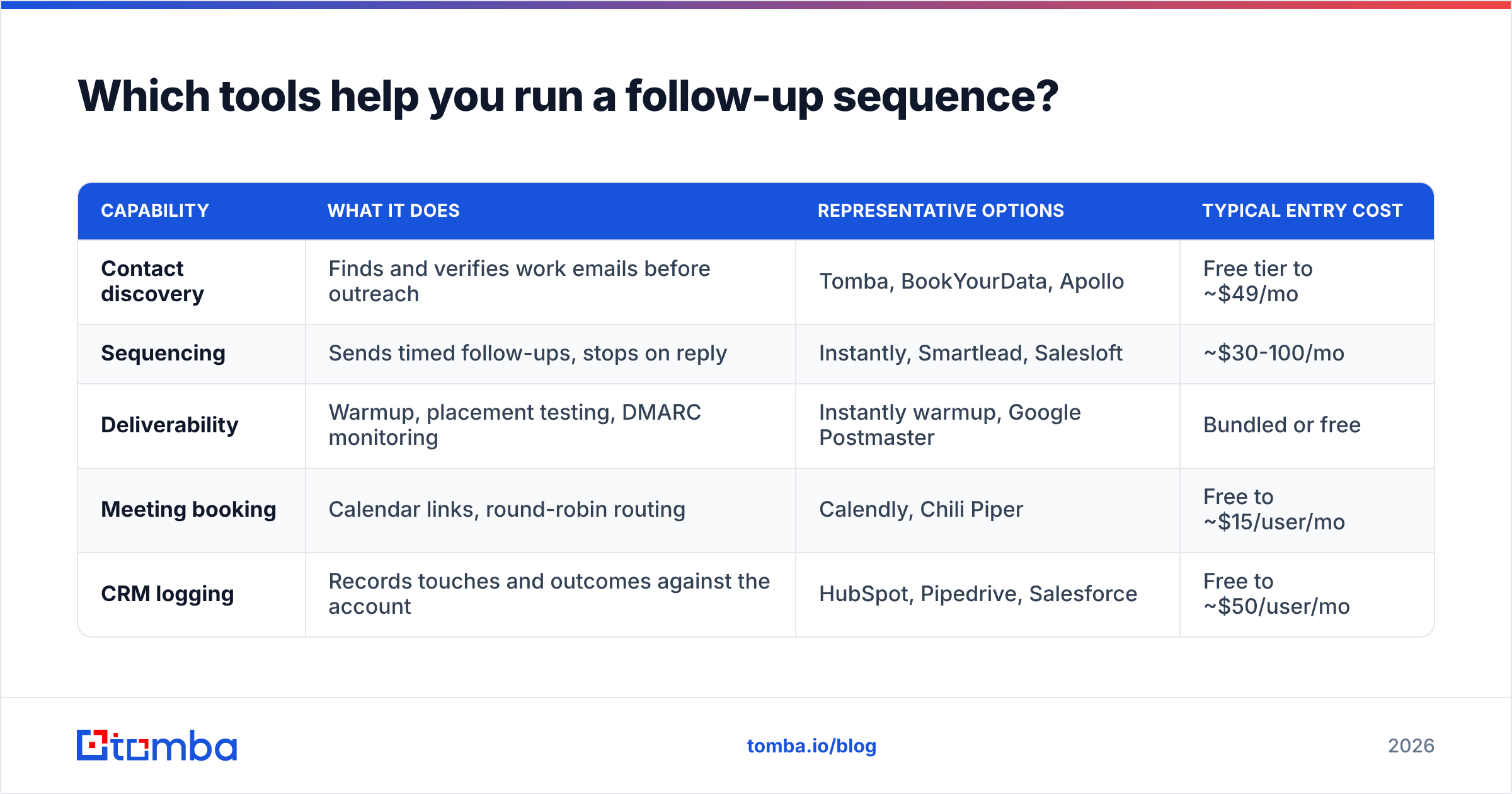
Sequencing, data, and deliverability are three separate jobs. Most stacks buy at least two of them:
| Capability | What it does | Representative options | Typical entry cost |
|---|---|---|---|
| Contact discovery | Finds and verifies work emails before outreach | Tomba, BookYourData, Apollo | Free tier to ~$49/mo |
| Sequencing | Sends timed follow-ups, stops on reply | Instantly, Smartlead, Salesloft | ~$30-100/mo |
| Deliverability | Warmup, placement testing, DMARC monitoring | Instantly warmup, Google Postmaster | Bundled or free |
| Meeting booking | Calendar links, round-robin routing | Calendly, Chili Piper | Free to ~$15/user/mo |
| CRM logging | Records touches and outcomes against the account | HubSpot, Pipedrive, Salesforce | Free to ~$50/user/mo |
Comparison shopping is worth doing on the review sites rather than vendor pages — G2's sales engagement category is the least biased starting point, and HubSpot's sales research publishes benchmark data you can sanity-check your own numbers against.
On the data side, the honest framing is that different tools win at different things. BookYourData is strong when you want a pre-built, filterable list to buy outright. Apollo bundles data with sequencing, which suits teams that want one login. Tomba sits on the discovery-and-verification side: Tomba pricing starts with a free tier of 25 searches per month, then $49/mo Starter, $99/mo Growth, and $249/mo Pro, with domain search, catch-all verification, and an email finder API for teams that want to wire discovery into their own sequence logic.
Whichever you pick, the sequencing tool should stop on reply, respect suppression, and let you see per-step reply rates. Without step-level reporting you can't tell whether your day-7 email is the one doing the work or the one burning goodwill.
How do you measure whether your follow-ups are working?#
Track four numbers, at the step level, not the campaign level:
- Reply rate per step. If step 3 outperforms step 1, your opener is the problem, not your persistence.
- Positive reply rate. Total replies include "unsubscribe" and "wrong person." Only bookings and warm redirects count as wins.
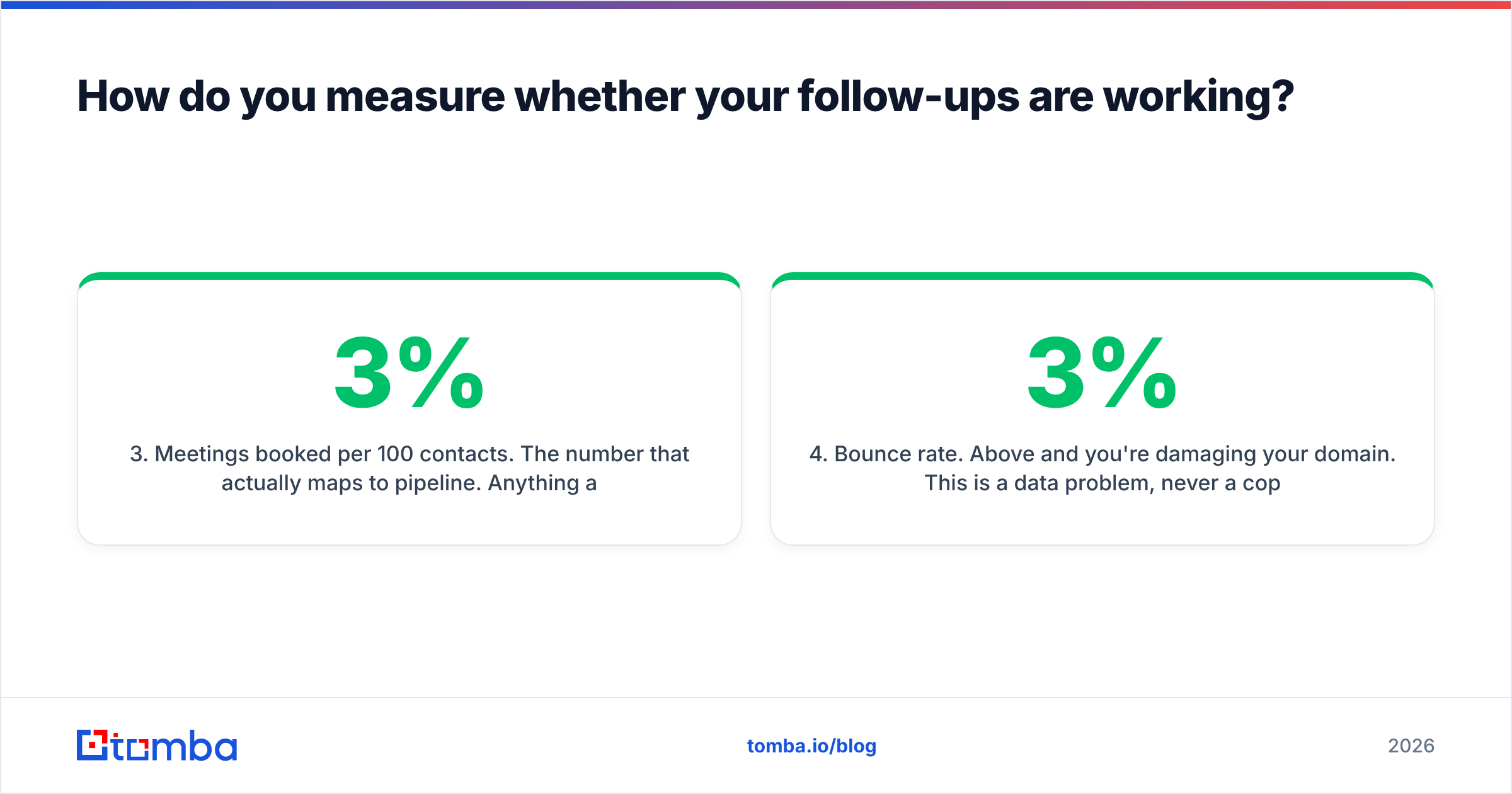
- Meetings booked per 100 contacts. The number that actually maps to pipeline. Anything above 2-3% on cold outbound is healthy; anything below 1% means the list, the offer, or the deliverability is broken.
- Bounce rate. Above 3% and you're damaging your domain. This is a data problem, never a copy problem.
Run one variable at a time. Change the cadence for two weeks, hold the copy constant, measure. Then change the copy and hold the cadence. Teams that change everything at once learn nothing and conclude that "cold email doesn't work anymore."
Ready to stop guessing at addresses?#
The best follow-up sequence in the world fails against a bounced address. Before you write another nudge, make sure the emails in your list actually resolve to a human who still works there. Tomba Email Finder finds verified work emails by name, domain, or company, with a free tier of 25 searches a month to test the accuracy against contacts you already know — then plug the same lookups into your sequencing tool through the API and let your follow-ups land where they're supposed to.
Related guides#
Ready to find emails that actually work?
Join 150,000+ professionals who stopped guessing and started sending. Free credits on signup — no credit card required.
Get the Tomba newsletter
Practical outbound tactics and product updates — once every two weeks.
About the author