Follow Up Email When Someone Doesn't Respond: 2026 Guide
Silence is not rejection — it's usually bad timing, a weak ask, or a dead address. Here's the cadence, the copy, and the data checks that turn no-reply threads into booked calls.
TL;DR
- Most replies happen on follow-ups two through four, not on the first email — so stopping after one send throws away the majority of your pipeline.
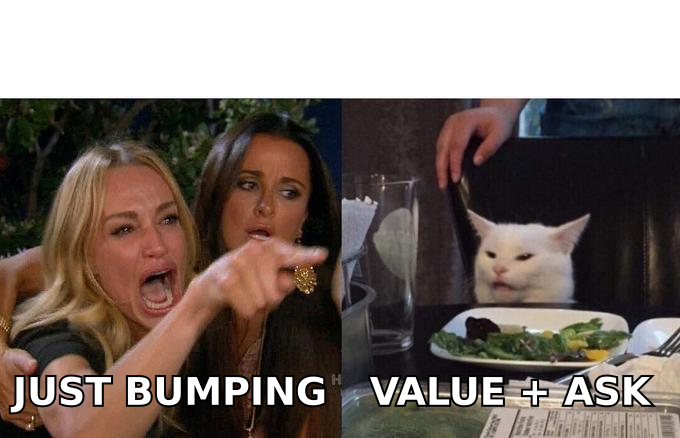
- A follow up email when someone doesn't respond should add a new reason to reply, not repeat the old one. "Just bumping this" is the lowest-performing pattern in outbound.
- Space touches 3 / 5 / 7 / 14 days apart, cap the sequence at 4–6 emails, and end with a clean breakup message.
- Before you blame your copy, check your data: a bounced or catch-all address produces the exact same silence as disinterest.
- Follow up on the same thread for warm contacts and existing conversations; start a fresh thread with a new subject line for cold prospects after touch three.
Why does nobody respond to your first email?#
Silence almost never means "no." It means your email arrived in a queue of 120 other messages on a Tuesday when your prospect was in back-to-back meetings, and it lost.
Think of it like knocking on an office door while the person inside is on a call. They heard you. They meant to come get you. Then the call ran long and you stopped existing. Knocking again isn't rude — it's the only way the conversation ever happens.
There are only five real reasons a prospect goes quiet, and each one has a different fix:
- They never saw it. The message landed in spam, Promotions, or under 400 unread. Fix: change send time, change subject line, improve email deliverability.
- They saw it and it wasn't relevant enough. Your opener talked about you. Fix: rewrite the value line around a trigger event in their world.
- They're interested but not now. Budget cycle, hiring freeze, Q3 launch. Fix: a low-friction "should I check back in October?" ask.
- They're not the decision maker. Fix: an explicit referral request — "if this sits with someone else, point me their way and I'll stop bothering you."
- The address is dead or unverified. Fix: verification, not persistence. No amount of clever copy reaches a mailbox that doesn't exist.
That fifth one is the silent killer. Teams spend weeks A/B testing subject lines while 12% of their list never receives anything at all.
What makes a follow up email when someone doesn't respond actually work?#
The rule: every follow-up must be able to stand alone as a first email.
If you deleted the original message from the thread, would touch three still make sense and still give the reader a reason to care? If not, it's a bump, and bumps get ignored. Each message needs one new asset — a case study, a benchmark number, a relevant news item, a shorter ask, or a different angle entirely.
Here's the anatomy that works in 2026:
- A subject line that isn't "Re: Re: Re:" — for cold threads after touch two, change it. Use the subject line generator if you're stuck, then cut whatever it gives you in half.
- A one-line context reset — "Following up on the note about your SDR onboarding time." Never assume they remember. Never make them scroll.
- One new piece of value — a number, a resource, a competitor observation, a template. This is the entire reason the email exists.
- A smaller ask than last time — if touch one asked for a 30-minute call, touch three should ask for a yes/no. Descending ask size is the single highest-leverage change most teams never make.
- An easy exit — "If this isn't a priority, say 'not now' and I'll close the loop." Giving permission to decline raises reply rates because it removes the social cost of answering.
- Under 90 words — follow-ups should get shorter, not longer, as the sequence progresses.
How many follow-ups should you send — and when?#
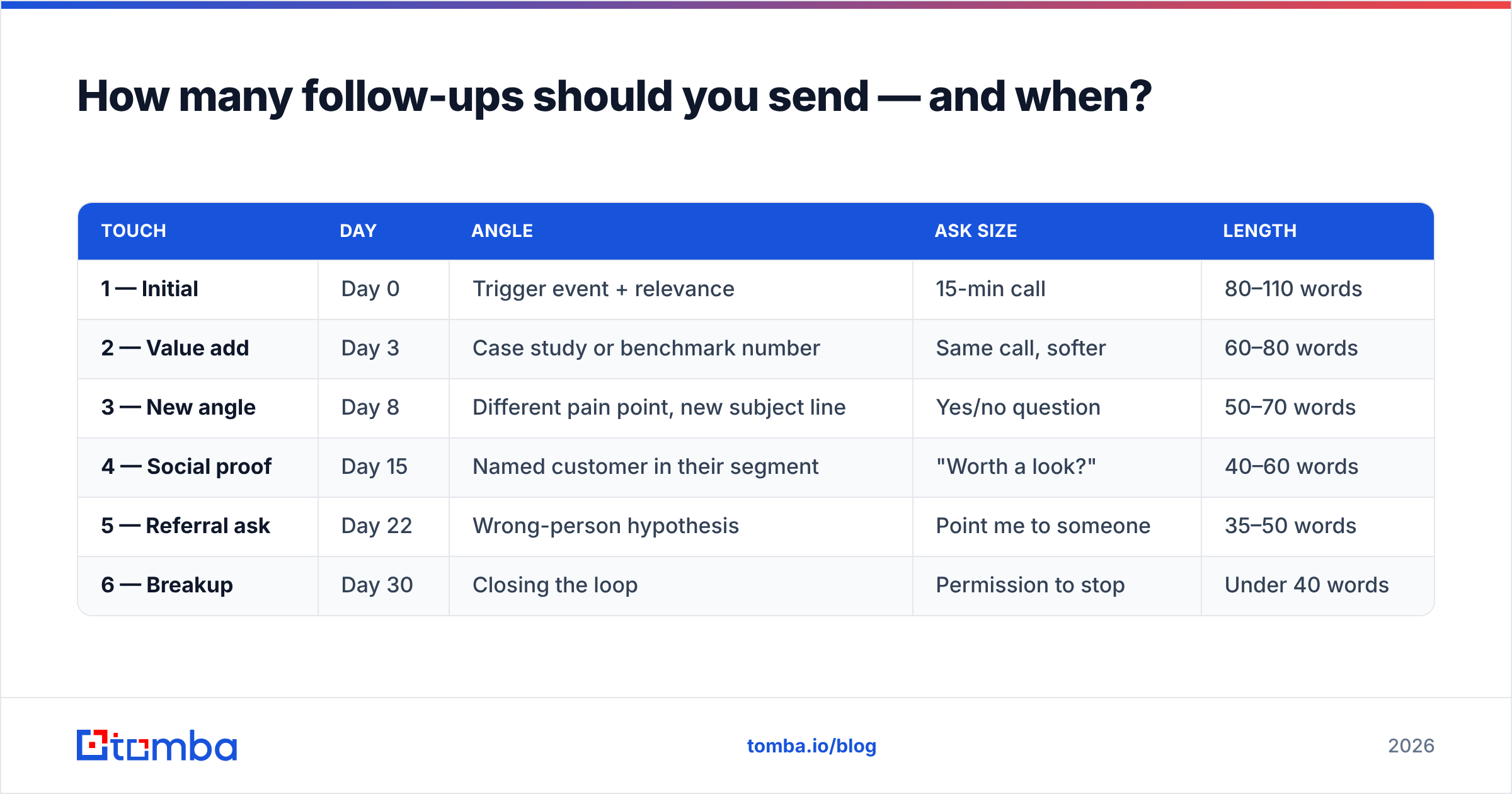
Four to six touches over roughly three weeks is the range where reply rate is still climbing and complaint rate is still flat. Past six, you're mostly generating unsubscribes and spam reports, which damages sender reputation for every future campaign.
Use expanding intervals. Tight at the start (while you're still in recent memory), wider later (so you don't look desperate).
| Touch | Day | Angle | Ask size | Length |
|---|---|---|---|---|
| 1 — Initial | Day 0 | Trigger event + relevance | 15-min call | 80–110 words |
| 2 — Value add | Day 3 | Case study or benchmark number | Same call, softer | 60–80 words |
| 3 — New angle | Day 8 | Different pain point, new subject line | Yes/no question | 50–70 words |
| 4 — Social proof | Day 15 | Named customer in their segment | "Worth a look?" | 40–60 words |
| 5 — Referral ask | Day 22 | Wrong-person hypothesis | Point me to someone | 35–50 words |
| 6 — Breakup | Day 30 | Closing the loop | Permission to stop | Under 40 words |
Two rules that matter more than the exact days:
- Never send two follow-ups in the same 48 hours. It reads as automation, not attention.
- Reset the clock on any human signal. A link click, a website visit, a LinkedIn profile view — treat it as a new Day 0 and send a relevant message immediately rather than waiting for the next scheduled touch.
What should each follow-up actually say?#
Templates are scaffolding, not scripts. Replace every bracket or the whole thing reads like a mail merge.
Touch 2 — the value add (Day 3)
Subject: Re: [original subject]
[First name] — one number that made me send the first note: teams running [their motion] typically lose 3–4 hours a week to manual list building.
We cut that to about 20 minutes for [similar company]. Happy to send the two-page breakdown instead of taking a call, if that's easier.
Worth a look?
Touch 3 — the new angle (Day 8)
Subject: your [specific process] question
Different angle: when [competitor or peer company] moved to [approach], their reply rate went from 4% to 11% in six weeks.
Is improving [metric] on your list for this quarter — yes or no? Either answer is useful.
Touch 4 — social proof (Day 15)
Subject: how [named customer] handled this
[Customer], also [industry], had the same problem with [pain]. Fixed it in a fortnight. Two-minute summary here: [link].
Want me to walk you through the setup?
Touch 5 — the referral ask (Day 22)
Subject: wrong person?
[First name], I may have aimed this at the wrong desk. If [topic] belongs to someone else on your team, point me at them and I'll take you off this thread entirely.
Touch 6 — the breakup (Day 30)
Subject: closing the loop
Assuming [topic] isn't a priority right now — closing this out so I stop cluttering your inbox. If that changes, reply anytime and I'll pick it back up.
The breakup email reliably outperforms touches four and five in reply volume. Loss aversion is real: people answer the message that says you're leaving. Just don't fake it. If you send a breakup and then send three more emails, you've taught the prospect your words mean nothing.
Should you follow up in the same thread or start a new one?#
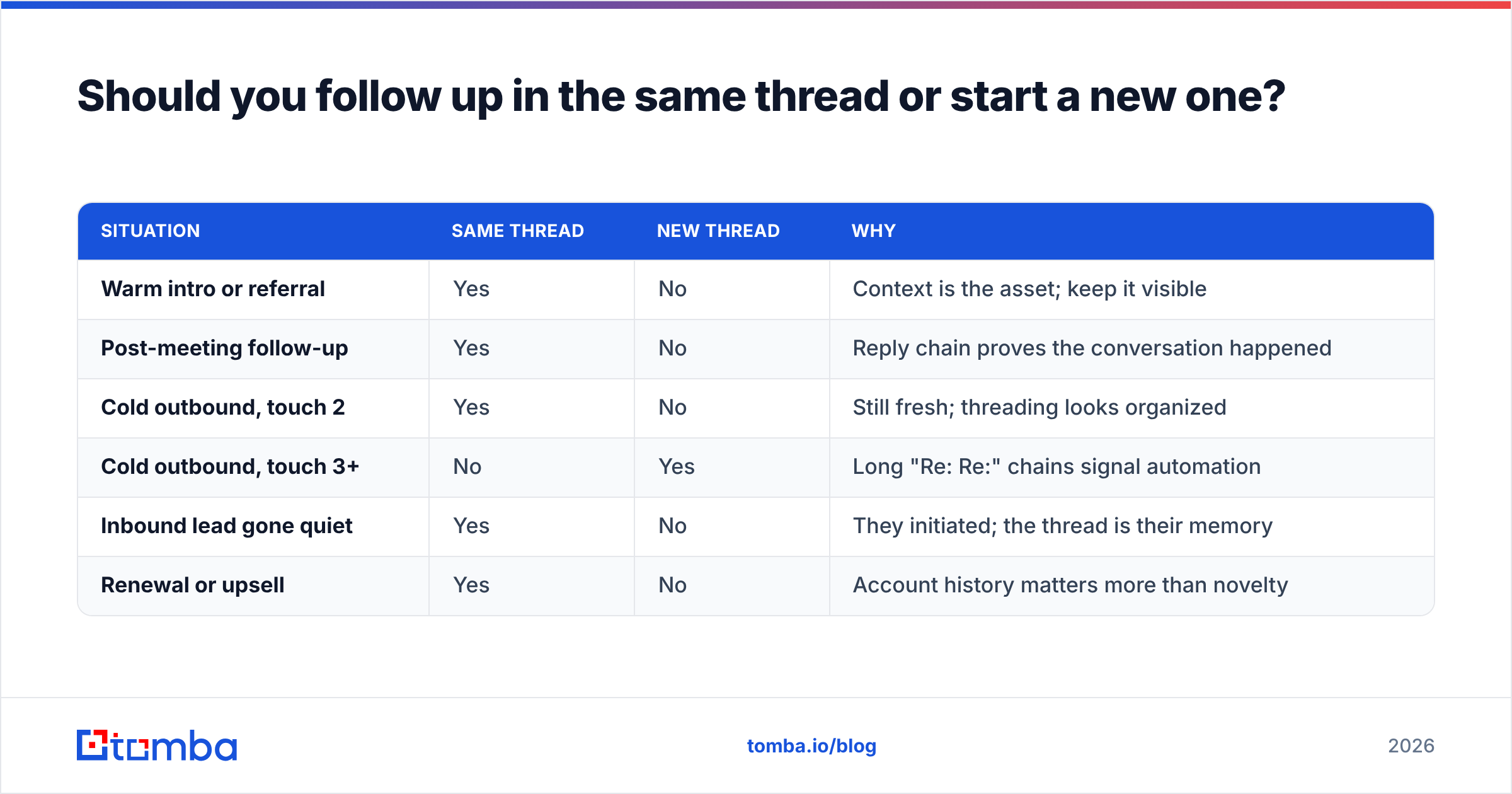
It depends on the relationship, and getting this wrong costs you deliverability as well as replies.
| Situation | Same thread | New thread | Why |
|---|---|---|---|
| Warm intro or referral | Yes | No | Context is the asset; keep it visible |
| Post-meeting follow-up | Yes | No | Reply chain proves the conversation happened |
| Cold outbound, touch 2 | Yes | No | Still fresh; threading looks organized |
| Cold outbound, touch 3+ | No | Yes | Long "Re: Re:" chains signal automation |
| Inbound lead gone quiet | Yes | No | They initiated; the thread is their memory |
| Renewal or upsell | Yes | No | Account history matters more than novelty |
One practical caveat: mailbox providers weigh engagement heavily. Google's sender guidelines make it explicit that recipients who never open or reply drag your domain down. Threading endlessly into a silent inbox is exactly the pattern filters learn to demote.
Is it your copy — or your data?#
Before your third rewrite of touch two, run the boring check. This is the part most sequence advice skips entirely, and it's usually where the leak is.
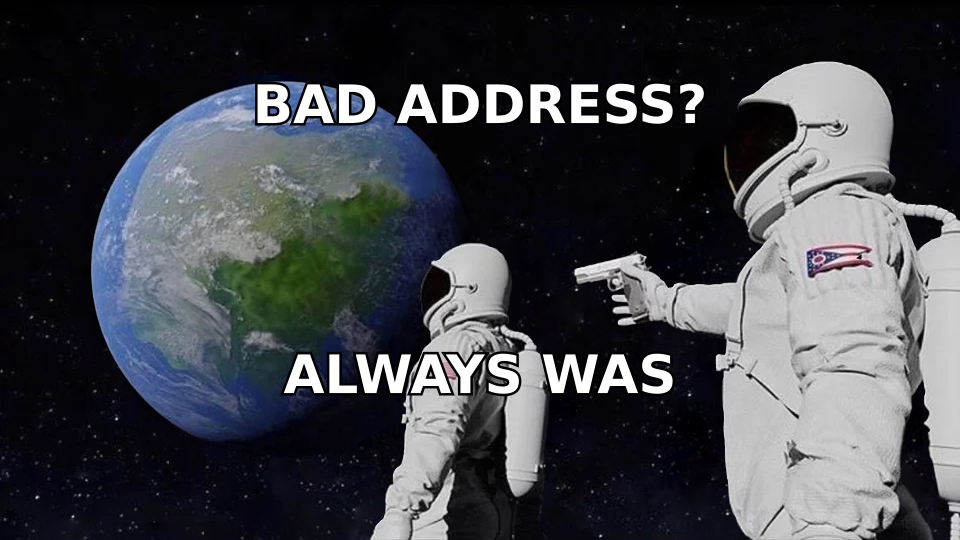
Silence has three data-shaped causes:
- Hard bounces you never looked at. Suppress them immediately. Continuing to send to bounced addresses is the fastest way to get a domain blocklisted.
- Catch-all domains. The server accepts everything and delivers nothing. Your dashboard shows "delivered." Nobody read it. A catch-all verifier tells you whether a specific mailbox actually exists behind the wildcard.
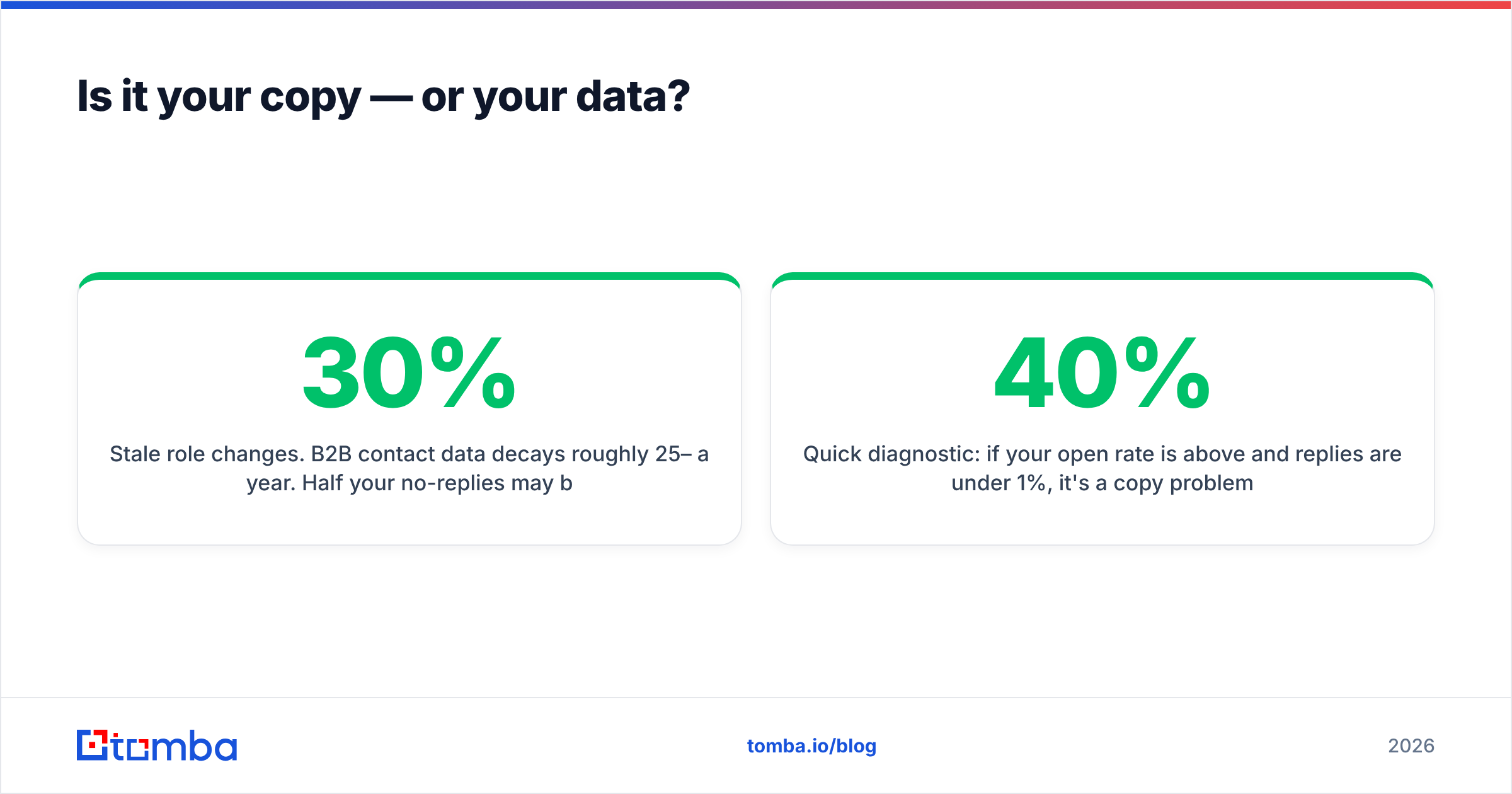
- Stale role changes. B2B contact data decays roughly 25–30% a year. Half your no-replies may be people who left the company eight months ago.
Run your list through an email verifier before the campaign, not after it stalls. A clean list changes your response rate math more than any subject-line test will, because it fixes the denominator.
Quick diagnostic: if your open rate is above 40% and replies are under 1%, it's a copy problem. If opens are under 20%, it's a deliverability or data problem, and no template will save you.
What's the right way to automate follow-ups without sounding automated?#
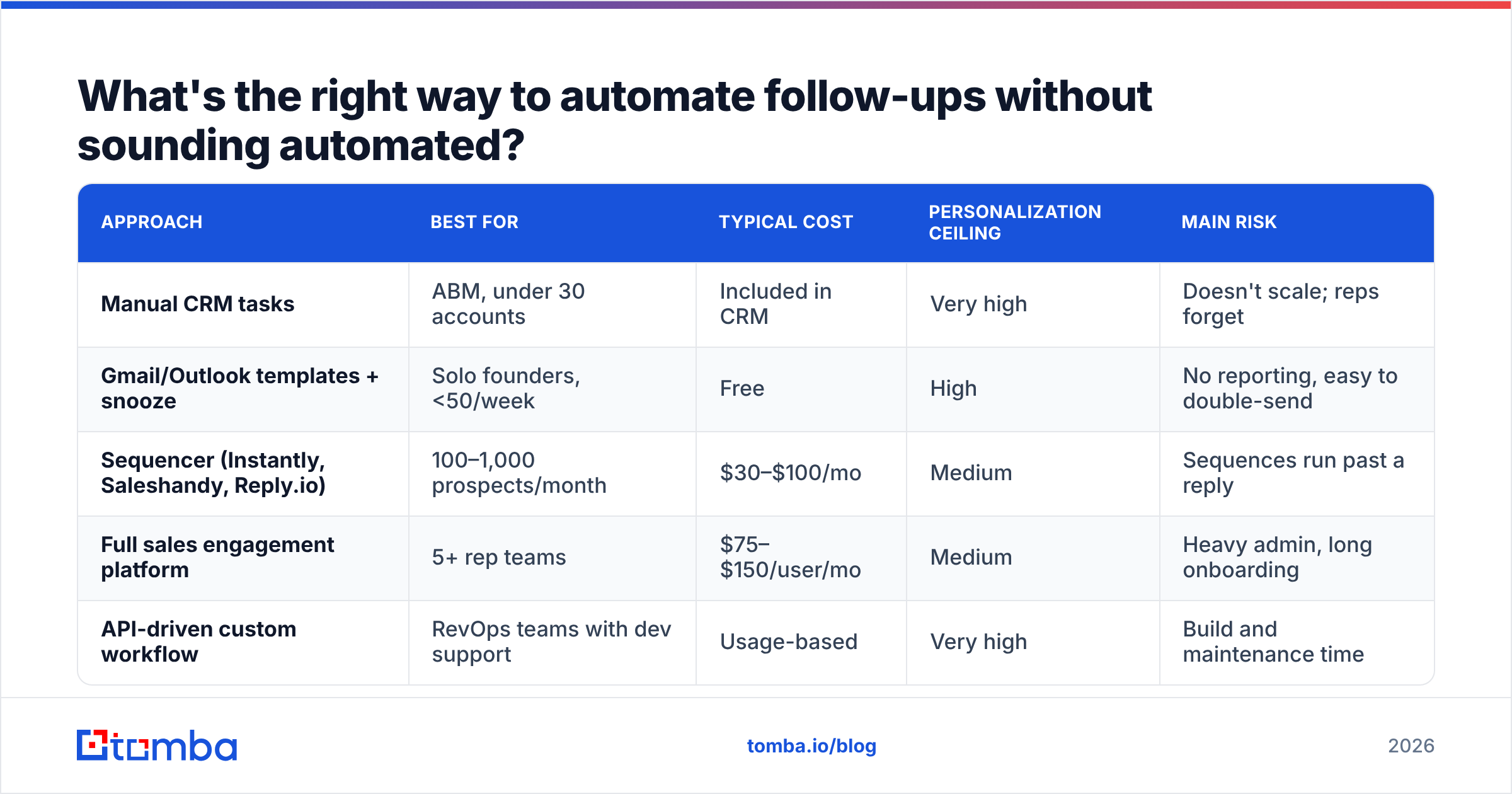
There's a spectrum, and the honest answer is that most teams over-tool this.
| Approach | Best for | Typical cost | Personalization ceiling | Main risk |
|---|---|---|---|---|
| Manual CRM tasks | ABM, under 30 accounts | Included in CRM | Very high | Doesn't scale; reps forget |
| Gmail/Outlook templates + snooze | Solo founders, <50/week | Free | High | No reporting, easy to double-send |
| Sequencer (Instantly, Saleshandy, Reply.io) | 100–1,000 prospects/month | $30–$100/mo | Medium | Sequences run past a reply |
| Full sales engagement platform | 5+ rep teams | $75–$150/user/mo | Medium | Heavy admin, long onboarding |
| API-driven custom workflow | RevOps teams with dev support | Usage-based | Very high | Build and maintenance time |
Whichever layer you choose, three settings decide whether it sounds human:
- Reply detection must stop the sequence — across the whole account, not just the individual thread. Nothing kills a deal faster than touch four landing after a prospect already replied to a colleague.
- Randomized send windows — 9:04, 9:31, 10:12 beats three emails at exactly 9:00.
- A real merge-field fallback — if
{{company}}is empty, the sentence must still read correctly. Browse the G2 sales engagement category if you're evaluating vendors, and test the fallback behavior in a trial before you commit.
For the copy layer itself, HubSpot's sales blog is a reasonable free library of patterns worth adapting — just don't paste them verbatim, since half your prospects have received those exact emails already.
What should you do when they still don't respond?#
Close the loop and move on — but move on intelligently.
- Re-enroll on a trigger, not a timer. New funding round, new VP of Sales, a job posting for the role your product supports. That's a legitimate reason to write again, and it resets the relationship.
- Switch channels once. A single connection request or a phone call after touch four often unblocks a thread email can't. Pull direct dials with a phone finder rather than dialing the switchboard.
- Nurture, don't chase. Move non-responders into a low-frequency newsletter or a quarterly value email. Zero ask, one useful thing.
- Log why. "No reply after 6 touches" is not a disqualification reason. "Wrong ICP — 8 employees, no sales team" is. The second one improves your targeting; the first one just clears your pipeline.
The teams with the best follow-up numbers aren't the most persistent. They're the ones with clean data, a descending ask, and the discipline to stop at six.
Start with an address that actually exists#
Every follow-up strategy in this guide assumes the message reaches a real, monitored inbox. That assumption is wrong more often than most teams realize — and it's the cheapest thing to fix.
Tomba's Email Finder returns verified professional addresses by name and domain, with a confidence score and the sources behind each result, so you know whether silence is a copy problem or a data problem before you write touch two. The free tier covers 25 searches a month; paid plans start at $49/mo on Starter and $99/mo on Growth, with bulk processing and API access included as you scale. Check the full Tomba pricing breakdown, verify your next list, then send the follow-up.
Related guides#
Ready to find emails that actually work?
Join 150,000+ professionals who stopped guessing and started sending. Free credits on signup — no credit card required.
Get the Tomba newsletter
Practical outbound tactics and product updates — once every two weeks.
About the author