Follow Up Emails: How Many, When, and What to Send in 2026
Most replies come from follow ups, not the first email. Here's how many to send, the exact spacing that still works in 2026, and what each message should say.
TL;DR
- Between 40% and 60% of replies to a cold sequence arrive after the first email, so stopping at one send throws away most of your pipeline.
- Four to six touches over 18–24 days is the sweet spot for most B2B teams. Beyond eight, reply rate flattens and spam complaints climb.
- Space follow ups on an expanding curve (3 → 4 → 5 → 7 days), not a fixed daily drip.
- Every follow up needs a new reason to exist. "Just bumping this" is the single most ignored sentence in B2B email.
- Cadence can't fix a bad list. Verify addresses before the first send — bounces from follow ups compound faster than from cold opens.
What is a follow up email, and why does it decide the whole sequence?#
A follow up email is any message you send after your first outreach attempt to the same person, in the same campaign, without having received a reply.
Think of it like knocking on a door. The first knock proves you exist. The second proves you're not a delivery driver who already left. The third is when people actually get up. In outbound email the pattern is nearly identical: your first send lands in a crowded inbox on a random Tuesday, and whether it gets read has more to do with what your prospect was doing at 9:14 a.m. than with your subject line.
That randomness is why follow ups outperform. Each additional send is a new lottery ticket against the prospect's schedule. Across the campaign data most sales tools publish, first emails land somewhere in the 3–8% reply range, and total sequence reply rates land in the 8–15% range. The delta is the follow ups.
The mistake teams make is treating follow ups as identical retries. They aren't. Each one should assume the prospect saw the previous message and didn't care enough to answer — which means repeating yourself is the worst possible strategy.
How many follow up emails should you send?#
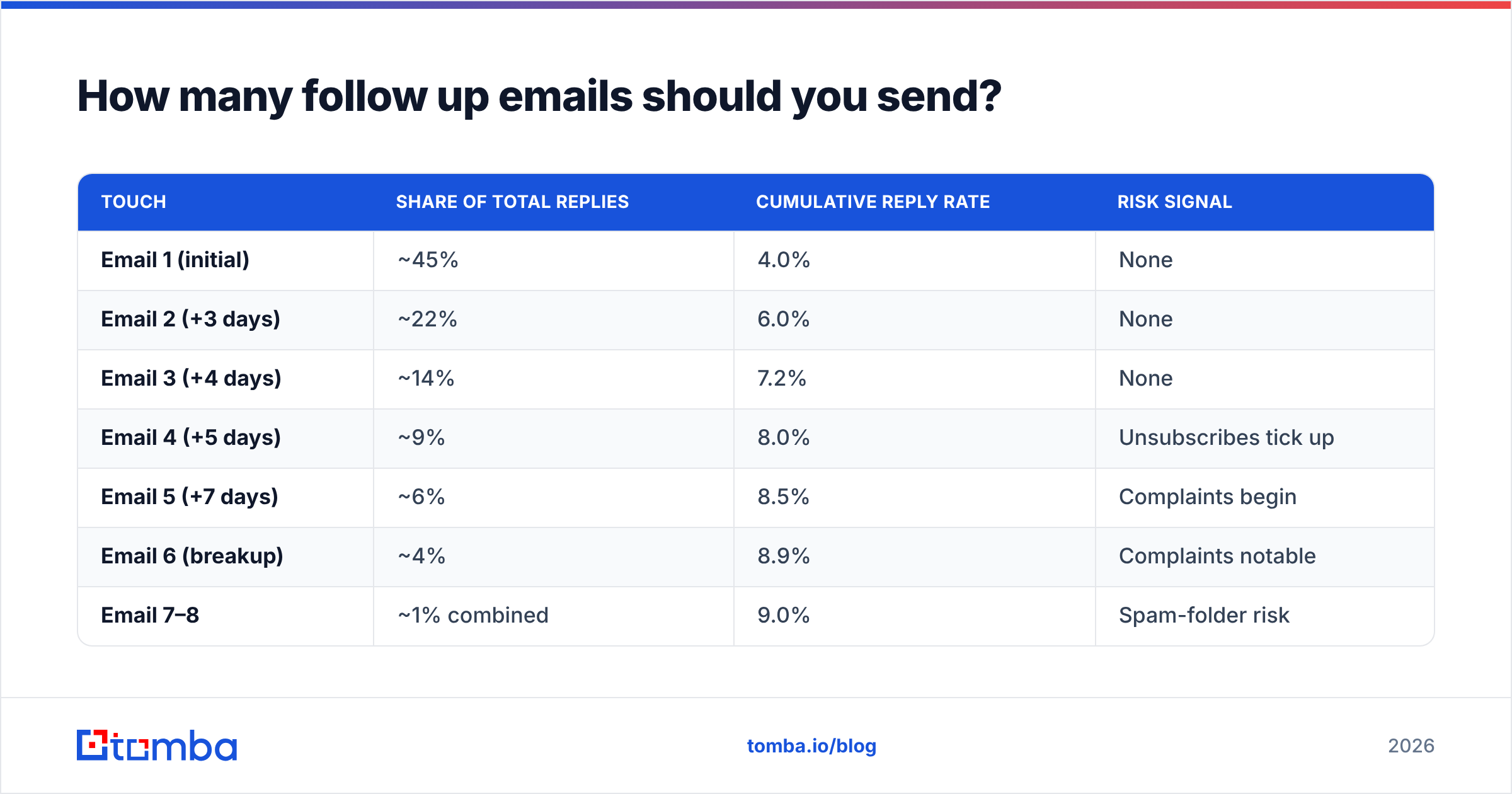
Four to six total touches, including the first email. That's the range where reply rate is still climbing and complaint rate is still flat.
Here's what the curve typically looks like when teams measure it honestly:
| Touch | Share of total replies | Cumulative reply rate | Risk signal |
|---|---|---|---|
| Email 1 (initial) | ~45% | 4.0% | None |
| Email 2 (+3 days) | ~22% | 6.0% | None |
| Email 3 (+4 days) | ~14% | 7.2% | None |
| Email 4 (+5 days) | ~9% | 8.0% | Unsubscribes tick up |
| Email 5 (+7 days) | ~6% | 8.5% | Complaints begin |
| Email 6 (breakup) | ~4% | 8.9% | Complaints notable |
| Email 7–8 | ~1% combined | 9.0% | Spam-folder risk |
Two things fall out of that table. First, touch two through four carry roughly 45% of your total replies — that's the section nobody should skip. Second, the marginal value of touch seven is close to zero while the marginal risk is not. When a prospect marks message seven as spam, they aren't just killing that thread; they're teaching the mailbox provider something about your sending domain that affects every prospect on that provider.
Adjust the count by deal size. A $500/month SaaS deal doesn't justify eight touches. A $200,000 enterprise contract with a 14-month cycle absolutely justifies a long, low-frequency nurture running quarterly. The rule isn't "more is better" — it's "match persistence to contract value."
When should you send each follow up?#
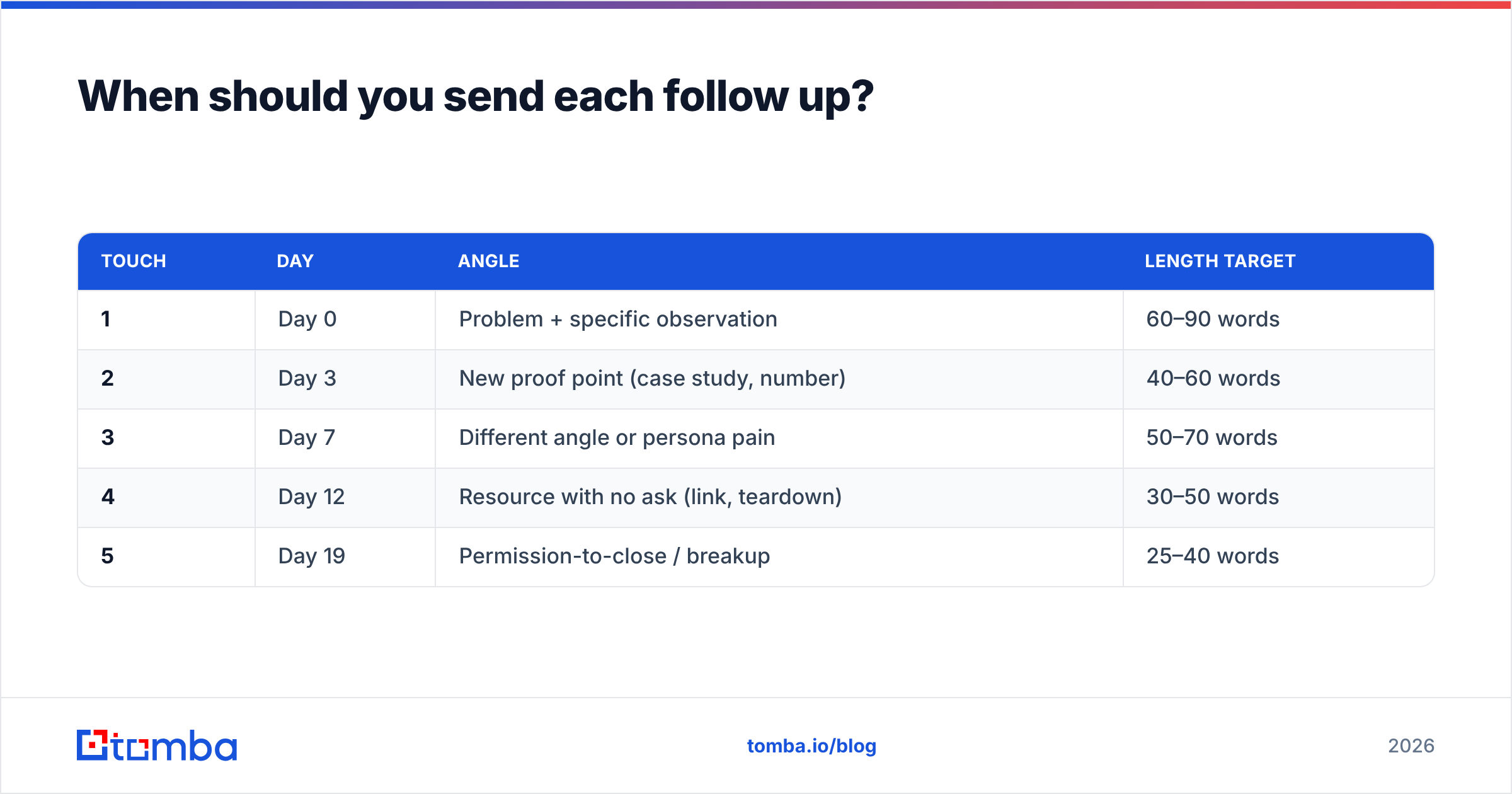
Use expanding intervals. The gap between messages should grow as the sequence goes on, because a prospect who ignored three emails in a row needs more time before the fourth reads as persistence rather than pestering.
Here's a cadence that works for most B2B teams selling into managers and directors:
| Touch | Day | Angle | Length target |
|---|---|---|---|
| 1 | Day 0 | Problem + specific observation | 60–90 words |
| 2 | Day 3 | New proof point (case study, number) | 40–60 words |
| 3 | Day 7 | Different angle or persona pain | 50–70 words |
| 4 | Day 12 | Resource with no ask (link, teardown) | 30–50 words |
| 5 | Day 19 | Permission-to-close / breakup | 25–40 words |
Notice the word count shrinking. Later follow ups should be shorter, not longer. A 200-word fourth email reads as desperation; a 30-word fourth email reads as a busy person being efficient.
A few timing details that matter more than most people expect:
- Never follow up within 24 hours. It signals automation and gives the prospect no chance to have simply been busy.
- Skip Monday mornings and Friday afternoons. Monday 8–10 a.m. is inbox-triage hour, when unread mail gets bulk-archived. Friday after 2 p.m. is when nothing gets decided.
- Send in the prospect's timezone, not yours. A 9 a.m. send from Berlin lands at 3 a.m. in New York, and by the time your prospect opens their laptop you're buried under 40 newer messages.
- Respect the reply-time signal. If someone opened your email six times and never replied, that's a different prospect from someone who never opened at all — the first deserves a direct question, the second deserves a new subject line.
- Pause the sequence on any human signal. Out-of-office, a forward, a "not right now" — all of these should stop automation and hand the thread to a person.
What should each follow up email actually say?#
Each follow up needs a reason to exist that isn't "you didn't answer." Here are the five angles that consistently outperform, in the order they work best:
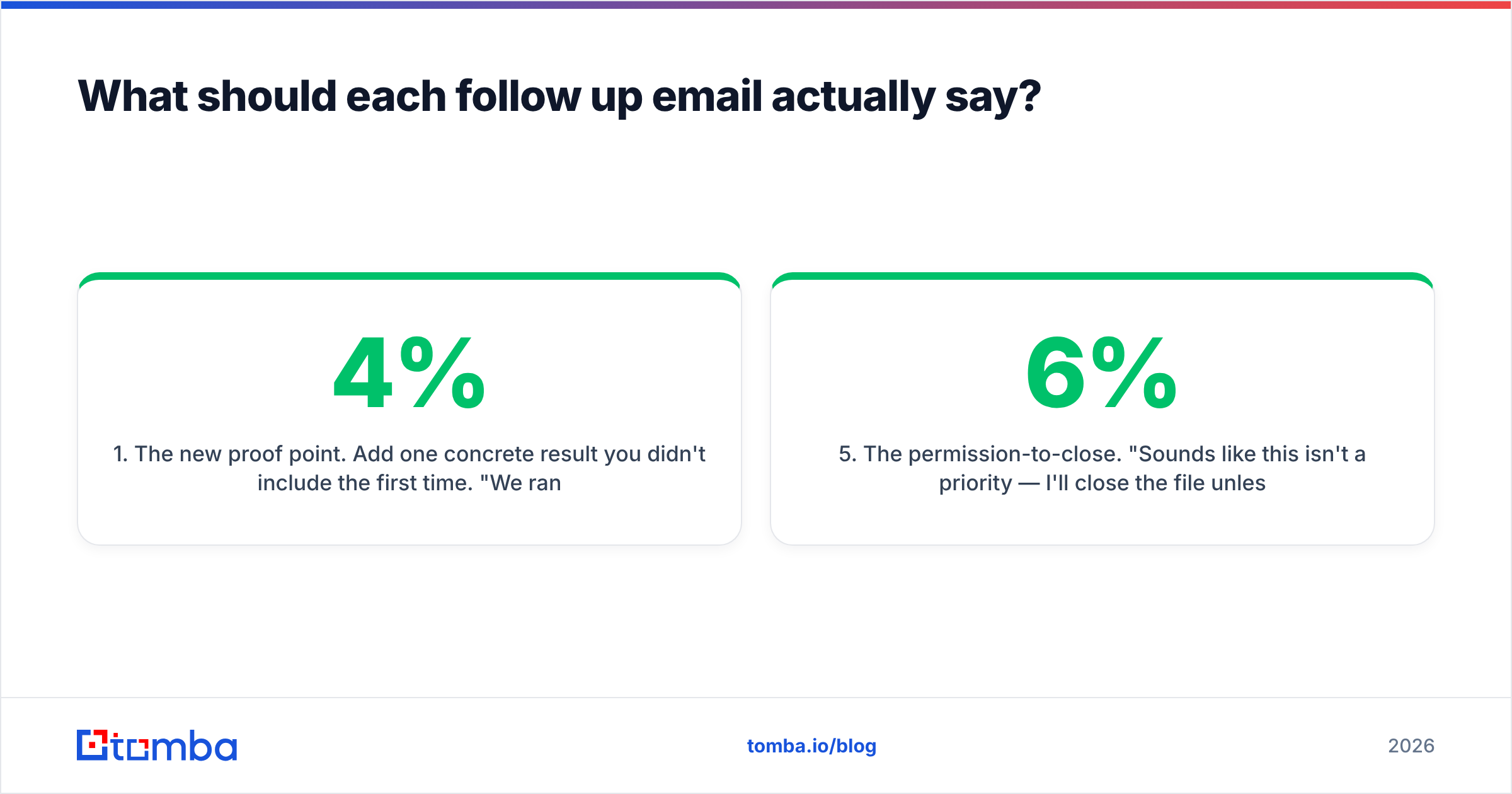
- The new proof point. Add one concrete result you didn't include the first time. "We ran this with a 12-person SDR team at a logistics company — their meeting rate went from 4% to 9% in six weeks." Specificity is the whole game; a vague claim adds nothing to the original message.
- The reframe. Same problem, different lens. If email one pitched time savings, email two pitches data accuracy. You're testing which pain the prospect actually owns, since you can't know from the outside.
- The pure-value send. No ask, no calendar link. A relevant teardown, benchmark, or article. This is the highest-goodwill message in the sequence and often the one that gets the "actually, this was useful" reply.
- The one-question email. Strip everything down to a single question that takes ten seconds to answer. "Is data accuracy or send volume the bigger bottleneck for your team right now?" Binary questions get answered because they don't require composing a thought.
- The permission-to-close. "Sounds like this isn't a priority — I'll close the file unless you tell me otherwise." Widely misused as a guilt lever, but done plainly it reliably surfaces the 4–6% of prospects who meant to reply and forgot.
What to cut from every follow up: "just checking in," "circling back," "bumping this to the top of your inbox," "did you see my last email," and any apology for emailing. None of these carry information. If you strip the filler and the message has nothing left, that's your signal that the message shouldn't be sent.
If you're building these from scratch, the cold email templates library is a faster starting point than a blank page, and a subject line generator helps you avoid recycling "Following up" five times in one thread.
Should you follow up in the same thread or start a new one?#
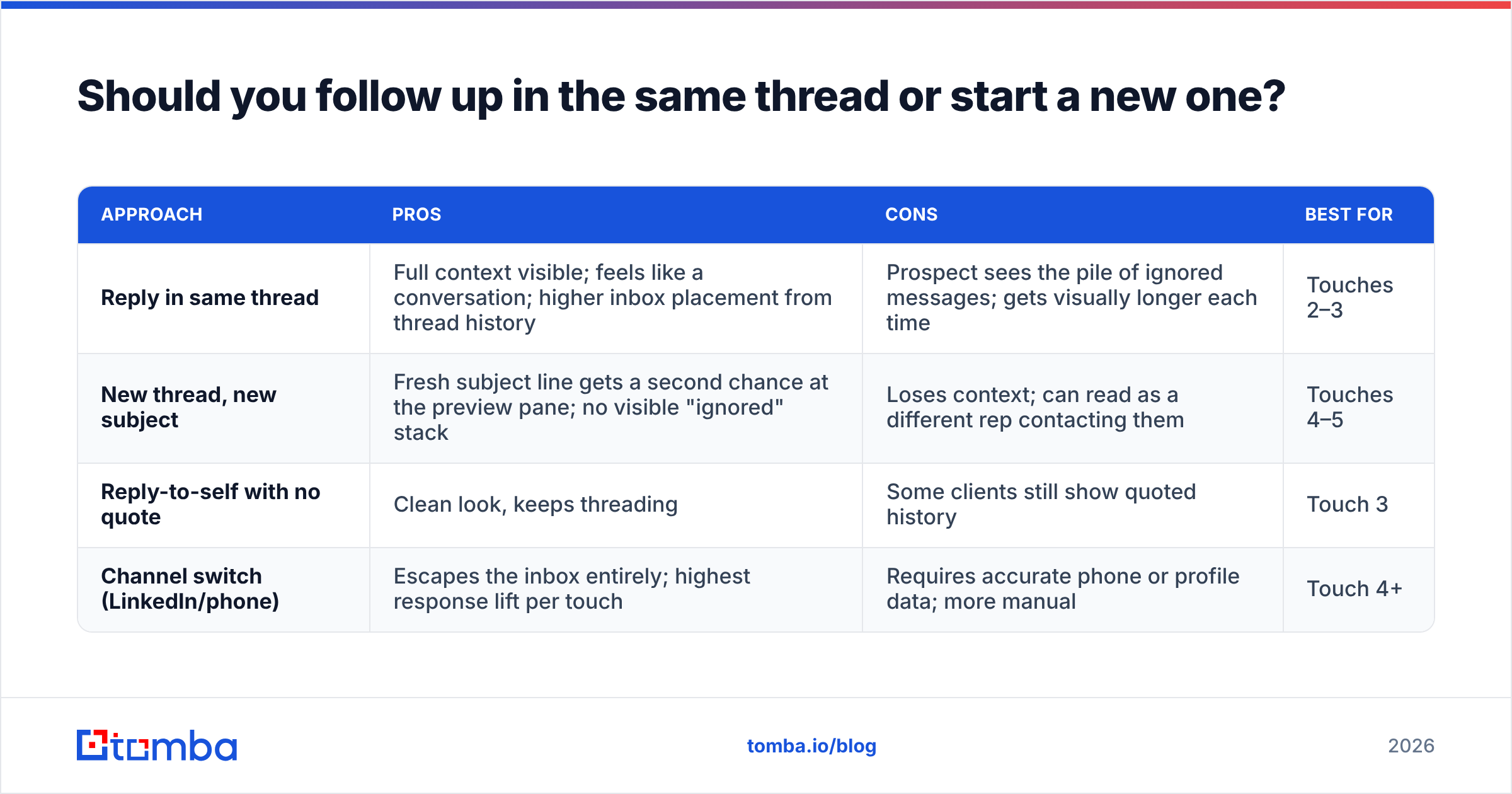
Same thread for touches two and three, new thread for touch four onward. That's the pragmatic answer, and here's the tradeoff behind it.
| Approach | Pros | Cons | Best for |
|---|---|---|---|
| Reply in same thread | Full context visible; feels like a conversation; higher inbox placement from thread history | Prospect sees the pile of ignored messages; gets visually longer each time | Touches 2–3 |
| New thread, new subject | Fresh subject line gets a second chance at the preview pane; no visible "ignored" stack | Loses context; can read as a different rep contacting them | Touches 4–5 |
| Reply-to-self with no quote | Clean look, keeps threading | Some clients still show quoted history | Touch 3 |
| Channel switch (LinkedIn/phone) | Escapes the inbox entirely; highest response lift per touch | Requires accurate phone or profile data; more manual | Touch 4+ |
That last row deserves attention. The largest single lift in follow up performance usually doesn't come from a better email — it comes from not sending an email. A prospect who ignored three messages may answer a LinkedIn note in twelve minutes. If you have verified B2B phone numbers, a 45-second call between touch three and four converts far better than touch four alone. Guidance from teams tracking this on G2 and in HubSpot's sales resources has pointed the same direction for years: multi-channel sequences beat email-only sequences at roughly the same touch count.
How do you follow up without wrecking deliverability?#
Follow ups punish a bad list harder than first sends do, because you hit the same invalid address multiple times. One bounce on a dead mailbox is noise. Five bounces on the same dead mailbox across a five-touch sequence is a pattern, and mailbox providers treat patterns as intent.
Concretely, here's what to control:
- Verify before the first send, not after the first bounce. Run the list through an email verifier and drop anything that isn't deliverable. If a domain is catch-all, mark it and cap it at two touches instead of five — catch-alls accept everything, so a "valid" result there is weaker evidence than it looks.
- Cap daily volume per mailbox. 30–50 sends per inbox per day is the working ceiling for cold outreach in 2026. Follow ups count toward that number, which people forget: a five-touch sequence to 200 prospects is 1,000 sends, not 200.
- Honor unsubscribes instantly and visibly. Google's bulk sender guidelines require one-click unsubscribe and a spam complaint rate under 0.3%. A follow up sent to someone who opted out is the fastest route to a domain-level penalty.
- Watch reply rate as a health metric, not just a sales metric. A sequence with a falling response rate but stable open rate usually means your copy is fine and your targeting isn't. Fixing targeting is cheaper than fixing a burned domain.
- Rotate sending domains for high volume. Not to evade filters, but so a single bad campaign can't take your primary domain down with it.
The uncomfortable truth is that most "follow ups don't work for us" complaints are list problems in disguise. If 18% of your contacts are wrong, your sequence is spending 18% of its sends teaching Gmail that you send to addresses that don't exist.
What are the most common follow up mistakes?#
Sending the same message with a new date. Prospects notice. If touch three could be pasted over touch two without changing meaning, delete one of them.
Front-loading the cadence. Five emails in seven days is not persistence, it's a denial-of-service attack on someone's attention. Expanding intervals exist for a reason.
Using guilt. "I've reached out three times now" makes the prospect the problem. They owe you nothing. Every message should read like it's the first time you've written, tonally, even if it references prior context.
Automating the human moments. When someone replies "not now, ask me in Q3," that goes in the CRM as a task, not back into the sequence. Nothing destroys a relationship faster than an automated bump arriving after a real human answer.
Skipping enrichment. A follow up that says "saw you're hiring three AEs" outperforms a generic bump by a wide margin, and that's a data problem, not a copy problem. Pulling firmographic and role context through data enrichment before the sequence starts means every touch has something new to say.
Treating breakup emails as a trick. The "should I close your file?" email works because it's true. If you send it and then keep emailing anyway, you've taught that prospect that nothing you write is accurate.
What does a good follow up sequence look like end to end?#
Here's a five-touch structure you can copy, built for a mid-market B2B offer with a 30–60 day cycle:
- Day 0 — Observation + problem. Reference something specific about their company (a job posting, a product launch, a stack change). One sentence on the problem it implies. One sentence on what you do. One low-friction question.
- Day 3 — Proof. Two sentences. A named-industry result with a number. Repeat the question.
- Day 7 — Reframe. Different pain, same product. Two to three sentences. New question.
- Day 12 — Value, no ask. A link to something genuinely useful. Explicitly say "no need to reply."
- Day 19 — Permission to close. One or two lines. Ask if you should stop. Mean it.
Run that against 200 verified contacts and you have a measurable experiment: roughly 1,000 sends, a clean control, and enough volume to tell whether your problem is the list, the copy, or the offer. Run it against 200 scraped, unverified guesses and you learn nothing except that your bounce rate is bad.
That's the part most teams get backwards. Cadence design is the fun part; list quality is the part that determines whether the cadence matters at all. Build the list right, then spend your effort on making touches two through four say something new.
Start with contacts that actually exist. Your follow up sequence multiplies whatever list you feed it — good addresses turn into more replies, bad ones turn into bounces that follow you across every campaign. Tomba's Email Finder pulls verified professional addresses by domain, name, or company, with a free tier of 25 searches a month and paid plans starting at $49/mo. Check the full Tomba pricing if you're running sequences at volume, or start with the free tier and see how your bounce rate changes before touch two.
Related guides#
Ready to find emails that actually work?
Join 150,000+ professionals who stopped guessing and started sending. Free credits on signup — no credit card required.
Get the Tomba newsletter
Practical outbound tactics and product updates — once every two weeks.
About the author