Follow Up Format: How to Structure Emails That Get Replies
Most follow ups die from bad structure, not bad timing. Here is the follow up format that works touch by touch — anatomy, cadence, word counts, and copy you can steal.
TL;DR
- A follow up format is a repeatable skeleton — trigger line, one idea, one ask, one exit — not a longer version of your first email.
- Most follow ups fail on structure and reference, not on timing. "Just bumping this up" adds zero new information, so it earns zero new attention.
- Four to five touches over 12–18 business days beats eight touches over 30. Each touch should carry a different reason to reply.
- Every follow up should be 40–90 words, single-ask, and readable on a phone without scrolling.
- None of it matters if the address bounces. Verify before you sequence, or your follow up format is just a slow way to burn your domain.
What is a follow up format?#
A follow up format is the fixed structure you reuse for every message after your first email: what goes in the first line, what the body is allowed to contain, what the ask is, and how the message ends.
Think of it like a restaurant's plating standard. The ingredients change nightly, but the plate always has a protein, a starch, a sauce, and negative space. Diners recognise it instantly. A follow up format works the same way — the prospect's brain parses the shape before it parses the words, and a familiar shape lowers the cost of reading.
The technical version: a follow up format is a constrained template with four required slots and one optional slot. Constraint is the point. When reps improvise, they default to the two worst patterns in B2B email — the guilt bump ("did you see my last note?") and the restate ("as I mentioned, we help companies like yours..."). Both re-spend the recipient's attention without buying anything new.
What are the parts of a follow up email format?#
Here is the anatomy every touch after touch one should follow:
- Reference line (1 sentence). Anchor to something real and external: their hiring page, a product release, a LinkedIn post, a headcount change. Never anchor to your own previous email — that makes your inbox the subject, and nobody cares about your inbox.
- New payload (1–3 sentences). One idea the prospect did not have before opening: a benchmark, a teardown observation, a customer number, a competitor move. If you cannot name the new information in five words, you do not have a follow up — you have a bump.
- Single ask (1 sentence). One question, answerable in under ten words. "Worth 15 minutes Thursday?" is an ask. "Let me know your thoughts on the below and whether it makes sense to connect" is homework.
- Exit ramp (optional, 1 sentence). By touch four, give permission to say no: "If this isn't a priority this quarter, say so and I'll close the loop." Explicit exits convert lurkers into repliers — a "no" is a routing decision, not a loss.
- Signature discipline. No banner images, no eight-line footers, no tracking pixel on plain-text sequences. Keep the HTML-to-text ratio boring.
That is the whole format. Four slots, 40–90 words, one screen on mobile. Anything longer is a proposal wearing a follow up's clothes.
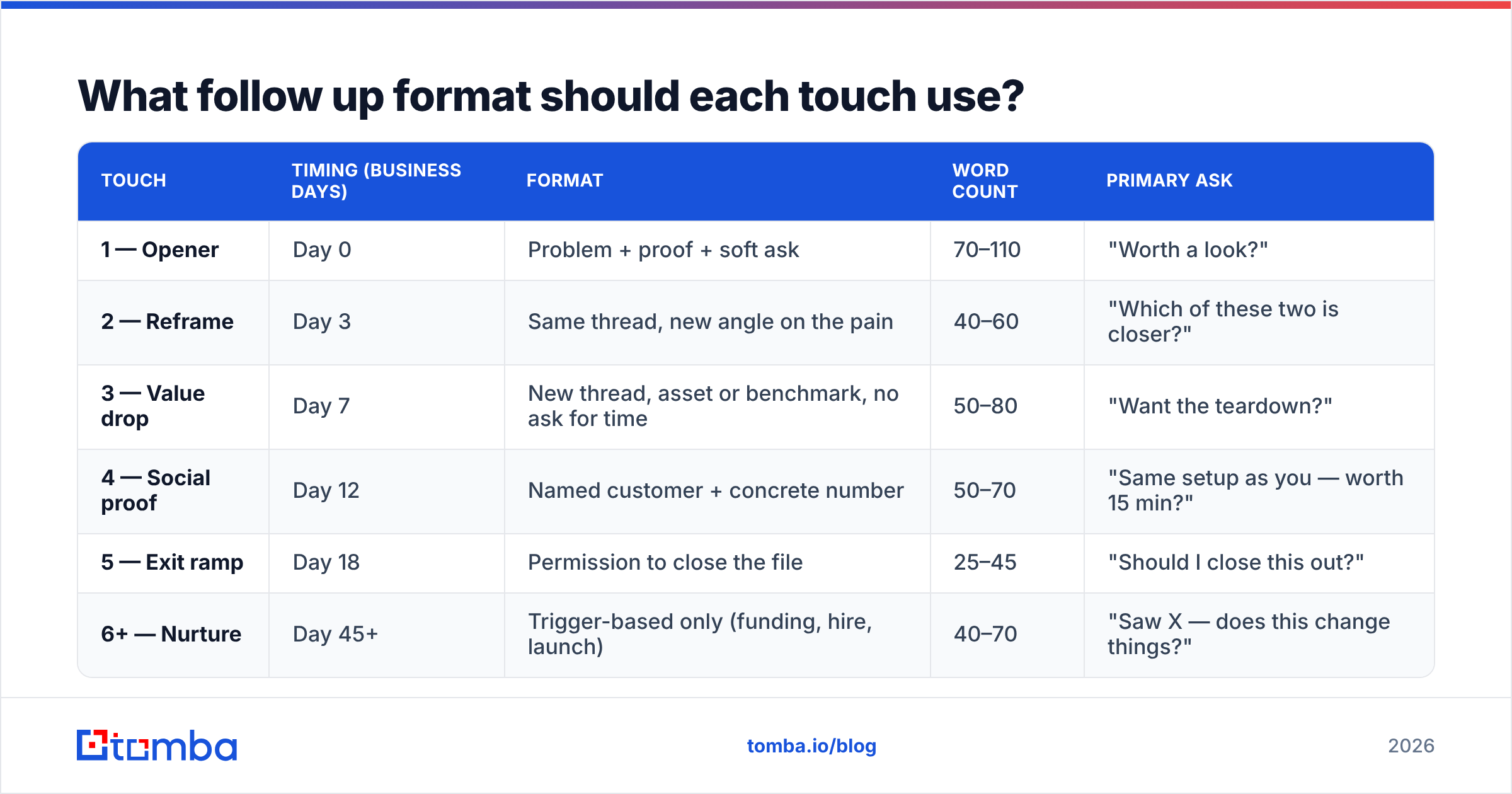
What follow up format should each touch use?#
Different touches do different jobs. Reusing one template across all of them is why sequences flatline at touch three.
| Touch | Timing (business days) | Format | Word count | Primary ask |
|---|---|---|---|---|
| 1 — Opener | Day 0 | Problem + proof + soft ask | 70–110 | "Worth a look?" |
| 2 — Reframe | Day 3 | Same thread, new angle on the pain | 40–60 | "Which of these two is closer?" |
| 3 — Value drop | Day 7 | New thread, asset or benchmark, no ask for time | 50–80 | "Want the teardown?" |
| 4 — Social proof | Day 12 | Named customer + concrete number | 50–70 | "Same setup as you — worth 15 min?" |
| 5 — Exit ramp | Day 18 | Permission to close the file | 25–45 | "Should I close this out?" |
| 6+ — Nurture | Day 45+ | Trigger-based only (funding, hire, launch) | 40–70 | "Saw X — does this change things?" |
Two rules make this table work. First, alternate between replying in-thread (touches 2 and 5) and starting a fresh thread with a new subject line (touches 3 and 4). In-thread replies preserve context; new threads escape a thread the prospect has already mentally archived. Second, never let two consecutive touches carry the same payload type. Benchmark, then proof, then trigger — not benchmark, benchmark, benchmark.
If you are building subject lines for the new-thread touches, a subject line generator is faster than staring at a cursor, but test the output against your own replies before you trust it.
Is "just checking in" ever an acceptable follow up format?#
No — and the reason is structural, not stylistic.
"Just checking in" fails because it inverts the value exchange. You are asking the recipient to spend attention so that you can resolve your uncertainty. Nothing in the message serves them. HubSpot's sales team has been making this argument for years, and every rep who tests it against a value-carrying alternative gets the same result: the bump gets ignored, the payload gets a reply — even when the reply is no.
The fix is mechanical. Take any "checking in" draft and ask: what would this email be if you deleted the first sentence? If the answer is "nothing," rewrite it. If the answer is "a stat and a question," delete the first sentence and send that instead.
The same logic kills these formats:
- The guilt trip — "I've reached out three times..." Their non-reply is information, not a debt.
- The fake deadline — "Closing my file Friday" when you demonstrably do not. Prospects have seen this thousands of times.
- The one-word bump — "Thoughts?" Reads as low-effort because it is.
- The novel — a 400-word follow up longer than the original. Length signals desperation.
How long should a follow up email be?#
Shorter than the email before it. That is the single most reliable heuristic in follow up formatting.
Touch one earns 70–110 words because it has to establish relevance from zero. By touch five you have already spent your context budget, so 25–45 words is plenty. A descending word count reads as confidence; an ascending one reads as panic.
Practical constraints worth enforcing in your template library:
- Line length: break paragraphs at two sentences maximum. Mobile screens turn four-sentence blocks into grey walls.
- Links: one, maximum, per follow up. Two or more links plus a tracking domain is a recognisable spam shape.
- Questions: exactly one question mark per email. Two questions halve your reply rate because the prospect has to compose rather than react.
- Attachments: none until they ask. Cold attachments trip filters and get quarantined.
Gartner's research on the B2B buying journey makes the underlying point well: buyers spend a tiny fraction of their cycle with any single vendor. Your follow up is competing with the other 95% of their week, not with your competitor's follow up. Format for a distracted skim, not for a careful read.
How does data quality change your follow up format?#
More than copy does, and this is the part most teams get backwards.
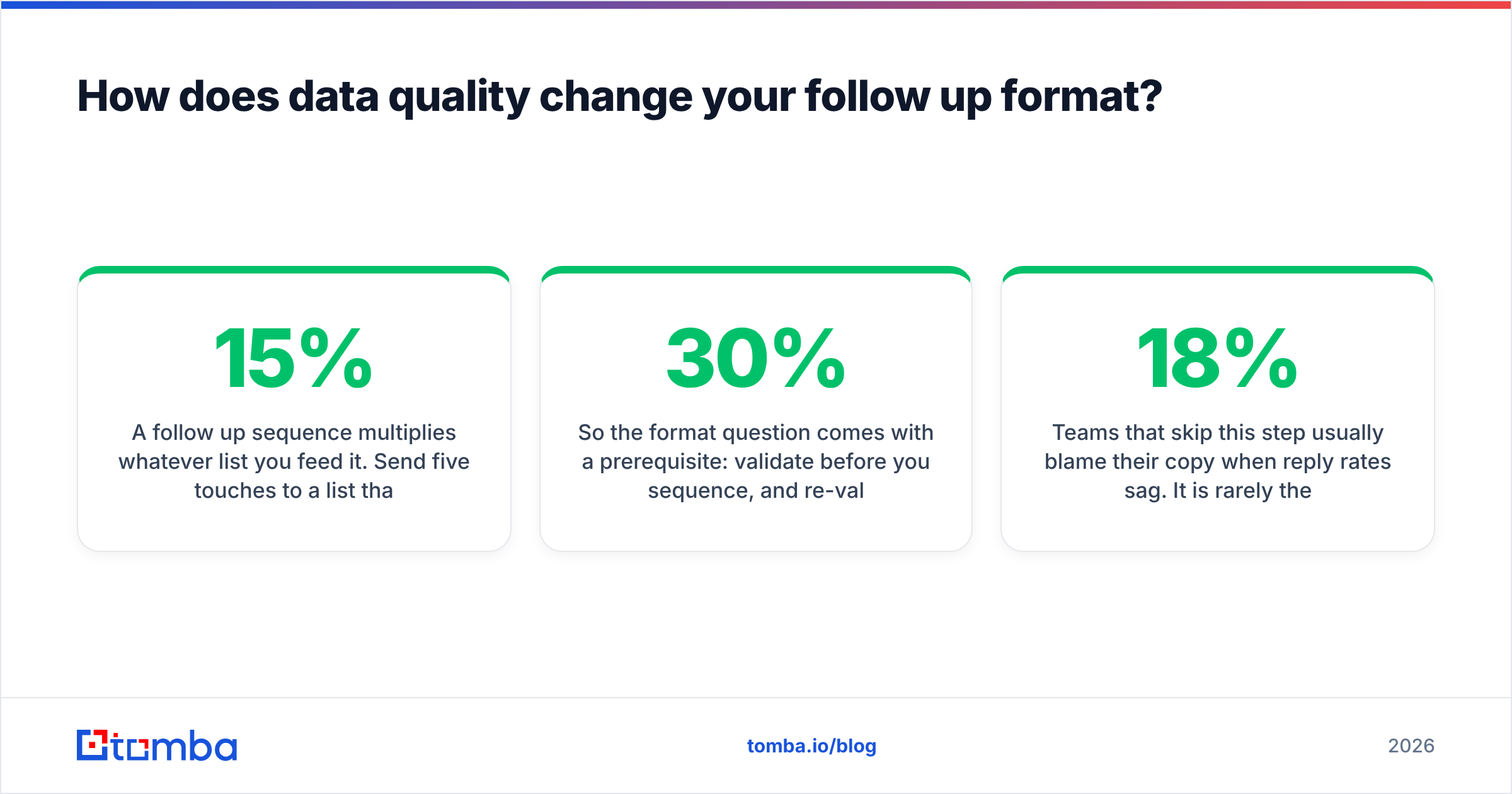
A follow up sequence multiplies whatever list you feed it. Send five touches to a list that is 15% invalid, and you are generating five times the bounces, five times the spam-trap hits, and five times the reputation damage. Google's bulk sender guidelines are explicit about complaint and bounce thresholds — cross them and your perfectly formatted touch four never renders in a human's inbox at all.
So the format question comes with a prerequisite: validate before you sequence, and re-validate before any nurture touch sent 45+ days after the last one. B2B contacts decay somewhere in the 20–30% per year range because people change jobs; a contact that was valid at touch one may be gone by the time your quarterly trigger email fires.
Three practical adjustments:
- Run the list through an email verifier before day zero, and drop anything that comes back invalid rather than "risky." Risky addresses on a five-touch cadence are a bad trade.
- Handle catch-all domains separately. They accept everything at SMTP time and bounce silently later. A catch-all verifier tells you which catch-alls are worth sequencing and which should get a two-touch cap.
- Re-find, don't re-send. When a contact bounces mid-sequence, use a domain search to pull the current team roster and restart with the person who inherited the role. That is a far better use of the next touch than emailing a dead mailbox.
Teams that skip this step usually blame their copy when reply rates sag. It is rarely the copy. It is the 18% of the list that was never going to receive anything.
What does a good follow up sequence actually look like?#
Here is a full five-touch sequence in the format above, written for a fictional sales-ops buyer. Steal the shape, not the words.
Touch 2 — Reframe (day 3, in-thread)
Following the note below — I may have aimed at the wrong problem.
Most sales-ops leads I talk to at your headcount are not worried about lead volume; they're worried that 20% of what's already in the CRM is undeliverable.
Which one is closer for you?
38 words. New angle, one question, no guilt.
Touch 3 — Value drop (day 7, new thread, subject: "your CRM's dead-contact rate")
Ran a quick sample against three companies your size last month. Average share of contact records that failed verification: 22%. The reps only found out by bouncing.
I wrote up how we measured it — two pages, no pitch. Want it?
41 words. Payload first, ask is for permission to send an asset, not for time.
Touch 5 — Exit ramp (day 18, in-thread)
Haven't heard back, which usually means this isn't a Q3 problem.
Want me to close this out, or check back after your planning cycle?
25 words. Two acceptable outcomes, both of which are a reply.
Notice what none of them do: reference how many times you have written, apologise for following up, or restate your value proposition. The format does the persuading.
How do you scale a follow up format without sounding like a robot?#
Templatise the structure, personalise the reference line. That split is the entire answer.
The reference line is the only slot that must be unique per prospect. Everything else — payload types, ask phrasing, exit ramp — can be a library of five to ten pre-written blocks that you mix. That is how a team sends 400 touches a week without producing 400 identical emails.
To make the reference line cheap to write, pull it from structured data instead of manual research: recent role changes, tech stack, headcount bands, funding. Data enrichment fills those fields on import, so the rep writing touch three is picking from facts rather than reopening LinkedIn for the ninth time.
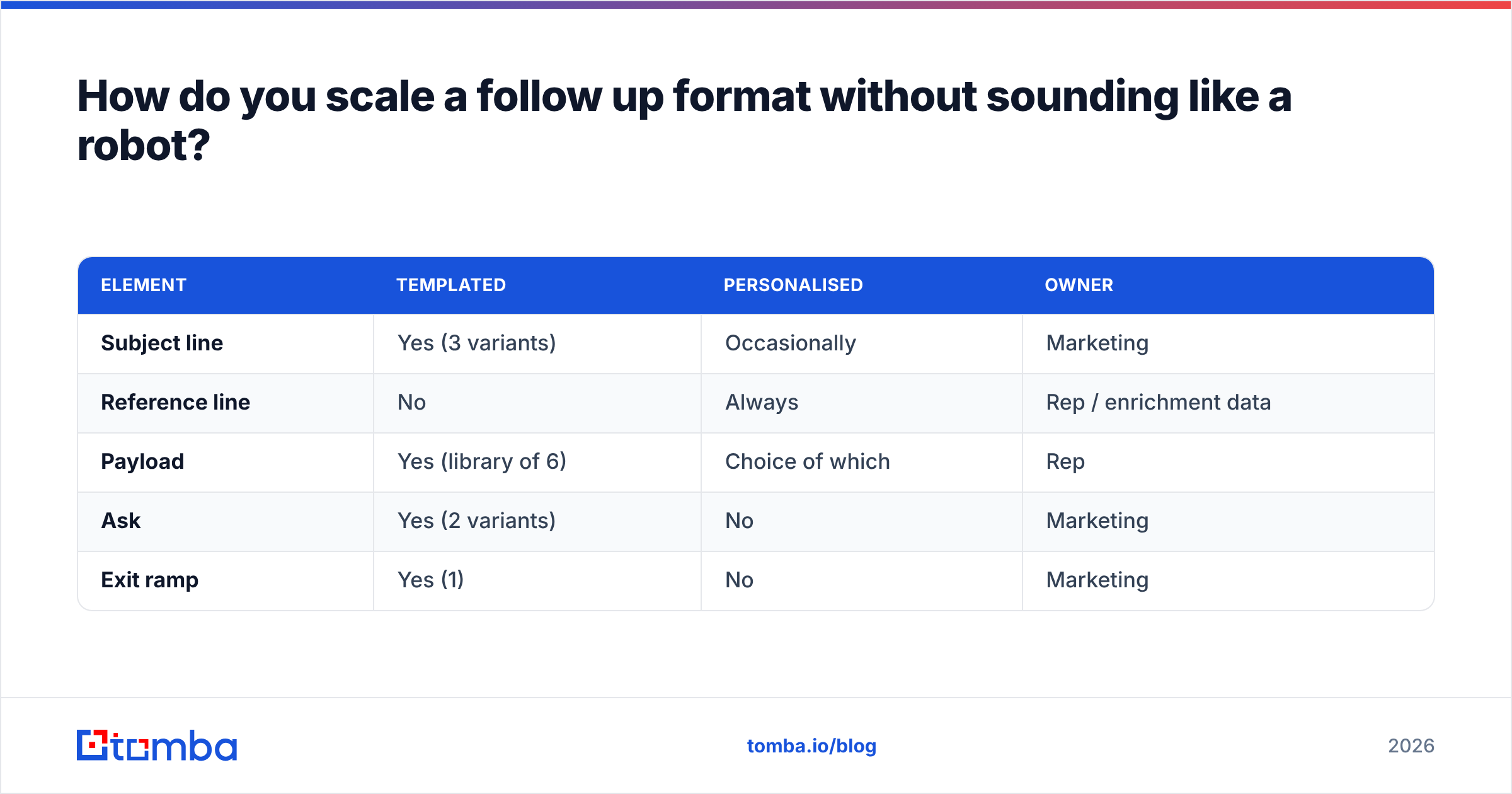
A workable division of labour:
| Element | Templated | Personalised | Owner |
|---|---|---|---|
| Subject line | Yes (3 variants) | Occasionally | Marketing |
| Reference line | No | Always | Rep / enrichment data |
| Payload | Yes (library of 6) | Choice of which | Rep |
| Ask | Yes (2 variants) | No | Marketing |
| Exit ramp | Yes (1) | No | Marketing |
If you want a starting library rather than a blank page, the cold email templates collection gives you payload blocks you can rewrite in your own voice — which you should, because a template sent unedited is a template a hundred other reps also sent unedited.
What should you measure to know your follow up format works?#
Track reply rate per touch, not sequence-level reply rate. Sequence-level numbers hide the touch that is dragging the average down.
Four numbers worth watching:
- Reply rate by touch position. A healthy sequence sees touch two and touch five outperform touch one. If touches three and four flatline, your payloads are weak.
- Positive vs. negative reply split. A rising "no" rate is a good sign — it means your exit ramp works and your pipeline is honest.
- Bounce rate after touch one. Anything above 2% means the list, not the format, is the problem.
- Unsubscribe/complaint rate. If it climbs after touch four, your cadence is too tight or your ask is repeating.
Improving your email response rate is usually a matter of fixing one touch, not rewriting the sequence. Find the dead touch, change its payload type, and re-run.
Start with contacts that actually receive your follow ups#
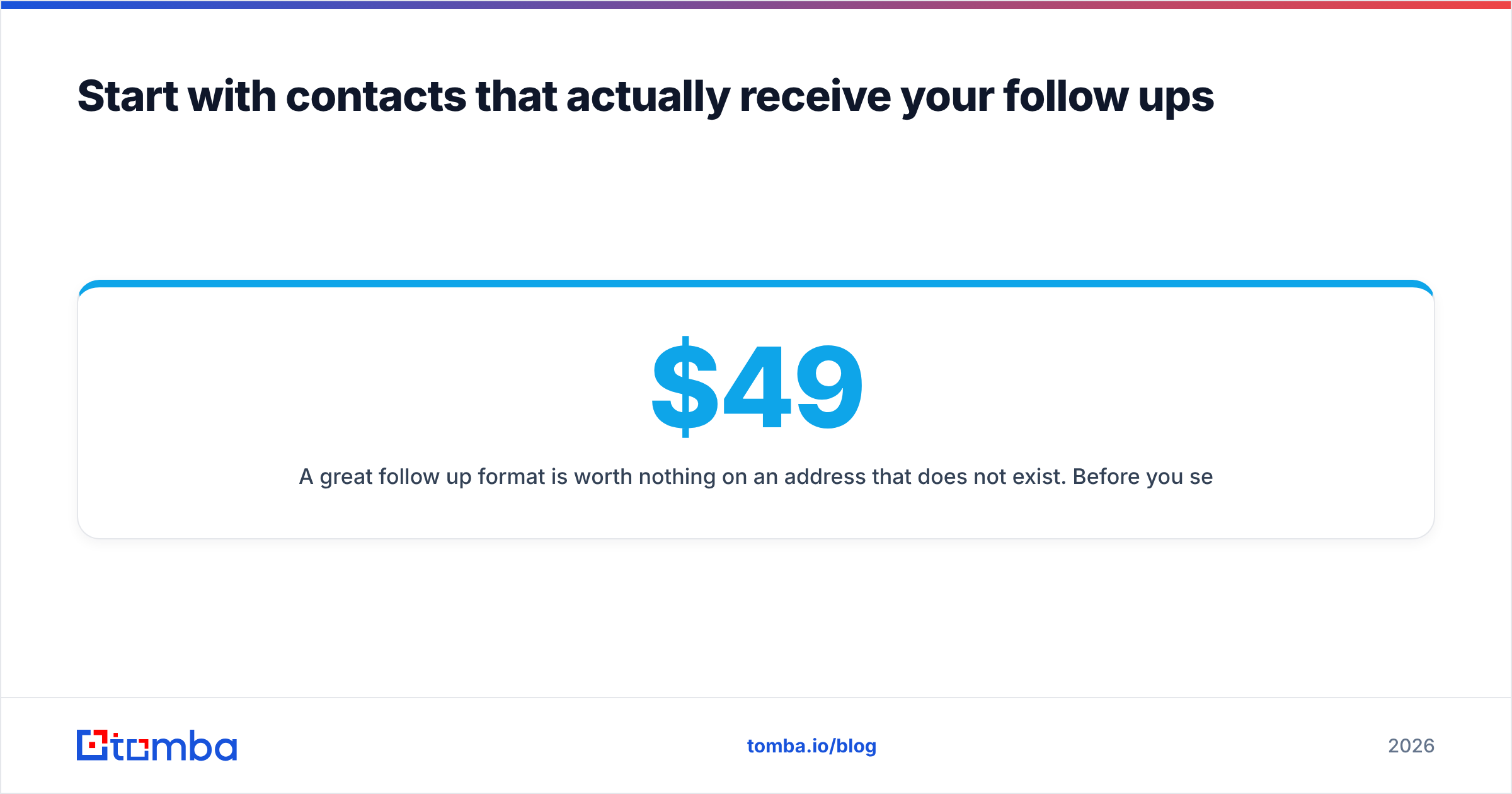
A great follow up format is worth nothing on an address that does not exist. Before you sequence anyone, use the Tomba Email Finder to pull verified work emails by name and domain, then run the list through verification so touches two through five land in a real inbox. The free tier covers 25 searches a month if you want to test the workflow on a small list first; paid plans start at $49/mo, with Growth at $99/mo and Pro at $249/mo — full Tomba pricing is on the site. Fix the data, then fix the format, and your follow ups start doing the job you wrote them for.
Related guides#
Ready to find emails that actually work?
Join 150,000+ professionals who stopped guessing and started sending. Free credits on signup — no credit card required.
Get the Tomba newsletter
Practical outbound tactics and product updates — once every two weeks.
About the author