Follow Up Inquiry Email: Templates and Timing That Work
Most inquiry follow-ups die because they say "just checking in" three days too early. Here are the timing windows, templates, and sequence structures that actually pull replies in 2026.
TL;DR
- A follow up inquiry email is a reply to someone who already raised their hand — an inbound form fill, a pricing question, a demo request, an RFQ, or a conference conversation. It is not cold email, and treating it like cold email is why most of them fail.
- Speed dominates everything else. Responding to an inbound inquiry within 5 minutes versus 30 minutes changes qualification odds by roughly an order of magnitude, according to the widely cited Lead Response Management research.
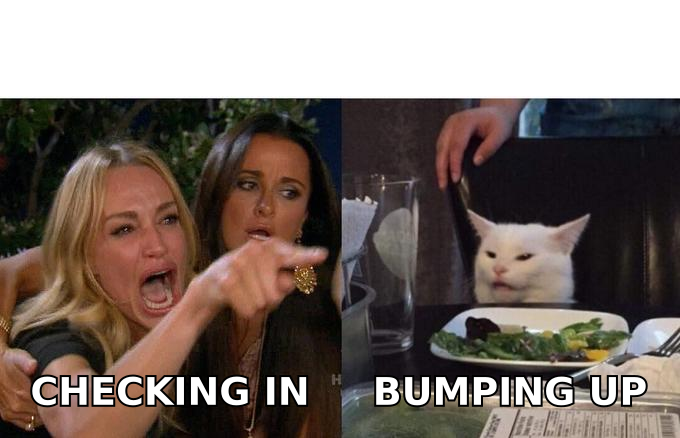
- The single worst opener in B2B is "just checking in." It carries no new information, so the recipient has no reason to act.
- Three to five follow-ups spread across 14 days out-perform both one-and-done and 10-touch grinds for inbound inquiries.
- Every follow-up needs one of four payloads: new information, a deadline, a decision-simplifier, or a graceful exit.
What Is a Follow Up Inquiry Email?#
A follow up inquiry email is the message you send after someone contacts you — or after you contacted them about a specific request — and the thread went quiet.
Think of it like a restaurant server checking a table. A bad server hovers and asks "everything okay?" every four minutes with nothing to add. A good server notices the water glass is empty, refills it, and mentions the special is running out. Same interruption, completely different reception. The difference is that the good server brings something to the table.
There are two directions this email travels, and they behave differently:
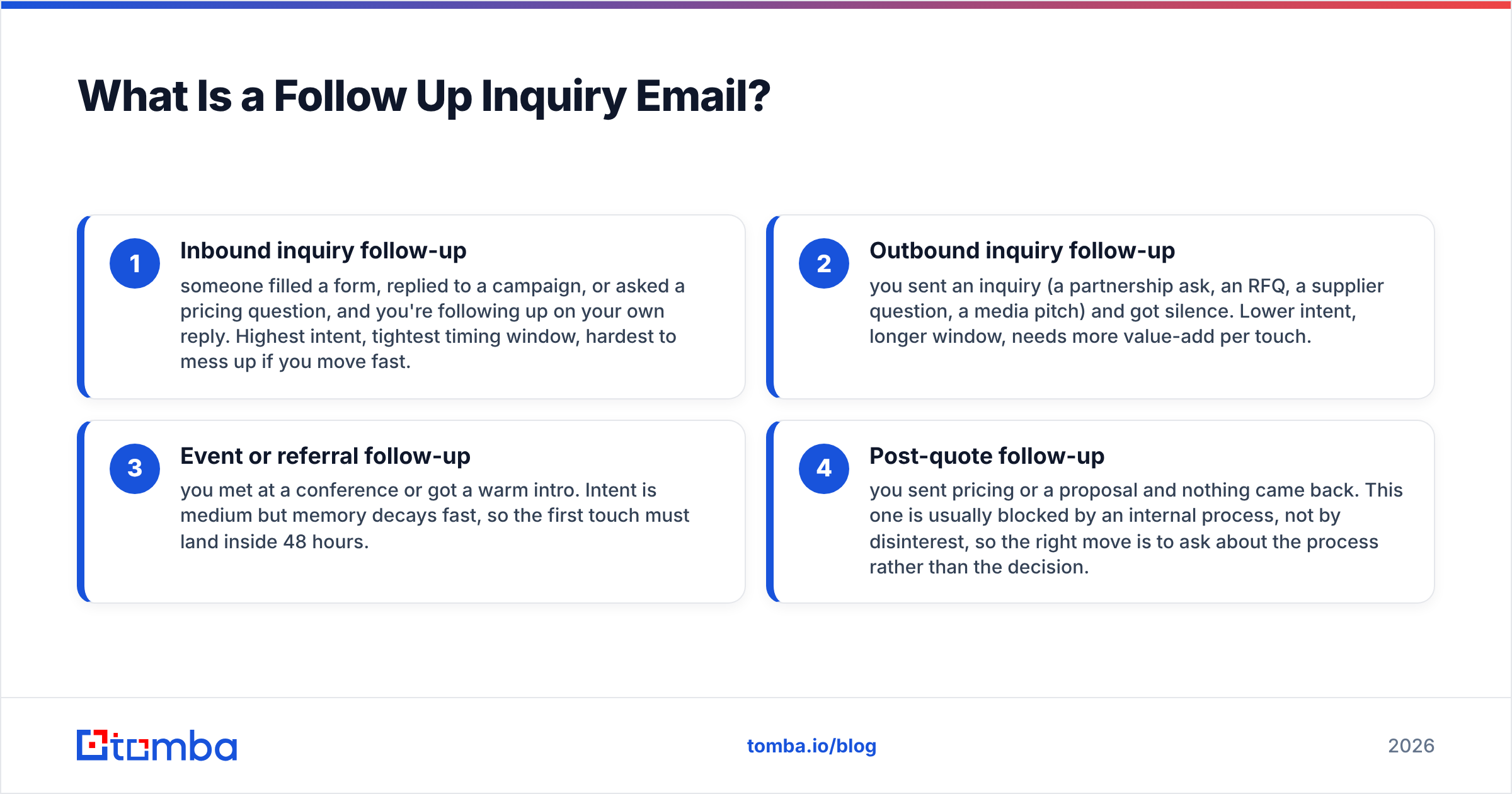
- Inbound inquiry follow-up — someone filled a form, replied to a campaign, or asked a pricing question, and you're following up on your own reply. Highest intent, tightest timing window, hardest to mess up if you move fast.
- Outbound inquiry follow-up — you sent an inquiry (a partnership ask, an RFQ, a supplier question, a media pitch) and got silence. Lower intent, longer window, needs more value-add per touch.
- Event or referral follow-up — you met at a conference or got a warm intro. Intent is medium but memory decays fast, so the first touch must land inside 48 hours.
- Post-quote follow-up — you sent pricing or a proposal and nothing came back. This one is usually blocked by an internal process, not by disinterest, so the right move is to ask about the process rather than the decision.
Each of these needs a different opening line, a different cadence, and a different exit. Lumping them into one "follow-up template" folder is the most common mistake in B2B sales orgs.
Why Do Most Follow Up Inquiry Emails Get Ignored?#
Because they contain zero new information. If your email can be summarized as "did you see my last email," you have asked the recipient to do work — re-read a thread, reconstruct context, form a decision — in exchange for nothing.
Here's the pattern that kills reply rates:
- No new payload. "Circling back" is not a payload. A case study, a price change, a competitor's move, a relevant news item, or a new integration is.
- Wrong timing. Sending 24 hours after a proposal that requires three internal stakeholders to review makes you look impatient. Sending 12 days after a hot inbound demo request makes you look absent.
- Buried ask. If your call to action is in the fourth paragraph, it does not exist. Mobile previews cut most emails at 90 characters.
- Wrong address. A significant slice of "no reply" is actually "no delivery." Role addresses, stale contacts, and typo'd form fills all fail silently.
- Too long. Follow-ups that run past 125 words consistently underperform shorter ones in most published benchmark data. The follow-up is a nudge, not a re-pitch.
That fourth point deserves more attention than it usually gets. When an inbound form fill bounces or lands on an address the person no longer uses, your CRM records it as an unresponsive lead and your rep burns four follow-ups into a void. Running inbound submissions through an email verifier before the sequence starts removes that entire failure class. For B2B forms where someone typed a personal address by mistake, a domain search against their company gives you the working corporate address instead.
What Is the Right Timing for a Follow Up Inquiry Email?#
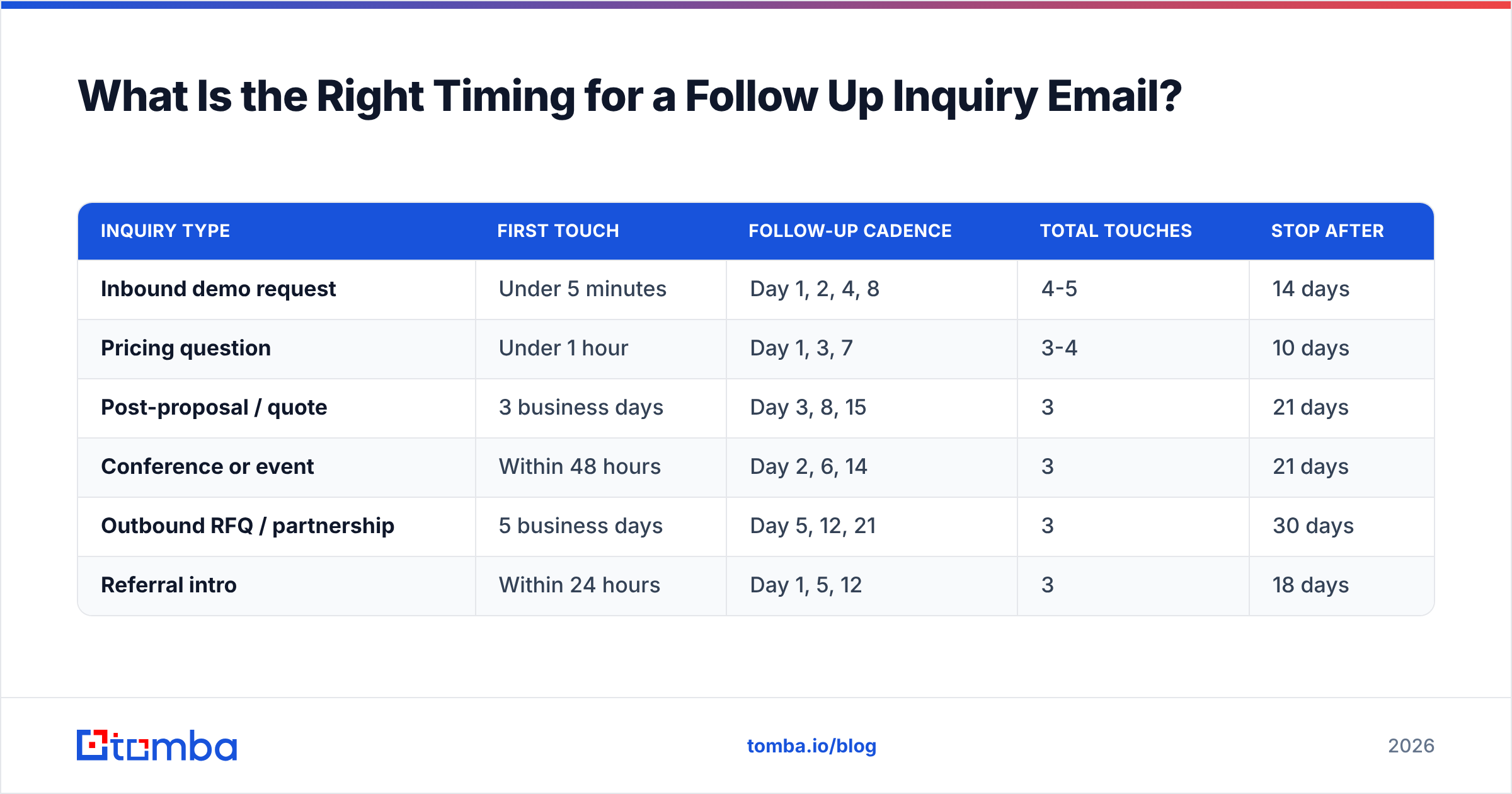
The window depends entirely on what triggered the thread. Here is the cadence structure that holds up across most B2B teams:
| Inquiry type | First touch | Follow-up cadence | Total touches | Stop after |
|---|---|---|---|---|
| Inbound demo request | Under 5 minutes | Day 1, 2, 4, 8 | 4-5 | 14 days |
| Pricing question | Under 1 hour | Day 1, 3, 7 | 3-4 | 10 days |
| Post-proposal / quote | 3 business days | Day 3, 8, 15 | 3 | 21 days |
| Conference or event | Within 48 hours | Day 2, 6, 14 | 3 | 21 days |
| Outbound RFQ / partnership | 5 business days | Day 5, 12, 21 | 3 | 30 days |
| Referral intro | Within 24 hours | Day 1, 5, 12 | 3 | 18 days |
Two rules govern the table. First, response speed on the initial touch matters more than anything you do afterwards — the Lead Response Management study that most inbound playbooks cite found contact odds drop sharply after the first five minutes and fall off a cliff after 30. Second, intervals should widen, never narrow. Day 1, 2, 4, 8 respects that the recipient is getting less interested over time; Day 1, 2, 3, 4 reads as escalating pressure.
For post-proposal follow-ups specifically, resist the three-day itch. Procurement cycles, legal review, and budget approvals move on weekly rhythms, not daily ones. Following up before the internal meeting has even happened produces a "still reviewing" non-answer that costs you a touch and gains you nothing.
What Should Each Follow-Up Actually Say?#
Every follow-up needs exactly one of four payloads. Pick one per email — stacking them dilutes the message.
1. New information. Something the recipient did not have when they went quiet.
Subject: One thing I left out about the API limits
Hi Dana — after we spoke I realized I gave you the wrong number on rate limits. It's 15,000 requests/minute on the plan you were looking at, not 5,000, which matters for the bulk import you described.
Does that change the math on your side?
2. A deadline or constraint. Real ones only. Fabricated urgency is detectable and it costs you the relationship.
Subject: Q3 onboarding slots
Hi Marcus — our implementation team has two slots left for a September start. Not trying to rush you, but if the November go-live date is firm, we'd need to book by the 12th. Should I hold one provisionally?
3. A decision simplifier. Reduce the number of choices to one binary.
Subject: Simplest next step
Hi Priya — rather than the full 45-minute walkthrough, would a 10-minute screen share on just the Salesforce sync be more useful? That seemed to be the open question.
Tuesday 2pm or Thursday 11am?
4. The graceful exit. The highest-reply-rate email in most sequences, and the most underused.
Subject: Closing the loop
Hi Sam — I haven't heard back, so I'm assuming this isn't a priority right now. Totally fine. I'll stop following up.
If the timing changes in Q4, reply to this thread and I'll pick it right back up.
That last one works because it removes the obligation. People reply to it at a rate that surprises reps every single time, and roughly a third of those replies are "no wait, don't close it."
What Are the Best Follow Up Inquiry Email Templates?#
Copy these, then rewrite them in your own voice. A template that sounds like a template is worse than no template.
Template 1 — Inbound form fill, first follow-up (send within minutes)
Subject: Re: your question about [product]
Hi [First name] — saw you asked about [specific thing from form]. Short answer: [direct answer in one sentence].
If it'd help to see it working on your data, I have 15 minutes open today at [time] or tomorrow at [time].
Template 2 — Second touch, no reply (Day 2)
Subject: Re: your question about [product]
[First name] — one thing I should have mentioned: [company similar to theirs] had the same [specific problem] and solved it with [approach]. Took them about [timeframe].
Worth 15 minutes?
Template 3 — Post-proposal, first follow-up (Day 3)
Subject: Anything blocking on the proposal?
Hi [First name] — checking whether the proposal made it through to [stakeholder] or if there's something in it that needs adjusting before it goes further.
Happy to reformat, split by department, or add a phased option if that helps it move.
Template 4 — Post-event, within 48 hours
Subject: The [specific thing] we talked about at [event]
[First name] — good talking at [event] booth. You mentioned [specific detail they said]. Here's the [resource / doc / benchmark] I promised: [link].
Still happy to walk through the [specific use case] side if useful.
Template 5 — The pattern interrupt (Day 8, when nothing else worked)
Subject: Wrong person?
Hi [First name] — I might be barking up the wrong tree here. Is [topic] actually owned by someone else on your team? Happy to redirect and stop cluttering your inbox.
Template 5 is doing double duty: it's an easy reply and it routes you to the real buyer. When it works, use a phone finder or LinkedIn to reach the person they name rather than waiting on a forward that may never happen.
How Do You Write Subject Lines That Get Opened?#
Keep the thread. For follow-ups on an existing conversation, replying in-thread with "Re:" preserved beats a fresh subject line most of the time, because the recipient recognizes the context.
When you do need a new subject, the rules are narrow:
- Under 45 characters. Mobile clients truncate past that.
- Lowercase-ish and specific. "quick question on the API limits" outperforms "Following Up On Our Conversation."
- No brackets, no emoji, no ALL CAPS. All three read as marketing blast.
- Never use "Following up," "Checking in," or "Touching base." These are the three most-used and most-ignored follow-up subjects in B2B.
If you want to test variants systematically, a subject line tester will catch spam-trigger phrases and length problems before you send. For a starting bank of angles, the cold email templates library covers both inbound and outbound structures.
How Does Follow-Up Compare Across Tool Categories?#
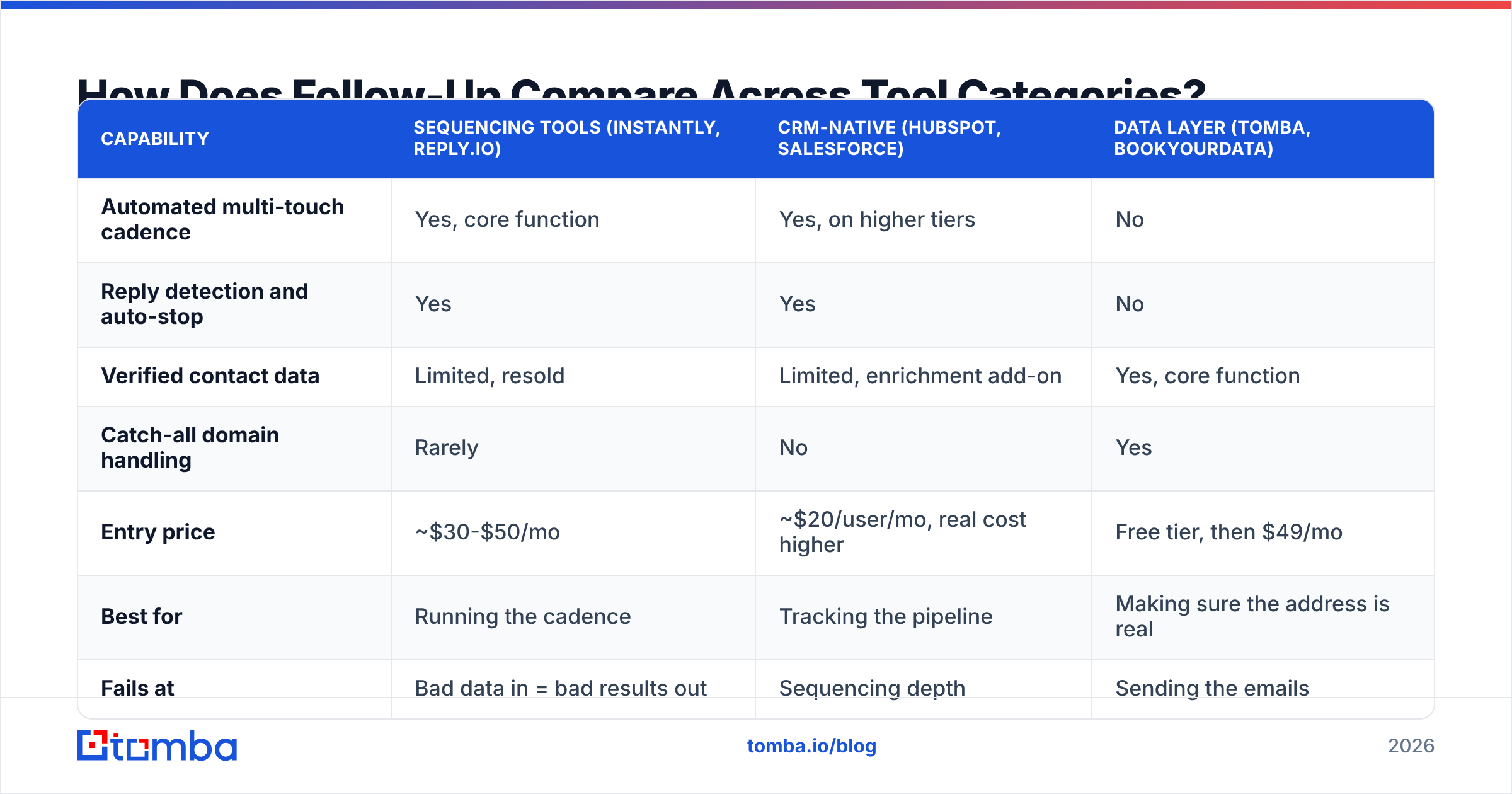
Most teams need three separate capabilities and try to buy them as one product. Here's how the categories actually split:
| Capability | Sequencing tools (Instantly, Reply.io) | CRM-native (HubSpot, Salesforce) | Data layer (Tomba, BookYourData) |
|---|---|---|---|
| Automated multi-touch cadence | Yes, core function | Yes, on higher tiers | No |
| Reply detection and auto-stop | Yes | Yes | No |
| Verified contact data | Limited, resold | Limited, enrichment add-on | Yes, core function |
| Catch-all domain handling | Rarely | No | Yes |
| Entry price | ~$30-$50/mo | ~$20/user/mo, real cost higher | Free tier, then $49/mo |
| Best for | Running the cadence | Tracking the pipeline | Making sure the address is real |
| Fails at | Bad data in = bad results out | Sequencing depth | Sending the emails |
The honest read: these are complements, not substitutes. A sequencing tool with a 20% bad-address rate will report a terrible reply rate and you'll blame the copy. Fix the data layer first, then the timing, then the copy — in that order, because each one caps the ceiling of the next.
BookYourData is a solid option if you want to buy a pre-built list with a bounce guarantee attached. Tomba fits better when you're verifying and enriching contacts you already have — inbound form fills, event scans, CRM records that have gone stale — rather than buying net-new. Both approaches are legitimate; they solve different halves of the problem.
How Many Follow-Ups Are Too Many?#
Three to five for inbound inquiries. Three for post-proposal. Stop there.
The argument for 8-12 touch sequences comes from cold outbound, where you're trying to catch someone at a moment of need they hadn't articulated. An inquiry follow-up is the opposite situation — the need was already articulated. If five well-spaced, information-carrying emails across two weeks produce nothing, the answer is no, or the timing is wrong, or you're talking to the wrong person.
There's also a cost you don't see on the dashboard. Every ignored follow-up is a small negative engagement signal, and mailbox providers weight those. Sustained low engagement degrades sender reputation, which pushes your future emails — including the ones to people who would have replied — toward the promotions tab or the spam folder. Grinding out touch #9 on a dead lead is borrowing deliverability from your next campaign.
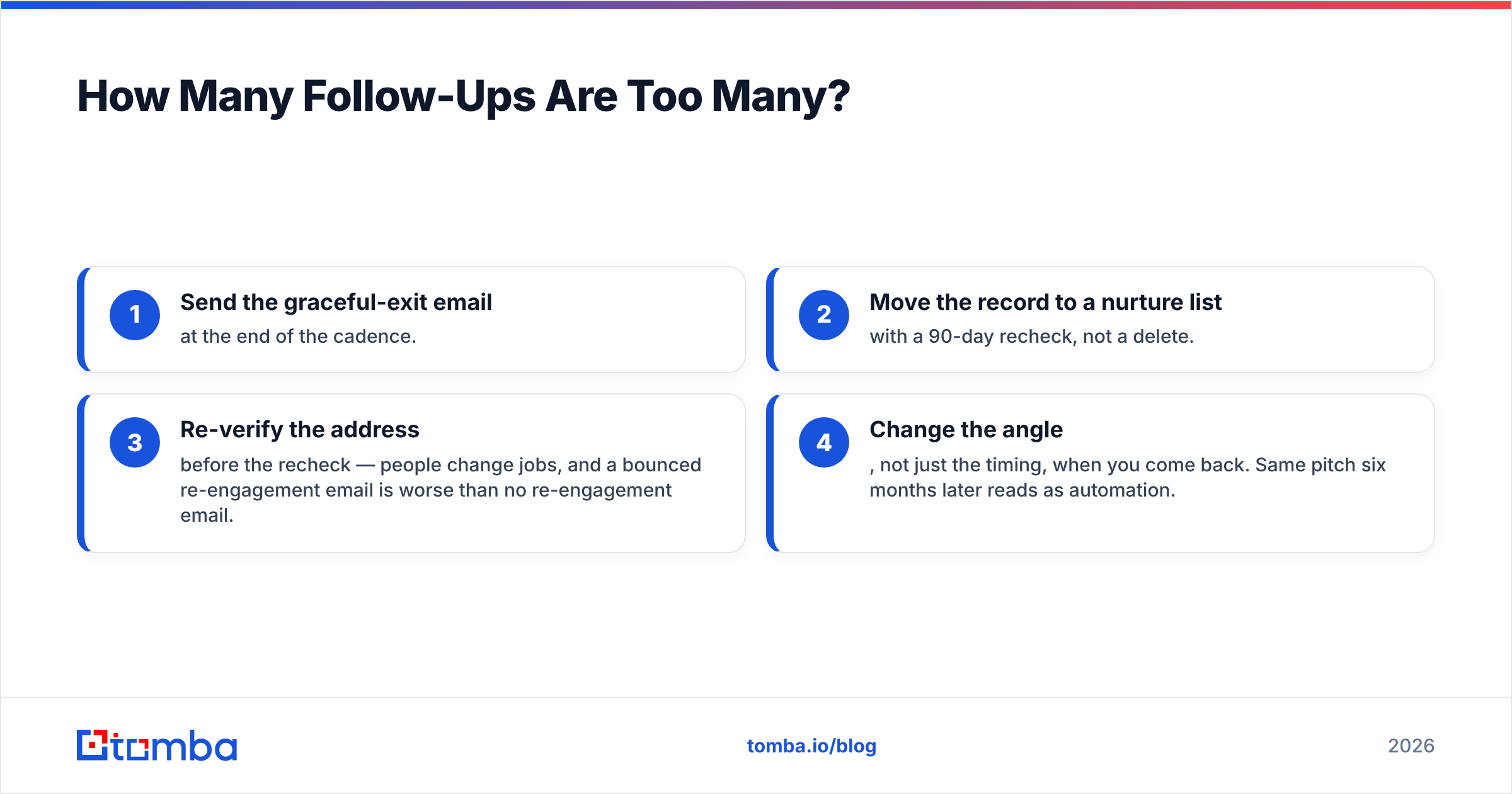
A cleaner exit protocol:
- Send the graceful-exit email at the end of the cadence.
- Move the record to a nurture list with a 90-day recheck, not a delete.
- Re-verify the address before the recheck — people change jobs, and a bounced re-engagement email is worse than no re-engagement email.
- Change the angle, not just the timing, when you come back. Same pitch six months later reads as automation.
What Should You Measure?#
Four numbers, tracked per sequence rather than per email:
- Time to first response. Median, not average — averages hide the one lead you answered in four days.
- Reply rate by touch number. If touch 4 outperforms touch 2, your early emails are too weak or too fast.
- Positive reply rate, separated from total replies. "Not interested" is a reply and it should not flatter your dashboard.
- Bounce and unknown-user rate. Anything above 3% means your data hygiene, not your copy, is the bottleneck.
Track the response rate split by inquiry source too. Inbound demo requests and gated-content downloads behave nothing alike, and averaging them together produces a number that tells you nothing actionable. If you want an external benchmark to compare against, G2's sales engagement category and HubSpot's sales statistics roundup both publish reference ranges worth checking your numbers against.
Frequently Asked Questions#
How long should a follow up inquiry email be? Under 100 words for touches 2 through 5. The first response can be longer if it's answering a substantive question, but every subsequent email should be readable in one mobile screen without scrolling.
Should I follow up on the same thread or start a new one? Same thread for the first three touches. Start a new thread only when you have a genuinely new angle, and reference the old conversation in the first line so it doesn't read as a cold email.
What time of day works best? Tuesday through Thursday, 7-9am or 1-2pm in the recipient's timezone, based on most published benchmark data. But timezone accuracy matters more than the specific hour — an 8am email that lands at 3am reads as automated.
Is it okay to follow up after a "no"? Not on the same offer. Wait 90 days minimum, and come back with a different angle — a new product capability, a changed circumstance on their side, a relevant benchmark. Re-pitching a rejected offer is the fastest way to get blocked.
What if the contact left the company? Auto-replies with "no longer with the company" are gifts. They tell you exactly when to re-enrich. Run the domain through a domain search to find the replacement, and reference the departed contact by name in your opener — it converts a cold email into a warm one.
Fix the Data Layer Before You Fix the Copy#
You can write the best follow up inquiry email in your industry and still get silence if the address is wrong, stale, or a catch-all that swallows mail without bouncing. That failure looks identical to disinterest in every CRM dashboard, which is why so many teams rewrite copy that was never the problem.
Start by verifying what you already have. Tomba's Email Finder finds and confirms professional addresses by name and domain, with a free tier at 25 searches a month and paid plans starting at $49/mo — check the current Tomba pricing for the tier that matches your volume. Run your inbound form fills and event lists through it before the sequence starts, and you'll know that a non-reply is actually a non-reply.
Related guides#
Ready to find emails that actually work?
Join 150,000+ professionals who stopped guessing and started sending. Free credits on signup — no credit card required.
Get the Tomba newsletter
Practical outbound tactics and product updates — once every two weeks.
About the author