Follow Up Invitation Email: Templates, Timing, and RSVP Fixes
Most event invites die in silence, not rejection. Here is how to structure a follow up invitation email sequence that recovers RSVPs without nagging: send windows, templates, and the deliverability checks that decide whether anyone sees it.
TL;DR
- Most invitations are not rejected, they are missed. A follow up invitation email exists to fix attention, not to re-argue the case for attending.
- Three touches beat seven. The pattern that works is: nudge at 72 hours, value-add at day 7, last-call 24–48 hours before the event.
- Every follow-up needs a new reason to exist — a speaker reveal, a seat count, an agenda drop. Repeating "just following up" trains people to ignore you.
- Bounced invites are silent RSVP killers. Verify addresses before the first send, not after the reminder sequence has already burned your sender reputation.
- Webinars, sales meetings, conferences, and internal all-hands each need different cadences. One template does not stretch across all four.
What is a follow up invitation email?#
A follow up invitation email is a second (or third) message sent to someone who received an invite and did not respond. It is not a resend. It is a different message with a different job: the original invitation sells the event, the follow-up removes friction from replying.
That distinction matters more than any subject-line trick. When people forward you their "follow-up" copy, it is usually the original email with "Just checking in!" pasted on top. That gets ignored because the recipient already made a decision — they decided not to decide. Your follow-up has to change the decision environment: add scarcity, add specificity, add a one-click reply path, or shrink the ask.
Typical scenarios where follow-ups carry the RSVP load:
- Webinar and virtual event registrations — high volume, low commitment, 30–50% of eventual registrations come after the first email in most B2B programs.
- Sales meeting requests — one recipient, high stakes, follow-up quality determines whether the deal starts at all.
- Conference and dinner invites — limited seats, so scarcity is real and usable.
- Partner or speaker invitations — long consideration cycles, follow-ups need to add new information, not pressure.
- Internal events — the audience is captive but distracted, so calendar mechanics matter more than copy.
Why do invitation emails need a follow-up at all?#
Because inbox behavior is triage, not evaluation. A typical B2B professional processes email in bursts, and anything that requires a calendar check gets deferred. Deferred means forgotten.
Three structural reasons follow-ups recover meaningful volume:
- Timing roulette. Your first send landed while they were in a meeting. A second send at a different hour on a different day gets a genuinely different reader.
- Commitment lag. People will not block a Thursday afternoon three weeks out. They will block it four days out. Your original invite arrived before the decision was possible.
- Deliverability variance. Some first sends never render in the primary tab. If your list has stale addresses, your sending reputation drops and even valid recipients see less of you.
That last one is where most invitation programs quietly bleed. If 12% of your invite list bounces, mailbox providers read that as list hygiene failure, and the follow-ups you send to good addresses get filtered harder than the original. Running the list through an email verifier before the first invite is cheaper than any copy optimization you could run afterward. HubSpot's marketing research has consistently shown list quality outranking creative variables on engagement outcomes, and event invites are the most bounce-sensitive campaign type because the lists are often scraped or years old.
When should you send each follow up invitation email?#
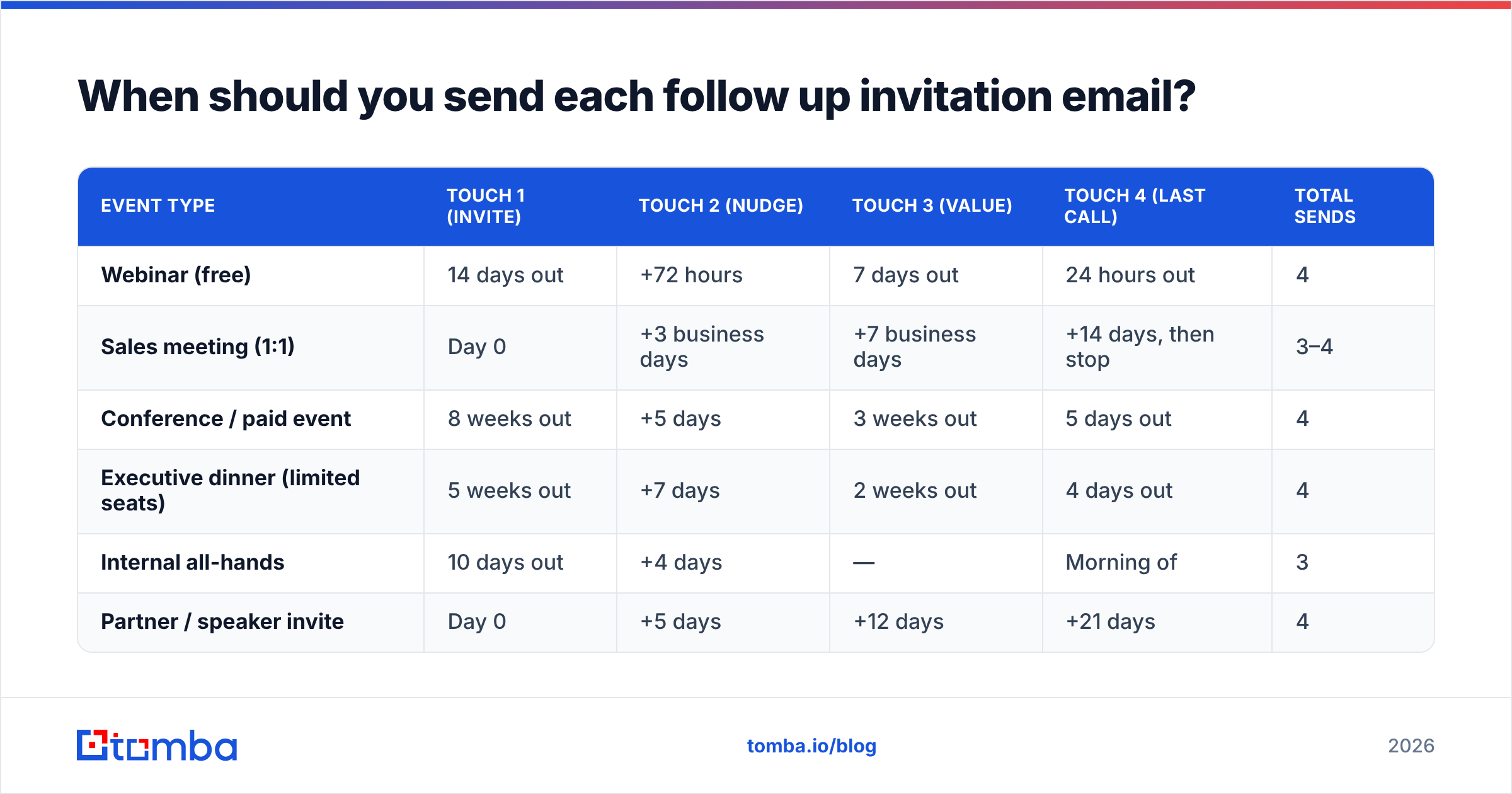
Cadence is the highest-leverage variable, and it changes by event type. Here is the timing model that holds up across most B2B programs.
| Event type | Touch 1 (invite) | Touch 2 (nudge) | Touch 3 (value) | Touch 4 (last call) | Total sends |
|---|---|---|---|---|---|
| Webinar (free) | 14 days out | +72 hours | 7 days out | 24 hours out | 4 |
| Sales meeting (1:1) | Day 0 | +3 business days | +7 business days | +14 days, then stop | 3–4 |
| Conference / paid event | 8 weeks out | +5 days | 3 weeks out | 5 days out | 4 |
| Executive dinner (limited seats) | 5 weeks out | +7 days | 2 weeks out | 4 days out | 4 |
| Internal all-hands | 10 days out | +4 days | — | Morning of | 3 |
| Partner / speaker invite | Day 0 | +5 days | +12 days | +21 days | 4 |
Two rules survive every variation. First, the gap between touches should shrink as the event approaches — early reminders can be spaced a week apart, the final ones cannot. Second, the last-call email should land inside the window where the recipient can actually see their calendar for that day. For a Tuesday 2pm webinar, that is Monday morning, not Friday afternoon.
What should a follow up invitation email actually say?#
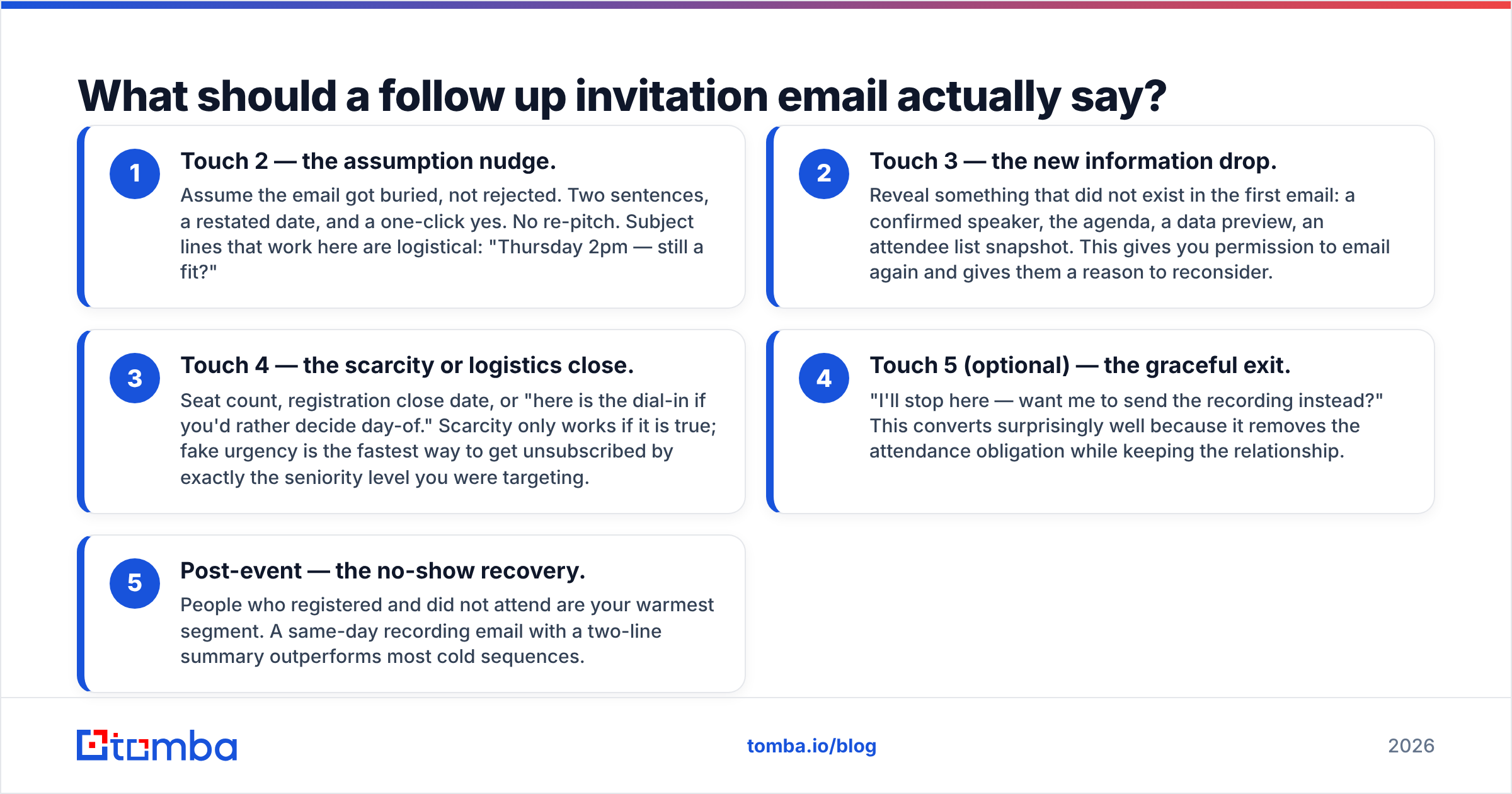
Each follow-up needs a distinct payload. Use this structure and you will never write "just circling back" again.
- Touch 2 — the assumption nudge. Assume the email got buried, not rejected. Two sentences, a restated date, and a one-click yes. No re-pitch. Subject lines that work here are logistical: "Thursday 2pm — still a fit?"
- Touch 3 — the new information drop. Reveal something that did not exist in the first email: a confirmed speaker, the agenda, a data preview, an attendee list snapshot. This gives you permission to email again and gives them a reason to reconsider.
- Touch 4 — the scarcity or logistics close. Seat count, registration close date, or "here is the dial-in if you'd rather decide day-of." Scarcity only works if it is true; fake urgency is the fastest way to get unsubscribed by exactly the seniority level you were targeting.
- Touch 5 (optional) — the graceful exit. "I'll stop here — want me to send the recording instead?" This converts surprisingly well because it removes the attendance obligation while keeping the relationship.
- Post-event — the no-show recovery. People who registered and did not attend are your warmest segment. A same-day recording email with a two-line summary outperforms most cold sequences.
The copy discipline underneath all five: one ask per email, one link, and a subject line under 45 characters. If you are testing variants, a subject line generator plus a manual read-aloud pass will catch the ones that sound like automation.
What do the templates look like?#
Touch 2 — assumption nudge (webinar)
Subject: Thursday 2pm — saving you a seat?
Hi {{first_name}},
Sent you an invite to our session on {{topic}} last week — guessing it landed mid-meeting.
It's Thursday at 2pm ET, 35 minutes, and {{speaker}} is walking through {{specific_thing}}.
Want me to hold a spot? One click: {{link}}
— {{sender}}
Touch 3 — new information (sales meeting)
Subject: Added the {{competitor}} benchmark to the deck
Hi {{first_name}},
Since I last wrote, we pulled the {{industry}} benchmark data you'd care about — {{metric}} across {{n}} companies your size.
Happy to walk you through it in 20 minutes. Tuesday or Wednesday morning work?
If it's not a priority this quarter, tell me and I'll send the summary instead.
Touch 4 — scarcity close (executive dinner)
Subject: 4 seats left — {{city}} dinner, {{date}}
Hi {{first_name}},
We're at 16 of 20 confirmed for the {{city}} dinner on {{date}}. Attendees so far include {{company_a}}, {{company_b}}, and {{company_c}}.
I'd like to keep one of the remaining seats for you through Friday. Yes or no is fine either way.
Touch 5 — graceful exit (any event)
Subject: Closing the loop on {{event}}
Hi {{first_name}},
Last note on this — I'll assume the timing doesn't work.
If you'd still like the recording and the slides, reply "send it" and I'll queue them up after the session.
Notice what is missing: no "I hope this email finds you well," no restating the entire value proposition, no three-paragraph recap. If you need a starting library rather than writing from scratch, the email templates collection covers adjacent formats you can adapt.
How many follow-ups is too many?#
Four to five touches for external invites, three for internal. Past that, response rates flatten while unsubscribe and spam-complaint rates keep climbing — and complaints are permanent damage in a way that a missed RSVP is not.
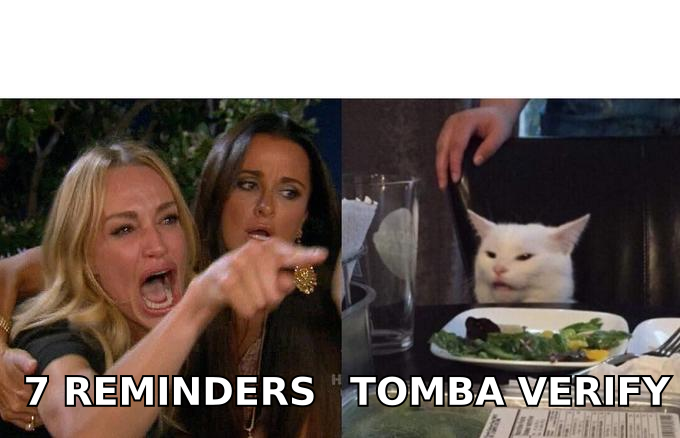
The trap teams fall into is treating volume as effort. Seven reminders to a list that was never verified produces bounces, complaints, and a domain that struggles to reach anyone next quarter. Three well-timed sends to a clean list beat it every time.
Does deliverability decide whether the follow-up even lands?#
Yes, and it decides it before the copy matters. Event invite lists are unusually dirty — they come from registration forms with typos, old CRM exports, badge scans, and partner lists that were assembled two years ago. That combination produces exactly the bounce pattern that mailbox filters punish.
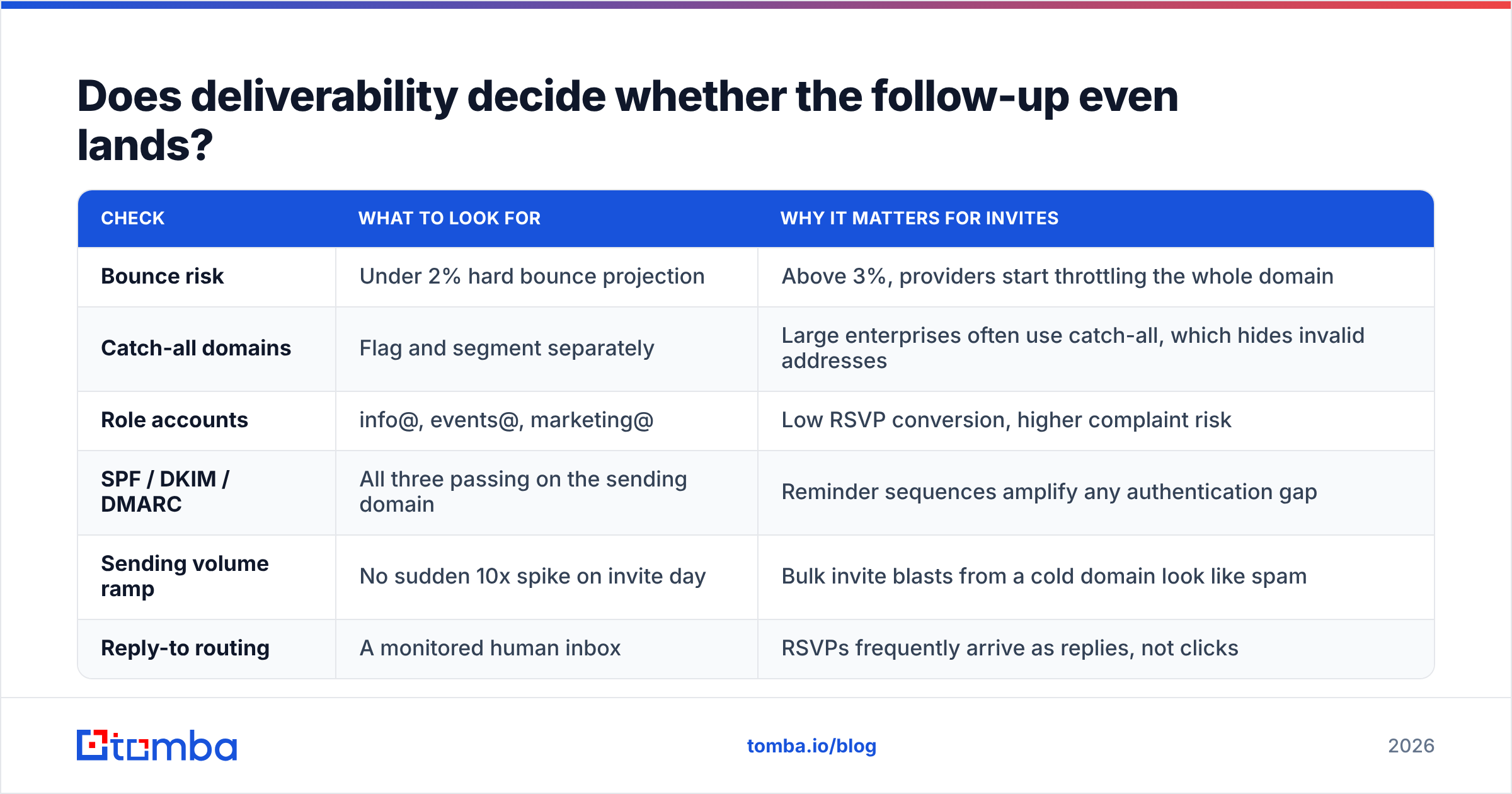
A pre-send checklist that takes under an hour:
| Check | What to look for | Why it matters for invites |
|---|---|---|
| Bounce risk | Under 2% hard bounce projection | Above 3%, providers start throttling the whole domain |
| Catch-all domains | Flag and segment separately | Large enterprises often use catch-all, which hides invalid addresses |
| Role accounts | info@, events@, marketing@ | Low RSVP conversion, higher complaint risk |
| SPF / DKIM / DMARC | All three passing on the sending domain | Reminder sequences amplify any authentication gap |
| Sending volume ramp | No sudden 10x spike on invite day | Bulk invite blasts from a cold domain look like spam |
| Reply-to routing | A monitored human inbox | RSVPs frequently arrive as replies, not clicks |
Two of those deserve extra attention for invite programs. Catch-all domains are common at the enterprises you most want in the room, and a naive verifier marks them "unknown" and you either drop good contacts or keep bad ones. A dedicated catch-all verifier resolves more of that grey zone. And authentication — Google's bulk sender requirements now enforce SPF, DKIM, and DMARC alignment for anyone sending meaningful volume to Gmail addresses, which most event lists do.
If your invite list is being built rather than exported — say you are inviting 300 target-account executives to a regional dinner — the sequence matters: find the contacts, verify them, then write. A domain search across your target account list gives you the named contacts and patterns per company, and verification runs before anything enters the sequencing tool.
Which mistakes kill RSVP rates most reliably?#
- Resending the identical email. Recipients recognize it instantly and it reads as automation failure. Change the subject, the angle, and the length every time.
- Burying the date and time. The single most common fix in invite audits: put "Thursday, March 12, 2pm ET, 35 minutes" on its own line, above the fold, in every touch.
- Asking for a calendar decision with no calendar link. If they have to open another tab, you have lost half of them.
- Sending from a no-reply address. Kills the highest-intent response path and signals bulk mail to filters.
- Ignoring the timezone. "2pm" without a zone is a guaranteed no-show generator for distributed audiences.
- Treating registrants and non-responders identically. Nothing erodes credibility faster than reminding someone to register for an event they already registered for.
- Following up on a list you never cleaned. Every bounce in touch 2 makes touch 3 land worse for everyone else on the list.
How do you measure whether follow-ups are working?#
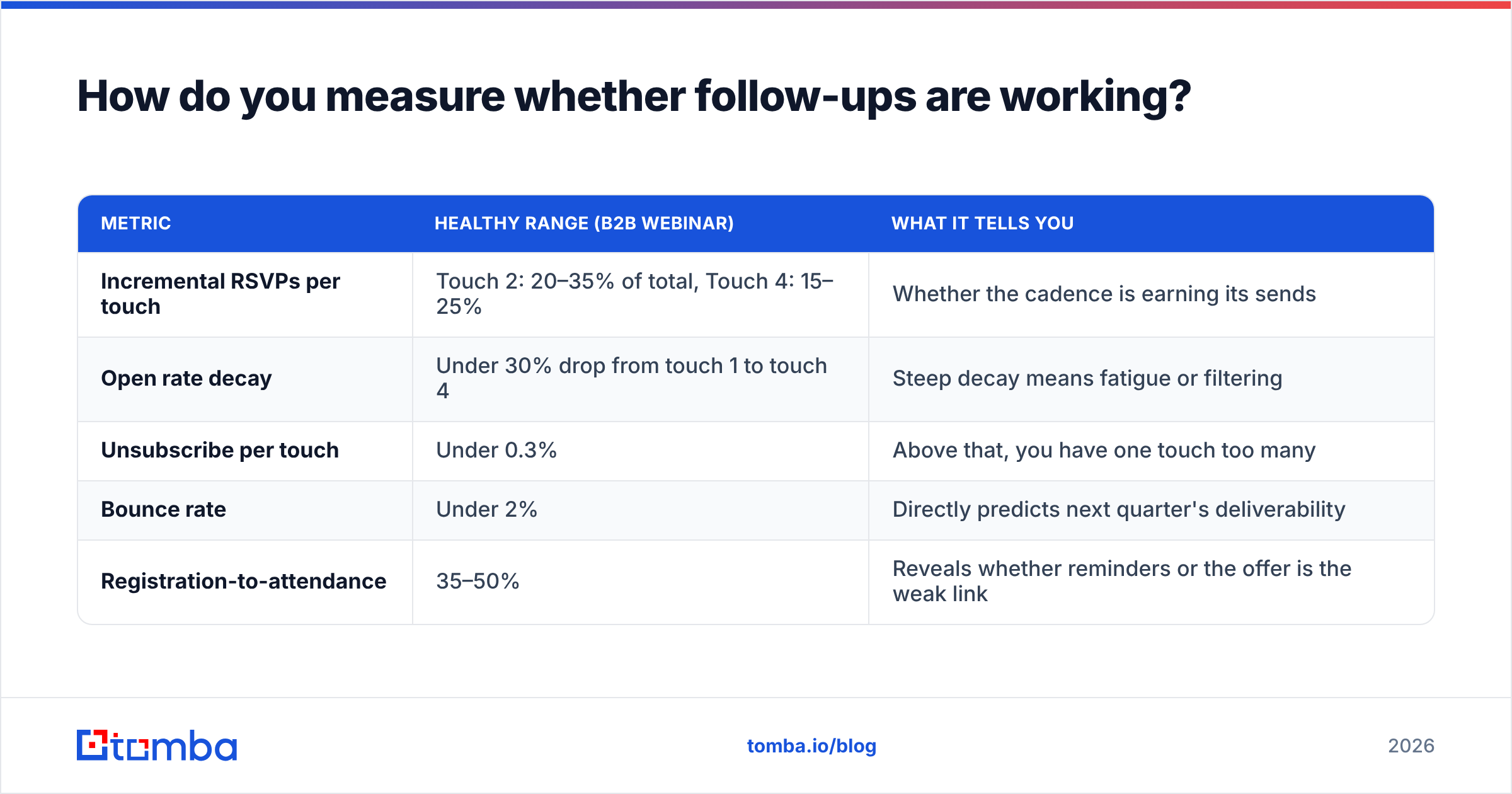
Track four numbers per touch, not just aggregate registrations:
| Metric | Healthy range (B2B webinar) | What it tells you |
|---|---|---|
| Incremental RSVPs per touch | Touch 2: 20–35% of total, Touch 4: 15–25% | Whether the cadence is earning its sends |
| Open rate decay | Under 30% drop from touch 1 to touch 4 | Steep decay means fatigue or filtering |
| Unsubscribe per touch | Under 0.3% | Above that, you have one touch too many |
| Bounce rate | Under 2% | Directly predicts next quarter's deliverability |
| Registration-to-attendance | 35–50% | Reveals whether reminders or the offer is the weak link |
If touch 4 produces almost nothing while touch 2 produces most of your volume, the fix is usually timing, not copy — the last call is landing too far from the event. If every touch produces flat, low numbers, the problem is upstream: either the list is wrong or the event premise is not compelling enough to survive a follow-up.
Vendors like Eventbrite publish similar benchmarks for consumer events, but B2B numbers run lower on registration-to-attendance and higher on incremental follow-up contribution. Use your own baseline after two events rather than optimizing against someone else's median.
Where should you start?#
Start with the list, then the cadence, then the copy — in that order. A three-touch sequence to 400 verified, correctly-targeted contacts will fill more seats than a seven-touch sequence to 2,000 unverified ones, and it will not cost you your sending domain in the process.
If you are building an invite list from target accounts rather than exporting one, the Tomba Email Finder gets you named contacts by domain, role, or company with verification built into the same workflow — so the addresses in your sequence are the ones that will actually receive touch 2. The free tier covers 25 searches a month if you want to test the flow on a single event, and paid plans start at $49/mo; the full breakdown lives on Tomba pricing. Build the list clean once, and every follow-up after it gets easier.
Related guides#
Ready to find emails that actually work?
Join 150,000+ professionals who stopped guessing and started sending. Free credits on signup — no credit card required.
Get the Tomba newsletter
Practical outbound tactics and product updates — once every two weeks.
About the author