Follow Up Meeting Request Email: Templates That Get Replies
Most meeting requests die in the follow-up. Here are the timing rules, the 9 templates, and the sequence structure that actually books calls in 2026 — plus what to do when nobody answers.
TL;DR
- Roughly half of booked meetings come from message two through four, not the first send. If you stop after one email, you are leaving most of your calendar empty.
- The single biggest failure is the "just following up" bump: it adds zero new information and gives the recipient nothing to react to.
- Wait 2–3 business days after the initial request, then 4–5, then 7. Six to eight touches over three weeks is the realistic ceiling before you damage the relationship.
- Every follow-up needs one new asset — a data point, a customer story, a shorter ask, or a specific time — plus one clear next step.
- Bad addresses and unverified contacts sink follow-up sequences faster than bad copy. Fix the data layer before you rewrite the subject line.
What Is a Follow Up Meeting Request Email?#
A follow up meeting request email is any message you send after an initial ask for someone's time went unanswered, was deferred, or ended without a scheduled next step. It exists because the first request almost never lands at the right moment.
Think of it like knocking on a neighbor's door. The first knock might come while they're on a call, in the shower, or out. That does not mean they don't want to talk to you. It means the timing was wrong. A follow-up is a second knock — at a different hour, with something in your hand this time.
There are four distinct situations people lump together under the same label, and they need different copy:
- Cold follow-up — no prior relationship, the first meeting request got no reply. Requires the most new value per message.
- Warm follow-up — they engaged somewhere (downloaded something, replied to a newsletter, met you at an event) but never booked. Reference the trigger explicitly.
- Post-meeting follow-up — you already met and need the next session. Recap decisions, then propose the next step.
- No-show follow-up — they booked and didn't attend. Assume good faith, keep it two sentences, re-offer times.
If you write all four the same way, three of them underperform.
Why Do Most Follow Up Meeting Requests Fail?#
They fail for reasons that have almost nothing to do with wording.
The message has no new information. "Just bumping this to the top of your inbox" asks the recipient to do work — reread your old email, decide, and reply — while giving them nothing new to decide with. Every follow-up should be readable on its own.
The ask is too large. A 30-minute call with a stranger is a big commitment. A five-minute question, a two-line reply, or a yes/no is not. Shrinking the ask across the sequence is the highest-leverage change most people never make.
The timing is mechanical. Sending at the same hour on the same weekday every time signals automation. Vary the send window, and stop sending into Friday afternoons.
The address was never valid. This is the silent killer. If 18% of your list bounces, your sender reputation drops, your inbox placement drops, and even your good addresses stop seeing your follow-ups. You will blame the copy. It was the data.
There is no exit. Sequences with no defined end become nagging. Define the breakup message before you send message one.
How Long Should You Wait Between Follow-Ups?#
The honest answer: longer than you want to, shorter than you fear.
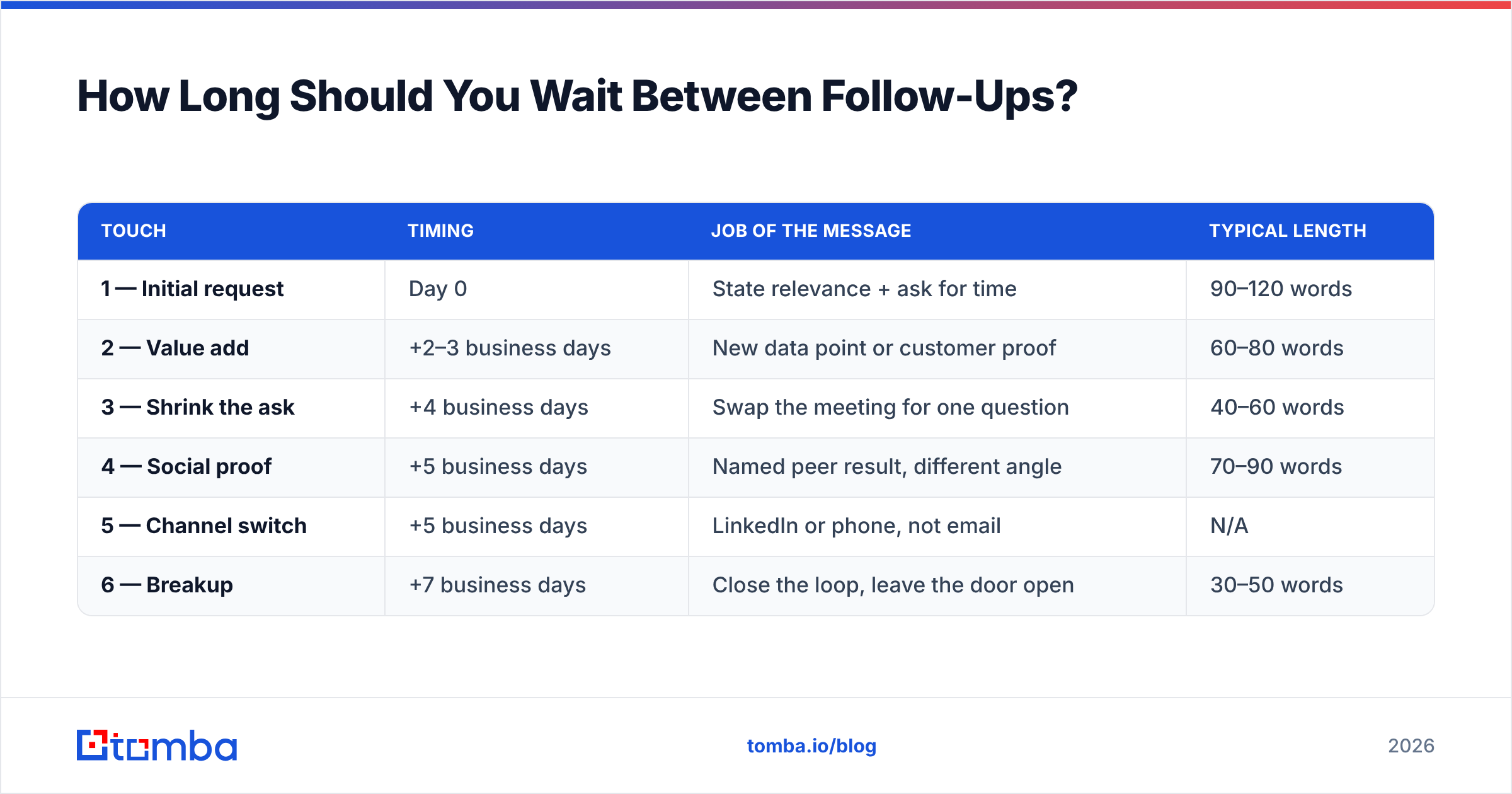
Here is a cadence that works across most B2B segments, with the job each message has to do:
| Touch | Timing | Job of the message | Typical length |
|---|---|---|---|
| 1 — Initial request | Day 0 | State relevance + ask for time | 90–120 words |
| 2 — Value add | +2–3 business days | New data point or customer proof | 60–80 words |
| 3 — Shrink the ask | +4 business days | Swap the meeting for one question | 40–60 words |
| 4 — Social proof | +5 business days | Named peer result, different angle | 70–90 words |
| 5 — Channel switch | +5 business days | LinkedIn or phone, not email | N/A |
| 6 — Breakup | +7 business days | Close the loop, leave the door open | 30–50 words |
Two structural rules matter more than the exact days.
Rule one: gaps widen, messages shorten. Early follow-ups can be close together because your first email is still recent context. Later ones need space, and by touch four your recipient should be able to read the whole thing in the preview pane.
Rule two: three weeks is the sequence, not three days. Compressing six touches into eight days reads as pressure. Stretching them past six weeks means they've forgotten you entirely and you're effectively cold again.
Which Follow Up Meeting Request Email Templates Actually Work?#
Nine templates, mapped to the situations above. Replace the brackets — do not send these raw.
1. The value-add bump (touch 2, cold)
Subject: One number on [their metric]
[Name] — after I wrote you Tuesday, our team pulled Q2 numbers for [their industry]. Companies at your headcount are seeing [specific figure] on [specific metric], mostly from [specific cause].
I don't know whether that's your situation. If it is, 15 minutes on Thursday or Friday would tell us both. If it isn't, say so and I'll stop.
2. The shrunken ask (touch 3, cold)
Subject: Skip the call — just this
Rather than book time, one question: are you handling [specific process] in-house or through [vendor category] right now?
One word is a complete answer.
3. The peer proof (touch 4, cold)
Subject: How [Peer Company] handled [problem]
[Peer Company] ran the same setup you do and cut [metric] by [figure] in [timeframe]. The change was smaller than you'd expect — [one sentence of mechanism].
Worth 15 minutes? Tuesday 10am or Wednesday 2pm both work here.
4. The breakup (touch 6, cold)
Subject: Closing the loop
I've reached out a few times about [topic] and haven't heard back — which usually means it isn't a priority right now. Completely fair.
I'll stop here. If [problem] moves up your list in Q4, reply to this and I'll pick it back up.
5. The warm-trigger follow-up
Subject: Re: [thing they engaged with]
You downloaded [asset] last week. The part most people ask about afterward is [specific section] — usually because [common situation].
Happy to walk through how that applies to [Company] specifically. 15 minutes this week?
6. The post-meeting recap
Subject: Recap + next step from [day]
Good conversation today. What I heard:
- [Decision or constraint one]
- [Decision or constraint two]
- You'll check with [stakeholder] on [item]
Next step on my side: [specific deliverable] by [date]. Proposing we reconvene [date] at [time] — does that hold?
7. The stalled-deal revive
Subject: Still worth solving?
We talked in [month] about [problem] and things went quiet — normally that means priorities shifted or budget moved.
Two questions: is [problem] still on the list, and is [date range] a better window than now? Either answer helps me stop guessing.
8. The no-show
Subject: Missed you — reschedule?
Looks like [time] got away from both of us. No problem.
Here are two windows that are open on my side: [option A] and [option B]. Or grab anything that works: [scheduling link].
9. The internal / champion follow-up
Subject: Anything you need from me for [stakeholder]?
You mentioned [stakeholder] needs to sign off. I've put together [one-page summary / pricing breakdown / security doc] so you're not building it yourself.
Want me to send it, or would a short joint call be faster?
What Makes a Follow-Up Subject Line Get Opened?#
Subject lines on follow-ups behave differently from cold opens. The recipient has already seen your name, so novelty matters less than specificity.
- Keep "Re:" only when there genuinely is a thread. Faking a reply chain is a trust cost you pay later.
- Lead with their world, not yours. "One number on onboarding drop-off" beats "Following up on my last email."
- Four to seven words. Mobile preview truncates around 35 characters.
- Skip the question mark on touch two. You already asked a question. Statements read as less needy.
- Never use "quick" as a softener. "Quick call?" is the single most-ignored phrase in B2B email — recipients have learned it means 30 minutes.
If you want to pressure-test variants before sending, run them through a subject line tester rather than guessing.
How Do Deliverability and Data Quality Affect Follow-Ups?#
More than copy does. Here's the mechanism, plainly.
Every follow-up you send to a dead address is a bounce. Mailbox providers read bounce rate as a signal of list hygiene. Cross roughly 2% and your inbox placement starts sliding — meaning your valid prospects stop seeing message three, four, and five. The sequence looks like it failed on messaging. It failed on data.
Three checks before any sequence goes live:
- Verify every address. Run the list through an email verifier and drop anything that comes back invalid or risky. Catch-all domains need separate handling — a catch-all verifier tells you whether the mailbox actually exists behind an accept-all MX record.
- Confirm authentication. SPF, DKIM, and DMARC all aligned. Google and Yahoo's bulk-sender requirements made this non-negotiable, and a missing SPF record is the most common cause of an otherwise-good sequence landing in spam.
- Watch reply rate as a health metric, not just a KPI. Providers weigh engagement. A sequence with 0.5% replies across 3,000 sends is teaching Gmail your domain is noise.
For an evidence-based view of how providers treat sender behavior, Google's own Postmaster Tools guidance is the primary source worth reading — vendor blog posts mostly paraphrase it.
Follow-Up by Email vs LinkedIn vs Phone: Which Wins?#
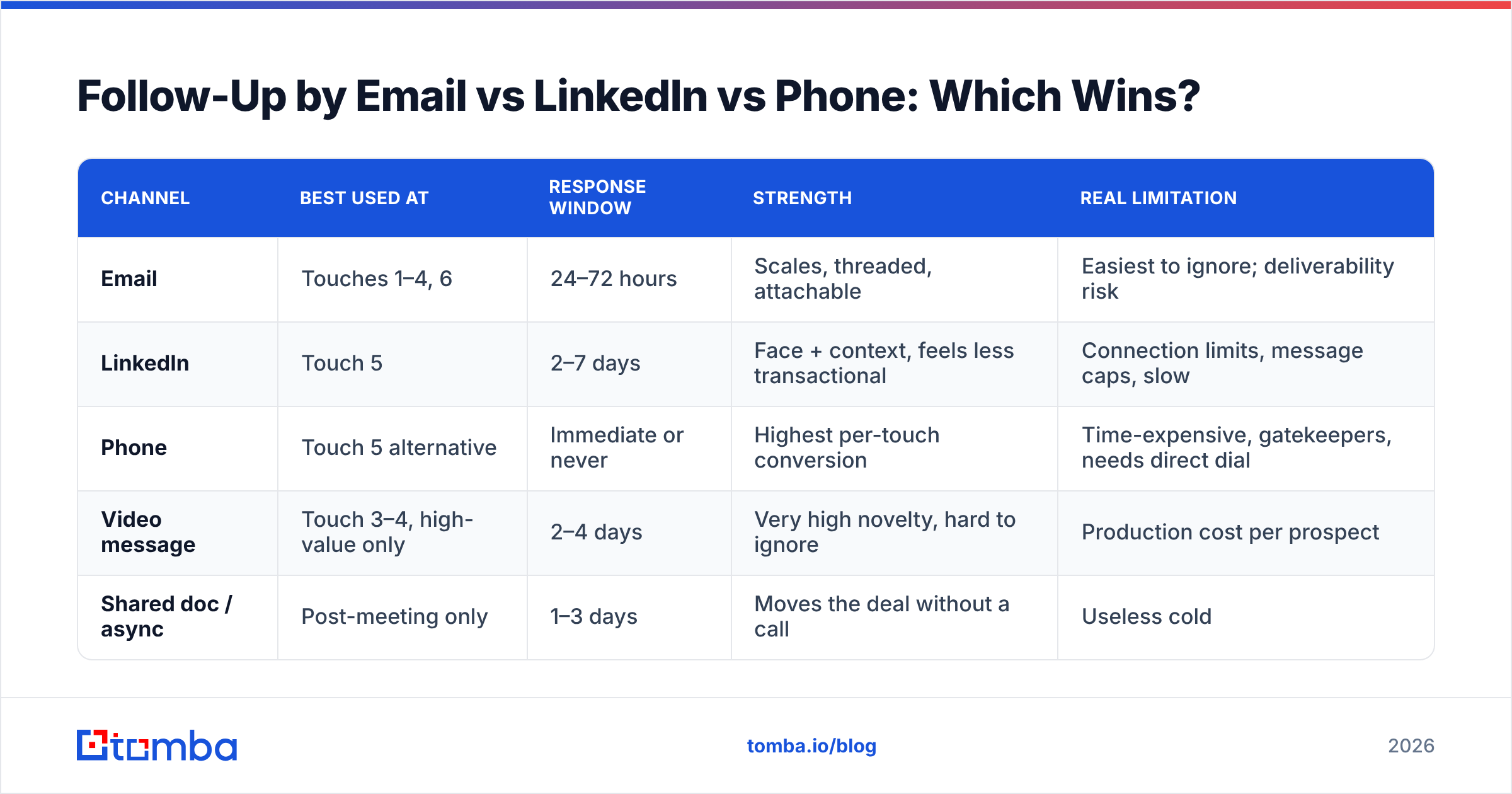
None of them alone. The mix matters, and each channel has a job.
| Channel | Best used at | Response window | Strength | Real limitation |
|---|---|---|---|---|
| Touches 1–4, 6 | 24–72 hours | Scales, threaded, attachable | Easiest to ignore; deliverability risk | |
| Touch 5 | 2–7 days | Face + context, feels less transactional | Connection limits, message caps, slow | |
| Phone | Touch 5 alternative | Immediate or never | Highest per-touch conversion | Time-expensive, gatekeepers, needs direct dial |
| Video message | Touch 3–4, high-value only | 2–4 days | Very high novelty, hard to ignore | Production cost per prospect |
| Shared doc / async | Post-meeting only | 1–3 days | Moves the deal without a call | Useless cold |
The pattern that outperforms single-channel: email for the first three touches, one channel switch around day 12, then return to email for the breakup. Switching channels resets attention without adding volume to the same inbox.
If touch five is a call, you need an actual direct number, not a switchboard. A phone finder is the difference between reaching the person and reaching their company's IVR.
How Do You Personalize Follow-Ups Without Spending an Hour Each?#
Personalization has tiers, and most teams over-invest in the wrong one.
- Tier 1 — Firmographic (cheap, low lift). Industry, headcount, tech stack, funding stage. Automatable from enrichment data. Worth doing on every send, worth almost nothing as your only personalization.
- Tier 2 — Role-based (cheap, medium lift). What a VP of RevOps at a 200-person Series B actually worries about. Write five variants once, map by title, reuse forever.
- Tier 3 — Trigger-based (medium cost, high lift). New hire, funding round, job posting, product launch, leadership change. This is the highest ROI tier and the one most teams skip because it requires a monitoring habit.
- Tier 4 — Individual research (expensive, highest lift). Their podcast appearance, their conference talk, a specific line in their annual report. Reserve for your top 50 accounts.
A practical split: Tier 1 and 2 on everything, Tier 3 on your top 20%, Tier 4 on your top 5%. Teams that try Tier 4 on everyone send 12 emails a week and book nothing.
Enrichment does the heavy lifting for tiers one through three. Pulling firmographic and role data automatically via data enrichment means your follow-up writing time goes to the parts a machine can't do.
What Does a Complete Follow-Up Sequence Look Like?#
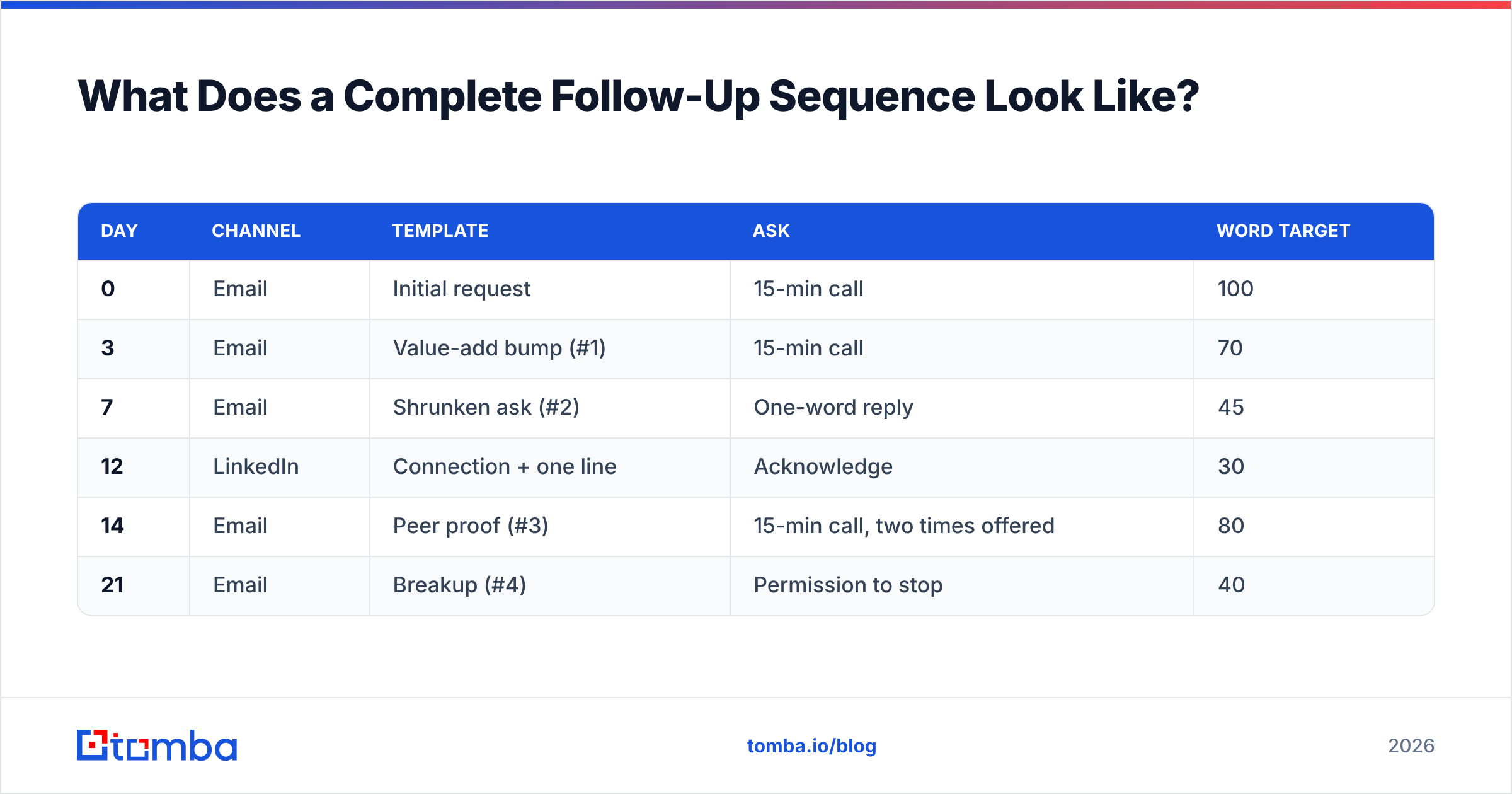
Here is a full three-week sequence for a cold meeting request, assembled from the pieces above.
| Day | Channel | Template | Ask | Word target |
|---|---|---|---|---|
| 0 | Initial request | 15-min call | 100 | |
| 3 | Value-add bump (#1) | 15-min call | 70 | |
| 7 | Shrunken ask (#2) | One-word reply | 45 | |
| 12 | Connection + one line | Acknowledge | 30 | |
| 14 | Peer proof (#3) | 15-min call, two times offered | 80 | |
| 21 | Breakup (#4) | Permission to stop | 40 |
Notes that matter:
- Only two of six messages ask for the meeting directly. The others ask for information, acknowledgment, or permission. That's deliberate.
- The word count falls, then rises once. Touch five is longer because it introduces a genuinely new proof point. Length is earned by new information, never by restating.
- Day 21 is a real stop. Put them back in a nurture list and revisit in a quarter. Re-entering the same sequence in six weeks is how teams get marked as spam.
Which Tools Support a Follow-Up Workflow?#
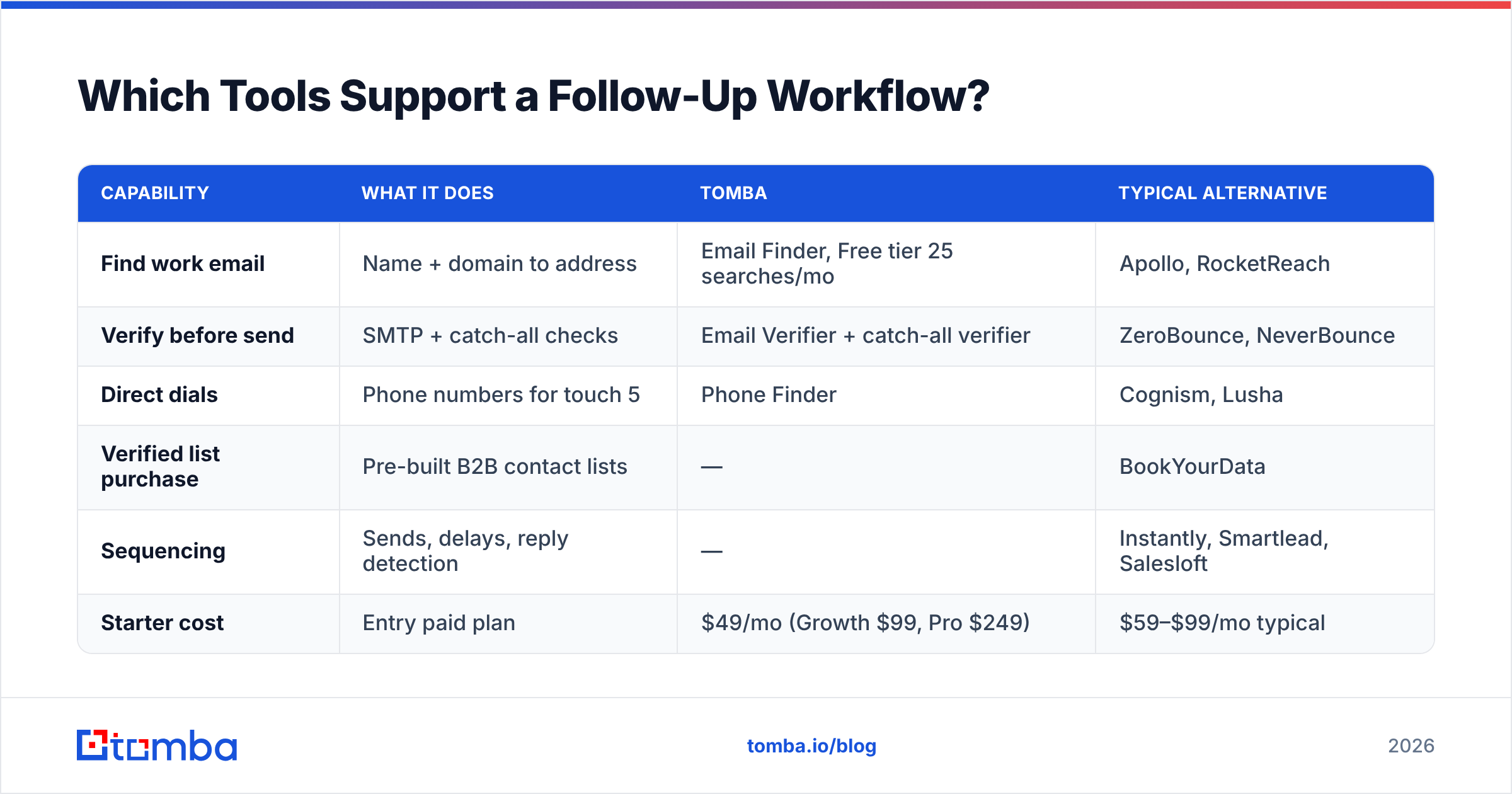
You need three capabilities: find the contact, verify it, and sequence the sends. Most teams over-buy on sequencing and under-buy on data.
| Capability | What it does | Tomba | Typical alternative |
|---|---|---|---|
| Find work email | Name + domain to address | Email Finder, Free tier 25 searches/mo | Apollo, RocketReach |
| Verify before send | SMTP + catch-all checks | Email Verifier + catch-all verifier | ZeroBounce, NeverBounce |
| Direct dials | Phone numbers for touch 5 | Phone Finder | Cognism, Lusha |
| Verified list purchase | Pre-built B2B contact lists | — | BookYourData |
| Sequencing | Sends, delays, reply detection | — | Instantly, Smartlead, Salesloft |
| Starter cost | Entry paid plan | $49/mo (Growth $99, Pro $249) | $59–$99/mo typical |
Two honest notes. First, Tomba is a data layer, not a sequencer — you still need a sending tool, and pairing them is the normal setup. Second, if you'd rather buy a verified list than build one, BookYourData is a solid pay-as-you-go option with per-record verification, and it solves a different problem than a finder does: you're buying coverage, not looking up specific people you've already identified. Full Tomba pricing is public if you want to compare per-credit economics.
For teams running follow-ups at volume, the practical workflow is: build the target list, enrich it, verify it with a bulk email finder pass, then push clean records into whichever sequencer you already own. Roughly 70% of the outcome is decided before the first word is written.
What Should You Measure?#
Four numbers, in this order of usefulness:
- Reply rate per touch. Tells you which message in the sequence is dead weight. If touch three replies at 0.3% and touch four at 4%, cut three and move four up.
- Meetings booked per 100 sends (not per contact). Normalizes across sequence length.
- Bounce rate. Above 2%, stop sending and fix the list. This is a hard gate, not a metric to watch trend on.
- Positive reply ratio. Replies split into interested / not-now / never. A high reply rate that's 80% "never" means your targeting is wrong, not your copy.
Skip open rate. Apple Mail Privacy Protection and similar features have made it directionally useless since 2021, and G2's own analyst commentary on sales engagement tooling reflects the same shift toward reply-based measurement.
Start With the Data Layer#
Better follow-up copy is worth maybe a 20% lift. Sending to addresses that actually exist is worth several times that — a sequence pointed at bad data fails no matter how good message four is.
Start there. Use the Tomba Email Finder to build your target list from names and domains, verify every record before it enters a sequence, and only then spend your time on the templates above. The free tier gives you 25 searches a month to test the workflow on a real account list; Starter is $49/mo when you're ready to run it at volume.
Fix the data, then fix the follow-up. In that order.
Related guides#
Ready to find emails that actually work?
Join 150,000+ professionals who stopped guessing and started sending. Free credits on signup — no credit card required.
Get the Tomba newsletter
Practical outbound tactics and product updates — once every two weeks.
About the author