The B2B Follow Up Plan: Cadence, Timing, and Templates
Most deals don't die at the pitch — they die in the silence after it. Here's a follow up plan with real timing windows, channel mixes, and message angles that keep sequences alive without becoming noise.
TL;DR
- A follow up plan is a pre-decided sequence of touches — timing, channel, and angle — that runs whether or not you feel like sending it. It is not "checking in until they answer."
- Most replies land between touch 2 and touch 6. Stopping at one email throws away the majority of your pipeline before it ever forms.
- Spacing beats volume: day 0, +3, +7, +14, +30 with different angles outperforms five emails in five days.
- Multichannel (email + phone + LinkedIn) lifts connect rates, but only if the contact data behind it is verified — a perfect cadence sent to a dead mailbox is zero touches.
- Measure reply rate per touch number, not just per sequence. That single metric tells you where to cut and where to extend.
What is a follow up plan, and what is it not?#
A follow up plan is a written schedule of contact attempts, each with a fixed delay, a fixed channel, and a distinct reason for existing. You build it once, you run it every time, and you stop making case-by-case decisions about whether today feels like a good day to send.
That last part is the whole point. Rep judgment is the least reliable component in outbound. When follow-up is discretionary, it collapses under a busy week. When it's a plan, it survives.
Here's what separates a plan from a habit:
- Fixed intervals, not vibes. Touch 3 goes out on day 7 because day 7 is in the plan — not because you remembered the account on a slow Thursday.
- One angle per touch. Every message adds something: a new proof point, a different use case, a relevant trigger event. "Just bumping this" is not an angle.
- Defined channels per step. Email, phone, LinkedIn, and voicemail each get assigned slots. You don't decide mid-sequence.
- A hard stop. The plan says when you break up and when the contact re-enters a nurture track. Sequences without an exit turn into spam.
- A data prerequisite. Every step assumes a verified address or number. If step 1 bounces, the remaining steps are theater.
- A logged outcome. Each touch writes back to the CRM so the next rep — or the next quarter — inherits context instead of guesswork.
If your current process is missing three or more of those, you don't have a follow up plan. You have a to-do list that occasionally gets done.
How many follow-ups does it actually take?#
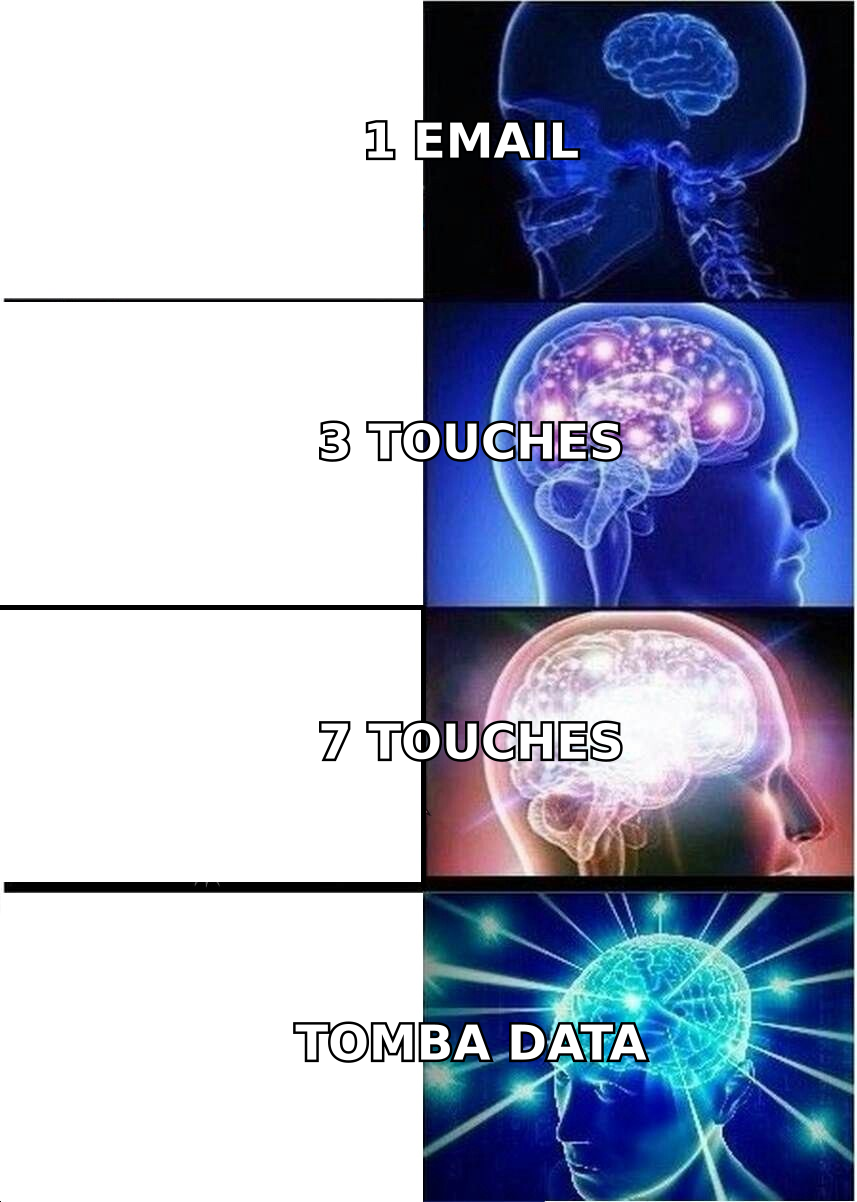
More than one, and fewer than you fear.
Across published outbound benchmarks and vendor-reported sequence data, the shape is consistent: touch 1 produces a minority of total replies, touches 2–4 produce the bulk, and touches 5–8 produce a long, thin tail that still converts — often with the highest-intent responses, because the people who answer on touch 6 answered because timing finally aligned, not because you caught them bored.
The practical read:
- Touch 1 is a coin flip on timing. Assume it will be missed.
- Touches 2–4 are where compounding happens. Recognition builds; your name stops being noise.
- Touches 5–7 catch the people whose priorities shifted. This is where the "actually, we just started looking at this" replies live.
- Touch 8+ has sharply diminishing returns on the same angle. Better to break up and re-enter in 90 days with a genuinely new reason.
The teams that under-perform almost never fail because they sent too many messages. They fail because they sent two, heard nothing, and quietly moved on. HubSpot's sales research library has documented this gap for years, and it hasn't closed.
What does a good follow up cadence look like in 2026?#
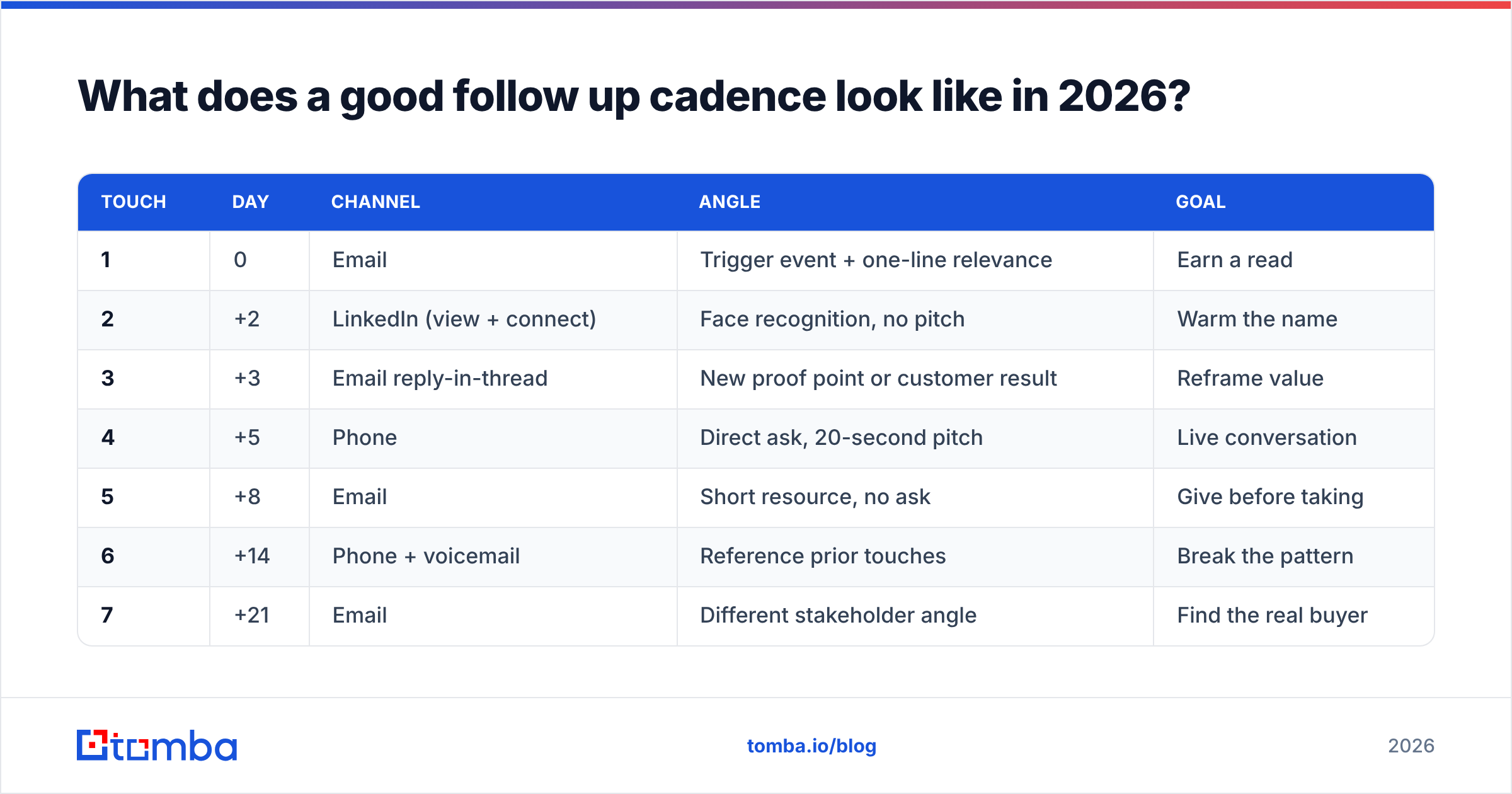
Below is a working baseline. Adapt the intervals to deal size — enterprise cycles stretch, SMB compresses — but keep the structure.
| Touch | Day | Channel | Angle | Goal |
|---|---|---|---|---|
| 1 | 0 | Trigger event + one-line relevance | Earn a read | |
| 2 | +2 | LinkedIn (view + connect) | Face recognition, no pitch | Warm the name |
| 3 | +3 | Email reply-in-thread | New proof point or customer result | Reframe value |
| 4 | +5 | Phone | Direct ask, 20-second pitch | Live conversation |
| 5 | +8 | Short resource, no ask | Give before taking | |
| 6 | +14 | Phone + voicemail | Reference prior touches | Break the pattern |
| 7 | +21 | Different stakeholder angle | Find the real buyer | |
| 8 | +30 | Break-up / permission to close file | Force a decision |
Three rules make this cadence work rather than annoy:
Vary the channel, not just the wording. Five emails in a row read as one persistent sender. Email, then LinkedIn, then a call, then email reads as a company that's genuinely trying to reach you.
Escalate spacing, never compress it. The gaps widen — 2, 3, 5, 8, 14, 21, 30. Early touches ride recency; later touches ride timing. Compressing late-stage touches is the fastest way to earn a spam complaint.
Never send the same message twice. If touch 5 could be swapped with touch 3 and nobody would notice, you have one message sent five times.
Which channels belong in your follow up plan?#
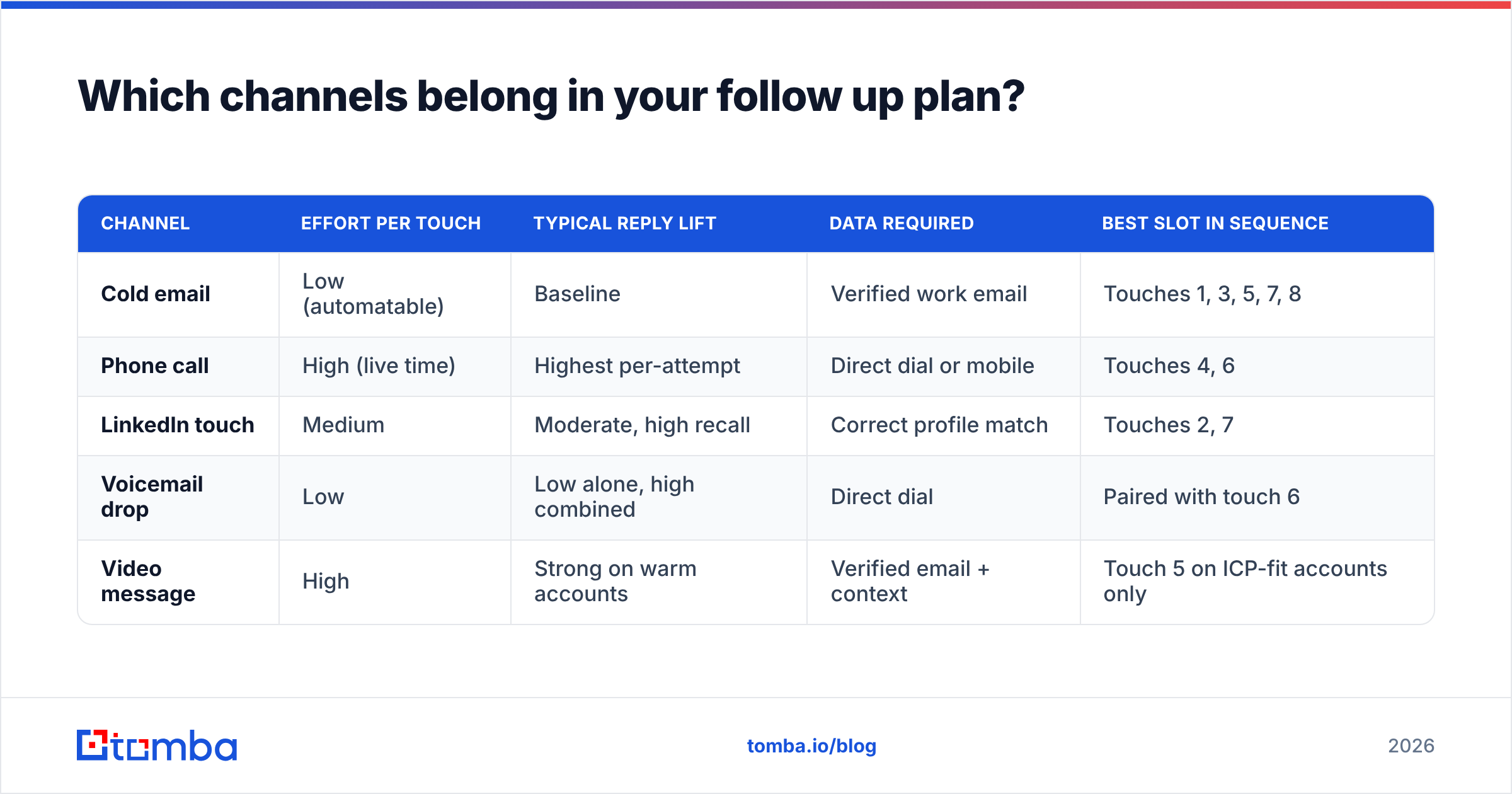
Not all channels carry the same cost or the same yield. Here's the honest trade-off table:
| Channel | Effort per touch | Typical reply lift | Data required | Best slot in sequence |
|---|---|---|---|---|
| Cold email | Low (automatable) | Baseline | Verified work email | Touches 1, 3, 5, 7, 8 |
| Phone call | High (live time) | Highest per-attempt | Direct dial or mobile | Touches 4, 6 |
| LinkedIn touch | Medium | Moderate, high recall | Correct profile match | Touches 2, 7 |
| Voicemail drop | Low | Low alone, high combined | Direct dial | Paired with touch 6 |
| Video message | High | Strong on warm accounts | Verified email + context | Touch 5 on ICP-fit accounts only |
Phone remains the highest-yield single touch and the most expensive. That's why it sits at positions 4 and 6 — after email has done the recognition work, so the call isn't cold anymore. Pulling accurate B2B phone numbers for those two slots costs far less than dialing switchboards for all eight.
LinkedIn is the cheapest recognition builder in the stack. A profile view plus a connection request before touch 3 measurably improves email reply rates, because your name arrives already seen. Just don't pitch in the connection note.
What should each follow-up actually say?#
The message hierarchy, from best to worst:
- New information. A funding round, a job posting, a competitor move, a product launch. This is the only follow-up that never feels like a follow-up.
- New proof. A customer in their segment, a specific number, a short case detail. Not a case-study link dump — one sentence with a figure in it.
- New angle. Same problem, different framing. If touch 1 pitched cost savings, touch 3 pitches speed.
- New person. Loop in a peer or a superior with a one-line "you may own this instead."
- The break-up. Direct, unresentful, easy to answer. "I'll close the file on this — want me to check back in Q1?" converts surprisingly well because it costs the reader almost nothing to reply.
What doesn't work, in descending order of harm: "just checking in," "bumping this to the top of your inbox," "did you see my last email," and any subject line containing the word "re:" when there was no prior thread.
Keep every follow-up under 90 words. If you need a starting library, our cold email templates cover the standard angles, and the subject line generator is useful for keeping touch 5 from looking like touch 3.
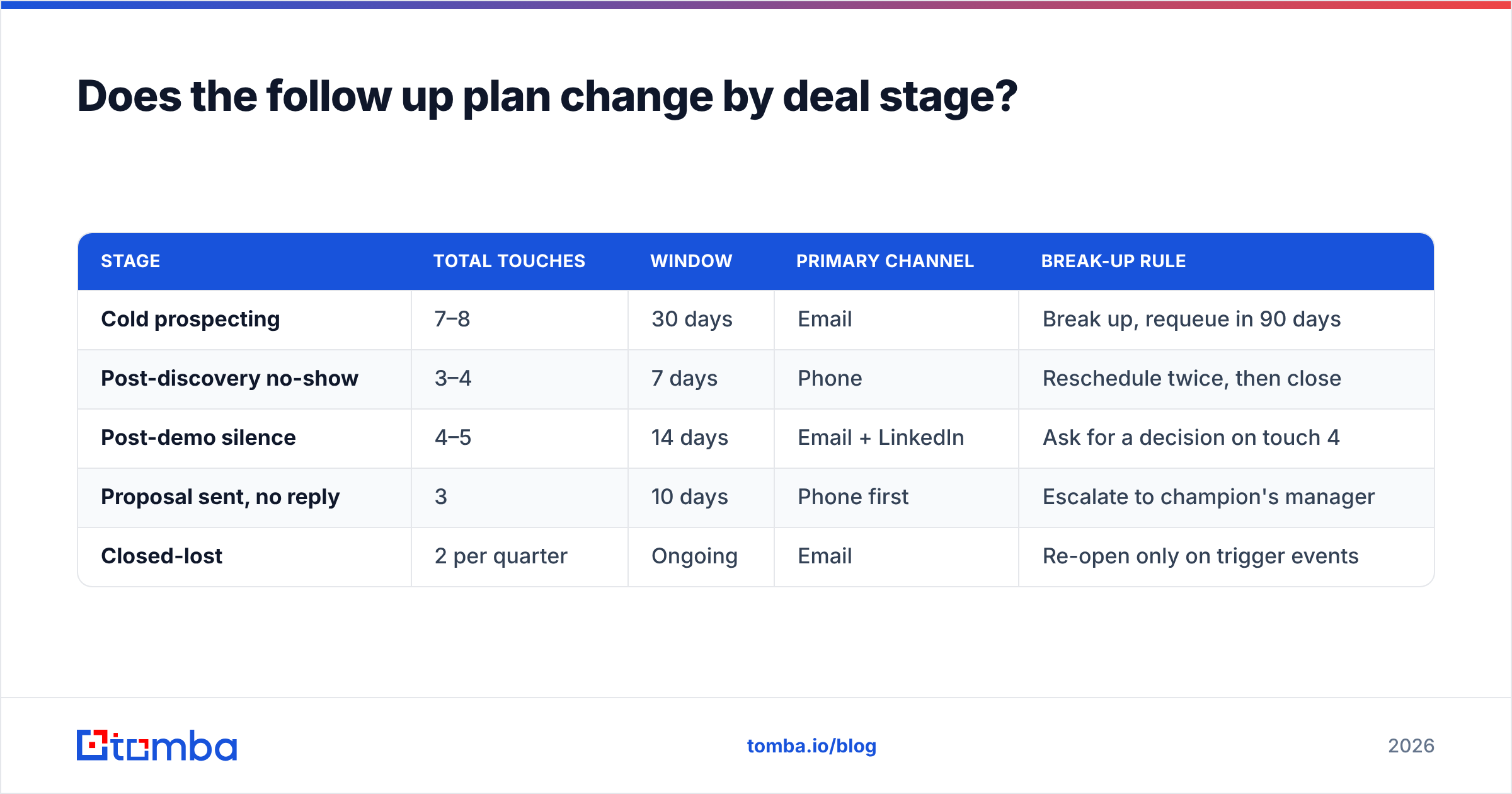
Does the follow up plan change by deal stage?#
Yes — substantially. A single cadence applied everywhere is why most sequences underperform.
| Stage | Total touches | Window | Primary channel | Break-up rule |
|---|---|---|---|---|
| Cold prospecting | 7–8 | 30 days | Break up, requeue in 90 days | |
| Post-discovery no-show | 3–4 | 7 days | Phone | Reschedule twice, then close |
| Post-demo silence | 4–5 | 14 days | Email + LinkedIn | Ask for a decision on touch 4 |
| Proposal sent, no reply | 3 | 10 days | Phone first | Escalate to champion's manager |
| Closed-lost | 2 per quarter | Ongoing | Re-open only on trigger events |
Post-demo silence is the most commonly botched stage. Reps who chased hard on cold outreach suddenly go quiet after a good demo because they don't want to seem pushy. That's backwards — a prospect who spent 30 minutes with you has earned a firmer, faster cadence, not a softer one. Gartner's sales research has consistently found that buying groups stall on internal consensus, not on vendor annoyance. Your follow-up is often the thing that unblocks their internal thread.
How do you keep the plan from breaking?#
Cadence quality is capped by data quality. This is the failure mode nobody puts on the dashboard.
Run the numbers. An eight-touch sequence to 500 contacts is 4,000 planned touches. If 22% of your addresses are stale — a normal figure for a list older than six months — roughly 880 of those touches never happen, your bounce rate spikes, and your domain reputation absorbs the damage. The cadence didn't fail. The inputs did.
Three guardrails, in order of impact:
Verify before the sequence starts, not after touch 1 bounces. Running the list through an email verifier removes invalid addresses before they hit your sender reputation. A hard bounce on touch 1 kills the remaining seven touches for that contact and dents deliverability for everyone else in the batch.
Re-verify long sequences mid-flight. A 30-day cadence spans enough time for job changes. For enterprise sequences that run 60–90 days, re-check at the midpoint.
Handle catch-all domains deliberately. Catch-all servers accept everything, so standard verification returns "unknown." Either route them to a catch-all verifier or move those accounts to a phone-first cadence rather than guessing.
Your email deliverability is a shared resource across every sequence you run. One badly sourced list degrades the follow up plan for accounts that had nothing to do with it.
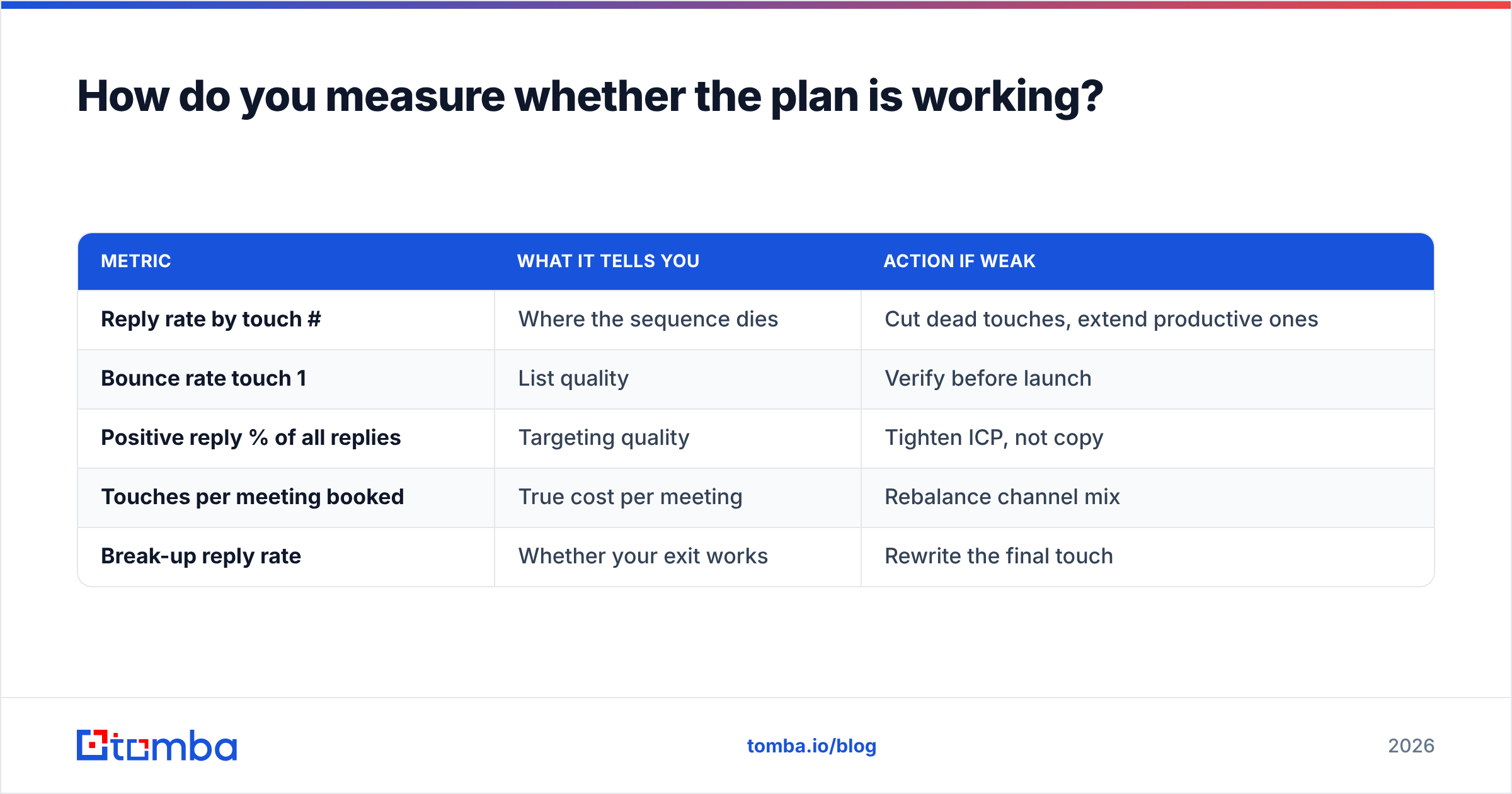
How do you measure whether the plan is working?#
Track reply rate per touch number, not per sequence. Sequence-level metrics hide everything useful.
| Metric | What it tells you | Action if weak |
|---|---|---|
| Reply rate by touch # | Where the sequence dies | Cut dead touches, extend productive ones |
| Bounce rate touch 1 | List quality | Verify before launch |
| Positive reply % of all replies | Targeting quality | Tighten ICP, not copy |
| Touches per meeting booked | True cost per meeting | Rebalance channel mix |
| Break-up reply rate | Whether your exit works | Rewrite the final touch |
The single most revealing chart is replies plotted against touch number. If it drops to near-zero after touch 3, your later messages are repeats and should be rewritten. If it stays flat through touch 7, extend the sequence — you're leaving pipeline on the table. If touch 8 (the break-up) spikes, that's normal and healthy; it means your exit message is doing real work.
Also watch response rate by segment. A cadence that works on 20-person startups often fails on 2,000-person enterprises for structural reasons — more stakeholders, longer internal cycles — not because the copy is bad.
What are the most common follow up plan mistakes?#
- Stopping at touch 2. The most expensive mistake in outbound, and the most common.
- Same-day double-sends. Two emails within 24 hours reads as automation failure.
- No break-up message. Contacts sit in limbo forever and pollute your reporting.
- Guessed email addresses. Pattern-guessing works maybe 60% of the time and destroys sender reputation the other 40%.
- Copy-pasting a competitor's cadence. Their sequence was tuned to their ICP, their deal size, and their sender reputation. Yours is different.
- Never sunsetting. Cadences decay. Rebuild the angles quarterly even when the structure stays.
Where should you start?#
Build the eight-touch structure first, fill in your angles second, and clean your data before either. A mediocre cadence to verified contacts beats a brilliant cadence to a stale list every single time — the first one at least gets delivered.
If your bottleneck is the contact data underneath the plan, start with the Tomba Email Finder. It pulls verified work emails by name, domain, or company, so touch 1 lands and touches 2 through 8 have somewhere to go. The free tier gives you 25 searches a month to test the workflow, and paid plans start at $49/mo on Starter, $99/mo on Growth, and $249/mo on Pro — see full Tomba pricing for credit limits and bulk allowances. Get the inputs right, then let the plan do what plans do: run whether or not anyone feels like it.
Related guides#
Ready to find emails that actually work?
Join 150,000+ professionals who stopped guessing and started sending. Free credits on signup — no credit card required.
Get the Tomba newsletter
Practical outbound tactics and product updates — once every two weeks.
About the author